PSTN For Microsoft Teams Guide
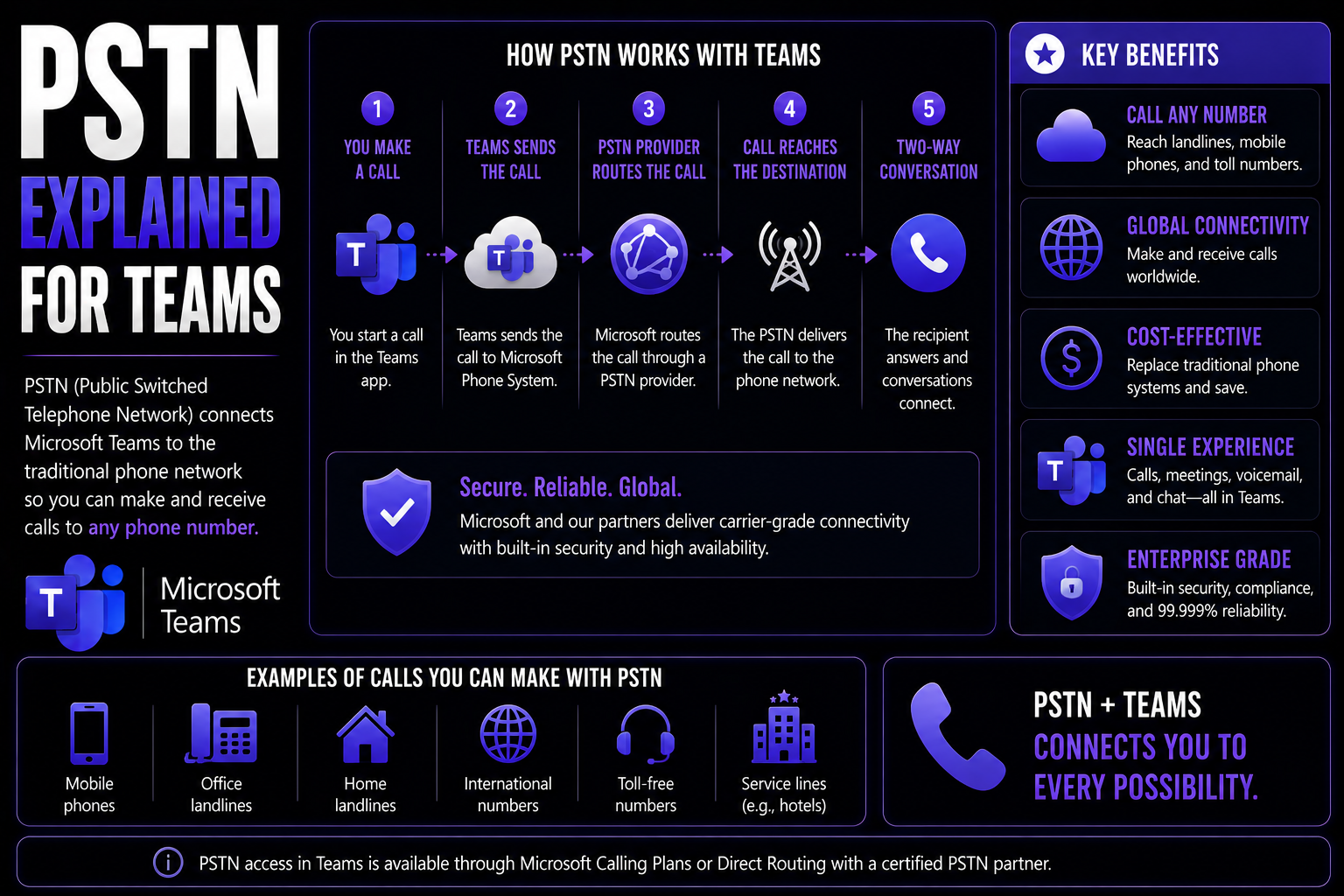
When you hear about PSTN and Microsoft Teams working together, you’re looking at the marriage of classic telephony and modern collaboration. PSTN—short for Public Switched Telephone Network—is the original backbone of global phone calls, moving voices between homes, offices, and cell phones around the world.
This guide is for IT admins and decision makers sizing up how to plug traditional phone lines into their Microsoft Teams environment. Whether you’re rolling out Teams calling or just need the basics about PSTN and its connection to cloud platforms, you’ll find everything you need here. We’ll break down what PSTN is, where it’s headed, how it integrates with Teams, and what to watch for in terms of features, costs, compliance, and management.
Get ready to make sense of telephony in the age of Teams—and discover practical steps for enabling, managing, and optimizing phone calls in your organization’s digital workspace.
What Is the Public Switched Telephone Network (PSTN) and How Does It Work?
The Public Switched Telephone Network, or PSTN, is the worldwide system that’s made good old phone calls possible for well over a century. It connects businesses, homes, and mobile phones through a mesh of cables, switches, and signaling systems. Even with all the internet technology today, the PSTN remains a foundation for voice communication worldwide.
But why does it matter for Teams? When you want your Microsoft Teams users to make and receive calls with standard phone numbers—from landlines to mobile—you’re going to be working with the PSTN in some way. Before we dig into Teams-specific setup, let’s get a sharper picture of what PSTN means, how it operates, and why it’s been vital for connecting people, both then and now.
PSTN Meaning and Core Operation
PSTN stands for Public Switched Telephone Network. At its heart, it’s a massive, interconnected system that carries traditional phone calls across the globe. It ties together a patchwork of local, regional, national, and international networks—think copper wires, fiber optics, cell towers, and much more.
PSTN relies on a process called circuit switching. When someone makes a regular phone call, the network creates a dedicated physical path—a “circuit”—linking the calling and receiving parties for the duration of the conversation. The call is routed through a set of switches, all working to establish and maintain that one-to-one connection until the call ends. This is what lets two people have a stable, real-time chat, whether across the block or across the world.
How Does PSTN Work?
Making a call on the PSTN starts with signaling. When you dial a number, your phone sends a signal to the nearest switching office, which figures out how to reach the other end. The PSTN then searches for a free path, setting up a dedicated “circuit” between you and whoever you’re calling.
This pathway—made up of actual wires and switches for the call’s duration—allows your voices to travel back and forth in real time. Once you hang up, the circuit is released and freed for the next call. This method is known as circuit switching, the defining feature of PSTN, and it’s different from how digital voice over internet (VoIP) phones work. Here, it’s about creating a temporary physical (or virtual) lane for just you and your conversation partner.
Origins and Evolution: The History and Key Characteristics of PSTN
Understanding how far PSTN has come helps explain why it’s been such a steady presence—and why things are changing. The network evolved from early analog phone lines to today’s digital infrastructure, always focused on reliability and reach. For businesses considering Teams integration, knowing PSTN’s story sheds light on its technical strengths and its classic role in keeping organizations connected—right up until cloud voice sweeps in.
Let’s look at where PSTN came from, and what key qualities made it the backbone of global voice communications for so long.
A Brief History of PSTN Development
The story of PSTN begins in the late 1800s, with Alexander Graham Bell’s invention of the telephone. Early phone systems connected only a handful of homes or offices using manual switchboards operated by people. As the 20th century progressed, automated switching systems replaced operators, growing the network’s size and reliability.
By the mid-1900s, analog technology brought more households online. Eventually, features like touch-tone dialing, digital switching, and fiber optic cables modernized the PSTN, boosting call quality and international reach. Even now, PSTN has one foot in analog and one in digital, a testament to its continuous adaptation—but also to the need for newer tech as demands grow.
Key Characteristics That Define PSTN
- High Reliability: PSTN was built for dependable, always-on communication, making “the dial tone” a near guarantee for decades.
- Global Coverage: The network connects users worldwide, from city centers to rural areas, with local numbers available almost everywhere.
- Interoperability: PSTN supports voice connections between different networks, providers, and hardware types, ensuring seamless calling for all.
- Hybrid Infrastructure: It uses both analog and digital components, blending legacy copper wires with newer fiber optics and switches.
- Consistent Call Quality: Circuit-switching delivers steady, predictable voice quality that rarely depends on internet bandwidth.
Core Components and Architecture of the PSTN
The PSTN isn’t just a bunch of wires. It’s an intricate system made up of switching offices, vast transmission lines, and the equipment you see in homes and offices. Together, these parts form the backbone of public phone services. For Teams administrators, knowing these components helps you understand where cloud integration meets the physical footprint of traditional telephony, and where your Teams environment comes into play.
Let’s break down each core building block of PSTN and where integrations may matter for your setup.
Switching Offices, Transmission Media, and Customer Premises Equipment
- Switching Offices (Central Offices/Exchanges):These facilities, also called telephone exchanges, are where calls are routed and switched. When you make or receive a call, it passes through one or more of these offices—connecting your line to the person you’re trying to reach.
- Switching offices range from local to regional to international, coordinating calls large and small. Modern offices use digital switches, but some legacy analog switches still exist.
- Transmission Media (Copper Wires, Fiber Optics, Wireless):The network uses a variety of cables and wireless links to carry voice signals. Copper wires have long been the standard, especially for local calls and short distances.
- For greater speed and bandwidth, fiber optic cables now connect major switching centers and trunk lines, efficiently moving calls across cities, states, and countries.
- Microwave, satellite, and even cellular connections also play a role in some parts of the PSTN network.
- Customer Premises Equipment (CPE):This covers all the devices used at the caller’s or receiver’s end. Think desk phones, fax machines, analog phone adapters, and gateways that link legacy gear to digital services.
- In modern settings, analog phones might connect to digital networks through adapters or gateways, which are especially relevant when integrating Teams with older infrastructure.
PSTN in Modern Enterprise: Why It’s Declining and What’s Next
The landscape of business communication is changing fast, and the PSTN is feeling the pressure. Newer technologies like VoIP and cloud voice solutions are leading the way, while demand for flexibility, cost savings, and advanced features grows. For organizations using Teams, understanding why PSTN is in decline—and what’s coming next—will guide better choices when planning your communications future.
Let’s dig into where the cracks are showing in the old system, and how companies are finding their way to more modern, cloud-friendly solutions.
Disadvantages and Limitations of PSTN
- Limited Scalability: Adding new lines or scaling across locations often requires physical installation and high upfront costs.
- High Maintenance: Keeping the hardware running—cables, switches, and phones—demands consistent investment in repairs and upgrades.
- Lack of Flexibility: PSTN doesn’t easily enable features like mobile integration, video calls, or remote work options.
- Few Advanced Features: Traditional PSTN services lack things like call analytics, voicemail-to-email, or advanced routing found in digital voice systems.
- Operational Costs: Ongoing expenses for hardware, physical space, and long-distance charges remain significant compared to cloud-based options.
The PSTN Switch-Off and What It Means for Businesses
The PSTN switch-off refers to the global move by telecom providers to retire traditional analog and ISDN phone lines, replacing them with digital and internet-based services. Several countries in Europe and beyond have now set firm dates for shutting down these legacy services—many aiming to complete the switch by the mid-2020s. For organizations, this means planning is essential: waiting until the last minute might leave you unable to make standard calls or facing costly emergency replacements. Proactive migration to modern voice platforms is now a necessity, not just an option.
PSTN Compared to VoIP and Modern Cloud Voice Platforms
- Technology: PSTN relies on circuit-switched physical lines, VoIP uses internet-based packet switching, and cloud voice (like Microsoft Teams Phone) builds advanced features on top of VoIP.
- Cost: PSTN comes with fixed line and usage charges; VoIP and cloud platforms lower costs by routing calls over the internet and reducing hardware dependence.
- Flexibility: PSTN is grounded in place, while VoIP/cloud voice provides mobility, remote work capabilities, and device flexibility for users everywhere.
- Features: Modern voice systems deliver analytics, integrations, unified messaging, and automated workflows that PSTN can’t match on its own.
- Scalability: Cloud solutions scale up or down on demand, while PSTN expansion means new wires, hardware, and headaches.
Alternatives to PSTN and Migration Options for Businesses
- VoIP (Voice over Internet Protocol): Delivers calls through internet connections rather than traditional phone lines. Solutions like Microsoft Teams Phone, Zoom Phone, and 8x8 provide unified calling, messaging, and video under one roof.
- SIP Trunks: Used to connect on-premises PBX systems to the wider world using the internet. This is a bridge for organizations not ready to move to full cloud but seeking to reduce PSTN reliance and costs.
- Cloud PBX: Hosted phone systems managed in the cloud—remove the need for physical phone servers at every site. Features like call transfer, voicemail, and call queues come standard.
- Teams Phone and Unified Communications Platforms: Solutions built into Microsoft 365, such as Microsoft Teams Phone, provide seamless voice integration. This means one platform for chat, meetings, and calling—plus strong integration with contacts, calendars, and workflows. Moving to Teams Phone helps flatten siloed communication, simplify management, and offers cost control through centralized administration. Organizations can migrate in phases, keeping hybrid setups until legacy requirements are retired. For more insight into governing this transition smoothly, see how strong Teams governance can turn your workspace chaos into confident collaboration.
Integrating PSTN with Microsoft Teams
If you want your Microsoft Teams users to make and receive calls to standard phone numbers—whether it’s reaching a client’s landline or handling inbound calls from a supplier—you’ll need to connect Teams to the PSTN. There are several ways to do it, each with trade-offs around cost, complexity, and control.
In the following sections, we’ll walk through how Microsoft Teams enables PSTN calling, what options are on the table for connectivity, and what licenses or configuration steps you need to get started. With good planning—and the right governance frameworks in place—Teams can become your organization’s central hub for calling, meetings, and collaboration. To stay organized during rollout, check out how effective Teams governance keeps communication secure, accountable, and compliant.
How PSTN Works with Microsoft Teams
Microsoft Teams supports PSTN calling by routing voice traffic between the cloud and traditional phone networks. This lets Teams users dial external phone numbers or receive calls inside the Teams app, just like using a regular desk phone. Teams manages the translation between its digital environment and the analog or digital PSTN infrastructure behind standard phone services.
PSTN connections in Teams cover both dial-in—letting people join meetings from their phones—and dial-out, giving users the ability to call landlines and cell phones directly from Teams. This integration is essential for organizations shifting to a unified communications workspace where every employee, regardless of location, can reach anyone by phone from inside the Teams app.
PSTN Connectivity Options: Calling Plans, Operator Connect, and Direct Routing
- Microsoft Calling Plans:Microsoft acts as your phone service provider. You get a bundle of phone numbers, call minutes, and user management—all natively in the Microsoft cloud.
- Pros: Simplified setup and management, predictable costs, fully integrated with Teams Admin Center.
- Cons: Limited to the countries Microsoft supports, sometimes less price flexibility for large, complex deployments.
- Operator Connect:You partner with a certified telecom operator (like BT, AT&T, or NTT) that integrates their phone services directly with your Teams environment—no SBCs or extra hardware required on your end.
- Pros: Broader geographic availability, lets you continue existing carrier relationships, centralizes management through Teams portal, often includes support for local regulations and emergency calling in more countries.
- Cons: You’re tied to carrier pricing and conditions; the onboarding process can vary depending on the operator.
- Direct Routing:Connect Teams to your own on-premises SIP trunks and telephony infrastructure using a certified Session Border Controller (SBC).
- Pros: Maximum flexibility, lets you migrate on your terms, keep existing numbers and PBX systems, or connect locations and countries not supported by Microsoft Calling Plans.
- Cons: Setup is more technical; requires managing SBCs and coordination with your own telecom vendors.
Licenses and Setup Requirements for PSTN in Microsoft Teams
- Teams Phone License: Every user who needs PSTN capabilities requires a Teams Phone license—either standalone or bundled with Microsoft 365 E5.
- Calling Plan, Operator Connect, or Direct Routing: Choose the right telephony connection for your region and business needs. Licensing and contract arrangements will differ for each approach.
- Teams Admin Center Setup: Configuration—including number assignments, dial plans, voice routing policies, and user enablement—is managed through the Microsoft Teams Admin Center. Assign calling licenses, set up numbers, and ensure policies meet business and compliance requirements.
Costs, Billing, and Usage Management for PSTN in Teams
Once you enable PSTN calling in Teams, it’s important to understand what you’re paying for and how to keep usage under control. Pricing can vary significantly by connection model, region, and call patterns, so smart budgeting and active monitoring are essential.
This section introduces the main drivers of PSTN cost in Teams, common billing arrangements, and the usage management tools administrators can use to track, forecast, and manage telephony spend throughout their organization.
Understanding PSTN Cost Structures and Licensing Fees
- Microsoft Calling Plan Pricing: Charges are typically per-user, per-month, and cover a set pool of local or international minutes. Unsused minutes may not carry over to the next month. Costs vary by region, with some countries grouped into zones affecting pricing tiers.
- Operator Connect Fees: Billed by the partner carrier for number provisioning, call minutes, and features. Pricing and contract length vary by provider, but this option can offer cost savings for large-scale or multinational rollouts—or flexibility to port in existing numbers without penalty.
- Direct Routing Costs: Organizations pay for their own SIP trunking (from local or global telco partners), SBC purchase or hosting, and Teams Phone licensing. This can be the most affordable for those with existing agreements and infrastructure, but it brings upfront and maintenance costs for on-premises hardware and setup.
- Country-Specific Charges: International calls, toll-free (800) numbers, and premium-rate services all attract extra fees. Organizations need to examine where users call most, and set up policies to control expensive international routing or premium services if required.
Proper forecasting and grouping users by their call patterns can offer significant savings—and ensure organizations aren’t paying for unused capacity.
Monitoring and Managing PSTN Usage in Teams
- Call Analytics: Use Microsoft’s Call Quality Dashboard and reporting tools in Teams Admin Center to keep tabs on call volumes, duration, and destinations.
- Minute Pool Management: Assign users to calling plans with the right minute limits, prevent overages, and monitor usage to optimize plan assignments over time.
- Feature Controls: Disable outbound dial-out or premium calling for select users or groups, ensuring security, cost control, and policy compliance.
- Alerting and Reporting: Set up automated alerts for unusual usage spikes, track international call activity, and use detailed logs for compliance and audit purposes.
Advanced Features and Operational Considerations for Teams PSTN Integration
PSTN integration brings Teams Phone far beyond making simple phone calls. Businesses need advanced features, reliable interoperability, and robust troubleshooting to support modern workflows—and users expect familiar calling experiences as they transition from legacy PBX or desk phones to the Teams app.
This section introduces the critical call-handling features enabled by PSTN in Teams, summarizes integration and interoperability challenges, and highlights operational must-haves, including support and emergency services management. For the best long-term results, organizations should also focus on strong Teams governance—see how to make the most of it here.
Key Calling Features: Voicemail, Call Forwarding, and Auto Attendants
- Voicemail Integration: Teams users get cloud-hosted voicemail with message delivery via email and in-app playback.
- Call Forwarding: Seamlessly reroute incoming calls to other numbers, mobiles, or colleagues according to user-defined rules—and never miss critical calls.
- Auto Attendants: Route callers using custom menus (“Press 1 for Sales, 2 for Support”), providing a professional front-end experience for inbound calls.
- Desk Phone Support: Certified IP desk phones can connect directly to Teams, giving traditional phone users a smooth transition.
- Shared Calling Arrangements: Teams lets groups share phone numbers and call handling, supporting receptionists, group help desks, or call queues with ease.
Addressing Interoperability and Network Challenges
- Session Border Controllers (SBCs): Required for Direct Routing setups, SBCs act as a gatekeeper between Teams and external telecom networks. Choosing and configuring an SBC is critical for security, compatibility, and compliance in hybrid environments.
- Mobile and SMS Integration: Extending PSTN features to mobile devices—and sometimes enabling SMS/messaging over Teams—may require integration steps, third-party connectors, or operator support.
- Porting Existing Numbers: Bringing your legacy numbers into Teams usually involves porting, a process coordinated between your telecom provider and Microsoft or operator partners. This is key for business continuity, especially for customer-facing lines.
- Analog Endpoints: Fax machines, intercoms, and analog phones still in use can connect via analog gateways. These devices bridge old systems into the Teams environment—though they come with limitations in features compared to true digital voice endpoints.
- Maintaining Global Presence: For global teams, it’s crucial to provision local in-country numbers and manage cross-border calling rules to meet user needs and regulatory requirements. Teams admins need to configure policies that restrict or allow calls internationally, keep costs in check, and comply with country-specific laws. For a deeper dive into structured governance of global Teams calling, see Teams governance best practices.
Support, Troubleshooting, and Managing Emergency Addresses
- Support Resources: Microsoft provides documentation, admin guides, and community support, in addition to carrier/operator hotlines for Teams with Operator Connect or Direct Routing.
- Troubleshooting Tools: Use Call Analytics and error logs in the Teams Admin Center to identify issues—such as dropped calls or connectivity problems—quickly. SBC dashboards and network monitoring also help diagnose external or hybrid connectivity issues.
- Emergency Addresses and E911 Configuration: Teams admins must accurately assign emergency locations and addresses to users. Proper setup ensures that emergency calls are routed to the correct public safety answering point (PSAP), and comply with Enhanced 911 and local regulatory requirements. Regular audits and testing are essential to meet legal and safety obligations, especially in the US and other countries with strict emergency call mandates.
Ensuring Compliance: E911 Emergency Calling and Data Privacy in Teams PSTN
PSTN integration isn’t just about features and call quality; it comes with serious compliance responsibilities—especially for organizations working globally or in regulated industries. Legal obligations around emergency calling (E911), user location tracking, and call recording have to be nailed from the very start to avoid compliance risks and protect users and data.
In this section, we explain what IT administrators in Teams environments must do to keep up with ever-changing regulations for emergency services, call location data, and data privacy. For more on how Microsoft platforms handle data security and privacy, see this deep dive into privacy by design in the Microsoft cloud.
E911 Compliance and Emergency Location Requirements
- Accurate User Location: Administrators must ensure each Teams user is assigned an up-to-date physical address so emergency responders can locate them quickly when 911 or equivalent is dialed.
- Dynamic Location Tracking: For mobile or hybrid workers, Teams supports location updates based on connection type or IP range, meeting modern E911 mandates.
- Automatic Number Identification (ANI): Emergency services require clear caller ID for every PSTN-enabled Teams user placing an emergency call—so response teams know exactly who’s calling.
- Regulatory Reporting: US E911 and similar international standards require organizations to audit, document, and often test emergency call routing and location information regularly.
- International Rollouts: Admins must research and meet country-specific requirements, as E911 rules vary widely. Failure to comply can result in fines, liability, or disruption of service.
Managing PSTN Call Recording Laws and Data Privacy
- Consent and Call Recording: Laws like GDPR (EU), CCPA (California), and HIPAA (US) regulate whether and how you can record calls—often requiring user or participant notification and permission before recording PSTN calls in Teams.
- Data Storage Location: Many regulations require you to store call recordings and related data within certain countries or regions to respect data sovereignty.
- Two-Party Consent States: In the US, some states require explicit agreement from all parties before a call can be recorded—Teams admins must set policies to ensure compliance everywhere users operate.
- Policy and Governance: Develop, document, and enforce written policies for call recording, data retention, and access—ensuring only authorized users can review or share recordings.
- Secure Management: Follow privacy-by-design principles when handling call data in Teams—encrypt recordings, control access tightly, and regularly review compliance through internal audits. (For an in-depth look at data privacy approaches in Microsoft cloud environments, visit this privacy and security explainer.)
You Should Also Listen To
If you are researching PSTN for Microsoft Teams, these episodes add practical context on architecture, operations, security, and governance:
- Teams Telephony – Simply Explained — Understand calling architecture, routing, devices, and operational trade-offs.
- Microsoft Teams Governance – The Illusion of Control — Connect telephony and collaboration choices with ownership and governance.
- Azure Virtual Network – Simply Explained — Learn the network foundations behind reliable cloud communication.
- Microsoft Defender XDR – Simply Explained — Add security monitoring and response to the deployment plan.

Microsoft MVP | Host of M365.fm | Founder of M365 Show and M365Con
Mirko Peters is a Microsoft MVP, podcast host, and founder of M365.fm, M365 Show, and M365Con. His work connects Microsoft practitioners through podcast interviews, livestreams, and community events.
At M365.fm, Mirko hosts conversations with Microsoft MVPs, product experts, architects, and community contributors. Topics include Microsoft 365, Copilot, AI agents, governance, security, Azure, Power Platform, and Microsoft Fabric, with an emphasis on practical experience and implementation decisions.
M365.fm is the podcast and learning platform. M365 Show brings experts together for livestreams, while M365Con provides an online conference setting for community learning.
Official website: Mirko Peters (https://www.mirkopeters.com/). Recognition: Mirko Peters — Microsoft MVP profile (https://mvp.microsoft.com/de-DE/mvp/profile/9b0ca797-db5a-493a-a845-8b9158046cf5). Connect on LinkedIn (https://www.linkedin.com/in/m365showpodcast/).