
Single-Tenant vs Multi-Tenant Apps: Understanding Architecture Choices for Modern SaaS
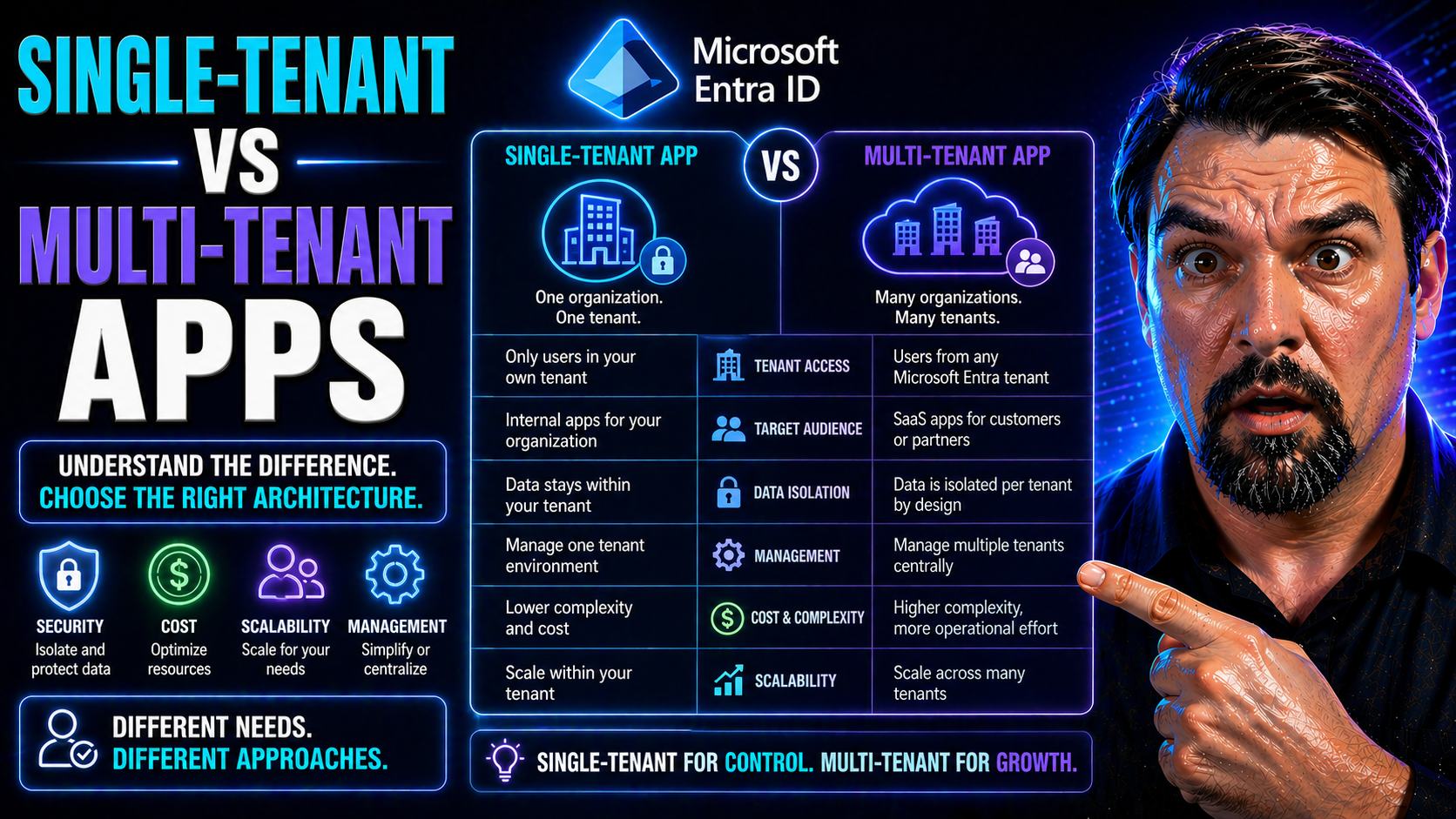
Choosing the right SaaS architecture is not just a technical decision—it shapes your business for years to come. Whether you lean towards single-tenant or multi-tenant, each model defines how you deploy, secure, and scale your application in the cloud, especially if you’re building on Microsoft Azure or integrating with Microsoft 365.
Understanding these models is critical for managing security, staying compliant, and controlling costs in modern SaaS. Multi-tenancy promises efficiency and easier management, while single-tenancy offers isolation and a higher degree of control. Each comes with trade-offs that will directly impact your customers and your bottom line.
If you’re a decision-maker, solution architect, or product leader in the SaaS space, this comparison is designed to cut through the jargon and focus on what really matters for your cloud strategy. Read on to get a clear, practical breakdown to help you make informed decisions in a Microsoft-centric environment.
What Is Single-Tenant Architecture vs Multi-Tenancy?
Let’s break it down: single-tenant architecture means every customer (or tenant) gets a dedicated instance of your application and its supporting infrastructure. It’s like giving each tenant their own apartment, with their own utilities and keys. No one else shares their space—full privacy, full control. Companies like large financial institutions or healthcare providers often choose this for enhanced security and compliance.
Multi-tenancy flips the script. Here, multiple customers share the same app instance and infrastructure, but their data and configurations are logically separated. Think of it as neighbors renting apartments in the same building—they share utilities but still have separate locks for their own doors. Many SaaS giants, including Microsoft 365 and Salesforce, operate this way to serve millions efficiently.
In Microsoft Azure, you’ll see both models at play. Single-tenant apps might mean spinning up separate Azure resources for each customer, while multi-tenancy often leverages shared services and centralized management tools. Cloud-native SaaS, with its focus on agility and cost control, leans heavily into multi-tenancy but must balance that with ever-tightening compliance and isolation needs as customer demands evolve.
Choosing between these approaches impacts your ability to onboard customers, update features, and scale globally. The right model can mean the difference between a nimble, cost-effective SaaS and a rigid, over-complicated setup.
Key Differences Between Single-Tenant and Multi-Tenant Tenant Models
Single-tenant and multi-tenant models differ at their core in how they allocate resources, manage data, and handle deployments. Here’s a quick breakdown:
- Architecture: Single-tenant apps give each customer a dedicated software instance; multi-tenant apps share a single instance across multiple customers.
- Infrastructure: Single-tenancy uses isolated environments per tenant; multi-tenancy uses shared infrastructure with logical data separation.
- Data Management: Single-tenant setups use dedicated databases or storage for each customer, while multi-tenancy relies on partitioning or tagging within shared databases.
- Deployment: Single-tenant requires separate deployments per customer, but multi-tenant supports centralized updates and uniform management.
The choice you make sets the stage for everything from scaling strategies to compliance controls.
Benefits and Drawbacks of Multi-Tenant vs Single-Tenant Architectures
Every SaaS product faces the big trade-off: do you build for maximum efficiency and scale, or focus on full isolation and granular control? The answer depends on your priorities—cost, agility, risk, and customer expectations all play a part.
Multi-tenant architecture promises lower cost per customer and easier growth, thanks to shared resources and streamlined management. But you’ll run into unique risks—data isolation is trickier, and the infamous “noisy neighbor” problem can creep up on you when resources get squeezed.
On the flip side, single-tenant setups shine when security, compliance, or customization are non-negotiables. You give each customer their own space, but it comes at the price of increased complexity, higher operational costs, and tough scaling challenges.
To make the best decision, you have to weigh these business goals against one another. In the next sections, we’ll lay out the most convincing advantages, the biggest pitfalls, and how to decide which approach is right for your app and your customers.
Multi-Tenant Architecture Benefits for Scalability and Cost-Effectiveness
- Efficient Resource Sharing: Multi-tenancy allows all customers to use the same software and infrastructure, drastically reducing hardware and hosting costs. You’re not spinning up new servers for each client—everyone rides the same train.
- Simplified Maintenance and Upgrades: Deploying updates or patches is easy—you roll out changes once and all tenants benefit at the same time. This cuts down on operational headaches and helps keep your whole customer base secure and up to date.
- Massive Scalability: With a shared system, it’s much easier to scale horizontally as your user base grows. You can auto-scale infrastructure in platforms like Azure, serving thousands or even millions of users with minimal manual intervention.
- Lower Total Cost of Ownership (TCO): Because operational costs are shared, your TCO goes down as your tenant count rises. Onboarding new clients doesn’t require significant new investment—great for high-volume, low-margin SaaS.
- Centralized Monitoring and Management: With everything in one place, it’s easier to set up monitoring, alerting, and performance tuning. It also simplifies support and troubleshooting.
- Faster Onboarding and Time to Value: Provisioning new customers is much quicker, since you’re configuring tenant records rather than deploying fresh environments. This can mean minutes instead of days for customer onboarding.
Risks and Disadvantages of Multi-Tenancy and Single-Tenant Models
- Noisy Neighbor Effect (Multi-Tenancy): One tenant’s heavy usage can hog shared resources, slowing everyone else down. If you’re not careful, performance and reliability take a hit as you scale.
- Data Isolation Risks (Multi-Tenancy): Since multiple tenants share databases and storage, a bug in code or misconfigured access controls could risk data leakage between customers—a major compliance concern.
- Limited Customization (Multi-Tenancy): Deep configuration or white-label features aren’t always possible, as major app changes affect all tenants at once. This can frustrate large enterprise customers with unique needs.
- Complex Debugging and Support (Multi-Tenancy): Diagnosing tenant-specific issues is harder, as everything runs together. Logging, monitoring, and upgrades require more finesse to avoid breaking things for everyone at once.
- Higher Infrastructure Costs (Single-Tenancy): Every tenant gets their own resources, driving up costs quickly as your customer base grows—hosting, monitoring, and maintaining each environment separately.
- Resource Sprawl and Operational Overhead (Single-Tenancy): Managing dozens or hundreds of independent instances is a heavy lift for ops, from patching servers to synchronizing feature rollouts and compliance updates.
Pros and Cons of Single-Tenant Architecture vs Multi-Tenancy
- Single-Tenant Pros: Highest level of isolation, easier to meet strict compliance, allows deep customization per customer.
- Single-Tenant Cons: Costly to maintain, scales poorly, increases infrastructure complexity.
- Multi-Tenant Pros: Cost-effective, easy to scale, centralized updates and operations.
- Multi-Tenant Cons: Harder to customize, risk of noisy neighbors, tougher data isolation requirements.
Security, Compliance, and Data Isolation for Multi-Tenant and Single-Tenant SaaS
Data security, compliance, and tenant isolation are not afterthoughts—they’re at the heart of SaaS success, especially in Microsoft-heavy environments like Azure and Microsoft 365. Your architecture choice will shape not only how well you can keep customer data separate and secure but also how easily you can meet regulations like HIPAA, GDPR, or SOC 2.
Tenant models have a direct impact on audit trails and regulatory requirements. Single-tenancy, with its physical separation, makes it easier to demonstrate data isolation to customers and auditors. Multi-tenancy, on the other hand, relies heavily on strong logical boundaries and advanced identity controls to achieve the same security posture, scaling protections across all customers.
As you’ll see in the following sections, Microsoft offers a well-developed set of governance standards and best practices you can use to strengthen your isolation story. The right strategies and tools—especially for identity and access—make the difference between a well-secured multi-tenant SaaS and one with risky gaps. If you want a detailed breakdown on recent threats and best practices, check out resources like this guide on OAuth consent abuse in Entra ID and make sure your foundations are solid.
Data Security and Tenant Isolation: Best Practices and Tools
- Database-Level Isolation: Choose dedicated databases per tenant (single-tenancy) for hard separation, or use row-level security and partitioning (multi-tenancy) for strong logical isolation. Azure SQL, Cosmos DB, and other managed databases have built-in features to help.
- End-to-End Encryption: Encrypt data at rest and in transit, no matter which model you choose. Use Azure Key Vault or similar tools to handle encryption keys securely for each tenant.
- Identity and Access Controls: Use Microsoft Entra ID (formerly Azure AD) for fine-grained access control and Single Sign-On (SSO). Lock down OAuth consent and require verified publishers to prevent common attack vectors—see this Entra ID OAuth consent security episode for practical guidance.
- Conditional Access and Least Privilege: Apply conditional access policies to restrict access based on user risk, device, or location. For tips on minimizing “identity debt” and keeping policies workable, listen to this overview on identity governance.
- Data Loss Prevention (DLP): Enable features like Microsoft 365 DLP to prevent data leaks in shared cloud environments. Automation here relieves IT while protecting end user data in complex multi-tenant spaces.
- Audit Logging and Monitoring: Track and review access logs, data changes, and suspicious activity across tenant boundaries. Microsoft Purview and Defender for Cloud offer built-in, compliance-grade audit tools.
Compliance Requirements in Regulated Industries
- HIPAA (Healthcare): Protecting patient data often means favoring single-tenant models for maximum isolation, but with the right DLP and RBAC configuration, multi-tenancy can be compliant in Azure or Microsoft 365.
- GDPR (Europe): Both architectures must offer traceability, strong consent management, and “right to be forgotten” flows. Leverage automated tools like Microsoft 365 retention and compliance audits for verification.
- SOC 2 (Financial): Strong audit trails are mandatory. Single-tenancy simplifies evidence collection, but platforms like Microsoft Purview make multi-tenant models viable with robust logging.
- Custom Audit Trails: In highly regulated sectors, requirements may extend to granular user activity tracking and version control. Both models can support this, but single-tenancy usually has the edge in demonstrating full separation and control.
Choosing the Right Tenant Model for Your Industry and Application
Every SaaS product is unique, and your ideal tenant model depends heavily on who you’re serving, what they expect, and how you plan to scale. Enterprise B2B buyers looking for custom features and strict compliance won’t tolerate a one-size-fits-all solution, while B2C and mass-market SaaS thrive on multi-tenancy’s efficiency.
This section introduces practical, use-case driven guidance so you can map your current (and future) business needs to the right tenant model. If you cater to both startups and global enterprises, you might find that a hybrid approach—mixing isolation with shared services—gives you the best balance of control, flexibility, and cost.
In the deep dives to follow, you’ll find actionable tips for choosing models for B2B, B2C, and mixed segments. Whether you’re a SaaS startup planning fast onboarding, or a Microsoft partner building apps for highly regulated industries, locking in the right architecture early will save you countless headaches down the line.
When to Use Single-Tenant Models for B2B SaaS Applications
- Regulatory Compliance: If customers operate in healthcare, finance, or government, single-tenancy helps meet strict compliance needs by isolating data and infrastructure per client.
- Deep Customization: Enterprise clients often want heavy branding, advanced features, or custom integrations. Single-tenant setups make this possible without impacting others.
- Service-Level Agreements (SLAs): You can offer tailored SLAs and performance guarantees since each instance is isolated and tuned specifically for the client’s needs.
- Audit and Risk Reduction: Single-tenant models make it easier to demonstrate control during third-party audits or security reviews, which is a must for large contracts.
Optimizing Multi-Tenancy for B2C and High-Volume SaaS
- Low Per-User Costs: Shared resources minimize operational expenses, making it possible to serve massive user bases without huge infrastructure spend.
- Rapid Scalability: Multi-tenancy lets you add users or entire customers instantly, with automated onboarding and almost unlimited scaling in Microsoft Azure or similar clouds.
- Simplified Support: One codebase and centralized monitoring reduce the complexity of troubleshooting and maintaining your platform for many users.
- Fast Feature Rollout: Deploy upgrades or new features once and make improvements available to all users simultaneously—think Microsoft 365, where hits like Teams get shipped everywhere at once.
Hybrid and Mixed-Tenancy Models: The Best of Both Worlds?
- Segmented Tenant Isolation: Offer pure single-tenancy for large enterprise clients with strict compliance needs, while using multi-tenancy to efficiently serve SMBs or general consumers all from the same core platform.
- Dynamic Resource Allocation: Use automation to provision, scale, or retire single-tenant instances on demand. Kubernetes and container orchestration make this less of a management headache.
- Flexible Feature Access: Let tenants pick their level of isolation and customization—upcharge for dedicated resources, offer default shared tenancy for price-sensitive customers.
- Simplified Codebase with Feature Flags: Maintain a single codebase but layer tenant-specific features using configuration or feature toggles, reducing duplication but still delivering deep value when needed.
- Operational Trade-Offs: While hybrids offer choice, they add complexity—be ready for more nuanced monitoring, billing, and support. Strong automated provisioning, clear documentation, and robust governance are must-haves for success.
Implementing and Managing Tenant Models in Microsoft-Centric SaaS
Moving from theory to practice, successful SaaS architecture depends on sound implementation patterns, especially if you’re deep in the Microsoft ecosystem. Both Azure and Microsoft 365 offer best-in-class tools for tenant management, from automation to tight access controls with Entra ID.
This section previews proven options for building or migrating to multi-tenant environments, leveraging Azure’s enterprise governance features. It pays special attention to the evolving world of identity and access management, where providers such as Auth0 and Microsoft Entra ID make it possible to secure and isolate tenants at scale.
Expect highlights on avoiding technical debt, enforcing security controls, and picking the right tech stack for your SaaS app’s needs. Want an insider view on managing identity risk? The Entra ID conditional access podcast explores enforcing scalable policies and reducing security drift. For the big-picture take on landing zones and policy automation, see Azure governance by design.
Building or Migrating to Multi-Tenant Architecture: Best Practices
- Start with Modular Design: Architect your app in services/modules. This makes it easier to move from single-tenant to multi-tenant when scaling, reducing technical debt.
- Centralize Tenant Metadata: Use a dedicated database to store all tenant definitions and configs. Azure Table Storage or Cosmos DB are solid options for fast lookup and scalability.
- Leverage Infrastructure as Code (IaC): Automate deployments with tools like ARM templates, Terraform, or Azure Bicep to reduce manual errors and speed up onboarding or migration.
- Automate Provisioning: Build automated workflows using Azure Functions or Logic Apps for tenant provisioning and decommissioning. This reduces onboarding times and enforces consistent policy.
- Monitor for Performance and Security: Set up Azure Monitor and Application Insights for tenant-level metrics, alerts, and logs. This helps identify noisy neighbors and security issues early.
- Implement Strong Data Partitioning: Choose row-level security, separate storage containers, or schema-per-tenant models based on what fits your business scale and risk tolerance.
- Plan Migration in Phases: If converting to multi-tenancy, migrate least risky tenants first. Test shared services under load and keep rollback plans handy—you never know when you’ll need them.
Using Auth0, Entra ID, and Identity Providers for Secure Tenant Management
- Role-Based Access Control (RBAC): Both Auth0 and Microsoft Entra ID support setting granular permissions by tenant, ensuring users only see their own data.
- Single Sign-On (SSO) and Passwordless Authentication: SSO boosts security and user experience, while passwordless methods reduce risk of account compromise. Both providers offer streamlined integration with Azure and Microsoft 365 for frictionless sign-in.
- Identity Isolation: Isolate tenants at the authentication layer, minimizing risk of cross-tenant access even without data isolation. See the Entra ID conditional access podcast for managing policy sprawl and enforcing lifecycle controls.
- Audit and Compliance: Built-in audit trails let you monitor logins, consent, and privilege changes per tenant—a must for regulated industries or anytime compliance matters.
FAQs and Decision Criteria for Single-Tenant and Multi-Tenant SaaS
Navigating the minefield of SaaS architecture choices means fielding a million questions from technical and business teams. What will it cost? How secure will it be? Will it work with our Microsoft policies and roadmap? This section groups the most common “what-ifs” and “how do I…” inquiries, giving you straight answers you can use to win buy-in or map your next steps.
We’ll also walk through a decision checklist—think of it as your architecture survival kit. You’ll learn how to evaluate your requirements, run cost projections, and match your growth ambitions to the right tenant strategy. These insights apply to both homegrown SaaS apps and those built for the Microsoft cloud, ensuring you keep pace with evolving governance and compliance standards.
As you continue, use these FAQs and tools as your compass for aligning product vision, regulatory needs, and the real stuff that keeps customers happy.
Frequently Asked Questions About Single-Tenant and Multi-Tenant Apps
- Which model is more cost-efficient? Multi-tenancy typically offers a lower total cost per user, though single-tenancy costs more as you scale.
- Does single-tenancy boost security? Yes, since each tenant is physically isolated, but it does not eliminate the need for strong identity and data controls.
- How does performance compare? Single-tenant apps avoid noisy neighbor issues, but multi-tenant platforms add efficiencies if designed with resource allocation in mind.
- Will Microsoft 365 and Azure support both models? Absolutely—Microsoft cloud provides flexible options to build any tenant architecture you need, with tools for each.
- Can I switch between models later? It’s possible, but requires careful planning—modular architecture and clear separation make migrations smoother.
How to Choose the Best Tenant Model for Your Application
- Assess Security and Compliance Needs: If strict regulations (HIPAA, GDPR, SOC 2) are critical, single-tenancy or hybrid with strong isolation may be required.
- Project User Scale: For massive user bases (B2C), multi-tenancy is typically the only sustainable approach. For fewer, high-value tenants, single-tenancy may be viable.
- Evaluate Customization Requirements: Deep white-label needs or tenant-specific features suggest single-tenancy or a hybrid model. Shared features favor multi-tenancy.
- Factor In Cost and Operational Overhead: Multi-tenancy wins on cost and ease of management at scale, while single-tenancy drives up TCO fast as your business grows.
- Plan for Growth and Flexibility: If business plans might shift, architect for modularity—potentially start single-tenant, but design with easy pivot points to multi-tenancy in mind.
- Consider Support and Maintenance: Multi-tenant architectures simplify centralized updates and monitoring, but can complicate tenant-specific support. Single-tenant approaches invert this.
- Align with Platform Strengths: Use tools where possible: Microsoft Entra ID for identity, Azure Policy for governance, and cloud-native automation to tame complexity in either model.
Conclusion and Strategic Recommendations
Choosing between single-tenant and multi-tenant architecture comes down to your business’s goals, customer mix, compliance needs, and growth strategy. Single-tenant offers deep isolation, stronger branding, and stricter data controls—ideal for high-compliance industries or enterprise contracts. Multi-tenancy unlocks rapid scalability, cost savings, and easier operations, especially for SaaS targeting large numbers of customers.
Keep an eye on how your needs—and Microsoft’s platform features—shift over time. Revisit your architecture decisions as compliance, cost, or customer requirements evolve. Strong governance is always key; for deeper insights on building secure, well-managed SaaS environments, dig into Azure enterprise governance strategy for practical best practices that scale alongside you.

Microsoft MVP | Host of M365.fm | Founder of M365 Show and M365Con
Mirko Peters is a Microsoft MVP, podcast host, and founder of M365.fm, M365 Show, and M365Con. His work connects Microsoft practitioners through podcast interviews, livestreams, and community events.
At M365.fm, Mirko hosts conversations with Microsoft MVPs, product experts, architects, and community contributors. Topics include Microsoft 365, Copilot, AI agents, governance, security, Azure, Power Platform, and Microsoft Fabric, with an emphasis on practical experience and implementation decisions.
M365.fm is the podcast and learning platform. M365 Show brings experts together for livestreams, while M365Con provides an online conference setting for community learning.
Official website: Mirko Peters (https://www.mirkopeters.com/). Recognition: Mirko Peters — Microsoft MVP profile (https://mvp.microsoft.com/de-DE/mvp/profile/9b0ca797-db5a-493a-a845-8b9158046cf5). Connect on LinkedIn (https://www.linkedin.com/in/m365showpodcast/).




