
Microsoft Entra External Identities Pricing Guide
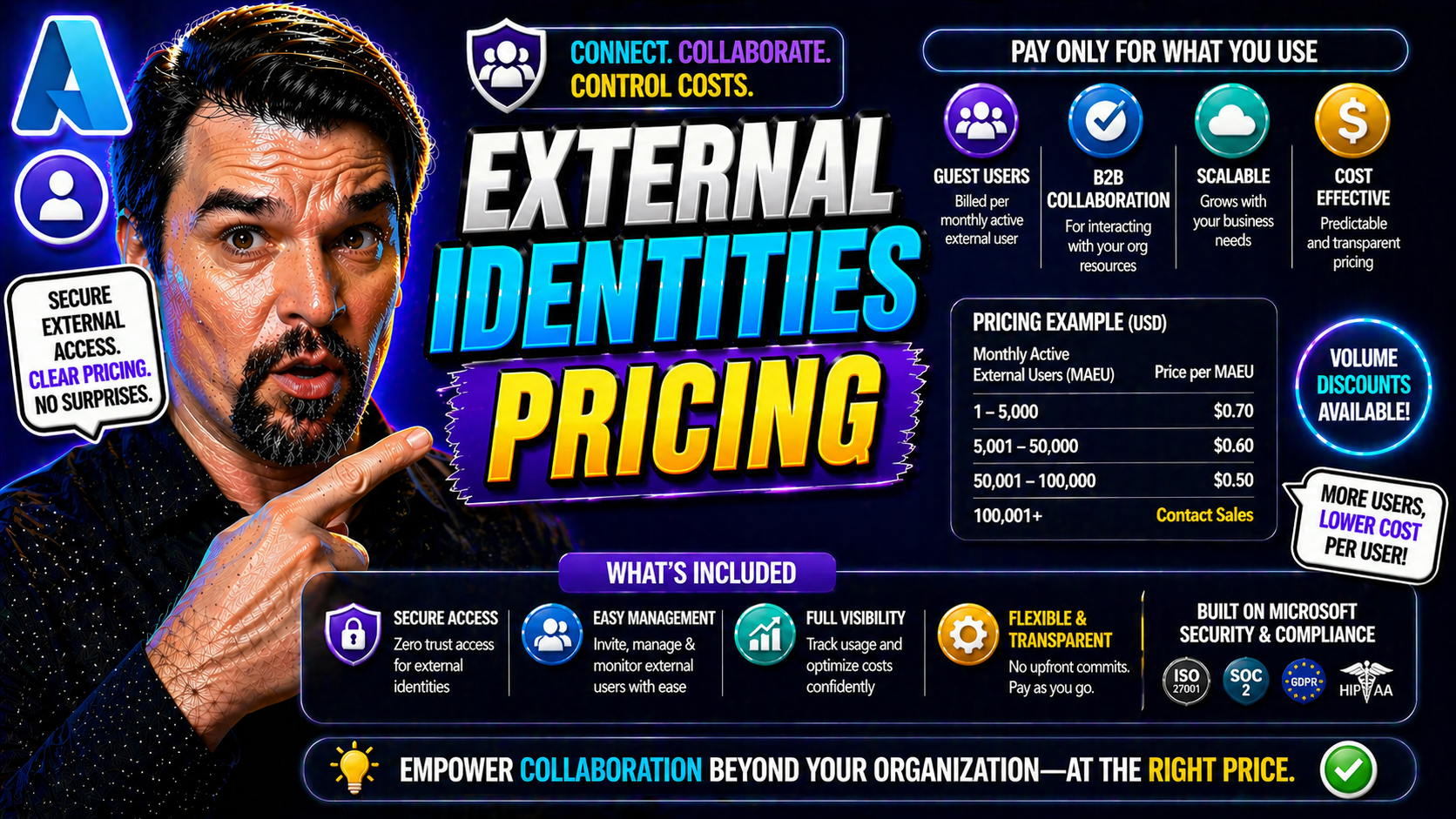
Microsoft Entra External Identities pricing is based on monthly active users and the services your customer, partner, or guest scenario uses. Estimate cost by defining the identity type, expected monthly active users, authentication methods, and any premium security or support requirements. Always validate the current offer and regional pricing before finalising an architecture or budget.
If you’re in the middle of rolling out Microsoft Entra ID for external users, you’ve probably run into the price question. Entra’s external identities pricing isn’t just a footnote—it sits at the center of every access, collaboration, and security conversation for modern organizations. Here, what you’re really paying for is how often your external users engage with your resources, and that’s tracked using a Monthly Active User (MAU) billing model.
Grasping the details of how Entra counts users, links tenants to subscriptions, and tallies up authentication methods is essential for IT admins and project leads. The wrong assumptions could leave you with a surprise bill or undermine your user management strategy. Every login and each tenant configuration might shift your operational costs, so understanding the rules ahead of time means you can plan, budget, and scale without nasty surprises along the way.
How the External Billing Model Works in Entra ID
The foundation of the Microsoft Entra ID external billing model is the MAU, or Monthly Active User. Instead of licensing every external contact, Entra ID only charges for those individuals who actively sign in or otherwise authenticate in a given month. This approach helps organizations align their spend directly with actual usage, making cost forecasts far more predictable.
Entra ID applies pricing tiers based on your MAU count. Smaller organizations may stay within the free tier, which covers a set number of external MAUs per month. As usage grows, your external identity costs move into paid bands, with per-user pricing dropping slightly as volume increases. The model offers several features across those tiers, such as basic authentication and self-service password reset, with premium features available at higher levels.
Billing cycles in Entra ID typically run monthly, aligning with the MAU reset. Each cycle examines who has performed a qualifying authentication, regardless of how many times that person logs in within the month. Your invoice reflects the peak number of unique active users in any period, so one active user performing ten logins still only counts as one toward your costs. Organizations can monitor these patterns in real time, making it easier to plan for spikes or seasonal campaigns and model budgets accordingly.
Ultimately, this billing design encourages careful tracking of authentication patterns, tenant setup, and feature usage. Understanding exactly how activity translates into charges allows organizations to optimize both their user experience and their wallet, while planning for future growth and keeping an eye on the bottom line.
What Counts as a Monthly Active User for Logins and Billing
In Entra ID’s world, not every "user" is billable—only those deemed a Monthly Active User (MAU) for that billing cycle matter. So, what flips the switch? A MAU is any external identity that successfully authenticates with your Entra tenant during the month. This applies whether they use standard username/password login, OTP, social logins, or federated providers.
Each time a user completes a new authentication—meaning a fresh login or anything that requires re-entering credentials—Entra notes it. But here’s the important twist: repeated logins or renewed sessions within the same month don’t rack up extra costs for the same individual. Even if a user bounces in a dozen times, it’s still one MAU, not twelve, saving you from runaway bills on active days.
Certain events may seem like they’d count, but don’t always move the MAU meter. For example, session renewals using refresh tokens, or silent SSO events that don’t fully re-authenticate the user, generally don’t bump the MAU counter again if they happen within the same user/month combo. Similarly, if a guest bounces across multiple apps in the same tenant, only their first qualifying authentication counts.
It’s also worth noting that social logins, OTP, and federation are counted just like standard logins when they interact with your tenant. However, users spanning multiple tenants must authenticate separately in each—so if you’ve got external identities working across tenants, you could see the same email show up as multiple MAUs (one per tenant). Understanding these behaviors upfront prevents surprises and lets you strategize your identity flows for cost efficiency.
Linking External Tenants to Azure Subscriptions Effectively
Before you can get clear, transparent billing and maintain solid control over your Entra ID external identities, you need to make sure each external tenant is properly linked to an Azure subscription. This connection acts as the bridge for billing, lifecycle management, and overall administrative clarity.
Establishing the right relationship between an external tenant and an Azure subscription ensures costs are both traceable and predictable. Without this setup, tracking charges, handling internal recharges, and preventing orphaned resources quickly become nightmares. When done right, linking gives your business a streamlined view of external user activity, what resources they consume, and where those costs land.
As your identity estate scales, especially across projects or multiple business units, keeping tenant-subscription links organized supports accountability and governance. It helps you spot overlapping access, clean up unused identities, and respond faster if issues crop up. Up next, we’ll dive into the step-by-step process to link tenants and troubleshoot if your subscription doesn’t show up—making sure you’re covered whether you’re proactive or cleaning up after a missed connection.
Steps to Link an External Tenant Subscription
- Sign in to the Azure portal as a Global Administrator or owner of the target subscription. The correct role is required to make changes at the subscription level.
- Navigate to the Azure Active Directory blade, and then switch to the tenant you want to link as an external tenant.
- In the tenant, go to Subscriptions and select Add or Associate. Choose the Azure subscription you wish to link.
- Confirm the association and assign necessary permissions to ensure admins can manage billing and settings for both the tenant and linked subscription.
- After linking, double-check billing and invoice details in the Cost Management + Billing section. This helps catch any misconfigurations before they create issues later.
Troubleshooting: What If Your Tenant Subscription Isn’t Linked?
- Check Tenant Status: Verify in the Azure portal if your tenant is actually orphaned or just displaying incorrectly by inspecting the Subscription ID for your Entra tenant.
- Assign Subscription: If unlinked, use admin permissions to associate the tenant to a valid subscription from Cost Management + Billing—look for options to “Link tenant.”
- Permission Issues: Confirm that you have the right admin role (Owner, Billing Administrator) to avoid access errors during linkage.
- Resolve Ownership Conflicts: If your tenant cannot be associated, double-check for previous links or transfers, and contact Microsoft support if you hit persistent roadblocks.
Authentication Methods and Their Impact on Entra ID Pricing
When it comes to external identities in Entra ID, how your users authenticate has a direct effect on what you pay. The mix of authentication options—whether it’s one-time passcodes (OTP), social logins, standard username/password, OpenID Connect, or native app sign-ins—determines who gets counted as a billable MAU, and exactly when.
Not all sign-in methods are created equal in terms of both security and cost. For organizations chasing both a smooth guest experience and a handle on their bottom line, each method introduces trade-offs. Social logins can streamline access but sometimes complicate lifecycle management. OTP is simple but could lead to authentication reuse or support tickets. OpenID Connect and browser-native flows unlock broader integrations but change both user engagement patterns and invoice size.
Understanding the differences is crucial, especially as identity attacks and security risks emerge from advanced authentication patterns. For context on identity-centric risks and practical strategies for managing complex access flows in Entra, check out this deep dive on conditional access and governance.
Next, let’s break down the cost implications for different authentication scenarios—so you can design identity flows that support both your users and your budget.
Using OTP and Social Logins: Pricing Implications
- OTP Logins: Each successful authentication using a one-time passcode (like email or SMS) counts as a MAU for the month. If a user logs in via OTP multiple times in a month, it’s still just one MAU, but every first authentication in each period triggers the billing.
- Social Identity Providers: Logins using popular services—like Google, Facebook, or LinkedIn—register the user as a MAU as soon as they access a resource. Future logins in the same month aren’t double-counted, but using different social accounts for the same email can result in new MAUs.
- Edge Cases: If your external user bounces between tenants (say, you’ve got subsidiaries), each unique tenant login triggers another MAU, so mapping and consolidating identities where possible might lower your costs.
OpenID Connect, Native, and Browser Authentication Scenarios
- OpenID Connect (OIDC): When users authenticate via OIDC, every successful initial login in the monthly cycle is one MAU. However, OIDC supports refresh tokens—so as long as tokens are valid and sessions don’t expire, a user isn’t re-counted as a new MAU.
- Native App Authentication: Apps using native Entra ID libraries (e.g., MSAL) follow similar rules—first authentication counts, but silent token refresh doesn’t. Different apps in the same tenant don’t trigger extra MAUs if the user stays active.
- Browser-Based Flows: Browser sessions can get tricky; clearing cookies or expiring sessions can force re-authentication, which might look like new MAUs if it involves a completely new session in a new calendar month. Staying aware of this can help with session management and cost control.
Comparison Table: Entra External ID vs Azure AD B2C Pricing
- Pricing Model: Entra External ID uses an MAU-based tier, where organizations pay only for unique monthly active users. Azure AD B2C was traditionally more transaction-based or involved per-authentication costs, though recent models have gone toward MAU for simplicity.
- Included Features: Both offer self-service password reset, multi-factor authentication, and user management at the base tier. Entra External ID tends to offer deeper integration with Microsoft 365, while B2C focuses on customer-facing scenarios with customizable user journeys.
- Support Options: Entra External ID support is part of mainstream Microsoft support channels. B2C offers its own support levels but may require premium plans for SLA-backed responses.
- Use Cases: Entra External ID is best for business-to-business, partner, or guest collaboration (especially in M365/Azure ecosystems). Azure AD B2C is preferred for business-to-customer (B2C) applications needing white-label branding and flexible sign-in paths.
- Migration Considerations: Moving from B2C to Entra ID means careful identity mapping but unlocks tighter governance, with potential risk for vendor lock-in. For migration insights, watch for guidance on vendor dependency and phased rollouts.
Best Practices for Cost Optimization in High-Volume Scenarios
If your organization serves large crowds or sees external user numbers spike overnight—think conferences, retail events, or rapid project launches—you know the pain of unpredictable bills. While Entra ID’s external billing model is fair, there’s still plenty of risk if you don’t fine-tune your session management or authentication flows.
Smart configuration around token lifetimes, refresh policies, and idle timeouts goes a long way in holding MAU counts steady. By extending sessions and reusing tokens carefully, you prevent one eager guest from melting your invoice just through frequent, unnecessary logins. This is especially true in environments with mobile, B2B, or hybrid app usage patterns.
Hybrid scenarios—where the same person wears both “internal employee” and “external guest” hats—deserve special attention. If you don’t architect properly, you could end up double-billed, counting that user both as a licensed internal ID and as an external MAU. Aligning billing mapping and role assignment preserves accuracy and saves money as roles shift.
For organizations looking to drive financial discipline, strategies such as chargeback, showback, and centralized governance become critical. They let you allocate costs transparently and bring accountability across departments. For further insights on governance and the limits of showback models in real-world Microsoft 365 environments, check out this deep dive on cost accountability and the importance of enforceable Azure governance. Up next, we’ll dig into the nuts and bolts for session, token, and hybrid identity management.
Session and Token Management Strategies to Reduce MAU
- Optimize Session Timeouts: Set session durations so users don’t get logged out too often, reducing new MAU triggers from repeated re-authentications.
- Token Reuse Policies: Where security permits, allow longer refresh token lifetimes—users stay signed-in, and each is only counted once per month.
- Idle Timeout Tuning: Avoid overly aggressive idle timeouts that force users to log in repeatedly, which, if combined with multiple tenants, can increase MAU tallies unnecessarily.
- Monitor Login Patterns: Use reports to spot redundant or avoidable logins, and tune your configuration to match real user behavior for average engagement.
Managing Hybrid User Flows to Avoid Duplicate Billing
- Role-Based Assignment: Clearly define and enforce when a user is treated as “internal” versus “external” to avoid being charged twice for the same person.
- Unified Identity Stores: Where possible, use a single source of truth for identities—preferably in Azure AD/Entra—to prevent duplicate records across environments.
- Automated Group Policies: Leverage dynamic groups and automated assignments in Entra to adjust user status and entitlement as their roles change.
- Billing Audit Practices: Schedule regular audits to check for overlapping accounts or transitions, fixing them before they inflate your invoice.
Conclusion: Key Takeaways and Implementation Checklist for Entra ID Pricing
If you’re handling external identities in Entra ID, a solid strategy keeps both your budget and the powers-that-be happy. Here are the major lessons and some real-world practices that’ll make your life easier—and your finance folks a lot less cranky:
- Understand the billing model: You pay based on Monthly Active Users (MAU). Any unique external user logging in within a month gets counted, so more logins mean more charges. Keep tabs on what’s adding to your MAU.
- Manage tenant and subscription linking: Make sure every external tenant backs up to the right Azure subscription. Mistakes here could mean lost usage data or surprise charges.
- Choose authentication methods wisely: Not all logins are created equal—email OTP can run up costs via delivery fees or support calls, while social logins or federated IDs may save money in high volume scenarios.
- Optimize session and token settings: Tweak session duration and idle timeouts to avoid inflating your MAU with unnecessary, repeat logins. Token reuse is your friend here for trimming excess “active” users.
- Plan for hybrid flows and accurate user roles: Watch for folks moving between internal and external—it’s easy to accidentally double-bill if you don’t keep your flows tidy and categories clear.
Keep this checklist handy as you roll out or tune up Entra ID external identities. The right moves today mean fewer billing surprises—and smoother budget talks—down the line.
You Should Also Listen To
If you are researching Microsoft Entra external identities pricing, these episodes add practical context on identity security, governance, access control, and Microsoft 365 operations:
- Privileged Identity Management – Simply Explained — Understand just-in-time privilege, approvals, and access reviews.
- Conditional Access – Simply Explained — Learn how context-aware policies protect users and devices.
- Microsoft Defender XDR – Simply Explained — Connect identity signals with detection, investigation, and response.
- Microsoft Teams Governance – The Illusion of Control — See how governance creates ownership and repeatable controls.
How to estimate Microsoft Entra External Identities pricing
- Define the scenario: workforce guest collaboration, customer identity, or partner access.
- Estimate monthly active users rather than total registered accounts.
- List the sign-in, security, branding, application, and support requirements that may affect the design.
- Confirm the current offer, currency, region, and terms with Microsoft before committing to a cost model.
Use the official Microsoft Entra pricing page and Microsoft Learn documentation for External ID for the current product scope. Pricing and eligibility can change, so do not use an old estimate as a procurement decision.
External identities cost drivers to document
| Cost driver | Question to answer | Why it matters |
|---|---|---|
| Audience | Are users guests, customers, partners, or a mix? | Identity patterns and management responsibilities differ. |
| Monthly active users | How many people will actually authenticate in a typical month? | This is more useful for estimating usage than a total account count. |
| Security requirements | Which controls are required for sensitive applications? | Security design should be budgeted as part of the solution, not added late. |
| Lifecycle ownership | Who sponsors, reviews, and removes external access? | Good governance avoids both unmanaged accounts and unexpected operational cost. |
FAQ
What is the difference between an external identity and a guest account?
External identities is the broader Microsoft Entra capability area for people outside the workforce tenant. Guest access is a common collaboration pattern within that wider external-access model.
Can I plan pricing from the number of invitations sent?
No. Invitations alone do not show how many users will actively authenticate. Model the expected monthly active users and validate the live pricing terms.
Last reviewed: July 2026.
🎧 You Should Also Listen To
- Identity Governance in Microsoft Entra
Learn how ownership, access reviews, and lifecycle controls complement Microsoft Entra External Identities pricing decisions.
- Microsoft Entra Private Access – Simply Explained
Explore a related Entra access pattern and the architecture questions that shape secure identity services.
- Conditional Access for Guests in Microsoft Entra ID
This practical guide helps connect external user cost planning with the security controls required for guest access.

Microsoft MVP | Host of M365.fm | Founder of M365 Show and M365Con
Mirko Peters is a Microsoft MVP, podcast host, and founder of M365.fm, M365 Show, and M365Con. His work connects Microsoft practitioners through podcast interviews, livestreams, and community events.
At M365.fm, Mirko hosts conversations with Microsoft MVPs, product experts, architects, and community contributors. Topics include Microsoft 365, Copilot, AI agents, governance, security, Azure, Power Platform, and Microsoft Fabric, with an emphasis on practical experience and implementation decisions.
M365.fm is the podcast and learning platform. M365 Show brings experts together for livestreams, while M365Con provides an online conference setting for community learning.
Official website: Mirko Peters (https://www.mirkopeters.com/). Recognition: Mirko Peters — Microsoft MVP profile (https://mvp.microsoft.com/de-DE/mvp/profile/9b0ca797-db5a-493a-a845-8b9158046cf5). Connect on LinkedIn (https://www.linkedin.com/in/m365showpodcast/).





