What Is Microsoft Teams Phone Guide
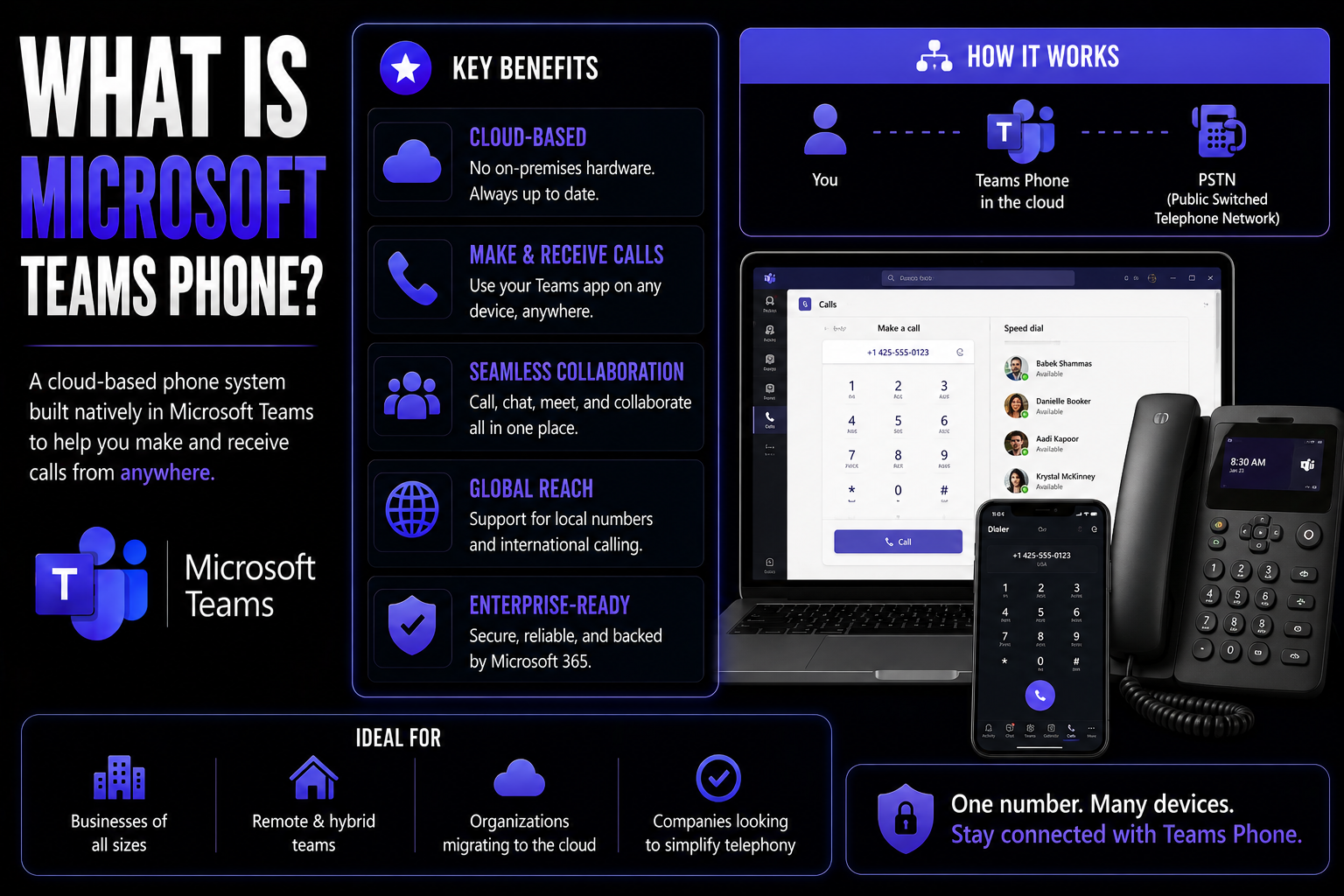
Microsoft Teams Phone is a cloud-based enterprise VoIP solution that transforms the familiar Teams app into your organization's modern phone system. Instead of relying on bulky, old-school desk phones or an on-premises PBX, Teams Phone lets you make and receive work calls from just about anywhere—directly from your computer, smartphone, or certified desk phone.
This is more than just throwing a dial pad into Microsoft Teams. Teams Phone weaves calling into your chat, meetings, files, and business workflows. As part of the Microsoft 365 ecosystem, it pairs voice with collaboration tools you’re already using, making conversations and projects flow better. Businesses are choosing Teams Phone to cut the cord from outdated phone hardware, gain flexibility, and unlock features only possible in the cloud.
If you’re wondering about the benefits, think of Teams Phone as that bridge between old telephony and today’s remote, hybrid, and mobile work worlds. It delivers the reliability and professionalism of enterprise telephony but without the headaches and costs of legacy systems.
Understanding Microsoft Teams Phone and Its Enterprise VoIP Capabilities
Before we dive into the nuts and bolts, let’s set the stage. The days when everyone had to sit at the same desk with the same old telephone are fading fast. Organizations of all sizes now expect their phone systems to work wherever their people work—be that office, home, or halfway across the world. Microsoft Teams Phone steps up as a cloud-based telephony solution engineered for these modern realities.
So, what’s really going on here? Teams Phone lets you use Microsoft Teams not just for messaging and meetings, but also for voice calls, just like a traditional business phone—but using internet VoIP (Voice over IP) instead of copper wires. This “softphone” experience doesn’t just sit on your desk; it keeps up with you on your laptop, tablet, or mobile. Forget about proprietary phone hardware: you’re getting an enterprise-grade phone system that rides on the Microsoft cloud.
The result is more than a new way to make calls. Microsoft Teams Phone becomes the nerve center for communication, connecting people through voice, video, and collaboration in one platform. It means you eliminate silos—no more chasing that stray voicemail or toggling between separate tools just to stay in the loop.
As we journey ahead, you’ll see how Teams Phone is reimagining how business calls are made, managed, and integrated with your broader Microsoft 365 experience. From replacing that tired PBX box to powering global connectivity, Teams Phone shapes up as a foundation for the next era of workplace communication.
From Legacy PBX to Modern Enterprise VoIP Systems
Legacy PBX systems once ruled the business phone scene, with big boxes installed onsite to manage calls and extensions. These systems demanded significant investment in hardware, regular maintenance, and offered little flexibility outside the office walls.
Today, Microsoft Teams Phone replaces the traditional PBX model with a cloud-native enterprise VoIP approach. Calls now route over the internet—no need for wires snaking through closets. This shift dramatically lowers costs, increases flexibility for remote and hybrid scenarios, and opens up powerful integrations. Over the past decade, the migration to VoIP and cloud-based phone systems has accelerated as organizations seek more agile, scalable, and integrated communications solutions.
Key Features and Integration Benefits of Teams Phone
Now that you’ve got the big picture of Teams Phone and why businesses are moving to cloud-based phone systems, let’s talk about the fun stuff: features and integrations. Teams Phone isn’t just a digital phone in an app—it’s loaded with enterprise telephony capabilities and deep Microsoft 365 integrations that help you work smarter, not harder.
This is where you see the true difference between old school business telephony and a modern cloud approach. Teams Phone gives organizations a whole toolbox: global calling, flexible PSTN connectivity options, and seamless ways to manage users, devices, and workflows. Plus, every call and message lives side-by-side with your meetings, files, and chats for genuine unified communications.
The real game changer? Teams Phone becomes the backbone for company-wide collaboration. With direct integration to Outlook, calendar, and other critical Microsoft tools, everything feels connected—no more jumping between apps or needing a cheat sheet to handle a client call. The next sections break down how Teams Phone delivers on the promise of enterprise-grade communication and what it means for your day-to-day productivity.
Telephony Capabilities: PSTN Calling, Direct Routing, and Operator Connect
- PSTN Calling with Microsoft Calling Plans: Teams Phone connects users to the traditional phone network (PSTN), allowing them to call landlines and mobile numbers worldwide. With Microsoft Calling Plans, you can buy phone numbers and minutes directly from Microsoft—no technical setup required, just assign numbers to users.
- Direct Routing: This feature lets organizations bring their own telephone carriers and SIP trunks. Using certified Session Border Controllers (SBCs), companies can connect Teams Phone to their existing telecom agreements. This is perfect for businesses with custom requirements, established carrier contracts, or specific regional presence needs.
- Operator Connect: For those who want more flexibility without managing complex infrastructure, Operator Connect links your chosen telecom provider natively with Teams. Providers handle the heavy lifting—provisioning numbers, managing call routing, and offering direct support—all from within the Teams Admin Center.
- Softphone and Device Compatibility: Make and receive calls from PCs, Macs, mobile devices, and Teams-certified desk phones or conference systems. No more being chained to a desk—your work number follows you.
- Advanced Calling Features: Teams Phone delivers enterprise essentials like call forwarding, transfer, voicemail, call queues, auto attendants, and emergency calling—all managed in the cloud for reliability and ease of use.
With these options, Teams Phone covers everything from basic company-wide calling to complex, multinational deployments. Your IT team can mix and match—choose a calling plan for one region and Direct Routing for another—ensuring that everyone has the connectivity they need, wherever they are.
Teams Phone Integrations and Unified Communications Workflow Benefits
- Deep Outlook and Calendar Integration: Make and join calls directly from Outlook invites or your Teams calendar. No more copying numbers or switching screens—your scheduled meetings, calls, and voicemails are all accessible in one unified interface.
- Chat, Channel, and File Collaboration: Every voice call in Teams flows naturally from chat or channel conversation. Share files, pull up documents, and keep chats going—no context lost, no back-and-forth between disconnected apps.
- Streamlined Workflow and Reduced Context Switching: All your calls, voicemails, meetings, and files are stored within Teams, massively cutting down on "where was that information?" headaches. You can switch from a chat to a call, to a meeting, or to collaborative editing without breaking stride.
- Extensibility with Apps and Bots: Enhance your workflow with custom apps and bots in Teams. Automate repetitive tasks, create team dashboards, or bring advanced analytics right into your calling experience. For a deep dive on transforming Teams meetings into powerful work hubs with custom apps and automation, check out advanced Teams meeting extensibility.
- Unified Security and Governance: All communication benefits from Microsoft 365’s robust security framework, from call encryption to compliance. Settings and permissions stay consistent across your Teams environment, simplifying IT management.
These integrations help teams ditch the tool-hopping and focus on getting work done together. Whether you’re fielding customer calls or collaborating on a cross-functional project, everything you need lives right inside Teams Phone.
Microsoft Teams Phone Licensing and Microsoft Calling Plan Breakdown
Navigating Microsoft Teams Phone licensing can feel like reading fine print on a lease—every detail counts. But understanding your options up front makes life much easier (and cheaper) down the road. Microsoft Teams Phone isn’t just “flipped on” for every Microsoft 365 user; it’s an added layer that unlocks telephony features inside Teams, depending on your organization’s plan and licensing strategy.
At its core, Teams Phone licensing works as an add-on to most Microsoft 365 business and enterprise subscriptions. Some premium plans may include Teams Phone by default (like Microsoft 365 E5), while others—such as E3 or Business Premium—require a separate Teams Phone license to enable full calling features.
You’ll also need to think about how you want users to make and receive calls from the external world. That’s where Microsoft Calling Plans, Direct Routing, and Operator Connect come in—each with different cost implications. The Calling Plan, for instance, is a direct subscription with Microsoft for minutes and phone numbers; it’s the simplest path for most businesses new to enterprise VoIP.
As you explore Teams Phone, keep in mind: your licensing, calling plan, and carrier decisions will shape your overall investment. The next section will drill into the actual calling costs and help you compare Teams Phone with your current setup.
Analyzing Costs: Domestic vs International Calling for Teams Phone
Microsoft Teams Phone pricing depends on the type of calls your organization makes. Domestic Calling Plans cover calls within your country and are typically charged as a flat monthly fee per user with a set number of minutes. International Calling Plans add or expand coverage to multiple countries—essential for global businesses—which generally cost more due to higher per-minute or bundled rates.
Organizations can mix and match plans across users or sites. Additional costs may come from bringing your own carrier (Direct Routing or Operator Connect), but this lets you optimize for special needs or negotiate better rates. Compared to legacy systems, Teams Phone aims to deliver predictable, scalable pricing with flexibility for international growth.
Basic Setup Steps for Deploying Teams Phone
Stepping into the world of Teams Phone deployment? Consider this your front-door briefing. Successful setup means thinking through licensing, network readiness, and device selection long before your first call ever rings through Teams.
Getting started begins with assigning Teams Phone licenses to users and picking your connectivity route: Microsoft Calling Plan, Direct Routing, or Operator Connect. For most organizations, that process happens through the Teams Admin Center—Microsoft’s web-based control panel for cloud telephony setup, device management, and troubleshooting.
Once connectivity is established, you’ll allocate phone numbers to users, configure Teams-certified desk phones (if needed), and set up things like call queues or auto attendants. All of this happens in the cloud, backed by Microsoft’s security and reliability guarantees. Device provisioning and network checks keep audio quality high, whether users are in the office or working remotely.
The real trick to a seamless deployment? Don’t skip training. End users should know how to use the new softphone system, how to move calls between devices, and what security best practices look like. That’s what separates a successful rollout from a support nightmare. Up next, we’ll get into the day-to-day life of managing Teams Phone and keeping things running smoothly.
User and System Management in Teams Phone Environments
- User Provisioning and Number Assignment: Using the Teams Admin Center, IT admins assign phone numbers to users, whether newly issued or ported from existing carriers. Bulk assignments and automated provisioning help streamline processes for large teams or seasonal scaling.
- Call Policy Configuration: Teams Phone lets admins define who can make outbound calls, set call forwarding rules, manage international dialing restrictions, and build custom call queues and auto attendants. This enforces company policies and keeps communication compliant and efficient.
- Device and Endpoint Management: Manage Teams-certified desk phones, IP phones, shared devices, and mobile endpoints from one central place. The Admin Center makes it simple to push software updates, monitor device health, and troubleshoot hardware issues as they arise.
- Security and Compliance Oversight: Leverage role-based access and permission settings to control who can modify system configurations or view sensitive call data. Teams Phone incorporates organization-wide compliance features like call recording (where permitted), data retention, and auditing.
- Ongoing Maintenance and Governance: Maintaining Teams Phone isn’t a one-and-done deal. IT needs to handle user onboarding/offboarding, monitor call quality, and update policies in response to organizational growth or regulatory changes. For guidance on structuring Teams environments for security and accountability, see how Teams governance transforms collaboration.
By centralizing daily management, Teams Phone keeps phone system administration consistent—whether you’re running a team of 10 or 10,000.
Scalability and Flexibility: Future-Proofing Communication
- Rapid User Scaling: Add or remove user licenses instantly—ideal for fast growth or sudden team changes without waiting on hardware.
- Support for Remote and Hybrid Teams: Teams Phone enables seamless calling whether you’re in the office or working from home.
- No Infrastructure Upgrades Needed: Cloud-based architecture eliminates the need for on-premise PBX equipment or lengthy installations.
- Business Continuity: Disaster recovery and global redundancy keep calls flowing, regardless of where your teams are located.
- Flexible Deployment Options: Use Calling Plan, Direct Routing, or Operator Connect (or all three together) to match your unique needs—today and tomorrow.
Ideal Scenarios for Teams Phone Adoption
- Remote and Hybrid Workforces: Perfect for companies with employees working from home, on the road, or in shared office spaces.
- Multi-Site or International Organizations: Centralized management makes it easy for businesses with locations in multiple countries or regions.
- Rapid Business Expansion: Scaling up or opening new offices is a breeze without expensive hardware installs.
- Seasonal Workforce Changes: Easily onboard or offboard temporary staff, adjusting licenses as business needs shift.
Teams Phone Limitations, Drawbacks, and Common Challenges
No solution is perfect—even Microsoft’s. Teams Phone brings major benefits for many organizations, but it does come with a few known limitations you’ll want to factor in. For one thing, highly specialized call centers may find that Teams Phone lacks the deep call routing, AI analytics, or vertical-specific integrations of some dedicated solutions. Uptime and SLA transparency can confuse new adopters, as Microsoft’s guarantees may differ from legacy telco contracts.
Support can also trip up some businesses, especially if they run complex hybrid environments with Direct Routing and multiple telecom partners. While Teams Phone offers excellent core features, not every country has full coverage, and newer compliance or regulatory requirements—like certain call recording mandates—may require third-party add-ons.
Regional constraints may affect how some features roll out, and integration with legacy equipment, like analog fax machines, is limited compared to classic PBX setups. These pain points shouldn’t be dealbreakers, but they are worth considering for organizations with advanced or industry-specific requirements.
With that in mind, understanding Teams Phone’s limitations will help you plan effectively and avoid surprises as you roll out modern enterprise telephony.
When to Look Elsewhere: Comparing Teams Phone to Other Business Telephony Options
- Advanced Call Center Features Needed: If you require deep outbound dialers, advanced call routing, or omnichannel customer support, a dedicated contact center solution or providers like AT&T might be a better fit.
- Highly Regulated Industries: Some sectors require granular compliance and call recording. Specialized solutions tailored to HIPAA, GDPR, or financial regulations may provide more out-of-the-box options.
- Legacy Hardware Integration: If your business depends on analog devices, doorphones, or fax machines, sticking with—or slowly transitioning from—a physical PBX could make more sense in the short run.
- Telecom Contract Lock-In: Organizations with multi-year agreements with a specific service provider may find migrating fully to Teams Phone less practical.
Conclusion: Is Teams Phone Microsoft’s Best Option for Your Organization?
Microsoft Teams Phone offers a modern, scalable, and integrated approach to business voice communications. By uniting calling, meetings, and collaboration in a single platform, it simplifies daily work and reduces complexity. Not every organization will find it the perfect match—specialized needs or strict compliance environments may demand more customization—but for many, the advantages outweigh the drawbacks.
Teams Phone is easy to use, easy to manage, and fits naturally into the Microsoft 365 world you may already rely on. If you’re weighing options, focus on your organization’s scale, flexibility needs, compliance posture, and workflow integration. That clarity will help you make the call, pun intended.
Recommended Articles and Feedback: Continue Your Microsoft Teams Phone Journey
- Unlock Confident Collaboration: Learn how to structure Microsoft Teams for security, efficient communication, and smooth management in this in-depth guide on Teams Governance. It covers workplace structure, compliance, and protecting your sensitive data.
- Master Data Privacy for Advanced Productivity: Dive into Microsoft Copilot data privacy and compliance to see how AI and automation fit safely inside your Microsoft 365 communications stack.
- Stay Up to Date: Teams Phone evolves fast. Bookmark trusted Microsoft 365 blogs and subscribe for new announcements—being informed is your best edge.
- Share Your Experience: We welcome feedback and peer tips about using Teams Phone. Share your challenges, wins, or questions to help others learning the ropes.
You Should Also Listen To
If you are researching what is Microsoft Teams Phone, these episodes add practical context on architecture, operations, security, and governance:
- Teams Telephony – Simply Explained — Understand calling architecture, routing, devices, and operational trade-offs.
- Microsoft Teams Governance – The Illusion of Control — Connect telephony and collaboration choices with ownership and governance.
- Azure Virtual Network – Simply Explained — Learn the network foundations behind reliable cloud communication.
- Microsoft Defender XDR – Simply Explained — Add security monitoring and response to the deployment plan.

Microsoft MVP | Host of M365.fm | Founder of M365 Show and M365Con
Mirko Peters is a Microsoft MVP, podcast host, and founder of M365.fm, M365 Show, and M365Con. His work connects Microsoft practitioners through podcast interviews, livestreams, and community events.
At M365.fm, Mirko hosts conversations with Microsoft MVPs, product experts, architects, and community contributors. Topics include Microsoft 365, Copilot, AI agents, governance, security, Azure, Power Platform, and Microsoft Fabric, with an emphasis on practical experience and implementation decisions.
M365.fm is the podcast and learning platform. M365 Show brings experts together for livestreams, while M365Con provides an online conference setting for community learning.
Official website: Mirko Peters (https://www.mirkopeters.com/). Recognition: Mirko Peters — Microsoft MVP profile (https://mvp.microsoft.com/de-DE/mvp/profile/9b0ca797-db5a-493a-a845-8b9158046cf5). Connect on LinkedIn (https://www.linkedin.com/in/m365showpodcast/).