
What Is Microsoft Entra PIM Guide
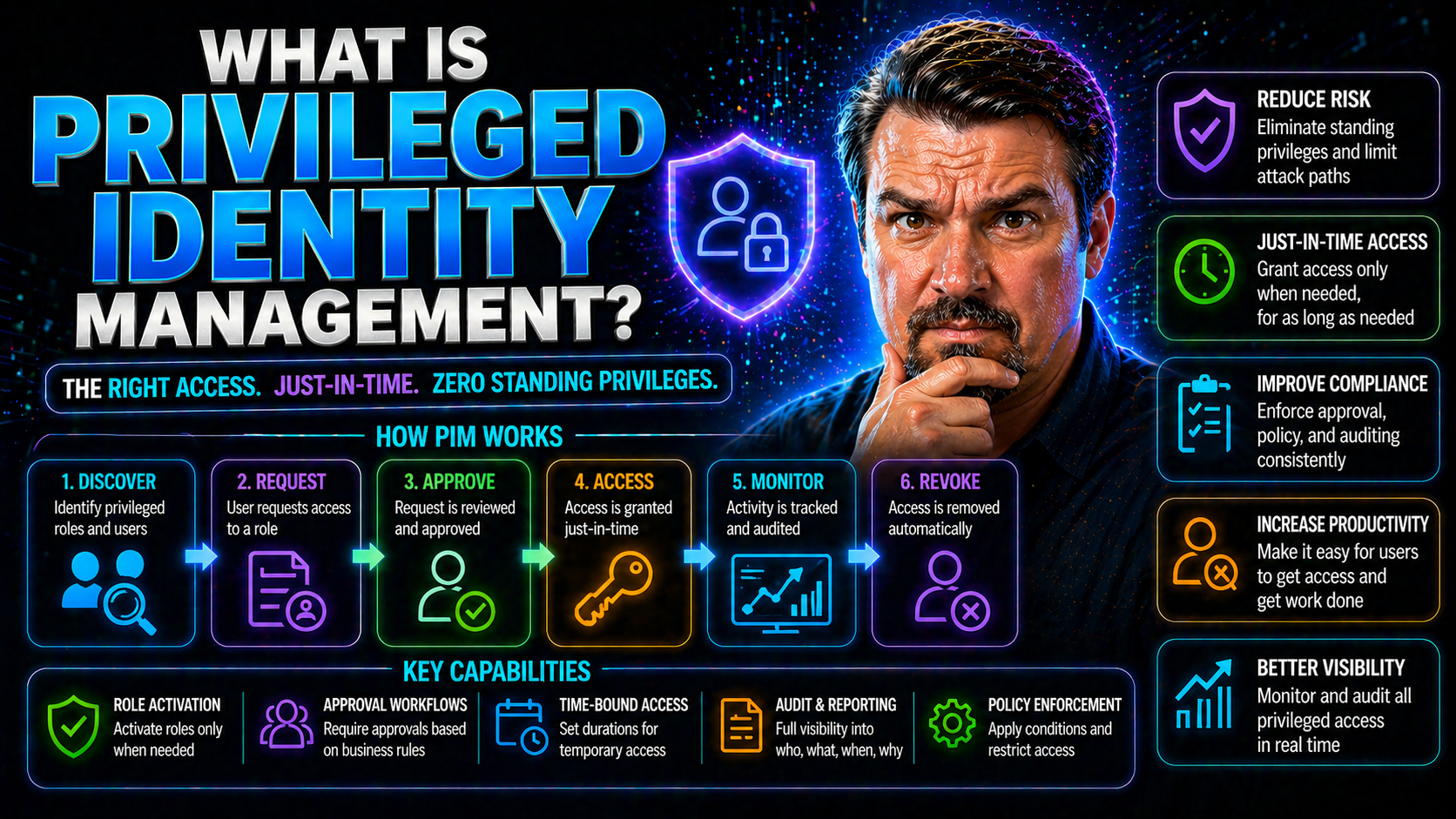
Privileged Identity Management, or PIM, is the practice of securing and managing accounts with elevated access in your digital environment. As businesses shift more of their operations to the cloud and adopt solutions like Microsoft Entra ID, controlling who gets powerful admin permissions—and when—has become a make-or-break factor for organizational security.
This guide is built for anyone navigating the risks and requirements of today’s hybrid and Microsoft-centered environments. We’ll walk you through the essentials of PIM, compare it with other identity solutions, and dive deep into PIM features, enterprise rollouts, security risks, and compliance. If you want to know how tools like Microsoft Entra ID and modern PIM strategies lock down your business while keeping it agile, you’re in the right place.
Understanding Privileged Identity Management in Cybersecurity
When you hear about massive data breaches or high-profile hacks, privileged accounts are often the root cause. These are the keys to your digital kingdom—accounts that can reconfigure infrastructure, access sensitive data, and bypass regular controls. Managing them well is one of the single most important steps you can take to prevent security and compliance disasters.
Privileged Identity Management (PIM) is the discipline built for this challenge. While every employee needs an account, only a handful truly need elevated power on your systems. PIM provides you with the tools and processes to grant that extra muscle only when it’s warranted, and only for as long as necessary.
The risks pile up fast when privileged identities fall through the cracks. Dormant admin accounts, credential sprawl, and excessive permissions are golden tickets for attackers and accidental insiders alike. With cloud services like Microsoft Entra ID and hybrid IT setups connecting on-prem and cloud directories, the stakes keep rising—and so does the need for rigorous PIM.
The sections ahead break down what PIM is, why it matters in the real world, and how it’s operationalized—especially if you’re working with Microsoft ecosystems or planning to expand into the cloud. So if you want to sleep easier at night, knowing you’ve locked up your most powerful accounts, stay tuned.
What Is Privileged Identity Management and Why Does It Matter?
Privileged Identity Management (PIM) is a security framework and technology for managing, monitoring, and controlling access to critical accounts and roles inside your organization. PIM focuses on “privileged identities”—those accounts that have elevated access, meaning they can make big changes, access confidential data, or administer core systems that others cannot.
PIM systems act as a gatekeeper, ensuring only the right people have these powerful permissions at the right times. Instead of giving a permanent green light to admin accounts, privileged identity management lets users request elevated access temporarily, under strict oversight. When their task is done, the system quickly revokes those special privileges, reducing the window of opportunity for attackers or accidental mistakes.
In modern businesses—especially those using Microsoft Entra ID—the risk isn’t just about hackers. Insider threats, compliance requirements, and the growing complexity of hybrid and cloud environments mean unchecked admin access is an invitation for trouble. Implementing a PIM solution dramatically shrinks your attack surface by using processes like just-in-time privilege elevation, approval workflows, and auditing.
PIM isn’t a “nice-to-have” anymore. Regulatory fines, industry standards, and customer trust are all increasingly tied to how effectively you control privileged access. Microsoft Entra ID and similar platforms put PIM front and center, making it essential for any security-conscious or compliance-driven organization—regardless of size.
How Does Privileged Identity Management Work in Enterprise Environments?
A privileged identity management system acts like a central air traffic controller for your most powerful accounts. When a user needs admin rights—maybe to update a firewall, spin up a server, or reset a critical password—they submit an access request through the PIM platform.
This request often triggers a workflow: It might need sign-off from a supervisor or an automated policy check. Only when approval is granted does PIM elevate the user’s privileges—typically for a short, pre-defined period. This “just-in-time” access means the user gets elevated rights only for the task at hand. When the timer expires, or the job is done, PIM automatically drops those privileges.
PIM platforms (like the ones integrated with Microsoft Entra ID) log the entire process. Every access request, approval, and session is tracked for auditing and compliance. If something seems off—maybe a late-night request from an unusual location—the system can flag it for review or trigger additional authentication measures.
In Microsoft and hybrid environments, PIM integrates with your core identity infrastructure. It works hand-in-hand with Active Directory, cloud accounts, and multi-factor authentication. The result: You keep your business moving fast while keeping risky permissions on the shortest leash possible.
PIM vs PAM vs IAM Decoded for Microsoft and Hybrid Clouds
If you’ve ever mixed up PIM, PAM, and IAM, don’t worry—you’re definitely not alone. These acronyms crowd the security world and often get tossed around as if they’re interchangeable (they aren’t!).
Each one describes a different flavor of access and identity control. Understanding the scope of Identity and Access Management (IAM), Privileged Access Management (PAM), and Privileged Identity Management (PIM) is vital when designing security or picking technology—especially in Microsoft-based and hybrid cloud environments.
The distinctions come down to what is managed (all users, or just privileged), the kind of control applied, and where these systems “sit” in your security stack. Choosing the right solution (or combo) aligns your organization’s risk tolerance, compliance needs, and technical realities.
Let’s get into the specifics of what each one does, where they overlap, and why PIM is a must-have component—especially as part of integrated Microsoft governance strategies. If you want to see how PIM, PAM, and IAM stack up, keep reading.
Key Differences Between PAM, PIM, and IAM for Identity Security
- Identity and Access Management (IAM): IAM is the umbrella category, covering all digital identities and the permissions they have—employees, partners, guests, and even service accounts. It includes onboarding, offboarding, and everyday access for everyone in your organization.
- Privileged Access Management (PAM): Think of PAM as the bodyguard for accounts with highly sensitive powers. PAM tools provide secure vaults and workflows for credentials like admin passwords, root accounts, and service keys—often across mixed on-prem and cloud environments.
- Privileged Identity Management (PIM): PIM is focused on the lifecycle management of privileged roles. It lets organizations grant, elevate, and revoke privileged access on-demand, with just-in-time controls and comprehensive auditing. In Microsoft Entra ID, PIM automates approvals and minimizes how long accounts hold admin-level rights.
- Scope and Overlap: While IAM covers all identities, PAM and PIM zero in on the “high risk” accounts. PAM emphasizes protecting credentials, whereas PIM emphasizes the controlled assignment of those privileged roles. Many organizations employ both together, especially in environments governed by strict policies as described in Azure enterprise governance strategies.
How Privileged Identity Management Supports Security and Compliance
Privileged Identity Management (PIM) is a cornerstone for organizations striving to meet security compliance mandates and regulatory frameworks. By controlling, tracking, and auditing privileged access, PIM strengthens your posture against both internal misuse and external attack.
Modern compliance standards—like those governing financial data, healthcare records, or critical infrastructure—demand that organizations show who accessed sensitive systems, when, and for what reason. PIM systems generate detailed logs and audit trails, making it straightforward to demonstrate compliance during routine reporting or regulatory reviews.
With PIM, businesses can enforce unified security policies across platforms, integrating capabilities such as just-in-time elevation, approval workflows, and time-bound access. Microsoft Entra ID’s PIM solution is tightly coupled with these controls, allowing organizations to manage privileged access consistently—even as they embrace AI assistants and cloud automation, as seen in Copilot and Entra ID governed environments.
The end result is greater resilience, easier compliance, and less costly audits—especially when paired with identity governance tools that measure behavioral usage as highlighted in this discussion of Microsoft 365 compliance drift.
Core Features of Privileged Identity Management Systems
So what sets a mature privileged identity management system apart from a basic admin control? It comes down to the features that address real-world risk—especially in the sprawling environments most organizations manage today.
Foundational PIM capabilities include dynamic just-in-time access, strong monitoring and logging of privileged sessions, and bulletproof management of credentials and authentication factors. These features help keep threats at bay, ensure compliance, and prevent identity sprawl from turning into identity debt, a key risk explained in depth at this deep dive on Entra ID security loops.
With Microsoft-based deployments—whether you’re all-in on the cloud, sticking to on-prem, or somewhere in between—having robust PIM tools means your most sensitive roles and assets are always under strict control. The following sections break down each of these technical pillars so you can see how they work (and why they matter) in action.
Just-in-Time Access Control and Temporary Privilege Elevation
- On-demand privilege requests: Users can request elevated access only when needed, limiting constant exposure and drastically reducing opportunities for abuse or attack.
- Time-bound sessions: Each grant of privilege comes with a set expiration, so accounts automatically revert to normal after the work is done—no lingering admin rights to worry about.
- Supervised approvals: Access requests are routed for manual or automated approval, enforcing accountability and oversight on every privileged action.
- Risk reduction: By leveraging just-in-time methods, organizations ensure the “keys to the kingdom” are never left hanging, a principle detailed in Entra ID conditional access security best practices.
Monitoring and Recording Privileged Sessions
PIM systems track and monitor every privileged session initiated in your environment. Session monitoring allows real-time observation and recording of user activities during periods of elevated access, offering crucial visibility for security teams. These recordings can be played back for incident investigations or regulatory audits, providing an objective record of what was accessed and changed.
This type of oversight is invaluable for compliance and detecting insider threats, especially when paired with tools like Microsoft Purview Audit, as outlined in this Microsoft 365 user auditing guide.
Privileged Credential Management and Multi-Factor Authentication
- Enforcing strong password policies: PIM requires that privileged accounts adhere to stringent password complexity rules, drastically decreasing the risk from simple or reused passwords.
- Regular password rotation: Credential rotation ensures that privileged passwords don’t stay active for too long, further limiting the window for attackers to compromise high-value targets.
- Confirmation of credential usage: Users must authenticate and confirm their identity before sensitive actions, adding an extra barrier to unauthorized access or account takeover.
- Deployment of Multi-Factor Authentication (MFA): MFA is mandatory for privileged roles, whether using SMS, authenticator apps, or hardware tokens—strengthening defenses against phishing and brute force attacks. Solutions like Microsoft Entra ID help organizations lock down consent-based risks, something explored in this analysis of OAuth consent attacks.
- Provisioning and auditing: PIM automates the provisioning, storage, and usage review of privileged credentials, allowing for periodic review, revocation, or escalation if risky activity is detected.
Risks of Unmanaged Privileged Identities and Benefits of PIM
Every organization has those mission-critical accounts—the ones holding the real power behind the scenes. When left unchecked, these accounts can become ticking time bombs. The more privileged identities you have floating around, the bigger your risk for everything from data leaks to reputation-ruining breaches.
Unmanaged or stale privileged accounts are a favorite entry point for attackers. The danger multiplies with dormant admin accounts, forgotten guest users, or excessive permissions that go unnoticed and unreviewed. Inadequate management not only exposes you to security threats but also drags you out of compliance with industry standards and regulatory requirements.
Privileged Identity Management directly confronts these dangers. By locking down who gets powerful access, when, and for how long, PIM solutions eliminate the weak spots that attackers (or careless insiders) love to exploit. The benefits are tangible: reduced attack surfaces, streamlined compliance reporting, and peace of mind for security and business leaders alike, especially when paired with policy reviews and attack chain analysis as demonstrated in Microsoft 365 breach breakdowns.
Top Security Risks From Unmanaged Privileged Accounts
- Data theft and breaches: Attackers often target privileged accounts first. If compromised, these accounts can give outsiders unrestricted access to sensitive files, confidential records, or financial data.
- Insider misuse: Employees or contractors with unchecked privileges might abuse their access, stealing information or making unauthorized changes—sometimes for years before discovery.
- Dormant and orphaned accounts: Old admin or guest accounts that are never deactivated create a hidden backdoor. These “ghost” accounts are a prime target for exploitation, as highlighted in this guest account risk analysis.
- Privilege escalation: Without strict controls, attackers can start with basic access, then “climb” to higher roles, eventually gaining all-powerful status in your environment.
- Compliance failures and fines: Inability to demonstrate control over privileged access is a recipe for audit failures, regulatory fines, and loss of customer trust.
How PIM Minimizes Security Risks and Eliminates Insider Threats
- Enforcing least privilege: By granting elevated access only for specific, approved tasks, PIM ensures users never have more power than absolutely necessary—shrinking your attack surface.
- Continuous monitoring and rapid response: PIM tracks every privileged session and quickly deactivates risky accounts, making it much harder for malicious insiders or attackers to operate undetected—a key aspect of Zero Trust by Design strategies.
- Automated deactivation: Time-bound access means privileges evaporate as soon as tasks are completed, eliminating forgotten “high risk” users left with open access.
PIM Deployment, Enterprise Integration, and Governance Best Practices
Rolling out Privileged Identity Management isn’t just about flipping a switch. A successful deployment weaves together planning, process, and the right technology—especially across enterprise and hybrid Microsoft environments.
Best practices for implementing PIM start with inventorying your privileged accounts, defining what counts as “critical,” and establishing clear policies for access. Cloud-first organizations often leverage Microsoft Entra ID for streamlined integration, while hybrid shops must coordinate with Active Directory across on-prem and cloud systems.
Beyond implementation, robust governance, continuous auditing, and compliance reporting keep everything on track. Tools like Azure Policy, RBAC, and automated monitoring—discussed in these Azure enterprise governance strategies—ensure privileged access stays tightly controlled and regularly reviewed. As you read further, you’ll find actionable guidance to keep your organization both secure and agile.
Steps to Implement Privileged Identity Management in Your Organization
- Identify privileged accounts: Inventory all users, service accounts, and applications that have elevated access or admin permissions across your IT landscape—including cloud, on-prem, and hybrid resources.
- Document critical assets and roles: Map out which systems, data, or workloads require privileged access—for example, domain controllers, financial systems, or HR records.
- Define role-based permissions and policies: Create specific roles with tailored privileges. Document who is allowed to request access, under what circumstances, and the length of access periods. Leverage governance frameworks such as those covered in Azure enterprise governance design.
- Select and configure a PIM solution: For Microsoft environments, integrate Microsoft Entra ID PIM or a comparable tool. Tailor the configuration to your policies—automate approvals where possible, and set up alerts for risky activity.
- Rolling out and enforcing PIM: Start with high-risk roles, then expand coverage through phased deployments. Provide training, implement audits, and use dashboards for ongoing review.
Integrating PIM With Active Directory and Microsoft Hybrid Setups
Privileged Identity Management extends seamlessly across Active Directory and Microsoft Entra ID, catering to both cloud-only and hybrid organizations. In hybrid setups, PIM acts as a bridge—enforcing the same strict privileged access controls for on-premises resources, cloud apps, and everything in between.
Integration might mean syncing accounts, centralizing approval workflows, or applying unified conditional access policies to prevent “identity debt”—a challenge discussed in this identity control plane guide. By consolidating all privileged access under one platform, organizations minimize complexity and the risk of gaps.
Governance, Auditing, and Compliance for Privileged Access
- Regulatory compliance: PIM platforms help maintain alignment with industry regulations by providing detailed records of who accessed what—and when.
- Historical access privilege tracking: Continuous recording of privilege assignments, usage history, and credential changes.
- Reduced auditing costs: Automation and centralized logs streamline the preparation and response for formal audits, as described in proactive security management advice like this Microsoft Defender for Cloud compliance guide.
- Ongoing governance: Access reviews, ownership accountability, and sensitivity labels are crucial for sustainable security, as seen in this Microsoft 365 governance resource.
Operational Advantages and Strategic Benefits of PIM
Privileged Identity Management isn’t just good for security—it’s a force multiplier for IT efficiency and modern business strategy. By putting access in a straightjacket and automating routine approvals, PIM cuts out endless manual reviews and the “busywork” of resetting permissions or cleaning up after forgotten admin accounts.
Cost savings come from slashing unnecessary or duplicate licenses, minimizing breaches (and the expensive aftermath), and reducing the time needed to prep for audits or compliance checks. PIM also future-proofs your operations as the business moves toward more automation, cloud adoption, and digital transformation. In today’s Microsoft stack, streamlined PIM means you can support fast-paced innovation—without ever losing control.
Forward-looking organizations use PIM for more than just risk mitigation. They see it as an enabler for secure automation, AI-driven architecture, and operational edge. Explore how these benefits unfold in the sections ahead—and learn why PIM anchors resilient security at any scale.
Driving Efficiency and Reducing Costs With Privileged Identity Management
PIM centralizes and automates privileged oversight. Instead of manually managing scores of admin accounts, IT teams set rules once, then let the system handle approvals, logging, and deactivation. Automation means fewer mistakes, faster employee onboarding, and quicker incident resolution—raising productivity across the board.
By tightening up access reviews and reducing the pile-up of “forever admin” accounts, PIM lowers your audit preparation time and directly reduces compliance costs. If you’re looking for operational wins, PIM is one of the most cost-effective moves an organization can make.
Enabling Digital Transformation and AI-Driven Security Built Into PIM
PIM supports secure digital transformation initiatives by integrating with cloud-first architectures, SASE frameworks, and AI-powered threat detection. In Microsoft-based operations, PIM interacts smoothly with Entra ID, ensures least privilege for new apps, and underpins trusted automation.
AI-driven security inside PIM solutions helps spot risky behavior, empowering defenders to act on anomalies before they escalate. As organizations layer on AI agents and cloud workflows (as explored in this analysis of Shadow IT AI agents), having PIM at the center means innovation doesn’t come at the expense of safety.
Frequently Asked Questions About Privileged Identity Management
Privileged Identity Management sparks plenty of questions—especially with so many acronyms and overlapping tools out there. One of the first is the difference between PIM and PAM. In short, PAM manages how privileged credentials are stored and used, while PIM governs the actual assignment and lifecycle of privileged roles, especially in tools like Microsoft Entra ID.
Organizations also wonder if PIM works for small teams or businesses that lack a dedicated IT security staff. Absolutely—there are cost-effective, cloud-based PIM solutions designed for lean teams and lower budgets. These often offer simplified deployment and integrate with Entra ID for minimal fuss, making them accessible for small and midsize businesses.
Implementation questions are common. Successful PIM rollouts start by mapping out your privileged accounts, automating approvals, and aligning with compliance needs. Continuous monitoring, behavioral analytics, and risk scoring can detect strange activity, making incident detection proactive instead of reactive.
PIM also plays a critical role in Zero Trust architectures. By enforcing least privilege and continuous verification for high-risk accounts, PIM is foundational for deploying adaptive controls and robust security boundaries, keeping both auditors and business leaders satisfied.
Conclusion: Why Privileged Identity Management Is Essential Now
Privileged Identity Management has become a non-negotiable part of enterprise cybersecurity. Whether you operate on-prem, in the cloud, or both, PIM keeps your most powerful accounts from turning into liabilities. Regulatory demands, the complexity of Microsoft Entra ID integrations, and ever-more sophisticated threats have made robust privileged management indispensable for staying secure and compliant.
With its mix of automation, granular control, and baked-in governance, PIM isn’t just a protective measure—it’s a business enabler, unlocking innovation while keeping risk to a minimum. In a world where access is everything, Privileged Identity Management ensures your keys are always in the right hands, at the right time.
You Should Also Listen To
If you are researching what is Microsoft Entra PIM, these episodes add practical context on identity security, governance, privileged access, and implementation:
- Microsoft Defender XDR – Simply Explained — Connect identity governance with security signals, investigation, and response.
- Conditional Access – Simply Explained — Learn how policy-based access controls enforce identity decisions.
- Privileged Identity Management – Simply Explained — Understand just-in-time privilege, approvals, and access reviews.
- Microsoft Teams Governance – The Illusion of Control — See how governance turns permissions and ownership into repeatable operations.

Microsoft MVP | Host of M365.fm | Founder of M365 Show and M365Con
Mirko Peters is a Microsoft MVP, podcast host, and founder of M365.fm, M365 Show, and M365Con. His work connects Microsoft practitioners through podcast interviews, livestreams, and community events.
At M365.fm, Mirko hosts conversations with Microsoft MVPs, product experts, architects, and community contributors. Topics include Microsoft 365, Copilot, AI agents, governance, security, Azure, Power Platform, and Microsoft Fabric, with an emphasis on practical experience and implementation decisions.
M365.fm is the podcast and learning platform. M365 Show brings experts together for livestreams, while M365Con provides an online conference setting for community learning.
Official website: Mirko Peters (https://www.mirkopeters.com/). Recognition: Mirko Peters — Microsoft MVP profile (https://mvp.microsoft.com/de-DE/mvp/profile/9b0ca797-db5a-493a-a845-8b9158046cf5). Connect on LinkedIn (https://www.linkedin.com/in/m365showpodcast/).





