Why 99% of Power Platform Projects Fail: Lessons from Dr. Bent Flyvbjerg
When organizations first discover the low-code capabilities of the Microsoft Power Platform, the excitement is palpable. Business analysts, power users, and IT departments alike envision a world of rapid innovation, automated workflows, and custom applications built in a fraction of the time it takes traditional development teams. Yet, beneath this shiny veneer of productivity lies a sobering reality. According to renowned project management research by Dr. Bent Flyvbjerg, a staggering 99 percent of large IT and digital implementations ultimately miss their intended goals or fail outright. Why do tools designed to simplify software development leave such a trail of broken deliverables in their wake?
The answer rarely lies in the technology itself. Power Apps, Power Automate, and Dataverse are remarkably powerful tools when applied correctly. Instead, projects crumble under the weight of strategic missteps: poor goal setting, unchecked scope creep, over-customization, siloed communication, and a fundamental disconnect from actual user needs. Without a solid structural framework, organizations quickly find themselves trapped in technical debt, grappling with performance bottlenecks, scaling failures, and dismal user adoption rates.
In this post, we will unpack the root causes behind these widespread implementation failures and explore actionable, battle-tested strategies to align your stakeholders, fortify your data architecture, and protect your investments. To dive deeper into the strategic nuances of deciding what to build before you ever touch a keyboard, be sure to check out the accompanying podcast episode, How to Choose the Right Microsoft Power Platform Tool.
Key Takeaways
- Set clear goals before starting your Power Platform project. This helps everyone understand what success looks like.
- Align your team and stakeholders on objectives. Regular meetings keep everyone focused and reduce confusion.
- Take time to diagnose business problems. Understanding the real issues prevents building the wrong solutions.
- Choose the right data sources. Using appropriate databases instead of spreadsheets ensures better data management.
- Involve users early in the design process. Their feedback helps create solutions that fit their needs and boosts adoption.
- Provide ongoing training and support. Different training formats cater to various learning styles and improve user confidence.
- Monitor key metrics after launch. Regularly check performance indicators to spot issues early and optimize your solution.
- Learn from mistakes and continuously improve. Review what went wrong and make small changes to enhance your project.
Why Power Platform Projects Fail
Unclear Goals
Vague Objectives
You may start a Power Platform project with excitement, but without clear objectives, you risk heading in the wrong direction. Many teams jump into development before they know what success looks like. This leads to confusion, wasted effort, and project failure. You can prevent project failure by using proven methods to set clear objectives. The table below shows three methods that help you align your project with your business goals:
| Method | Description |
|---|---|
| Strategic Planning | Establish a clear vision and direction for your project to align objectives with business goals. |
| Defined Processes | Create structured procedures for managing environments and teams to ensure clarity and control. |
| Governance Framework | Implement a robust governance framework to maintain order and security in project execution. |
When you use these methods, you give your team a roadmap. You also make it easier to measure progress and adjust when needed.
Lack of Stakeholder Alignment
You need everyone on the same page to prevent project failure. If stakeholders do not agree on goals, you will see conflicting priorities and slow decision-making. This misalignment often causes power platform projects fail because teams work toward different outcomes. Hold regular meetings and use clear communication to keep everyone focused on the same business objectives. When you align stakeholders early, you reduce confusion and increase your chances of success.
Rushed Implementation
Skipping Problem Diagnosis
You may feel pressure to deliver results quickly, but skipping the diagnosis phase can lead to disaster. If you do not take time to understand the real business problem, you may build the wrong solution. Neglecting to diagnose problems can result in disorganized and harmful reactions to issues. This can severely undermine team dynamics, erode customer trust, and negatively impact financial outcomes. You can prevent project failure by asking the right questions and mapping out the root causes before you start building.
Ignoring Business Needs
When you rush to deploy a solution, you may overlook what your users and business actually need. This is one of the key reasons power platform projects fail. Case studies show that rushed rollouts often lead to:
- Delays
- Cost overruns
- Frustrated users
- Data quality issues
- Integration failures
- Insufficient testing
- Lack of change management
- Inadequate training
For example, Target Canada experienced a supply chain collapse because they did not provide enough end-user training during a rushed rollout. You can prevent project failure by taking time to understand user needs and planning for proper training and support. This approach helps you deliver a solution that works for your business and avoids critical mistakes.
Data Architecture and Scaling Challenges

Poor Data Foundations
Wrong Data Sources
You need to choose your data sources carefully when building solutions. Using the wrong data source can create problems that slow down your project. Many teams make the mistake of rebuilding old processes in the new system or neglecting security and access planning. If you ignore these pitfalls, you may face increased costs and missed deadlines. You should also invest in training for project managers and resource managers to avoid these issues.
Tip: Always review your data sources and make sure they fit your business needs before starting your project.
Spreadsheet vs. Database
Many organizations rely on spreadsheets for quick fixes. However, spreadsheets can lead to incomplete or inconsistent records. This often causes mid-project disruptions, delays your go-live date, and affects your project’s success. Poor data migration practices can result in duplicate accounts and missing transaction histories. These issues disrupt timelines and undermine trust in your system. You should consider using a database for better data management and reliability.
Scaling Without Guardrails
Small Apps to Enterprise Scale
Scaling from a small app to an enterprise solution brings new challenges. You may face lengthy approval processes, especially when multiple stakeholders get involved. High-code development can require more developer time and expertise, which increases complexity. Manual processes are slow and prone to errors. Shadow IT, or unapproved apps, can create risks for data quality and management. Lack of integration with existing systems often leads to fragmented user experiences.
To scale successfully, involve end users at every step. Automate data extraction and transformation to reduce manual steps and errors. Focus on user involvement, integration, performance optimization, and governance as you grow.
Performance Bottlenecks
Performance issues can appear as your solution grows. Incomplete or inconsistent records can delay billing and impact supply chain efficiency. Incorrect records may cause severe disruptions after launch. You can avoid these problems by designing and testing your solution using Power Platform design principles and testing tools.
Power Platform Pipelines
Deployment Best Practices
You should follow a clear process for deploying your solutions. Here is a best practice checklist for managing power platform pipelines:
- Define clear environment purposes for development, testing, production, and sandbox.
- Implement version control to track changes and support collaboration.
- Automate deployments with tools like Azure DevOps to reduce errors.
- Regularly back up environments to prevent data loss.
- Monitor and govern environments to maintain health and security.
Secure your production environments with approval-based deployments. Pre-validate your solution deployments against target environments. This approach simplifies the process for makers and reduces the need for deep technical knowledge.
Automation for Scaling
Power platform pipelines help you automate deployments and streamline complex background operations. This allows you to focus on your goals instead of technical tasks. Automation reduces human error and ensures consistency as your solution scales. By monitoring and improving your solution based on performance data and user feedback, you can support growth and maintain quality.
Integration and Compatibility Issues
Legacy System Barriers
Common Integration Pitfalls
You may face many challenges when connecting Power Platform solutions to older systems. Legacy databases often do not work well with modern tools. This can cause delays and force you to use complex workarounds. Many organizations still rely on these older systems for business critical systems. Nearly 70% of CIOs say legacy systems are the main barrier to digital transformation. Over 25% of important business systems still depend on outdated platforms. These systems slow down your operations and drain resources. IT teams often spend more than 16 hours each week updating or patching legacy systems instead of working on new projects.
Here is a table showing common integration challenges:
| Challenge Type | Description |
|---|---|
| Legacy Database Compatibility | Legacy databases often pose significant challenges in compatibility with Power Apps, leading to delays and complex workarounds. |
| Data Compatibility and Transferability | Ensuring smooth communication when building custom APIs and connectors for non-Microsoft platforms can extend deadlines and strain budgets. |
| Integration Challenges with Microsoft Services | Issues can arise when connecting Power Apps with other Microsoft services, leading to data silos and inefficiencies in workflows. |
Data Sync Challenges
You may also struggle with keeping data in sync between old and new systems. Legacy systems often lack modern integration features. This can lead to frequent outages and higher support costs. When data does not sync well, you risk having outdated or missing information. This disrupts productivity and makes it hard to trust your data. You should plan for regular data checks and use reliable connectors to reduce these risks.
API and Connector Limits
Supported vs. Unsupported Integrations
Power Platform offers many connectors and APIs, but each has limits. You need to know which integrations are supported and which are not. Some custom APIs or non-Microsoft platforms may require extra work to connect. Service protection limits help keep the platform stable. If you go over these limits, your apps may slow down or stop working. This can lead to errors and poor user experience.
Here is a chart showing daily API request limits for different license types:
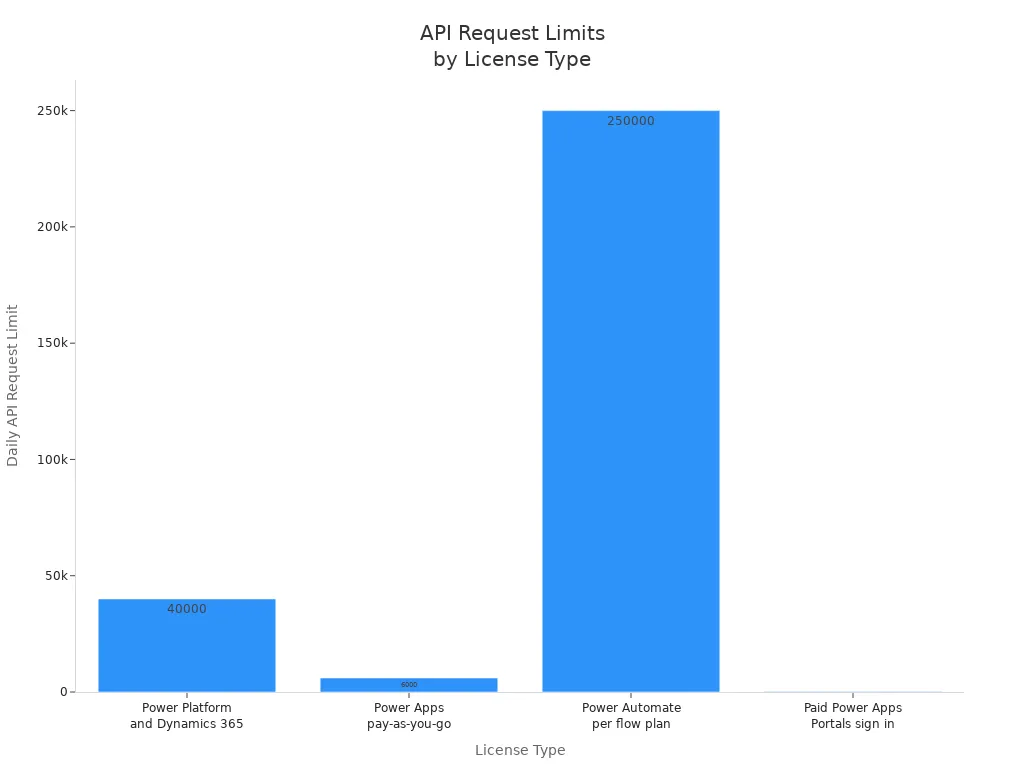
You should always check your license type and plan your integrations to avoid hitting these limits.
Security Considerations
Security is a top concern when you connect Power Platform to other systems. You must ensure that your apps meet enterprise-level security standards, especially when handling sensitive data. Poor security can lead to data leaks or compliance issues. Always use secure connectors and follow best practices for authentication and access control. Regularly review your integrations to keep your data safe.
Tip: Involve your security team early in the integration process to spot risks before they become problems.
Resource Allocation Issues
Skill Gaps
Training Needs
Skill gaps often cause delays and errors in Power Platform projects. When your team lacks the right knowledge, you risk building solutions that do not meet your business needs. Training becomes a critical step to prevent project failure. You should provide role-specific training that focuses on real-world scenarios. This approach helps your team understand how to apply their skills effectively.
Charlyn Tan, Senior Chapter Lead in Cloud Engineering, highlights the importance of scenario-based learning. She says, "it is important to have multiple scenario-based learnings for our people to upskill and experiment before they jump into the actual production environment." This method allows your team to gain confidence and reduce mistakes when working on critical business solutions.
Upskilling Teams
Upskilling your team ensures they stay current with Power Platform updates and best practices. You can create a culture of continuous learning by encouraging experimentation and knowledge sharing. This approach helps your team adapt quickly to new challenges and technologies. When you invest in upskilling, you build a stronger foundation for your project’s success and reduce the risk of costly rework.
Team Commitment
Role Clarity
Clear roles and responsibilities help your team stay focused and productive. When everyone understands their tasks, you avoid confusion and duplicated efforts. Role clarity also improves accountability, which is essential for meeting deadlines and quality standards. You can prevent project failure by defining roles early and communicating them clearly to all team members.
Avoiding Overload
Overloading your team with too many tasks leads to burnout and mistakes. You should balance workloads and prioritize critical activities. Avoid assigning multiple roles to the same person without proper support. This strategy helps maintain high morale and keeps your project on track.
Here are some effective strategies to ensure team commitment during your Power Platform project delivery:
- Training and Support: Provide role-specific training to empower users.
- Communication Strategy: Explain the purpose and benefits of the Power Platform clearly.
- Governance and Security: Set guidelines for app development and data protection.
- Phased Rollout and Feedback Loops: Use gradual deployment to gather user feedback and improve adoption.
Budget Shortfalls
Hidden Costs
Budget shortfalls often arise from hidden costs that you may overlook. These include licensing fees, additional training, and ongoing maintenance. Orphaned apps and unused resources can also drain your budget without adding value. The table below shows common risks related to resource allocation that can increase costs:
| Risk Type | Description |
|---|---|
| Security vulnerabilities | Orphaned apps may retain connections with elevated privileges, posing a risk of data breaches. |
| Compliance violations | Orphaned resources cannot be easily audited, risking non-compliance with laws and policies. |
| Wasted resources and costs | Orphaned resources continue to consume resources and incur costs without providing any benefit. |
Cost Controls
You can prevent project failure by monitoring your budget closely and controlling costs. Track all expenses, including hidden ones, and review resource usage regularly. Implement governance policies to retire unused apps and clean up orphaned resources. This approach helps you optimize spending and ensures your business gets the most value from the Power Platform investment.
By addressing skill gaps, securing team commitment, and managing your budget carefully, you build a strong foundation for your Power Platform project. These steps help you avoid common pitfalls and deliver solutions that truly support your business goals.
Communication Breakdowns
Communication breakdowns can derail even the most promising Power Platform projects. You need strong communication to keep teams aligned, stakeholders engaged, and strategies clear.
Siloed Teams
Collaboration Gaps
When teams work in silos, information does not flow freely. You may see duplicated work, missed deadlines, and confusion about responsibilities. Research shows that:
- 68% of employees face negative effects from information silos, including duplicated work and missed deadlines.
- 70% of customer experience professionals identify silo mentality as the main barrier to exceptional service.
- Companies with integrated customer experience approaches see significantly higher satisfaction scores.
You can bridge these gaps by encouraging open communication and using project management tools that connect everyone.
Cross-Functional Work
Cross-functional collaboration brings together different skills and perspectives. You should involve IT, business users, and leadership early in the process. This approach helps you spot risks, share knowledge, and build solutions that work for everyone. Regular workshops and shared documentation keep everyone on the same page.
Poor communication is identified as a leading cause of project failure in Microsoft Power Platform projects. Research indicates that utilizing appropriate project management software can enhance communication within teams and with clients, which is crucial for project success.
Stakeholder Engagement
Feedback Loops
You need to keep stakeholders involved from start to finish. Set up feedback loops to gather input and adjust your project as needed. This practice helps you catch issues early and build trust with your stakeholders.
Progress Updates
Regular updates keep everyone informed and invested. You should share progress reports, demo new features, and celebrate milestones. This transparency prevents surprises and keeps your project moving forward.
Here are best practices for stakeholder engagement:
- Identify and Prioritise Stakeholders
- Understand Stakeholder Needs
- Develop a Communication Plan
- Engage Early and Continuously
- Manage Expectations
- Resolve Conflicts Proactively
- Build Relationships
- Feedback Mechanisms
- Document and Learn
- Regularly Reassess and Adapt
Strategy Alignment
Clear Roadmaps
A clear roadmap shows your team where you are going and how you will get there. You should outline key milestones, responsibilities, and timelines. This clarity helps everyone stay focused and reduces confusion.
Transparent Goals
Transparent goals align all departments and teams. When you share your vision, you foster collaboration and reduce resistance to change. Leadership support leads to smoother adoption and increased productivity. You also encourage innovation and improve return on investment.
You can prevent project failure by making communication a priority. Use tools, regular meetings, and clear documentation to keep everyone connected and aligned.
User Adoption and Training

Ignoring User Needs
User-Centric Design
You must design your Power Platform solutions with users in mind. When you ignore user needs, you risk building tools that do not fit daily workflows. Users may struggle to complete tasks or find features confusing. This frustration can lead to low adoption rates and wasted resources. You should always involve users early in the design process. Ask them about their challenges and goals. Build prototypes and let users test them. This approach helps you create solutions that people want to use.
- Ignoring user needs can result in solutions that are not user-friendly.
- Users may feel frustrated and disengaged if their requirements are not addressed.
- Adoption rates drop when users see the platform as a burden, not a benefit.
- Engaging users throughout the project increases acceptance and success.
Tip: Schedule regular check-ins with users during development. Their feedback will help you adjust your design before launch.
Feedback Collection
You need to collect feedback from users at every stage. Use surveys, interviews, or feedback forms to gather their thoughts. Listen to what users say about the platform’s strengths and weaknesses. This information helps you spot problems early and make improvements. When users see that you value their input, they become more invested in the project’s success.
Training Gaps
Training Formats
Training plays a key role in user adoption. You should offer different training formats to match how people learn best. Some users prefer hands-on practice, while others like self-paced study. The table below shows effective training formats for Power Platform users:
| Training Format | Description |
|---|---|
| In-person workshops | Hands-on sessions where users learn directly from instructors and practice using Power Platform tools. |
| Online courses | Self-paced modules that let users study at their own pace. |
| Webinars | Live sessions that share updates and best practices. |
| Hands-on labs | Practical exercises for applying knowledge in real-world scenarios. |
You can boost adoption by mixing these formats. This approach helps users build confidence and skills.
Measuring Effectiveness
You should measure how well your training works. Track attendance and completion rates. Ask users to rate the training and share what they learned. Use quizzes or practical tests to check understanding. Review support requests to see if users still struggle with common tasks. Adjust your training based on this feedback to close any gaps.
Support Channels
Community Building
Support does not end after training. You need to build a strong user community. Set up a dedicated support channel in Microsoft Teams where users can ask questions and share tips. Use clear naming conventions and structured communication to keep things organized. A centralized support channel makes it easier for everyone to find answers and collaborate.
- Create a dedicated support channel for user questions and help.
- Use structured communication to improve clarity.
- Encourage users to give detailed information for faster responses.
Ongoing Help
You should provide ongoing help to keep users engaged. Offer regular office hours or Q&A sessions. Update documentation as new features roll out. Encourage users to help each other and share their experiences. This ongoing support builds trust and keeps adoption rates high.
Note: Continuous support and open communication help users feel confident and supported as they use Power Platform tools.
Monitoring and Continuous Improvement
Post-Launch Oversight
Key Metrics
You need to track key metrics after launching your Power Platform project. Real-time monitoring of performance indicators such as data transfer rates, system resource usage, and error rates helps you spot issues early. You can use tools like Power Platform Analytics and Application Insights to follow user activity and error logs. This approach lets you identify bottlenecks and areas for improvement. Continuous performance optimization ensures your solution runs efficiently and avoids wasting resources. Regular reviews of these metrics help you maintain a healthy system and prevent project failure.
- Monitor application performance to find slow spots.
- Track user activity to see how people use your solution.
- Review error logs to catch problems before they grow.
Dashboard Setup
Setting up dashboards gives you a clear view of your project’s health. Dashboards display important metrics in one place, making it easy to spot trends and changes. You can customize dashboards to show data that matters most to your team. Use dashboards to evaluate how well your processes work and to identify areas for further change. When you share dashboards with stakeholders, you keep everyone informed and engaged. This transparency supports continuous improvement and helps you prevent project failure.
Tip: Update your dashboards regularly to reflect new goals and feedback from users.
Project Failure Recovery
Learning from Mistakes
You will face challenges during your Power Platform project. Learning from mistakes is a cornerstone of continuous improvement. When you encounter project failure, review what went wrong and why. Decide if you need to stabilize your solution or re-architect it. Stabilization works when your site structure matches business needs and user adoption is high. Re-architecture is necessary when you see issues like shadow IT or unclear ownership. This decision is critical for moving forward.
- Review lifecycle management practices for testing and rollback.
- Check governance readiness by confirming site ownership and change control.
- Evaluate user adoption to see if stabilization is possible.
Iterative Enhancements
Continuous improvement means making small changes over time. You should gather feedback from users after deployment to ensure their needs are met. Use error handling features in Power Automate and Power Apps to manage failures. Implement retry strategies for operations that may fail. Store requests in a queue if a service is unavailable. Test your service regularly to know when it becomes available again. These steps help you recover from project failure and build a stronger solution.
- Refine governance practices to match your goals.
- Optimize performance to support workload capacity.
- Scale your adoption safely by improving your framework.
Note: Continuous improvement keeps your Power Platform project healthy and helps you prevent project failure.
You see power platform projects fail when you skip structured planning or ignore data architecture. Project failure often happens because teams rush, miss user needs, or overlook integration. You prevent project failure by tracking metrics, using checklists, and learning from mistakes. Review your Power Platform pipelines and seek expert advice to avoid project failure. Remember, ongoing optimization helps you reduce project failure and keeps your solutions strong.
Tip: Use a checklist to spot risks and stop project failure before it starts.
FAQ
What is the most common reason Power Platform projects fail?
You often see failure when teams skip clear goal setting. Without defined objectives, you cannot measure progress or success. Start every project with a clear vision and shared goals.
How can you avoid data issues in Power Platform projects?
You should choose the right data sources and use databases instead of spreadsheets. Review your data structure before you build. This helps you prevent errors and delays.
Why is user adoption important for project success?
User adoption drives real value. If users do not use your solution, your project will not deliver results. Involve users early and provide training to boost adoption rates.
What steps help you scale Power Platform solutions?
You need to plan for growth from the start. Use automation, set up governance, and test for performance. These steps help you move from small apps to enterprise-ready solutions.
How do you handle integration with legacy systems?
You should assess your legacy systems and use supported connectors. Plan for regular data checks. Work with IT to ensure smooth integration and reduce risks.
What training methods work best for Power Platform users?
Mix different formats like in-person workshops, online courses, and hands-on labs. This approach helps users learn in ways that suit them best.
How do you monitor Power Platform projects after launch?
Set up dashboards to track key metrics. Review user activity and error logs. Use feedback to make improvements and keep your solution running smoothly.
What should you do if your project faces failure?
Review what went wrong. Learn from mistakes. Decide if you need to stabilize or rebuild. Use feedback and improve your process for future success.
🎧 Listen to this episode
Want a practical explanation of How to Choose the Right Microsoft Power Platform Tool? This episode breaks down the topic in clear language and shows why it matters for Microsoft 365, Azure, Power Platform, security, AI, and modern work.
Listen to this episode if you want to:
- Understand the key concepts behind How to Choose the Right Microsoft Power Platform Tool
- See how it fits into the wider Microsoft technology ecosystem
- Learn where it can create practical value for your organization
You may also enjoy these related M365 FM episodes:
- Terraform vs Azure Bicep: Which IaC Tool Should You Choose?
- Choose the Right Power BI License and Capacity
- AI Cybersecurity Resilience Beyond Security Tool Coverage
- Make SharePoint Search Show the Right Files First
- No-Code vs Low-Code vs Pro-Code: Which Should You Choose?
Discover more practical Microsoft conversations on M365 FM.

Microsoft MVP | Host of M365.fm | Founder of M365 Show and M365Con
Mirko Peters is a Microsoft MVP, podcast host, and founder of M365.fm, M365 Show, and M365Con. His work connects Microsoft practitioners through podcast interviews, livestreams, and community events.
At M365.fm, Mirko hosts conversations with Microsoft MVPs, product experts, architects, and community contributors. Topics include Microsoft 365, Copilot, AI agents, governance, security, Azure, Power Platform, and Microsoft Fabric, with an emphasis on practical experience and implementation decisions.
M365.fm is the podcast and learning platform. M365 Show brings experts together for livestreams, while M365Con provides an online conference setting for community learning.
Official website: Mirko Peters (https://www.mirkopeters.com/). Recognition: Mirko Peters — Microsoft MVP profile (https://mvp.microsoft.com/de-DE/mvp/profile/9b0ca797-db5a-493a-a845-8b9158046cf5). Connect on LinkedIn (https://www.linkedin.com/in/m365showpodcast/).