
Building a Passwordless Migration Strategy for Modern Enterprises
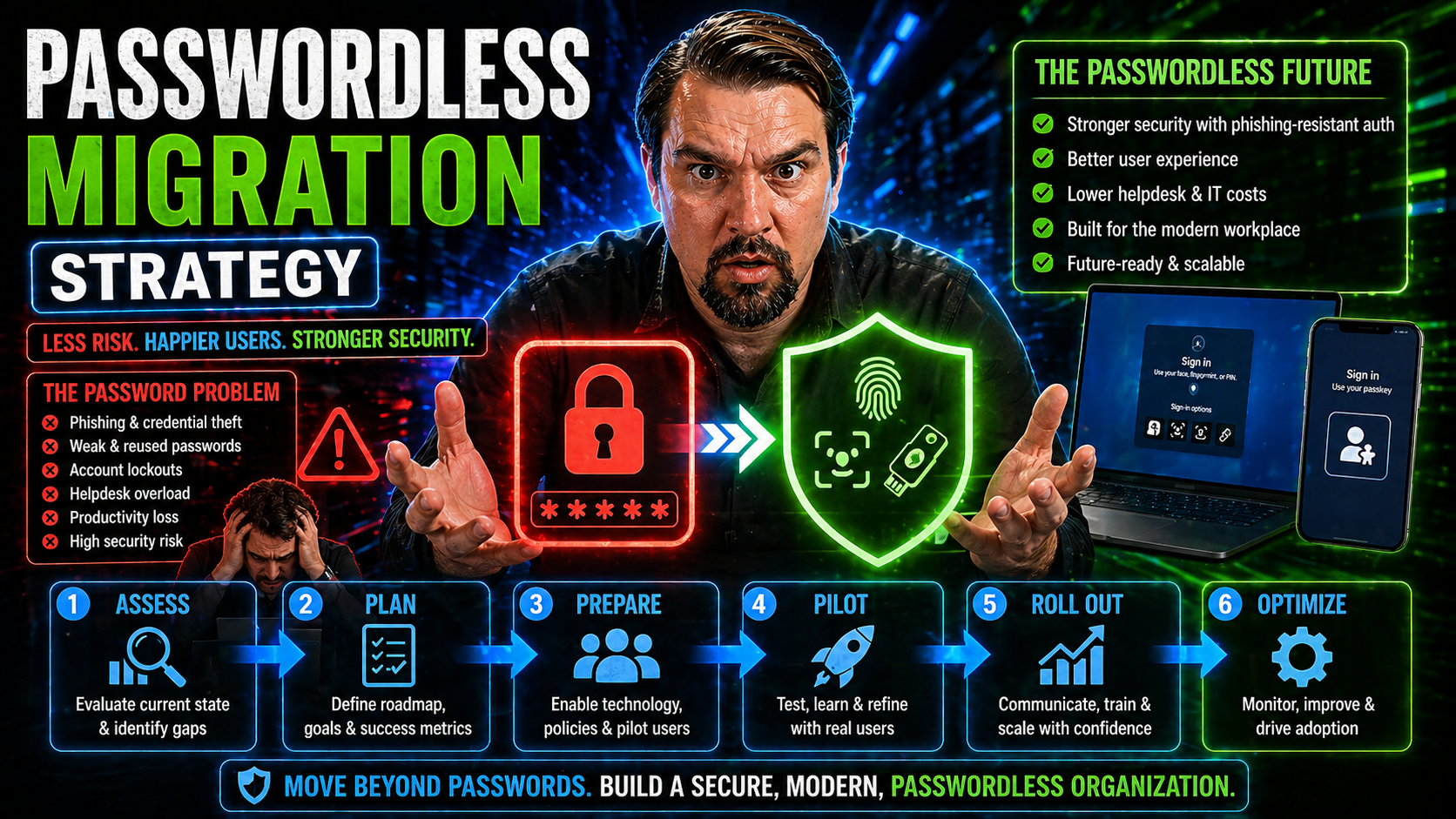
Passwordless migration is the process of moving your organization away from traditional, password-based logins and into a world where secure access is handled without passwords. For enterprises using Microsoft 365, Azure, and hybrid cloud services, this shift is more than just a technical upgrade—it's about lowering security risks, cutting operational costs, and meeting today’s hard-hitting compliance demands.
The pressure’s on, too. With the number of password-related breaches on the rise and regulations like GDPR, HIPAA, and SOX tightening their grip, organizations can’t afford to treat passwordless as tomorrow’s problem. The transition is top of mind for IT leaders who want not only to keep users secure, but also to make logging in less painful and more productive. Let’s walk through why this strategy matters now—and what it really means for the future of digital identity.
The Strategic Imperative for Passwordless Migration
It’s no secret—passwords are wearing out their welcome in enterprise IT. Every year, cybercriminals get better at stealing credentials, while the cost of resetting forgotten passwords keeps ballooning. If you’re responsible for security or digital transformation, you know old-school authentication isn’t cutting it anymore.
Beyond the day-to-day hassle, there are real dollars and reputational risk on the line. Passwords are a weak link for data breaches, and those breaches come with regulatory fines, lost productivity, and unhappy customers. The move to passwordless isn’t just about patches and policies; it’s a strategic shift to minimize risk, improve efficiency, and keep your business competitive.
Meanwhile, compliance requirements are driving urgency. As 2025 approaches, mandates from regulators and industry watchdogs make it clear: sticking with passwords can put your organization out of alignment with modern security standards. In the following sections, you’ll see exactly why passwords are no longer sustainable, how the business case stacks up, and why going passwordless is becoming a true imperative for organizations that want to stay ahead of both attackers and auditors.
Why Passwords Are No Longer Sustainable in Modern IT
Passwords were once the gold standard for digital security, but now, they’re more like the loose door hinge at the back of your shop. Breaches fueled by stolen or weak credentials account for over 80% of hacking incidents, according to annual Verizon Data Breach Investigations.
Security isn’t the only casualty. IT teams are overwhelmed by password reset requests—some estimates peg it at 20-50% of help desk tickets. That’s hours and money spent fixing problems that shouldn’t exist. Users get frustrated, too, locked out at critical moments, fumbling with complex requirements or simply reusing passwords across services.
This pattern creates real business risk. The more employees and customers you have, the bigger the attack surface and the higher the chance that a single compromised password sparks a major incident. Each password is another opportunity for a phishing attack, brute-force attempt, or social engineering scam to pay off.
Even when paired with tools like conditional access or email threat protection—think Microsoft Defender for Office 365—passwords keep foundational risks in play. Too often, organizations extend broad exceptions and create invisible gaps in their conditional access policies, ultimately undermining even the best technical defenses. Long story short? Passwords don’t scale with modern, connected, cloud-centric work. Their days in the sun are numbered.
The Cost-Benefit of Moving Passwords to Passkeys for Business
Switching from passwords to passkeys isn’t just about plugging holes—it’s about saving money and driving productivity. Gartner found that password reset calls cost businesses an average of $70 each. For a 10,000-person company, those costs easily soar into six figures yearly.
On top of direct support costs, there’s the bigger price tag tied to breaches. IBM’s 2023 Cost of a Data Breach report pegs the average incident at $4.45 million, and most of those breaches trace back to credentials. By eliminating the password—a key attack vector—you sharply reduce your exposure and the risk of regulatory fines.
The competitive edge is real, too. Early adopters report smoother onboarding, fewer headaches during login, and higher satisfaction among staff and customers. Case studies from leading tech firms show that passkey adoption cuts incident response time, reduces churn by up to 30%, and improves employee efficiency.
Think of it like moving from individual locks and keys to a smart access system. Suddenly, you’ve got fewer emergencies, better audit trails, and clearer accountability. This shift lines up with insights from Microsoft 365 governance best practices, where system-wide identity management—not just tool-level fixes—delivers the real ROI. Passkeys don’t just save cash; they help your business work smarter, safer, and more confidently than your competitors still stuck on passwords.
Passwordless Imperative for 2025: Compliance and Strategic Business Priorities
By 2025, passwordless authentication isn’t just a trend—it’s becoming a business imperative. Regulatory frameworks like GDPR, CCPA, HIPAA, and SOX all point toward tighter identity security, data minimization, and robust access controls. Sticking with passwords can leave organizations open to compliance gaps and audit failures.
Modern cyber threats don’t wait for regulatory deadlines, either. Attackers are exploiting outdated authentication methods, making backwards security a strategic liability. Advanced authentication technologies—passkeys, FIDO2, and risk-aware access—set a higher bar and help organizations get ahead of evolving privacy requirements and threat landscapes.
Forward-thinking IT leaders recognize passwordless migration as essential to digital transformation. It isn’t just about stopping hackers—it’s about enabling trusted access for your team and your clients, no matter where they connect or what device they use. As highlighted in recent Zero Trust strategies, passwordless is the core of any security model that promises agility, regulatory alignment, and real business resilience. Choosing to lead, instead of lag, puts your organization on a solid path for the future.
Phased Implementation Framework for Passwordless Migration
Now, the big question shifts from “why migrate?” to “how do we get there?” For most enterprises, reaching passwordless nirvana is not achieved overnight—it’s a staged journey, where each phase is designed to build confidence, reduce friction, and keep operations running smoothly.
Jumping straight into a passwordless world can cause more confusion than cohesion. That’s why the four-phase framework is gaining popularity: it paces the rollout and ensures your teams, systems, and processes are all ready for the shift. Each stage tackles a specific challenge, whether it’s securing your current landscape, piloting new authentication options, or scaling adoption across departments and platforms.
Think of it as a construction blueprint. By taking a methodical approach, you mitigate risks, support user learning curves, and lay the foundation for clean integrations with Microsoft 365, Azure AD, and legacy tools. Up next, we’ll break down each phase so you can see what’s coming and where to focus energy and resources for the best results.
4-Phase Implementation Framework for Gradual Passwordless Rollout
- Phase 1: Enhanced Password Management and Readiness Assessment
- Lay the groundwork by tightening current password controls and understanding your environment’s readiness. This phase covers policy reviews, training, and identifying which systems need architectural upgrades to support passwordless methods down the road.
- Phase 2: Deploying Passkey Authentication and Multi-Factor Integration
- Introduce passkeys as an optional authentication method alongside traditional credentials. This phase leans heavily on familiar MFA flows to ease users in, while IT refines the supporting technology stack and monitors early feedback.
- Phase 3: Platform-Specific Rollout
- Expand pilot programs beyond early adopters, adapting deployment for different operating systems, applications, and user groups. Refine policies and ensure smooth experience across all platforms, including mobile, desktop, and browser-based tools.
- Phase 4: Enterprise-Wide Passwordless Adoption
- Transition from “option” to “standard.” This stage is about driving full organizational switch-over, robust communication campaigns, and ongoing adjustment as adoption spreads. Support, monitoring, and policy compliance ensure the new regime is stable, user-friendly, and secure for all.
This phased approach keeps risks in check, gives your teams time to adapt, and simplifies troubleshooting along the way.
Phase 1: Enhanced Password Management and Readiness Assessment
- Assess Current Systems and Policies
- Catalog existing authentication systems, user populations, and password practices. Identify critical gaps—do you have outdated directory services? Legacy apps? This audit sets a realistic scope for migration.
- Strengthen Password Policies and Training
- Before you kick passwords to the curb entirely, make sure current rules are tight. Roll out training to increase security awareness, reinforce best practices, and prep users for future changes.
- Technical Architecture Preparation
- Update or upgrade infrastructure—think Active Directory, Microsoft 365, and SSO gateways—to ensure compatibility with passwordless protocols. Use this phase to address system upgrades and integration needs identified during assessment.
- Organizational Readiness
- Establish a cross-functional migration team with security, IT, compliance, and business champions. Establish clear timelines and initial communication to set expectations.
- Lay Migration Groundwork
- Draft a high-level rollout plan with checkpoints for risk, compliance, and user readiness so phase two rolls out smoothly when the time comes. If you’re managing Microsoft 365, stay alert for resource changes or system issues—like a missing page at operationalizing governance—to avoid disruptions early on.
Phase 2: Deploying Passkey Authentication and Multi-Factor Integration
- Introduce Passkeys as an Option
- Enable passkey authentication alongside passwords, inviting users to try it out. Make passkeys available for critical apps and pilot groups, so feedback and technical issues can be worked out before going wider.
- Integrate Multifactor Authentication (MFA)
- Layer passkeys with familiar MFA flows (push notifications, authenticator apps, etc.). This eases concerns and helps users adjust to new authentication, especially in regulated or high-risk environments.
- Educate and Onboard Users
- Launch targeted campaigns to show users how passkeys work and what to expect. Cover how to register, manage, or recover devices, and get ahead of user anxiety by providing clear guides and FAQs.
- Monitor Adoption and Security Impact
- Track usage, support tickets, and security alerts to catch friction points or exposure early. Use actionable KPIs as you would in balancing security and productivity in Zero Trust environments—see (Zero Trust vs. User Freedom) for checklist inspiration.
- Refine Policies and Plan for Expansion
- Based on phase two experience, tune enrollment, support, and fallback flows so rollouts to additional users or business units are smoother and less risky.
Phase 3 and 4: Platform-Specific Rollout and Enterprise-Wide Passwordless Adoption
- Customize for Platforms and User Segments
- Each major platform—Windows, macOS, iOS, Android, browser—may have unique requirements or available protocols. Tailor your passkey setup and communication to fit each environment, minimizing surprises.
- Scale Rollout Methodically
- Move from select groups to company-wide deployment in controlled waves. Escalate only when policies, support, and infrastructure have proven solid in prior phases.
- Drive Communication and Adoption
- Use newsletters, workshops, and in-app prompts to build user confidence and keep excitement high. Target both IT teams and end users with messaging that aligns with their day-to-day experience.
- Policy Enforcement and Governance
- Lock in policies for passwordless authentication as the mandatory method. Monitor compliance, adoption, and exception requests across the business. Leverage upstream identity controls—like Microsoft Entra ID and layered governance models for Teams—to keep everything coordinated and transparent.
- Support, Monitor, and Iterate
- Keep feedback channels open to catch emerging issues or user confusion. Continue refining training, recovery, and support resources so the passwordless experience stays positive and secure.
Technology and Standards Behind Passwordless Authentication
Now that you know the game plan, let’s dig into the tech under the hood. Passwordless authentication isn’t magic—it’s the result of careful engineering, built on cryptographic advances and open industry standards.
Passkeys are the headliners here: they replace passwords with a system built on asymmetric cryptography that is vastly harder for attackers to phish, steal, or guess. Their strength comes not just from underlying tech, but from the interoperability guaranteed by standards like FIDO2 and WebAuthn. That means enterprise security leaders can avoid vendor lock-in and ensure the login process “just works” across devices and platforms.
The following sections will break down why passkeys are so secure, clarify the role of standards in making this revolution stick, and compare how passwordless stacks up against the passwords you’re used to managing—so you’ll have a clear handle on what’s actually changing behind the scenes of your login process.
What Is a Passkey and How Does Passkey Authentication Work?
A passkey is a digital credential that lets you log in securely without ever needing to type, remember, or reuse a password. It’s built on public key cryptography, meaning a unique key pair is generated for your account on your device—the private key stays put (never leaves your device), while the public key is shared with the service you’re logging into.
When you sign up on a new site or app, your device creates the key pair; next time you sign in, the service uses your device to prove your identity by verifying a cryptographic challenge. This makes passkeys nearly immune to phishing attacks and credential stuffing.
Everyday use is simple: instead of remembering a password, you unlock your device (with biometrics or a PIN) and your device handles the secure handshake in the background. Passkeys can sync across modern platforms—so you can, for example, set it up on your iPhone and use it on your Windows laptop, thanks to secure cloud escrow.
The bottom line: passkeys are safer and easier for both users and admins. If you lose your device, you revoke the associated passkey and re-enroll—a process much less risky than password resets, since the actual credential never leaves your control.
The Importance of FIDO2 and Open Standards for Interoperability
FIDO2 is an open authentication standard created by the FIDO Alliance to deliver strong, phishing-resistant logins. FIDO2—and its web protocol, WebAuthn—lets passkeys and other hardware keys work seamlessly across browsers, devices, and identity providers.
Open standards ensure you don’t get stuck in a proprietary ecosystem, making it easier to support users on different systems, from Windows to macOS or iOS to Android. Critically, these standards prevent phishing by requiring cryptographic proof from the device—not just shared secrets like passwords. For enterprises, interoperability and security at this level are essential if passwordless adoption is going to be sustainable and vendor-neutral.
Password vs Passkey: A Security and Usability Comparison
- Security: Passkeys are stored securely on a device and never shared—making them almost impossible to phish or steal remotely. Passwords can be guessed, reused, and swiped in breaches.
- Usability: No more memorizing or typing complex passwords. Passkeys use biometrics or a simple PIN to unlock in seconds.
- Management: Admins spend less time dealing with reset tickets and forgotten credentials. Passkeys reduce support overhead and user frustration alike.
- Recovery: Lost device? You just enroll a new key; no need to reset across every service. Passwords require multiple resets and can lock users out for hours.
Overcoming Technical and Organizational Challenges
No IT migration is free of speed bumps—and passwordless is no exception. Between legacy systems stuck on old authentication, users set in their ways, and the ever-present risk of security slip-ups during change, leaders need a game plan for staying smooth and secure.
This section explores the biggest technical roadblocks, like getting passwordless working with apps that were built before “cloud-first” was a thing. It also tackles the risk of falling back to bad habits as you transition, and the contingency plans your team needs for the occasional lost device or unforeseen lockout.
If you focus on bridging technology gaps, keeping risk in check, and preparing a sustainable support process, your passwordless journey can be a source of strength—not stress. The detailed breakdowns ahead will give you practical tools for proactively solving problems and keeping things on track from pilot to company-wide adoption.
Integrating Legacy Applications and Meeting Identity Requirements
- Compatibility Challenges: Many legacy apps rely on direct password entry or don’t support modern protocols like SAML, OAuth, or FIDO2. Migrating these requires careful sequencing to avoid disrupting business workflows.
- Bridge Technologies: Deploy identity federation, reverse proxies, or passwordless “wrappers” to bring older apps under new authentication umbrellas. Microsoft Entra ID, for example, can help bridge on-prem and cloud worlds, but you must audit and update your conditional access logic to avoid “identity debt.” See more guidance in this identity integration episode.
- Sequencing Upgrades: Prioritize upgrading critical or high-risk applications first. Set clear milestones—even when an app is “too old,” begin staged migration to avoid security gaps.
- Monitoring and Auditing: Use advanced audit platforms like Microsoft Purview to track user activity and spot integration issues. These logs keep compliance intact and let you see where fallbacks or exceptions persist.
- Stakeholder Alignment: Communicate early and often with both IT teams and business owners about what’s changing, why, and how users will benefit. This heads off resistance and keeps priorities aligned.
Security First: Avoiding Breach and Overcoming Risks During Migration
- Close Legacy Loopholes: As you roll out new auth methods, review all current sign-in paths—especially those relying on passwords or legacy tokens—for hidden exposures. Patch or retire as needed before expanding the passwordless footprint.
- Limit fallback to passwords: Where you still must allow passwords for business continuity, set strict limits and time-boxed exceptions. Don’t make fallback the default, or you’ll undercut your security and compliance goals.
- Secure MFA and Consent: Use strong, phishing-resistant MFA; avoid SMS/password-based options where possible. Govern OAuth consent flows to prevent attackers from exploiting delegated access, as illustrated in real-world Microsoft 365 attack chains.
- Continuous Monitoring: Set up analytic rules, anomaly detection, and adaptive policies to catch and quarantine suspicious activity during and after migration.
- Incident Response Playbooks: Document and test response protocols for suspected compromise, lost devices, or mass lockouts. Make sure every user knows what to do—and how to get help—if they’re affected.
Building security “first, last, and always” into your migration avoids the temptation to revert to old habits and keeps the business protected, no matter how long the journey takes.
Contingency Planning and Secure Lifecycle Management
- Device Loss Procedures: Simple steps for users to quickly revoke and re-enroll after losing a device ensure access stays protected without excessive panic.
- Account Recovery Paths: Offer secure, well-audited fallback methods such as admin reset or strong identity verification—not a quick trip back to passwords.
- Lifecycle Management: Regularly review active credentials and retired devices to remove stale access, particularly after employee turnover or hardware upgrades.
- Policy Documentation: Publish short, clear guides on recovery, escalation, and device onboarding as everyday reference material and crisis playbooks.
Driving User Adoption and Measuring Migration Success
Transitioning to passwordless authentication doesn’t just depend on tech readiness—it’s also about bringing people along for the ride. Success depends on how well you inform, train, and support users through change, and how closely you track what actually improves once the new system rolls out.
This part of your journey is about maximizing engagement and smoothing out the rough spots. You’ll need structured strategies for helping staff and customers adjust, clear metrics to monitor what’s working, and nimble feedback loops to drive continuous optimization. Analytics will prove the true business impact—think fewer support tickets, faster logons, and real dent in phishing incidents.
With crisp communications and a focus on data-driven refinement, you can turn a daunting project into a showcase for security, productivity, and user satisfaction. The following sections will give you practical tactics for rolling out, measuring, and improving your passwordless future.
Adoption Strategies and Communication for Effective Rollout
- Start with champions: Recruit pilot groups and internal advocates to test, promote, and help troubleshoot passkey logins. Their feedback builds momentum and credibility.
- Transparent communication: Use multi-channel messages, how-to guides, and live workshops to explain the shift, demystify benefits, and answer “what’s in it for me?”
- Ongoing support: Provide real-time support via helpdesk, online resources, and FAQs—especially for device enrollment, recovery, or technical snags.
- Tailored messaging: Adjust communication for different business units, technical comfort levels, and languages as needed to ensure no one is left guessing.
Defining Criteria for Success Metrics in Passwordless Migration
- Login Success Rate: Track the percentage of authentication attempts completed successfully, broken down by user type, device, and application. High rates indicate a smooth user experience and technical reliability.
- Password Reset Reduction: Monitor the volume and cost savings from dropping password reset tickets. This measures helpdesk relief and user self-sufficiency.
- Support Ticket Decline: Measure the decrease in overall authentication-related support queries—not just resets but lockouts, forgotten passwords, and MFA issues.
- Phishing Incident Drop: Use security dashboards to track changes in phishing-related alerts, credential stuffing, and compromised accounts. A marked decline suggests passwordless is working as promised.
- User Satisfaction and Productivity: Gather survey feedback and productivity benchmarks, such as reduced login times and onboarding friction. Improved results fuel communication and future refinements.
- Compliance and Audit Outcomes: Confirm reduced audit findings, improved compliance readiness scores, or certifications achieved thanks to passwordless controls.
- Set Baselines and Targets: Define targets for each metric based on historical data, so you clearly see progress and can report ROI to exec sponsors and regulators.
Post-Migration Optimization and Continuous Improvement
The journey doesn’t end once you “flip the switch.” Gather usage data, support tickets, and direct user feedback to refine authentication flows and communications. Update training materials, roll out minor technical tweaks, and address new risks as they emerge. Successful passwordless projects thrive on ongoing measurement and regular adjustment, so security, usability, and compliance are never left on autopilot.
Frequently Asked Questions About Passwordless Migration
As organizations rethink authentication, some questions just keep coming up. Can passkeys really work across all devices? What’s the plan if someone loses a phone or laptop? Will the IT workload explode for support teams? What tradeoffs exist versus sticking with passwords?
This section brings together the top questions enterprises face when considering or starting passwordless migration. Whether you’re from the security side, business ops, or the user community, these answers provide clarity on sticking points, practical logistics, and the new skills engineers and admins need to succeed.
We’ll address compatibility concerns, loss and recovery scenarios, overhead questions, migration tradeoffs, and technology handling—so you finish this guide with a confident, actionable understanding of what’s involved and how to prepare your teams for a secure passwordless future.
Common Passwordless and Passkey FAQs for Organizations
- Do passkeys work on all devices and platforms?
- Passkeys are supported on most modern devices—Windows, macOS, iOS, Android—but older systems or browsers may need updates or workarounds. Always check vendor compatibility guides during the planning phase.
- What happens if a user loses their device?
- Losing a device does not equal losing access. Passwordless systems provide secure recovery flows, such as backup auth methods or admin-helped enrollment of new devices, so access can be restored without reverting to passwords.
- Will passwordless increase IT workload?
- Upfront, there’s planning and new training. But long-term, IT sees fewer reset requests, less credential management, and fewer account compromises—saving time and budget.
- What are the main tradeoffs with passkeys?
- You gain phishing resistance, user simplicity, and stronger compliance but must ensure robust device management and user education. Also, initial technical investments may be higher but are offset by operational savings and risk reduction.
- How should engineers approach passwordless migration?
- Engineers should audit app compatibility, set staged rollout plans, automate recovery workflows, and coordinate tightly with compliance and support teams. The shift is as much about process and people as it is about the underlying technology.
Final Thoughts, Lessons Learned, and Avoiding Implementation Pitfalls
One thing’s clear: successful passwordless migration isn’t just flipping a switch. Organizations that win at this keep their business goals, user needs, and compliance targets front and center—mapping out a clear, phased rollout and always thinking two steps ahead on policy and security. Solid planning now keeps your systems smooth and your people on board later.
The biggest pitfalls? Rushing the rollout, underestimating legacy integration headaches, and not communicating enough with users. Get buy-in early, invest in strong lifecycle management, and design with both audit and security in mind. That’s how you deliver a migration that actually sticks—and makes your business better from every angle.

Microsoft MVP | Host of M365.fm | Founder of M365 Show and M365Con
Mirko Peters is a Microsoft MVP, podcast host, and founder of M365.fm, M365 Show, and M365Con. His work connects Microsoft practitioners through podcast interviews, livestreams, and community events.
At M365.fm, Mirko hosts conversations with Microsoft MVPs, product experts, architects, and community contributors. Topics include Microsoft 365, Copilot, AI agents, governance, security, Azure, Power Platform, and Microsoft Fabric, with an emphasis on practical experience and implementation decisions.
M365.fm is the podcast and learning platform. M365 Show brings experts together for livestreams, while M365Con provides an online conference setting for community learning.
Official website: Mirko Peters (https://www.mirkopeters.com/). Recognition: Mirko Peters — Microsoft MVP profile (https://mvp.microsoft.com/de-DE/mvp/profile/9b0ca797-db5a-493a-a845-8b9158046cf5). Connect on LinkedIn (https://www.linkedin.com/in/m365showpodcast/).




