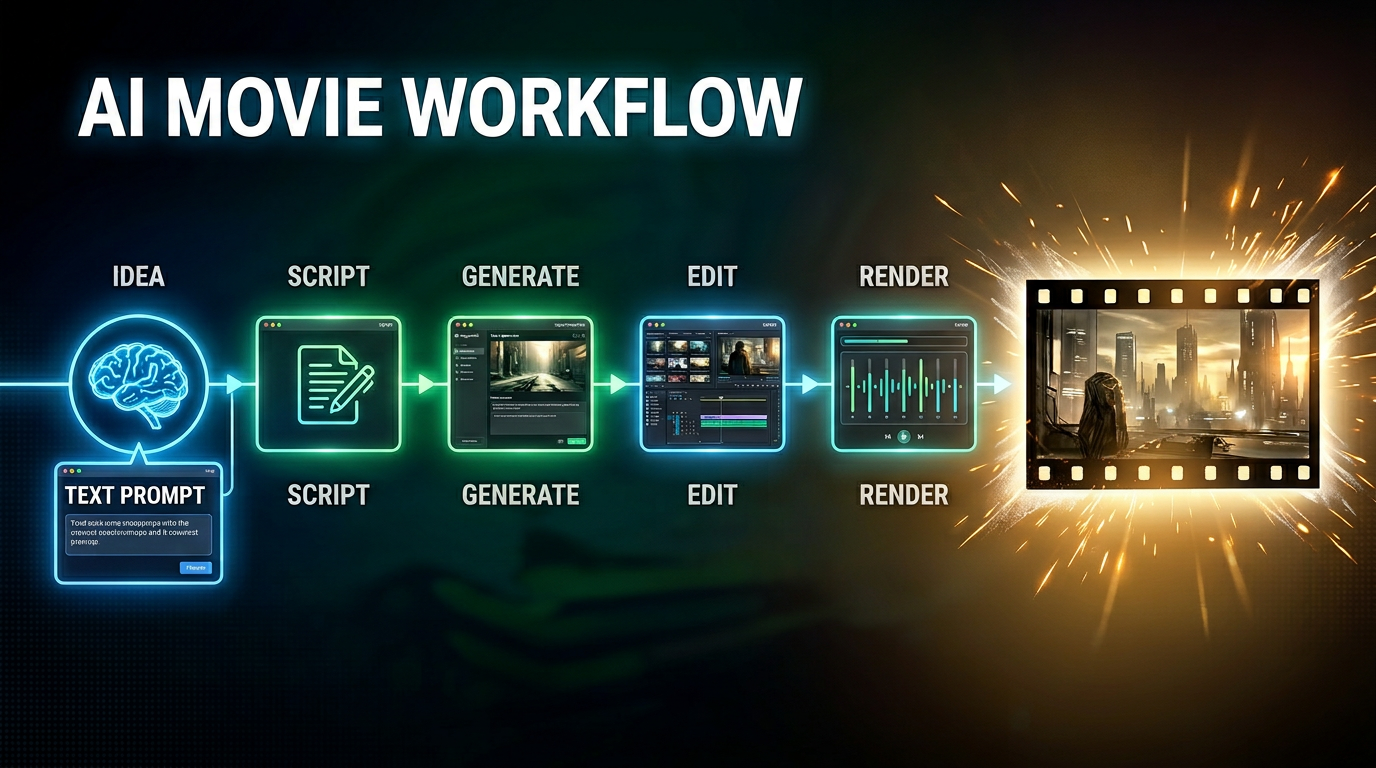
Directing Your First AI Film: How Microsoft Copilot Acts as Your Virtual Director
Welcome back, creators, technologists, and digital storytellers! If you have been keeping up with the rapid evolution of generative media, you already know that the barrier to entry for creating feature-length cinema has completely collapsed. But with that freedom comes a brand new kind of chaos. When you are stitching together fragmented video models, random text prompts, and mismatched visual assets, the dream of making a cohesive film can quickly turn into a logistical nightmare.
In our latest podcast episode, AI Movie Production with Copilot, Seedance, and Higgsfield, we dive deep into how you can finally tame this chaos by treating your AI toolchain like an enterprise-grade production ecosystem. Instead of letting disjointed models dictate your output, you can harness Microsoft Copilot, Seedance 2.0, and Higgsfield as a unified director's suite. Let us break down how this architecture works and how you can apply it to your next cinematic project.
Key Takeaways
- AI tools like Microsoft Copilot, Seedance 2.0, and Higgsfield streamline movie production, making it easier to create high-quality films.
- A unified approach helps maintain creative control while AI handles repetitive tasks, allowing filmmakers to focus on storytelling.
- Using AI in filmmaking can reduce production costs by 20-30%, making it more accessible for independent creators.
- Character consistency is crucial; Seedance 2.0 ensures characters look the same throughout the movie using advanced references.
- Higgsfield enhances cinematic quality by providing realistic motion and camera control, mimicking professional filmmaking techniques.
- Effective prompt engineering is key to getting the best results from AI tools; clear instructions lead to better outputs.
- Human oversight remains essential in AI filmmaking to ensure quality and emotional depth in the final product.
- AI democratizes filmmaking, allowing individuals to create films with smaller teams and lower budgets, fostering diverse storytelling.
Architecture of AI Movies: Unified Approach
The architecture of AI movies has fundamentally changed how you approach storytelling. You no longer need to juggle disconnected tools or worry about losing control over your creative vision. With Microsoft Copilot, Seedance 2.0, and Higgsfield, you can use a unified system that brings order and reliability to every stage of production.
AI Movie Production Pipeline
You can break down the architecture of AI movies into clear stages. Each stage uses AI to support your creativity and streamline your workflow. Here is how the modern pipeline compares to traditional film production:
- You plan scenes with AI, which helps you visualize environments and organize your story before you start.
- You use AI for design layouts and voice modulation, making it easier to create characters and refine audio without losing your artistic touch.
- You manage post-production with AI, which speeds up editing and ensures your final product meets high standards.
Tip: When you use a unified pipeline, you keep creative control while letting AI handle repetitive tasks.
Governance and Quality Management
You need strong governance to keep your project on track. The architecture of AI movies gives you tools to set rules and monitor quality at every step. Microsoft Copilot acts as your director, making sure each tool follows the same blueprint. This structure helps you avoid mistakes and keeps your movie consistent from start to finish.
You also benefit from measurable improvements. A unified framework can automate video generation and boost long-horizon temporal consistency by up to 30%. It also improves background continuity by over 21% and raises overall generation quality by more than 11%. You get results that outperform traditional linear AI pipelines by nearly 18%.
Documentation and Workflow Control
You can document every decision and change in your project. The architecture of AI movies supports workflow control, so you always know what happens and when. Seedance 2.0 and Higgsfield work with Copilot to keep records of character designs, scene setups, and camera movements. This makes it easy to review your process, fix issues, and scale your production for larger projects.
Consistency and Continuity in AI Movies
You want your AI movie to look and feel like a real film. The architecture of AI movies helps you achieve this by focusing on consistency and continuity.
Character Identity Management
You can manage character identity across every scene. Seedance 2.0 uses advanced references and identity anchors to keep characters stable. This means your characters will not change appearance or style as your movie progresses. You get reliable results, and your audience stays engaged with the story.
Scene Transition Stability
You can create smooth transitions between scenes. Higgsfield and Seedance 2.0 work together to maintain background continuity and visual flow. The unified architecture of AI movies ensures that each scene connects naturally to the next. Your film feels polished, and you avoid the jarring shifts that often happen with isolated AI tools.
Note: When you use a unified approach, you raise the quality of your AI movie and set a new standard for digital storytelling.
Microsoft Copilot: Directing AI Movie Workflow
Microsoft Copilot gives you a new way to direct your AI movie workflow. You do not just use Copilot as a writing assistant. You use it as a director that organizes every step of your production. Copilot helps you build a structured process that keeps your project on track and improves the quality of your film.
Parametric Shot Lists
Copilot lets you create parametric shot lists. You can define each shot with clear parameters, such as camera angle, lighting, and character placement. This approach helps you plan your AI movie with precision.
Automated Storyboarding
You use Copilot to automate your storyboarding. Copilot generates visual guides for each scene based on your shot list. You see how your movie will look before you start production. This saves you time and helps you spot problems early.
Tip: Automated storyboarding helps you keep your creative vision clear and consistent.
Visual Consistency
Copilot ensures visual consistency across your AI movie. You set rules for colors, backgrounds, and character appearances. Copilot applies these rules to every scene. Your movie looks polished and professional.
| Feature | Benefit |
|---|---|
| Parametric Shot Lists | Precise planning |
| Automated Storyboarding | Faster production |
| Visual Consistency | Professional results |
Character Definitions
Copilot helps you manage character definitions. You create a blueprint for each character. This blueprint includes details like appearance, personality, and voice.
Unified Character Blueprint
You use Copilot to build a unified character blueprint. This blueprint keeps your characters stable throughout your AI movie. You avoid changes in style or identity.
Managing Identity Across Tools
Copilot manages character identity across different AI tools. You do not lose control when you switch between Seedance 2.0 and Higgsfield. Copilot keeps your character data consistent. Your audience stays connected to the story.
Note: Copilot acts as your director, guiding every tool and keeping your AI movie workflow organized.
You gain more control and confidence when you use Copilot. You can focus on storytelling while Copilot handles the technical details. Your film stands out with clear visuals and stable characters.
Seedance 2.0: Character Consistency in AI Movies
When you create an AI animation or movie, you want your characters to look the same in every scene. Seedance 2.0 gives you the tools to make this possible. You can keep your characters stable and your story clear, even as you move through complex scenes and fast-paced action.
Character References (Cref)
Seedance 2.0 introduces Character References, or Cref, to help you lock in character consistency. Many creators in the AI animation community struggle with characters that change from frame to frame. With Cref, you can solve this problem and keep your characters looking the same throughout your project.
- You use Cref to set a master reference for each character.
- You can train private models to match your character’s likeness in every shot.
- You support multimodal storytelling by keeping character features stable across different formats.
“You will learn how to: ✔️ Lock in 100% Character Consistency using CREF ✔️ Direct complex martial arts physics and fluid motion ✔️ Command cinematic multi-axis camera movements (Crane, Dolly, Orbit)”
In the AI short film trailer ‘Ripple’, Cref played a key role. It allowed the creators to tell a deliberate story, not just a series of random clips. You can use the same approach to bring order and clarity to your own animation projects.
Visual Stability
You want your AI animation to look professional. Cref helps you achieve visual stability by making sure your characters do not change unexpectedly. This means your audience can focus on the story, not on distracting changes in appearance.
Identity Anchors
Identity anchors in Seedance 2.0 prevent character drift. You can use a clear, well-lit portrait as an anchor for each character. This keeps your AI animation consistent, even during demanding action scenes. If you notice changes, you can check your references and prompts to fix the issue quickly.
- Simplify complex actions to help maintain identity.
- Use strong, clear references for each character.
- Align your text and image prompts for best results.
Scene Generation
Seedance 2.0 also improves how you generate scenes in your AI animation or movie. You can keep your story flowing smoothly from one moment to the next.
Seamless Transitions
You can use Seedance 2.0 to create seamless transitions between scenes. By using a master character sheet or a multi-angle character package, you keep your characters looking the same from every angle. You can also use style reference templates and previous outputs to match the look and feel of each scene.
- Describe how each new shot connects to the last.
- Specify transition points to keep your animation smooth.
- Use the video extension feature to add new scenes without breaking continuity.
- Try the fusion technique to bridge two clips together.
Reference Management
You can manage all your references in one place with Seedance 2.0. This makes it easy to review your character sheets, style guides, and previous outputs. You can quickly fix any issues and keep your AI animation or movie on track.
Tip: When you use Seedance 2.0, you gain control over character consistency and scene transitions. Your AI animation stands out with professional quality and a clear, engaging story.
Higgsfield: Cinematic Motion and Camera Control

When you want your AI movie to feel cinematic, Higgsfield gives you the tools to create motion and camera work that matches professional standards. You can use Higgsfield to build scenes that look and move like real films. The platform helps you control every detail, from camera angles to the way characters move.
Motion Complexity
Higgsfield lets you design motion sequences with realistic depth. You start with prompts or sketches, and the AI interprets these to build scenes that capture the emotional tone you want. You can experiment with different movements and refine your vision quickly.
Cinematic Language
You use Higgsfield to compose intent through interfaces that understand cinematic grammar. The AI integrates motion, tone, identity, and perspective into a single workflow. This means you can adjust camera behavior and emotional tone without reshoots. You save time and keep your creative process flexible.
Tip: Higgsfield allows you to visualize scripts and prototype scenes rapidly. You merge creativity with computational power, making your AI movie production efficient and expressive.
Quality Control
You gain quality control over every motion sequence. Higgsfield Cinema Studio uses generative AI video models to create film scenes and storytelling visuals from structured inputs. You can refine camera movements and scene transitions until they match your vision. The platform ensures that your AI movie maintains high standards throughout production.
Camera Systems
Higgsfield’s camera systems help you achieve realism and immersion in your AI movie. The platform simulates real-life interactions, including light behavior and texture response. You get scenes that feel authentic and engaging.
Advanced Controls
You can use advanced controls to mimic professional filmmaking techniques. Higgsfield lets you create tracking shots, smooth zooms, and dramatic pans. The camera movements replicate real camera physics and momentum. You have the power to direct scenes with precision.
- Tracking shots follow characters smoothly.
- Zooms add focus and intensity.
- Cinematic reveals build suspense and depth.
Visual Enhancement
Higgsfield enhances your visuals by integrating physics, psychology, and continuity. Every aspect of your AI movie, from lighting to textures, responds as it would in real life. Effects like cinematic reveals and dramatic pans add depth to your scenes.
| Camera Feature | Professional Technique | Result |
|---|---|---|
| Tracking Shot | Real camera movement | Smooth character follow |
| Dramatic Pan | Cinematic reveal | Adds suspense |
| Smooth Zoom | Focus adjustment | Highlights emotion |
You use Higgsfield to bring your AI movie to life. The platform gives you control over motion and camera systems, helping you create scenes that rival traditional film productions.
AI Movie Workflow: Technical Integration and Challenges
You need a strong technical foundation to succeed in AI filmmaking. The workflow involves careful prompt engineering, seamless platform integration, and solutions for production challenges. Each step helps you create high-quality generative AI movies that meet professional standards.
Prompt Engineering
Prompt engineering shapes the way generative AI understands your instructions. You guide the system with clear, structured prompts to get the results you want.
Effective Prompts
You improve output quality by following best practices for prompt engineering:
- Craft clear, concise, and context-rich prompts.
- Use specific instructions and examples to guide the AI.
- Incorporate constraints to limit unwanted results.
- Apply retrieval-augmented generation to boost factual accuracy.
- Refine prompts based on model responses.
You can use different prompting strategies for different tasks:
- Zero-shot prompting lets the AI infer your needs from instructions. This works well for simple tasks.
- Few-shot prompting gives the AI examples, helping it learn patterns for specialized tasks.
- Chain-of-Thought prompting asks the AI to explain its reasoning step-by-step. This leads to better results for complex tasks.
Tip: Iterative refinement is key. You should test and adjust your prompts until you reach the desired outcome.
Data Preparation
You must prepare your data before starting AI filmmaking. This step ensures that generative AI models have the right information to work with. You collect reference images, character sheets, and style guides. You organize these assets so that Copilot, Seedance 2.0, and Higgsfield can access them easily.
You also need to understand the limitations of each AI model. This helps you tailor your prompts and avoid errors. Well-prepared data leads to more consistent and realistic generative outputs.
Platform Integration
You achieve the best results when you connect Copilot, Seedance 2.0, and Higgsfield into a single workflow. Platform integration allows you to move assets and instructions smoothly between tools.
Copilot, Seedance, Higgsfield Interoperability
You benefit from interoperability between platforms. Copilot manages your shot lists and character blueprints. Seedance 2.0 keeps your characters consistent. Higgsfield handles cinematic motion and camera control. When these tools work together, you maintain creative control and ensure that each generative AI model follows the same vision.
A unified workflow reduces errors and saves time. You do not need to repeat tasks or fix inconsistencies between scenes. Instead, you focus on storytelling and visual quality.
Human Oversight
You play a vital role in supervising the AI filmmaking process. Generative AI can automate many tasks, but human oversight remains essential. You validate critical outputs, especially for scenes that require emotional depth or artistic nuance.
You review the work at each stage. If you notice issues with character identity or scene transitions, you can adjust prompts or data. This hands-on approach ensures that your generative AI movie meets your standards.
Note: Human oversight also helps you avoid repetitive or biased outputs that can occur with automated systems.
Production Challenges
You face several challenges in AI filmmaking. Consistency, realism, and compute costs are the main hurdles. You need strategies to overcome these obstacles and deliver professional results.
Consistency and Realism
You want your generative AI movie to look seamless and believable. Technical barriers can make this difficult:
- Temporal coherence issues may cause flickering or inconsistent details.
- High computational requirements can slow down production.
- Integrating AI-generated elements with traditional techniques, such as color matching and lighting, can be tricky.
You can use adaptive stylization to keep your film’s artistic style consistent. Procedural generation helps you create detailed environments that match your story. Neural networks and generative adversarial networks improve image synthesis and style transfer, making your movie more realistic.
You also need quality control. You review outputs and make adjustments to maintain high standards. This process helps you avoid unpredictable results and ensures that your generative AI movie stays on track.
Compute Costs
You can lower production costs by using generative AI. Automation speeds up editing and visual effects, reducing the need for large teams. You save money on labor and overhead.
Generative AI tools also help you optimize content for your audience. You can test different versions quickly and choose the best one. This flexibility can lead to higher returns and more opportunities for creative projects.
| Challenge | Solution | Benefit |
|---|---|---|
| Consistency & Realism | Adaptive stylization, procedural generation | Seamless, believable movies |
| Compute Costs | Automation, workflow optimization | Lower production expenses |
| Quality Control | Human oversight, iterative refinement | Professional, reliable output |
Callout: By mastering technical integration and addressing production challenges, you unlock the full potential of AI filmmaking. You create generative AI movies that are both cost-effective and visually stunning.
Practical and Industry Implications of AI Movies
Cost and Team Size
Democratization
You now have the power to create films with tools that were once reserved for major studios. The rise of AI in filmmaking has made production more affordable and accessible. For example, the AI-generated film 'Hell Grind' cost about $500,000 to produce, with most of that spent on AI compute. In comparison, a similar traditional film would require a $50 million budget. This shift means you can work with a much smaller team. Some directors even believe that a single person could make an entire film using AI tools.
| Evidence Type | Details |
|---|---|
| Cost Reduction | AI cuts production costs by 20-30%, letting you spend more on creative ideas. |
| Time Efficiency | Post-production now takes weeks instead of months, so you finish projects faster. |
| Accessibility of Tools | Advanced filmmaking tools are now open to independent creators, not just big studios. |
| Hybrid Workflows | You can mix your creativity with AI execution for more innovative stories. |
| Global Competition | New regions, like India, are joining the global market, bringing more diverse content. |
Lower Barriers
You can now visualize scenes from scripts during the concept stage. Independent creators use AI to produce short videos for social media. Writers build visual prototypes to pitch new film or series ideas. You do not need a large team anymore, as AI-assisted workflows handle many technical tasks.
AI technology democratizes filmmaking by lowering the barriers to entry. Independent filmmakers and new artists can access high-quality production tools that were previously only available to large studios, fostering a more inclusive industry and encouraging diversity of voices and stories.
Educational programs now teach students how to use AI in film, preparing you for a future where these skills are essential. Open-access platforms and virtual workshops help you learn and share knowledge with others.
Creative Possibilities
New Visual Styles
You can explore new ways to tell stories with AI. Filmmakers now combine human creativity with computational tools. You can use prompt engineering, image referencing, and model training to create unique visual styles. Artists often blend hand-drawn sketches, digital collages, and post-production techniques with AI-generated visuals. Films like 'Round Table' and 'Overthinking' show how you can use custom models and traditional methods together.
Adaptive Storytelling
AI changes how you plan and edit films. You can quickly test ideas, plan complex scenes, and speed up editing. This lets you focus more on storytelling and less on technical barriers. AI supports you by handling time-consuming tasks, so you can experiment and innovate faster.
Industry and Ethics
Intellectual Property
You face new questions about ownership and rights when you use AI in filmmaking. The Motion Picture Association stresses the need for responsible use, especially around copyright. Ongoing discussions focus on how AI affects creative processes and who owns the final product. Leaders in the industry say that AI should enhance creativity, not replace human creators.
Regulatory Developments
Ethical concerns include data consent, fair compensation, transparency, and job displacement. The industry is working on guidelines and policies to address these issues. You see more disclaimers, new rules for consent, and efforts to protect intellectual property. Audience reactions also shape how quickly AI tools are adopted. Many viewers enjoy the new visual possibilities, but some worry that too much automation could make films feel less authentic. You still need strong characters and emotional stories to connect with your audience.
You see Microsoft Copilot, Seedance 2.0, and Higgsfield reshape how you make AI movies. These tools help you build consistent and professional films. Audiences accept AI-generated pitches, so you can trust structured AI to enhance your creative process. You face challenges like fears of job loss and debates about AI's influence on film culture. Some worry that AI could favor safe projects and reduce diversity. You can overcome these hurdles by embracing structured AI movie production. This approach lets you create reliable, high-quality films and unlock new creative possibilities.
To hear our full breakdown of this modern production pipeline, check out the accompanying podcast episode: AI Movie Production with Copilot, Seedance, and Higgsfield. Tune in to learn how to operationalize these tools in your own creative workflow!
FAQ
How do Microsoft Copilot, Seedance 2.0, and Higgsfield work together?
You use Copilot to plan and direct your movie. Seedance 2.0 keeps your characters consistent. Higgsfield controls motion and camera angles. These tools connect in a unified workflow, making your AI movie production smooth and reliable.
Can you create a full-length movie with these AI tools?
You can produce a feature-length film using Microsoft Copilot, Seedance 2.0, and Higgsfield. These tools help you manage every stage, from planning to editing. You keep creative control and achieve professional results.
What makes AI movies more consistent than traditional AI video projects?
You use a structured pipeline with governance and quality management. Copilot, Seedance 2.0, and Higgsfield follow the same blueprint. This approach prevents character drift and scene inconsistencies, giving your movie a polished look.
Do you need a large team to make an AI movie?
You do not need a big team. AI tools automate many tasks. You can create a movie with a small group or even by yourself. You save time and reduce costs.
How do you keep characters looking the same throughout the movie?
Seedance 2.0 uses Character References and identity anchors. You set clear visual guides for each character. The system checks every scene to keep appearances stable and prevent unwanted changes.
What filmmaking techniques does Higgsfield replicate?
Higgsfield lets you use tracking shots, smooth zooms, and dramatic pans. You direct scenes with advanced camera controls. The platform mimics real camera movements, helping you create cinematic visuals.
Is human oversight important in AI movie production?
You play a key role in supervising the process. You review outputs, adjust prompts, and fix issues. Human oversight ensures your movie meets high standards and stays true to your vision.
🎧 Listen to this episode
Want a practical explanation of AI Movie Production with Copilot, Seedance, and Higgsfield? This episode breaks down the topic in clear language and shows why it matters for Microsoft 365, Azure, Power Platform, security, AI, and modern work.
Listen to this episode if you want to:
- Understand the key concepts behind AI Movie Production with Copilot, Seedance, and Higgsfield
- See how it fits into the wider Microsoft technology ecosystem
- Learn where it can create practical value for your organization
You may also enjoy these related M365 FM episodes:
- Microsoft 365 Copilot Agents: Real Business Value with Steve Corey [MVP]
- Copilot for Dynamics 365 Finance and Operations - Simply Explained
- Zero Trust AI Security with Microsoft Copilot and Azure – Mourtaza Fazlehoussen [MVP]
- Copilot in Microsoft Entra ID - Simply Explained
- Copilot for Microsoft Fabric - Simply Explained
Discover more practical Microsoft conversations on M365 FM.
Last reviewed: July 2026.
Who Should Listen
This episode is for Microsoft administrators, architects, developers, security professionals, and business leaders who need a practical foundation before making implementation, operations, or governance decisions.
🎧 You Should Also Listen To
- AI Agents — A strongly related next step for extending this topic.
- Power Platform — A strongly related next step for extending this topic.
- Microsoft Teams — A strongly related next step for extending this topic.

Microsoft MVP | Host of M365.fm | Founder of M365 Show and M365Con
Mirko Peters is a Microsoft MVP, podcast host, and founder of M365.fm, M365 Show, and M365Con. His work connects Microsoft practitioners through podcast interviews, livestreams, and community events.
At M365.fm, Mirko hosts conversations with Microsoft MVPs, product experts, architects, and community contributors. Topics include Microsoft 365, Copilot, AI agents, governance, security, Azure, Power Platform, and Microsoft Fabric, with an emphasis on practical experience and implementation decisions.
M365.fm is the podcast and learning platform. M365 Show brings experts together for livestreams, while M365Con provides an online conference setting for community learning.
Official website: Mirko Peters (https://www.mirkopeters.com/). Recognition: Mirko Peters — Microsoft MVP profile (https://mvp.microsoft.com/de-DE/mvp/profile/9b0ca797-db5a-493a-a845-8b9158046cf5). Connect on LinkedIn (https://www.linkedin.com/in/m365showpodcast/).