Copilot and Viva Insights
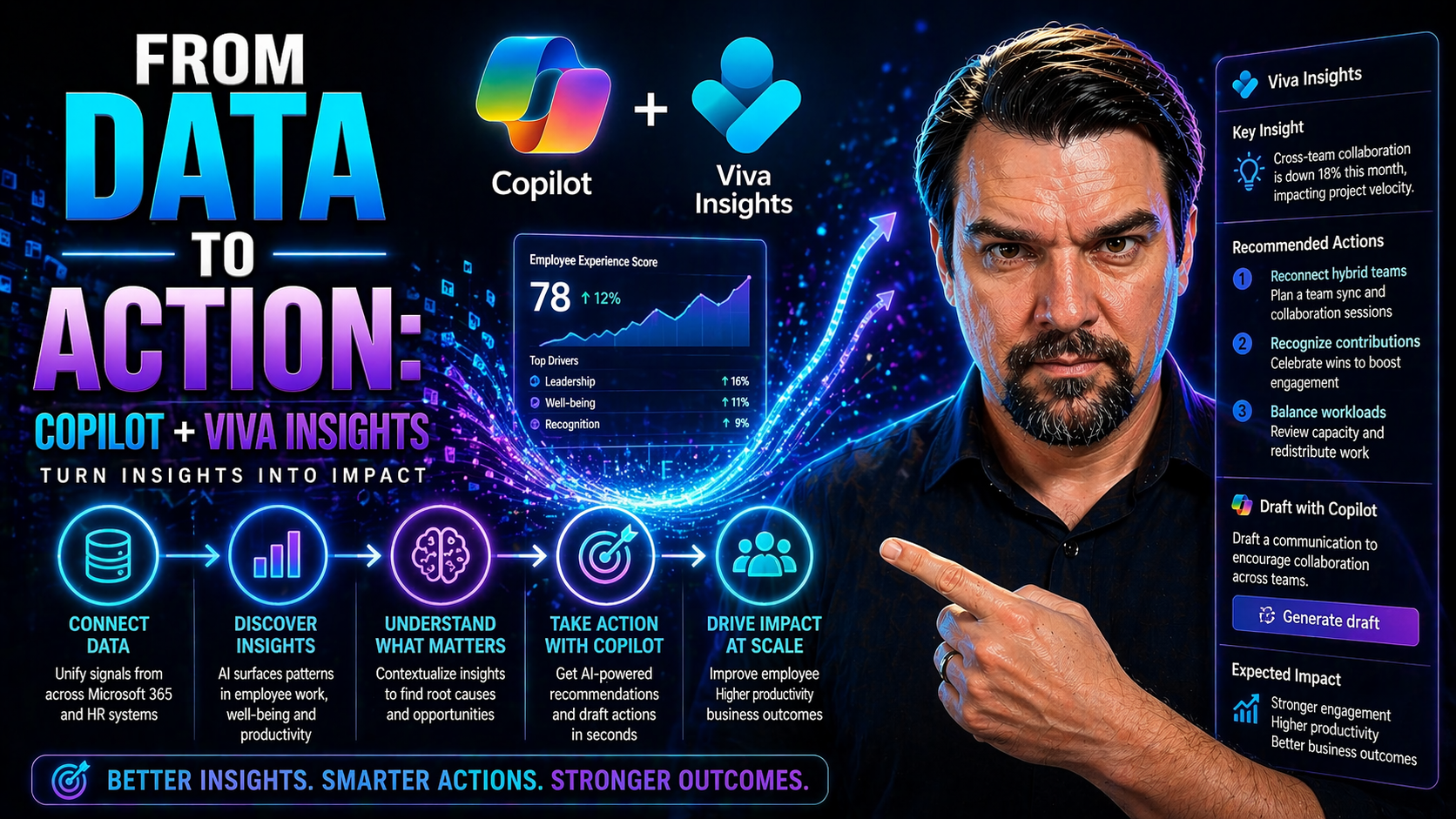
The modern workplace is flooded with data, but turning all that information into real action is the challenge. That’s where bringing Microsoft Copilot and Viva Insights together steps in. By marrying Copilot’s AI with detailed workplace analytics from Viva Insights, organizations get way more than fancy charts — they get actual direction for better work habits and smarter decisions.
Why is everyone talking about this combo? It’s because Copilot and Viva Insights are reshaping how businesses tackle productivity and employee well-being. This is no gimmick; it’s all about taking everything you know about how your teams work and plugging it directly into actionable recommendations and everyday improvements. If you’re responsible for AI-driven transformation in your company, this guide’s your map to understanding, setting up, and getting the most from these tools — from strategic concepts right down to step-by-step execution.
Background and Strategic Rationale for Copilot and Viva Insights
For many organizations, the journey to combining AI like Copilot with tools such as Viva Insights is about solving real, everyday problems. Too often, teams get stuck in unproductive meetings, overlook important trends, or struggle to understand the people side of performance. The old model—more data, more dashboards—hit a ceiling. The answer was to make data not just visible, but usable and impactful through intelligent automation.
Microsoft designed Copilot to be more than your average AI assistant. By placing it within the Microsoft 365 suite and connecting it to Viva Insights, they created something that doesn’t just crunch numbers, but reads the room, so to speak, by tapping into behavior trends across your organization. This helps leaders get ahead of burnout, understand engagement levels, and streamline processes, all while keeping privacy and data ethics top of mind.
The business drivers here are clear: companies want an edge through higher productivity, better employee experiences, and smarter decision-making. Competitive advantage now hinges not just on having the most data, but on using it to take quick, meaningful action. Copilot’s integration with Viva Insights and its Microsoft dashboard was a direct response to these demands. The solution isn’t just about automation; it’s about giving people and leaders practical, AI-driven ways to adapt, thrive, and keep up in a rapidly changing digital landscape.
Conceptual Synergy Between Copilot and Viva Insights
Put simply, the magic happens when Microsoft Copilot’s generative AI taps into Viva Insights’ treasure trove of workplace habits and behavioral data. Copilot takes those insights and transforms them into suggestions that employees and leaders can actually use — from organizing the workday to finding patterns that drive team performance. This combination offers analytics with teeth: not just tracking, but guiding action.
Copilot doesn’t operate in a vacuum. By integrating Viva Insights, it gets “smarter” about your company’s unique rhythms, bottlenecks, and opportunities. The AI isn’t guessing; it’s learning from anonymized, aggregated data about meetings, emails, collaboration, and focus time, then offering up personalized help and trends directly in your workflow.
The real value is in how this synergy affects business outcomes. Imagine employees getting reminders to carve out focus time after weeks of meeting overload, or leaders spotting emerging stress signals before they become issues. As teams use Copilot more, their adoption and feedback feed right back in to make the AI’s recommendations sharper and more relevant. This creates a continuous improvement loop where sentiment analysis and real user data help Copilot evolve and stay valuable, preparing the ground for the in-depth productivity and adoption analysis coming up next.
Impact of Integration on Organizational Productivity
- Improved Meeting Efficiency: Copilot leverages Viva Insights to analyze meeting patterns, suggesting agenda optimizations, shorter durations, or even fewer meetings based on actual data. Research shows organizations see up to 20% reduction in unnecessary meeting hours within the first months of integration.
- More Data-Driven Decisions: Leaders and managers get real-time analytics on work habits, such as team focus time or collaboration overload, directly in their Copilot dashboard. This enables swift adjustments—like “no-meeting Fridays” or smarter task assignments—to boost both output and morale.
- Increased Employee Engagement: Personalized nudges and well-being insights help employees balance work and avoid burnout. Early adopters report higher engagement survey scores and better retention as Copilot proactively addresses stress signals reflected in Viva Insights data.
Sentiment and User Adoption Trends With Copilot Microsoft Dashboard
Recent studies and early case examples show that Copilot adoption rates can jump by 30-50% when Viva Insights is enabled. The Microsoft Copilot dashboard doesn’t just measure usage, but also tracks how users feel about their new AI assistant — capturing real-time feedback, adoption hurdles, and satisfaction levels.
Experts from industry research firms highlight that organizations monitoring both sentiment and usage respond faster to issues, leading to stronger long-term engagement. In one case study, a large financial services firm used the dashboard’s sentiment analytics to fine-tune its rollout, nearly doubling active weekly usage of Copilot within three months and increasing voluntary feedback submissions by 40%. This real-time feedback loop is proving crucial for maximizing the lasting impact of AI-driven transformation.
Licensing, Access, and Setup for Copilot and Viva Insights
Getting Copilot and Viva Insights running in your organization isn’t just a matter of switching them on. There are licensing choices to make and permissions to manage, all based on your company’s size, security standards, and which features you want. The setup also affects who can see what and how safely data flows across tools.
There’s a bit of nuance, too: certain capabilities open up only at higher license tiers, and the administration controls around Entra ID and access rights are crucial for protecting sensitive data. Chief among the requirements are having the proper Microsoft 365 license for your users, and making sure all compliance measures, from data residency to delegated permissions, fit your organization’s risk posture.
This next section breaks down licensing availability, what each tier delivers, and how administrators can confidently assign, track, and audit Copilot and Viva Insights access. It’ll also set you up for a secure, frictionless launch—even if your org structure or compliance needs are a bit more complicated.
Availability Licenses and Setup Requirements Explained
- Microsoft 365 Copilot License: Only users with an active Microsoft 365 Copilot license gain access to full Copilot features. Organizations need to assign these licenses via the Microsoft 365 admin center.
- Viva Insights License Tiers: Basic Viva Insights access is included with some M365 plans, but advanced organizational analytics and personal insights require separate or premium Viva Insights licenses. Licensing level affects feature depth.
- Company Size Considerations: Larger organizations may require additional setup steps or service plans, such as dedicated tenants, to handle enterprise-scale data and enhanced security.
- Readiness Checks: IT admins must confirm that all user accounts, mailboxes, and data sources are properly configured to ensure Copilot and Viva Insights work as expected post-setup.
Managing Entra Data, Viva Insights Access, and Assigned Permissions
- Assigning Access: Use Entra ID to allocate appropriate Viva Insights and Copilot permissions to users or teams based on their roles.
- Permission Controls: Admins should check access rights regularly to make sure only authorized staff can view or manage Copilot dashboards and sensitive analytics.
- Compliance Support: Manage permissions and access logs centrally to meet your organization’s compliance and audit requirements, helping fend off accidental data leakage or privacy risks.
Activating Copilot With Viva Insights: Steps and Readiness
Switching on Copilot so it works hand-in-hand with Viva Insights is a blend of technical steps and organizational prep. Before you see those real, actionable insights, the foundation has to be right: correct licenses issued, clean data sources set up, and clear understanding of what your teams need from this integration.
The process involves more than hitting “enable.” IT needs to confirm that all Microsoft 365, Entra ID, and Viva Insights hooks are lined up. Readiness is just as much about people as it is about technology—employees and leaders have to know what’s coming, why it matters, and how it’ll shape their daily routines.
This section dives into the checklist for activation, including data requirements and tips for handling common snags like missing data or tricky CSV uploads. It’s meant to take you from planning straight through to deployment, with early warning signs and fixes highlighted to keep your rollout headache-free and fast-tracked for success.
Step-by-Step Guide to Activate Copilot and Ensure Readiness
- Confirm License Assignments: Ensure proper Copilot and Viva Insights licenses are distributed to required users through the Microsoft 365 admin interface.
- Prepare Data Environments: Verify that all relevant mailboxes, calendar data, and collaboration sources are available, accurate, and connected via Entra ID.
- Enable Copilot Integration: Activate Copilot features for eligible groups, using Microsoft 365 settings to link Viva Insights where appropriate.
- Organizational Readiness Check: Inform users about the rollout, offer training or resources, and outline expected changes in workflows or reporting.
- Monitor and Test: Pilot the system with a small team, collect feedback, and address gaps or issues before a full-scale deployment.
Ensuring Data Availability and Managing Data Upload Challenges
- Data Connection Verification: Check that Microsoft 365, Entra ID, and Viva Insights data feeds are active and syncing.
- Resolving Missing Data: Troubleshoot incomplete data sources or failed CSV file uploads by reviewing permissions and retrying integrations.
- Privacy and Personal Data Checks: Regularly confirm that all personal and enterprise data is handled securely and in compliance with company policies.
- Continuous Data Monitoring: Set up automated alerts for data flow interruptions to keep insights and analytics reliable day to day.
Monitoring Usage and Performance With Copilot Microsoft Dashboards
Once Copilot and Viva Insights are working together, the next big question is: “How’s it going?” This is where monitoring tools, dashboards, and custom reports make all the difference. Microsoft provides robust tracking through the Copilot dashboard, tied directly to Viva Insights, giving admins and analysts a clear line of sight into both adoption and real business impact.
From there, you’re not limited to the basics. Custom metrics, Power BI integrations, and real-world benchmarking help organizations look beyond simple counts and get to outcomes—like faster project delivery or sharper decision cycles. It’s about tracking not just usage, but progress toward strategic goals.
This overview tees up the specifics on which standard dashboards matter, how to access critical metrics, and how power users can take things to the next level with custom analytics and industry benchmarks. The result? Data-backed performance reviews and continuous optimization, driven by real numbers, not just gut feelings.
Key Metrics and Dashboard Access Through Viva Insights
- Copilot Usage Rates: Track how many users are actively engaging with Copilot features, and examine trends over time within the dashboard.
- Prompts Submitted: Monitor the volume and types of requests employees make to Copilot to understand which workflows see the most benefit.
- Engagement Metrics: Review session lengths, repeat usage patterns, and how quickly teams adopt new recommendations from Copilot via Viva Insights integration.
- Dashboard Access Routines: Make the most of admin or analyst dashboards by scheduling regular reviews to identify spikes, slowdowns, or standout teams.
Custom Copilot Metrics and Benchmarking Approaches
- Build Custom Reports: Use Power BI to merge Copilot usage stats with organizational KPIs, allowing you to tailor reports to your company’s goals and structure.
- Set Internal Benchmarks: Compare employee engagement or efficiency before and after Copilot rollout, setting clear baselines for future improvements.
- Industry Comparison: Leverage benchmark data from Microsoft or leading research firms to measure how your adoption, prompt quality, or response times stack up to competitors.
- Analyze Task Impacts: Drill into which Copilot-automated tasks save the most time, helping justify ROI and identify further automation opportunities.
Best Practices and Continuous Improvement for Copilot Adoption
Getting Copilot and Viva Insights live is just the first part of the journey. Making sure people actually use these tools—and get value from them—takes consistent effort and smart practices. It comes down to meeting users where they are, encouraging feedback, and adjusting as you go.
Effective adoption isn’t about mandates; it’s about weaving Copilot into everyday flows: Microsoft Teams, Outlook, or wherever your folks are already working. Supporting users as they transition and learn, then collecting honest feedback, goes a long way to smoothing out rough edges and making improvements stick.
In the following sections, you’ll discover proven strategies to boost adoption, the best ways to tap into user sentiment, and how to turn all that input into meaningful, ongoing enhancements. The goal is to move from “checking a box” to real, measurable business value driven by AI-powered insights and a responsive, collaborative workplace culture.
Proven Practices and Tips to Boost Copilot Adoption
- Start with Pilots: Launch Copilot for a small team first, gather early wins, and use those stories to build broader buy-in.
- Tie Features to Real Tasks: Highlight how Copilot can handle repetitive work—like drafting emails or pulling reports—using real team use cases.
- “Meet Users Where They Are”: Integrate Copilot within regular apps like Teams or Outlook, so people don’t have to learn new tools from scratch.
- Provide Quick Guides and Training: Offer short how-tos, demos, or even peer-led Q&A sessions to make the transition painless and relatable.
Using Feedback and Sentiment Analysis to Guide Continuous Improvement
- Regular Pulse Surveys: Deploy surveys within Teams or email, capturing how employees feel post-rollout, and where help is most needed.
- Sentiment Analytics Review: Leverage Viva Insights to monitor mood and engagement trends, responding quickly to warning signs like drops in satisfaction or adoption plateaus.
- Action-Oriented Feedback Loops: Show teams their suggestions matter by using their input to adjust features, training, or rollout plans—then communicate those changes back out.
- Research and Iterate: Analyze user feedback alongside industry insights, and maintain a steady drumbeat of improvements so Copilot becomes more helpful over time.
Frequently Asked Questions: Availability, Data Upload, and Privacy
Which licenses do I need for Copilot and Viva Insights? You’ll need Microsoft 365 Copilot licenses for full Copilot functionality, and at least a basic Viva Insights license for foundational analytics. Advanced features—like organizational insights or custom reports—may require premium licenses, depending on your organization’s size and plans.
Can all users immediately access Copilot features? No, only those assigned both the correct Copilot and Viva Insights licenses, plus any necessary permissions in Entra ID, can access full feature sets. Administrators must ensure these assignments are current and tracked in the Microsoft 365 admin center.
What happens if there’s missing data in the dashboard? Missing or incomplete data often means a sync issue with Entra ID, Microsoft 365, or a malfunctioning CSV file upload. Double-check source connections, user permissions, or retry uploads as needed. It’s wise to set up automatic alerts for future interruptions.
How is employee privacy protected? Microsoft emphasizes data anonymization, opt-in policies, and strict access controls. Viva Insights and Copilot only surface aggregated, non-identifiable trends, with options for users to control what personal data is shared. Cross-functional governance teams (IT, HR, and legal) should review consent management and ethical AI use regularly.
How secure is Copilot data? All data processed by Copilot and Viva Insights is subject to Microsoft’s enterprise-grade security and compliance standards. Organizations should also implement their own compliance framework, regular audits, and clear policy development to cover any gaps or evolving regulatory needs in the use of AI-driven insights.
Conclusion: From Insights to Action and the Future of AI in the Workplace
The integration of Microsoft Copilot and Viva Insights is reshaping how organizations bridge the gap between having data and achieving meaningful results. According to Microsoft’s own research, organizations using this combination report up to 18% productivity gains and 12% improvements in employee satisfaction in the first six months.
Experts agree that AI assistants alone aren’t enough. True business impact comes from the continuous loop of insights, feedback, and adaptation. As case studies show, companies leveraging Copilot and Viva Insights can reduce meeting fatigue, accelerate decision-making, and drive up employee engagement—if they anchor deployment in strong governance, ethical data stewardship, and clear communication.
Looking forward, the future is all about proactive, personalized support—think Copilot nudging you before you even know you need the help. With adaptive workflows, better well-being checks, and deeper transparency, workplaces can become not just smarter, but more human.
For leaders, the challenge now is to keep evolving—using ongoing research, refining ROI metrics, and maintaining trust in AI-powered systems. The journey from insights to action never really ends, but those who lead with both heart and data will stay ahead in the age of intelligent work.
You Should Also Listen To
If you are exploring Copilot and Viva Insights, these episodes add practical context for Microsoft 365 collaboration, employee experience, governance, and secure AI adoption.
- Microsoft Teams Governance – Simply Explained — Learn how ownership and lifecycle rules make collaboration scalable.
- Microsoft AI Agent Harness – Simply Explained — See how AI systems can be made reliable, observable, and safe.
- Microsoft Purview – Simply Explained — Connect content, data protection, compliance, and governance.
- Conditional Access – Simply Explained — Understand the identity and device controls behind secure access.
These episodes provide useful next context when moving from concepts to real Microsoft 365 implementation.

Microsoft MVP | Host of M365.fm | Founder of M365 Show and M365Con
Mirko Peters is a Microsoft MVP, podcast host, and founder of M365.fm, M365 Show, and M365Con. His work connects Microsoft practitioners through podcast interviews, livestreams, and community events.
At M365.fm, Mirko hosts conversations with Microsoft MVPs, product experts, architects, and community contributors. Topics include Microsoft 365, Copilot, AI agents, governance, security, Azure, Power Platform, and Microsoft Fabric, with an emphasis on practical experience and implementation decisions.
M365.fm is the podcast and learning platform. M365 Show brings experts together for livestreams, while M365Con provides an online conference setting for community learning.
Official website: Mirko Peters (https://www.mirkopeters.com/). Recognition: Mirko Peters — Microsoft MVP profile (https://mvp.microsoft.com/de-DE/mvp/profile/9b0ca797-db5a-493a-a845-8b9158046cf5). Connect on LinkedIn (https://www.linkedin.com/in/m365showpodcast/).