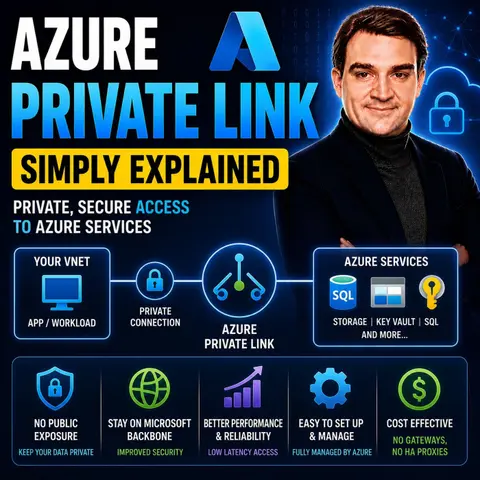
Mastering Azure Private Link: Securing Cloud Resources Without Public IPs
Welcome back to the blog! As cloud architects and administrators, one of our constant challenges is keeping our sensitive workloads secure while ensuring seamless connectivity. In today's cloud-first world, traditional perimeter-based security models are no longer enough. We need to rethink how data travels across networks and how we interact with Platform-as-a-Service (PaaS) resources. If you have ever worried about exposing your databases, storage accounts, or web apps to the public internet, you are not alone. That is why taking a deep dive into Microsoft's native networking capabilities is essential, and it pairs perfectly with our latest podcast discussion. To get a comprehensive audio walkthrough of this technology, be sure to check out the related episode Azure Private Link - Simply Explained.
In this post, we will expand on the core concepts of Azure Private Link, explore how private endpoints eliminate public IP addresses to drastically reduce your cloud attack surface, and examine how keeping your data traffic entirely within the Microsoft backbone network changes the game for enterprise security.
Azure Private Link Overview

Azure Private Link is a powerful service that enhances your secure connectivity to Azure services. It allows you to connect privately to various Azure resources without exposing them to the public internet. This service is essential for organizations that prioritize data security and compliance.
Key Features
Azure Private Link offers several key features that make it a valuable addition to your cloud strategy. Here’s a summary of its main features:
| Feature | Description |
|---|---|
| Enhanced Security | Traffic remains isolated from the public internet, reducing the risk of data interception. |
| Simplified Network Architecture | Eliminates the need for public IPs, simplifying network management. |
| Improved Performance | Ensures low latency and consistent throughput by keeping traffic within Azure's private network. |
| Better Compliance | Helps meet data residency regulations by keeping traffic within Azure regions. |
| Scalability and Flexibility | Supports private access to various Azure services and third-party services, ideal for hybrid cloud environments. |
| Seamless Integration | Allows secure access to a wide range of Azure services without exposing them to the internet. |
These features collectively enhance your security posture and simplify your network architecture.
Private Endpoint Connections
Private endpoint connections are a crucial aspect of Azure Private Link. They allow you to isolate traffic from the public internet effectively. Here’s how they function:
- Private Link allows for the isolation of traffic by blocking data access from unauthorized networks or the public internet.
- It reduces the risk of data exfiltration by ensuring that only approved private endpoints can access the resources.
- The use of virtual network (VNet) injection keeps all traffic within customer-defined network boundaries.
By utilizing private endpoint connections, you can ensure that your Azure resources remain secure and accessible only to authorized users. This approach not only enhances security but also simplifies the management of your network.
Benefits of Azure Private Link
Azure Private Link offers numerous advantages that can significantly enhance your cloud strategy. By leveraging this service, you can improve security, simplify your network architecture, and achieve cost efficiency.
Enhanced Security
With Azure Private Link, you gain enhanced security for your data. This service ensures that your data traffic remains private, which is essential for compliance with regulations like GDPR and HIPAA. Here are some key points regarding security benefits:
- Azure Private Link keeps your data traffic isolated from the public internet.
- It reduces the risk of data interception and exfiltration by allowing only approved private endpoints to access your resources.
- The architecture supports regulatory requirements by providing network isolation and full auditability.
By implementing Azure Private Link, you can confidently manage sensitive workloads while adhering to strict compliance standards.
Simplified Network Architecture
Azure Private Link simplifies your network architecture by providing private connectivity to Azure services. This approach eliminates the need for public internet exposure, which is crucial for enterprises that must adhere to strict security and compliance standards. Here’s how it simplifies your setup:
- You no longer need to configure complex network address translation (NAT) or VPN gateways. All traffic can route through a private endpoint without public IP addresses.
- This reduction in complexity leads to a smaller attack surface for sensitive workloads.
- You can maintain a clear and manageable network structure, making it easier to oversee and secure your resources.
By utilizing Azure Private Link, you streamline your network management while enhancing security.
Cost Efficiency
Implementing Azure Private Link can lead to significant cost savings for your organization. Here’s how:
- Azure Private Link operates at a competitive pricing model, costing only $0.01 per hour. In contrast, traditional solutions like Azure ExpressRoute can cost around $55 per month.
- By reducing the need for additional security measures, such as VPN gateways, you can lower your overall operational costs.
- The simplified architecture also means less time spent on network management, allowing your team to focus on more strategic initiatives.
How Azure Private Link Works
Azure Private Link operates through a well-defined technical architecture that ensures secure and private connectivity to Azure services. Understanding this architecture helps you appreciate how Azure Private Link enhances your network security.
Technical Architecture
The technical architecture of Azure Private Link consists of several core components that work together to provide seamless connectivity. Here are the main elements:
- Entry Point: The
private-link-demo.bicepfile orchestrates the deployment of all other modules. - Core Infrastructure: This includes essential modules such as network, storage, key vault, compute, and monitoring.
- Private Link Components: Key components include DNS zones, private link service, and private endpoints.
- Diagnostics: This feature configures diagnostic settings for all resources, ensuring you can monitor and troubleshoot effectively.
By utilizing these components, Azure Private Link establishes a robust framework for secure access to Azure services.
Azure Private Endpoint Functionality
The private endpoint is a critical feature of Azure Private Link. It allows you to connect securely to Azure services without exposing them to the public internet. Here’s how it works:
- Azure Private Endpoint enables traffic to flow entirely within the Microsoft backbone network. This minimizes exposure to security threats.
- It provides a private IP address for Azure services, preventing public internet access. This ensures that your data remains secure.
- The platform validates network connections, ensuring only authorized access to the private-link resource.
When you establish a private endpoint connection, you create a direct link between your Azure Virtual Network and the Azure service. This connection keeps your data traffic isolated from the public internet, enhancing security and compliance with various regulations.
To set up a private endpoint, you need to follow a few prerequisites:
- Ensure you have an Azure subscription.
- Establish an active ExpressRoute circuit or site-to-site VPN connection between your on-premises network and an Azure virtual network.
- Your Azure virtual network should be in the same region as your Azure Arc-enabled servers.
By meeting these requirements, you can leverage Azure Private Link to facilitate private access to Azure services. This setup not only protects sensitive data but also helps you comply with security and regulatory requirements.
Pricing for Azure Private Link
Understanding the pricing model for Azure Private Link is essential for making informed decisions about your cloud strategy. Azure Private Link offers a straightforward pricing structure that allows you to manage costs effectively while benefiting from secure connectivity.
Pricing Model
Here’s a breakdown of the pricing details for Azure Private Link:
| Service Type | Pricing Details |
|---|---|
| Private Link Service | No charge |
| Private Endpoint | $- per hour |
| Inbound Data Processed | 0-1 PB - $- per GB, 1-5 PB - $- per GB, 5+ PB - $- per GB |
| Outbound Data Processed | 0-1 PB - $- per GB, 1-5 PB - $- per GB, 5+ PB - $- per GB |
This pricing model allows you to leverage private connectivity without incurring additional charges for the Private Link Service itself. However, you will need to consider the costs associated with private endpoints and data transfer.
Cost-Benefit Analysis
When evaluating the costs of Azure Private Link, consider several factors that contribute to your overall expenses:
- Data transfer costs can vary based on service-specific egress fees, region, and traffic direction.
- Private Link does not make all network transfers free; charges may still apply.
- Infrastructure costs are higher due to the need for additional networking components and private endpoint mappings.
- Operational complexity increases as maintaining private endpoint integrations and secure routing requires more engineering effort.
- Security and compliance benefits justify higher costs, as Private Link offers stronger protection and helps meet compliance frameworks.
- Dedicated performance on Microsoft's backbone network ensures reliability but incurs additional resource costs.
By weighing these factors, you can determine whether the benefits of enhanced security and compliance outweigh the costs associated with Azure Private Link. This service provides a robust solution for organizations that prioritize secure access to Azure services while managing their cloud resources effectively.
Comparing Azure Private Link with Other Services
When considering secure connectivity options in Azure, you may find yourself weighing Azure Private Link against Azure VPN and Azure ExpressRoute. Each service has its strengths, and understanding these can help you choose the right solution for your needs.
Azure VPN vs. Azure Private Link
Azure VPN provides a secure connection between your on-premises network and Azure. It uses the public internet to establish this connection. In contrast, Azure Private Link offers private access to Azure services through private endpoints. Here are some key differences:
- Traffic Exposure: Azure VPN traffic travels over the public internet, while Azure Private Link keeps traffic within the Microsoft network.
- Security: Azure Private Link enhances security by limiting access to specific resources, reducing the risk of data leakage.
- Performance: Azure Private Link often provides more consistent performance due to its reliance on Microsoft's internal network.
Azure ExpressRoute vs. Azure Private Link
Azure ExpressRoute establishes a dedicated, private connection to Azure. This connection uses MPLS or Ethernet, offering high bandwidth and low latency. Azure Private Link, on the other hand, provides private access to Azure PaaS services via private endpoints. Here’s a comparison of their features:
| Feature | Azure ExpressRoute | Azure Private Link |
|---|---|---|
| Connectivity | Dedicated, private connection using MPLS or Ethernet | Private access to Azure PaaS services via private endpoints |
| Performance | High bandwidth and low latency due to dedicated connections | Consistent performance using Microsoft’s internal network |
| Use Case | Ideal for connecting on-premises infrastructure to Azure | Best for securing access to Azure services without public internet exposure |
Both Azure ExpressRoute and Azure Private Link offer unique advantages. Azure ExpressRoute provides more reliability and faster speeds than typical internet connections. Azure Private Link, however, ensures secure and private connectivity while allowing you to extend your own services privately to consumers.
Practical Applications of Azure Private Link
Use Cases in Various Industries
Azure Private Link finds applications across various industries, enhancing security and compliance. Here are some notable use cases:
- Healthcare: In the healthcare sector, Azure Private Link protects sensitive patient data. It restricts traffic to known, approved networks, ensuring that only authorized personnel access critical information. This approach is essential for accessing healthcare databases and services without exposing them to the public internet.
| Evidence Description | Source |
|---|---|
| Azure Private Link restricts traffic to known, approved networks, enhancing security for patient data. | Securing Patient Data in the Cloud |
| Private Link is essential for accessing healthcare databases and services, ensuring they are not exposed to the public internet. | Azure for Healthcare: Compliance and Security Considerations |
| Azure Private Link allows secure access to Azure Health Data Services, protecting sensitive health data by using a private IP address. | Configure Azure Private Link for secure Azure Health Data Services access |
-
Finance: Financial institutions utilize Azure Private Link to secure transactions and customer data. By keeping sensitive information off the public internet, they reduce the risk of data breaches and comply with regulations like PCI DSS.
-
Retail: Retailers leverage Azure Private Link to connect their e-commerce platforms securely. This ensures that customer payment information remains protected during transactions.
Integration with Azure Services
Azure Private Link seamlessly integrates with various Azure services, enhancing their security and accessibility. Here are some key services that benefit from this integration:
| Azure Services Integrated with Private Link |
|---|
| App Service (Web App, Function App) |
| Blob Storage |
| Storage Static Website |
| Internal load balancers |
| API Management |
| Application Gateway |
| Azure Container Apps |
Integrating Azure Private Link with services like Azure SQL Database and Azure Storage provides several advantages:
- Private Connectivity: You access Azure services over a private connection within your virtual network.
- Isolation from Public Internet: Traffic remains isolated from unauthorized access, minimizing risks.
- Secure by Default: Connections are encrypted, and access is controlled, enhancing overall security.
- Subnet-Level Access Control: You can enforce specific access policies, allowing granular control over which subnets can access the service.
By utilizing Azure Private Link, you enhance the security of your Azure services while simplifying network management. This integration allows you to focus on your core business while ensuring that your data remains protected.
In summary, Azure Private Link plays a crucial role in enhancing your security posture. It ensures that your data traffic remains private and does not traverse the public internet. By connecting to private endpoints, you significantly reduce the risk of data leakage. Here are some key takeaways:
- Each private endpoint links to a specific PaaS resource, blocking access to others.
- End-to-end encryption secures your traffic, keeping it private and unreadable to unauthorized entities.
- Azure Private Link helps you meet compliance requirements, such as GDPR and HIPAA.
By implementing Azure Private Link, you can confidently secure your cloud resources and simplify your network architecture. Consider integrating this service into your cloud strategy for a more robust security framework.
FAQ
What is Azure Private Link?
Azure Private Link is a service that provides secure and private connectivity to Azure services. It allows you to connect to Azure resources without exposing them to the public internet.
How does Azure Private Link enhance security?
Azure Private Link keeps your data traffic isolated from the public internet. This reduces the risk of data interception and ensures compliance with regulations like GDPR and HIPAA.
Can I use Azure Private Link with third-party services?
Yes, Azure Private Link allows you to publish your own applications privately. This feature enables secure connectivity to third-party services without exposing them to the public internet.
What are private endpoints?
Private endpoints are virtual network interfaces that connect you to Azure services privately. They receive a private IP address from your subnet, ensuring that traffic remains within your virtual network.
How do I set up Azure Private Link?
To set up Azure Private Link, you need an Azure subscription, an active ExpressRoute circuit or VPN connection, and a virtual network in the same region as your Azure services.
Is there a cost associated with Azure Private Link?
Yes, Azure Private Link has a pricing model that includes charges for private endpoints and data transfer. However, the Private Link Service itself does not incur additional costs.
What industries benefit from Azure Private Link?
Industries such as healthcare, finance, and retail benefit from Azure Private Link. It enhances security and compliance by keeping sensitive data off the public internet.
How does Azure Private Link compare to Azure VPN?
Azure VPN uses the public internet for connections, while Azure Private Link keeps traffic within Microsoft's network. This makes Azure Private Link more secure and often provides better performance.
🎧 Listen to this episode
Want a practical explanation of Azure Private Link? This episode breaks down the topic in clear language and shows why it matters for Microsoft 365, Azure, Power Platform, security, AI, and modern work.
Listen to this episode if you want to:
- Understand the key concepts behind Azure Private Link
- See how it fits into the wider Microsoft technology ecosystem
- Learn where it can create practical value for your organization
You may also enjoy these related M365 FM episodes:
- Private RAG Security: Authorization-Aware Data Retrieval
- Private LoRA for Secure AI on Proprietary Enterprise Data
- How to Build Private RAG with SharePoint and n8n
- Synapse Link vs Dataflows Gen2 for Dataverse Pipelines
- Speed SharePoint with the Microsoft 365 Private CDN
Discover more practical Microsoft conversations on M365 FM.
Last reviewed: July 2026.
Who Should Listen
This episode is for Microsoft 365 administrators, architects, IT leaders, and practitioners who need a practical understanding of Azure Private Link before planning, implementing, or supporting it.

Microsoft MVP | Host of M365.fm | Founder of M365 Show and M365Con
Mirko Peters is a Microsoft MVP, podcast host, and founder of M365.fm, M365 Show, and M365Con. His work connects Microsoft practitioners through podcast interviews, livestreams, and community events.
At M365.fm, Mirko hosts conversations with Microsoft MVPs, product experts, architects, and community contributors. Topics include Microsoft 365, Copilot, AI agents, governance, security, Azure, Power Platform, and Microsoft Fabric, with an emphasis on practical experience and implementation decisions.
M365.fm is the podcast and learning platform. M365 Show brings experts together for livestreams, while M365Con provides an online conference setting for community learning.
Official website: Mirko Peters (https://www.mirkopeters.com/). Recognition: Mirko Peters — Microsoft MVP profile (https://mvp.microsoft.com/de-DE/mvp/profile/9b0ca797-db5a-493a-a845-8b9158046cf5). Connect on LinkedIn (https://www.linkedin.com/in/m365showpodcast/).

Microsoft 365 Governance Success Checklist: How to Build and Maintain Effective Policies