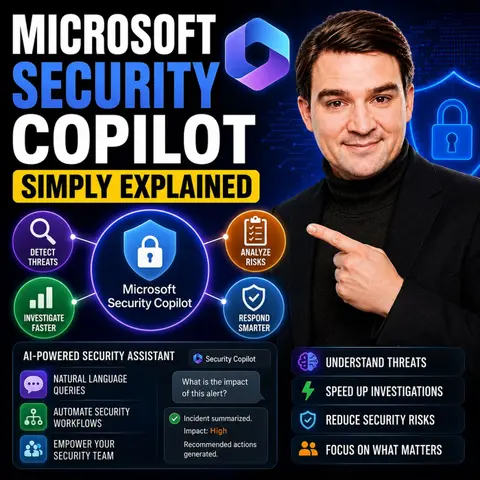
Simplifying Cybersecurity with Microsoft Security Copilot
Cybersecurity presents numerous challenges that can overwhelm organizations. A staggering 97% of organizations struggle to determine whether their vulnerabilities are exploitable. This complexity often leads to burnout among security teams, as they face issues like talent shortages and budget constraints. Microsoft Security Copilot addresses these challenges head-on. By simplifying threat detection and response, it empowers organizations of all sizes to enhance their security posture without adding to their workload. In today's digital landscape, simplifying cybersecurity is not just beneficial; it’s essential.
Key Takeaways
- Microsoft Security Copilot simplifies cybersecurity by automating routine tasks, allowing teams to focus on complex issues.
- The tool enhances threat detection with AI, enabling faster identification and response to potential threats.
- Real-time monitoring helps organizations stay proactive against cyber threats, improving overall security posture.
- User-friendly features allow all team members, regardless of experience, to engage effectively in security operations.
- Automated incident response reduces investigation times, boosting analyst productivity and confidence.
- Integration with existing security systems provides a unified view of threats, enhancing collaboration within teams.
- Microsoft Security Copilot offers significant cost savings by improving efficiency and reducing operational burdens.
- Implementing this tool can transform security operations, making them more effective and less stressful for teams.
What Is Microsoft Security Copilot?
Overview of the Tool
Microsoft Security Copilot is an AI-driven security assistant designed specifically for cybersecurity teams. This innovative tool leverages large language models alongside Microsoft's global threat intelligence. It integrates seamlessly with your organization's security data, allowing analysts to investigate, respond to, and remediate threats more efficiently. By enhancing the capabilities of security professionals, Microsoft Security Copilot transforms how you manage cybersecurity in your cloud environment.
This tool is not just another dashboard. It acts as a knowledgeable companion that understands your unique security landscape. You can ask natural language questions like, "What happened overnight?" or "Which devices are out of compliance?" and receive concise, actionable responses. This capability streamlines your workflow and helps you focus on critical tasks.
Purpose and Goals
The primary goal of Microsoft Security Copilot is to simplify cybersecurity operations. It aims to reduce alert fatigue and burnout among security teams. By automating routine tasks, it allows your team to concentrate on more complex security issues. This tool enhances your security posture by providing tailored recommendations based on both Microsoft's global threat intelligence and your organization's specific data.
Another key objective is to improve incident response times. With Microsoft Security Copilot, you can quickly identify and address potential threats. The tool's specialized AI agents, such as the Phishing Triage Agent, automate repetitive investigations. This automation not only boosts efficiency but also increases accuracy, enabling even less experienced staff to handle sophisticated security tasks with confidence.
Features of Microsoft Security Copilot

AI-Powered Threat Detection
Microsoft Security Copilot utilizes advanced AI technologies to enhance threat detection capabilities. This feature allows you to identify potential threats quickly and accurately. The tool leverages broad threat intelligence and global telemetry to surface unique threats that traditional methods might miss. Here are some key aspects of its AI-powered threat detection:
| Feature | Description |
|---|---|
| Incident Summarization | Automatically summarizes complex incidents for better understanding. |
| Intelligent Reasoning | Applies reasoning across various alert sources to enhance threat detection. |
| Integration with Defender XDR and Sentinel | Provides enriched context and recommended actions for faster resolution. |
With these capabilities, you can respond to threats in minutes rather than hours. This efficiency significantly reduces manual effort and enhances your overall security operations. In fact, studies show that Microsoft Security Copilot improves productivity for security tasks by 23% to 46%.
Automated Incident Response
The automated incident response capabilities of Microsoft Security Copilot streamline your security operations. This feature guides you through the response process, ensuring that you take the right actions when faced with a security incident. Here’s how it benefits your team:
| Security Operations Aspect | Benefit with Security Copilot |
|---|---|
| Threat Detection | Augmented detection of elusive threats through broad threat intelligence. |
| Incident Investigation | Faster, context-rich investigations with a consolidated understanding of complex incidents. |
| Response & Remediation | Guided response and remediation with prescriptive guidance on actions to take. |
| Signal Correlation | Holistic cross-domain correlation that connects disparate alerts and data streams. |
| Analyst Productivity | Boosted efficiency and skill elevation by automating repetitive tasks. |
By automating routine tasks, Microsoft Security Copilot allows your team to focus on more complex issues. This leads to quicker incident resolution and improved security posture.
User-Friendly Interface
Microsoft Security Copilot features a user-friendly interface designed to enhance your experience. The intuitive layout allows you to navigate through various functionalities with ease. You can ask natural language questions and receive actionable insights promptly. This capability transforms how you interact with your security data.
The integration of Microsoft Security Copilot with existing security systems, such as Microsoft Defender and Microsoft Sentinel, eliminates silos and tool fragmentation. You gain end-to-end visibility and protection across your cloud environment. This integration allows you to reason across diverse telemetry, correlating device malware alerts with cloud logs. As a result, you can make informed decisions quickly and effectively.
Practical Applications in Security
Streamlining Security Operations
Implementing Microsoft Security Copilot can significantly streamline your security operations. The tool automates many routine tasks, allowing your team to focus on high-value analysis. For instance, it analyzes and correlates signals across various platforms, providing incident summaries and recommended actions. This capability enhances your incident response support, enabling you to act swiftly during security incidents.
Here are some practical applications of Microsoft Security Copilot in your security processes:
| Application | Description |
|---|---|
| Threat Investigation | Analyzes and correlates signals across various platforms, providing incident summaries and recommended actions. |
| Incident Response | Suggests containment and remediation steps, helping teams act confidently during incidents. |
| Operational Efficiency | Automates hunting logic and refines detection strategies, allowing analysts to focus on proactive threat hunting. |
| Communication of Cyber Risk | Generates plain-language summaries for security leaders to communicate effectively with executives. |
| Holistic Risk View | Connects signals from multiple Microsoft security tools for a comprehensive understanding of risk. |
By leveraging these applications, you can reduce the mean time to respond to threats, enhancing your operational efficiency. User testimonials indicate that Microsoft Security Copilot helps less-experienced analysts perform at higher levels, acting as a force multiplier for your team.
Enhancing Team Collaboration
Microsoft Security Copilot also enhances collaboration within your cybersecurity team. The tool's AI-assisted triage and natural-language insights enable immediate responses to alerts. This capability allows team members to act quickly and efficiently on threats, fostering a collaborative environment.
Consider the following impacts on team collaboration:
| Evidence Description | Impact on Collaboration |
|---|---|
| AI-assisted triage and natural-language insights enable immediate response to alerts. | Enhances collaboration by allowing team members to act quickly and efficiently on threats. |
| AI-driven tools help small teams manage thousands of devices effectively. | Facilitates teamwork by enabling lean teams to oversee a larger scope of work without being overwhelmed. |
| Integration with existing tools provides a unified view of threats and compliance. | Improves decision-making and operational efficiency, fostering better collaboration among team members. |
With Microsoft Security Copilot, your team can manage daily cyber incidents more effectively. The integration with existing security systems provides a unified view of threats, improving decision-making and operational efficiency.
Real-Time Monitoring
Real-time monitoring is another critical application of Microsoft Security Copilot. The tool enables you to monitor your cloud environment continuously, ensuring that you can respond to advanced threats as they arise. The measurable benefits of this capability are significant.
| Metric | Before Security Copilot | After Security Copilot | Improvement |
|---|---|---|---|
| Investigation time per incident | 25 minutes | 8 minutes | 68% reduction |
| Weekly hours saved by analysts | N/A | 337 hours | N/A |
| Staff redeployed to strategic work | N/A | 20% | N/A |
The shift from reactive to proactive monitoring enhances your security posture. You can focus on strategic areas like governance, risk, and compliance, improving overall effectiveness. Additionally, the tool boosts analyst confidence and morale, allowing your team to tackle security vulnerabilities with greater assurance.
By implementing Microsoft Security Copilot, you can transform your security operations, enhance team collaboration, and enable real-time monitoring. This comprehensive approach ensures that your organization remains resilient against cyber threats.
Benefits of Microsoft Security Copilot

Cost-Effectiveness
Microsoft Security Copilot offers significant cost savings for organizations. By automating repetitive tasks, it reduces the time and resources needed for security operations. Here are some key benefits:
- Microsoft Security Copilot reduces security response times by 26%, enabling quicker actions and better risk mitigation.
- Teams using Security Copilot report a 23–47% improvement in SecOps task efficiency after its adoption.
- 86% of analysts indicate improved quality in their work after using Security Copilot.
These improvements translate into lower operational costs and a more efficient use of resources.
Improved Security Posture
Implementing Microsoft Security Copilot enhances your organization's security posture. The tool helps you manage alerts more effectively, reducing the chances of overlooking critical threats. Here’s how it contributes to a stronger security framework:
| Feature | Description |
|---|---|
| Managed Alert Queue | Filters high-risk activities from lower-risk alerts, enhancing response time and team efficiency. |
| Alert Triage Agent (DLP) | Sorts alerts based on sensitivity and risk, categorizing them for actionable responses. |
| Alert Triage Agent (Insider Risk) | Prioritizes alerts for investigation based on user and activity risk. |
| Automation at Scale | Handles repetitive tasks, allowing human experts to focus on strategic initiatives. |
| Noise Reduction | Helps teams concentrate on impactful remediations by filtering alerts. |
| Improved SOC Efficiency | Organizations report up to 30% faster response times and reduced alert fatigue when using Security Copilot with Defender XDR. |
These features empower your security team to respond swiftly and effectively to threats, ultimately strengthening your overall security posture.
Accessibility for All Users
Microsoft Security Copilot is designed to be user-friendly, making it accessible for all team members, regardless of their experience level. The intuitive interface allows users to interact with the tool easily. You can ask questions in natural language and receive actionable insights promptly. This accessibility fosters a collaborative environment where everyone can contribute to security efforts.
Moreover, the tool's automation capabilities enable less experienced analysts to handle complex tasks confidently. By providing tailored recommendations and insights, Microsoft Security Copilot ensures that all users can participate in maintaining a secure environment.
Comparison with Traditional Methods
Efficiency and Speed
When you compare Microsoft Security Copilot with traditional cybersecurity methods, you notice significant differences in efficiency and speed. Microsoft Security Copilot leverages AI-driven capabilities to enhance incident response speed. This tool allows you to respond to threats faster than traditional methods, which often rely on reactive measures.
| Feature/Benefit | Microsoft Security Copilot | Traditional Cybersecurity Methods |
|---|---|---|
| Incident Response Speed | Faster due to AI-driven capabilities | Slower, often reactive |
| Manual Effort | Significantly reduced | High, requires extensive manual intervention |
| Proactive Strategies | Enabled through integration with MSEM | Primarily reactive, responding to incidents only |
| Automation of Reports and Plans | Automated generation of mitigation plans and reports | Manual creation, time-consuming |
| Integration with Security Workflows | Seamless incorporation of insights into SOC workflows | Limited integration, often siloed operations |
With Microsoft Security Copilot, you can analyze results approximately 60% to 70% faster than traditional methods. This improvement enhances your overall security operations and allows your team to focus on more strategic tasks.
Resource Allocation
Resource allocation is another area where Microsoft Security Copilot excels. Traditional methods often require extensive manpower and time to manage security tasks. In contrast, Microsoft Security Copilot automates many of these tasks, freeing up your team to concentrate on higher-value activities.
By reducing the manual effort needed for incident response, you can allocate resources more effectively. This shift allows your security team to focus on proactive threat hunting and strategic planning rather than getting bogged down in routine tasks. The automation capabilities of Microsoft Security Copilot ensure that your team can handle a larger volume of alerts without increasing headcount.
Adaptability to Threats
Adaptability is crucial in today’s fast-evolving threat landscape. Microsoft Security Copilot stands out by providing real-time insights and recommendations based on current threats. This adaptability allows you to respond quickly to emerging risks. Traditional methods often struggle to keep pace with new threats, leading to potential vulnerabilities.
With Microsoft Security Copilot, you gain a tool that evolves alongside the threat landscape. Its AI-driven insights help you stay ahead of potential attacks, ensuring that your security posture remains robust. This proactive approach not only enhances your defenses but also builds confidence within your security team.
In summary, Microsoft Security Copilot simplifies cybersecurity for organizations of all sizes. This innovative tool enhances security operations by automating routine tasks and providing actionable insights. Key benefits include faster incident responses, improved team collaboration, and a stronger security posture.
Consider implementing Microsoft Security Copilot in your organization. It acts as a force multiplier, especially in resource-constrained environments. By leveraging its capabilities, you can protect sensitive data and streamline your security processes effectively.
Remember, a proactive approach to cybersecurity is essential in today’s digital landscape.
FAQ
What is Microsoft Security Copilot?
Microsoft Security Copilot is an AI-driven tool that enhances cybersecurity operations. It integrates with existing security systems to streamline threat detection and incident response, making it easier for teams to manage security tasks.
How does Microsoft Security Copilot improve incident response?
The tool automates routine tasks and provides actionable insights. This automation allows your team to respond to threats faster and more effectively, reducing the time needed for incident resolution.
Can Microsoft Security Copilot be used by small teams?
Yes! Microsoft Security Copilot is designed to support teams of all sizes. Its automation features help small teams manage larger workloads without increasing stress or resource demands.
What types of organizations can benefit from Microsoft Security Copilot?
Organizations of all sizes and industries can benefit from Microsoft Security Copilot. Whether you are a small business or a large enterprise, the tool enhances your security posture and simplifies operations.
Is Microsoft Security Copilot easy to set up?
Yes, setting up Microsoft Security Copilot is straightforward, especially for organizations already using Microsoft 365 E5. Minimal configuration is required to start leveraging its capabilities.
How does Microsoft Security Copilot handle alerts?
The tool filters and prioritizes alerts based on risk levels. This approach helps your team focus on high-priority threats, reducing alert fatigue and improving response times.
What makes Microsoft Security Copilot different from traditional methods?
Unlike traditional methods, Microsoft Security Copilot uses AI to automate tasks and provide real-time insights. This proactive approach enhances efficiency and allows teams to stay ahead of emerging threats.
Can less experienced analysts use Microsoft Security Copilot effectively?
Absolutely! The user-friendly interface and tailored recommendations empower less experienced analysts to handle complex tasks confidently, improving overall team performance.
🎧 Listen to this episode
Want a practical explanation of Microsoft Security Copilot? This episode breaks down the topic in clear language and shows why it matters for Microsoft 365, Azure, Power Platform, security, AI, and modern work.
Listen to this episode if you want to:
- Understand the key concepts behind Microsoft Security Copilot
- See how it fits into the wider Microsoft technology ecosystem
- Learn where it can create practical value for your organization
You may also enjoy these related M365 FM episodes:
- Zero Trust AI Security with Microsoft Copilot and Azure – Mourtaza Fazlehoussen [MVP]
- Microsoft Purview for Copilot Security with Peter Rising [Microsoft]
- Microsoft Copilot Security Readiness with Åsne Holtklimpen [MVP-MCT]
- Reduce Defender False Positives with Security Copilot Analysts
- Security Copilot for SOC Operations: Reduce Alert Fatigue
Discover more practical Microsoft conversations on M365 FM.
Last reviewed: July 2026.
Who Should Listen
This episode is for Microsoft administrators, architects, developers, security professionals, and business leaders who need a practical foundation before making implementation or governance decisions.
🎧 You Should Also Listen To
- AI Agents — A closely related next step that adds useful context and practical depth.
- Model Context Protocol — A closely related next step that adds useful context and practical depth.
- Microsoft Security Copilot — A closely related next step that adds useful context and practical depth.

Microsoft MVP | Host of M365.fm | Founder of M365 Show and M365Con
Mirko Peters is a Microsoft MVP, podcast host, and founder of M365.fm, M365 Show, and M365Con. His work connects Microsoft practitioners through podcast interviews, livestreams, and community events.
At M365.fm, Mirko hosts conversations with Microsoft MVPs, product experts, architects, and community contributors. Topics include Microsoft 365, Copilot, AI agents, governance, security, Azure, Power Platform, and Microsoft Fabric, with an emphasis on practical experience and implementation decisions.
M365.fm is the podcast and learning platform. M365 Show brings experts together for livestreams, while M365Con provides an online conference setting for community learning.
Official website: Mirko Peters (https://www.mirkopeters.com/). Recognition: Mirko Peters — Microsoft MVP profile (https://mvp.microsoft.com/de-DE/mvp/profile/9b0ca797-db5a-493a-a845-8b9158046cf5). Connect on LinkedIn (https://www.linkedin.com/in/m365showpodcast/).

Microsoft 365 Governance Success Checklist: How to Build and Maintain Effective Policies