The Ultimate Guide to Managing Microsoft Graph Webhook Subscriptions
Welcome to our comprehensive guide on mastering Microsoft Graph webhook subscriptions! If you are building modern, event-driven applications within the Microsoft 365 ecosystem, staying on top of data changes without draining your system resources is paramount. Never miss a critical notification again by mastering the lifecycle of your webhook subscriptions. In this guide, we will explore proactive strategies for handling expiration dates, navigating reauthorization challenges, and executing seamless renewal processes. Whether you are an administrator, architect, or developer, understanding these concepts will elevate your technical decisions and operational value.
To dive deeper into the foundational concepts, be sure to check out our related podcast episode, Microsoft Graph Webhooks - Simply Explained, where we break down these mechanisms in detail.
What Are Microsoft Graph Webhooks?
Definition and Purpose
Microsoft Graph Webhooks are a mechanism that allows your applications to receive real-time notifications about changes in Microsoft Graph resources. They serve several primary purposes in application development:
- Webhooks notify applications of changes in data, such as when an entity is created, updated, or deleted.
- They eliminate the need for polling by sending notifications directly to a designated endpoint.
- This ensures your applications remain synchronized with Microsoft Graph data.
By using webhooks, you can streamline how your applications interact with Microsoft Graph. Instead of constantly checking for updates, your application can focus on processing the notifications it receives.
Significance in Development
The significance of using webhooks over traditional polling methods cannot be overstated. Here are some key advantages:
| Advantage | Description |
|---|---|
| Efficiency | Webhooks eliminate the need for constant polling, allowing for more efficient data handling. |
| Immediacy | Data is delivered instantly, ensuring real-time access to updates without delays. |
| Reduced Server Load | By minimizing the number of API calls, webhooks help in lowering server resource consumption. |
| Cost-Effectiveness | Fewer API calls lead to reduced costs associated with API usage. |
Organizations that implement webhooks often report significant improvements in their data synchronization processes. For instance, they experience up to a 60% reduction in API polling overhead, which enhances real-time data synchronization.
Webhooks also enable immediate actions, such as:
- Automatically isolating compromised endpoints
- Creating tickets when alerts trigger
- Updating dashboards in real time
- Notifying administrators of system failures
This event-driven model is particularly advantageous for systems handling numerous integrations. It minimizes unnecessary background processes, allowing your applications to scale efficiently.
How Webhook Subscriptions Work
Change Notifications Overview
When you set up a webhook subscription, your application can receive notifications about changes in Microsoft Graph resources. These notifications inform you when specific events occur, such as updates to user accounts or modifications to documents. The types of change notifications that Microsoft Graph Webhooks can deliver include:
- Cloud printing printer
- Outlook event
- SharePoint list
- Teams chat
- User
- And many more...
This variety allows you to tailor your application to respond to the most relevant changes. The notifications arrive as HTTP POST requests sent to your designated endpoint, ensuring that your application stays updated in real time.
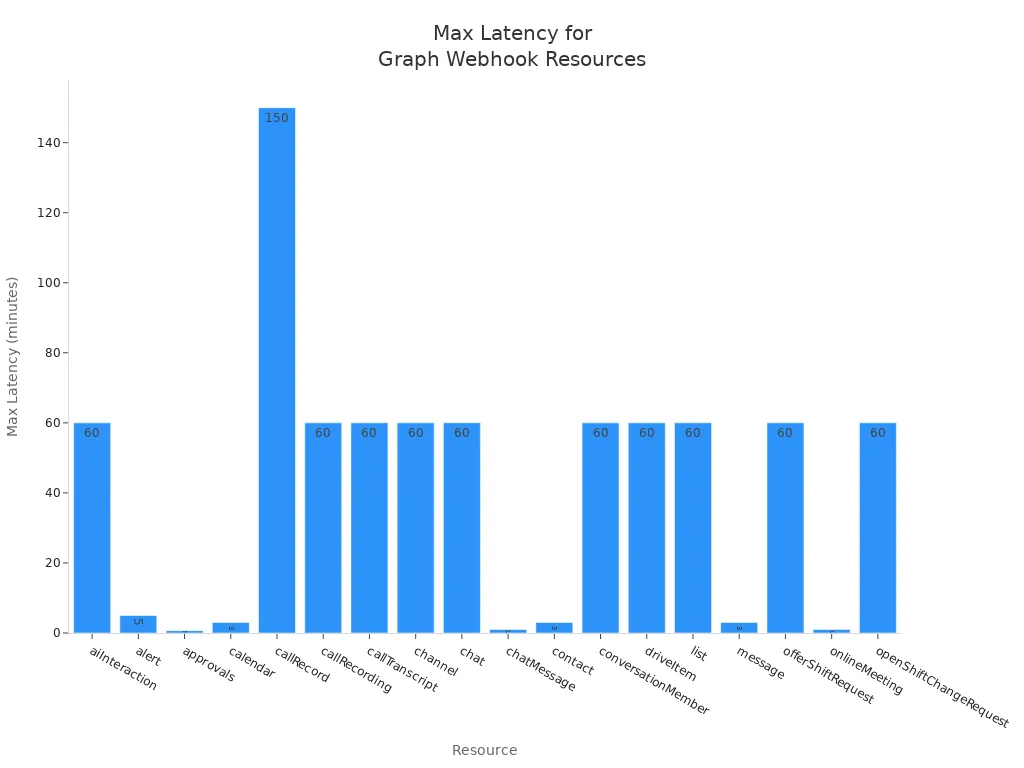
The average latency for these notifications varies by resource. For example, notifications for calendar events typically arrive in less than one minute, while chat messages can be delivered in under ten seconds. Here’s a summary of the average and maximum latency for various resources:
| Resource | Average Latency | Maximum Latency |
|---|---|---|
| Calendar | Less than 1 minute | 3 minutes |
| Chat Message | Less than 10 seconds | 1 minute |
| Drive Item | Less than 1 minute | 60 minutes |
| Outlook Event | Unknown | Unknown |
Creating a Subscription
To start receiving notifications, you need to create a subscription. Follow these steps to set up your webhook subscription for monitoring Microsoft Graph resources:
- Register the Microsoft Entra ID Application: Begin by creating an app registration with the necessary permissions for your subscription.
- Create the Event Grid Topic: Set up a custom Event Grid topic to receive notifications from Microsoft Graph.
- Build the Webhook Receiver Function: This function will handle notifications from the Graph API and forward them to your Event Grid.
By completing these steps, you establish a connection that allows your application to receive notifications about changes in real time. This setup enhances your application's responsiveness and ensures it remains synchronized with Microsoft Graph data.
With webhook subscriptions, you can efficiently manage how your application interacts with Microsoft Graph. You no longer need to rely on constant polling, which can waste resources and slow down your application. Instead, you can focus on processing the notifications you receive, leading to a more efficient and effective application.
Subscription Management
Lifecycle of Subscriptions
Managing the lifecycle of your webhook subscriptions is crucial for maintaining effective notifications. When you create a subscription, it goes through several stages:
- Creation: You initiate the subscription by specifying the resource and the notification URL.
- Active State: The subscription remains active until it reaches its expiration date.
- Expiration: Microsoft Graph requires you to renew the subscription before it expires. If you do not renew it, the subscription will become inactive.
- Reauthorization: If you receive an authorization challenge notification, you must respond promptly. This notification goes to your lifecycleNotificationUrl. You need to validate the authenticity of the notification and ensure you have a valid access token. If your app is no longer authorized, renewing the subscription may fail, requiring you to obtain a new access token.
Managing these stages effectively helps you avoid missed notifications. You should also handle subscriptionRemoved notifications. Acknowledge receipt and validate authenticity. If necessary, create a new subscription to continue receiving notifications.
Renewing Subscriptions
To maintain uninterrupted notifications, you must renew your webhook subscriptions proactively. Here are some recommended procedures for renewing your subscriptions:
- Validate the client state from the event.
- Ensure your app has a valid access token.
- Call the appropriate API to renew or reauthorize the subscription.
Follow these steps to renew your subscription:
- Send an update request to extend the expiration time before the current subscription expires.
- Utilize Lifecycle Notifications to receive warnings about approaching expiration.
- Upon receiving a
microsoft.graph.subscriptionReauthorizationRequiredevent, validate the client state and ensure a valid access token is available. - Call the
/reauthorizeaction to reauthorize without extending the expiration date, or use thePATCHmethod to renew and reauthorize simultaneously.
Proper management of subscription lifecycles is crucial. It ensures that your applications can maintain uninterrupted operation by proactively renewing subscriptions before they expire. By following these guidelines, you can effectively process webhook submissions and keep your applications responsive to changes.
Delta Queries and Their Role
Understanding Delta Queries
Delta queries are a powerful feature in Microsoft Graph that allow you to track changes in resources efficiently. They enable your application to identify new, updated, or deleted entities without needing to read the entire resource each time. This capability streamlines the synchronization process and minimizes the data processed, leading to faster updates. Here’s how delta queries function:
- You make a GET request with the delta function on the desired resource. For example,
GET https://graph.microsoft.com/v1.0/users/delta. - Microsoft Graph responds with the requested resource and a state token.
- When you need to learn about changes, use the
@odata.deltaLinkURL received in the previous step to make requests. - Microsoft Graph returns a response describing changes since the last request, along with either a
@odata.nextLinkor a@odata.deltaLink.
This process allows you to maintain data integrity while minimizing the resources needed for data synchronization.
Use Cases for Delta Queries
Delta queries have several practical applications in enterprise environments. Here are some common use cases:
| Use Case | Description |
|---|---|
| Data Management | Delta queries simplify data management and support operations like insert, update, and delete. |
| Version Control | They allow users to access or revert to earlier versions of data for audits and rollbacks. |
| Data Sharing | Delta queries enable secure data sharing across organizations, ensuring data consistency. |
These use cases highlight the versatility of delta queries in various scenarios. They enhance the efficiency of data synchronization processes by allowing your application to track changes without unnecessary overhead. This method specifically returns only the changes since the last request, making it ideal for applications that need to monitor modifications in Microsoft Graph resources.
By leveraging delta queries, you can ensure your applications remain responsive and up-to-date with the latest information. This capability is essential for maintaining a seamless user experience in applications that rely on real-time data.
Combining Webhooks with Delta Queries
Benefits of Integration
Integrating Microsoft Graph Webhooks with delta queries offers several advantages that enhance your application's performance. Here are some key benefits:
| Feature | Benefit |
|---|---|
| Webhooks | Notify applications of changes, enabling real-time updates. |
| Delta Queries | Allow for incremental data fetching, reducing unnecessary data retrieval. |
By combining these two powerful features, you can ensure that your application remains responsive and efficient. Webhooks send immediate notifications about data changes, which eliminates the need for constant polling. Meanwhile, delta queries allow you to fetch only the updates since the last synchronization. This combination ensures that only relevant and new data is processed, optimizing network performance and reducing unnecessary data transfers.
Additionally, using delta queries helps ensure that no changes are missed, especially if notifications are delayed. This integration allows you to maintain a seamless user experience while minimizing resource consumption.
Implementation Strategies
To effectively implement the combination of webhooks and delta queries, consider the following strategies:
- Optimize Network Traffic: Use JSON Batching to combine multiple requests into one. This reduces latency and improves overall performance.
- Utilize Delta Queries: Fetch only changes since the last sync instead of retrieving the entire dataset. This approach minimizes data transfer and speeds up synchronization.
- Implement Webhooks for Real-Time Notifications: Allow your application to respond immediately to changes without constant polling. This ensures that your application stays updated with the latest information.
While integrating these features, be aware of potential pitfalls. Notifications can be lost, which affects reliability. Subscriptions may expire, leading to missed updates. Additionally, if the endpoint goes down, it can cause interruptions. However, delta queries remain reliable as they can be executed at any time. They provide a complete list of changes since the last check, allowing for recovery from missed notifications.
By following these strategies, you can create a robust system that leverages the strengths of both webhooks and delta queries. This combination will enhance your application's responsiveness and efficiency, making it better suited to meet user demands.
Best Practices for Microsoft Graph Webhooks
Security Considerations
When using Microsoft Graph Webhooks, security should be a top priority. Implementing the right measures helps protect your application and its data. Here are some essential actions you should take:
- Use HTTPS encryption to safeguard sensitive data.
- Verify incoming requests with a signature and shared secret key.
- Protect callback URLs with complex paths and IP whitelisting.
- Include authentication tokens in request headers.
Monitoring your webhooks is crucial. Log key metrics such as delivery success rates, response times, and authentication failures. This practice helps you identify issues like invalid callbacks or missed notifications, ensuring your notification system remains reliable.
To further enhance security, consider these verification methods for webhook notifications:
| Method | Description |
|---|---|
| HMAC Signature | A signature header is added, generated by encoding the JSON payload with the client secret using the sha256 algorithm. |
| HTTPS Connection | Secure communication is ensured through HTTPS, preventing unauthorized access. |
| Developer Payload | A unique string is set in the developerPayload field to verify requests. |
Performance Optimization
Optimizing the performance of your webhook subscriptions is vital for maintaining a responsive application. Here are some techniques to enhance performance:
- Subscription Management: Regularly check the status of your subscriptions. Perform a subscription check every 12 hours to verify their status. Renew subscriptions 24 hours before expiry to avoid service interruptions.
- Efficient Data Handling: Use delta queries to track changes efficiently. Delta queries allow you to receive notifications about changes without needing to retrieve the entire dataset. This method minimizes data transfer and speeds up synchronization.
- Batch Processing: If your application needs to handle multiple notifications, consider using JSON batching. This technique allows you to combine multiple requests into one, reducing latency and improving overall performance.
- Error Handling: Implement robust error handling for your webhook notifications. If you encounter issues, log them and set up alerts to notify your team. This proactive approach helps you address problems before they impact users.
By following these best practices, you can ensure that your Microsoft Graph Webhooks operate securely and efficiently. This will enhance your application's responsiveness and provide a better experience for your users.
In summary, Microsoft Graph Webhooks provide a powerful way to receive real-time notifications about changes in your applications. They allow for quick implementation with minimal code, making them cost-effective and efficient. By integrating delta queries, you can optimize data retrieval, ensuring your applications only fetch what has changed. This combination enhances responsiveness and reduces unnecessary API calls.
To get started, ensure you configure your webhooks correctly and respond to notifications promptly. Monitor your endpoint performance and manage your access token lifecycle to avoid interruptions. By following these best practices, you can build robust applications that leverage the full potential of Microsoft Graph Webhooks and delta queries. For a comprehensive audio companion to these concepts, revisit our related episode, Microsoft Graph Webhooks - Simply Explained.
FAQ
What is a Microsoft Graph Webhook subscription?
A Microsoft Graph Webhook subscription allows your application to receive notifications about changes in specific resources. You create a subscription to monitor events like updates to user accounts or document modifications.
How do I create a subscription?
To create a subscription, register your application, specify the resource to monitor, and provide a notification URL. Follow the steps outlined in the blog to set up your subscription effectively.
How long does a subscription last?
Subscriptions have a limited lifespan, typically ranging from a few hours to several days. You must renew your subscription before it expires to maintain uninterrupted notifications.
What happens if my subscription expires?
If your subscription expires, you will stop receiving notifications. You need to renew it promptly to continue monitoring changes in the specified resource.
Can I have multiple subscriptions?
Yes, you can create multiple subscriptions for different resources. This flexibility allows you to monitor various events simultaneously, enhancing your application's responsiveness.
How do I handle subscription renewal?
To renew a subscription, send an update request before it expires. Monitor your subscriptions regularly to ensure they remain active and responsive to changes.
What should I do if I miss a notification?
If you miss a notification, use delta queries to retrieve the latest changes. Delta queries help you catch up on updates since your last successful notification.
Are there any security measures for subscriptions?
Yes, implement security measures such as HTTPS encryption and request validation. These practices help protect your subscription and ensure that notifications come from trusted sources.
🎧 You Should Also Listen To
- Microsoft Graph Change Notifications – Simply Explained provides the next practical learning step and adds useful context for this topic.
- Microsoft Graph Connectors – Simply Explained provides the next practical learning step and adds useful context for this topic.
- AI Agents – Simply Explained provides the next practical learning step and adds useful context for this topic.
Last reviewed: July 2026.

Microsoft MVP | Host of M365.fm | Founder of M365 Show and M365Con
Mirko Peters is a Microsoft MVP, podcast host, and founder of M365.fm, M365 Show, and M365Con. His work connects Microsoft practitioners through podcast interviews, livestreams, and community events.
At M365.fm, Mirko hosts conversations with Microsoft MVPs, product experts, architects, and community contributors. Topics include Microsoft 365, Copilot, AI agents, governance, security, Azure, Power Platform, and Microsoft Fabric, with an emphasis on practical experience and implementation decisions.
M365.fm is the podcast and learning platform. M365 Show brings experts together for livestreams, while M365Con provides an online conference setting for community learning.
Official website: Mirko Peters (https://www.mirkopeters.com/). Recognition: Mirko Peters — Microsoft MVP profile (https://mvp.microsoft.com/de-DE/mvp/profile/9b0ca797-db5a-493a-a845-8b9158046cf5). Connect on LinkedIn (https://www.linkedin.com/in/m365showpodcast/).