


 Apple Podcasts
 Spotify
 Youtube Music
 Spreaker
 Podchaser
 Amazon Music
 Microsoft Graph Webhooks - Simply Explained
Quick Answer: Microsoft Graph Webhooks is an important Microsoft topic for teams that need clearer technical decisions, safer implementation, and practical operational value. This episode explains what it does, where it fits in the Microsoft ecosystem, and the key considerations for administrators, architects, and business stakeholders.
Microsoft Graph Webhooks serve as a powerful tool for developers. They enable you to receive notifications in real-time about changes in Microsoft Graph resources. This immediate feedback mechanism allows your applications to respond instantly to events, such as calendar updates or document modifications. Unlike traditional polling methods, which often yield no new data in 98.5% of requests, webhooks minimize server load and enhance efficiency. By leveraging this event-driven model, you can build applications that are not only responsive but also resource-efficient.
Key Takeaways
- Microsoft Graph Webhooks provide real-time notifications about changes in data, making applications more responsive.
- Using webhooks reduces server load by eliminating the need for constant polling, which can waste resources.
- Setting up a webhook subscription involves registering your application and creating a notification endpoint.
- Webhooks allow immediate actions, such as updating dashboards or notifying administrators of issues.
- Delta queries complement webhooks by tracking changes efficiently, minimizing data transfer and speeding up updates.
- Regularly manage and renew your webhook subscriptions to avoid interruptions in notifications.
- Implement security measures like HTTPS and request validation to protect your webhook data.
- Combining webhooks with delta queries enhances application performance and ensures no changes are missed.
What Are Microsoft Graph Webhooks?
Definition and Purpose
Microsoft Graph Webhooks are a mechanism that allows your applications to receive real-time notifications about changes in Microsoft Graph resources. They serve several primary purposes in application development:
- Webhooks notify applications of changes in data, such as when an entity is created, updated, or deleted.
- They eliminate the need for polling by sending notifications directly to a designated endpoint.
- This ensures your applications remain synchronized with Microsoft Graph data.
By using webhooks, you can streamline how your applications interact with Microsoft Graph. Instead of constantly checking for updates, your application can focus on processing the notifications it receives.
Significance in Development
The significance of using webhooks over traditional polling methods cannot be overstated. Here are some key advantages:
| Advantage | Description |
|---|---|
| Efficiency | Webhooks eliminate the need for constant polling, allowing for more efficient data handling. |
| Immediacy | Data is delivered instantly, ensuring real-time access to updates without delays. |
| Reduced Server Load | By minimizing the number of API calls, webhooks help in lowering server resource consumption. |
| Cost-Effectiveness | Fewer API calls lead to reduced costs associated with API usage. |
Organizations that implement webhooks often report significant improvements in their data synchronization processes. For instance, they experience up to a 60% reduction in API polling overhead, which enhances real-time data synchronization.
Webhooks also enable immediate actions, such as:
- Automatically isolating compromised endpoints
- Creating tickets when alerts trigger
- Updating dashboards in real time
- Notifying administrators of system failures
This event-driven model is particularly advantageous for systems handling numerous integrations. It minimizes unnecessary background processes, allowing your applications to scale efficiently.
How Webhook Subscriptions Work
Change Notifications Overview
When you set up a webhook subscription, your application can receive notifications about changes in Microsoft Graph resources. These notifications inform you when specific events occur, such as updates to user accounts or modifications to documents. The types of change notifications that Microsoft Graph Webhooks can deliver include:
- Cloud printing printer
- Outlook event
- SharePoint list
- Teams chat
- User
- And many more...
This variety allows you to tailor your application to respond to the most relevant changes. The notifications arrive as HTTP POST requests sent to your designated endpoint, ensuring that your application stays updated in real time.
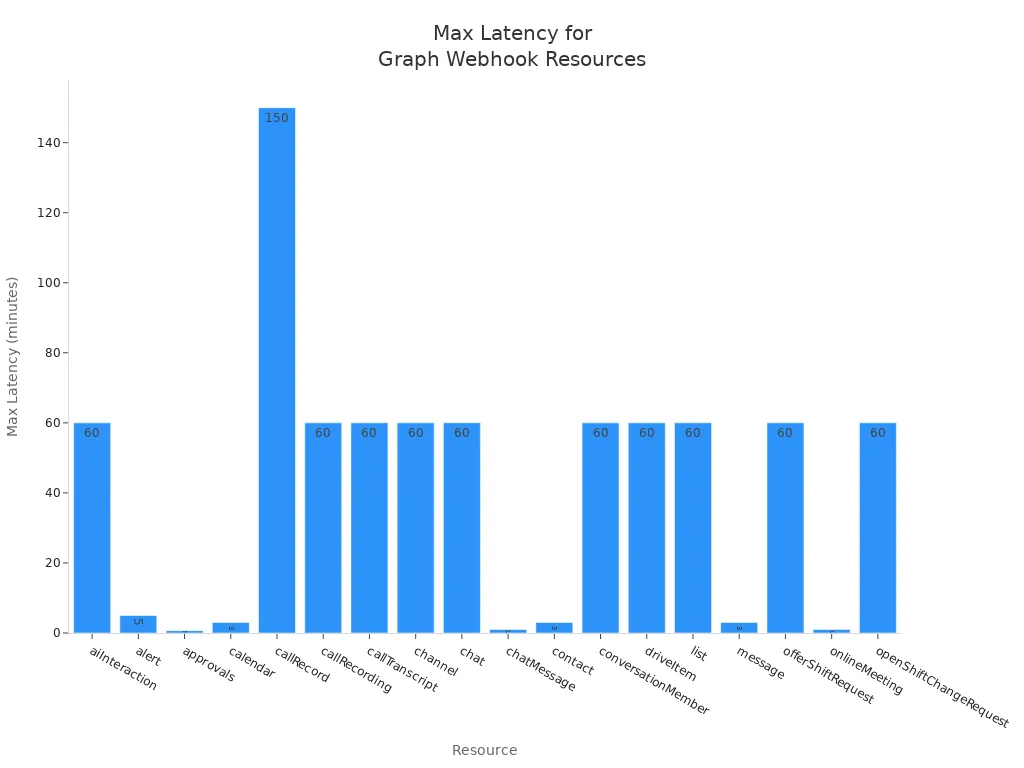
The average latency for these notifications varies by resource. For example, notifications for calendar events typically arrive in less than one minute, while chat messages can be delivered in under ten seconds. Here’s a summary of the average and maximum latency for various resources:
| Resource | Average Latency | Maximum Latency |
|---|---|---|
| Calendar | Less than 1 minute | 3 minutes |
| Chat Message | Less than 10 seconds | 1 minute |
| Drive Item | Less than 1 minute | 60 minutes |
| Outlook Event | Unknown | Unknown |
Creating a Subscription
To start receiving notifications, you need to create a subscription. Follow these steps to set up your webhook subscription for monitoring Microsoft Graph resources:
- Register the Microsoft Entra ID Application: Begin by creating an app registration with the necessary permissions for your subscription.
- Create the Event Grid Topic: Set up a custom Event Grid topic to receive notifications from Microsoft Graph.
- Build the Webhook Receiver Function: This function will handle notifications from the Graph API and forward them to your Event Grid.
By completing these steps, you establish a connection that allows your application to receive notifications about changes in real time. This setup enhances your application's responsiveness and ensures it remains synchronized with Microsoft Graph data.
With webhook subscriptions, you can efficiently manage how your application interacts with Microsoft Graph. You no longer need to rely on constant polling, which can waste resources and slow down your application. Instead, you can focus on processing the notifications you receive, leading to a more efficient and effective application.
Subscription Management
Lifecycle of Subscriptions
Managing the lifecycle of your webhook subscriptions is crucial for maintaining effective notifications. When you create a subscription, it goes through several stages:
- Creation: You initiate the subscription by specifying the resource and the notification URL.
- Active State: The subscription remains active until it reaches its expiration date.
- Expiration: Microsoft Graph requires you to renew the subscription before it expires. If you do not renew it, the subscription will become inactive.
- Reauthorization: If you receive an authorization challenge notification, you must respond promptly. This notification goes to your lifecycleNotificationUrl. You need to validate the authenticity of the notification and ensure you have a valid access token. If your app is no longer authorized, renewing the subscription may fail, requiring you to obtain a new access token.
Managing these stages effectively helps you avoid missed notifications. You should also handle subscriptionRemoved notifications. Acknowledge receipt and validate authenticity. If necessary, create a new subscription to continue receiving notifications.
Renewing Subscriptions
To maintain uninterrupted notifications, you must renew your webhook subscriptions proactively. Here are some recommended procedures for renewing your subscriptions:
- Validate the client state from the event.
- Ensure your app has a valid access token.
- Call the appropriate API to renew or reauthorize the subscription.
Follow these steps to renew your subscription:
- Send an update request to extend the expiration time before the current subscription expires.
- Utilize Lifecycle Notifications to receive warnings about approaching expiration.
- Upon receiving a
microsoft.graph.subscriptionReauthorizationRequiredevent, validate the client state and ensure a valid access token is available. - Call the
/reauthorizeaction to reauthorize without extending the expiration date, or use thePATCHmethod to renew and reauthorize simultaneously.
Proper management of subscription lifecycles is crucial. It ensures that your applications can maintain uninterrupted operation by proactively renewing subscriptions before they expire. By following these guidelines, you can effectively process webhook submissions and keep your applications responsive to changes.
Delta Queries and Their Role
Understanding Delta Queries
Delta queries are a powerful feature in Microsoft Graph that allow you to track changes in resources efficiently. They enable your application to identify new, updated, or deleted entities without needing to read the entire resource each time. This capability streamlines the synchronization process and minimizes the data processed, leading to faster updates. Here’s how delta queries function:
- You make a GET request with the delta function on the desired resource. For example,
GET https://graph.microsoft.com/v1.0/users/delta. - Microsoft Graph responds with the requested resource and a state token.
- When you need to learn about changes, use the
@odata.deltaLinkURL received in the previous step to make requests. - Microsoft Graph returns a response describing changes since the last request, along with either a
@odata.nextLinkor a@odata.deltaLink.
This process allows you to maintain data integrity while minimizing the resources needed for data synchronization.
Use Cases for Delta Queries
Delta queries have several practical applications in enterprise environments. Here are some common use cases:
| Use Case | Description |
|---|---|
| Data Management | Delta queries simplify data management and support operations like insert, update, and delete. |
| Version Control | They allow users to access or revert to earlier versions of data for audits and rollbacks. |
| Data Sharing | Delta queries enable secure data sharing across organizations, ensuring data consistency. |
These use cases highlight the versatility of delta queries in various scenarios. They enhance the efficiency of data synchronization processes by allowing your application to track changes without unnecessary overhead. This method specifically returns only the changes since the last request, making it ideal for applications that need to monitor modifications in Microsoft Graph resources.
By leveraging delta queries, you can ensure your applications remain responsive and up-to-date with the latest information. This capability is essential for maintaining a seamless user experience in applications that rely on real-time data.
Combining Webhooks with Delta Queries
Benefits of Integration
Integrating Microsoft Graph Webhooks with delta queries offers several advantages that enhance your application's performance. Here are some key benefits:
| Feature | Benefit |
|---|---|
| Webhooks | Notify applications of changes, enabling real-time updates. |
| Delta Queries | Allow for incremental data fetching, reducing unnecessary data retrieval. |
By combining these two powerful features, you can ensure that your application remains responsive and efficient. Webhooks send immediate notifications about data changes, which eliminates the need for constant polling. Meanwhile, delta queries allow you to fetch only the updates since the last synchronization. This combination ensures that only relevant and new data is processed, optimizing network performance and reducing unnecessary data transfers.
Additionally, using delta queries helps ensure that no changes are missed, especially if notifications are delayed. This integration allows you to maintain a seamless user experience while minimizing resource consumption.
Implementation Strategies
To effectively implement the combination of webhooks and delta queries, consider the following strategies:
- Optimize Network Traffic: Use JSON Batching to combine multiple requests into one. This reduces latency and improves overall performance.
- Utilize Delta Queries: Fetch only changes since the last sync instead of retrieving the entire dataset. This approach minimizes data transfer and speeds up synchronization.
- Implement Webhooks for Real-Time Notifications: Allow your application to respond immediately to changes without constant polling. This ensures that your application stays updated with the latest information.
While integrating these features, be aware of potential pitfalls. Notifications can be lost, which affects reliability. Subscriptions may expire, leading to missed updates. Additionally, if the endpoint goes down, it can cause interruptions. However, delta queries remain reliable as they can be executed at any time. They provide a complete list of changes since the last check, allowing for recovery from missed notifications.
By following these strategies, you can create a robust system that leverages the strengths of both webhooks and delta queries. This combination will enhance your application's responsiveness and efficiency, making it better suited to meet user demands.
Best Practices for Microsoft Graph Webhooks
Security Considerations
When using Microsoft Graph Webhooks, security should be a top priority. Implementing the right measures helps protect your application and its data. Here are some essential actions you should take:
- Use HTTPS encryption to safeguard sensitive data.
- Verify incoming requests with a signature and shared secret key.
- Protect callback URLs with complex paths and IP whitelisting.
- Include authentication tokens in request headers.
Monitoring your webhooks is crucial. Log key metrics such as delivery success rates, response times, and authentication failures. This practice helps you identify issues like invalid callbacks or missed notifications, ensuring your notification system remains reliable.
To further enhance security, consider these verification methods for webhook notifications:
| Method | Description |
|---|---|
| HMAC Signature | A signature header is added, generated by encoding the JSON payload with the client secret using the sha256 algorithm. |
| HTTPS Connection | Secure communication is ensured through HTTPS, preventing unauthorized access. |
| Developer Payload | A unique string is set in the developerPayload field to verify requests. |
Performance Optimization
Optimizing the performance of your webhook subscriptions is vital for maintaining a responsive application. Here are some techniques to enhance performance:
-
Subscription Management: Regularly check the status of your subscriptions. Perform a subscription check every 12 hours to verify their status. Renew subscriptions 24 hours before expiry to avoid service interruptions.
-
Efficient Data Handling: Use delta queries to track changes efficiently. Delta queries allow you to receive notifications about changes without needing to retrieve the entire dataset. This method minimizes data transfer and speeds up synchronization.
-
Batch Processing: If your application needs to handle multiple notifications, consider using JSON batching. This technique allows you to combine multiple requests into one, reducing latency and improving overall performance.
-
Error Handling: Implement robust error handling for your webhook notifications. If you encounter issues, log them and set up alerts to notify your team. This proactive approach helps you address problems before they impact users.
By following these best practices, you can ensure that your Microsoft Graph Webhooks operate securely and efficiently. This will enhance your application's responsiveness and provide a better experience for your users.
In summary, Microsoft Graph Webhooks provide a powerful way to receive real-time notifications about changes in your applications. They allow for quick implementation with minimal code, making them cost-effective and efficient. By integrating delta queries, you can optimize data retrieval, ensuring your applications only fetch what has changed. This combination enhances responsiveness and reduces unnecessary API calls.
To get started, ensure you configure your webhooks correctly and respond to notifications promptly. Monitor your endpoint performance and manage your access token lifecycle to avoid interruptions. By following these best practices, you can build robust applications that leverage the full potential of Microsoft Graph Webhooks and delta queries.
FAQ
What is a Microsoft Graph Webhook subscription?
A Microsoft Graph Webhook subscription allows your application to receive notifications about changes in specific resources. You create a subscription to monitor events like updates to user accounts or document modifications.
How do I create a subscription?
To create a subscription, register your application, specify the resource to monitor, and provide a notification URL. Follow the steps outlined in the blog to set up your subscription effectively.
How long does a subscription last?
Subscriptions have a limited lifespan, typically ranging from a few hours to several days. You must renew your subscription before it expires to maintain uninterrupted notifications.
What happens if my subscription expires?
If your subscription expires, you will stop receiving notifications. You need to renew it promptly to continue monitoring changes in the specified resource.
Can I have multiple subscriptions?
Yes, you can create multiple subscriptions for different resources. This flexibility allows you to monitor various events simultaneously, enhancing your application's responsiveness.
How do I handle subscription renewal?
To renew a subscription, send an update request before it expires. Monitor your subscriptions regularly to ensure they remain active and responsive to changes.
What should I do if I miss a notification?
If you miss a notification, use delta queries to retrieve the latest changes. Delta queries help you catch up on updates since your last successful notification.
Are there any security measures for subscriptions?
Yes, implement security measures such as HTTPS encryption and request validation. These practices help protect your subscription and ensure that notifications come from trusted sources.
🎧 You Should Also Listen To
- Microsoft Graph Change Notifications – Simply Explained provides the next practical learning step and adds useful context for this topic.
- Microsoft Graph Connectors – Simply Explained provides the next practical learning step and adds useful context for this topic.
- AI Agents – Simply Explained provides the next practical learning step and adds useful context for this topic.
Last reviewed: July 2026.
🚀 Want to be part of m365.fm?
Then stop just listening… and start showing up.
👉 Connect with me on LinkedIn and let’s make something happen:
- 🎙️ Be a podcast guest and share your story
- 🎧 Host your own episode (yes, seriously)
- 💡 Pitch topics the community actually wants to hear
- 🌍 Build your personal brand in the Microsoft 365 space
This isn’t just a podcast — it’s a platform for people who take action.
🔥 Most people wait. The best ones don’t.
👉 Connect with me on LinkedIn and send me a message:
"I want in"
Let’s build something awesome 👊
1
00:00:00,000 --> 00:00:04,880
Hello everyone and welcome to another episode of Microsoft Knowledge Nuggets here on M365.
2
00:00:04,880 --> 00:00:06,360
FM, I'm your host, Mirko Peters.
3
00:00:06,360 --> 00:00:10,760
Today's topic is one that almost everyone building with Microsoft 365 has heard of,
4
00:00:10,760 --> 00:00:14,160
but very few people can explain clearly what exactly are graph webhooks.
5
00:00:14,160 --> 00:00:16,960
Why should you care about them instead of doing things the old way?
6
00:00:16,960 --> 00:00:18,760
Imagine you're expecting an important letter.
7
00:00:18,760 --> 00:00:20,480
You walk to your mailbox. It's empty.
8
00:00:20,480 --> 00:00:23,040
You walk back. 10 minutes later, you check again.
9
00:00:23,040 --> 00:00:25,560
Still nothing. You do this all day wasting time and energy.
10
00:00:25,560 --> 00:00:26,520
That's polling.
11
00:00:26,520 --> 00:00:27,840
Now imagine a different world.
12
00:00:27,840 --> 00:00:30,480
The mailman rings your doorbell the moment a letter arrives.
13
00:00:30,480 --> 00:00:33,280
You don't check. You wait for the ring. That's a webhook.
14
00:00:33,280 --> 00:00:36,760
By the end of this episode, you'll understand what graph webhooks are.
15
00:00:36,760 --> 00:00:40,280
Why they replace constant checking and how the pieces fit together.
16
00:00:40,280 --> 00:00:42,800
The polling problem. Let's break this down.
17
00:00:42,800 --> 00:00:46,440
To understand why webhooks matter, you need to understand why polling hurts.
18
00:00:46,440 --> 00:00:48,320
Here's how most applications work today.
19
00:00:48,320 --> 00:00:49,680
Your app needs an answer.
20
00:00:49,680 --> 00:00:52,320
It asks Microsoft Graph, "Hey, any new users?"
21
00:00:52,320 --> 00:00:53,960
Graph responds, "Nope."
22
00:00:53,960 --> 00:00:55,880
So your app waits a bit then asks again.
23
00:00:55,880 --> 00:00:57,240
Any new users now?
24
00:00:57,240 --> 00:01:00,320
Still no. Over and over. This process is polling.
25
00:01:00,320 --> 00:01:03,400
Think of it like constantly calling a friend to ask if they have news.
26
00:01:03,400 --> 00:01:06,400
You dial, they pick up, you check, they say no, you hang up.
27
00:01:06,400 --> 00:01:08,320
Then you call again five minutes later.
28
00:01:08,320 --> 00:01:10,440
And again, you're burning their time and your own.
29
00:01:10,440 --> 00:01:11,560
You're probably annoying them.
30
00:01:11,560 --> 00:01:15,000
Now imagine thousands of apps doing this to Microsoft Graph at the same time.
31
00:01:15,000 --> 00:01:18,400
Every app polling every few minutes, asking the same questions,
32
00:01:18,400 --> 00:01:20,560
getting the same answers. That's a lot of noise.
33
00:01:20,560 --> 00:01:23,440
Microsoft has a name for when you poll too aggressively,
34
00:01:23,440 --> 00:01:26,800
throttling, or as some developers call it, "graph jail."
35
00:01:26,800 --> 00:01:28,880
When you send too many requests, Microsoft says,
36
00:01:28,880 --> 00:01:30,680
"Okay, you're done for a while."
37
00:01:30,680 --> 00:01:32,400
They limit how many calls your app makes,
38
00:01:32,400 --> 00:01:34,240
once your throttleed everything slows down.
39
00:01:34,240 --> 00:01:37,160
The legitimate request pile up, your app stops working properly.
40
00:01:37,160 --> 00:01:38,680
You have no idea when you'll be let out.
41
00:01:38,680 --> 00:01:40,400
How many requests are we talking about?
42
00:01:40,400 --> 00:01:43,240
Say your app pulls every five minutes for user changes.
43
00:01:43,240 --> 00:01:45,440
That works out to 12 requests per hour.
44
00:01:45,440 --> 00:01:47,600
Over a full day, that's 208 requests.
45
00:01:47,600 --> 00:01:48,920
And that's just for one resource.
46
00:01:48,920 --> 00:01:52,440
If you're also polling for groups, files, messages, and calendar events,
47
00:01:52,440 --> 00:01:55,320
you rack up thousands of unnecessary requests per day.
48
00:01:55,320 --> 00:01:56,440
Most of them return nothing.
49
00:01:56,440 --> 00:01:58,440
Zero changes, but you still made the call.
50
00:01:58,440 --> 00:02:01,080
And here's the thing, even if you poll every five minutes,
51
00:02:01,080 --> 00:02:03,640
you're still not getting real-time updates.
52
00:02:03,640 --> 00:02:06,000
A change could happen one minute after your last poll.
53
00:02:06,000 --> 00:02:08,040
You won't know about it for another four minutes.
54
00:02:08,040 --> 00:02:11,000
You're wasting resources and still missing the window.
55
00:02:11,000 --> 00:02:13,040
Now, contrast that with an event-driven approach.
56
00:02:13,040 --> 00:02:15,120
Instead of calling Microsoft Graph every few minutes,
57
00:02:15,120 --> 00:02:16,720
you wait for Microsoft Graph to call you.
58
00:02:16,720 --> 00:02:18,760
You set up a listener, when something changes,
59
00:02:18,760 --> 00:02:20,400
Graph sends you a notification.
60
00:02:20,400 --> 00:02:22,840
You don't dial. You pick up when the phone rings.
61
00:02:22,840 --> 00:02:24,280
What are web hooks?
62
00:02:24,280 --> 00:02:25,920
So what exactly is a web hook?
63
00:02:25,920 --> 00:02:27,400
Here's the simplest definition.
64
00:02:27,400 --> 00:02:31,360
A web hook is an HTTP request sent automatically when something happens.
65
00:02:31,360 --> 00:02:32,600
You don't ask for it.
66
00:02:32,600 --> 00:02:34,560
The server just pushes it to you.
67
00:02:34,560 --> 00:02:35,920
Think of it like a doorbell.
68
00:02:35,920 --> 00:02:38,000
You don't stand outside checking every few minutes.
69
00:02:38,000 --> 00:02:39,120
You install a doorbell.
70
00:02:39,120 --> 00:02:40,840
When someone arrives, they ring it.
71
00:02:40,840 --> 00:02:42,160
You hear the ring and answer.
72
00:02:42,160 --> 00:02:44,280
The doorbell does the watching for you.
73
00:02:44,280 --> 00:02:46,880
Web hooks are sometimes called reverse APIs.
74
00:02:46,880 --> 00:02:50,280
With a normal API, your app makes a request and the server responds.
75
00:02:50,280 --> 00:02:51,520
Your app is in control.
76
00:02:51,520 --> 00:02:53,840
With a web hook, the server sends the request to your app.
77
00:02:53,840 --> 00:02:55,120
The server is in control.
78
00:02:55,120 --> 00:02:57,320
It pushes data instead of waiting for you to ask.
79
00:02:57,320 --> 00:02:59,560
Now Microsoft Graph uses web hooks too,
80
00:02:59,560 --> 00:03:02,240
but Microsoft calls them change notifications.
81
00:03:02,240 --> 00:03:04,080
It's the same thing, just a different name.
82
00:03:04,080 --> 00:03:06,600
When something changes in Microsoft 365,
83
00:03:06,600 --> 00:03:10,240
Graph sends an HTTP post to a URL you provide.
84
00:03:10,240 --> 00:03:12,600
That post contains information about what changed.
85
00:03:12,600 --> 00:03:15,040
There are a lot of things you can get notified about.
86
00:03:15,040 --> 00:03:18,680
A new user created in your tenant, a file updated in SharePoint,
87
00:03:18,680 --> 00:03:21,880
a message sent in Teams, a calendar event that changes,
88
00:03:21,880 --> 00:03:23,880
or a group that gets a new member.
89
00:03:23,880 --> 00:03:25,880
All of these can trigger a notification.
90
00:03:25,880 --> 00:03:28,840
Here's a real example, say you run a company with a time tracking system.
91
00:03:28,840 --> 00:03:32,120
When a new employee joins, you want to create an account automatically.
92
00:03:32,120 --> 00:03:36,560
Without web hooks, you pull the user's endpoint every few minutes checking for new people.
93
00:03:36,560 --> 00:03:39,600
With web hooks, you subscribe to user creation events.
94
00:03:39,600 --> 00:03:42,440
When someone joins, Graph sends your app a notification.
95
00:03:42,440 --> 00:03:45,640
Your app receives it, validates it, and creates the account.
96
00:03:45,640 --> 00:03:48,880
Or within seconds, no polling, no wasted requests.
97
00:03:48,880 --> 00:03:52,640
Another example, you have a SharePoint document library where receipts get uploaded.
98
00:03:52,640 --> 00:03:55,080
Without web hooks, you pull the library constantly.
99
00:03:55,080 --> 00:03:57,880
With web hooks, Graph tells you the moment a file is added.
100
00:03:57,880 --> 00:04:01,960
Your app grabs it, checks if it's a receipt, and processes it automatically.
101
00:04:01,960 --> 00:04:03,520
That's the power of web hooks.
102
00:04:03,520 --> 00:04:06,320
Instead of your app constantly asking anything new,
103
00:04:06,320 --> 00:04:08,240
you let the system tell you when something happens.
104
00:04:08,240 --> 00:04:11,720
It's more efficient, more reliable, and much faster.
105
00:04:11,720 --> 00:04:13,520
How Microsoft Graph Webhooks work.
106
00:04:13,520 --> 00:04:16,080
Now you know what web hooks are and why polling is the problem.
107
00:04:16,080 --> 00:04:18,800
Let's look at how Microsoft Graph Webhooks actually work,
108
00:04:18,800 --> 00:04:20,920
because the flow is simpler than you might think.
109
00:04:20,920 --> 00:04:26,040
It comes down to three things, a subscription, a notification, and your end point.
110
00:04:26,040 --> 00:04:28,720
First, you create a subscription, you tell Microsoft Graph,
111
00:04:28,720 --> 00:04:31,360
"Hey, I want to know when this specific thing changes."
112
00:04:31,360 --> 00:04:34,720
You give Graph the details of what to watch and where to send the news.
113
00:04:34,720 --> 00:04:36,520
Think of it like signing up for an alert.
114
00:04:36,520 --> 00:04:39,520
You tell the system what you care about and you give it your contact info.
115
00:04:39,520 --> 00:04:41,520
Second, Microsoft Graph watches that resource.
116
00:04:41,520 --> 00:04:42,520
It monitors for changes.
117
00:04:42,520 --> 00:04:46,640
When something happens, like a user created, a file updated, or a message arrives,
118
00:04:46,640 --> 00:04:47,640
Graph notices.
119
00:04:47,640 --> 00:04:49,360
Third, Graph sends a notification.
120
00:04:49,360 --> 00:04:52,080
It files off an HTTP post to the URL you provided.
121
00:04:52,080 --> 00:04:54,920
That post contains information about what changed.
122
00:04:54,920 --> 00:04:57,720
Your end point receives it and your application processes it.
123
00:04:57,720 --> 00:04:59,160
So the high level flow is simple.
124
00:04:59,160 --> 00:05:00,160
You subscribe.
125
00:05:00,160 --> 00:05:01,160
Graph watches.
126
00:05:01,160 --> 00:05:03,080
Graph sends a post when something changes.
127
00:05:03,080 --> 00:05:05,560
Let's break down those three building blocks a bit more.
128
00:05:05,560 --> 00:05:08,000
The subscription is your request to be alerted.
129
00:05:08,000 --> 00:05:12,040
It's like saying, "I want to know whenever a new user is added to my tenant."
130
00:05:12,040 --> 00:05:14,680
You send that request to Microsoft Graph and Graph stores it.
131
00:05:14,680 --> 00:05:17,360
From that point on, Graph is watching on your behalf.
132
00:05:17,360 --> 00:05:21,680
The notification is the alert itself, an HTTP post that Graph sends to your endpoint.
133
00:05:21,680 --> 00:05:25,760
The post body contains details about the change, like what resource changed, what type of change
134
00:05:25,760 --> 00:05:27,240
happened, and when it happened.
135
00:05:27,240 --> 00:05:29,240
Your endpoint is the door you leave open.
136
00:05:29,240 --> 00:05:32,600
It's a URL on your server, configured to receive these post requests.
137
00:05:32,600 --> 00:05:34,280
It just needs to listen and respond fast.
138
00:05:34,280 --> 00:05:35,280
That's it.
139
00:05:35,280 --> 00:05:37,560
No complex logic required at the receiving end.
140
00:05:37,560 --> 00:05:40,120
Just catch the notification, acknowledge it, and process it.
141
00:05:40,120 --> 00:05:41,520
Now compare this to polling.
142
00:05:41,520 --> 00:05:46,000
With polling, your app sends hundreds of get requests, each asking anything new.
143
00:05:46,000 --> 00:05:47,560
Most of the time the answer is no.
144
00:05:47,560 --> 00:05:49,280
With webhooks, there's just one post.
145
00:05:49,280 --> 00:05:50,280
The notification.
146
00:05:50,280 --> 00:05:51,280
That's it.
147
00:05:51,280 --> 00:05:52,280
One message instead of hundreds.
148
00:05:52,280 --> 00:05:56,560
The efficiency difference is enormous, and your endpoint doesn't need to be complicated.
149
00:05:56,560 --> 00:06:00,560
It just needs to be publicly accessible, speak HTTPS, and respond quickly.
150
00:06:00,560 --> 00:06:02,800
We'll talk about what quickly means in a bit.
151
00:06:02,800 --> 00:06:04,440
But the core idea is simple.
152
00:06:04,440 --> 00:06:09,560
Your endpoint listens, Graph calls, you respond, and done.
153
00:06:09,560 --> 00:06:10,560
Creating a subscription.
154
00:06:10,560 --> 00:06:12,720
So how do you actually set one of these up?
155
00:06:12,720 --> 00:06:15,280
Let's walk through creating a subscription step by step.
156
00:06:15,280 --> 00:06:19,640
You start by sending an HTTP post request to a specific URL on Microsoft Graph.
157
00:06:19,640 --> 00:06:21,440
That URL is HTTPS, Graph.
158
00:06:21,440 --> 00:06:24,400
Microsoft.com v1.0, subscriptions.
159
00:06:24,400 --> 00:06:26,880
You're posting straight to the subscriptions endpoint.
160
00:06:26,880 --> 00:06:30,720
Inside that request body, you include the details of what you want to subscribe to.
161
00:06:30,720 --> 00:06:32,560
There are four key fields you need to provide.
162
00:06:32,560 --> 00:06:34,240
First is notification URL.
163
00:06:34,240 --> 00:06:35,960
This is your endpoint's URL.
164
00:06:35,960 --> 00:06:38,560
The place where Microsoft Graph will send the notifications.
165
00:06:38,560 --> 00:06:41,800
It has to be HTTPS and it has to be publicly accessible because Graph needs to reach it
166
00:06:41,800 --> 00:06:42,800
from the internet.
167
00:06:42,800 --> 00:06:44,000
Second is resource.
168
00:06:44,000 --> 00:06:45,760
This tells Graph what you want to watch.
169
00:06:45,760 --> 00:06:47,920
You specify the Microsoft Graph resource path.
170
00:06:47,920 --> 00:06:53,040
For example, users if you want to watch for user changes or me, male folders, inbox messages
171
00:06:53,040 --> 00:06:55,400
if you want to watch for new emails in your inbox.
172
00:06:55,400 --> 00:06:57,680
The resource tells Graph exactly what you care about.
173
00:06:57,680 --> 00:06:59,400
Third is change type.
174
00:06:59,400 --> 00:07:02,440
This tells Graph what kind of changes to notify you about.
175
00:07:02,440 --> 00:07:05,880
You can specify created, updated, deleted, or any combination.
176
00:07:05,880 --> 00:07:09,640
So if you only care about new users being created, you set change type to create it.
177
00:07:09,640 --> 00:07:12,640
If you care about updates too, you set it to create it, updated.
178
00:07:12,640 --> 00:07:14,640
Fourth is expiration date time.
179
00:07:14,640 --> 00:07:18,000
This is when the subscription expires because subscriptions don't last forever.
180
00:07:18,000 --> 00:07:21,920
You set a date and time and Graph stops sending notifications after that point.
181
00:07:21,920 --> 00:07:24,640
The maximum duration depends on the resource you're watching.
182
00:07:24,640 --> 00:07:27,200
For users and groups, the max is about three days.
183
00:07:27,200 --> 00:07:30,760
For drive items in SharePoint or OneDrive, it can be up to 30 days.
184
00:07:30,760 --> 00:07:33,640
You need to check the documentation for each resource type.
185
00:07:33,640 --> 00:07:35,760
There's also an optional field worth mentioning.
186
00:07:35,760 --> 00:07:36,920
Client state.
187
00:07:36,920 --> 00:07:38,400
This is a secret string you create.
188
00:07:38,400 --> 00:07:39,960
It can be anything you want.
189
00:07:39,960 --> 00:07:42,320
A random string, a good, whatever you choose.
190
00:07:42,320 --> 00:07:46,560
Microsoft Graph includes this value in every notification it sends to your endpoint.
191
00:07:46,560 --> 00:07:50,560
And you use it to verify that the notification actually came from your subscription.
192
00:07:50,560 --> 00:07:54,400
If someone tries to send fake notifications to your endpoint, the client state won't match
193
00:07:54,400 --> 00:07:55,920
and you can reject it immediately.
194
00:07:55,920 --> 00:07:58,400
It's a simple security measure, but it's important.
195
00:07:58,400 --> 00:08:01,880
Creating a subscription is like signing up for a newspaper delivery.
196
00:08:01,880 --> 00:08:03,560
You give the newspaper your address.
197
00:08:03,560 --> 00:08:05,560
That's your notification URL.
198
00:08:05,560 --> 00:08:09,120
You tell them what sections you want, that's your resource and change type, and you tell
199
00:08:09,120 --> 00:08:11,320
them how long you want the delivery to continue.
200
00:08:11,320 --> 00:08:12,840
That's your expiration date time.
201
00:08:12,840 --> 00:08:14,320
The newspaper handles the rest.
202
00:08:14,320 --> 00:08:16,520
But here's the thing, subscriptions expire.
203
00:08:16,520 --> 00:08:19,000
You can't create one and forget about it.
204
00:08:19,000 --> 00:08:23,240
After the expiration date time passes, Graph stops sending notifications and your subscription
205
00:08:23,240 --> 00:08:24,240
is gone.
206
00:08:24,240 --> 00:08:27,400
If you want to keep receiving notifications, you need to renew the subscription before it
207
00:08:27,400 --> 00:08:31,120
expires by sending a patch request to the subscription endpoint with a new expiration
208
00:08:31,120 --> 00:08:32,120
date time.
209
00:08:32,120 --> 00:08:34,680
So creating a subscription is the first step, but it's not the last.
210
00:08:34,680 --> 00:08:36,080
You need to manage the life cycle.
211
00:08:36,080 --> 00:08:37,840
We'll talk more about that later.
212
00:08:37,840 --> 00:08:39,480
The validation handshake.
213
00:08:39,480 --> 00:08:42,800
Before your subscription goes live, there's one step you can't skip.
214
00:08:42,800 --> 00:08:46,800
Microsoft Graph doesn't just accept your subscription request and start sending notifications.
215
00:08:46,800 --> 00:08:50,360
It first needs to confirm your endpoint is real and ready to receive them.
216
00:08:50,360 --> 00:08:51,360
Here's how it works.
217
00:08:51,360 --> 00:08:55,120
When you send your post request to create a subscription, Microsoft Graph immediately fires
218
00:08:55,120 --> 00:08:57,960
off a test post to your notification URL.
219
00:08:57,960 --> 00:09:01,280
That test post includes a query parameter called validation token.
220
00:09:01,280 --> 00:09:02,600
It's just a random string.
221
00:09:02,600 --> 00:09:06,360
Your endpoint needs to grab that token and send it back as a plain text response and you
222
00:09:06,360 --> 00:09:08,160
have to do it within 10 seconds.
223
00:09:08,160 --> 00:09:10,240
Think of it like a courier delivering a package.
224
00:09:10,240 --> 00:09:12,840
They show up at your door and ask, is this the right address?
225
00:09:12,840 --> 00:09:13,840
Can you confirm?
226
00:09:13,840 --> 00:09:14,840
You have to sign for it.
227
00:09:14,840 --> 00:09:16,240
If you don't, they walk away.
228
00:09:16,240 --> 00:09:17,880
The courier doesn't leave the package.
229
00:09:17,880 --> 00:09:18,880
They just leave.
230
00:09:18,880 --> 00:09:20,600
But that's exactly what's happening here.
231
00:09:20,600 --> 00:09:24,240
Microsoft Graph is saying, I'm about to send you important notifications.
232
00:09:24,240 --> 00:09:27,880
Prove you're the right person at the right address.
233
00:09:27,880 --> 00:09:32,240
Your endpoint responds by echoing back the validation token, which tells Graph, yes,
234
00:09:32,240 --> 00:09:33,240
I'm here.
235
00:09:33,240 --> 00:09:34,240
I'm listening.
236
00:09:34,240 --> 00:09:35,800
Send me the notifications.
237
00:09:35,800 --> 00:09:38,160
Now here's where a lot of developers trip up.
238
00:09:38,160 --> 00:09:42,960
The validation token must be returned as plain text, not JSON, not HTML, plain text.
239
00:09:42,960 --> 00:09:46,400
And the response must have a content type header set to text plain.
240
00:09:46,400 --> 00:09:50,480
If you send it back wrapped in JSON or encoded in anyway, the validation fails.
241
00:09:50,480 --> 00:09:51,920
Your subscription won't be created.
242
00:09:51,920 --> 00:09:55,240
Microsoft Graph returns an error and you're stuck wondering what went wrong.
243
00:09:55,240 --> 00:09:57,040
There's another technical detail worth knowing.
244
00:09:57,040 --> 00:10:01,000
Microsoft Graph's validation service doesn't reliably support TLS 1.3.
245
00:10:01,000 --> 00:10:02,840
It negotiates TLS 1.2.
246
00:10:02,840 --> 00:10:07,560
So if your endpoint only accepts TLS 1.3 connections, the validation handshake fails before your
247
00:10:07,560 --> 00:10:09,360
application code even runs.
248
00:10:09,360 --> 00:10:14,760
You need to make sure your endpoint supports TLS 1.2, at least for the validation step.
249
00:10:14,760 --> 00:10:18,680
After that, you can enforce whatever TLS version you want for the actual notifications.
250
00:10:18,680 --> 00:10:21,840
The good news is this validation handshake only happens once per subscription.
251
00:10:21,840 --> 00:10:25,440
It's not something your endpoint has to handle every time a notification arrives, just the
252
00:10:25,440 --> 00:10:26,640
first time.
253
00:10:26,640 --> 00:10:31,200
Once Graph confirms your endpoint is real, it trusts it for the life of that subscription.
254
00:10:31,200 --> 00:10:33,960
So you only need to get this right once.
255
00:10:33,960 --> 00:10:35,760
Handling notifications and security.
256
00:10:35,760 --> 00:10:39,440
Once the validation handshake goes through and your subscription goes live, Microsoft Graph
257
00:10:39,440 --> 00:10:41,480
starts sending those notifications.
258
00:10:41,480 --> 00:10:43,880
So what do those actually look like in practice?
259
00:10:43,880 --> 00:10:48,720
When something changes, Graph sends an HTTP post to your endpoint with a JSON object in
260
00:10:48,720 --> 00:10:49,720
the body.
261
00:10:49,720 --> 00:10:53,480
That object contains the resource that changed the type of change that created, updated,
262
00:10:53,480 --> 00:10:55,480
or deleted, and a timestamp.
263
00:10:55,480 --> 00:10:59,360
It also includes the client state value you set when you created the subscription.
264
00:10:59,360 --> 00:11:02,240
That's your secret string your way of knowing the message is real.
265
00:11:02,240 --> 00:11:05,240
So here's the first thing to do when a notification arrives.
266
00:11:05,240 --> 00:11:06,560
Validate that client state.
267
00:11:06,560 --> 00:11:09,600
Compare the value in the notification against the secret you stored when you created the
268
00:11:09,600 --> 00:11:10,600
subscription.
269
00:11:10,600 --> 00:11:12,640
If they don't match, discard it immediately.
270
00:11:12,640 --> 00:11:14,000
Because it could be a fake.
271
00:11:14,000 --> 00:11:16,760
Someone trying to trick your system into processing bad data.
272
00:11:16,760 --> 00:11:19,480
This matters because your endpoint lives on the public internet.
273
00:11:19,480 --> 00:11:22,160
Anyone who knows your URL could send a post to it.
274
00:11:22,160 --> 00:11:25,480
Without client state validation, you'd have no way to tell the difference between a real
275
00:11:25,480 --> 00:11:28,280
Microsoft Graph notification and a fake one.
276
00:11:28,280 --> 00:11:30,640
It's a simple check, but it's your first line of defense.
277
00:11:30,640 --> 00:11:34,760
Once you've confirmed the notification is legit, you need to respond fast.
278
00:11:34,760 --> 00:11:38,440
Microsoft Graph expects a 200 level HTTP response within three seconds.
279
00:11:38,440 --> 00:11:42,720
If you take longer graph notices, and if it happens too often, graph starts treating you
280
00:11:42,720 --> 00:11:43,720
differently.
281
00:11:43,720 --> 00:11:44,720
Here's how the throttling works.
282
00:11:44,720 --> 00:11:49,720
If more than 10% of your responses exceed the three second window in any 10 minute period,
283
00:11:49,720 --> 00:11:51,960
Microsoft Graph marks your endpoint as slow.
284
00:11:51,960 --> 00:11:54,920
When that happens, new notifications get delayed by 10 minutes.
285
00:11:54,920 --> 00:11:58,120
They still arrive eventually, but you lose real time delivery.
286
00:11:58,120 --> 00:12:03,160
If things get worse, with more than 15% of your responses exceeding 10 seconds, graph marks
287
00:12:03,160 --> 00:12:04,680
your endpoint as drop.
288
00:12:04,680 --> 00:12:07,760
In that state, notifications are dropped entirely for 10 minutes.
289
00:12:07,760 --> 00:12:08,760
Here's the scary part.
290
00:12:08,760 --> 00:12:10,640
Drop notifications cannot be recovered.
291
00:12:10,640 --> 00:12:12,640
They're gone, and you'll never get them back.
292
00:12:12,640 --> 00:12:14,280
Think of it like a busy phone line.
293
00:12:14,280 --> 00:12:16,840
If you don't pick up quickly, the caller tries again later.
294
00:12:16,840 --> 00:12:19,800
But if you never pick up, eventually the caller gives up.
295
00:12:19,800 --> 00:12:23,120
Microsoft Graph is the caller, and your endpoint is the phone.
296
00:12:23,120 --> 00:12:25,120
You can't pick up fast or risk losing the message.
297
00:12:25,120 --> 00:12:26,920
So what's the best practice here?
298
00:12:26,920 --> 00:12:29,080
Acknowledge immediately and process asynchronously.
299
00:12:29,080 --> 00:12:34,080
Your endpoint should validate the client state, accept the notification, and return it 200 or
300
00:12:34,080 --> 00:12:36,160
202 responses as fast as possible.
301
00:12:36,160 --> 00:12:39,360
Then push the notification into a queue for background processing.
302
00:12:39,360 --> 00:12:42,480
And Azure queue, a service bus, even a simple database table.
303
00:12:42,480 --> 00:12:46,720
The point is to get out of the response cycle quickly and let your background workers handle
304
00:12:46,720 --> 00:12:47,720
the heavy lifting.
305
00:12:47,720 --> 00:12:50,520
And one more security reminder, your endpoint must be HTTPS.
306
00:12:50,520 --> 00:12:55,120
No exceptions, Microsoft Graph will not send notifications to an HTTP endpoint.
307
00:12:55,120 --> 00:12:58,480
And your endpoint must be publicly accessible if it's behind a firewall or a VPN Graph
308
00:12:58,480 --> 00:12:59,480
can't reach it.
309
00:12:59,480 --> 00:13:03,320
For development, you can use tools like en-groc to create a public tunnel to your local
310
00:13:03,320 --> 00:13:04,320
machine.
311
00:13:04,320 --> 00:13:08,840
But in production, your endpoint needs to live somewhere, Graph can find it.
312
00:13:08,840 --> 00:13:11,040
Keeping notifications alive, life cycle.
313
00:13:11,040 --> 00:13:15,000
So you've got your subscription setup, notifications are flowing, and everything looks good.
314
00:13:15,000 --> 00:13:17,280
But here's something that catches a lot of people off guard.
315
00:13:17,280 --> 00:13:19,000
Your subscription has an expiration date.
316
00:13:19,000 --> 00:13:21,880
It doesn't last forever, depending on what resource you're watching.
317
00:13:21,880 --> 00:13:25,200
The maximum subscription duration is usually between three and seven days.
318
00:13:25,200 --> 00:13:28,920
For some resources like drive items and SharePoint, you can get up to 30 days.
319
00:13:28,920 --> 00:13:30,640
But the point is, it's not permanent.
320
00:13:30,640 --> 00:13:33,280
You cannot create a subscription and forget about it.
321
00:13:33,280 --> 00:13:35,200
Think of it like a magazine subscription.
322
00:13:35,200 --> 00:13:38,040
You sign up, you start receiving issues and everything's great.
323
00:13:38,040 --> 00:13:41,320
But if you don't renew before the subscription runs out, the issue stops coming.
324
00:13:41,320 --> 00:13:42,320
Same thing here.
325
00:13:42,320 --> 00:13:45,560
If your subscription expires, Microsoft Graph stops sending notifications.
326
00:13:45,560 --> 00:13:48,480
And you might not realize it until you wonder why nothing's happening.
327
00:13:48,480 --> 00:13:51,040
So you need a renewal strategy, the way you renew is simple.
328
00:13:51,040 --> 00:13:55,320
Send a patch request to the subscription endpoint using the subscription ID and update the
329
00:13:55,320 --> 00:13:57,520
expiration date time to a new future date.
330
00:13:57,520 --> 00:13:59,560
That extends the life of the subscription.
331
00:13:59,560 --> 00:14:03,160
You can do this as many times as you want, as long as you do it before the current expiration
332
00:14:03,160 --> 00:14:04,160
passes.
333
00:14:04,160 --> 00:14:08,040
Now, Microsoft Graph actually helps you hear with something called life cycle notifications.
334
00:14:08,040 --> 00:14:12,200
When you create a subscription, you can provide a separate URL called the life cycle notification
335
00:14:12,200 --> 00:14:13,200
URL.
336
00:14:13,200 --> 00:14:17,080
Microsoft Graph sends alerts to that URL when certain things happen.
337
00:14:17,080 --> 00:14:20,960
Like when your subscription is about to expire, when your access token is about to run out,
338
00:14:20,960 --> 00:14:22,960
or when the permissions on your app change.
339
00:14:22,960 --> 00:14:25,080
These life cycle notifications give you a heads up.
340
00:14:25,080 --> 00:14:27,440
You don't have to guess when your subscription is going to die.
341
00:14:27,440 --> 00:14:30,500
Graph tells you, hey, your subscription expires in a few hours.
342
00:14:30,500 --> 00:14:32,000
You might want to renew.
343
00:14:32,000 --> 00:14:35,400
It's like getting a reminder from your magazine publisher that your subscription is about
344
00:14:35,400 --> 00:14:36,400
to end.
345
00:14:36,400 --> 00:14:38,000
Very helpful if you're paying attention.
346
00:14:38,000 --> 00:14:40,160
But what happens if things go wrong anyway?
347
00:14:40,160 --> 00:14:43,600
Maybe your endpoint goes down for a while or notifications get dropped because you were too
348
00:14:43,600 --> 00:14:44,600
slow.
349
00:14:44,600 --> 00:14:45,600
What then?
350
00:14:45,600 --> 00:14:46,600
That's where Delta query comes in.
351
00:14:46,600 --> 00:14:50,560
Delta query is a separate feature of Microsoft Graph that lets you ask, what changed since the
352
00:14:50,560 --> 00:14:51,960
last time I checked?
353
00:14:51,960 --> 00:14:54,200
And it returns only the changes, nothing else.
354
00:14:54,200 --> 00:14:55,200
Here's how it works.
355
00:14:55,200 --> 00:14:59,000
The first time you run a Delta query on a resource, say, users, graph returns all the users
356
00:14:59,000 --> 00:15:00,000
in your tenant.
357
00:15:00,000 --> 00:15:03,200
But it also returns something extra, a special link called a Delta link.
358
00:15:03,200 --> 00:15:04,200
You save that link.
359
00:15:04,200 --> 00:15:06,960
The next time you run the same query, you use that Delta link.
360
00:15:06,960 --> 00:15:10,880
And instead of getting all users again, you get only the ones that changed since your last
361
00:15:10,880 --> 00:15:11,880
request.
362
00:15:11,880 --> 00:15:14,160
New users, updated users, deleted users.
363
00:15:14,160 --> 00:15:15,640
That's it.
364
00:15:15,640 --> 00:15:19,360
Think of it like reading a what's new list instead of reading the entire encyclopedia every
365
00:15:19,360 --> 00:15:21,280
time, much faster, much less data.
366
00:15:21,280 --> 00:15:22,800
Now here's the smart pattern.
367
00:15:22,800 --> 00:15:24,680
Combine web hooks with Delta query.
368
00:15:24,680 --> 00:15:26,920
Use web hooks to tell you when something changed.
369
00:15:26,920 --> 00:15:29,480
Then use Delta query to find out exactly what changed.
370
00:15:29,480 --> 00:15:30,880
Let me explain why that matters.
371
00:15:30,880 --> 00:15:32,880
Web hooks are fast, but they're not perfect.
372
00:15:32,880 --> 00:15:33,880
Notifications can get lost.
373
00:15:33,880 --> 00:15:36,080
Subscriptions can expire and your endpoint can go down.
374
00:15:36,080 --> 00:15:37,320
But Delta query is reliable.
375
00:15:37,320 --> 00:15:38,680
You can run it any time.
376
00:15:38,680 --> 00:15:41,360
And it gives you a complete list of changes since your last check.
377
00:15:41,360 --> 00:15:44,520
So even if you miss a notification, you can catch up.
378
00:15:44,520 --> 00:15:45,920
And here's the typical flow.
379
00:15:45,920 --> 00:15:48,440
Set up a web hook subscription for user changes.
380
00:15:48,440 --> 00:15:52,040
Run an initial Delta query to get the baseline state and save the Delta link.
381
00:15:52,040 --> 00:15:55,880
When a web hook arrives telling you a user changed, run a Delta query using your saved
382
00:15:55,880 --> 00:15:56,880
Delta link.
383
00:15:56,880 --> 00:15:58,640
That gives you the exact change.
384
00:15:58,640 --> 00:15:59,640
Process it.
385
00:15:59,640 --> 00:16:01,280
Then save the new Delta link from that response.
386
00:16:01,280 --> 00:16:03,760
Next time a web hook comes in, repeat the process.
387
00:16:03,760 --> 00:16:08,040
And if you ever miss a notification or if your subscription expires, just run the Delta
388
00:16:08,040 --> 00:16:09,040
query again.
389
00:16:09,040 --> 00:16:10,360
You'll get everything you missed.
390
00:16:10,360 --> 00:16:11,360
It's a safety net.
391
00:16:11,360 --> 00:16:14,440
Web hooks give you speed and Delta query gives you reliability.
392
00:16:14,440 --> 00:16:17,080
Together, they're a powerful combination.
393
00:16:17,080 --> 00:16:19,160
Real world example and next steps.
394
00:16:19,160 --> 00:16:21,720
Imagine a new employee joins your company tomorrow.
395
00:16:21,720 --> 00:16:26,920
Someone in HR creates their account in Microsoft Entra ID and that single action kicks off
396
00:16:26,920 --> 00:16:28,120
a chain reaction.
397
00:16:28,120 --> 00:16:31,960
If you've set up a web hook subscription for user changes, Microsoft Graph notices instantly
398
00:16:31,960 --> 00:16:34,040
and fires a post to your endpoint.
399
00:16:34,040 --> 00:16:35,080
Here's what happens next.
400
00:16:35,080 --> 00:16:39,880
Your endpoint receives the notification, validates the client state, and if it matches your secret,
401
00:16:39,880 --> 00:16:41,160
you know it's legit.
402
00:16:41,160 --> 00:16:46,320
To return a 202 accepted response within three seconds, acknowledging the notification,
403
00:16:46,320 --> 00:16:48,040
and then your background worker picks it up.
404
00:16:48,040 --> 00:16:51,680
The worker Caesar user was created, but the notification doesn't include all the details,
405
00:16:51,680 --> 00:16:54,440
so it runs a Delta query using your saved Delta link.
406
00:16:54,440 --> 00:16:59,160
That returns the new user's full information, name, email, department, job title, manager,
407
00:16:59,160 --> 00:17:00,280
everything you need.
408
00:17:00,280 --> 00:17:03,880
Now your worker takes that information and creates an account for the new employee in
409
00:17:03,880 --> 00:17:05,680
your third party time tracking system.
410
00:17:05,680 --> 00:17:06,760
It sends a welcome email.
411
00:17:06,760 --> 00:17:09,360
It adds them to the appropriate distribution lists.
412
00:17:09,360 --> 00:17:14,040
All of this happens within seconds of HR creating the account in Entra ID, no polling,
413
00:17:14,040 --> 00:17:16,640
no manual steps, no delays.
414
00:17:16,640 --> 00:17:17,960
Think about the alternative.
415
00:17:17,960 --> 00:17:21,840
Without web hooks, you'd have to poll the user's endpoint every few minutes, hundreds of requests
416
00:17:21,840 --> 00:17:25,600
per day, and even then you might not catch the new user for several minutes.
417
00:17:25,600 --> 00:17:27,040
With web hooks, it's instant.
418
00:17:27,040 --> 00:17:29,280
One notification, one Delta query done.
419
00:17:29,280 --> 00:17:30,280
That's the real value.
420
00:17:30,280 --> 00:17:34,280
Your system becomes faster, more efficient, and less likely to hit throttling limits.
421
00:17:34,280 --> 00:17:38,200
Instead of constantly asking Graph for updates, you let Graph tell you when something happens.
422
00:17:38,200 --> 00:17:40,840
It's a fundamental shift in how you build integrations.
423
00:17:40,840 --> 00:17:42,200
So here's what I want you to try.
424
00:17:42,200 --> 00:17:44,760
Think about one process you're currently polling for.
425
00:17:44,760 --> 00:17:47,120
Maybe you're checking for new emails in a shared mailbox.
426
00:17:47,120 --> 00:17:50,160
Maybe you're watching for file changes in a SharePoint library.
427
00:17:50,160 --> 00:17:54,320
Maybe your monitoring user updates for your HR system could a web hook replace that polling?
428
00:17:54,320 --> 00:17:56,240
In most cases, the answer is yes.
429
00:17:56,240 --> 00:17:57,920
And you don't need to build everything from scratch.
430
00:17:57,920 --> 00:18:01,680
Tools like Azure Functions can host your web hook endpoint with minimal code.
431
00:18:01,680 --> 00:18:05,760
Power Automate can handle subscriptions and notifications without writing a single line.
432
00:18:05,760 --> 00:18:07,720
Even logic apps can process web hook payloads.
433
00:18:07,720 --> 00:18:08,800
The infrastructure is there.
434
00:18:08,800 --> 00:18:10,640
You just need to use it.
435
00:18:10,640 --> 00:18:12,520
So here's the core idea in plain English.
436
00:18:12,520 --> 00:18:13,520
Stop polling.
437
00:18:13,520 --> 00:18:14,520
Start listening.
438
00:18:14,520 --> 00:18:18,640
Web hooks let you move from constantly asking Microsoft Graph for updates to getting notified
439
00:18:18,640 --> 00:18:20,680
instantly when something changes.
440
00:18:20,680 --> 00:18:25,000
That shift transforms your system from one that wastes, calls, and risks throttling to one
441
00:18:25,000 --> 00:18:27,080
that's fast, efficient, and reliable.
442
00:18:27,080 --> 00:18:31,840
Instead of thousands of unnecessary requests per day, you get one notification per change.
443
00:18:31,840 --> 00:18:34,680
Instead of waiting minutes to find out about an update, you know, within seconds.
444
00:18:34,680 --> 00:18:38,840
Instead of worrying about hitting GraphJail, you work within the system the way it was designed.
445
00:18:38,840 --> 00:18:43,400
So if you're building integrations with Microsoft 365, web hooks are the smarter path.
446
00:18:43,400 --> 00:18:44,800
They make your system faster.
447
00:18:44,800 --> 00:18:47,040
They make it less likely to be throttled.
448
00:18:47,040 --> 00:18:49,880
And they give you real time awareness of what's happening in your tenant.
449
00:18:49,880 --> 00:18:52,520
That's it for this episode of Microsoft Knowledge Nuggets.
450
00:18:52,520 --> 00:18:56,160
Subscribe on your favorite podcast platform and share this with someone starting their journey
451
00:18:56,160 --> 00:18:57,360
with Microsoft Graph.
452
00:18:57,360 --> 00:18:58,360
I'm Mirko Peters.

Founder of m365.fm, m365.show and m365con.net
Mirko Peters is a Microsoft 365 expert, content creator, and founder of m365.fm, a platform dedicated to sharing practical insights on modern workplace technologies. His work focuses on Microsoft 365 governance, security, collaboration, and real-world implementation strategies.
Through his podcast and written content, Mirko provides hands-on guidance for IT professionals, architects, and business leaders navigating the complexities of Microsoft 365. He is known for translating complex topics into clear, actionable advice, often highlighting common mistakes and overlooked risks in real-world environments.
With a strong emphasis on community contribution and knowledge sharing, Mirko is actively building a platform that connects experts, shares experiences, and helps organizations get the most out of their Microsoft 365 investments.




