
Zero Trust Reference Architecture Explained
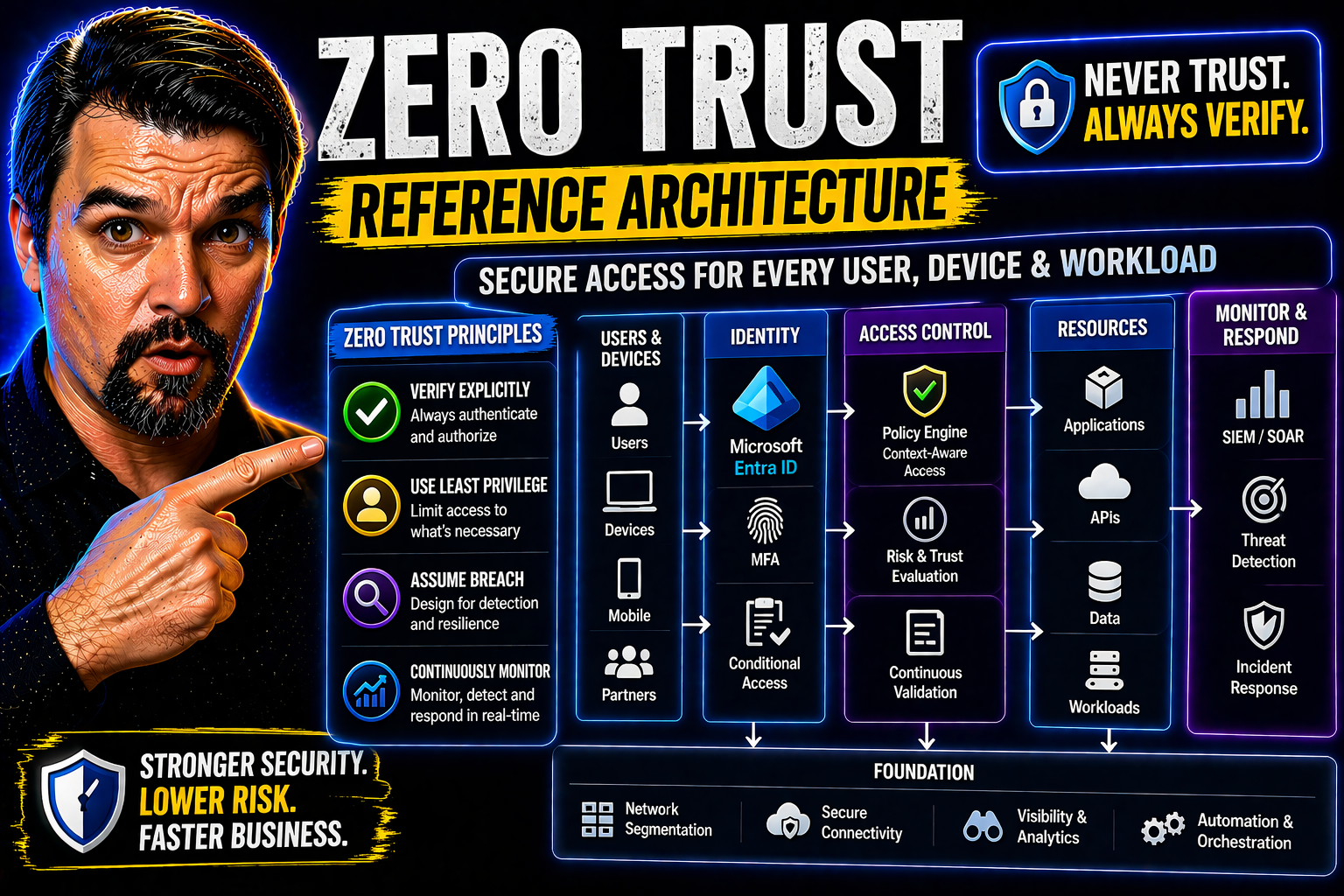
Zero Trust Reference Architecture is the blueprint for securing modern enterprises against today’s advanced cyber threats. Instead of assuming you’re safe once “inside the walls” of your network, Zero Trust flips the old model on its head: trust no one and nothing, verify everything, every time. Even your CEO gets checked at the door. As organizations stretch out into the cloud and their employees log in from everywhere (and everything), hackers are sniffing around for any weak spot. That’s why moving to Zero Trust isn’t a choice—it’s survival.
This article will break down what Zero Trust really means for IT and security professionals, with a strong focus on Microsoft-centric solutions like Entra ID. You’ll see how to make security more than a locked door—it becomes a smart, adaptable system that keeps your assets safe no matter where the work happens. We’ll walk you through the theory and, more importantly, direct you to actionable steps you can use now.
Foundations of Zero Trust Reference Architecture
Before Zero Trust, most organizations stuck with perimeter-based security—like putting a fence around your house and hoping nothing gets through. Once someone made it inside, they were implicitly trusted. But the rise of cloud computing, remote work, and widespread cyberattacks shattered that illusion. Attackers don’t care about your fence; they’re already looking for a way in or might even be inside disguised as an employee or bot.
Zero Trust Reference Architecture responds to this reality with a new mindset. Its core philosophies are about assuming nothing and demanding proof at every turn. Everything—users, devices, apps, and even workflows—must validate who they are and what they’re doing at all times. This is a big shift, moving from trusting internal systems by default to constantly verifying every request, regardless of where it comes from.
You’ll see Zero Trust described in frameworks from organizations like NIST and CISA, which have become the benchmarks for getting security right in today’s cloud-first world. The focus now is on identity as the new perimeter, continuous monitoring, and making sure that even if (or when) hackers breach one layer, they can’t run loose through the entire system. In the next sections, we dig deeper into these guiding ideas, why outdated models fail, and how Zero Trust changes the game for organizations large and small.
Core Trust Principles in Zero Trust Architecture
- Never Trust, Always Verify: Zero Trust means you don’t implicitly trust anyone or anything—even if it’s inside your network. Every access request must be checked: who is asking, what device are they using, and what are they trying to reach? This relentless verification ensures attackers can’t move freely even if they sneak in.
- Least-Privilege Access: Users and devices get the minimum permissions needed, nothing extra. This “just enough access” model shrinks the attacker’s options if they compromise an account. It’s about strong boundaries—your HR staff shouldn’t be able to poke around in dev environments just because they work at the same company.
- Continuous Authentication and Evaluation: Don’t stop checking just because someone passed the login screen once. Zero Trust constantly re-evaluates risk by looking at signals like location, device health, and behavior. If something changes or looks suspicious, access is restricted or challenged again. For practical steps, check out this discussion on balancing Zero Trust security and user freedom in Microsoft 365.
- Microsegmentation: The network is sliced into smaller zones, making it hard for threats to jump from one area to another. For example, finance apps are fenced off from company chat tools—if a breach hits accounting, it won’t immediately snowball into total chaos.
- Explicit Policy and Automation: Access decisions are enforced by clear, centrally managed rules, often automated and updated in real time. Tools like Microsoft’s Conditional Access make these policies enforceable and flexible, as explored in their Zero Trust by Design approach.
- Breach Containment and Rapid Recovery: If a breach occurs, Zero Trust minimizes its impact. Lateral movement is blocked, detection is swift, and access to sensitive data is tightly controlled—making cleanup easier and limiting the damage.
By following these principles, Zero Trust doesn’t just lock doors—it checks every window, tracks every visitor, and always has an emergency plan. This architecture fundamentally transforms enterprise security posture and aligns with how modern attackers operate.
Why 'Never Trust, Always Verify' Is Critical for Breach Defense
The old way of thinking—assuming everything inside your network is safe—simply doesn’t cut it anymore. Attackers don’t politely knock at your front door; they sneak in through phished credentials, compromised tokens, or vulnerabilities in a forgotten server. Once inside, traditional security lets them roam like they own the place. This is how a simple slip leads to massive breaches.
Zero Trust’s “never trust, always verify” flips the story. Every access request, no matter who makes it or where it comes from, is an opportunity to catch the bad guys. If an attacker tries to leverage a stolen password or session token, their run ends fast—they’ll need to prove themselves at every hop, not just at the front gate.
Modern Microsoft environments, for example, show exactly why this matters. Attack techniques like consent phishing, OAuth token abuse, and session hijacking easily sidestep traditional MFA setups. For a vivid breakdown of these real threats, check out this guide to Microsoft 365 attack chains. It highlights how routine trust can let attackers run wild if robust validation isn’t in place at every step.
Practical Zero Trust means putting up roadblocks everywhere— continuously evaluating risk factors, challenging questionable actions in real time, and enforcing tight app consent controls. This approach doesn’t just slow down hackers; it turns every move into a risk for them, massively reducing the odds of widespread damage when breaches do occur.
Understanding CISA's Zero Trust Maturity Model and Federal Guidance
When it comes to Zero Trust, the U.S. Cybersecurity and Infrastructure Security Agency (CISA) sets the gold standard for strategy and maturity. Their Zero Trust Maturity Model, and similar Department of Defense (DoD) directives, outline how organizations—especially in the public sector—should measure and phase their Zero Trust journey.
CISA’s model breaks the Zero Trust approach into clearly defined pillars: identity, devices, networks, applications/workloads, data, and analytics. Each pillar has recommended steps and technical outcomes, guiding organizations from basic to advanced maturity. Maturity isn’t “all or nothing”—it’s about progressing through readiness levels, plugging gaps, and tackling the riskiest areas first.
Federal mandates increasingly require agencies to hit certain Zero Trust milestones by specific deadlines, pushing adoption industry-wide. For IT leaders in regulated or hybrid cloud environments, referencing official guidance isn’t just about compliance; it’s about using proven roadmaps to build real-world resilience. To see what strong governance looks like in action, review this analysis of Azure enterprise governance strategy—it illustrates the need for enforced, automated policies to prevent drift and sustain effective security postures in large-scale cloud deployments.
Bottom line: Whether you’re public or private sector, these maturity models give you concrete benchmarks and clarity on what “good” Zero Trust looks like at every stage.
How Zero Trust Strategy Protects Organizations at Scale
Zero Trust defends organizations by layering dynamic protections that adapt as the business grows. Instead of relying on fixed perimeter controls, it ensures that users, devices, and applications are always verified—no matter how many locations, apps, or users you add. As your company scales, these controls flex with you, embedding security into every workflow.
This strategy closes blind spots and dramatically reduces the risk of breaches by limiting unauthorized access and containing threats before they spread. It also checks compliance boxes and makes it easier to meet shifting regulatory demands, all while improving your ability to recover if something does slip through. With Zero Trust, growth doesn’t mean more vulnerability—it means smarter, stronger security embedded everywhere.
Key Components of a Zero Trust Reference Architecture
Zero Trust isn’t just a catchy security slogan—it’s built on a practical set of components that cover every angle of enterprise protection. Think of it like a team working together: identities, devices, networks, and policies each play a role in enforcing that “never trust, always verify” reality. This section gives you the big picture of how those parts cooperate to lock down your environment from the inside out.
Understanding each component—the identity of your users, the health of their devices, the brainy policy engines, and tough network segmentation—will help you make sense of how Zero Trust works. This context sets you up for a deeper dive into Microsoft-specific tools like Entra ID, and shows how access, enforcement, and monitoring are tightly woven together. Before you get into the details, just remember: every piece has a job, and skipping any one of them leaves a gap for attackers to exploit.
Identity and Device Verification in Zero Trust Architecture
- Policy-Driven Authentication: Every user and device must go through robust authentication based on centrally defined policies. Credentials alone aren’t enough—factors like device health, role, and location are checked before access is granted.
- Risk-Based Access: The system evaluates real-time signals (like sign-in behavior and device compliance) to decide if a user should be challenged with additional verification or limited access.
- Device Posture Checks: Devices must meet certain standards (up-to-date OS, not jailbroken, compliant with security policies) before they can access sensitive resources. This goes for company-issued and personal BYOD devices alike.
- Continuous Re-Validation: Verification isn’t one-and-done. The trust level of both user and device is regularly reassessed, especially if new risks pop up.
- Entra ID and Conditional Access: Microsoft’s Entra ID (formerly Azure AD) is a backbone for identity and device verification in Zero Trust, enabling Conditional Access policies that continuously score risk and enforce controls. For practical steps to reduce risk and enforce clear policy boundaries, explore the strategies in this discussion on Entra ID and conditional access governance.
- Onboarding and Maintenance: Fast, secure onboarding processes ensure only verified identities and devices enter the system, while regular reviews catch forgotten or non-compliant assets. For refining safe rollout and auditing with Conditional Access, see the checklist in this resource.
Strong verification at this foundation sets up every other Zero Trust control for success, ensuring security posture stays solid as real-world conditions change.
Phishing-Resistant Multifactor Authentication Best Practices
- Use Strong, Phishing-Resistant Methods: Rely on FIDO2, Windows Hello, or WebAuthn authenticators instead of old-school SMS or app codes. These are tied to devices and can’t be easily phished.
- Lock Down Consent Flows: Attackers might hijack OAuth consent to sneak around MFA. In Microsoft (Entra ID) environments, restrict who can consent to apps and demand only verified publishers can be added, as described in this breakdown of OAuth consent attacks.
- Follow CISA’s Playbook: Use the Phishing-Resistant Authenticator Playbook for a step-by-step rollout—start with high-risk users, pilot, monitor adoption, and keep fallback methods to an absolute minimum.
- Regularly Review Authentication Flows: Don’t “set and forget.” Audit for legacy authentication, block insecure methods, and enforce conditional access to catch gaps.
- Educate and Support Users: Prepare users for the transition. Give them clear instructions, support, and incentives to adopt stronger MFA, smoothing the adoption curve by addressing friction head-on.
Applying these practices lets you stay ahead of attackers exploiting the weakest link—your users’ authentication steps.
Centralized Policy Engine, Administrator, and Enforcement Points
- Centralized Policy Engine: This is the “brain” that evaluates every access request based on current risk, business rules, and user context. Platforms like Entra ID orchestrate this evaluation in real time, enforcing both static and adaptive policies.
- Administrator Roles and Attestation: Clear, minimal admin roles (with just-in-time elevation) reduce the chance of privilege abuse. Automated attestation means admins prove their identity and necessity for access before being granted control.
- Enforcement Points: These distributed guards enforce the policy—whether in the cloud, on-prem, at the network edge, or within SaaS apps. Every enforcement point logs, challenges, and blocks as defined by policy.
- Continuous Policy Evaluation: Policies are always being checked against new data: user behavior, threat alerts, compliance requirements. Changes to risk posture or business context can instantly update what access is allowed.
- Central vs Distributed Enforcement: While centralization makes policy manageable and auditable, distributing enforcement points prevents single points of failure and supports hybrid environments. Governance is essential—see best practices in this episode on Entra ID conditional access governance to avoid policy drift and identity debt.
This system keeps guardrails tight, decision-making fast, and your environment auditable from end to end.
Microsegmentation and Network Security Approaches
- Microsegmentation: Split networks into bite-sized segments based on user role, app, environment, or business unit. If an attacker gets into one segment, it doesn’t automatically open the door to everything else—they’re trapped in a digital broom closet, not a castle.
- Network Isolation: Combine firewall rules, software-defined networking, and VLANs to tailor traffic flows. This means sensitive areas (like finance) are completely walled off from lower-risk zones (like the marketing content server).
- Infrastructure Controls: Network controls are enforced at different layers using solutions like Azure Network Security Groups, microfirewalls, or private endpoints. This ensures that both legacy and cloud-native resources are protected by granular boundaries.
- Segmentation Approaches: Go beyond physical or logical separation and use dynamic criteria—such as user risk, app sensitivity, time of day, or business process. This supports practical segmentation in both on-premises and Microsoft Azure or hybrid environments.
- Least-Privilege Movement: Only authorized, compliant devices and users can cross from one segment to another—and only for the minimal time and resource needed. Lateral movement is under constant watch, with rich audit trails for investigation and compliance.
By making it tough to move sideways through the network, microsegmentation dramatically reduces the impact of a breach and supports regulatory compliance across all environments.
Implementing End-to-End Zero Trust with Customization and Tools
Zero Trust isn’t just a concept—it’s a step-by-step journey. This section moves you from theory into real-world action, looking at how to roll out Zero Trust with platforms like NextLabs, Microsoft Entra ID, and more. You’ll see what works, what to watch out for, and how to pick the right tools for your environment.
It’s not all plug-and-play. Different organizations have different risk profiles, maturity levels, and compliance needs. That’s why the focus isn’t just on what tools to buy, but how to integrate, configure, and customize your Zero Trust deployment for your unique needs. Workshops, reference architectures, and lessons learned in the field help organizations avoid common stumbles and roll out changes with real impact—not just more paperwork.
Implementing Zero Trust with NextLabs, Microsoft, and Other Platforms
- NextLabs: Known for policy-driven access control, NextLabs excels at fine-grained entitlements, dynamic data masking, and unified policy management across apps and clouds. Good for regulated environments needing field-level controls.
- Microsoft Solutions (M365, Entra ID, Azure): Microsoft’s ecosystem tightly integrates identity, device, and network controls with analytics and automation. Entra ID heads up secure authentication and conditional access; Azure Policy and Management Groups enforce cloud boundaries; and Microsoft Defender offers endpoint and threat protection. To maintain airtight governance and avoid security drift, follow the guidance outlined in this Azure governance resource.
- Integration Strengths: Microsoft is well-suited for organizations leveraging cloud-native and hybrid resources, while NextLabs shines in environments demanding custom policy logic or strong data governance.
- Orchestration and Automation: Both platforms provide APIs and integration hooks. Orchestrate policy enforcement across applications, cloud services, and data layers for unified visibility and response.
- Decision Points: Evaluate internal skill sets, compliance requirements, app footprints, and existing investments. Integration is key—make sure your selected tools can communicate via open protocols and APIs to avoid lock-in and silos.
Aligning these tools and strategies with your own requirements paves the way for end-to-end Zero Trust deployment, delivering practical protection without unnecessary complexity or friction.
How to Implement End-to-End Customized Zero Trust Deployments
- Assess Current Maturity and Gaps: Start with a practical readiness check—identify where you stand using diagnostic tools and map your riskiest assets and access paths.
- Leverage Structured Programs: Utilize workshops like Microsoft’s Zero Trust Workshop, which provides hands-on guidance, assessments, and roadmaps tailored to your situation. For learning adoption and training, consider a centralized, governed approach such as this Copilot Learning Center model to improve outcomes.
- Run a Phased Rollout: Don’t boil the ocean. Pilot Zero Trust controls with a select group of apps, users, or business units, then scale up as you fine-tune your approach and build support.
- Modernize Security Posture: Continuously tune controls, audit outcomes, and integrate with Microsoft Defender, Purview, and conditional access for robust data and endpoint protection. For stepwise best practices that preserve user experience while locking down risk, reference these Microsoft 365 security essentials.
- Define Metrics and Success Criteria: Set clear KPIs for adoption, risk reduction, and compliance. Regularly review these metrics to ensure your Zero Trust program is delivering measurable improvements.
Bespoke deployment, not generic one-size-fits-all, is the key to rapid, relevant, and sustainable Zero Trust adoption.
Securing Critical Assets: Data, Endpoints, Applications, and AI
Zero Trust doesn’t end with just keeping the front door locked. Protecting your most valuable digital assets—data, endpoints, applications, and especially new AI workloads—is where the rubber meets the road. In today’s world, sensitive data lives everywhere, and critical workloads might be on-prem, in the cloud, or inside AI models like Microsoft Copilot.
This part of the journey is all about putting practical guardrails where it matters most. Whether you’re worried about data loss, ransomware, rogue AI, or oversight over external collaboration, Zero Trust gives you the tools to govern each layer. Microsoft platforms, from Purview to Defender, offer actionable ways to classify, monitor, and fence off your data, apps, and endpoints. As you read on, you’ll see exactly how security-by-design isn’t one strategy—it’s many controls, tailored for every asset you need to protect.
How Zero Trust Safeguards Data, People, and Endpoints
- Continuous Access Evaluation: Access to data and endpoints is checked in real time. If risk signals change—a suspicious login, a non-compliant device—access is instantly limited, reducing exposure to threats.
- Data Governance and DLP: Tools like Microsoft Purview and Data Loss Prevention (DLP) policies label, classify, and control sensitive data flow across apps and environments. Need a Power Platform example? See practical DLP setups for developers at this guide.
- Threat Detection and Forensic Auditing: Advanced monitoring logs access attempts, user actions, and endpoint activity. Microsoft Purview Audit provides deep, cross-tenant visibility for investigations, especially useful for regulated organizations (learn how).
- Least-Privilege Enforcement: Users, processes, and endpoints only access what they truly need. Automated policy updates keep permissions minimal even as roles or business needs change.
- External Collaboration Controls: Stop data leaks before they happen by auditing and restricting risky external sharing in Microsoft 365, SharePoint, or OneDrive (how to catch risky sharing before disaster).
These real-world controls, layered and monitored, make sure your most important assets are locked down at all times.
Securing Critical Assets: Applications and Workloads
- Application Governance: All business apps—whether SaaS, custom, on-prem, or hybrid—should have managed identity, explicit ownership, and access boundaries. Establish governance with access reviews, sensitivity labels, and accountability, as discussed in this Microsoft 365 governance deep-dive.
- Secured App Provisioning: Provision apps only with the least privilege needed and ensure all apps integrate identity validation and approval workflows. No shadow IT!
- Protecting SaaS, On-Prem, and Hybrid Workloads: Apply Zero Trust policies across all hosting models. In Microsoft 365 or Azure, conditional access and DLP let you extend controls from the cloud to the foggiest on-prem stacks. To get started with full-lifecycle DLP deployment, listen to this episode.
- Role-Based and Adaptive Access: Use dynamic policies to adjust privileges based on context—location, risk score, or job changes—keeping approvals and access reviews ongoing, not just yearly checkboxes.
- Monitoring and Analytics: Integrate threat analytics and security monitoring with application logs to catch unusual behaviors and enforce policy—vital for detecting risks and proving compliance.
- Automation and Orchestration: Employ policy automation to respond rapidly to new risks—terminate sessions or revoke app permissions when suspicious activity is detected.
With these controls, all workloads—from business apps to complex SaaS tools—stay compliant, locked down, and ready for anything the modern threat landscape throws your way.
Zero Trust for AI and Generative AI Deployment
- AI-Specific Access Controls: Apply role-based, context-aware access to AI models—just like you would for data or apps. Only trusted users and automated agents should talk to generative models or sensitive AI pipelines. For advanced controls, review this Copilot agent governance framework.
- Data Pipeline Protection: Ensure every data feed into AI models is monitored, labeled, and protected by DLP. Block unauthorized connectors and classify data at the tenant, connector, and environment level.
- Agent Governance: AI agents (like Copilot or Power Automate bots) must have their own stable identities—segregate their permissions from human users to avoid privilege creep. Learn more about avoiding “agentic drift” in this AI agent governance guide.
- Session Isolation: Treat every AI interaction as a risk opportunity; monitor for overbroad queries, and block potentially sensitive data requests before anything is leaked. Strong DLP and consent controls are essential here (see session governance best practices).
- Monitor and Audit AI Workflows: Set up runtime monitoring, audit logs, and anomaly detection across agent sessions, Power Automate flows, and Copilot requests (go deeper into compliance and visibility strategies).
- Responsible AI and Compliance: Extend your Zero Trust policy frameworks—like sensitivity labeling, DLP, and segregation of duties—to all AI-powered tools. This covers you for regulatory reporting, data residency, and reduction of “shadow IT.”
Integrating Zero Trust controls with AI deployments helps you unlock the power of automation and generative models—without letting sensitive data walk out the (virtual) door.
Continuous Monitoring, Analytics, and Anomaly Detection
Continuous monitoring is the “always on” guard dog in Zero Trust. You’re not just letting people in and hoping for the best. You’re watching, learning, and adjusting in real time. Analytics and automation make it possible to spot suspicious behavior or policy violations—sometimes before an actual breach happens.
Microsoft platforms provide telemetry and signals from endpoints, cloud, and SaaS resources, which are fed into SIEM solutions like Sentinel and enriched by tools such as Microsoft Defender for Cloud. This gives you rich insight, automated detection, and rapid response across your entire environment. For a deep dive into maintaining compliance and responding to drift, see this step-by-step guide for monitoring in Microsoft Defender for Cloud.
Real-time anomaly detection enables adaptive enforcement—immediately restricting access, firing off alerts, or blocking risky connections without waiting for manual review. SIEM and SOAR platforms help orchestrate these responses at scale. By integrating analytics with enforcement, you turn Zero Trust from a static set of rules into a living system that learns, reacts, and contains threats the moment they pop up. That’s how you stay ahead of cyber threats in a world where attackers never sleep.
Zero Trust Strategy, Benefits, and Leadership Guidance
For leaders—CISOs, CIOs, and business decision-makers—Zero Trust isn’t just about technical controls. It’s a long-term investment in protecting critical business outcomes, streamlining IT operations, and demonstrating resilience to regulators and customers alike. This section provides a map of where strategic value comes from and offers real-world guidance for measuring and presenting Zero Trust success.
You’ll learn to connect risk reduction, compliance wins, and simplified IT management directly to your business goals. Whether you’re building an executive case for budget or justifying the time and focus for your team, the discussion here lays out metrics, quick wins, and best practices from leading analysts. Guidance is provided for overcoming common obstacles, aligning IT and business, and communicating results at every step.
Strategic Benefits of Zero Trust and a Guide for CISOs
- Reduced Breach Risk and Faster Response: By eliminating implicit trust and tightly limiting access, Zero Trust constrains what attackers can do even if they break in. Automated detection and analytics mean you respond fast, often before significant harm. For AI-driven scenarios, enforcing least-privilege and DLP, as detailed here for Copilot security, protects data and compliance.
- Stronger Compliance and Auditability: Continuous monitoring, access reviews, and unified logging make demonstrating compliance much easier—no more last-minute scrambles ahead of audits.
- IT Simplification and Automated Governance: With centralized policy and automation, IT can reduce manual access requests, minimize busywork, and focus on strategic initiatives. Good governance balances enabling business while steering clear of security gaps—see Power Platform governance best practices for a safe, compliant, and innovative environment.
- Support for Innovation and Cloud Adoption: Zero Trust controls keep your environment secure as you move to cloud, roll out new SaaS, or leverage AI—so you don’t have to trade security for agility.
- Persuasive Metrics and Executive Reporting: CISOs benefit from setting clear metrics—incident reduction, faster onboarding/offboarding, time-to-detect, audit coverage—to demonstrate ROI and ongoing progress.
Armed with these benefits and tactics, CISOs can advocate confidently for Zero Trust projects, knowing the investment pays off at multiple levels.
Zero Trust Architecture Reference: Frequently Asked Questions and Downloads
- What does Zero Trust really mean? It means no one and nothing (users, devices, apps) is trusted automatically. Everything is verified, every time, with access guarded by real-time policies.
- How long does it take to implement Zero Trust? It’s not a switch you flip overnight. Expect a phased approach—pilot critical areas, expand as controls mature, and adapt over time as new threats and assets emerge.
- Will Zero Trust slow down business or annoy users? Not if done right! Thoughtful rollout, contextual access, and user-friendly controls keep friction low. See this guide for tips to balance strong security with a smooth experience.
- Where can I get reference guides or workshops? Download implementation playbooks, policy templates, and step-by-step videos on Zero Trust by Design for Microsoft 365 and Dynamics 365 at this podcast resource. Consider adopting a governed learning approach for Copilot with materials available here.
- How do we keep our Zero Trust program current? Frequent policy reviews, continuous monitoring, and staying plugged into hands-on training and forums—like the M365 FM podcast—equip you to adapt. Use automation-rich tools to minimize drift and make policy enforcement a daily routine.
- Any quick wins for busy IT teams? Yes—start with a core set of conditional access and DLP policies, modernize audit and monitoring, and tick off high-impact actions that don’t disrupt users, as detailed in this security essentials guide.
Want deeper learning? Dive into reference playbooks, checklists, and real-world workshops to accelerate your Zero Trust journey today.
Zero Trust Reference Architecture for Hybrid Workforce Environments
Hybrid workforces are here to stay. Employees log in from home, coffee shops, shared offices, and anywhere Wi-Fi stretches. This opens Pandora’s box of security headaches—especially for organizations trying to keep sensitive data off poorly managed devices or unsecured home networks. Here’s where Zero Trust shines bright.
This section tackles the unique blend of challenges that come with remote and BYOD (bring-your-own-device) scenarios. It sets the stage for practical strategies: securing unmanaged endpoints, monitoring home and public network risks, and balancing usability with tight security. Microsoft cloud platforms, especially Entra ID and Conditional Access, provide ways to apply consistent, context-aware defenses that work even when you don’t control the device—or the network underneath it.
As you flip through these next pieces, you’ll get actionable blueprints for enabling safe, reliable access for your hybrid workforce without gambling your data, reputation, or compliance on someone else’s router.
Securing Non-Corporate Devices and Home Networks in Zero Trust
- Adaptive Access Policies for BYOD: Use risk-based Conditional Access to check device posture—OS version, patch level, managed status—before letting personal or shared devices access sensitive apps. No pass, no entry.
- Device Attestation and Registration: Require users to register devices and validate their security health. For real control, enforce attestation policies in Entra ID to verify that the device meets your minimum security settings.
- Network Posture Checks: Analyze the network environment during sign-in. Suspicious or open networks (like coffee shop Wi-Fi) can trigger additional security requirements—forcing VPN, step-up authentication, or restricting high-risk actions.
- Continuous Verification and Monitoring: All access from non-corporate devices is surveilled using real-time analytics. If unusual patterns pop up, access is blocked or challenged (not just at login, but during the whole session). For process discipline and strong policy lifecycle, apply the strategies in this Entra ID conditional access episode.
- Streamlined Device Onboarding: Make registering or enrolling a BYOD device seamless—mobile device management supports automated enforcement with self-service guidance, cutting out IT bottlenecks while keeping standards high.
These steps allow your workforce to stay mobile and productive, while ensuring your data doesn’t hitch a ride on an unknown device or risky network.
Using Context-Aware Access Policies for Hybrid and Mobile Work
Zero Trust is meant to adapt on the fly—especially when users are mobile or working from unpredictable spots. Context-aware access policies take signals like user location, device health, time of day, and even recent behavior to decide if access is allowed, needs step-up verification, or should be flat denied.
Microsoft Conditional Access, in tandem with Entra ID, supports these dynamic decisions. Behavioral analytics watch for suspicious sign-ins, impossible travel, or changes in user patterns. Want to refine your policy boundaries? Review proven rollout plans and monitoring tactics in this guide to conditional access trust issues. Done right, you keep the security dialed up high, without slowing your team down.
Interoperability and Standards in Zero Trust Reference Architectures
Most real-world organizations don’t run on a single platform. To make Zero Trust work at scale—and avoid being locked into any one vendor—you need seamless interoperability across identity providers, policy engines, enforcement points, and applications. Open standards and protocols make it possible for different tools and clouds to talk to each other and enforce a consistent security baseline.
This section focuses on why standardized formats like OpenID Connect, SCIM, and SPIFFE/SPIRE aren’t just “nice to have” but are essential for agility and resilience. By prioritizing open ecosystems, you avoid technical dead-ends, ease integration headaches, and keep your options open if business needs shift. If you’re managing multiple clouds, SaaS platforms, or plan to change vendors, this guidance will show you how to build for the future, not just the moment.
How to Adopt Open Standards for Seamless Zero Trust Integration
- Federated Identity with OpenID Connect and OAuth2: Ensure all identity flows—login, SSO, consent—are based on standard protocols like OpenID Connect and OAuth2. This lets Microsoft solutions (Entra ID) connect with non-Microsoft tools and clouds in a secure, predictable way.
- Automated Provisioning via SCIM: Use SCIM for automatic identity and access provisioning. When a user changes roles or leaves, all connected apps immediately respond—avoiding orphaned access and minimizing risky lag.
- Standardized Policy Definitions and Exchange: Define and transmit security policies using standard formats (IETF SACM, XACML, or custom JSON) so rules travel freely between policy engines, platforms, and clouds. Microsoft Conditional Access and NextLabs support these workflows.
- Secure Credential Distribution with SPIFFE/SPIRE: Use SPIFFE IDs for machines and workloads in multi-cloud or hybrid setups, guaranteeing each workload can prove its identity wherever it runs. SPIRE automates this, smoothing out trust across mixed environments.
- Reduce Lock-In and Boost Flexibility: Architect your Zero Trust stack with modular, standards-driven layers. Choose tools that publish and read open protocols—this futureproofs your environment, and makes mergers, acquisitions, and audits much less painful.
Standards aren’t just a checkbox—they’re your foundation for fast, safe integration, now and as the environment evolves.
Cross-Vendor Policy Orchestration and Trust Chaining
Large and growing organizations often find themselves running multiple Zero Trust solutions—sometimes after mergers, or just to meet specific requirements in different business units. Cross-vendor policy orchestration brings it all together. Using frameworks like SPIFFE and SPIRE, you assign identities to workloads, applications, and infrastructure components—even if they’re spread across clouds, vendors, or on-premises.
Trust chaining connects these independently managed systems. Instead of relying on brittle, manual integrations, you use policy abstraction layers that let different engines honor each other’s decisions. For example, set a trust boundary for your workloads in Azure and have that automatically recognized by enforcement points in AWS or a third-party SaaS app.
This consolidated approach means access reviews, enforcement, and anomaly alerts can roll up into a single dashboard. Unified policy management slashes operational overhead, drives consistency, and helps you meet compliance needs—no matter how complex your environment gets. That’s how you scale strong Zero Trust, organization-wide, without risking security gaps or drowning in fragmented policies.

Microsoft MVP | Host of M365.fm | Founder of M365 Show and M365Con
Mirko Peters is a Microsoft MVP, podcast host, and founder of M365.fm, M365 Show, and M365Con. His work connects Microsoft practitioners through podcast interviews, livestreams, and community events.
At M365.fm, Mirko hosts conversations with Microsoft MVPs, product experts, architects, and community contributors. Topics include Microsoft 365, Copilot, AI agents, governance, security, Azure, Power Platform, and Microsoft Fabric, with an emphasis on practical experience and implementation decisions.
M365.fm is the podcast and learning platform. M365 Show brings experts together for livestreams, while M365Con provides an online conference setting for community learning.
Official website: Mirko Peters (https://www.mirkopeters.com/). Recognition: Mirko Peters — Microsoft MVP profile (https://mvp.microsoft.com/de-DE/mvp/profile/9b0ca797-db5a-493a-a845-8b9158046cf5). Connect on LinkedIn (https://www.linkedin.com/in/m365showpodcast/).




