
Microsoft Entra Access Reviews Guide
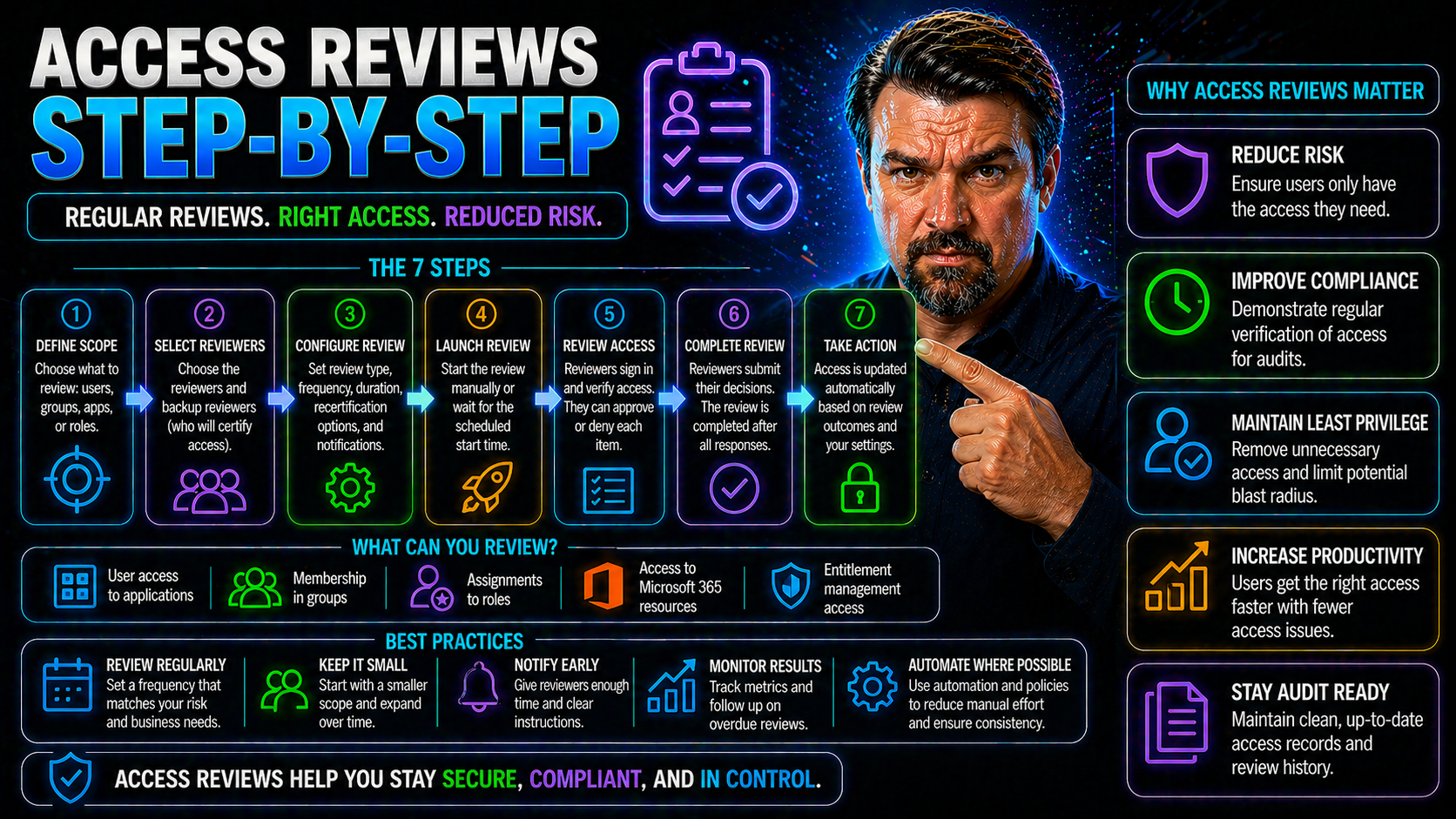
If you’re looking to tighten security and tick off compliance checkboxes, access reviews should be at the very top of your list. This guide is your practical, step-by-step pathway to building and running access reviews—especially with Microsoft’s Entra ID at the heart of your processes. You’ll get the strategies, frameworks, and checklists needed to make it all click, whether you’re owning IT or overseeing compliance, from the trenches or the boardroom. Understanding why access reviews are so crucial, which regulations demand them, and how to optimize every step in the process is what you’ll find here. Dive in to connect security, compliance, and efficiency—without missing the details that matter.
Understanding Why Access Reviews Are Critical
Access reviews are one of the most effective ways to protect your organization’s sensitive data, systems, and, let’s be honest, your sanity. When you know exactly who has access to what, it’s much easier to sleep at night. This isn’t about tracking every step folks take, but about making sure the right people have the right permissions—nothing more, nothing less.
Strong access governance is the safety net that helps organizations catch security holes before hackers or mistakes turn them into full-blown breaches. Getting this right is not just about playing defense; it also drives smoother operations and keeps everyone focused on what matters. The business case is tight: cutting down on overhead during audits, avoiding embarrassing compliance fails, and stopping data from falling into the wrong hands. In the competitive world of digital business, any gap in your access controls can undermine trust, compliance, and productivity in a heartbeat.
Neglecting access reviews comes with real risks, from the obvious possibilities like insider threats and accidental leaks to more subtle issues like entitlement creep and orphaned accounts. By grounding your security and compliance on periodic, well-structured access reviews, you build resilience—not just against cyber threats but also audit headaches and operational surprises. In the next sections, you’ll get a clear idea of what access reviews are, why access matters, and why disciplined attention is non-negotiable.
What Is an Access Review? Why Is Access Important?
An access review is a formal check-up on who’s got access to systems, apps, and sensitive information in your organization. Think of it as spring cleaning for your digital doors and locks—except you’re not just making things tidy, you’re catching risks before they become front-page news.
By running user access reviews, organizations make sure employees, contractors, and even external partners have only the access they need—no more, no less. This process involves identifying who can reach what and asking whether that access is still necessary based on their role or recent changes.
When you skip these reviews, you open the door to all kinds of trouble: insider threats, accidental leaks, privilege sprawl, and orphaned accounts lurking around long after someone leaves. Too much access puts data at risk, even if no one is acting maliciously. Mistakes happen, and with too much access, one click or slip-up can cause massive headaches. Continuous reviews keep your access governance sharp and responsive—closing gaps and flagging permissions before they’re exploited.
Staying vigilant with these reviews also makes life a lot easier come audit time. It shows that you’re not just talking about security, you’re walking the walk—supporting robust access management, and heading off data breaches before they start. Bottom line: a disciplined, recurring access review process is the foundation for smart, resilient security and compliance practices.
The Importance of Access Control and User Access
Access control is your organization’s first and last line of defense against unauthorized data exposure and system abuse. If user access isn’t reviewed and controlled regularly, it’s pretty much an open invitation for bad actors or costly accidents. Too often, unreviewed permissions lead directly to compliance violations, operational mistakes, or worse—data breaches that hit the news and your bottom line.
Simple measures like conditional access policies, strong authentication, and frequent reviews—especially in environments like Microsoft 365—can stop threats before they start. For practical strategies that strengthen controls without annoying users, see this guide on Microsoft 365 security essentials.
Compliance Frameworks and Standards Requiring Access Reviews
For organizations of any size, access reviews aren’t just about good security hygiene—they’re required for regulatory compliance. Auditors and regulators expect you to have clear, periodic reviews and documentation proving that anyone with access to sensitive systems or data truly needs it. Skipping reviews isn’t a gray area; it puts organizations at risk for fines, sanctions, or losing crucial certifications.
Access reviews form a core requirement in numerous industry and government regulations, from global standards to US-specific mandates. The specifics may vary, but the expectation is the same: regular access reviews to protect against unauthorized or lingering access, with proof you actually did the work. In many cases, this is the only thing standing between smooth audits and days spent searching for last year’s evidence.
This next section provides a solid overview of which standards drive access review obligations—so you know which frameworks matter most for your organization, and what kinds of documentation auditors will expect to see. To keep up with evolving expectations and avoid “compliance drift,” it also helps to leverage tools like continuous compliance monitoring in your Microsoft cloud environments.
Which Frameworks Drive Access Compliance?
- SOC 2: Requires periodic user access reviews to verify only authorized individuals have access to sensitive data. Auditors expect strict controls, especially in cloud and SaaS environments.
- ISO 27001: Calls for regular reviews of user access and permissions as part of the Information Security Management System (ISMS). Documentation is key for passing audits.
- PCI DSS: Mandates quarterly (or more frequent) reviews of user accounts for systems that handle payment data. Non-compliance can hit with costly penalties.
- HIPAA: Healthcare organizations must regularly validate user access to ePHI, documenting removal of unnecessary accounts to comply with federal law.
- NIST frameworks: Government-related and critical infrastructure sectors often follow NIST, which puts strong emphasis on recurring access certification and evidence trails.
For deeper pitfalls—like how policy gaps and user behaviors compromise Microsoft 365 compliance—check out this compliance drift podcast.
Access Compliance Standards and UARs Regulations
- User Access Review (UAR) Regulations: Auditors look for evidence of at least quarterly (often more frequent) reviews, sign-offs by data owners, and timely access removal actions.
- SOC 2 & ISO 27001 Benchmarks: Require documented policies, immutable audit logs, and role-aligned approval workflows for each review cycle.
- PCI DSS and HIPAA Standards: Demand detailed records showing who performed reviews, what changes were made, and how exceptions or findings were remediated.
- FTC Safeguards/Cyber Essentials: Emphasize clearly defined review cadences, reporting to leadership, and alignment with enterprise risk management.
Knowing what each standard expects eliminates surprises during your next compliance audit.
Step-by-Step Guide to Conducting Access Reviews
Now it’s time to roll up your sleeves and get into the actionable how-to side of the process. Conducting robust access reviews isn’t just a checkbox activity—it’s a repeatable cycle that starts with solid planning and flows all the way through documentation and remediation. When each step is followed with intention, access reviews become a powerful shield for both security and compliance outcomes.
This section walks you through every stage in the lifecycle: setting the scope and policy, gathering the right data, executing the review, addressing problems you find, and making sure your documentation is bulletproof. Attention to detail at every turn means you’re not just finding risks; you’re also fixing them and leaving an audit-ready trail behind you.
Whether you’re just starting out, or trying to take your process up a level, the following step-by-step breakdown will get you set up for success—especially if you’re working with Entra ID or managing hybrid Microsoft environments.
Define Scope and Establish a Review Policy
- Identify Critical Systems and Data: Start by pinpointing which applications, databases, and digital assets hold sensitive or business-critical information. This helps your reviews focus on what matters most and avoid wasting time on low-impact areas.
- Determine User Types and Roles: Map out who will be included—employees, contractors, vendors, privileged users, and service or guest accounts. Don’t overlook accounts with high privileges or external collaborators. Prioritizing highly privileged accounts and sensitive groups protects your biggest targets.
- Match Review Cadence to Risk: Align scope with the value and risk of each system. High-impact environments (like financial data or cloud admin roles) may need more frequent checks than low-risk apps.
- Document Policy and Responsibilities: Write a clear, enforceable review policy that names who’s responsible for kicking off, reviewing, and signing off each review. Include instructions for addressing exceptions or escalations.
- Leverage Automated Enforcement: For Microsoft and cloud setups, consider “governance by design” with policies (like Azure Policy and RBAC with PIM) that automate enforcement and prevent policy drift. This keeps scoping consistent and makes reviews auditable.
For more tips on setting guardrails and keeping reviews on track in enterprise environments, see this Azure enterprise governance strategy guide.
Gather Access Data and Assign Access Owners
- Centralize Access Data Collection: Pull access records from systems like Entra ID, Microsoft 365, file shares, legacy platforms, and HR systems. Using native tools or automation here is key—otherwise, you’ll drown in spreadsheets fast.
- Inventory Users and Permissions: Catalog every user, group, or service account tied to in-scope systems. Log what each one can access and when their rights were last reviewed or updated.
- Assign Access and Data Owners: Appoint department heads, managers, or system admins as “owners” for each set of resources. They become accountable for reviewing and validating access in their area.
- Automate Where You Can: Automation tools—especially in Entra ID—can pull user access data automatically, mapping permissions to business roles and streamlining the ownership assignment.
- Prepare to Tackle Consent Risk: Pay close attention to risky consent grants or persistent OAuth permissions. For example, attackers may abuse Entra ID OAuth consent to bypass security—learn how to spot and block these in this consent abuse guide.
Review User Access and Revoke Unnecessary Permissions
- Analyze Access for Risk and Relevance: Look at each permission and ask, “Does this person still need this access?” Focus on removing excessive privileges, outdated assignments, and “privilege creep” from users who’ve changed roles.
- Spot Orphaned and Inactive Accounts: Identify accounts with no active owner or that haven’t been used in ages—such as former employees, contractors, or stale service accounts. These are magnets for attackers and should be first on your removal list.
- Flag Exceptions and Review Edge Cases: That one-off admin or rare external user with too much access? Put them on an exception path for further scrutiny, possibly requiring additional sign-off before approving or revoking.
- Launch Remediation Campaigns: For issues found—such as a group with way too many “read/write” users—kick off a remediation campaign to realign permissions, document changes, and notify those impacted.
- Use Automation Where Possible: In modern Microsoft environments, tools can auto-recommend revocations or even automate permission changes based on review outcomes, making the process much less painful.
Need more on using automation to boost review efficiency? Try the related episodes in this Microsoft 365 governance podcast series.
Remediate Access Campaigns in Entra ID
Entra ID makes running access remediation campaigns simpler and more reliable. Using built-in access review features, you can automate the collection of user permissions, schedule reviews for high-risk groups, and trigger removal actions when permissions are no longer justified. The campaign dashboard lets you monitor progress, nudge reviewers, and follow up on outstanding items—while generating reports to prove you actually closed the loop. For examples of disciplined, lifecycle-based remediation, check the Entra ID conditional access security loop podcast.
Verify, Document, and Report Access Review Outcomes
- Validate Completed Changes: Double-check that all revocations or changes identified in the review were actioned in the system. This might mean running a new export of permissions or using automated verification features in tools like Entra ID.
- Create an Immutable Audit Trail: Keep tamper-proof logs of every review, who participated, what they approved or revoked, and evidence of each action taken. This step is crucial for passing audits.
- Compile Compliance Reporting: Generate formal reports or dashboards that summarize the review’s findings, exceptions handled, and remediation outcomes. Tailor these for different audiences—detailed logs for IT, executive summaries for leadership.
- Document Exception Handling: Clearly note any access exceptions, risk justifications, and planned follow-up actions—so nothing falls through the cracks or becomes a future audit issue.
- Leverage Purview Audit for Microsoft Environments: Use Microsoft Purview Audit for robust user activity tracking and evidence retention. Upgrading to Purview Audit Premium is smart for regulated or high-risk environments.
Best Practices for Access Reviews and Process Optimization
Once your basic access review process is in place, it’s time to make things smarter, faster, and more reliable. Regulatory compliance sets the minimum bar—but top organizations are pushing beyond that with best practices that save time and actually improve security. This means dialing in your review cadence, engaging the right business and IT stakeholders, and using automation tools to reduce manual work.
Optimized access reviews should be risk-based, not just periodic routines. They need to engage everyone—from IT to HR to line-of-business leaders—to ensure reviews are both consistent and meaningful. Automation and continuous governance turn a clunky annual checklist into a living, always-on process that stands up to real-world threats and ever-watchful auditors.
The next subsections dig into how to set review frequency aligned with business needs and risk, build processes everyone buys into, and embrace automation (especially using Microsoft and Entra ID tools) for maximum efficiency and security.
Set Cadence and Conduct Risk-Aligned Review Cycles
- Match cadence to risk: Highly sensitive systems (think financials, HR, admin roles) should undergo quarterly reviews, while lower-impact areas might get annual check-ins.
- Incorporate trigger-based reviews: Don’t wait for the calendar. Kick off reviews after key changes like role transitions, project closures, or contractor offboarding.
- Adjust cycle length as business evolves: Regularly reassess and align frequency with actual risk—not just tradition or legacy policy.
Engage Stakeholders and Ensure Consistency in Access Reviews
- Identify and Involve Key Players: Go beyond IT—work with HR, compliance, department managers, and data owners to share responsibility and context for each review. Everyone brings a piece of the puzzle, especially for non-technical access approvals.
- Set Clear, Repeatable Steps: Build a documented playbook outlining who does what and when, so reviews never fall between the cracks or rely on heroics.
- Automate for Consistency: Use automated workflows and reminders to keep reviews moving. Entra ID and similar platforms can send notifications and escalate overdue approvals.
- Audit for Accountability: Keep logs of who participated, who approved, and which actions were taken. Transparent evidence trails make reviews repeatable and auditable.
- Drive Accountability through Governance: Transparency by itself doesn’t guarantee anyone will act. For deeper insights on turning transparency into results, check out this podcast episode on showback and governance accountability.
Simplify with Automation and Continuous Access Governance
- Leverage Entra ID Tools: Use Entra ID’s automated review campaigns to gather user access data, send reminders, and even auto-remove permissions when access is no longer justified.
- Automate Exception Handling: Intelligent workflows can flag unusual access or escalation paths—cutting down on time-consuming manual coordination.
- Adopt Always-On Reviews: Instead of big annual efforts, continuously monitor for risky changes and trigger reviews based on real events or anomalies. This reduces risk windows and makes governance stick.
- Iterate and Improve: Use reporting data from each review cycle to spot bottlenecks, minimize human error, and refine your access governance process over time.
- Stay Current with the Latest Trends: Keep up with Microsoft and industry best practices by listening to the latest M365 Copilot and governance episodes.
Integrating Access Reviews into Your Employee Lifecycle
Access reviews shouldn’t live in their own silo. For real security and compliance, they need to be built into HR and business workflows from day one—right at onboarding and again during offboarding. That way, user rights don’t get stuck in limbo, and nobody keeps access they shouldn’t after changing roles or leaving the company.
Connecting access reviews to employee lifecycle phases means provisioning and deprovisioning happen automatically, with no gaps for attackers or accidental misuse. Plus, with good documentation and staff training, you build a culture of security that’s ready for anything.
The following sections outline how to embed access reviews with onboarding/offboarding workflows and highlight why system inventory and user education are the foundation for an effective, accurate review process.
Integrate Access Reviews with Onboarding and Offboarding Workflows
It’s critical to sync access review cycles with your onboarding and offboarding routines. When someone joins, permissions should be granted based only on business need—no more, no less. As roles shift or folks leave, access must be revisited quickly to prevent so-called orphaned accounts or lingering privileges from sitting idle or being abused down the line.
A smart process will use HR triggers—like start or end dates, departmental moves, or contract terminations—to kick off access reviews or automatic permission removals. Visual checklists and automated workflows in Entra ID can make sure no new hire or departing contractor falls through the cracks.
This is especially important for external users or Microsoft 365 guest accounts, which often get overlooked. To see the real risks and how to plug these holes, check the advice in this deep dive on managing the lifecycle of M365 guest accounts.
Ultimately, integrating reviews into employee lifecycle events slashes your attack surface, meets audit obligations, and brings peace of mind to IT and leadership teams alike.
Employee Training and Up-to-Date System Inventory
- Mandatory Security Training: Educate employees on why access reviews matter, how permissions are assigned, and their personal responsibility in reporting suspicious or inappropriate access.
- Maintain a Living System Inventory: Keep detailed, real-time records of every system, application, and the people who have access. This makes reviews quicker, more accurate, and leaves no systems forgotten.
- Review New Technologies and Shadow IT: Continually scan for unsanctioned apps (“Shadow IT”) cropping up in your environment, using tools like Microsoft Defender for Cloud Apps or Entra ID logs. For step-by-step discovery and management, see this guide to eradicating Shadow IT chaos.
Challenges of Manual Access Review Processes
Let’s be real: manual access reviews can chew up time, patience, and resources faster than almost any other compliance task. For many IT and security teams, “manual” means endless spreadsheets, scattered approvals, and hours spent chasing down managers or digging through audit logs—often for little reward.
As environments get more complex, just tracking who has access to what (and why) gets nearly impossible. Multi-cloud, hybrid, or even single-platform setups create tangled webs of roles, accounts, and exceptions—making the process painstakingly slow and prone to error.
But hope isn’t lost: after you’ve seen the common traps detailed below, you’ll find proven solutions to automate, coordinate, and scale access reviews in a way that keeps you out of the weeds—and ahead of emerging risks.
Resource-Intensive and Time-Consuming Challenges in Manual Reviews
- Labor-Heavy Data Collection: Gathering access data from dispersed systems typically requires manual exports, cross-referencing, and constant updates. One missed data pull can derail an entire review cycle.
- Outdated or Incomplete Records: When records are old, incomplete, or scattered, reviews can miss key accounts—or worse, grant a false sense of security.
- Limited Visibility for Decision-Makers: Without consolidated dashboards, managers and reviewers struggle to quickly judge whether access is appropriate, leading to rubber-stamping or overlooked risk.
- High Dependency on Individuals: Staff turnover or absence often brings reviews to a grinding halt. If only one person knows the process, you’re courting disaster.
- Complex Approval Chains: Reviews that cross departments or require multiple sign-offs create bottlenecks, confusion, and ultimately, inconsistent execution.
- Burnout and Dissatisfaction: Tedious, repetitive processes wear down staff morale, increasing the risk of skipped steps or errors—putting the whole compliance posture at risk.
Complex Environments and Difficulties Modifying Access
- Multi-Cloud and Hybrid Setups: Tracking access across Microsoft 365, on-premises systems, Azure, and SaaS tools multiplies complexity—especially when roles and groups overlap.
- Role Proliferation (“Role Sprawl”): Over time, the number of roles, groups, and exceptions multiplies, muddying accountability and making reviews confusing to execute or modify.
- Audit Trail Limitations: Without unified logging or audit solutions, piecing together who changed what and when becomes an exercise in frustration—and opens you up to audit findings.
Solutions for Scalable, Automated, and Coordinated Access Reviews
- Deploy Access Automation: Modern tools like Entra ID automate recurring reviews, data collection, and even permission revocation—slashing manual effort and error.
- Coordinate Across Stakeholders: Assign clear ownership to IT, HR, and department leaders. Document workflows that spell out who’s responsible for what, when.
- Prioritize Risk-Based Reviews: Use context, such as business criticality or user privilege, to focus reviewers on the highest-risk accounts first, making reviews smarter and more efficient.
- Implement Policy-Driven Controls: Conditional access policies and lifecycle automation reduce the risk of “identity debt” and enforce clear, sustainable security. For further strategies, see this discussion on identity management and policy enforcement in Microsoft environments.
- Iterate and Improve: After every review cycle, use findings to fine-tune roles, revise policies, and teach reviewers how to spot subtle risk factors earlier.
Best Access Review Tools, Templates, and Resources
If you want to move fast—or just avoid starting from scratch—don’t undervalue the power of the right tools and templates. This next section rounds up top access governance platforms, must-have checklists, and proven templates (with a spotlight on Entra ID and Microsoft 365 integrations), so you can move from planning to action without missing a beat.
Whether you run a small team or a sprawling enterprise, having the right digital toolkit makes reviews more efficient, scalable, and audit-friendly. These resources aren’t just about ease of use—they accelerate onboarding and help document evidence for compliance, saving hours come audit season.
If “best-in-class” sounds ambitious, you’ll appreciate how these solutions help operationalize everything you’ve seen so far, let you tailor the process to local needs, and deliver stronger accountability throughout.
Top Access Governance Software and Entra ID Tools for 2025
- Microsoft Entra ID: Built-in access reviews for Microsoft 365, Azure AD, and external guest accounts. Powerful automation, policy enforcement, and seamless integration with Microsoft cloud services.
- SailPoint IdentityNow: Enterprise-grade identity governance platform with customizable access certification, risk-based policies, and full integration with on-prem, hybrid, or cloud systems.
- Saviynt: Cloud-first IGA solution emphasizing dynamic risk modeling, automated user lifecycle management, and granular entitlement management across diverse environments.
- One Identity Manager: Unified approach to managing user access, roles, and reviews. Scales for enterprise, covers compliance standards, and offers workflow automation.
- Access Review Add-ons and Integrations: Look for plug-ins that connect Entra ID with HRIS, finance, and ticketing tools for fully automated provisioning and deprovisioning.
Must-Have Access Review Templates and Compliance Checklists
- Access Review Scoping Template: Standardizes how to identify in-scope systems, user groups, and privileged accounts for each cycle. Useful for recurring or event-driven reviews.
- Reviewer Assignment Checklist: Outlines exactly who owns, reviews, and approves changes for every system. Clarifies escalation paths for exceptions.
- Step-by-Step Access Review Playbook: Documents every task, from data collection to stakeholder notifications, so nothing falls through the cracks.
- Compliance Reporting Template: Pre-built forms for capturing review outcomes, reviewer's sign-off, exceptions, and remediation actions. Ideal for proof-of-compliance evidence.
- Downloadable HR/IT Deprovisioning Guide: Checklists for removing access at offboarding, with triggers from HR or project management systems.
These resources cut onboarding time, reduce errors, and make passing audits as pain-free as possible.
Access Reviews Frequently Asked Questions and Key Takeaways
- How often should access reviews be done? It depends on system sensitivity—quarterly for critical systems, at minimum annually for others, but also after employee role changes or departures.
- Who’s accountable for reviews? IT typically manages the process, but data owners, department managers, and compliance leads must review and approve.
- What are the must-have technical features? Automated data pulls, delegated reviews, exception handling, and robust reporting—especially for regulated environments.
- What’s the biggest compliance risk? Orphaned accounts, privilege creep, and spotty documentation—each invites audit findings and security gaps.
- Quick takeaway: Automated, always-on reviews with stakeholder accountability make life easier, audits smoother, and data safer. Start with Scoping, Review, Remediation, and Documentation templates to hit the ground running.
Aligning Access Reviews With Identity Governance and Administration Programs
As access reviews grow more complex and frequent, the old ad hoc playbooks just don’t scale. That’s why leading organizations embed them into broader identity governance and administration (IGA) strategies—using enterprise-grade platforms like SailPoint, Saviynt, or enhanced Entra ID workflows. These platforms let you automate, track, and align user access reviews seamlessly with onboarding, risk triggers, and compliance policies.
Done right, this bridges technical workflows with board-level governance, turning access reviews from awkward compliance chores into streamlined, policy-driven programs. It connects every review to the full user lifecycle, dynamically adjusting for changes and evolving risk profiles.
The following breakdowns show how to configure review workflows within popular IGA tools and harness dynamic risk scoring to prioritize what—and who—gets attention first. Remember, native controls are only the beginning: deliberate design and integration drive real, sustainable governance. For more on this mindset, see this discussion on the realities of Microsoft 365 governance.
How to Configure Access Review Workflows Within IGA Platforms
- Integrate with Identity Sources: Sync IGA tools with Entra ID, HRIS, and other identity stores to pull real-time user and access data. This lays the groundwork for accurate, up-to-date reviews.
- Map Access Review Processes: Build custom workflows to trigger reviews on set schedules (quarterly, annual), risk events (privilege escalations), or HR changes (new hires, role switches).
- Align to Certification Campaigns: Tie reviews to access certification modules within the IGA tool, ensuring every cycle results in sign-off—and auto-remediation for unapproved or missed reviews.
- Automate Escalation and Exception Handling: Route non-responsive or high-risk cases to secondary reviewers, compliance, or management, reducing bottlenecks and ensuring nothing is missed.
- Ensure Full Auditability: Use the IGA platform’s native dashboards and logs to record every action, approval, and change—for airtight audit evidence.
- Distinguish Between Ownership and Access: Confirm that access assignments reflect clear ownership and accountability—see this guide on preventing stale permissions and orphaned accounts in Microsoft 365 access governance.
Using Dynamic Risk Scoring and Policy Engines for Smarter Access Reviews
- Leverage Risk Scoring Engines: Prioritize access reviews using risk criteria like recent login activity, data sensitivity, user behavior anomalies, or privilege level—so high-risk cases are reviewed first.
- Deploy Context-Aware Policy Rules: Automate review triggers for permission changes, failed login attempts, or privilege escalations using built-in policy engines.
- Move Beyond Calendar-Driven Reviews: Adopt an adaptive, event-driven approach to reviews. High-risk users or departments get more frequent checks, while low-risk groups get streamlined.
- Maintain Proactive Governance: Use insights from automated scoring and policy feedback to adjust review cadence and focus, so you’re always one step ahead of emerging threats.
Engaging All Stakeholders in the Access Review Process
Access reviews are not just a “techie thing.” For sustainable, robust governance, HR, legal, department managers, and compliance officers all need to be in the loop. When ownership is shared and responsibilities are clear, reviews go smoother, stay accurate, and stand up better to auditors or regulators.
Getting everyone moving in the same direction—whether for quarterly cycles or one-off exceptions—takes proven models for defining who owns what, and how each review is escalated or reported up the chain. A clear RACI matrix (Responsible, Accountable, Consulted, Informed) is your friend here. It’s about more than cooperation—it’s the backbone of reliable, repeatable reviews.
In the subsections below, you’ll see how to break down roles, escalate decisions, and translate technical outcomes into compliance-ready summaries for leadership. For a deeper dive on transforming cost and access transparency into real accountability, explore this episode on IT showback and governance.
Roles and Responsibilities: Defining Data Owners, Approvers, and Compliance Leads
- Data/Access Owners: Usually department or application managers, accountable for reviewing and attesting to user access within their area.
- Access Approvers: May be line managers or security leads. They have authority to approve, deny, or escalate access changes and exceptions.
- Compliance Leads: Oversee process consistency, ensure required evidence is captured, and coordinate audit responses. Set review cadence and overall policy.
- RACI Models: Clarify who does what (Responsible/Accountable), who’s consulted for edge cases, and who needs to be informed about outcomes or exceptions.
Translating Access Review Results for Executives and Auditors
- Summarize with Dashboards: Build high-level dashboards showing review status, outstanding risks, and completion rates—a quick view for execs and board members.
- Create Compliance Narratives: Frame technical steps as accessible stories: “All finance admin roles reviewed and 10% stale accounts removed, reducing our risk score by X%.”
- Package Audit-Ready Evidence: Generate detailed, immutable reports showing who reviewed what, when, and what actions were taken. Makes auditor Q&As as short as possible.
- Highlight Key Findings: Spotlight trends—like repeat privilege issues or delayed reviews—so leadership can focus attention and allocate resources to prevent repeat findings.
Handling Third-Party and Vendor Access Reviews
Vendors, contractors, and partners often need deep access to systems, data, or cloud environments—especially in Microsoft and SaaS-heavy operations. But this third-party access brings serious security and compliance risk, so it needs special attention in your review process.
Unlike regular users, third-party accounts are more likely to slip through the cracks—sometimes left open long after a contract ends. That’s why step-by-step, compliance-oriented programs for scoping, validating, and offboarding external access are essential. When tied to automated triggers and lifecycle management, these reviews block one of the biggest sources of attack and compliance exposure.
The next sections show how to inventory and monitor third-party access (especially in Microsoft cloud environments), then automate offboarding to cut risk and boost audit readiness. For more on spotting external sharing risks, this practical framework for external sharing in M365 is a must-read.
Scoping and Tracking Vendor Access Across Microsoft Environments
- Inventory All External and Guest Accounts: Create an up-to-date list of vendor, contractor, and partner accounts—including every M365 guest and Azure AD B2B user.
- Tag Accounts by Contract or Engagement: Tie accounts to vendors, projects, or contracts for easy tracking and review. Use expiration dates or engagement milestones as automated review triggers.
- Partner with Vendor Risk Programs: Link access reviews to formal vendor risk assessments and contract terms, ensuring review cycles align with commitments and compliance standards.
- Monitor for Inactive Access: Use Entra ID or third-party tools to flag guest accounts or external users who haven’t logged in recently—a big red flag for dormant risk.
- Enforce Structuring Guest Lifecycles: Require justification and expiration dates when onboarding guests; regularly review and time-box access. For in-depth tactics, see this strategy for securing M365 guest accounts.
Automated Deprovisioning of Vendor and Contractor Accounts
To eliminate lingering risk from external accounts, configure Entra ID and connected systems to autodeprovision access based on contract or engagement end dates. This can be linked directly to HRIS, procurement, or project management triggers, ensuring deletion or disabling happens automatically—no manual intervention required. Automated offboarding not only reduces your attack surface but gives auditors clear, defensible evidence of compliance with third-party access policies.
You Should Also Listen To
If you are researching Microsoft Entra access reviews, these episodes add practical context on identity security, governance, privileged access, and implementation:
- Microsoft Defender XDR – Simply Explained — Connect identity governance with security signals, investigation, and response.
- Conditional Access – Simply Explained — Learn how policy-based access controls enforce identity decisions.
- Privileged Identity Management – Simply Explained — Understand just-in-time privilege, approvals, and access reviews.
- Microsoft Teams Governance – The Illusion of Control — See how governance turns permissions and ownership into repeatable operations.

Microsoft MVP | Host of M365.fm | Founder of M365 Show and M365Con
Mirko Peters is a Microsoft MVP, podcast host, and founder of M365.fm, M365 Show, and M365Con. His work connects Microsoft practitioners through podcast interviews, livestreams, and community events.
At M365.fm, Mirko hosts conversations with Microsoft MVPs, product experts, architects, and community contributors. Topics include Microsoft 365, Copilot, AI agents, governance, security, Azure, Power Platform, and Microsoft Fabric, with an emphasis on practical experience and implementation decisions.
M365.fm is the podcast and learning platform. M365 Show brings experts together for livestreams, while M365Con provides an online conference setting for community learning.
Official website: Mirko Peters (https://www.mirkopeters.com/). Recognition: Mirko Peters — Microsoft MVP profile (https://mvp.microsoft.com/de-DE/mvp/profile/9b0ca797-db5a-493a-a845-8b9158046cf5). Connect on LinkedIn (https://www.linkedin.com/in/m365showpodcast/).





