
Driving Sustainable Habits Through Scenario-Based Training
Welcome back to the blog where we dive deeper into the strategies, tools, and mindsets that help modern organizations truly thrive in the digital age. If you have ever rolled out a new software suite or an enterprise-grade AI tool and watched user engagement plummet after the initial excitement wears off, you are certainly not alone. Many organizations fall into the trap of treating deployment as a finish line rather than a starting gate. When it comes to transforming how your team operates day in and day out, generic rollouts simply do not cut it. To see genuine productivity gains and long-term behavioral change, we need to move past standard training sessions and instead align our onboarding efforts directly with real business tasks. Through role-based learning paths, thoughtful microlearning, and continuous support, your team can save valuable time, minimize friction, and integrate Microsoft Copilot smoothly into their daily workflows.
For a comprehensive, expert-led discussion on this exact topic, be sure to check out the related podcast episode Microsoft Copilot Adoption with Edyta Gorzoń [MVP]. Edyta shares invaluable insights on how to transition from basic software deployment to realizing true business impact.
Copilot Adoption Strategy

Key Steps for Success
Direct Answer
You need a comprehensive plan to achieve high-impact implementations with Microsoft 365 Copilot. A successful copilot adoption strategy goes beyond technical deployment. You must focus on people, processes, and technology together. When you align leadership, communication, and structured onboarding, you set the stage for company-wide success.
A clear strategy helps you avoid common pitfalls. You should not treat adoption as a one-time event. Instead, you must build a foundation that supports ongoing learning and engagement. This approach transforms your business into an AI-powered organization.
Actionable Steps
To drive copilot adoption, follow these practical steps:
- Secure Executive Sponsorship
Gain support from C-level or VP-level leaders. Their involvement signals the importance of copilot and motivates teams to participate. - Form an AI Council
Create a group that includes IT, business leaders, and early adopters. This council will guide strategies, gather feedback, and adjust plans as needed. - Review Security and Data Settings
Check your security framework before rollout. Make sure you have clear policies for data privacy and permissions. - Assign Seats Intentionally
Focus on teams that will benefit most from copilot. Targeted seat assignments lead to faster results and better feedback. - Provide Structured Training
Offer scenario-based training that matches real business processes. This helps users build confidence and integrate copilot into daily work. - Track Metrics and Measure Impact
Use dashboards and analytics to monitor usage and productivity. Link copilot adoption to business outcomes, not just activity.
Tip: Measurement is not about watching individuals. It helps you see how well copilot supports your goals and where you can improve.
- Integrate with Existing Tools
Make sure copilot works within your current workflows. Avoid forcing users to change how they work unless it adds clear value.
Change Management Essentials
Addressing User Concerns
You must address user concerns early in the process. Many employees worry about job security, data privacy, or trusting AI-generated content. Open communication helps reduce fear and builds trust. Use simple language and real examples. Avoid technical jargon that can confuse or alienate staff.
The Microsoft Engagement Framework, which follows the ADKAR model, works well for change management. This model guides you through awareness, desire, knowledge, ability, and reinforcement. Each stage helps users move from learning about copilot to using it confidently.
Building Sustainable Habits
Building new habits takes time and support. You should not expect instant results. Encourage teams to use copilot daily. Provide ongoing training and create support channels for questions. Recognize early wins and share success stories to keep momentum strong.
The Copilot Success Kit from Microsoft offers guides and resources to help you treat adoption as an organizational change. This toolkit supports user enablement and technical readiness, making it easier to embed copilot into your digital transformation strategies.
When you focus on change management, communication, and leadership, you create the right environment for copilot to thrive. These strategies help you move from pilot projects to company-wide success, unlocking the full potential of AI in your organization.
Copilot Readiness
Getting ready for copilot means more than just flipping a switch. You need to prepare your environment, protect your data, and make smart choices about who gets access. Copilot readiness helps you avoid risks and ensures a smooth rollout.
Security and Governance
Data Privacy
You must protect sensitive information before you deploy copilot. Start by reviewing your data classification and privacy policies. Use tools like Microsoft Purview to label data based on sensitivity. This step helps you control who can see or share important files. You should also set up data loss prevention policies. These policies stop users from sharing confidential data by mistake. Regular training helps your team understand how to use copilot safely.
Tip: Create an incident response plan for AI-related security events. This plan prepares you to act fast if something goes wrong.
Permissions Management
Managing permissions is a key part of copilot readiness. You need to check that users have the right access to resources. Too many permissions can lead to oversharing, which puts your data at risk. Use role-based access controls to limit who can view or edit files. Review sharing settings and audit access regularly. Good governance processes help you stay compliant with industry standards like ISO 27001.
| Challenge | Description |
|---|---|
| Managing User Permissions | Ensure users have appropriate access before deploying copilot. |
| Preventing Oversharing of Data | Review sharing settings to avoid exposing sensitive information. |
| Establishing Governance Processes | Set up clear rules for how copilot is used and monitored. |
| Ensuring Compliance | Follow regulatory frameworks to protect your organization. |
Microsoft 365 Copilot Technical Preparation
Environment Assessment
You need to check your technical environment before you launch copilot. Start by looking at your current needs. Decide where copilot can help the most. Clean and organize your data to match your governance policies. Make sure your staff knows how to use copilot. Strengthen your cybersecurity measures to protect sensitive data. Plan how you will add copilot to your existing workflows.
Compliance Checks
You must meet certain requirements to use Microsoft 365 Copilot. Each user needs the right Microsoft 365 subscription, such as E3 or E5. Users must have a primary mailbox in Exchange Online and an Azure Active Directory account. Make sure your browsers support third-party cookies. Check that your network allows access to the endpoints needed for AI features. Review your mobile devices to ensure they meet system requirements. Always check compliance with industry rules, like HIPAA for healthcare or GDPR for financial services.
| Requirement Type | Details |
|---|---|
| Licensing Requirements | Users need Microsoft 365 E3/E5 or similar subscriptions. |
| Mailbox Requirements | Each user must have a primary mailbox in Exchange Online. |
| Sign-in Requirements | Users require an Azure Active Directory account. |
| Browser Requirements | Modern browsers with third-party cookies enabled are necessary. |
| Network Requirements | Network endpoints must be accessible for AI scenarios. |
| Mobile Device Requirements | Devices must run iOS 16.0+, iPadOS 16.0+, or Android 10+. |
| Data Governance | Review permissions, audit access, and set up data loss prevention. |
Seat Assignments
Identifying Key Users
You should not give copilot access to everyone at once. Start with teams that will benefit most, such as those with repetitive tasks or high data needs. Organization owners assign seats to specific user accounts. Focus on early adopters who can give feedback and help others learn.
License Management
Managing licenses is part of copilot readiness. You can assign and remove seats in your organization’s settings. If you remove all assigned seats, your copilot plan will be canceled. If a user has a personal plan and gets assigned a seat, their personal plan is canceled and they get a refund. Track your licenses to avoid billing issues, especially if users belong to multiple organizations.
Note: Careful seat assignment and license management help you control costs and maximize the value of copilot.
Internal Support for Copilot
Executive Sponsorship
Leadership Engagement
You need strong executive sponsorship to drive successful copilot adoption. Leaders must communicate why your organization is investing in copilot. When leadership explains the strategic reasons for using AI, employees understand the bigger picture. Leaders also help identify key use cases for copilot, which makes the rollout more relevant to your business needs. You should see executives set clear goals for copilot adoption. These goals shape your plan and help you measure progress. Leaders who get involved create a culture that welcomes AI and encourages everyone to participate.
- Leadership communicates the strategic rationale for copilot adoption.
- Executives identify important use cases for copilot in your organization.
- Visible support from leaders ensures resources for training and change management.
- Leadership involvement builds a culture that embraces AI and motivates employees.
- Executive sponsorship at the highest level helps set clear goals and measure impact.
Signaling Importance
When leaders show visible support for copilot, employees pay attention. You can boost engagement by having executives join training sessions or share their own experiences with copilot. This signals that copilot is a priority for your organization. It also helps secure resources for training and ongoing support. When leaders champion copilot, teams feel more confident about using AI in their daily work.
Building a Copilot Team
AI Council Roles
You should form an AI council to guide your copilot journey. This group includes IT, business leaders, and early adopters. The council sets direction, gathers feedback, and adjusts plans as needed. They make sure copilot aligns with your business goals. The council also helps address challenges and shares best practices across teams.
Champions and Early Adopters
Select champions and early adopters to support your copilot rollout. Champions act as trusted guides and innovators. They help others see the value of copilot and encourage experimentation. Champions provide feedback to bridge the gap between users and IT. They surface real-world use cases and adoption challenges. A good rule is to have one champion for every 25 to 50 employees. Make sure you include champions from different roles and departments. Hold regular meetings and create forums for champions to share ideas and solve problems together.
User Community
Collaboration
A user community helps you scale copilot adoption. You can use this network to deliver localized training and share resources that fit your teams’ needs. Community tools let users share experiences and learn from each other. This approach increases awareness and helps more people use copilot effectively.
| Benefit | Description |
|---|---|
| Scalable awareness and adoption efforts | Leverages a global network for localized training and tailored resources. |
| Peer-to-peer influence and education | Utilizes community tools to share experiences and training, enhancing learning through collaboration. |
| Feedback and listening mechanisms | Establishes a system for community members to provide feedback to the core team, improving the product. |
Peer Learning
Peer learning drives sustained copilot usage. You might learn a useful prompt by watching a colleague try something new. Seeing others use copilot in meetings can spark your interest. When users experiment together, they feel motivated to try new features. Peer-driven learning helps everyone get more value from copilot and supports continuous improvement.
Tip: Encourage employees to share their copilot tips and discoveries in team meetings or online forums. This keeps learning active and helps everyone grow.
By building strong internal support, you create the foundation for lasting copilot success. Leadership, dedicated teams, and a vibrant user community will help you unlock the full potential of Microsoft Copilot.
Copilot Training and Habits
Scenario-Based Training
Aligning with Business Processes
You unlock the full value of copilot when you connect training to real business tasks. Scenario-based training lets you bring your own work to sessions. You see how copilot helps with drafting proposals, summarizing documents, or generating formulas in Excel. This approach makes learning practical and relevant. When you use copilot for your daily tasks, you build confidence and skill quickly. A retail company found that 78% of pilot users applied copilot within the first week after scenario-based training. You experience faster adoption when you learn through real-world examples.
Practical Learning
You benefit from practical learning methods that match your role. Role-based learning paths help you see how copilot fits your job. Tailored training increases perceived relevance by 73%. Just-in-time learning, scheduled within 48 hours of access, boosts feature adoption by 65%. Microlearning, such as daily tips and quick guides, encourages you to try new copilot functions. You gain skills by practicing with your own tasks and seeing immediate results.
Tip: Use microlearning to build habits. Try a new copilot feature each day and share your discoveries with your team.
Embedding Copilot in Workflows
Workflow Redesign
You redesign workflows to integrate copilot into your daily routine. You automate routine tasks like drafting emails or summarizing reports. You use Copilot Studio to create AI workflows that fit your team's needs. You connect copilot with CRM systems for better access to customer data. You apply agentic AI by setting clear goals and letting copilot help with proactive decisions. You see measurable outcomes, such as 15-20% productivity gains and up to 7 hours saved per employee each week in professional services.
| Task | Copilot Integration Example |
|---|---|
| Drafting proposals | Copilot generates first drafts |
| Summarizing documents | Copilot condenses key points |
| Automating workflows | Copilot pairs with Power Automate |
| Researching in Edge | Copilot summarizes articles |
| Navigating Windows | Copilot launches apps and adjusts settings |
Encouraging Daily Use
You encourage daily use by embedding copilot in meetings, emails, and reports. You tailor prompts to your context, improving the relevance of copilot's responses. You motivate your team to experiment with new features. You celebrate early wins and share success stories to build momentum. You see higher productivity and smarter decisions when copilot becomes part of your routine.
Ongoing Education
Continuous Learning
You maintain copilot proficiency through ongoing training and education. You access resources like the Get started with Microsoft 365 Copilot learning path. You explore AI for education courses from Microsoft to deepen your understanding. You review and update your skills regularly. Monthly activities include analyzing usage trends and adjusting training based on feedback. You stay current as copilot evolves.
Support Channels
You rely on structured support channels for continuous learning. Multi-modal training approaches cater to different learning styles. Instructor-led sessions provide foundational and advanced knowledge. Self-paced e-learning lets you learn at your own speed. Change management resources ensure you receive clear communication and support. You connect with department champions and executive sponsors for guidance. You participate in monthly reviews to optimize training materials.
Note: Organizations investing in change management see 2-3x higher sustained copilot usage rates. Structured support channels help you stay informed and confident.
You build sustainable habits by combining scenario-based training, workflow integration, and ongoing education. You unlock the full potential of copilot and drive lasting business transformation.
Measuring Copilot Impact

You need to measure the impact of copilot to understand its value and drive continuous improvement. Tracking how your teams use copilot helps you see where you gain productivity and where you can do more. When you focus on analytics, recognition, and sharing stories, you create a culture that values AI and celebrates business results.
Usage Analytics
Tracking Adoption
You start by tracking adoption through clear metrics. These numbers show how copilot changes your workflows and supports your business. For example, you can measure the number of pull requests (PRs) created, reviewed, and assisted by copilot. This data highlights the real impact of AI on your team's productivity gains.
| Metric | Description |
|---|---|
| PRs created | Number of changes submitted for review, showing AI usage in workflows. |
| PRs reviewed | Number of pull requests reviewed, reflecting team capacity improvements. |
| PRs created by Copilot | Pull requests with AI-generated code, showing integration in production. |
| PRs reviewed by Copilot | Reviews assisted by copilot, highlighting feedback efficiency. |
You can also track business results in other departments. In sales, you might look at deal velocity or proposal creation time. In marketing, you can measure content creation speed. Customer support teams can track ticket resolution time and customer satisfaction. These metrics help you see the direct impact of copilot on specific use cases.
Identifying Gaps
Analytics also help you spot gaps in copilot usage. Sometimes, you may find that data coverage is incomplete or that analytics dashboards have built-in constraints, such as a 28-day rolling window. Some users may not see their own usage data, especially in larger organizations. You need to address these gaps to get a full picture of copilot's impact and ensure everyone benefits from AI.
| Gap Type | Description |
|---|---|
| No Connection to Engineering Outcomes | Analytics may not link copilot usage to business results like cycle times or defect rates. |
| Data Coverage Is Incomplete | Disabled telemetry or missing interfaces can lower usage numbers. |
| Reporting Has Built-In Constraints | Dashboards may limit long-term trend analysis. |
| Limited Individual Visibility | Some users cannot track their own copilot usage. |
Tip: Regularly review your analytics and adjust your approach to close these gaps and maximize impact.
Recognition and Rewards
Celebrating Success
You boost engagement by celebrating successful use cases and recognizing team progress. Digital badges and shout-outs encourage teams to explore new copilot features. A monthly "Copilot Champion Spotlight" can highlight individuals who show innovative skills with AI. These celebrations build excitement and motivate others to try copilot in their daily work.
Incentivizing Engagement
You can incentivize engagement by empowering passionate advocates, known as Copilot Champions. These champions help drive peer adoption and share best practices. The Copilot Champs Community badge motivates users and signals their expertise. When you recognize and reward your champions, you create a ripple effect that increases copilot impact across your organization.
Sharing Success Stories
Internal Case Studies
You inspire your teams by sharing internal case studies that show real business results. For example, you might see a 32% increase in copilot usage, a 161% rise in copilot actions, and an 82% adoption rate among new users. Word document drafting with copilot can jump by 690%. These numbers show the true impact of AI on productivity.
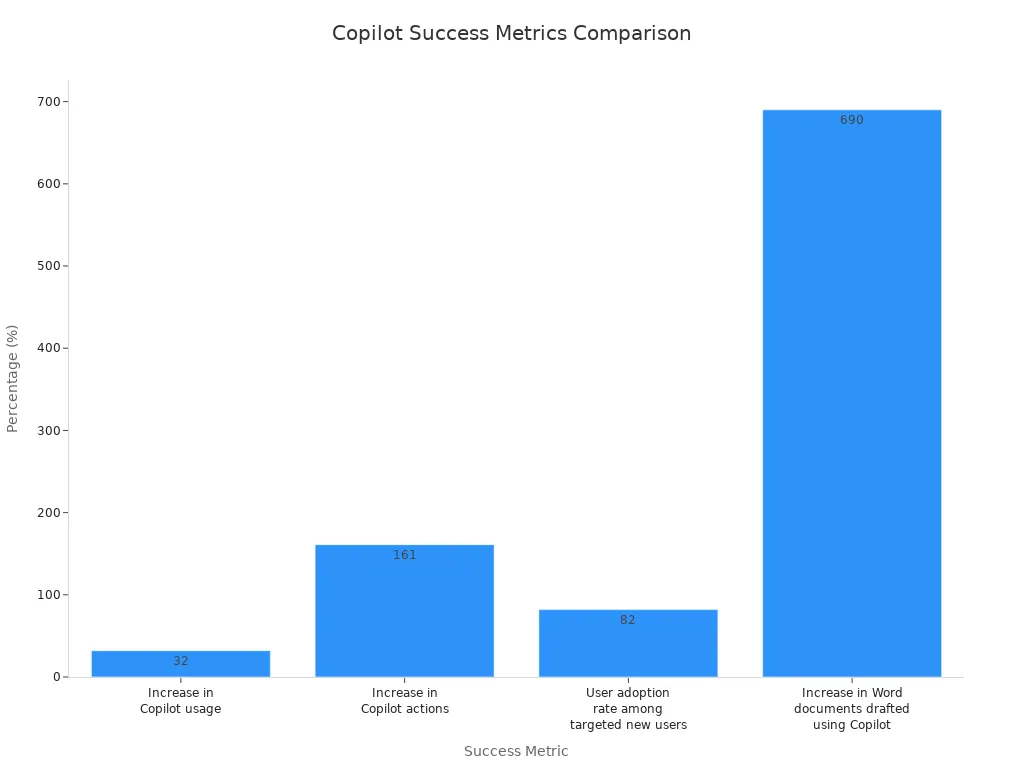
You can also highlight how comprehensive training and change management help everyone use copilot, no matter their skill level. Ongoing knowledge sharing, like a "prompt of the week," keeps learning active and supports continuous improvement.
External Communication
You share your success stories outside your organization to build your reputation as an AI leader. When you communicate your copilot journey, you attract talent and show your commitment to innovation. Sharing specific use cases and business results helps others see the value of copilot and encourages wider adoption.
By measuring copilot impact, you ensure that your investment delivers real productivity gains and supports your business goals. You create a feedback loop that drives continuous improvement and lasting success.
Customizing Copilot Solutions
Role-Based Agents
Tailored Workflows
You can tailor copilot to fit the unique needs of each role in your organization. Start by designing workflows that match daily tasks. For example, you might automate expense approvals by connecting copilot with your ERP system. You can create templates for sales teams to generate reports or for marketing to draft campaign emails. When you configure prompts for specific tasks, you help employees work faster and with fewer errors. IT teams can adjust copilot features so only the right people access sensitive data. This approach boosts both productivity and security.
- Automate routine processes, such as approvals or data entry.
- Build templates for common tasks in sales, marketing, or finance.
- Set up prompts for generating reports or summarizing meetings.
- Integrate with custom apps and databases for advanced needs.
Department-Specific Solutions
Each department faces different challenges. You can customize copilot to address these needs. In healthcare, you ensure compliance with regulations like HIPAA. In finance, you protect confidential data while speeding up reporting. For customer service, you design conversational flows that help agents answer questions quickly. Log in to Copilot Studio to access services and ground your copilot in your organization’s data. This makes every interaction more relevant and secure.
Integrating Copilot with Business Processes
Aligning with Goals
You should align copilot with your business goals. Start by identifying the main problems each department wants to solve. For example, sales teams may want to close deals faster, while HR may focus on onboarding new hires. When you connect copilot to these goals, you see real improvements in outcomes. Design conversational flows for critical topics, such as account management or customer support. Use generative actions to pull data from different sources, making copilot even more helpful.
Continuous Improvement
You need to review and improve your copilot setup regularly. Track how teams use copilot and gather feedback. Adjust workflows and prompts based on what works best. This process helps you keep up with changing business needs and technology updates. Continuous improvement ensures that copilot stays valuable and relevant.
Scaling Copilot Adoption
Expanding Use Cases
As you see success in one department, you can expand copilot to others. Start with pilot projects that focus on real business challenges. Treat these pilots as time-bound projects with clear goals. Train users on how copilot improves their job outcomes, not just on software features. This approach builds confidence and shows the value of AI across your organization.
Managing Growth
Scaling copilot requires careful planning. Prepare your Microsoft 365 environment by organizing data and setting permissions. Establish a consistent rhythm for tracking progress, such as weekly check-ins. Use these meetings to discuss usage, obstacles, and improvements. This structure helps you manage growth and maintain high adoption rates.
| Best Practice | Description |
|---|---|
| Identify specific business problems | Tailor copilot to solve unique challenges in each department. |
| Prepare the M365 environment | Organize data and set permissions before expanding adoption. |
| Focus training on job outcomes | Teach users how copilot improves their daily work. |
| Structure pilots as real projects | Set clear goals and timelines for pilot phases. |
| Track progress consistently | Hold regular check-ins to review usage and address challenges. |
Tip: Customizing and scaling copilot helps you unlock the full power of Microsoft AI for every team.
You drive copilot adoption by focusing on change management, clear communication, and strong leadership. For lasting adoption, you need ongoing support and regular measurement. Customize your approach to fit your business needs. These steps lead to copilot success and help you unlock real value with Microsoft. Start your copilot adoption journey today and transform the way your organization works.
- Build a plan for adoption.
- Support your teams every step.
- Measure progress and adjust.
FAQ
What is Microsoft Copilot?
Microsoft Copilot is an AI-powered assistant that helps you work smarter. You can use it to draft emails, summarize documents, and automate tasks in Microsoft 365 apps.
How do I start using Copilot in my organization?
You need to assign licenses, prepare your environment, and provide training. Start with a pilot group. Track results and expand as your team gains confidence.
Is Copilot secure for sensitive data?
Yes. You control access with permissions and data policies. Review your security settings before rollout. Use tools like Microsoft Purview to protect sensitive information.
Who should get Copilot access first?
Start with teams that handle repetitive tasks or large amounts of data. Early adopters can share feedback and help others learn.
How does Copilot support my business goals?
Copilot helps you save time, reduce errors, and boost productivity. You can align Copilot with your business processes to see real results.
What training resources are available?
You can use scenario-based training, online courses, and Microsoft’s Copilot Success Kit. Champions and user communities also support ongoing learning.
How do I measure Copilot adoption?
Track usage analytics, collect feedback, and review business outcomes. Use dashboards to see where Copilot makes the biggest impact.
Can I customize Copilot for different departments?
Yes. You can tailor workflows, prompts, and integrations for each department. This helps every team get the most value from Copilot.
🎧 Listen to this episode
Want a practical explanation of Microsoft Copilot Adoption with Edyta Gorzoń [MVP]? This episode breaks down the topic in clear language and shows why it matters for Microsoft 365, Azure, Power Platform, security, AI, and modern work.
Listen to this episode if you want to:
- Understand the key concepts behind Microsoft Copilot Adoption with Edyta Gorzoń [MVP]
- See how it fits into the wider Microsoft technology ecosystem
- Learn where it can create practical value for your organization
You may also enjoy these related M365 FM episodes:
- Microsoft 365 Copilot Adoption with Chris Hinch [Microsoft]
- Scale Microsoft Copilot Adoption in 90 Days with Carina de Vries [MVP]
- Increase Microsoft 365 Copilot Adoption with Behavior Change
- Microsoft 365 Copilot Agents: Real Business Value with Steve Corey [MVP]
- Copilot for Dynamics 365 Finance and Operations - Simply Explained
Discover more practical Microsoft conversations on M365 FM.

Microsoft MVP | Host of M365.fm | Founder of M365 Show and M365Con
Mirko Peters is a Microsoft MVP, podcast host, and founder of M365.fm, M365 Show, and M365Con. His work connects Microsoft practitioners through podcast interviews, livestreams, and community events.
At M365.fm, Mirko hosts conversations with Microsoft MVPs, product experts, architects, and community contributors. Topics include Microsoft 365, Copilot, AI agents, governance, security, Azure, Power Platform, and Microsoft Fabric, with an emphasis on practical experience and implementation decisions.
M365.fm is the podcast and learning platform. M365 Show brings experts together for livestreams, while M365Con provides an online conference setting for community learning.
Official website: Mirko Peters (https://www.mirkopeters.com/). Recognition: Mirko Peters — Microsoft MVP profile (https://mvp.microsoft.com/de-DE/mvp/profile/9b0ca797-db5a-493a-a845-8b9158046cf5). Connect on LinkedIn (https://www.linkedin.com/in/m365showpodcast/).





![Microsoft Copilot Adoption with Edyta Gorzoń [MVP]](https://d3wo5wojvuv7l.cloudfront.net/t_rss_itunes_square_1400/images.spreaker.com/original/c1dd26eff19ea70d2d2ab9e951efb36c.jpg "Microsoft Copilot Adoption with Edyta Gorzoń [MVP]")