
Identity Lifecycle Management: Modern Approaches for Secure Digital Workplaces
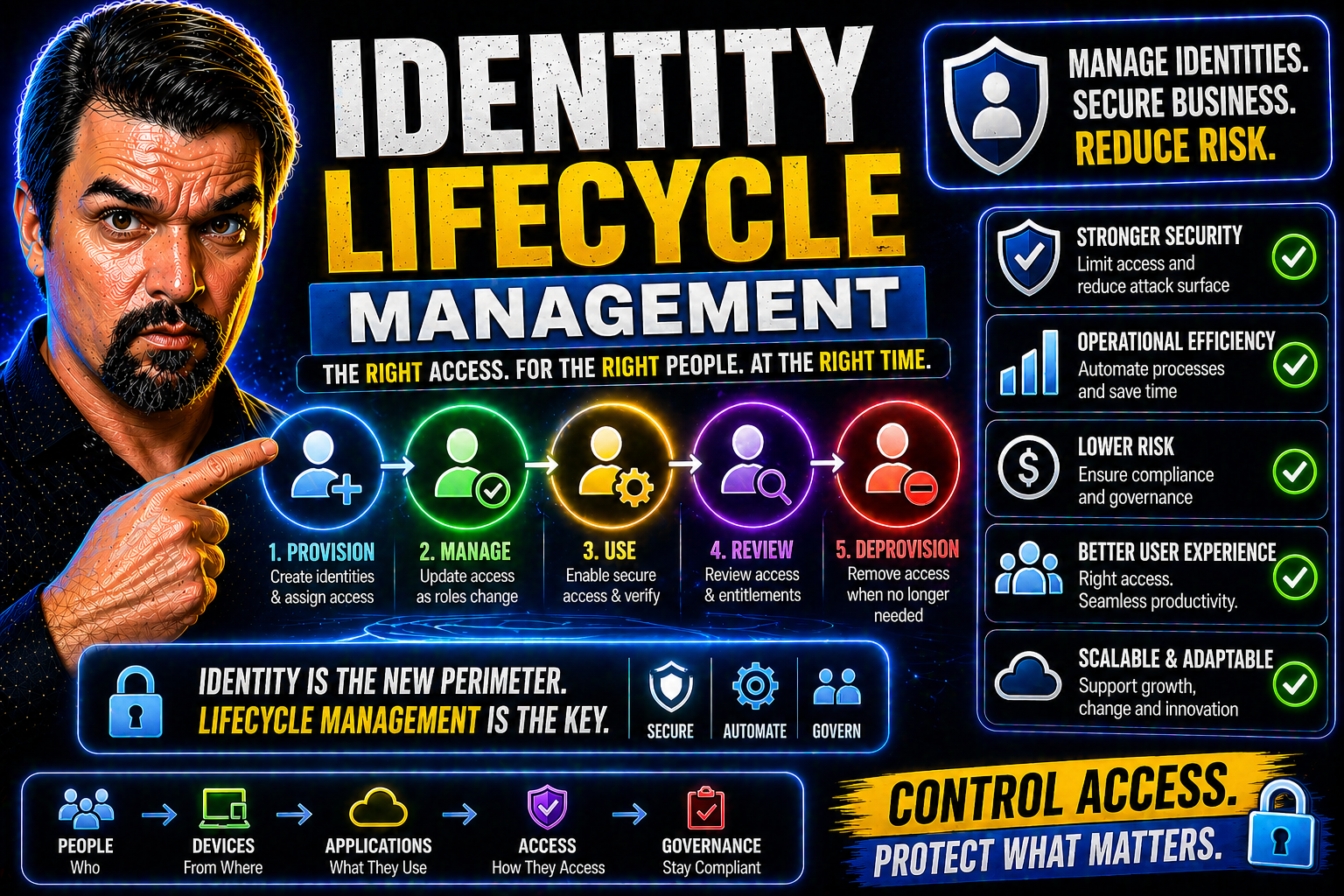
The way organizations manage digital identities has come a long way from handwritten sign-in sheets and sticky notes on monitors. Today, identity lifecycle management (ILM) sits at the core of modern security strategies—especially in enterprises built on Microsoft technology like Microsoft 365 and Entra ID. ILM isn’t just about tracking who’s hired or fired; it’s about automating every step, from onboarding a new user to cutting off access the minute someone—or some bot—no longer needs it.
In a world of cloud apps, hybrid work, and fast-paced business changes, robust ILM helps keep your people productive, your data safe, and your auditors happy. But it’s not always easy: silos, manual handoffs, and legacy systems love to throw wrenches in the works. We’ll dig into the tools, best practices, common pitfalls, and exactly how ILM supports Zero Trust and compliance mandates—plus, we’ll look at how Microsoft Entra ID makes this all achievable in real life.
Understanding Identity Lifecycle Management: Core Concepts and Frameworks
Identity lifecycle management touches every corner of an organization, weaving security, compliance, and productivity into a single fabric. At its foundation, ILM is about managing digital identities from the moment they arrive—whether that’s a new employee, a contractor, or even a machine account—all the way until their access is no longer needed. As cybersecurity threats and regulatory pressures grow, so does the importance of getting ILM right.
The field relies on strong frameworks and common terminology. You’ll hear about onboarding and offboarding, provisioning (giving access), deprovisioning (removing access), and the difference between digital identities for people versus non-humans like bots or service accounts. Knowing these basics helps you appreciate how ILM fits together and where it diverges from broader identity and access management (IAM), or from the highly specific controls found in Zero Trust security models.
As you explore ILM, you’ll soon see that it’s not a fancy new buzzword—it’s the engine room beneath your IAM and governance strategies, especially in Microsoft environments fueled by Entra ID. Next, we’ll break down these fundamental concepts, clarify how ILM works hand in hand with IAM, and show you the critical role ILM plays in building rock-solid, future-ready security frameworks.
What Is Identity Lifecycle Management and Why It Matters
Identity lifecycle management (ILM) is the discipline and set of processes an organization uses to create, manage, and retire digital identities and their access to systems and data. ILM covers the whole journey: onboarding new users, provisioning accounts and access, modifying permissions as roles or projects change, and securely offboarding users so no stray access remains.
Why does ILM matter? Because failing to maintain identities through their lifecycle leads to real risks—think unauthorized access, insider threats, compliance gaps, and even costly data breaches. As regulations like GDPR and SOX grow stricter, and attacks get craftier, automating the identity lifecycle is now a must-have, not a luxury.
The rise of automation in ILM helps organizations handle identity management at scale and speed. Systems like Entra ID can integrate with HR, IT, and business apps—ensuring a new hire gets only the access they need right when they join, and access is promptly removed upon exit. Manual, error-prone processes are replaced by transparent, auditable workflows, reducing the chance for mistakes or lingering “ghost accounts.”
Ultimately, getting ILM right isn’t just a win for IT—it’s essential for security, compliance, and keeping your operations smooth. Every step in the identity journey must be accounted for, tracked, and controlled so that your organization stays safe and productive.
ILM vs IAM: How Identity Lifecycle Management Complements IAM Systems
While ILM and IAM (identity and access management) sound similar, each plays a distinct role. IAM is the broader practice of governing, authenticating, and authorizing users to access various resources. ILM goes deeper into the process of managing identities throughout their lifespan—think joiner, mover, and leaver events—where access is automatically assigned and withdrawn as needed.
Put simply: IAM determines who can access what, but ILM manages when and how that access is granted, modified, or revoked, based on changes in an identity’s status or role. For example, an ILM workflow will automatically disable access when someone leaves or change privileges after a promotion—giving you dynamic, hands-off control that extends IAM’s reach.
Aligning ILM with Zero Trust and Modern Security Frameworks
ILM is a linchpin for Zero Trust security. By enforcing the principle of least privilege, ILM ensures that users and systems only get the access they need, for as long as they need it. Continuous verification—ongoing evaluation of access rights—means if someone’s role changes, their access adapts in real time.
Modern security frameworks demand rapid threat detection and compliance proof. ILM delivers by automating access reviews, tightly coupling onboarding/offboarding, and supporting auditable, policy-driven changes that shield your organization from evolving cyber risks. For more in-depth discussion of Zero Trust in Microsoft cloud, see Zero Trust by Design in Microsoft 365 and Dynamics 365.
The Stages of Identity Lifecycle Management: From Onboarding to Offboarding
The journey of an identity within your organization is more than just a simple begin-and-end story. It involves a series of well-defined stages that must each be handled with care—from when a user or account is created, all the way to their final removal. For Microsoft-centric organizations, these transitions often rely on automation and policies managed through platforms like Entra ID and the broader M365 ecosystem.
Each phase—onboarding, role and access modification, monitoring active accounts, and secure offboarding—carries its own security, operational, and compliance requirements. Automating these workflows not only reduces errors, it also accelerates productivity and delivers a much better user and admin experience. The following sections will walk through the lifecycle with practical, real-world Microsoft examples to show how these stages work in action—and what can go wrong if they’re neglected.
Employee Onboarding, Role Assignment, and Automated Provisioning
- HR-triggered account creation: User onboarding starts the moment HR enters a new hire into the system. Integration between HR and Entra ID (or related directory platforms) kicks off the identity creation process, sending the right data to the directory so IT doesn’t have to re-enter information—reducing manual error.
- Role-based access assignment: Once the new account appears, ILM engines match the individual to job roles, departments, or teams. Access is provisioned automatically based on policies that map roles to specific apps, SharePoint sites, or Azure resources. This way, there’s no guesswork or over-provisioning.
- Automated provisioning of apps and resources: With automated workflows, Entra ID can assign Microsoft 365 licenses, set up mailboxes, add users to MS Teams, and even assign learning modules or compliance training. New hires hit the ground running, and admins aren’t buried in support tickets.
- Initial review and confirmation: Onboarding should include an initial validation step, confirming the right access was granted. With self-service portals, new users or managers can verify their entitlements, prompting corrections before productivity—or security—is impacted.
Managing Access Modifications and Preventing Privilege Creep in ILM
- Dynamic role and project changes: As users change roles, projects, or departments, their required access often shifts. ILM platforms detect changes coming from HR or IT systems and trigger workflows that adjust entitlements accordingly, whether adding or removing permissions.
- Ongoing access management reviews: Regular access reviews—using automation from Entra ID or similar tools—help ensure nobody holds onto privileges they no longer need. Managers and resource owners are prompted to recertify access, closing the door on privilege creep before it grows into a security risk.
- Prevention of privilege creep: Privilege creep—when entitlements quietly accumulate over time—is a classic cause of both insider risk and compliance failures. By mandating periodic access certifications and logs, organizations keep the “just enough access” principle alive, instead of letting unnecessary permissions linger.
- Audit trails and monitoring: Solutions like Microsoft Purview Audit track every access change and user action, making it easy to investigate suspicious behavior or demonstrate compliance during audits.
Secure Offboarding and Automated Deprovisioning
- Automated account disablement: When a user leaves, the offboarding process is triggered automatically from the HR system. Access to all Microsoft 365 apps, mailboxes, Teams, and connected SaaS tools is immediately revoked, reducing the risk window for unauthorized access.
- Emergency incident response: For sudden terminations or security incidents, ILM tools support “kill switch” workflows—quickly disabling accounts or revoking tokens so nobody can log in, even if devices are still out in the wild.
- Deprovisioning non-employee accounts: Guest users, vendors, and contractors often pose a lingering risk if not properly offboarded. Entra ID’s time-based access and regular access reviews (especially for guest accounts) are essential for preventing orphaned accounts. Get more strategies on this from The Hidden Danger of M365 Guest Accounts.
- Compliance and audit completion: Every step of deprovisioning should be logged, proving to auditors and regulators that access was removed according to policy and within required timeframes, with no loose ends left behind.
Advanced ILM Capabilities: Automation, Governance, and Modern Access Models
As identity environments grow more complex—with cloud, hybrid, and AI-driven systems—organizations need advanced ILM capabilities to stay ahead. It’s no longer enough to just turn accounts off and on. Leading-edge ILM delivers just-in-time privileges, automated recertification, and deep analytics so you can see and control every access event without breaking a sweat.
Automation is at the heart of modern ILM: it replaces tedious, manual processes with consistent workflows that scale. Continuous monitoring keeps you in the know, helping spot abnormal behavior instantly and proving compliance on demand. Governance keeps things in check, especially as AI agents, bots, and users interact in unpredictable ways. If you want to keep a lid on misconfigurations or shadow automations—see AgentAgeddon: Agents Outpacing Governance Collapse for more on avoiding these risks—you’ll need to embrace these new ILM models.
In the detailed sections that follow, we’ll explore just-in-time access, continuous monitoring, and how analytics-driven governance helps organizations adapt ILM to both user and workload needs, without losing control.
Just-in-Time Access and Non-Permanent Privileges Disrupting Attackers
- Temporary, auditable access grants: JIT access means users and admins are only given permissions for a set period—enough to get the job done, but not so long that they become a permanent liability. Access is requested and approved, then revoked automatically when the task is complete.
- Standing privilege reduction: By replacing “always on” admin rights with just-in-time privileges, standing entitlements get slashed. This is critical for Microsoft environments, where legacy global admin rights tend to stick around long after they’re needed.
- Disrupting attacker movement: Threat actors thrive on excess privileges and stale entitlements. With JIT controls on Entra ID and tools like Azure AD Privileged Identity Management (PIM), attackers hitting compromised accounts can’t move laterally or escalate rights without triggering alarms—or simply being shut out entirely. This disciplined approach also helps reduce identity debt, a key security risk discussed in Entra ID Conditional Access Security Loop.
- Improving audit and compliance: Every JIT privilege elevation is logged and reviewable, meeting regulatory demands for transparency, and providing a straightforward audit trail for every high-privilege action.
Access Recertification and Continuous Monitoring for Compliance
- Scheduled and event-driven access reviews: ILM automates periodic reviews of access rights; managers or system owners are prompted to certify—or revoke—access for employees and bots based on current needs and compliance mandates.
- Real-time monitoring and alerting: Continuous assessment tools (like Microsoft Purview and Entra ID’s access review modules) provide up-to-the-minute visibility, detecting if a user is assigned a privileged role, signs in from a new location, or accesses sensitive data.
- Automated deprovisioning and remediation: If access is found to be unjustified, ILM can automatically revoke it. This keeps privilege creep in check and ensures compliance is maintained, even as people and projects shift.
- Simplified reporting and evidence gathering: Integration with Microsoft 365 audit tools such as Microsoft Purview Audit supports extended retention of logs and tracks activity across resources—meeting the needs of regulated industries and complex hybrid operations.
Role-Based Access Controls and Behavior-Driven Governance
- Role-based access controls (RBAC): Assign users to roles with pre-defined permissions, making access predictable and minimizing errors.
- Behavior-based policies: Use analytics and activity patterns to flag abnormal access or usage—automatically tuning policies and triggering reviews as behaviors change.
- Automated approval workflows: Approval chains for sensitive access requests ensure oversight and enforce policy without slowing productivity.
- Governance and auditing: Analytics tools aggregate access patterns, enabling ongoing optimization and regulatory reporting.
Extending ILM to Cloud, Hybrid, and Non-Human Identities
Identity isn’t just about people anymore. With the growth of cloud, hybrid IT, and automation, organizations need to extend ILM strategies to cover every identity—including APIs, bots, and service accounts across Microsoft 365, Azure, and on-premises systems. This shift brings new challenges: managing access policies everywhere, protecting machine identities, and keeping everything in sync as enterprise environments change shape.
Platforms like Entra ID are designed to help you bring these worlds together under one roof, letting you apply lifecycle policies, enforce Zero Trust principles, and maintain compliance—no matter where or what the identity looks like. For those whose hybrid infrastructure keeps them awake at night, Microsoft’s latest approaches are specifically designed to overcome the blind spots that plague old-school, on-prem-only identity management.
If you want to know why static service accounts and legacy automation create security headaches, see Workload Identities: The Only Fix for Non-Human Risk for a deep dive. Next, we break down practical approaches to covering cloud, hybrid, and non-human identities for comprehensive, future-proof ILM.
Managing Access in Cloud and Hybrid Environments
- Unified identity synchronization: Connect on-premises directories (like Active Directory) with Entra ID in the cloud, creating a single “source of truth” for users regardless of platform—reducing complexity and manual rework.
- Consistent policy enforcement across systems: Apply security policies—such as MFA, conditional access, and RBAC—consistently across Microsoft 365, Azure, and legacy apps. Leverage management groups, Azure Policy, and Entra Conditional Access to achieve this. See Entra ID Conditional Access Security Loop and Azure Enterprise Governance Strategy for more on effective governance.
- Lifecycle event-driven automation: ILM tools monitor identity events—hires, transfers, departures—so access changes happen instantly, no matter where identities reside.
- Hybrid and multi-cloud connectors: Integrate Microsoft cloud services with other SaaS or legacy systems using connectors, so ILM can extend its reach far beyond the boundaries of Azure or Microsoft 365.
Securing Non-Human Identities in ILM
- Service account lifecycle policies: Apply joiner-mover-leaver controls to service accounts, not just humans, using tools like Entra Workload Identities.
- Auditable API keys and secrets: Track creation, rotation, and revocation of secrets for machine identities to avoid shadow access.
- CI/CD pipeline coverage: Ensure bots and automated workflows in DevOps are granted only the minimum permissions, for the shortest time possible.
- Risk mitigation for legacy automation: Migrate old scripts and static accounts to managed identities or workload identities, enforcing least privilege and rotation. Learn more in Workload Identities: The Only Fix for Non-Human Risk.
Privileged Access Governance for Admins and Machine Accounts
- Privileged access management (PAM): Use granular controls to govern admin and high-risk machine accounts—such as JIT admin rights, PIM for Azure, and strong approval workflows—to limit exposure and reduce the blast radius if an account is compromised.
- Audit and oversight mechanisms: Every privileged action, whether human or automated, should be logged for monitoring and post-incident analysis. Microsoft Purview Audit is ideal for this.
- Segregation of accounts for automation: Separate admin and machine identities from end-user and system workflows, giving bots and automation their own identities with tightly-scoped permissions.
- Lifecycle policies for privilege: Apply automatic removal of privileged access once the admin task finishes, ensuring privilege does not linger unintentionally.
Solutions, Tools, and the Vendor Landscape for ILM
The ILM market has exploded in recent years, with platforms ranging from standalone cloud services to robust, enterprise-grade suites built specifically for Microsoft ecosystems. Selecting the right solution is more critical than ever, with strategic considerations like automation, integration, cloud, and non-human identity support all in play.
Beyond Microsoft Entra ID—which forms the backbone for organizations aiming to standardize on M365—leading vendors include Okta, SailPoint, Ping Identity, and CyberArk. Each brings unique features and a different focus, from deep integration with on-premises Active Directory, to advanced identity governance and privileged access controls.
But no tool is a silver bullet. You’ll need to weigh feature set, ability to integrate, reporting capabilities, how granular your controls can be, and whether you’re well covered for OAuth consent-based risks—see Entra ID OAuth Consent Attack Explained for what can go wrong if you miss these angles. Next up, we’ll compare the top ILM vendors and highlight what features are must-haves for success in a Microsoft-heavy world.
Top Lifecycle Management and Identity Governance Solutions
- Microsoft Entra ID: Deep integration with all things Microsoft, enabling end-to-end automation, Conditional Access, and robust support for cloud and hybrid identity scenarios.
- Okta: Cloud-native and SaaS-first, Okta shines for single sign-on and universal directory—exceptional for managing identities across multi-cloud applications.
- SailPoint: Leader in identity governance and administration (IGA), with powerful access certifications, risk analytics, and deep auditing suited for regulated industries.
- Ping Identity: Strong in federation and SSO for hybrid, complex environments. Offers tight integration with legacy and cloud systems, supporting advanced governance needs.
- CyberArk: Specializes in privileged access management, securing admin accounts and machine identities, with industry-leading session isolation and monitoring.
The right choice depends on your stack, scale, and regulatory pressures. For Microsoft shops, Entra ID’s breadth is hard to beat, but niche vendors fill gaps in governance and privilege management.
Essential Features to Evaluate in ILM Solutions
- Automation and Workflow Engine: ILM tools must automate onboarding, access changes, and offboarding. Look for solutions that support complex approval flows, conditional triggers, and self-service portals for users and managers.
- Granular Access Controls: Fine-grained permissions management is critical—assign roles, entitlements, and time-limited privileges down to the individual app or dataset.
- Seamless Authentication & Authorization: Integration with SSO, MFA, and modern authorization protocols (OAuth, SAML) for secure, user-friendly access.
- Complete Lifecycle Tracking: Track every action—creation, changes, and deletions—with immutable audit logs, supporting compliance needs and forensic investigations.
- Non-Human Identity Support: Verify the platform handles service accounts, bots, and workload identities with the same rigor as human users, enabling automation and secure DevOps.
- Robust Reporting & Analytics: Dashboards, reports, and compliance-ready evidence must be at your fingertips. Audit capabilities should cover both cloud and on-premises resources.
- Microsoft and SaaS Integration: Verify native connectors for Microsoft 365, Azure, Entra ID, and popular SaaS apps—avoiding custom scripts and fragile sync engines.
- OAuth Consent and Delegation Controls: Advanced protection against attacks leveraging OAuth consent, such as requiring admin approval for risky app integrations.
Best Practices, Challenges, and Strategic Benefits of Effective ILM
When you’re rolling out ILM, there are a lot of moving pieces—and common pitfalls can derail the best-laid plans. It’s not just about picking the right tools; it’s about getting your HR, IT, security, and business teams on the same page and applying proven strategies to avoid stale data, orphaned accounts, or costly manual mistakes.
Robust ILM brings immediate and long-term wins. By automating the joiner-mover-leaver cycle, driving continuous compliance, and streamlining onboarding/offboarding, organizations reduce risk, boost operational efficiency, and accelerate productivity for everyone—including hybrid and remote workers. Microsoft-centric shops have the extra advantage of deep platform integration and compliance-ready features packaged right into the stack.
If you’re looking for field-tested advice and need to steer clear of data silos, inconsistent governance, or burnout from constant firefighting, the coming sections break down common challenges, actionable best practices, and the security and compliance value ILM brings to your business. For more on balancing “citizen development” freedom with compliance, see Power Platform Security Governance Best Practices.
Overcoming Critical ILM Challenges and Solving Data Hygiene Issues
- Breaking down data silos: Ensure HR, IT, and business systems all feed current identity data into your ILM platform—reducing mismatches and duplicate accounts.
- Minimizing manual processes: Automate wherever possible, especially for onboarding, access reviews, and offboarding, to cut errors and delays.
- Aligning HR and IT workflows: Set up cross-team sync meetings and document shared processes to improve accuracy and close security gaps.
- Upgrading to governed data backbones: Avoid patchwork solutions for storing identity attributes—use platforms like Microsoft Dataverse for governance and security as outlined in Dataverse vs. SharePoint: The Governance Mistake Costing You Time.
Realizing Strategic Benefits: Security, Compliance, and Operational Efficiency
- Reduced security risk: Automated provisioning and timely deprovisioning lower the chances of insider threats and data leaks, especially with layered controls in Unlock Ironclad M365 Security Without Annoying Users.
- Continuous compliance: Built-in audit logs and evidence generation prove adherence to regulatory mandates like SOC 2, HIPAA, and GDPR.
- Faster onboarding/offboarding: Automated workflows mean new hires and departing workers are covered without admin bottlenecks.
- Boosted efficiency for hybrid teams: Access can be managed dynamically, fueling workforce flexibility without sacrificing control.
Best Practices for Implementing ILM and Balancing Security
- Establish clear policies and roles: Document who owns identity processes, what access is permitted, and escalation paths for exceptions. Keep these up to date as business needs evolve.
- Enforce the principle of least privilege: Default to granting only the minimum required access for a given role or task, and use just-in-time elevation for sensitive assignments.
- Foster tight HR-IT collaboration: HR events should trigger instant updates in ILM, syncing employee status so entitlements never lag behind reality.
- Prioritize ongoing security training: Educate staff—especially managers and power users—on the importance of secure access and reporting suspicious behavior. See security awareness training for details.
- Balance control and user experience: Use self-service access portals so users can request new access or validate existing permissions without ticket churn or unnecessary friction.
- Set rigorous auditing and review schedules: Regularly reconfirm assignments, check for unused accounts, and investigate anomalies with built-in tools.
- Monitor and refine policies iteratively: Treat ILM as an ongoing program, not a one-and-done project. Continue to adjust policies and technologies as your business, employees, and threat landscape evolve.
Identity Lifecycle Management for Third-Party and Ecosystem Access
It’s not just your own people who need access to systems—partners, vendors, and contractors regularly step inside your digital hallways. But granting access outside the home base introduces new risks: over-privileged vendor accounts, shadow IT, and inconsistent offboarding can lead to big security and compliance headaches.
Effective ILM for third-party access means applying the same rigor—automated onboarding, time-bound and auditable permissions, easy removal—to users who don’t draw a paycheck from you but still touch your data. Central IT may not have direct control over these identities, but the right tools and consent-based models allow organizations to delegate access management safely while staying compliant.
If you want to understand why enhanced monitoring and automation matter for external collaboration, check out Stop Blind External Sharing – Catch It Before Disaster. Next, we’ll lay out the foundations for secure, scalable third-party lifecycle management.
Managing Identity Lifecycles Across Organizational Boundaries
When you let third-party users—vendors, contractors, suppliers—get into your systems, you face risks you may not even see coming. Over-provisioned vendor accounts and “orphaned” access often go undetected, especially when there’s no clear process for oversight. A strong ILM framework applies lifecycle controls not just to your people, but to everyone. This means onboarding with defined access, setting time limits, reviewing external entitlements regularly, and deprovisioning access as soon as the need expires. Done right, you shield your organization from shadow IT, data leaks, and audit trouble down the road.
Automated Delegation and Consent Models for Ecosystem ILM
Automated delegation and consent frameworks change the game for ecosystem ILM. Instead of central IT sweating the details for every external account, partner organizations can manage their own users within a set policy boundary—requesting, approving, and removing access independently, but with built-in auditability. Consent-based access means only validated, justified permissions are granted, and approvals are tracked for compliance. For Microsoft environments, strict Entra ID controls—like those discussed in Entra ID OAuth Consent Attack Explained—are crucial for stopping persistent, invisible access granted through abused consent workflows.
Conclusion: The Future of Identity Lifecycle Management
Identity lifecycle management is no longer an optional IT luxury—it’s the heart of a secure, agile digital workplace. As organizations get more connected, move to cloud, and rely on automation and AI, ILM’s role will only expand. The future isn’t just automated onboarding and offboarding; it’s AI-driven identity insights, continuous compliance monitoring, and granular control over every new class of digital identity.
Expect ILM to evolve with more self-healing policies, context-aware access, and deeper integrations across security platforms. Governance challenges—especially with AI agents and non-human identities—will require fresh thinking, like the mechanisms detailed in Agentic Advantage: Governance in an AI World. To keep up, organizations will need to embrace automation, advance their policy enforcement, and continually review access across all users—human or not.
In the end, strong ILM is what separates the organizations with trustworthy, auditable digital workspaces from those risking costly chaos every time someone joins, leaves, or spins up a new app. The journey is ongoing, but getting the foundation in place now is an investment in security, compliance, and business agility for whatever comes next.
Getting Started with Identity Lifecycle Management in Your Organization
- Secure stakeholder buy-in: ILM touches HR, IT, security, compliance, and often the business side. Bring these teams together to align on objectives, highlight risks, and get consensus on ownership.
- Inventory current identities and access: Take a thorough inventory of all your digital identities—users, service accounts, external partners—and what they can access. This baseline will show where your gaps and priorities are.
- Develop clear policies and procedures: Document joiner-mover-leaver workflows and access review schedules. Outline the approval structure for new access, escalation paths, and how exceptions are managed.
- Pilot ILM tools and integrations: Test Entra ID or a third-party ILM suite in a safe environment. Sync with your HR and directory systems, simulate lifecycle events, and adjust workflows before scaling up.
- Automate and iterate: Replace as many manual tasks as possible with automated provisioning, review, and offboarding workflows. Continually review activity logs, process failures, and access anomalies as you mature.
- Adapt for hybrid and cloud environments: Ensure ILM covers both Microsoft and non-Microsoft apps, on-premises and cloud—especially if you’re running hybrid infrastructure, as Entra ID excels in bridging these worlds.
- Establish ongoing improvement cycles: Treat ILM as a continuous program, not a one-off project. Regularly audit your process, gather stakeholder feedback, and evolve policies to meet new requirements and risks as they arise.

Microsoft MVP | Host of M365.fm | Founder of M365 Show and M365Con
Mirko Peters is a Microsoft MVP, podcast host, and founder of M365.fm, M365 Show, and M365Con. His work connects Microsoft practitioners through podcast interviews, livestreams, and community events.
At M365.fm, Mirko hosts conversations with Microsoft MVPs, product experts, architects, and community contributors. Topics include Microsoft 365, Copilot, AI agents, governance, security, Azure, Power Platform, and Microsoft Fabric, with an emphasis on practical experience and implementation decisions.
M365.fm is the podcast and learning platform. M365 Show brings experts together for livestreams, while M365Con provides an online conference setting for community learning.
Official website: Mirko Peters (https://www.mirkopeters.com/). Recognition: Mirko Peters — Microsoft MVP profile (https://mvp.microsoft.com/de-DE/mvp/profile/9b0ca797-db5a-493a-a845-8b9158046cf5). Connect on LinkedIn (https://www.linkedin.com/in/m365showpodcast/).




