
Privileged Access Strategy Guide
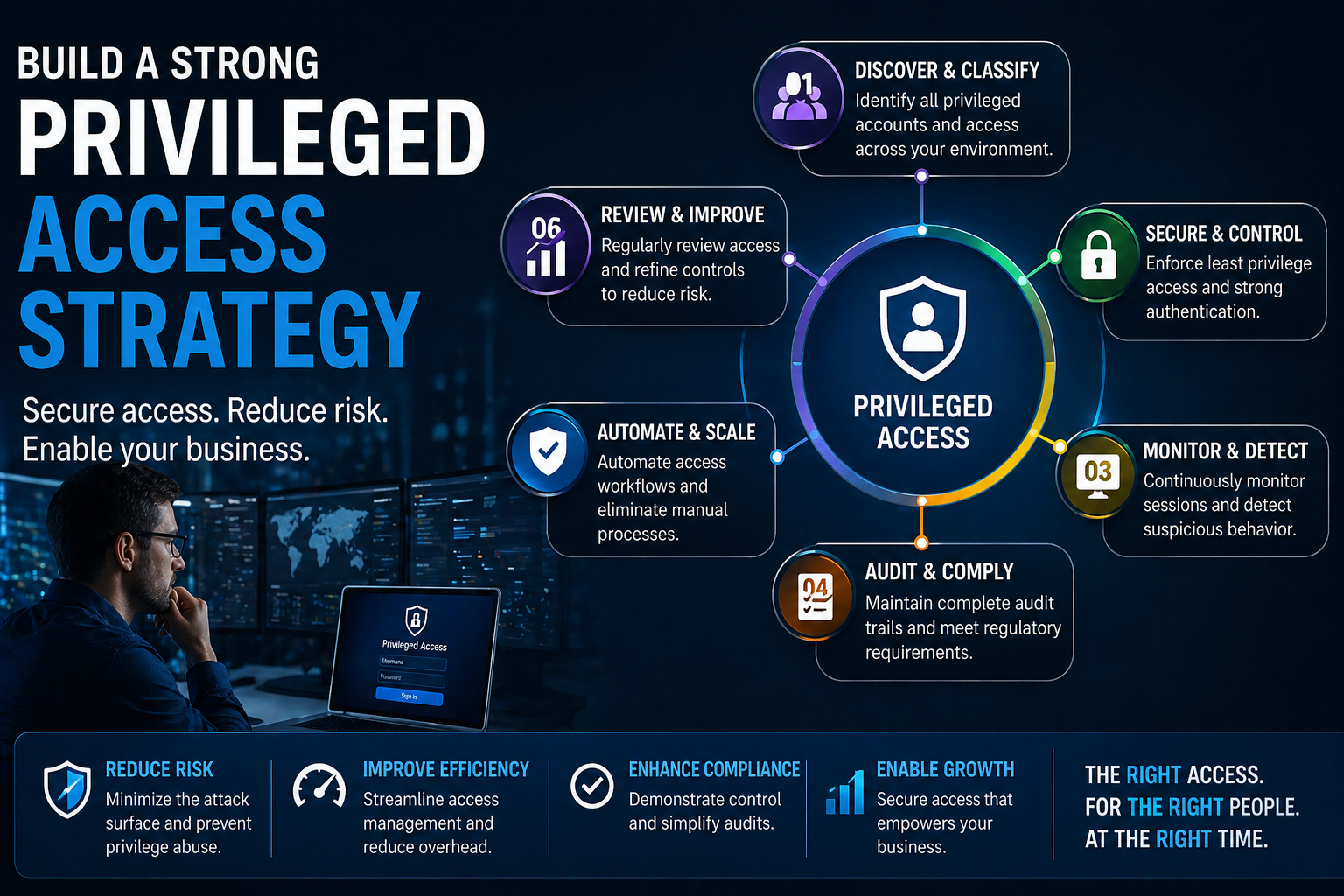
In the world of cybersecurity, a privileged access strategy stands tall as one of your best lines of defense. When attackers set their sights on your business, privileged accounts—like admin users and system accounts—are their golden ticket to your most valuable assets. The right strategy doesn’t just throw up a locked door; it checks everyone’s ID at the gate, watches for funny business, and makes sure the key never lands in the wrong hands.
This guide will walk you through practical steps to secure sensitive resources using modern, identity-centric controls, with a particular spotlight on Microsoft’s best-in-class technologies such as Entra ID. You’ll see how privilege management fits into a larger plan—protecting systems, meeting compliance demands, and supporting your growing cloud footprint. Ready to lock down critical systems and keep your business running, no matter what new threat the world cooks up? Let’s get into it.
Understanding Privileged Access Management and Its Strategic Role
Modern cybersecurity is shifting fast, and attackers know the best way in is through the doors marked “privileged.” Privileged Access Management—PAM for short—acts as the bouncer for your network, deciding who gets in, what they can do, and tracking every move they make. As hybrid work and cloud adoption soar, keeping a close watch on privileged accounts is no longer optional—it's a staple of Zero Trust strategies everywhere.
Think of PAM as the layer that stands between a bad actor and your most sensitive data. It’s not just about passwords, but about controlling, monitoring, and reviewing all powerful actions that could lead to disaster if abused. With threats constantly evolving, a strong PAM foundation helps make sure only the right people, on the right devices, at the right time, can access critical systems and data.
In the sections ahead, you’ll get a clearer picture of PAM terminology, learn exactly what “privileged access management” really means, and see how all these pieces support a resilient cybersecurity strategy. Whether you’re running everything on-premises, have moved to the cloud, or ride the line between, understanding PAM’s strategic role is the first step on the road to true security.
Privileged Access Management Terms and Acronym Explained
- PAM (Privileged Access Management): The practice of controlling, monitoring, and auditing access to critical systems by users with elevated privileges.
- Privilege Elevation: Granting a user temporary access to admin-level permissions, only when needed for specific tasks.
- Privileged Accounts: User or service accounts that hold enhanced access rights, such as administrators or root accounts.
- Session Monitoring: Tracking and recording privileged sessions in real time for audit, security, and forensic purposes.
- Privileged Account Lifecycle: The complete process of onboarding, managing, monitoring, and securely deactivating privileged accounts.
The Crucial Role of Privileged Access Management in Cybersecurity
Privileged Access Management acts as your organization’s last best guardrail against some of the most damaging cyber threats, including credential theft, privilege escalation, and lateral movement attacks. When attackers compromise privileged accounts, the path to sensitive data becomes dangerously simple—one bad move and an attacker could have free reign over critical assets.
PAM solutions reduce these risks by enforcing tight controls over who can access powerful accounts, when access is granted, and exactly what actions are performed. By putting guardrails around admin privileges and service accounts, you dramatically limit the blast radius of any attack, keeping sensitive data out of reach even if a password is stolen or misused.
PAM doesn't just stop outside threats; it’s essential for protecting against malicious insiders or accidental misuse by legitimate users. With real-time session monitoring and activity logging, security teams can spot suspicious actions right away, investigate breaches quickly, and meet tough compliance requirements. For example, integrating PAM with tools like Microsoft Sentinel or leveraging Entra ID’s logging helps track privileged actions across cloud and hybrid environments.
It’s all about control and visibility. For more on how attackers target privilege in real life, and how detection needs to go beyond MFA, check this Microsoft 365 attack chain breakdown. You’ll see why PAM is a critical pillar of any modern cybersecurity strategy.
Core Components and Models of a Privileged Access Management Solution
Now that you know the “why” behind privileged access management, let’s get into “what” makes it all work. At the heart of every solid PAM solution are a few technical building blocks—think encrypted vaults for credentials, real-time session monitoring, and just-in-time privilege grants—all designed to minimize risk without bottlenecking your team.
But PAM isn’t just about locking down passwords. The real power comes from tight integration with identity and access management systems like Entra ID, supporting advanced controls such as Conditional Access and dynamic policies that follow your users from on-premises to the cloud. When your PAM platform talks directly to your identity stack, you get strong authentication, seamless user experiences, and consistent enforcement everywhere.
Up next, we’ll unpack the main components—from session managers to password vaults—and then dig into the different models organizations use, including vault-based versus identity-integrated setups. You’ll also see why connecting PAM with modern identity platforms like Entra ID is a game-changer for cloud-first security.
Key Components That Make Up a Robust PAM Solution
- Privileged Credential Vaulting: Secure vaults encrypt and store admin passwords, keys, and secrets. Access is strictly logged and usually requires multi-factor authentication. This keeps credentials off endpoints and away from attackers lurking on the network. Vaulting is a cornerstone for passing compliance audits and aligning with Zero Trust.
- Privileged Session Management: PAM solutions establish controlled sessions for privileged activities. These sessions are monitored in real time and often recorded, delivering audit trails for investigations and regulatory requirements. Monitoring also enables security teams to spot suspicious commands or lateral movement as it happens.
- Just-in-Time Access: Instead of leaving privileged accounts active around the clock, just-in-time access triggers temporary elevation for specific tasks. Access is revoked automatically after a set period, drastically reducing the attack window if a credential is ever compromised.
- Approval Workflows: Sensitive operations (like privilege elevation or creating new admin accounts) are governed by approval processes—often involving ticketing systems, management sign-off, or custom policy rules. This prevents privilege misuse and keeps account creation in check.
- Audit Logging & Reporting: Every privileged action, request, and session is logged for later review. Connecting PAM logs to platforms like Entra ID or Microsoft Sentinel enables powerful analytics, compliance proof, and automated risk alerts. For more on taming identity sprawl, check the Entra ID governance loop.
- Service Account and Workload Identity Management: PAM must handle both human and non-human credentials. Solutions like Microsoft Entra Workload Identities replace risky, static service accounts with secretless, fully auditable identities—addressing a big gap in traditional PAM.
The PAM Model and The Role of Entra ID and Identity Management
There’s more than one way to build a privileged access model, but most organizations land on one of two main styles: vault-based and directory-integrated. The vault-based approach focuses on highly secure password vaults and session brokers; think extra layers between admins and critical devices. Directory-integrated (identity-first) models, such as those powered by Entra ID, treat identity itself as the control plane, using conditional access, risk-based policies, and seamless privilege elevation.
Entra ID plays a starring role in modern privileged access. It brings together Privileged Identity Management (PIM)—which grants just-in-time, policy-based access to Azure and Microsoft 365 admin roles—with broader IAM controls. IAM (Identity and Access Management) covers all user access, while PAM and PIM are focused directly on the riskiest accounts. Think of PAM as a subset of the wider IAM universe, but with deeper controls for highly sensitive operations.
Integrating PAM with Entra ID and comprehensive identity governance gives organizations one place to manage, monitor, and control both privileged and standard access, from on-premises servers to cloud workloads. When paired with strict consent policies and admin workflows, directory-integrated PAM forms a resilient defense against persistent threats—even those that bypass MFA by abusing OAuth, as detailed in this Entra ID OAuth consent attack breakdown.
Building a Holistic and Practical Privileged Access Strategy
It’s not enough to “set and forget” privileged access. Modern businesses need a living, breathing PAM strategy that grows with cloud adoption, evolving threats, and new compliance demands. Building a privileged access strategy means pulling together technical controls, business policies, and cultural change—you want to lock down the important stuff, but not grind productivity to a halt.
Your journey starts with understanding what assets truly matter, where privileged accounts live, and which risks keep you up at night. From there, the game is about crafting guardrails that protect critical data, stand up to regulations, and adapt easily as you shift workloads to the cloud or new platforms. Compliance is no longer a checkbox activity; it’s about measured, ongoing improvements that keep your business—and your auditors—at peace.
This section will guide you through actionable steps to develop a robust PAM strategy that works whether you have 100 users on-premises or thousands spread across Azure and Microsoft 365. You’ll also see why aligning privileged access strategy with larger cloud and digital transformation initiatives is the only way to avoid drift, enforce real governance, and keep your house in order. For a bird’s-eye view of cloud governance success, check out Azure enterprise governance best practices.
Key Steps to Developing and Implementing a Robust PAM Strategy
- Discover All Privileged Accounts: Start by inventorying every privileged account—admin, root, superuser, service accounts, and even legacy credentials hidden in workloads. Use automated discovery tools tied to your Microsoft ecosystem to avoid missing shadow or orphaned accounts.
- Assess Risks and Prioritize Assets: Not all privileged accounts are created equal. Map accounts to your most valuable data and systems. Run risk assessments to identify where an attacker could cause the most damage, then focus controls on your “crown jewels” first.
- Design and Enforce Access Policies: Draft clear rules for how and when privileged access is granted, reviewed, and revoked. Tie in role-based access control (RBAC), just-in-time elevation, and real-time session monitoring. This helps you bake security into user behavior, not bolt it on after the fact. For guidance on measuring the impact, explore compliance drift in Microsoft 365.
- Select & Deploy the Right Tools: Choose PAM solutions—like Entra ID PIM, Microsoft Purview Audit, or hybrid cloud platforms—that integrate into your existing security stack. Prioritize tools that support automation, actionable dashboards, and compliance reporting relevant to your business.
- Monitor, Audit, and Refine Continuously: Regularly review privileged activity with solutions such as Microsoft Purview Audit. Look beyond “who had access” and focus on behavioral analytics—flag suspicious changes, off-hours access, or privilege escalation.
- Train Users and Raise Awareness: Your controls are only as strong as the people following them. Conduct targeted training for privileged users and security staff so they understand evolving threats and compliance expectations.
Aligning Privileged Access Management with Cloud and Strategic Initiatives
Modern cloud adoption and remote work have shifted the entire game for privileged access. Traditional boundaries have faded—admin privileges can now reach far beyond the data center, exposing new risks and compliance gaps. To succeed, organizations need privileged access strategies that keep up with cloud-based PAM, enable secure remote operations, and adapt to strategic changes as digital journeys evolve.
Bringing PAM into your cloud transformation projects ensures that critical accounts and sensitive systems are protected regardless of location or platform. Aligning with broader digital initiatives, such as AI workloads or SaaS adoption, helps prevent Shadow IT risks and ensures external access is always secured and auditable. For a deeper look at new cloud security concerns, don’t miss this episode on AI and Shadow IT risks.
Best Practices and Crucial Steps for Effective Privileged Access Management
Knowing what to do is one thing—knowing how to do it right is another. This section gets down to the essentials: the proven practices and tactical steps you need for a PAM strategy that works day in and day out. With so many threats hammering at your front and side doors, effective access control isn’t a “nice to have”—it’s mandatory if you want to avoid headline-making breaches.
You’ll see the importance of enforcing least privilege, baking in multi-factor authentication, and not sleeping on those service account risks. Regular audits—combined with easy-to-understand reporting dashboards—transform compliance from a scramble into part of your routine. Even better, when you tap into Microsoft’s cloud-native tools, you can automate much of the grunt work, lowering costs and speeding up response to new risks.
In the next sections, you’ll get quick-win best practices followed by a step-by-step deployment roadmap that fits both on-premises and cloud-first Microsoft environments. For stronger everyday security without sacrificing user experience, see guidelines on ironclad M365 security and M365 data loss prevention.
Top Crucial Practices for Privileged Access Management
- Enforce Multi-Factor Authentication (MFA): Require MFA for all privileged accounts to prevent unauthorized access, even if a password is stolen.
- Rotate Passwords Regularly: Implement policies for frequent password changes, especially for service and admin accounts, to minimize risks from leaked credentials.
- Limit Unnecessary Admin Access: Use least privilege by granting admin rights only to those who absolutely need them—start restrictive, make exceptions visible and temporary.
- Manage Service Accounts Properly: Monitor, automate, and regularly review service accounts—avoid static passwords and use workload identities for non-human access. For further guidance on app platform governance, see Power Platform governance best practices.
Key Steps to Deploying an Effective PAM Solution
- Privileged Account Discovery: Use automated tools to uncover every privileged account across local AD, Azure, cloud services, and third-party tools. This full inventory is the launchpad for any real PAM program.
- Define and Enforce Access Policies: Write detailed rules for privileged access—who, when, how, and under what conditions. Implement these policies using your chosen tools, such as Entra ID Conditional Access, RBAC, or group-based controls.
- Set Up Credential Vaults and Session Controls: Configure encrypted vaults for storing credentials, apply just-in-time access, and enable session recording to prevent lateral movement and unauthorized actions.
- Integrate with Monitoring & Compliance Tools: Connect PAM logs to SIEM solutions like Microsoft Sentinel and compliance platforms such as Microsoft Defender for Cloud. This enables real-time detection, automated alerts, and continuous compliance without the manual grind.
- Conduct User Training and Policy Awareness: Train privileged users and support staff on best practices, threat vectors, and compliance expectations to eliminate avoidable mistakes and social engineering traps.
- Audit and Refine Regularly: Schedule frequent reviews of privileged access logs, exception reports, and policy drift—use dashboards and automated reports to flag issues before auditors or attackers do.
Real-World Applications and Tools for Privileged Access Management
Even the best PAM blueprint means little until you see it at work in the real world. This section pulls back the curtain on actual business scenarios—how organizations use PAM to secure admin accounts, control privilege elevation, and respond to threats hiding right under their noses. You’ll get bite-sized examples from regulated industries, cloud-first startups, and global enterprises alike.
Of course, having the right tools makes all the difference. Whether you’re looking at Microsoft Entra ID, new players like Lumos, or hybrid PAM platforms that bridge your legacy and modern worlds, the key is matching your pick to both tech stack needs and compliance realities. With cloud automation, identity-native controls, and API-driven architectures, today’s PAM solutions do more than block attacks—they drive operational efficiency, too.
The following cases and tool comparisons will help you understand what works best for your scale and cloud journey. From managed identities in Microsoft Fabric pipelines to full-blown Zero Trust by Design across Microsoft 365, you’ll see how practical PAM is changing the security game on the ground.
Privilege Management in Action: Use Cases from the Field
- Finance Organization: Enforces just-in-time admin privilege elevation and session recording to help prevent fraud and meet regulatory audit needs.
- Healthcare Provider: Replaces legacy service accounts with managed identities and Azure Key Vault, reducing the risk of insider threats and leaked secrets. Details on how this works can be found in securing Microsoft Fabric data pipelines.
- Cloud-Native Startup: Uses real-time access control policies in Entra ID to protect sensitive SaaS admin portals and ensure speedy offboarding of employees moving between roles.
- Global Enterprise: Implements Zero Trust by Design for unified identity, device, and session security in both Microsoft 365 and Dynamics 365, reducing the risk of privilege escalation attacks. For further insights, see Zero Trust implementation case study.
Comparing Leading PAM Tools and Solutions Like Entra ID and Lumos
- Microsoft Entra ID PIM: Delivers just-in-time admin elevation, approval workflows, session recording, and end-to-end auditability—all tightly integrated with Azure AD and Microsoft 365 environments.
- Lumos: A modern PAM platform that blends centralized access management, automated request workflows, and extensive SaaS integrations. It stands out for its cloud-first approach and deep reporting capabilities.
- Hybrid/On-Premises Solutions: Classic vault-based providers (e.g., CyberArk, BeyondTrust) excel for legacy data centers and complex network segments, but require more maintenance and may lag in cloud-native integration.
- Cloud-Native Platforms: Offer rapid deployment and automation, with seamless integration into identity platforms like Entra ID. Some lack depth in session monitoring or advanced approval workflows, so match features to your compliance profile.
Frequently Asked Questions and Key Takeaways for Privileged Access Management
PAM is a huge topic, and you’re bound to have questions—especially about how it fits with other identity controls and which next steps make the biggest impact. This wrap-up aims to clear up common confusion, highlight the takeaways that matter most, and equip you with a short action list for moving forward confidently.
You’ll get straight answers on the overlaps and differences between PAM, MFA, PIM, and IAM—a must for anyone trying to explain the investment to leadership or satisfy compliance auditors. Consider this your quick-reference section before you go deeper, buy tools, or launch pilots. And if you need a refresher on modern consent-based attacks, don’t miss the primer on OAuth consent abuse in Entra ID.
Use the following FAQs and takeaways to audit your current program, plan your next moves, or start conversations with your security, compliance, or cloud architecture teams. Locking down privilege access is a team effort, not a solo job—so keep these points on hand for your next strategy session.
PAM FAQ: Benefits, Differences, and Implementation Questions
- Is PAM the same as MFA? No. Multi-factor authentication (MFA) is a powerful access control method, but PAM goes further by managing, monitoring, and restricting all privileged access—MFA is often one part of a wider PAM policy.
- How does PAM differ from IAM or PIM? IAM manages identity and access for all users, while PAM specifically targets sensitive accounts and actions. PIM (Privileged Identity Management) is a subset focused on just-in-time admin rights, especially within Microsoft platforms.
- What are the key benefits of implementing PAM? Enhanced security against credential theft, better compliance posture, reduced risk of insider abuse, and stronger protection for critical systems—plus clear audit trails for investigations and reporting.
- Do I need specialized PAM tools if I use Entra ID? For Microsoft-centric environments, Entra ID PIM may cover most needs. For mixed or legacy environments, hybrid PAM platforms can bridge gaps and provide deeper, legacy-specific features.
- How fast can you expect results from PAM deployment? Many organizations see immediate risk reduction from discovery and credential vaulting. Full visibility and compliance improvements typically follow within weeks to months, depending on your starting point.
Key Takeaways and Next Steps for a Successful PAM Strategy
- Pilot PAM Tools: Start with a small, high-risk group and expand after validating workflows and outcomes.
- Invest in Continuous Training: Security tools are only as good as user awareness—update training regularly to cover new threats.
- Leverage Microsoft and Entra ID Resources: Use native integration and audit capabilities for fast wins, minimal friction, and compliance confidence. Check this resource on OAuth consent controls for advanced defense tips.
- Seek Expert Consultation: Don’t try to boil the ocean. Get help tailoring PAM to your business’s unique operating systems, cloud needs, and regulatory drivers.
- Measure and Refine Regularly: Align metrics with risk reduction, compliance goals, and user experience to maintain a resilient, adaptive PAM strategy.
You Should Also Listen To
If you are researching privileged access strategy, these episodes add practical context on identity security, governance, access control, and Microsoft 365 operations:
- Privileged Identity Management – Simply Explained — Understand just-in-time privilege, approvals, and access reviews.
- Conditional Access – Simply Explained — Learn how context-aware policies protect users and devices.
- Microsoft Defender XDR – Simply Explained — Connect identity signals with detection, investigation, and response.
- Microsoft Teams Governance – The Illusion of Control — See how governance creates ownership and repeatable controls.

Microsoft MVP | Host of M365.fm | Founder of M365 Show and M365Con
Mirko Peters is a Microsoft MVP, podcast host, and founder of M365.fm, M365 Show, and M365Con. His work connects Microsoft practitioners through podcast interviews, livestreams, and community events.
At M365.fm, Mirko hosts conversations with Microsoft MVPs, product experts, architects, and community contributors. Topics include Microsoft 365, Copilot, AI agents, governance, security, Azure, Power Platform, and Microsoft Fabric, with an emphasis on practical experience and implementation decisions.
M365.fm is the podcast and learning platform. M365 Show brings experts together for livestreams, while M365Con provides an online conference setting for community learning.
Official website: Mirko Peters (https://www.mirkopeters.com/). Recognition: Mirko Peters — Microsoft MVP profile (https://mvp.microsoft.com/de-DE/mvp/profile/9b0ca797-db5a-493a-a845-8b9158046cf5). Connect on LinkedIn (https://www.linkedin.com/in/m365showpodcast/).



