Unlocking Business Intelligence: A Deep Dive into Power BI Copilot
Imagine having an AI assistant that makes data analysis and report creation a breeze. That is exactly what Power BI Copilot offers! This innovative tool integrates seamlessly with Microsoft Power BI, allowing you to interact with your data using simple, natural language commands. You no longer need to navigate complex syntax or spend hours crafting reports. Just tell Copilot what you need, and watch it transform your ideas into insightful reports. With its user-friendly approach, the power of data is now accessible to everyone!
In this comprehensive blog post, we expand on the themes discussed in our podcast. To dive even deeper into the audio version, check out the related episode Power BI Copilot - Simply Explained.
Key Takeaways
- Power BI Copilot is an AI tool that simplifies data analysis and report creation using natural language commands.
- You can create reports quickly without needing coding skills. Just describe what you need, and Copilot does the rest.
- Copilot integrates well with Microsoft tools like Excel and Teams, making collaboration easier for teams.
- The tool can save you time, with reports generated in seconds and average time savings of up to 34.2% in content creation.
- Copilot helps you create visual reports easily, allowing you to focus on insights rather than technical details.
- Always review the outputs from Copilot for accuracy, especially for complex reports, as its accuracy can vary.
- Training your team on how to use Copilot effectively is crucial for maximizing its benefits.
- High-quality data models improve Copilot's performance, so ensure your data is well-structured and validated.
What Is Copilot?
Power BI Copilot is your intelligent assistant within the Power BI platform. It is designed to make data analysis and report creation easier than ever. With Copilot, you can interact with your data using natural language, which means you don't need to be a coding expert to get valuable insights. Just ask questions or describe what you need, and Copilot will handle the rest.
Key Features of Power BI Copilot
Power BI Copilot comes packed with features that set it apart from other AI tools. Here are some of the standout functionalities:
| Functionality | Description |
|---|---|
| Microsoft ecosystem integration | Provides native access to Excel, Teams, SharePoint, and Azure data sources, making it seamless for Microsoft 365 users. |
| Report summarization | Generates summaries of report pages and visual data, aiding executives in understanding dashboards quickly. |
| DAX assistance | Helps users generate DAX queries from natural language, simplifying the use of a complex formula language. |
| Conversational multi-turn | Supports back-and-forth interactions based on report context, enhancing user engagement and understanding. |
With these features, you can create reports and gain insights without needing technical expertise. For example, you can describe your needs in simple terms, and Copilot translates these into actionable data queries. This functionality streamlines your decision-making process by automatically generating reports with interactive visualizations.
Additionally, Power BI Copilot enhances workflow efficiency for business analysts. Here is how:
- Simplified DAX Formula Creation: You can create DAX formulas without coding expertise, making data analysis accessible to more users.
- Efficient Data Model Changes: Copilot's suggestions facilitate quick modifications to data models, promoting agile decision-making.
- Streamlined Visual Reporting: Adding visuals to reports is more intuitive, allowing you to create appealing reports without extensive technical knowledge.
- Faster Report Generation: Reports can be generated in seconds using natural language queries, enabling swift access to insights.
- Advanced Natural Language Reporting: You can ask complex questions and create detailed reports efficiently, fostering deeper analysis.
Power BI Copilot also supports collaboration among team members. You can work together in Power BI workspaces, allowing small teams to view content without formal publishing. Integration with Microsoft Teams enhances discussions about data while you view Power BI content, making your workflow smoother.
Benefits of Copilot for Power BI

Power BI Copilot transforms the way you create reports, making the process faster and more efficient. With its AI-driven capabilities, you can save significant time and effort. Imagine cutting down the hours you spend on report creation to just minutes! Here is how Copilot helps you streamline your workflow:
Streamlining Report Creation
-
Time-Saving Capabilities: Power BI Copilot automates many tasks that typically consume your time. For instance, organizations have reported an average time savings of up to 34.2% in content creation alone. This means you can focus on analyzing data rather than getting bogged down in the details of report generation. Here is a quick look at some average time savings across various tasks:
Task Average Time Savings (%) Meeting notes/summarization 18.6% Information search 29.8% Content creation 34.2% Email writing 20.0% Data analytics 20.6% 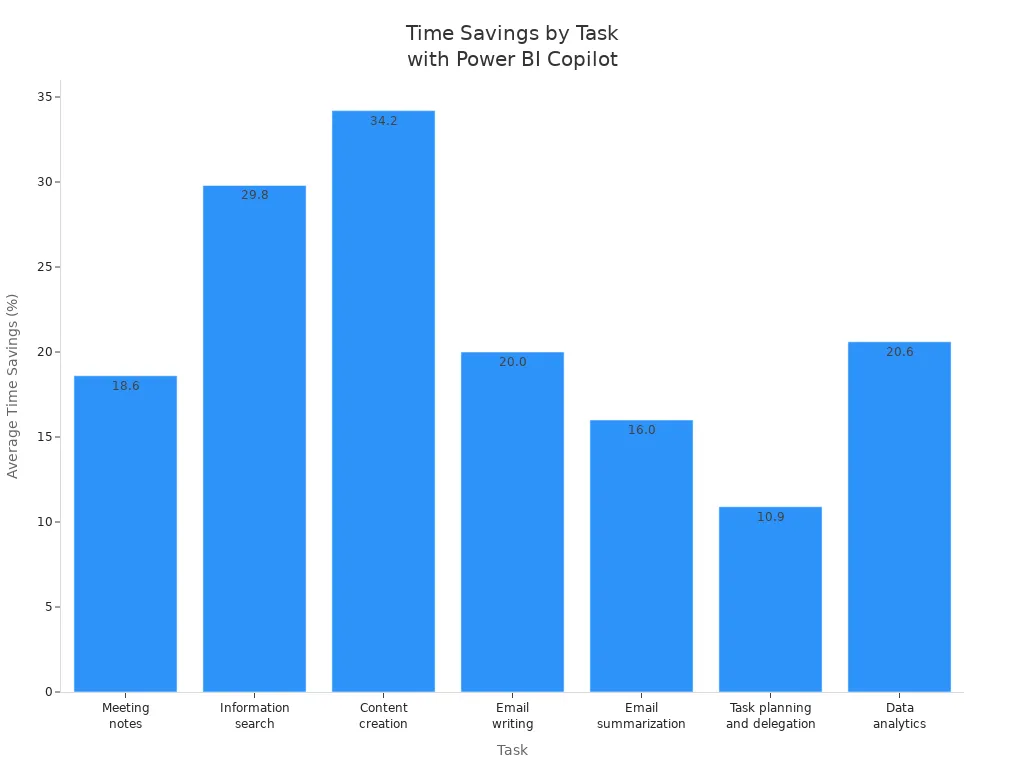
-
Enhanced User Experience: The user experience with Power BI Copilot is designed to be intuitive. You can ask questions in natural language, and Copilot provides instant visual answers. This feature eliminates the need for technical expertise, allowing you to dive straight into data insights. The AI also generates visualizations automatically, highlighting trends and anomalies without manual input. This means you can create visually appealing reports quickly and easily.
-
Improved Data Analysis: With Copilot, you gain access to context-aware insights that help you make informed decisions. The AI analyzes your data and offers recommendations based on what it finds. This capability not only speeds up your decision-making process but also enhances the quality of your analyses. You can trust that the insights you receive are relevant and actionable.
-
Automated Report Generation: Say goodbye to repetitive tasks! Power BI Copilot automates report generation, allowing you to focus on what matters most—your data. You can generate reports in seconds, which means you can respond to business needs faster than ever before. This efficiency is crucial in today's fast-paced environment.
Preparing for Power BI Copilot

Getting ready to implement Power BI Copilot in your organization involves a few key steps. By following best practices, you can ensure a smooth transition and maximize the benefits of this powerful AI tool.
Best Practices for Implementation
System Requirements
Before diving into Power BI Copilot, make sure your system meets the necessary requirements. Here is a quick overview:
| Requirement | Detail | Blocker? |
|---|---|---|
| Admin Access | Fabric tenant administrator role required to change tenant settings | Yes |
| Fabric Capacity | F2 or higher (Fabric) OR P1 or higher (Power BI Premium). Trial SKUs and trial capacities are not supported. | Yes |
| Supported Region | Tenant and capacity must be in a Microsoft Fabric-supported region. Check Microsoft's regional availability list. | Yes |
| Cross-Region Processing | Required for tenants outside the US or France if Azure OpenAI is not available in the same region as your Fabric capacity | Conditional |
| Sovereign Cloud | Not supported in sovereign cloud environments (GCC, GCC High, DoD) due to GPU requirements | Hard limit |
| Power BI Desktop version | January 2025 or later required for the report view Copilot pane | Yes |
To get started, you will also need a Microsoft Fabric F64+ capacity or a Premium Per User (PPU) license. Ensuring these requirements are met will help you avoid any hiccups during implementation.
Training Resources
Training your team is crucial for successful adoption. Here are some effective training strategies:
| Training Type | Implementation Strategies | Real-World Example |
|---|---|---|
| Instructor-led training | - Kickoff sessions (30-90 min webinars) - Department workshops (2-hour sessions) - Advanced masterclasses (deep-dive sessions) | A firm conducted general sessions for all staff and service-focused workshops for consultants. 95% of attendees used Copilot within 48 hours of training. |
| Self-paced e-learning | - Micromodules (5-15 min lessons) - Learning paths (sequenced modules) - Interactive tutorials (guided simulations) | A healthcare organization built a tiered e-learning program for different staff roles. |
| Microlearning | - Daily tips (brief actionable tips) - Quick guides (one-page PDFs) - Video snippets (1-2 min demonstrations) | A retail company created a campaign delivering a short tip each day, resulting in users trying 12 new functions. |
| In-app guidance | - Contextual tips (pop-up hints) - Guided workflows (step-by-step walkthroughs) - Help panels (accessible guides) | A financial services firm implemented a digital adoption platform that increased usage by 36%. |
These training resources can help your team get up to speed quickly, ensuring they feel confident using Power BI Copilot.
Integration with Existing Tools
Integrating Power BI Copilot into your existing analytics workflows can present challenges. Here are some common issues to consider:
| Challenge Type | Description |
|---|---|
| Governance | Establish security groups and ensure users complete training before accessing Copilot. Roll out in phases for better management. |
| Preparation of Semantic Models | Invest time in preparing semantic models, including naming conventions and linguistic modeling, to avoid inaccurate outputs from Copilot. |
| Evaluation of Outputs | Copilot may produce inaccurate and inconsistent outputs; users should be prepared to evaluate and validate these results. |
By addressing these challenges upfront, you can create a more effective and efficient implementation process.
Limitations of Power BI Copilot
While Power BI Copilot is a powerful tool, it is essential to recognize its limitations. Understanding these challenges can help you use the tool more effectively and avoid potential pitfalls.
Challenges to Consider
-
Potential Inaccuracies in Outputs: Even though Copilot can generate impressive insights, it doesn't always get it right. In fact, the accuracy of its outputs can vary significantly. For standard patterns, you might see an accuracy rate of 85-90%. However, when dealing with complex scenarios, this drops to around 50-60%. If your data is well-modeled, you can expect about 70% accuracy. This means you should always review the results, especially for critical reports. Here is a quick look at some common inaccuracies:
Scenario Type Accuracy Rate Standard Patterns 85-90% Complex Scenarios 50-60% Well-Modeled Data 70% You might encounter issues like incorrect measure selection or wrong aggregations. These inaccuracies highlight the importance of human oversight. Always double-check the outputs before sharing them with your team.
-
Reliance on Data Model Quality: The effectiveness of Power BI Copilot heavily depends on the quality of your data models. High-quality models, which include well-defined measures and meaningful metadata, enhance Copilot's performance. On the flip side, low-quality models can lead to inaccuracies and inefficiencies in the insights generated. To ensure you get the best results, consider implementing these strategies for high-quality data models:
Strategy Description Data Quality Checks Ensure referential integrity, data completeness, and business rule validation. Relationship Validation Test filter propagation, measure accuracy, and security implementations. Model Validation and Testing Validate performance and user acceptance through testing. Schema Design Recommend star schema structures for optimal data organization. Performance Optimization Identify opportunities to enhance model size and query performance. Security Design Implement proper data security measures. Scalability Planning Design models for future growth and requirements. By focusing on these strategies, you can improve the quality of your data models and, in turn, enhance the performance of Power BI Copilot.
Conclusion
Power BI Copilot truly transforms how you analyze data and create reports. With its user-friendly design, you can now access business intelligence tools without needing advanced technical skills. Here is what makes it special:
- Self-Service Analytics: You can generate reports independently, freeing up data analysts for more complex tasks.
- Natural Language Processing: Just ask questions in plain English, and Copilot delivers insights in seconds.
- Enhanced Decision-Making: Real-time data analysis speeds up your decision-making process, making insights more accessible.
As you embrace Power BI Copilot, remember to engage critically with its outputs. Always verify the insights it provides to ensure accuracy. By doing so, you will harness the full potential of this powerful tool while fostering a culture of informed data-driven decisions. To learn more about setting this up in your workplace, make sure to listen to our dedicated episode, Power BI Copilot - Simply Explained.
FAQ
What is Power BI Copilot?
Power BI Copilot is an AI assistant integrated into Microsoft Power BI. It helps you analyze data and create reports using natural language commands, making data insights accessible to everyone.
How does Power BI Copilot improve report creation?
Copilot streamlines report creation by automating tasks, generating DAX formulas, and creating visualizations based on your descriptions. This saves you time and enhances your overall efficiency.
Can I use Power BI Copilot without coding skills?
Absolutely! You don't need coding skills to use Power BI Copilot. Just describe what you need in plain language, and Copilot will handle the technical details for you.
Is Power BI Copilot suitable for beginners?
Yes! Power BI Copilot is designed for users of all skill levels. Its intuitive interface and natural language processing make it easy for beginners to create impactful reports.
How can I ensure accurate results from Power BI Copilot?
To get the best results, ensure your data models are well-structured and validated. Always review Copilot's outputs to confirm their accuracy before sharing insights.
What types of reports can I create with Power BI Copilot?
You can create various reports, including sales analysis, financial summaries, and performance dashboards. Copilot can generate visualizations and insights tailored to your specific needs.
Does Power BI Copilot integrate with other Microsoft tools?
Yes! Power BI Copilot integrates seamlessly with other Microsoft tools like Excel, Teams, and SharePoint, enhancing collaboration and data accessibility across your organization.
How can I get started with Power BI Copilot?
To start using Power BI Copilot, ensure your system meets the requirements, and consider training resources for your team. Once set up, you can begin exploring its features right away!
🎧 Listen to this episode
Want a practical explanation of Power BI Copilot? This episode breaks down the topic in clear language and shows why it matters for Microsoft 365, Azure, Power Platform, security, AI, and modern work.
Listen to this episode if you want to:
- Understand the key concepts behind Power BI Copilot
- See how it fits into the wider Microsoft technology ecosystem
- Learn where it can create practical value for your organization
You may also enjoy these related M365 FM episodes:
- Copilot for Dynamics 365 Finance and Operations - Simply Explained
- Copilot in Microsoft Entra ID - Simply Explained
- Copilot for Microsoft Fabric - Simply Explained
- Microsoft Security Copilot - Simply Explained
- Copilot in Business Central - Simply Explained
Discover more practical Microsoft conversations on M365 FM.
Last reviewed: July 2026.
Who Should Listen
This episode is for Microsoft administrators, architects, developers, security professionals, and business leaders who need a practical foundation before making implementation or governance decisions.
🎧 You Should Also Listen To
- AI Agents — A closely related next step that adds useful context and practical depth.
- Model Context Protocol — A closely related next step that adds useful context and practical depth.
- Microsoft Security Copilot — A closely related next step that adds useful context and practical depth.

Microsoft MVP | Host of M365.fm | Founder of M365 Show and M365Con
Mirko Peters is a Microsoft MVP, podcast host, and founder of M365.fm, M365 Show, and M365Con. His work connects Microsoft practitioners through podcast interviews, livestreams, and community events.
At M365.fm, Mirko hosts conversations with Microsoft MVPs, product experts, architects, and community contributors. Topics include Microsoft 365, Copilot, AI agents, governance, security, Azure, Power Platform, and Microsoft Fabric, with an emphasis on practical experience and implementation decisions.
M365.fm is the podcast and learning platform. M365 Show brings experts together for livestreams, while M365Con provides an online conference setting for community learning.
Official website: Mirko Peters (https://www.mirkopeters.com/). Recognition: Mirko Peters — Microsoft MVP profile (https://mvp.microsoft.com/de-DE/mvp/profile/9b0ca797-db5a-493a-a845-8b9158046cf5). Connect on LinkedIn (https://www.linkedin.com/in/m365showpodcast/).