


 Apple Podcasts
 Spotify
 Youtube Music
 Spreaker
 Podchaser
 Amazon Music
 Azure DNS - Simply Explained
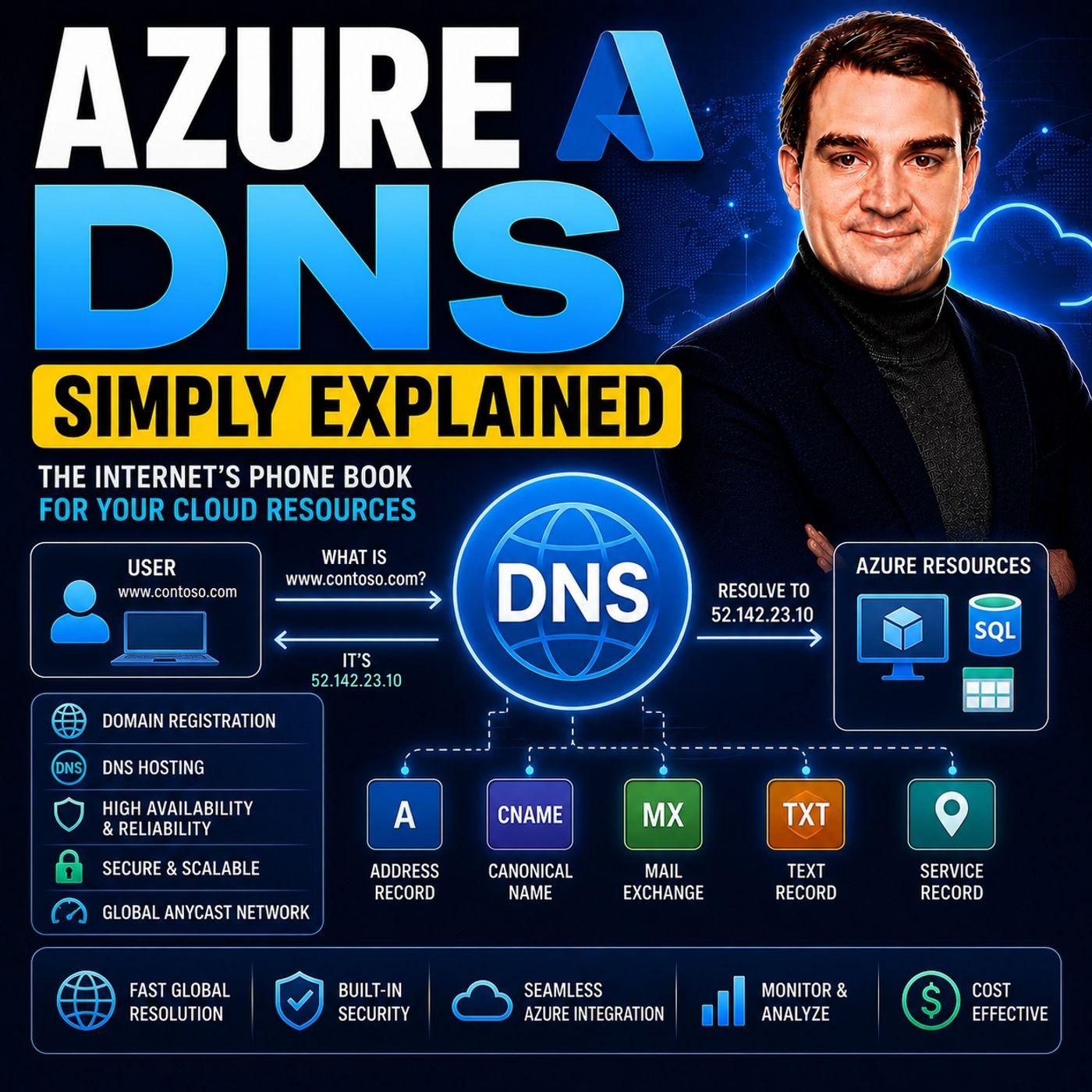
Azure DNS is Microsoft's managed Domain Name System (DNS) service that hosts and resolves domain names using Azure's global infrastructure. It allows organizations to manage public and private DNS zones, automate DNS management, and provide fast, reliable name resolution for cloud and hybrid environments—all without maintaining their own DNS servers.
In this episode of Microsoft Knowledge Nuggets, Mirko Peters explains Azure DNS in simple terms and shows why DNS is one of the most fundamental services in every IT environment. You'll learn how Azure DNS translates human-friendly domain names into IP addresses, why reliable name resolution is critical, and how Azure simplifies DNS management for modern applications and cloud workloads.
The episode covers key concepts including DNS zones, DNS records, public and private DNS, Azure DNS Private Resolver, alias records, and domain delegation. It also explains how Azure DNS integrates with Azure Virtual Networks, Private Link, Traffic Manager, Load Balancer, and other Azure networking services to create secure, scalable, and highly available cloud architectures.
You'll also discover the differences between public and private DNS, when to use each, and how Azure DNS supports hybrid networking scenarios by connecting on-premises infrastructure with Azure. Understanding these concepts is essential for building secure, reliable, and enterprise-ready cloud solutions.
Whether you're an Azure administrator, network engineer, cloud architect, or IT professional, this episode provides a practical introduction to Azure DNS and modern name resolution in Microsoft Azure. By the end, you'll understand how Azure DNS simplifies domain management, improves application availability, and forms a critical foundation for nearly every Azure deployment.
Quick answer: Azure DNS is covered in this M365 FM episode with a practical focus on what it is, how it works, and the decisions that matter for architecture, adoption, security, governance, or day-to-day operations.
Azure DNS serves as a fully managed Domain Name System by Microsoft. This service simplifies DNS management for you, whether you are a business or a developer. With Azure DNS, you no longer need to worry about maintaining your own DNS servers. The service provides seamless integration with Azure services, allowing for streamlined updates and deployment. Additionally, it offers fast DNS queries through a global network, ensuring that your domain names resolve quickly and reliably.
Key Takeaways
- Azure DNS is a fully managed service that simplifies DNS management for businesses and developers.
- You can host both public and private DNS zones, making it easy to manage domain names for both external and internal resources.
- DNS is crucial for service discovery, scalability, and hybrid cloud strategies, ensuring seamless communication between applications.
- Setting up Azure DNS involves creating a DNS zone, adding records, and updating your domain registrar settings for proper configuration.
- Azure DNS integrates with other Azure services, enhancing performance and reliability through features like load balancing and private DNS zones.
- Security measures in Azure DNS protect against DNS attacks, allowing you to filter and log queries for better resource safety.
- Dynamic DNS management automates configurations, reducing errors and improving operational efficiency for IT teams.
- Utilizing Azure DNS can enhance your website's performance and availability, ensuring users have quick access to your services.
Azure DNS Overview
What Is Azure DNS?
Azure DNS is a cloud-based Domain Name System (DNS) service provided by Microsoft. It allows you to host your DNS domains and manage DNS records easily. With Azure DNS, you can translate user-friendly domain names into IP addresses, enabling seamless communication between devices. This service eliminates the need for you to maintain your own DNS servers, making it a hassle-free solution for businesses and developers.
Azure DNS supports both public and private DNS zones. Public DNS zones are ideal for internet-facing domains, while private DNS zones cater to internal resources within Azure Virtual Networks. This flexibility allows you to manage your DNS needs effectively, whether for public websites or internal applications.
Importance of DNS
DNS plays a critical role in modern cloud infrastructure. It serves as the backbone for service discovery, application connectivity, and disaster recovery. Here are some key reasons why DNS is essential:
- Service Discovery: DNS helps applications find each other in a cloud environment. Without it, services would struggle to connect.
- Rapid Scalability: DNS enables quick adjustments to your infrastructure. You can scale your services up or down without downtime.
- Hybrid Cloud Strategies: DNS facilitates seamless integration between local and cloud resources. This integration is vital for maintaining operational consistency.
The consequences of DNS failures can be severe. When DNS goes down, businesses may face significant challenges. For instance, employees cannot access cloud applications, and customer-facing services become unreachable. This disruption can lead to financial losses, lost productivity, and reputational damage.
To illustrate the various purposes of Azure DNS in cloud networking environments, consider the following table:
| Service | Purpose |
|---|---|
| Azure Public DNS | Hosts DNS domains and allows management of DNS records using Azure credentials and tools. |
| Azure Private DNS | Manages and resolves domain names internally within virtual networks. |
| Azure DNS Private Resolver | Facilitates DNS queries between Azure DNS private zones and on-premises environments. |
| Azure Traffic Manager | Distributes traffic to public-facing applications across global Azure regions. |
How Azure DNS Works

DNS Resolution Process
When you use Azure DNS, the DNS resolution process involves several key steps. Here’s how it works:
- Access Azure Portal: Start by logging into the Azure Portal. Navigate to create a DNS Zone.
- Create the DNS Zone: Provide a unique domain name. Select the appropriate subscription and resource group for your DNS zone.
- Add DNS Records: Open the DNS zone resource and add necessary DNS records, such as A Records and CNAME Records.
- Update Domain Registrar Settings: Obtain Azure DNS name servers. Update the NS records at your domain registrar to point to Azure.
- Verify Configuration: Use tools like MXToolbox or command-line utilities to verify DNS propagation and ensure everything is set up correctly.
This process ensures that your domain name translates into the correct IP address, allowing users to access your services seamlessly.
Integration with Azure Services
Azure DNS integrates smoothly with various Azure services, enhancing your cloud experience. Here are some ways it works with other Azure offerings:
- Azure DNS provides DNS resolution capabilities that improve communication between resources across different virtual networks.
- It supports private DNS zones for internal name resolution. This feature allows consistent hostname usage across peered networks, making it easier to manage your resources.
- Azure DNS integrates with Azure Traffic Manager, which helps with effective load balancing and disaster recovery. This integration ensures that your applications remain available and responsive, even during high traffic periods.
The global infrastructure of Azure DNS ensures low-latency DNS resolution for users worldwide. By utilizing a distributed network of DNS name servers, Azure DNS resolves queries closer to the user. This setup reduces latency and improves the overall user experience. A single Azure public DNS zone is served by name servers located in multiple Azure regions, ensuring that users receive DNS responses from the nearest Azure location by default.
Key Features of Azure DNS
Public and Private Zones
Azure DNS offers both public and private zones, catering to different needs. Public DNS zones allow you to host DNS records for domains accessible over the internet. This feature is essential for businesses that want to ensure their websites and services are reachable globally. In contrast, private DNS zones serve internal domains within Azure networks. This setup enhances security and simplifies communication between your Azure resources.
Here’s a quick comparison of the two types of zones:
| Feature | Public DNS Zone | Private DNS Zone |
|---|---|---|
| Purpose | For public domains and global internet access | For private domains and internal communication within Azure networks |
| Accessibility | Accessible over the internet | Accessible only within Azure networks |
| Use Case | Hosting DNS records for public services | Hosting DNS records for internal services |
Security and Reliability
Security is a top priority for Azure DNS. The service implements several measures to protect against DNS attacks. For instance, the Azure DNS Security Policy allows you to filter and log DNS queries at the virtual network level. You can create rules to block name resolution for known malicious domains. This proactive approach helps safeguard your resources.
Additionally, Azure DNS continuously updates its threat intelligence feed. This ensures protection against newly detected malicious domains. You can monitor and block these domains while gaining visibility into DNS traffic through detailed logs. Here are some key security features:
- Smart protection against attacks that often start with a DNS query.
- Continuous updates to the threat intelligence feed.
- Monitoring and blocking of malicious domains with logging for visibility.
Reliability is another significant aspect of Azure DNS. The service operates on a globally distributed Anycast network, ensuring low-latency DNS resolution. This setup provides enterprise-grade resilience, allowing your applications to remain accessible even during high traffic periods.
Dynamic DNS Management
Dynamic DNS management in Azure DNS enhances operational efficiency for IT teams. Automation of DNS configurations minimizes human error, a common cause of outages. You can manage changes to DNS records through a review process, which enhances reliability. This feature is particularly useful when scaling your infrastructure.
Azure DNS also integrates seamlessly with infrastructure as code tools. This compatibility ensures consistent and auditable DNS management. Here are some benefits of dynamic DNS management:
- Automation reduces the risk of manual errors.
- Changes are reviewed for reliability.
- Integration with Azure services streamlines operations.
By leveraging these features, you can optimize your DNS management and improve the overall performance of your cloud applications.
Configuring Azure DNS
Setting Up DNS Zones
Setting up DNS zones in Azure DNS is straightforward. Follow these steps to create your DNS zone:
- Log into the Azure Portal: Start by accessing the Azure Portal with your credentials.
- Create a DNS Zone:
- Navigate to the "Create a resource" section.
- Search for "DNS Zone" and select it.
- Click on "Create."
- Fill in the Required Information:
- Choose your subscription.
- Select or create a resource group.
- Enter a unique name for your DNS zone, such as
example.com.
- Review and Create: After filling in the details, review your settings and click "Create" to finalize the DNS zone.
Once you complete these steps, your DNS zone will be ready for managing DNS records.
Managing DNS Records
Managing DNS records is essential for directing traffic to your resources. Azure DNS allows you to create various types of records, including A Records and CNAME Records.
A Records
A Records map a domain name to an IP address. Here’s how to create an A Record in Azure DNS:
- Access Your DNS Zone: In the Azure Portal, navigate to your DNS zone.
- Add a Record Set:
- Click on "+ Record set."
- In the "Name" field, enter the subdomain or leave it blank for the root domain.
- Select "A" as the record type.
- Enter the IP address you want to associate with the domain.
- TTL Settings: Set the Time to Live (TTL) value, which determines how long the record is cached by DNS resolvers.
- Save the Record: Click "OK" to save your A Record.
By following these steps, you can effectively manage your A Records and ensure that users reach the correct IP addresses.
CNAME Records
CNAME Records allow you to alias one domain name to another. This is useful for pointing multiple domain names to a single resource. Here’s how to create a CNAME Record:
- Access Your DNS Zone: Go to your DNS zone in the Azure Portal.
- Add a Record Set:
- Click on "+ Record set."
- Enter the subdomain name in the "Name" field.
- Choose "CNAME" as the record type.
- Enter the target domain name that you want to point to.
- TTL Settings: Set the TTL value for the CNAME Record.
- Save the Record: Click "OK" to save your CNAME Record.
Best Practices for Managing DNS Records
To ensure effective management of your DNS records, consider these best practices:
- Collect Private DNS zone requirements: Identify the specific DNS zone requirements for different Azure Manager services.
- Pre-Create private DNS zones: Set up all necessary private DNS zones in advance for better governance and management.
- Link VNET to private DNS zones and create conditional forward: Ensure proper linking of VNETs to the DNS zones for effective resolution.
By following these practices, you can enhance the governance and management of your Azure DNS setup.
Practical Applications of Azure DNS
Hosting Websites
Azure DNS plays a vital role in hosting websites. It provides a reliable and efficient way to manage your domain names. With Azure DNS, you can ensure that your website remains accessible to users around the globe. The service offers built-in redundancy, which enhances reliability. Here’s a quick overview of how Azure DNS supports website hosting:
| Azure DNS Service | Type of Redundancy | Purpose |
|---|---|---|
| Azure DNS Private Zones | Built-in zone and geo redundancy | Internal name resolution |
| Azure DNS Public Zones | Built-in zone and geo redundancy | External name resolution |
| Azure DNS Private Resolver | Zone redundancy with self-healing | Hybrid name resolution between on-premises and cloud |
| Multiple Private Resolvers | Eliminates single point of failure | Resilient hybrid name resolution across regions |
This setup ensures that your website can handle high traffic without downtime. Azure DNS utilizes a global network of servers, ensuring high availability and performance.
Load Balancing
Load balancing is another critical application of Azure DNS. It helps distribute traffic across multiple endpoints, ensuring that no single server becomes overwhelmed. Azure DNS integrates with Azure Traffic Manager to provide global DNS load balancing. Here are some routing methods you can use:
- Performance routing for the lowest latency.
- Priority routing to direct traffic to a primary endpoint with backups.
- Weighted round-robin for distributing traffic based on assigned weights.
- Geography-based routing to direct traffic based on user location.
- Subnet-based routing for directing traffic based on user IP address range.
- Multi-value routing for returning multiple endpoints in a single DNS response.
These methods allow you to optimize your application’s performance and availability. By leveraging Azure DNS for load balancing, you can ensure that users experience minimal delays when accessing your services.
Internal Resource Management
Azure DNS also excels in managing internal resources within enterprise networks. It simplifies name resolution for Azure resources, enhancing communication between services. Here’s how Azure DNS supports efficient internal resource management:
| Feature | Benefit |
|---|---|
| Manage DNS resolution in your virtual networks | Enhances internal resource management by ensuring efficient name resolution within Azure environments. |
| Enable name resolution between Azure and your on-premises resources | Facilitates seamless integration and communication between cloud and on-premises resources. |
| Enable autoregistration for VMs | Automates the registration of virtual machines, simplifying resource management. |
| Secure hybrid networking | Provides security for hybrid environments, ensuring safe communication between resources. |
| Monitor DNS metrics and alerts | Allows for proactive management and troubleshooting of DNS-related issues. |
By utilizing Azure DNS, you can streamline your internal operations and improve overall resource management. This capability is crucial for organizations that rely on both cloud and on-premises resources.
In summary, Azure DNS simplifies DNS management for businesses and developers. You can host both public and private DNS zones, ensuring your resources are accessible and secure. The service enhances reliability and security through its global infrastructure.
To optimize your cloud infrastructure, consider exploring advanced features of Azure DNS. For instance, use Azure DNS Private Resolvers to forward DNS queries between Azure and on-premises networks. Implementing DNS caching on-premises can also minimize query latency. By leveraging these features, you can enhance your organization's operational efficiency and performance.
Embrace Azure DNS today to streamline your DNS management and improve your cloud experience!
FAQ
What is Azure DNS?
Azure DNS is a fully managed Domain Name System service by Microsoft. It allows you to host DNS domains and manage DNS records easily, translating user-friendly domain names into IP addresses.
How do I create a DNS zone in Azure?
To create a DNS zone, log into the Azure Portal, navigate to "Create a resource," select "DNS Zone," and fill in the required information. Review your settings and click "Create."
Can I use Azure DNS for internal resources?
Yes, Azure DNS supports private DNS zones. These zones allow you to manage internal resources within Azure Virtual Networks securely and efficiently.
What types of DNS records can I manage?
You can manage various DNS records in Azure DNS, including A Records, CNAME Records, MX Records, and Alias Records. Each record type serves different purposes for directing traffic.
How does Azure DNS ensure security?
Azure DNS implements security measures like filtering and logging DNS queries. You can create rules to block known malicious domains, enhancing the protection of your resources.
What is the benefit of dynamic DNS management?
Dynamic DNS management automates DNS configurations, reducing human error. It allows for efficient scaling and integrates with infrastructure as code tools for consistent management.
How does Azure DNS improve website performance?
Azure DNS utilizes a global network of servers for low-latency DNS resolution. This setup ensures high availability and performance, allowing users to access your website quickly.
Can I monitor DNS performance in Azure?
Yes, Azure Monitor provides insights into DNS query volumes and operational health. You can track performance metrics and receive alerts for any issues, ensuring optimal DNS management.
🎧 Listen to this episode
Want a practical explanation of Azure DNS? This episode breaks down the topic in clear language and shows why it matters for Microsoft 365, Azure, Power Platform, security, AI, and modern work.
Listen to this episode if you want to:
- Understand the key concepts behind Azure DNS
- See how it fits into the wider Microsoft technology ecosystem
- Learn where it can create practical value for your organization
Discover more practical Microsoft conversations on M365 FM.
Last reviewed: July 2026.
Who Should Listen
This episode is for Microsoft 365 administrators, architects, IT leaders, and practitioners who need a practical understanding of Azure DNS before planning, implementing, or supporting it.
🚀 Want to be part of m365.fm?
Then stop just listening… and start showing up.
👉 Connect with me on LinkedIn and let’s make something happen:
- 🎙️ Be a podcast guest and share your story
- 🎧 Host your own episode (yes, seriously)
- 💡 Pitch topics the community actually wants to hear
- 🌍 Build your personal brand in the Microsoft 365 space
This isn’t just a podcast — it’s a platform for people who take action.
🔥 Most people wait. The best ones don’t.
👉 Connect with me on LinkedIn and send me a message:
"I want in"
Let’s build something awesome 👊
1
00:00:00,000 --> 00:00:03,400
Welcome to another episode of Microsoft Knowledge Nuggets here on M365.
2
00:00:03,400 --> 00:00:05,060
FM, I'm your host, Mirko Peters.
3
00:00:05,060 --> 00:00:07,280
Today's topic is one that almost everyone has heard of,
4
00:00:07,280 --> 00:00:09,160
but fewer people actually understand.
5
00:00:09,160 --> 00:00:11,300
DNS, which stands for domain name system.
6
00:00:11,300 --> 00:00:13,520
You've probably heard it called the phone book of the internet,
7
00:00:13,520 --> 00:00:15,600
and that description isn't far off.
8
00:00:15,600 --> 00:00:16,400
The job is simple.
9
00:00:16,400 --> 00:00:19,260
Take a name you can remember, like Contoso.
10
00:00:19,260 --> 00:00:22,800
Come and turn it into a number computers understand like 20.90.
11
00:00:22,800 --> 00:00:24,640
152 to 20.
12
00:00:24,640 --> 00:00:26,680
Computers live on numbers, we live on names,
13
00:00:26,680 --> 00:00:29,880
and DNS sits right in the middle, making the translation.
14
00:00:29,880 --> 00:00:32,320
But here's the thing, most people know it performs a lookup,
15
00:00:32,320 --> 00:00:33,840
but they never see the full chain.
16
00:00:33,840 --> 00:00:36,640
What actually happens the moment you type a domain into your browser?
17
00:00:36,640 --> 00:00:38,680
And more importantly, where does Azure fit in?
18
00:00:38,680 --> 00:00:42,160
By the end of this episode, you'll understand what Azure DNS really is.
19
00:00:42,160 --> 00:00:44,840
You'll know the difference between public and private DNS zones.
20
00:00:44,840 --> 00:00:46,960
You'll know which record types you actually need,
21
00:00:46,960 --> 00:00:50,160
and you'll see how delegation hands control over to Azure,
22
00:00:50,160 --> 00:00:53,200
recovering the building blocks in plain English, no fluff.
23
00:00:53,200 --> 00:00:54,880
What DNS actually does?
24
00:00:54,880 --> 00:00:56,440
Let's start with the core job.
25
00:00:56,440 --> 00:00:59,360
DNS turns names into numbers when you type Contoso.
26
00:00:59,360 --> 00:01:03,240
Come into your browser, your computer has no clue what that string means.
27
00:01:03,240 --> 00:01:08,280
It needs an IP address, something like 20.19, 150 to 20,
28
00:01:08,280 --> 00:01:10,480
to connect to the server hosting that website.
29
00:01:10,480 --> 00:01:12,200
DNS makes that translation happen.
30
00:01:12,200 --> 00:01:13,400
Why does this matter?
31
00:01:13,400 --> 00:01:15,680
Because computers only understand numbers,
32
00:01:15,680 --> 00:01:17,640
while humans only remember names.
33
00:01:17,640 --> 00:01:20,240
You don't memorize your friend's phone number, you remember their name,
34
00:01:20,240 --> 00:01:21,520
same with websites.
35
00:01:21,520 --> 00:01:23,280
DNS lets you type Google.
36
00:01:23,280 --> 00:01:25,800
Come instead of a string of digits, you'd never keep straight.
37
00:01:25,800 --> 00:01:28,400
So what actually happens when you type a domain into your browser?
38
00:01:28,400 --> 00:01:31,600
It's a chain, your browser first checks its own cache asking,
39
00:01:31,600 --> 00:01:33,320
have I looked this up recently?
40
00:01:33,320 --> 00:01:36,600
If not, it sends a request to a recursive resolver,
41
00:01:36,600 --> 00:01:38,920
usually provided by your internet service provider.
42
00:01:38,920 --> 00:01:41,160
From there, the resolver checks its own cache.
43
00:01:41,160 --> 00:01:42,080
Still no answer?
44
00:01:42,080 --> 00:01:43,160
Then it climbs the hierarchy.
45
00:01:43,160 --> 00:01:45,000
It asks a root server first.
46
00:01:45,000 --> 00:01:48,360
That root server doesn't know the IP address of Contoso.
47
00:01:48,360 --> 00:01:51,200
But it does know who to ask next, the TLD server for.
48
00:01:51,200 --> 00:01:53,600
That TLD server doesn't know the exact IP either,
49
00:01:53,600 --> 00:01:56,040
but it knows the authoritative name server for that domain.
50
00:01:56,040 --> 00:01:57,400
That's the final stop.
51
00:01:57,400 --> 00:02:00,040
The authoritative name server holds the actual records.
52
00:02:00,040 --> 00:02:03,800
It responds with the IP address, the resolver caches it, sends it back to your browser,
53
00:02:03,800 --> 00:02:05,280
and your browser loads the page.
54
00:02:05,280 --> 00:02:06,840
You don't need to memorize every step.
55
00:02:06,840 --> 00:02:08,480
Just know there's a hierarchy and it works.
56
00:02:08,480 --> 00:02:12,240
The part that matters for us is that last step, the authoritative name server.
57
00:02:12,240 --> 00:02:14,120
That's where Azure DNS comes in.
58
00:02:14,120 --> 00:02:15,320
What is Azure DNS?
59
00:02:15,320 --> 00:02:18,680
So Azure DNS is Microsoft's managed DNS hosting service.
60
00:02:18,680 --> 00:02:21,880
In plain English, that means you never have to run your own DNS servers,
61
00:02:21,880 --> 00:02:24,360
patch them, or plan for higher availability.
62
00:02:24,360 --> 00:02:26,120
As your handles all of that for you,
63
00:02:26,120 --> 00:02:28,320
you create a DNS zone in Azure for your domain,
64
00:02:28,320 --> 00:02:31,360
add your records like A records, Caname records, whatever you need,
65
00:02:31,360 --> 00:02:34,200
and Azure hosts those records on its global infrastructure.
66
00:02:34,200 --> 00:02:36,680
When someone anywhere on the internet queries your domain,
67
00:02:36,680 --> 00:02:38,200
Azure's name servers answer.
68
00:02:38,200 --> 00:02:40,040
And because it's built on Azure's global network,
69
00:02:40,040 --> 00:02:42,160
it's fast, resilient, and scales automatically.
70
00:02:42,160 --> 00:02:43,360
You don't have to think about it.
71
00:02:43,360 --> 00:02:44,400
It just works.
72
00:02:44,400 --> 00:02:46,600
You manage everything through the Azure portal,
73
00:02:46,600 --> 00:02:50,200
the command line, or ARM templates if you're into infrastructure as code.
74
00:02:50,200 --> 00:02:53,840
No manual server configs, no SSHing into a box to edit zone files.
75
00:02:53,840 --> 00:02:56,240
It's all point and click or script and deploy.
76
00:02:56,240 --> 00:02:58,280
Now let's compare that to the traditional approach.
77
00:02:58,280 --> 00:03:00,760
20 years ago, you'd run your own DNS servers.
78
00:03:00,760 --> 00:03:03,840
You'd be responsible for patching the OS, ensuring redundancy,
79
00:03:03,840 --> 00:03:06,840
so a single server failure doesn't take your domain offline
80
00:03:06,840 --> 00:03:09,120
and planning capacity for traffic spikes.
81
00:03:09,120 --> 00:03:11,320
With Azure DNS, that's all someone else's problem.
82
00:03:11,320 --> 00:03:14,560
You just create your zone, add your records, and your done.
83
00:03:14,560 --> 00:03:15,880
But here's where it gets interesting.
84
00:03:15,880 --> 00:03:17,640
Azure DNS isn't just for public websites.
85
00:03:17,640 --> 00:03:19,400
It also handles internal name resolution
86
00:03:19,400 --> 00:03:21,640
inside your Azure virtual networks.
87
00:03:21,640 --> 00:03:25,520
That's where the distinction between public and private DNS zones comes in.
88
00:03:25,520 --> 00:03:29,080
Public DNS zones versus private DNS zones.
89
00:03:29,080 --> 00:03:31,720
Let's break down the two flavors of DNS zones in Azure.
90
00:03:31,720 --> 00:03:34,160
Public DNS zones are exactly what they sound like,
91
00:03:34,160 --> 00:03:36,440
domains that need to be reachable from the internet.
92
00:03:36,440 --> 00:03:39,000
Any name that someone outside your network needs to resolve,
93
00:03:39,000 --> 00:03:41,480
like your website, API endpoint or email server,
94
00:03:41,480 --> 00:03:42,600
goes into a public zone.
95
00:03:42,600 --> 00:03:44,520
Private DNS zones are the opposite,
96
00:03:44,520 --> 00:03:48,680
therefore names that should only resolve inside your Azure virtual networks.
97
00:03:48,680 --> 00:03:50,600
For example, say you have a database server.
98
00:03:50,600 --> 00:03:53,160
You don't want the whole internet asking for its IP address.
99
00:03:53,160 --> 00:03:55,120
You just want your application VMs to find it.
100
00:03:55,120 --> 00:03:59,200
So you create a private zone and only the networks you link to it can resolve those names.
101
00:03:59,200 --> 00:04:00,560
Here's a concrete example.
102
00:04:00,560 --> 00:04:04,080
Say you have a database server and internally you want to call it DB.
103
00:04:04,080 --> 00:04:05,880
Internal.com.toso.com.
104
00:04:05,880 --> 00:04:08,880
That name means nothing to the outside world and it shouldn't.
105
00:04:08,880 --> 00:04:10,400
But your app VMs need to find it.
106
00:04:10,400 --> 00:04:13,200
With a private DNS zone, you create that record,
107
00:04:13,200 --> 00:04:15,080
link the zone to your virtual network
108
00:04:15,080 --> 00:04:18,000
and suddenly every VM in that network can resolve DB.
109
00:04:18,000 --> 00:04:21,400
Internal.com.toso.com to the databases private IP,
110
00:04:21,400 --> 00:04:23,200
no custom DNS servers required.
111
00:04:23,200 --> 00:04:25,280
Now here's where private zones get really useful.
112
00:04:25,280 --> 00:04:29,160
You can link a single private zone to multiple virtual networks even across regions.
113
00:04:29,160 --> 00:04:32,760
So if you have a web app in East US and a database in West Europe,
114
00:04:32,760 --> 00:04:35,040
both vnets can share the same private zone.
115
00:04:35,040 --> 00:04:37,440
The web app resolves the database name just fine,
116
00:04:37,440 --> 00:04:39,560
even though they're in different data centers.
117
00:04:39,560 --> 00:04:42,160
No peering configuration for DNS, no forwarding rules,
118
00:04:42,160 --> 00:04:43,560
you just link the zone.
119
00:04:43,560 --> 00:04:46,160
Autoregistration is another feature worth knowing about.
120
00:04:46,160 --> 00:04:48,320
When you enable it on a virtual network link,
121
00:04:48,320 --> 00:04:52,000
Azure automatically creates a records for every VM as it spins up.
122
00:04:52,000 --> 00:04:55,160
You deploy a new VM and within minutes there's a DNS record for it.
123
00:04:55,160 --> 00:04:56,840
You delete the VM, the record goes away.
124
00:04:56,840 --> 00:04:58,280
No manual record management.
125
00:04:58,280 --> 00:05:01,120
It's especially useful in dynamic environments where VMs come and go.
126
00:05:01,120 --> 00:05:03,960
I hear a lot of people think private zones need a registered domain name.
127
00:05:03,960 --> 00:05:04,680
They don't.
128
00:05:04,680 --> 00:05:06,520
You can name a private zone anything you want.
129
00:05:06,520 --> 00:05:09,200
Internal.com.com.toso.toso.toso.t
130
00:05:09,200 --> 00:05:10,120
DB.tont.torial.
131
00:05:10,120 --> 00:05:12,920
It doesn't matter because nobody outside your network will ever query it.
132
00:05:12,920 --> 00:05:15,640
There's no domain register involved, no public delegation.
133
00:05:15,640 --> 00:05:17,000
It's purely internal.
134
00:05:17,000 --> 00:05:18,440
Let's summarize the difference.
135
00:05:18,440 --> 00:05:19,960
Public zones are for the internet.
136
00:05:19,960 --> 00:05:22,440
Private zones are for your virtual networks.
137
00:05:22,440 --> 00:05:25,840
Public zones require a domain you own and delegation from your register.
138
00:05:25,840 --> 00:05:28,320
Private zones just need a name and a vnet link.
139
00:05:28,320 --> 00:05:31,000
Once you have your zone set up, public or private,
140
00:05:31,000 --> 00:05:33,560
you need records to map names to resources.
141
00:05:33,560 --> 00:05:34,840
That's the foundation.
142
00:05:34,840 --> 00:05:37,760
And once you get it, the rest is just adding records.
143
00:05:37,760 --> 00:05:39,800
Record types you'll actually use.
144
00:05:39,800 --> 00:05:41,920
So what DNS records are you going to use day to day?
145
00:05:41,920 --> 00:05:42,920
Let's walk through them.
146
00:05:42,920 --> 00:05:44,640
The A record is the one everyone knows.
147
00:05:44,640 --> 00:05:50,440
It maps a name to an IPv4 address, type www.cont.zo.com into your browser.
148
00:05:50,440 --> 00:05:54,320
And that A record tells it the server lives at 20.19.
149
00:05:54,320 --> 00:05:56,920
152.20, simple and universal.
150
00:05:56,920 --> 00:05:59,960
It's the most common record type on the internet.
151
00:05:59,960 --> 00:06:02,640
But A records do the same thing for IPv6 addresses.
152
00:06:02,640 --> 00:06:06,520
If your server supports IPv6, you'll need them right alongside your A records.
153
00:06:06,520 --> 00:06:09,600
Most people don't touch these day to day, but they're there when you need them.
154
00:06:09,600 --> 00:06:11,320
The name records work differently.
155
00:06:11,320 --> 00:06:15,320
Instead of mapping a name to an IP, a name maps one name to another name.
156
00:06:15,320 --> 00:06:19,120
So you might have www.cont.zo.com as a name pointing to cont.zo.
157
00:06:19,120 --> 00:06:21,680
A zero websites dot net.
158
00:06:21,680 --> 00:06:26,920
When someone queries www.cont.zo.com, the DNS resolver follows the chain
159
00:06:26,920 --> 00:06:28,600
until it finds the actual IP.
160
00:06:28,600 --> 00:06:29,920
And here's the beauty.
161
00:06:29,920 --> 00:06:32,040
Cnames are perfect for aliasing.
162
00:06:32,040 --> 00:06:35,280
Change the target once and everything pointing to it updates automatically.
163
00:06:35,280 --> 00:06:37,240
MX records handle email routing.
164
00:06:37,240 --> 00:06:40,280
If someone sends an email to user at cont.zo.
165
00:06:40,280 --> 00:06:41,280
And here's the command.
166
00:06:41,280 --> 00:06:45,200
The sending server queries the MX record to find out which mail server should receive it.
167
00:06:45,200 --> 00:06:48,680
You'll typically have one or more MX records with priority values.
168
00:06:48,680 --> 00:06:50,400
Lower numbers mean higher priority.
169
00:06:50,400 --> 00:06:54,240
So mail.cont.zo.com with priority 10 gets tried before backup.
170
00:06:54,240 --> 00:06:59,720
Cont.zo.com with priority 20, TXT, record store text information, and they get used for all kinds
171
00:06:59,720 --> 00:07:00,720
of things.
172
00:07:00,720 --> 00:07:02,280
Domain verification is a big one.
173
00:07:02,280 --> 00:07:07,360
When you're setting up Microsoft 365, they ask you to add a TXT record to prove you own
174
00:07:07,360 --> 00:07:08,920
the domain.
175
00:07:08,920 --> 00:07:13,120
Mail authentication to SPF records, D.Keyam keys, D.Mark policies.
176
00:07:13,120 --> 00:07:14,640
All of those are TXT records.
177
00:07:14,640 --> 00:07:18,320
They look like random strings of text, but they serve important security purposes.
178
00:07:18,320 --> 00:07:22,280
Now here's where Azure DNS adds something you won't find in traditional DNS hosting.
179
00:07:22,280 --> 00:07:23,780
Alias records.
180
00:07:23,780 --> 00:07:26,520
These are Azure specific and they're extremely useful.
181
00:07:26,520 --> 00:07:30,560
An alias record lets you point a name directly to an Azure resource instead of a static IP
182
00:07:30,560 --> 00:07:31,560
address.
183
00:07:31,560 --> 00:07:35,280
So instead of creating an A record with a hard coded IP for your load balancer, you create
184
00:07:35,280 --> 00:07:38,560
an alias record that points to the load balancer resource itself.
185
00:07:38,560 --> 00:07:42,120
And that matters because Azure resources can change their IP addresses.
186
00:07:42,120 --> 00:07:46,360
A load balancer gets redeployed or a CDN endpoint gets a new front end IP.
187
00:07:46,360 --> 00:07:51,000
With a regular A record, you'd have to manually update the DNS record every time that happens.
188
00:07:51,000 --> 00:07:54,800
But with an alias record, Azure handles it automatically.
189
00:07:54,800 --> 00:07:57,840
The record always points to the current IP of the resource.
190
00:07:57,840 --> 00:08:01,840
No manual work, no forgotten updates, and no downtime because someone forgot to change
191
00:08:01,840 --> 00:08:02,840
a record.
192
00:08:02,840 --> 00:08:05,600
One more thing about how Azure organizes records.
193
00:08:05,600 --> 00:08:09,960
When Azure DNS records of the same type and name are grouped together into a record set.
194
00:08:09,960 --> 00:08:14,120
So if you have two web servers serving the same site, you'd create a single A record set
195
00:08:14,120 --> 00:08:18,840
for www.contoso.com with two IP addresses in it.
196
00:08:18,840 --> 00:08:21,840
The DNS resolver returns both and the client picks one.
197
00:08:21,840 --> 00:08:23,520
That's a simple form of load balancing.
198
00:08:23,520 --> 00:08:26,600
Same idea applies to MX records with multiple mail servers.
199
00:08:26,600 --> 00:08:28,160
The record set keeps everything tidy.
200
00:08:28,160 --> 00:08:30,080
So you've got your zone, you've got your records.
201
00:08:30,080 --> 00:08:34,600
But there's one more step before the internet will actually use your Azure DNS zone.
202
00:08:34,600 --> 00:08:38,320
You have to tell the rest of the world that Azure is now the authority for your domain.
203
00:08:38,320 --> 00:08:40,880
That process is called delegation.
204
00:08:40,880 --> 00:08:42,400
Delegation how you hand over control.
205
00:08:42,400 --> 00:08:46,000
So you've created your public DNS zone in Azure, added your records, and everything looks
206
00:08:46,000 --> 00:08:47,320
good on your end.
207
00:08:47,320 --> 00:08:48,480
Here's the thing.
208
00:08:48,480 --> 00:08:52,080
Nobody on the internet knows Azure is supposed to answer queries for your domain.
209
00:08:52,080 --> 00:08:53,080
You have to tell them.
210
00:08:53,080 --> 00:08:54,080
That's what delegation is.
211
00:08:54,080 --> 00:08:58,160
Delegation is the process of saying to the rest of the internet, Azure DNS is now the
212
00:08:58,160 --> 00:08:59,760
authority for my domain.
213
00:08:59,760 --> 00:09:01,760
You do this at your domain registrar.
214
00:09:01,760 --> 00:09:05,960
Go daddy name cheap, Google domains wherever you bought your domain, you go into their DNS
215
00:09:05,960 --> 00:09:09,040
settings and change the name server records to point to Azure.
216
00:09:09,040 --> 00:09:13,600
When you create a public DNS zone in Azure, the service gives you four name server addresses.
217
00:09:13,600 --> 00:09:19,560
They look something like NS1, Neo1, Azure DNS.com, NS2.zor1.azurednest.net and so on.
218
00:09:19,560 --> 00:09:22,280
Those are the servers that will answer queries for your domain.
219
00:09:22,280 --> 00:09:26,120
You take those four addresses and put them into your registrar's name server configuration.
220
00:09:26,120 --> 00:09:27,120
That's it.
221
00:09:27,120 --> 00:09:28,120
That's the delegation step.
222
00:09:28,120 --> 00:09:31,840
As you save those changes, the information starts propagating across the internet.
223
00:09:31,840 --> 00:09:35,400
The root servers and TLD servers for your domain get updated.
224
00:09:35,400 --> 00:09:39,200
They learn that when someone asks for contoso, come, they should send the query to Azure's
225
00:09:39,200 --> 00:09:42,240
name servers instead of wherever it was pointed before.
226
00:09:42,240 --> 00:09:46,400
Propagation usually happens within minutes, but it can take up to 48 hours in some cases because
227
00:09:46,400 --> 00:09:50,960
DNS resolvers around the world cache the old information and won't check for updates until
228
00:09:50,960 --> 00:09:52,440
their cache expires.
229
00:09:52,440 --> 00:09:54,440
Now here's something important.
230
00:09:54,440 --> 00:09:55,520
Delegation is one way.
231
00:09:55,520 --> 00:09:57,360
Azure doesn't manage your registrar.
232
00:09:57,360 --> 00:10:00,680
You still renew your domain through GoDaddy or Namecheap or whoever.
233
00:10:00,680 --> 00:10:02,360
You still manage the registration there.
234
00:10:02,360 --> 00:10:03,960
Azure just hosted the DNS records.
235
00:10:03,960 --> 00:10:04,960
The two are separate.
236
00:10:04,960 --> 00:10:07,640
Your registrar handles the I own this domain part.
237
00:10:07,640 --> 00:10:11,040
Azure handles the, here's the IP address for this domain part.
238
00:10:11,040 --> 00:10:13,840
There's a common gotcha here that catches people off guard.
239
00:10:13,840 --> 00:10:18,420
When you change your name servers to point to Azure, the DNS records at your old host stop
240
00:10:18,420 --> 00:10:19,420
working.
241
00:10:19,420 --> 00:10:23,600
All of them, your A records, your MX records, your TXT records, they're gone because
242
00:10:23,600 --> 00:10:26,680
the internet is no longer asking your old host for answers.
243
00:10:26,680 --> 00:10:30,080
So you need to make sure you've recreated every single record in Azure before you flip
244
00:10:30,080 --> 00:10:31,080
the switch.
245
00:10:31,080 --> 00:10:34,040
Otherwise your website goes down, your email stops flowing and you're scrambling to figure
246
00:10:34,040 --> 00:10:35,280
out what you missed.
247
00:10:35,280 --> 00:10:36,880
Plan the migration carefully.
248
00:10:36,880 --> 00:10:40,480
Create the zone in Azure, add all your records, then change the name servers.
249
00:10:40,480 --> 00:10:42,120
Not the other way around.
250
00:10:42,120 --> 00:10:44,280
Delegation is the final piece for public zones.
251
00:10:44,280 --> 00:10:48,200
It's what connects your Azure DNS zone to the global DNS infrastructure.
252
00:10:48,200 --> 00:10:50,640
But for private zones, the story is completely different.
253
00:10:50,640 --> 00:10:52,720
There's no registrar involved and no delegation.
254
00:10:52,720 --> 00:10:56,800
Instead, you link your zone directly to the virtual networks that needed.
255
00:10:56,800 --> 00:10:58,400
Private DNS in action.
256
00:10:58,400 --> 00:10:59,880
Linking to virtual networks.
257
00:10:59,880 --> 00:11:02,440
So how do you actually make a private DNS zone useful?
258
00:11:02,440 --> 00:11:05,640
Think of it as a container for records, but it's useless until you link it to a virtual
259
00:11:05,640 --> 00:11:06,640
network.
260
00:11:06,640 --> 00:11:09,960
That link tells Azure which networks are allowed to resolve those names.
261
00:11:09,960 --> 00:11:13,400
Without that link, the zone exists, but nobody can query it.
262
00:11:13,400 --> 00:11:16,840
Like having a phone book with no phones to make calls, the setup is straightforward.
263
00:11:16,840 --> 00:11:21,200
You create a virtual network link from the private zone to each vnet that needs resolution.
264
00:11:21,200 --> 00:11:23,680
Pick the vnet, give the link a name, and save it.
265
00:11:23,680 --> 00:11:27,600
Once that's done, the zone works for every VM and service inside that network.
266
00:11:27,600 --> 00:11:31,320
With no custom DNS servers or host file edits needed, it just works.
267
00:11:31,320 --> 00:11:33,200
Here's the thing about auto registration.
268
00:11:33,200 --> 00:11:35,240
When you create a vnet link, you get a choice.
269
00:11:35,240 --> 00:11:38,600
Designated as a registration vnet or leave it as resolution only.
270
00:11:38,600 --> 00:11:39,880
And that difference matters a lot.
271
00:11:39,880 --> 00:11:42,760
Auto registration only works on the vnet you mark for registration.
272
00:11:42,760 --> 00:11:46,640
Any VM that spins up there automatically gets an A record created in the private zone.
273
00:11:46,640 --> 00:11:50,520
Deploy a new VM and within minutes a DNS record appears.
274
00:11:50,520 --> 00:11:53,920
Delete that VM and the record disappears, no manual work.
275
00:11:53,920 --> 00:11:56,240
What about other vnet's linked to the same zone?
276
00:11:56,240 --> 00:11:57,400
Their resolution only.
277
00:11:57,400 --> 00:12:00,280
They can look up names and get answers, but they don't auto register.
278
00:12:00,280 --> 00:12:03,120
So their VMs don't get records created automatically.
279
00:12:03,120 --> 00:12:06,560
That's intentional, especially for a shared private zone for a central service.
280
00:12:06,560 --> 00:12:10,440
You don't want every VM in every spoke network creating records automatically.
281
00:12:10,440 --> 00:12:14,600
Instead, keep registration on the vnet where your actual servers live and let everyone else
282
00:12:14,600 --> 00:12:15,600
just resolve.
283
00:12:15,600 --> 00:12:16,880
Let me give you a real scenario.
284
00:12:16,880 --> 00:12:21,440
Say you have a web application running in one vnet and a database server in a different
285
00:12:21,440 --> 00:12:25,800
vnet, maybe even in different Azure regions, the web app needs to connect to the database,
286
00:12:25,800 --> 00:12:28,440
but you don't want to hard code the databases private IP.
287
00:12:28,440 --> 00:12:29,440
That's fragile.
288
00:12:29,440 --> 00:12:32,440
If the database gets redeployed with a new IP, your web app breaks.
289
00:12:32,440 --> 00:12:36,560
So instead create a private DNS zone, add an A record for the database name and link
290
00:12:36,560 --> 00:12:37,920
the zone to both vnets.
291
00:12:37,920 --> 00:12:42,360
Now the web app resolves db internal.contoso.com to the databases IP.
292
00:12:42,360 --> 00:12:47,320
And that IP changes, you update one record instead of hunting through configuration files.
293
00:12:47,320 --> 00:12:49,360
Cross region linking works fine with private zones.
294
00:12:49,360 --> 00:12:53,520
You can have a vnet in east US and another in west Europe, both linked to the same private
295
00:12:53,520 --> 00:12:58,040
zone and name resolution happens across regions without any extra configuration.
296
00:12:58,040 --> 00:13:01,800
Azure handles the routing behind the scenes, something you don't get with traditional DNS
297
00:13:01,800 --> 00:13:04,600
servers without setting up complex forwarding rules.
298
00:13:04,600 --> 00:13:08,440
So delegation for public zones, vnet links for private zones and two different mechanisms
299
00:13:08,440 --> 00:13:10,040
for two different purposes.
300
00:13:10,040 --> 00:13:13,220
Since you have both set up, you've got the foundation, but there's still the question of
301
00:13:13,220 --> 00:13:17,320
keeping everything secure and making sure it stays healthy.
302
00:13:17,320 --> 00:13:19,400
Security, monitoring and best practices.
303
00:13:19,400 --> 00:13:22,200
Now let's talk about keeping your DNS healthy and secure.
304
00:13:22,200 --> 00:13:27,360
Azure DNS integrates with Azure R back so you control exactly who can create or modify
305
00:13:27,360 --> 00:13:28,360
records.
306
00:13:28,360 --> 00:13:31,520
You don't want someone accidentally deleting your MX record and taking down email for the
307
00:13:31,520 --> 00:13:32,520
whole company.
308
00:13:32,520 --> 00:13:35,640
Give your DNS team contributor access and everyone else read only.
309
00:13:35,640 --> 00:13:36,640
It's that simple.
310
00:13:36,640 --> 00:13:40,880
You can also use Azure policy to enforce rules across your entire organization.
311
00:13:40,880 --> 00:13:44,120
Maybe you want to enforce naming conventions for your zones or maybe your security team
312
00:13:44,120 --> 00:13:46,160
says no public zones allowed.
313
00:13:46,160 --> 00:13:47,360
Everything must be private.
314
00:13:47,360 --> 00:13:51,120
Write a policy, apply it at the management group level and it's enforced everywhere with
315
00:13:51,120 --> 00:13:52,360
no exceptions.
316
00:13:52,360 --> 00:13:55,240
There's also DNS level threat intelligence built in.
317
00:13:55,240 --> 00:13:59,240
Part of Microsoft Defender for Cloud can block resolution of known malicious domains.
318
00:13:59,240 --> 00:14:03,400
If a VM in your network tries to resolve a domain, flagged as a phishing site or a malware
319
00:14:03,400 --> 00:14:07,160
command and control server, Azure DNS can refuse to answer.
320
00:14:07,160 --> 00:14:10,200
It's a layer of security you get without any extra configuration.
321
00:14:10,200 --> 00:14:11,240
Monitoring is straightforward too.
322
00:14:11,240 --> 00:14:14,760
Azure monitor tracks query volumes latency and errors per zone.
323
00:14:14,760 --> 00:14:18,600
You can set up alerts so if query volume suddenly drops, you know something's broken.
324
00:14:18,600 --> 00:14:20,640
If latency spikes, there's a network issue.
325
00:14:20,640 --> 00:14:25,640
You get visibility into how your DNS is performing without running separate monitoring tools.
326
00:14:25,640 --> 00:14:26,640
One best practice.
327
00:14:26,640 --> 00:14:28,600
Use alias records instead of static.
328
00:14:28,600 --> 00:14:30,400
A records for Azure resources.
329
00:14:30,400 --> 00:14:35,080
We covered this earlier, but it's worth repeating alias records update automatically when the underlying
330
00:14:35,080 --> 00:14:37,760
resource changes static A records don't.
331
00:14:37,760 --> 00:14:42,120
If you're pointing to a load balancer, a CDN endpoint or a traffic manager profile, use
332
00:14:42,120 --> 00:14:43,120
an alias record.
333
00:14:43,120 --> 00:14:45,640
It's one less thing to remember when something changes.
334
00:14:45,640 --> 00:14:49,720
For hybrid environments with workloads on premises and in Azure, there's a service called
335
00:14:49,720 --> 00:14:51,560
Azure DNS private resolver.
336
00:14:51,560 --> 00:14:56,160
It's a managed service that bridges on premises DNS and Azure private DNS zones.
337
00:14:56,160 --> 00:15:00,000
Your on premises service can resolve names in Azure private zones and your Azure workloads
338
00:15:00,000 --> 00:15:01,800
can resolve on premises names.
339
00:15:01,800 --> 00:15:05,480
No custom DNS VMs to patch, no complex forwarding rules to maintain.
340
00:15:05,480 --> 00:15:09,720
It used to require a lot of manual setup, but now it's just a service you configure.
341
00:15:09,720 --> 00:15:10,800
So here's the big picture.
342
00:15:10,800 --> 00:15:14,680
Azure DNS is a managed service that handles your DNS hosting for you, giving you public
343
00:15:14,680 --> 00:15:18,080
zones for the internet and private zones for your virtual networks.
344
00:15:18,080 --> 00:15:22,160
Standard record types like A and Cnaim cover everything you need and alias records make it
345
00:15:22,160 --> 00:15:24,160
easy to point to other Azure services.
346
00:15:24,160 --> 00:15:28,160
Delegation hands control of your public domain to Azure and vnet links connect your private
347
00:15:28,160 --> 00:15:29,800
zones to the right networks.
348
00:15:29,800 --> 00:15:31,240
Now here's something to try.
349
00:15:31,240 --> 00:15:35,880
Grab a domain you own at a registrar, create a public zone in Azure, add a test record, and
350
00:15:35,880 --> 00:15:38,480
then change your name servers to delegate to Azure.
351
00:15:38,480 --> 00:15:41,880
That's the clearest way to see how it actually works in practice.
352
00:15:41,880 --> 00:15:46,680
Next episode will look at Azure DNS private resolver which links your cloud DNS to on premises
353
00:15:46,680 --> 00:15:47,680
networks.
354
00:15:47,680 --> 00:15:51,000
If you found this helpful, subscribe on your favorite podcast platform and share it with
355
00:15:51,000 --> 00:15:53,440
someone who's still running DNS on a virtual machine.

Founder of m365.fm, m365.show and m365con.net
Mirko Peters is a Microsoft 365 expert, content creator, and founder of m365.fm, a platform dedicated to sharing practical insights on modern workplace technologies. His work focuses on Microsoft 365 governance, security, collaboration, and real-world implementation strategies.
Through his podcast and written content, Mirko provides hands-on guidance for IT professionals, architects, and business leaders navigating the complexities of Microsoft 365. He is known for translating complex topics into clear, actionable advice, often highlighting common mistakes and overlooked risks in real-world environments.
With a strong emphasis on community contribution and knowledge sharing, Mirko is actively building a platform that connects experts, shares experiences, and helps organizations get the most out of their Microsoft 365 investments.




