


 Apple Podcasts
 Spotify
 Youtube Music
 Spreaker
 Podchaser
 Amazon Music
 Azure DDoS Protection - Simply Explained
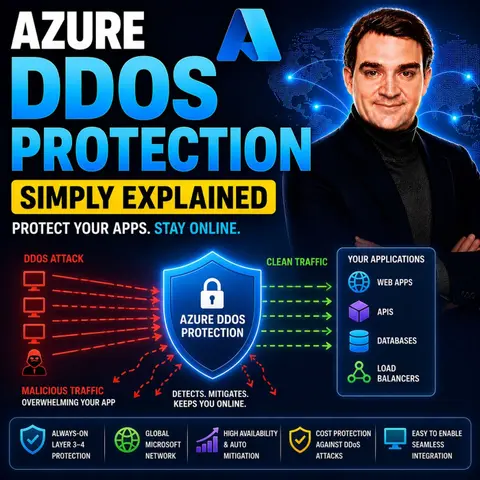

Azure DDoS Protection is Microsoft's managed service for defending applications and services against Distributed Denial of Service (DDoS) attacks. It automatically detects and mitigates malicious traffic designed to overwhelm your infrastructure, helping keep applications available even during large-scale attacks. Built directly into Azure's global network, it provides enterprise-grade protection without requiring complex security appliances.
In this episode of Microsoft Knowledge Nuggets, Mirko Peters explains Azure DDoS Protection in simple terms and shows why it's an essential part of securing internet-facing workloads. You'll learn what DDoS attacks are, how they impact applications, and how Azure automatically identifies and blocks malicious traffic while allowing legitimate users to access your services.
The episode covers key concepts including volumetric attacks, protocol attacks, application-layer threats, automatic detection, traffic mitigation, telemetry, alerting, and integration with Azure Monitor. It also explains how Azure DDoS Protection works alongside Azure Virtual Networks, Azure Firewall, Web Application Firewall (WAF), Front Door, Application Gateway, and Load Balancer to create a layered cloud security strategy.
You'll also discover the differences between Azure's built-in DDoS Infrastructure Protection and Azure DDoS Network Protection, helping you understand when the advanced capabilities are required for business-critical workloads. Knowing how these services complement each other is key to designing resilient and secure Azure environments.
Whether you're an Azure administrator, security engineer, cloud architect, or IT professional, this episode provides a practical introduction to Azure DDoS Protection. By the end, you'll understand how Azure safeguards applications against denial-of-service attacks and helps organizations maintain availability, resilience, and business continuity in the face of evolving cyber threats.
Quick answer: Azure DDoS Protection is covered in this M365 FM episode with a practical focus on what it is, how it works, and the decisions that matter for architecture, adoption, security, governance, or day-to-day operations.
In today's digital landscape, the frequency and impact of Distributed Denial-of-Service (DDoS) attacks continue to rise. Recent forecasts predict up to 58 million DDoS attacks will be mitigated by 2026. You may face an average of 3.85 incidents per year, with 44,000 attacks launched daily by cybercriminals. The financial repercussions can be staggering; mid-size companies often incur costs around $120,000 per incident. With 12% of small businesses shutting down after a major DDoS event, the stakes have never been higher. Protecting your applications with Azure DDoS Protection is not just a smart move; it’s essential for maintaining business continuity.
Key Takeaways
- DDoS attacks can severely disrupt business operations, leading to significant financial losses and reputational damage.
- Azure DDoS Protection is essential for safeguarding applications against these attacks, ensuring they remain accessible to legitimate users.
- Understanding the types of DDoS attacks—volume-based, protocol, and application layer—helps in preparing effective defenses.
- Azure DDoS Protection features include real-time monitoring, automatic attack mitigation, and adaptive tuning to enhance security.
- Implementing Azure DDoS Protection can reduce costs associated with DDoS attacks and improve overall operational efficiency.
- Regularly review and update your DDoS protection strategies to adapt to evolving threats and changes in your architecture.
- Integrating Azure DDoS Protection with other Azure services, like Web Application Firewall, strengthens your security posture.
- Follow best practices for setup and configuration to maximize the effectiveness of Azure DDoS Protection.
DDoS Attacks Overview

A Distributed Denial-of-Service (DDoS) attack aims to overwhelm a server or network with excessive traffic. This flood of requests makes the targeted system inaccessible to legitimate users. The consequences can be severe. Here are some key impacts of DDoS attacks on businesses:
- Significant downtimes and productivity losses occur, blocking access to essential services.
- Financial losses can reach up to $40,000 per hour due to lost sales and recovery expenses.
- Repeated outages can damage a company's reputation, leading to long-term revenue loss and decreased customer loyalty.
Understanding the types of DDoS attacks is crucial for protecting your Azure services. These attacks can be categorized into three main types:
Types of DDoS Attacks
Volume-Based Attacks
Volume-based attacks aim to overwhelm network bandwidth with massive traffic. Attackers use methods like ICMP Flood and UDP Flood to flood the network layer. These attacks can quickly consume available bandwidth, rendering services unavailable. For instance, an ICMP Flood sends excessive ICMP Echo Requests, exhausting network resources. Similarly, a Smurf Attack spoofs ICMP requests to a broadcast address, causing all devices to reply to the victim.
Protocol Attacks
Protocol attacks exploit vulnerabilities in network protocols like TCP and UDP. One common example is the SYN Flood attack. In this scenario, attackers send a flood of TCP handshake requests without completing the connections, filling server queues and preventing legitimate users from accessing the service. Another example is the Ping of Death, which sends malformed packets to crash the target system.
Application Layer Attacks
Application layer attacks target specific applications, often mimicking legitimate traffic. These attacks can be particularly damaging as they focus on the application itself rather than the network. For example, Slowloris keeps many connections open to a web server, consuming resources and preventing legitimate users from accessing the site. SQL injection attacks also fall into this category, where attackers exploit vulnerabilities in web applications to manipulate databases.
By understanding these types of DDoS attacks, you can better prepare your Azure services against potential threats. Implementing robust protection measures, such as Azure DDoS Protection, can help safeguard your applications and maintain business continuity.
Azure DDoS Protection Explained
Azure DDoS Protection is a vital service that helps you defend your applications against the growing threat of DDoS attacks. This managed service not only protects your resources but also ensures that your applications remain accessible to legitimate users. By leveraging Microsoft's global network, Azure DDoS Protection continuously monitors traffic and employs advanced algorithms to detect and mitigate attacks in real time.
How Azure DDoS Protection Works
Azure DDoS Protection operates through a combination of proactive features designed to identify and respond to threats quickly. Here’s how it works:
| Feature | Description |
|---|---|
| Always-on traffic monitoring | Monitors application traffic patterns 24/7 for DDoS attack indicators and automatically mitigates once detected. |
| Adaptive real-time tuning | Learns traffic patterns over time to adjust profiles suitable for the service as traffic changes. |
| Auto-tuned mitigation policies | Applies three policies (TCP SYN, TCP, UDP) for public IPs, configured via machine learning profiling. |
| Traffic threshold monitoring | Initiates mitigation automatically when traffic exceeds defined thresholds, stopping when it returns below. |
| Packet checks during mitigation | Ensures packets conform to specifications, checks for spoofing, and rate-limits packets if necessary. |
| Notification and logging | Notifies users of attack detection within minutes and retains metric data for 30 days for analysis. |
These features work together to create a robust defense against DDoS attacks, allowing you to focus on your core business activities without worrying about service disruptions.
Key Benefits of Azure DDoS Protection
Using Azure DDoS Protection offers several key benefits that enhance your security posture and operational efficiency:
| Benefit | Description |
|---|---|
| Intelligent Protection | Adaptive threat intelligence that detects and mitigates complex DDoS attacks automatically. |
| Visibility During Attacks | Full visibility into DDoS attacks with actionable insights for quick responses. |
| Rapid Response Support | Access to a rapid response team for investigation and custom mitigation within a 15-minute SLA. |
| Cost Protection | Helps reduce costs associated with DDoS-related usage spikes, such as app-scaling charges. |
Additionally, Azure DDoS Protection includes proactive features that further enhance your defenses:
- Adaptive Tuning: Continuously learns normal traffic patterns and adjusts detection thresholds for each protected resource, reducing false positives.
- Real-time Telemetry: Provides detailed metrics about attack traffic, types of attack vectors, and current mitigation status through Azure Monitor.
- Layered Defense Strategy: Combines Azure DDoS Protection with other Azure services to create a comprehensive defense-in-depth architecture.
By implementing Azure DDoS Protection, you not only safeguard your applications but also gain peace of mind knowing that you have a powerful tool to combat potential threats.
Azure DDoS Protection Tiers
Azure DDoS Protection offers two distinct tiers: IP Protection and Network Protection. Each tier serves different needs and scales, allowing you to choose the best fit for your organization.
IP Protection
The IP Protection tier is designed for smaller deployments. It provides essential DDoS protection for individual public IP addresses. This tier is ideal if you need to protect fewer than 15 public IP addresses. The cost structure is based on a per-IP monthly fee, making it a cost-effective choice for small-scale needs.
Here are some key features of the IP Protection tier:
| Feature | Description |
|---|---|
| Always-on Traffic Monitoring | Continuously analyzes traffic patterns for unusual behavior, aiding in early DDoS detection. |
| Automatic Attack Mitigation | Detects and mitigates DDoS assaults automatically, minimizing disruption during attacks. |
| Multi-layered Security | Protects against common DDoS attacks at Layers 3 and 4 of the OSI model. |
| Scaling to Address Threats | Automatically scales to handle DDoS attacks of any size, ensuring service uptime. |
| Cost Guarantee | Provides service credit for proven DDoS attack resource charges. |
| Native Integration | Simplifies deployment and administration through seamless setup in the Azure portal. |
| Turnkey Protection | Offers immediate protection for resources upon activation. |
| Advanced Analytics | Utilizes machine learning to customize mitigation rules for each IP address. |
Network Protection
The Network Protection tier is tailored for larger organizations with more extensive needs. It covers resources in virtual networks enabled for DDoS Protection. This tier has a fixed monthly cost for up to 100 IP addresses, making it suitable for businesses with more than 15 public IPs.
The Network Protection tier enhances DDoS mitigation through advanced features such as adaptive tuning and attack analytics. You gain access to the DDoS Rapid Response team, which is essential for managing DDoS attacks in complex environments. This tier allows for customized protection policies and automatic learning of traffic patterns, significantly reducing false positives.
Features of Network Protection
- Comprehensive Coverage: Protects all resources within a virtual network.
- DDoS Rapid Response: Access to a dedicated team for immediate assistance during an attack.
- Cost Protection Guarantees: Helps manage costs associated with DDoS-related usage spikes.
Use Cases for Network Protection
Network Protection is ideal for various scenarios:
- Web Application Protection: Safeguards critical web applications from various types of attacks when combined with a Web Application Firewall.
- Hybrid and Multi-Cloud Architectures: Protects public-facing endpoints in hybrid setups to prevent impacts on on-premises infrastructure.
- API and Service Endpoints: Shields public APIs and services from overwhelming traffic.
- Critical Infrastructure: Defends essential components like load balancers and VPN gateways from targeted attacks.
- Regulatory and Compliance Requirements: Ensures adherence to industry mandates for data availability and incident response.
By understanding the differences between these two tiers, you can select the right level of protection for your Azure services.
Features of Azure DDoS Protection

Real-Time Monitoring
Real-time monitoring is a crucial feature of Azure DDoS Protection. It helps you identify threats quickly and respond effectively. This feature continuously tracks traffic patterns and detects unusual spikes in network activity. Here are some key benefits of real-time monitoring:
- It alerts you when specific DDoS metrics indicate an ongoing attack, ensuring timely responses.
- You can configure alerts to notify your team immediately, allowing for swift action.
- Logging capabilities provide detailed records of DDoS mitigation events. These records help inform your security teams and improve future response strategies.
With real-time monitoring, you gain visibility into your network's health. This visibility allows you to maintain service availability and protect your applications from potential disruptions.
Automatic Attack Mitigation
Automatic attack mitigation is another standout feature of Azure DDoS Protection. This technology enables the service to detect and respond to DDoS attacks without requiring operator intervention. Here’s how it works:
| Feature | Description |
|---|---|
| Always-on Traffic Monitoring | Continuously analyzes traffic patterns for unusual behavior, aiding in early detection of DDoS attacks. |
| Automatic Attack Mitigation | Automatically detects and mitigates DDoS attacks without requiring operator intervention. |
| Multi-layered Security | Provides protection at Layers 3 and 4 of the OSI model against common DDoS attacks. |
| Scaling to Address Threats | Automatically scales to handle DDoS attacks of any size, ensuring service uptime. |
These features work together to create a robust defense against DDoS attacks. By leveraging automatic attack mitigation, you can focus on your core business activities without worrying about service disruptions. Azure DDoS Protection stands out from competitors due to its advanced capabilities. For instance, it offers adaptive tuning, attack analytics, and seamless integration with Azure Monitor, which many competitors lack.
Implementing Azure DDoS Protection
Setting up Azure DDoS Protection is essential for safeguarding your applications against potential threats. Follow this step-by-step guide to implement Azure DDoS Protection effectively.
Setup Guide
Accessing the Azure Portal
- Open your web browser and navigate to the Azure Portal.
- Sign in with your Microsoft account credentials.
- Once logged in, you will see the Azure dashboard.
Configuring DDoS Protection
To configure Azure DDoS Protection, follow these steps:
- Ensure you have an Azure DDoS Protection Plan for your public resources.
- Enable diagnostic logging on the protected resource and send logs to a Log Analytics Workspace.
- Create a Microsoft Sentinel Workspace linked to the Log Analytics Workspace.
- Install a Web Application Firewall policy in an Application Gateway or Front Door instance.
- Deploy the Azure DDoS Sentinel Solution to monitor and respond to DDoS attacks.
- Enable logging in the diagnostic settings of the protected resource.
- Install the Azure DDoS Sentinel Solution to identify DDoS attack IP addresses.
- Deploy the Azure Web Application Firewall policy.
- Implement the WAF Playbook to block attacker IP addresses based on incidents created by DDoS analytic rules.
By following these steps, you can ensure that your Azure resources are well-protected against DDoS attacks.
Best Practices for Integration with Azure Services
Integrating Azure DDoS Protection with your existing Azure services enhances your security posture. Here are some best practices to consider:
- Enable Azure DDoS Protection Standard to ensure automatic protection.
- Leverage Web Application Firewall (WAF) to defend against Layer 7 attacks.
- Implement Network Segmentation to isolate critical services.
- Monitor Traffic Regularly to detect abnormal activities.
- Use Rate-Limiting and Throttling based on application sensitivity.
- Consider Cost, as Azure DDoS Protection is scalable and cost-effective.
Additionally, you should create a Resource Group, establish a DDoS Protection Plan, and enable DDoS Protection on new or existing Virtual Networks (VNets) or IP addresses. Configure DDoS telemetry and diagnostic logs to keep track of any incidents. Running a test DDoS attack can also help verify the effectiveness of your setup.
By following these guidelines, you can effectively implement Azure DDoS Protection and ensure your applications remain secure and accessible.
Configuration Options for Azure DDoS Protection
When enabling Azure DDoS Protection for a virtual network, consider the following configuration options:
| Configuration Option | Description |
|---|---|
| Link Virtual Networks | Link more virtual networks to the same DDoS Protection plan if they are under the same Microsoft Entra (Azure AD) tenant. |
| Add Networks | To add networks, go to the plan's Protected resources section and click Add to select additional virtual networks. |
| Configure Security and Monitoring | Review and configure Network Security Groups (NSGs), routing, and monitoring through Azure Monitor to optimize your security posture. |
| Validation and Ongoing Management | After enabling protection, view the list of protected resources through the DDoS protection plan dashboard. Regularly review diagnostics, alerts, and DDoS telemetry in Azure Monitor for visibility and response. |
| Charges | Enabling DDoS Protection incurs charges based on the protection plan tier and number of protected resources. |
| Recommended for Critical Applications | Enabling DDoS Protection Standard for mission-critical applications is recommended for advanced mitigation, analytics, and support features. |
By understanding these configuration options, you can tailor Azure DDoS Protection to meet your specific needs.
In today's digital landscape, protecting your applications from DDoS attacks is crucial. Azure DDoS Protection offers automated defense mechanisms that enhance security and uptime. By implementing this service, you can safeguard critical workloads and minimize operational risks.
Consider these key takeaways when using Azure DDoS Protection:
- Risk-based protection models ensure that not all public IPs require the same level of defense.
- Design-time cost optimization helps avoid unnecessary expenses.
- Regular governance and reassessment of protection strategies are vital as your architecture evolves.
As DDoS mitigation technologies continue to advance, integrating AI and machine learning will play a significant role in real-time threat detection. By adopting Azure DDoS Protection, you position your organization to effectively combat evolving cyber threats.
FAQ
What is Azure DDoS Protection?
Azure DDoS Protection is a managed service that safeguards your applications from DDoS attacks. It monitors traffic, detects anomalies, and automatically mitigates threats to ensure your services remain accessible.
How does Azure DDoS Protection work?
Azure DDoS Protection continuously analyzes incoming traffic patterns. It uses machine learning to identify potential attacks and applies mitigation strategies in real-time, ensuring minimal disruption to your services.
What are the benefits of using Azure DDoS Protection?
Using Azure DDoS Protection enhances your security posture. Key benefits include intelligent threat detection, automatic attack mitigation, visibility during attacks, and cost protection against usage spikes.
How do I set up Azure DDoS Protection?
To set up Azure DDoS Protection, access the Azure Portal, create a DDoS Protection Plan, and enable it for your virtual networks or public IP addresses. Follow the setup guide for detailed steps.
What are the different tiers of Azure DDoS Protection?
Azure DDoS Protection offers two tiers: IP Protection and Network Protection. IP Protection secures individual public IPs, while Network Protection safeguards entire virtual networks, providing additional enterprise features.
Can Azure DDoS Protection integrate with other Azure services?
Yes, Azure DDoS Protection integrates seamlessly with other Azure services, such as Web Application Firewall (WAF) and Azure Monitor. This integration enhances your overall security strategy.
How much does Azure DDoS Protection cost?
The cost of Azure DDoS Protection varies based on the tier you choose and the number of protected resources. IP Protection has a per-IP monthly fee, while Network Protection has a fixed monthly cost for up to 100 IPs.
What should I do if I experience a DDoS attack?
If you experience a DDoS attack, Azure DDoS Protection will automatically mitigate the threat. Monitor the Azure Portal for alerts and reports to understand the attack's nature and impact.
🎧 Listen to this episode
Want a practical explanation of Azure DDoS Protection? This episode breaks down the topic in clear language and shows why it matters for Microsoft 365, Azure, Power Platform, security, AI, and modern work.
Listen to this episode if you want to:
- Understand the key concepts behind Azure DDoS Protection
- See how it fits into the wider Microsoft technology ecosystem
- Learn where it can create practical value for your organization
You may also enjoy these related M365 FM episodes:
- Fix Microsoft Purview Information Protection Rollouts
- Microsoft Purview vs Azure Information Protection
Discover more practical Microsoft conversations on M365 FM.
Last reviewed: July 2026.
Who Should Listen
This episode is for Microsoft 365 administrators, architects, IT leaders, and practitioners who need a practical understanding of Azure DDoS Protection before planning, implementing, or supporting it.
🚀 Want to be part of m365.fm?
Then stop just listening… and start showing up.
👉 Connect with me on LinkedIn and let’s make something happen:
- 🎙️ Be a podcast guest and share your story
- 🎧 Host your own episode (yes, seriously)
- 💡 Pitch topics the community actually wants to hear
- 🌍 Build your personal brand in the Microsoft 365 space
This isn’t just a podcast — it’s a platform for people who take action.
🔥 Most people wait. The best ones don’t.
👉 Connect with me on LinkedIn and send me a message:
"I want in"
Let’s build something awesome 👊
1
00:00:00,000 --> 00:00:02,000
Welcome to another episode of Microsoft Knowledge
2
00:00:02,000 --> 00:00:03,320
nuggets here on M365.
3
00:00:03,320 --> 00:00:05,080
FM, I'm your host, Mirko Peters.
4
00:00:05,080 --> 00:00:07,840
Today's topic is one that almost everyone has heard of,
5
00:00:07,840 --> 00:00:09,960
but few understand, de-doss attacks.
6
00:00:09,960 --> 00:00:11,720
Picture this, you run a small online store,
7
00:00:11,720 --> 00:00:13,560
nothing huge just a steady business.
8
00:00:13,560 --> 00:00:15,880
Orders come in, you ship them out, life is good.
9
00:00:15,880 --> 00:00:17,360
Then one day everything goes dark.
10
00:00:17,360 --> 00:00:18,680
Your website stops loading,
11
00:00:18,680 --> 00:00:21,480
customers start emailing you saying the page won't open,
12
00:00:21,480 --> 00:00:22,920
and you check your server dashboard
13
00:00:22,920 --> 00:00:25,560
to see a traffic spike like nothing you've ever seen before.
14
00:00:25,560 --> 00:00:27,640
Your server is completely overwhelmed.
15
00:00:27,640 --> 00:00:29,640
No order is going through, no way to fix it.
16
00:00:29,640 --> 00:00:30,760
Here's what actually happened,
17
00:00:30,760 --> 00:00:32,560
you got hit by a de-doss attack.
18
00:00:32,560 --> 00:00:34,000
Most people have heard the term,
19
00:00:34,000 --> 00:00:35,840
but very few understand what it actually is
20
00:00:35,840 --> 00:00:37,360
or how Azure protects against it.
21
00:00:37,360 --> 00:00:39,520
And that's a problem because if you run anything
22
00:00:39,520 --> 00:00:42,640
on the internet, a website, an API, a backend service,
23
00:00:42,640 --> 00:00:44,200
this is something you need to know about.
24
00:00:44,200 --> 00:00:45,120
By the end of this episode,
25
00:00:45,120 --> 00:00:47,760
you'll know exactly what de-doss attacks are,
26
00:00:47,760 --> 00:00:49,760
which Azure defenses kick in by default
27
00:00:49,760 --> 00:00:52,160
and which ones you might actually need to pay for.
28
00:00:52,160 --> 00:00:55,120
What a de-doss attack actually is.
29
00:00:55,120 --> 00:00:56,280
So let's start with the basics.
30
00:00:56,280 --> 00:00:57,360
What is a de-doss attack?
31
00:00:57,360 --> 00:00:59,560
Imagine a tiny coffee shop with one barista.
32
00:00:59,560 --> 00:01:01,600
It's a small place, cozy, maybe four tables.
33
00:01:01,600 --> 00:01:04,120
The barista can handle maybe 10 customers an hour.
34
00:01:04,120 --> 00:01:05,960
Now imagine 10,000 people walk in at once.
35
00:01:05,960 --> 00:01:07,000
They don't order anything.
36
00:01:07,000 --> 00:01:09,480
They just stand there asking questions, blocking the counter,
37
00:01:09,480 --> 00:01:10,560
taking up space.
38
00:01:10,560 --> 00:01:12,400
The barista can't serve real customers.
39
00:01:12,400 --> 00:01:14,440
The real customers can't even get through the door.
40
00:01:14,440 --> 00:01:17,400
The shop is technically open, but it's completely useless.
41
00:01:17,400 --> 00:01:18,560
That's a de-doss attack.
42
00:01:18,560 --> 00:01:20,600
The name tells you exactly what it is.
43
00:01:20,600 --> 00:01:23,320
Distributed means the attack comes from many computers at once,
44
00:01:23,320 --> 00:01:24,560
not just one person.
45
00:01:24,560 --> 00:01:26,640
It's not one guy with a grudge sitting in his basement.
46
00:01:26,640 --> 00:01:29,520
It's thousands, sometimes hundreds of thousands of devices,
47
00:01:29,520 --> 00:01:32,240
all sending traffic to your server at the same time.
48
00:01:32,240 --> 00:01:35,480
Denial of service means your real users can't get through.
49
00:01:35,480 --> 00:01:38,480
The service is denied to the people who actually needed.
50
00:01:38,480 --> 00:01:40,640
Now these attacks come in different flavors.
51
00:01:40,640 --> 00:01:42,560
The most common one is volumetric.
52
00:01:42,560 --> 00:01:44,120
That's the brute force approach.
53
00:01:44,120 --> 00:01:45,760
Attackers try to clog your internet pipe
54
00:01:45,760 --> 00:01:46,920
with raw traffic.
55
00:01:46,920 --> 00:01:49,480
So much data that your connection simply can't handle it.
56
00:01:49,480 --> 00:01:51,560
Think of it like trying to pour the entire ocean
57
00:01:51,560 --> 00:01:52,880
through a garden hose.
58
00:01:52,880 --> 00:01:54,040
Then you have protocol attacks.
59
00:01:54,040 --> 00:01:56,480
These target how your server handles connections.
60
00:01:56,480 --> 00:01:58,000
Instead of flooding your bandwidth,
61
00:01:58,000 --> 00:02:00,880
they exploit the way your server opens and closes connections.
62
00:02:00,880 --> 00:02:03,320
They send half-open connection requests over and over
63
00:02:03,320 --> 00:02:05,960
until your server runs out of memory and crashes.
64
00:02:05,960 --> 00:02:07,960
And then there are application layer attacks.
65
00:02:07,960 --> 00:02:09,120
These are the sneaky ones.
66
00:02:09,120 --> 00:02:10,600
Instead of sending garbage traffic,
67
00:02:10,600 --> 00:02:13,320
they send requests that look perfectly legitimate.
68
00:02:13,320 --> 00:02:16,880
A single request to your most expensive API endpoint looks fine,
69
00:02:16,880 --> 00:02:20,040
but 10,000 of them from different IPs can bring your app down.
70
00:02:20,040 --> 00:02:21,280
The server can't tell the difference
71
00:02:21,280 --> 00:02:22,640
between a real user and an attacker
72
00:02:22,640 --> 00:02:24,400
because the request itself is valid.
73
00:02:24,400 --> 00:02:25,880
Here's the thing about modern attacks.
74
00:02:25,880 --> 00:02:26,960
They're not just one of these.
75
00:02:26,960 --> 00:02:28,200
They're multi-vector.
76
00:02:28,200 --> 00:02:30,400
Attackers hit you on multiple fronts at once.
77
00:02:30,400 --> 00:02:32,960
A volumetric flood to saturate your bandwidth.
78
00:02:32,960 --> 00:02:35,720
A protocol attack to exhaust your server resources.
79
00:02:35,720 --> 00:02:38,320
And application layer attacks to drain your back end.
80
00:02:38,320 --> 00:02:39,080
All at the same time.
81
00:02:39,080 --> 00:02:40,680
So now you know what DDoS is.
82
00:02:40,680 --> 00:02:44,280
The important question is, what does Azure do about it?
83
00:02:44,280 --> 00:02:46,160
The free protection you already get.
84
00:02:46,160 --> 00:02:47,120
Here's some good news.
85
00:02:47,120 --> 00:02:49,320
Every Azure customer gets baseline protection
86
00:02:49,320 --> 00:02:50,760
that's always on and always free
87
00:02:50,760 --> 00:02:52,720
with nothing to configure or pay for.
88
00:02:52,720 --> 00:02:54,440
It's just there automatically.
89
00:02:54,440 --> 00:02:57,120
Microsoft calls this infrastructure level DDoS protection
90
00:02:57,120 --> 00:02:58,400
and it's not a joke.
91
00:02:58,400 --> 00:03:00,760
The same global defense systems that protect Microsoft's
92
00:03:00,760 --> 00:03:02,280
own services are running here.
93
00:03:02,280 --> 00:03:05,560
And Azure handles over 2,000 DDoS attacks every single day
94
00:03:05,560 --> 00:03:07,040
across its infrastructure.
95
00:03:07,040 --> 00:03:09,520
That's a lot of real world experience built into the system.
96
00:03:09,520 --> 00:03:10,800
But here's the important catch.
97
00:03:10,800 --> 00:03:13,360
This free protection protects Azure's network,
98
00:03:13,360 --> 00:03:16,160
not necessarily your specific application.
99
00:03:16,160 --> 00:03:17,640
Think of it like a security guard
100
00:03:17,640 --> 00:03:20,000
at the front gate of a large apartment building.
101
00:03:20,000 --> 00:03:21,520
They stop obvious troublemakers.
102
00:03:21,520 --> 00:03:23,520
Someone walking in with a crowbar gets caught,
103
00:03:23,520 --> 00:03:25,200
but they don't know your neighbor Sally
104
00:03:25,200 --> 00:03:26,520
from a complete stranger.
105
00:03:26,520 --> 00:03:28,000
They don't know what normal traffic looks like
106
00:03:28,000 --> 00:03:29,400
for your specific apartment.
107
00:03:29,400 --> 00:03:31,600
So if someone walks in who looks reasonably normal,
108
00:03:31,600 --> 00:03:32,640
they'll let them through.
109
00:03:32,640 --> 00:03:33,560
That's the free tier.
110
00:03:33,560 --> 00:03:35,200
It's a safety net for the platform,
111
00:03:35,200 --> 00:03:37,080
not a tailored defense for your workload.
112
00:03:37,080 --> 00:03:38,920
Here's what you don't get with the free tier.
113
00:03:38,920 --> 00:03:41,360
No visibility, no alerts, no reports,
114
00:03:41,360 --> 00:03:43,120
no way to tell an attack even happened.
115
00:03:43,120 --> 00:03:45,480
You might be under attack right now and never know it
116
00:03:45,480 --> 00:03:47,600
because the free tier doesn't tell you anything.
117
00:03:47,600 --> 00:03:49,640
It also doesn't tune itself to your workload.
118
00:03:49,640 --> 00:03:52,120
Your small web app and a massive video streaming service
119
00:03:52,120 --> 00:03:53,280
get treated the same way.
120
00:03:53,280 --> 00:03:55,080
The thresholds are set high because they're designed
121
00:03:55,080 --> 00:03:58,240
to protect Azure's infrastructure, not your specific application.
122
00:03:58,240 --> 00:03:59,920
And here's the most important part.
123
00:03:59,920 --> 00:04:02,080
If a moderate attack hits your specific application,
124
00:04:02,080 --> 00:04:03,640
the free tier might not step in.
125
00:04:03,640 --> 00:04:04,800
From Azure's perspective,
126
00:04:04,800 --> 00:04:06,720
the traffic isn't enough to threaten the platform,
127
00:04:06,720 --> 00:04:08,520
so it doesn't trigger any mitigation.
128
00:04:08,520 --> 00:04:09,720
But from your perspective,
129
00:04:09,720 --> 00:04:12,080
that moderate attack is enough to take your server down
130
00:04:12,080 --> 00:04:12,880
completely.
131
00:04:12,880 --> 00:04:16,120
Your server can still go down even though Azure's network is fine.
132
00:04:16,120 --> 00:04:17,440
The free tier protects Azure.
133
00:04:17,440 --> 00:04:18,600
It doesn't always protect you.
134
00:04:18,600 --> 00:04:20,080
That's where the paid tier comes in.
135
00:04:20,080 --> 00:04:22,160
Azure Deedos protection adds intelligence
136
00:04:22,160 --> 00:04:24,600
and visibility on top of that free baseline.
137
00:04:24,600 --> 00:04:26,960
And that's what we're going to talk about next.
138
00:04:26,960 --> 00:04:29,120
Azure Deedos protection, the two flavors.
139
00:04:29,120 --> 00:04:31,600
So Azure Deedos protection comes in two versions.
140
00:04:31,600 --> 00:04:33,440
Microsoft calls them SKUs.
141
00:04:33,440 --> 00:04:34,880
Network protection is the first one
142
00:04:34,880 --> 00:04:36,680
and IP protection is the second.
143
00:04:36,680 --> 00:04:39,400
They both do the same core job of protecting against layer three
144
00:04:39,400 --> 00:04:40,680
and layer four attacks.
145
00:04:40,680 --> 00:04:43,120
But the real difference is in scope, price,
146
00:04:43,120 --> 00:04:44,960
and what extras you get.
147
00:04:44,960 --> 00:04:46,520
Let's start with network protection.
148
00:04:46,520 --> 00:04:49,040
This is the original option, the more complete one.
149
00:04:49,040 --> 00:04:50,960
You protect an entire virtual network,
150
00:04:50,960 --> 00:04:53,080
which means every single public IP address
151
00:04:53,080 --> 00:04:55,520
inside that VNet gets covered automatically.
152
00:04:55,520 --> 00:04:58,880
If you add a new VM with a public IP tomorrow, it's protected.
153
00:04:58,880 --> 00:05:00,120
You don't have to think about it.
154
00:05:00,120 --> 00:05:01,480
For the first 100 public IPs,
155
00:05:01,480 --> 00:05:04,080
you're looking at about $2,700 per month.
156
00:05:04,080 --> 00:05:07,560
After that, it's roughly $27 per additional IP per month.
157
00:05:07,560 --> 00:05:09,280
So if you have a decent size deployment,
158
00:05:09,280 --> 00:05:11,960
the per IP cost gets very reasonable.
159
00:05:11,960 --> 00:05:13,560
But the price isn't the only thing you get.
160
00:05:13,560 --> 00:05:16,720
Network protection includes Deedos rapid response support,
161
00:05:16,720 --> 00:05:18,560
a dedicated team of Microsoft engineers
162
00:05:18,560 --> 00:05:20,120
you can call during an active attack.
163
00:05:20,120 --> 00:05:22,360
They help investigate, manually adjust thresholds
164
00:05:22,360 --> 00:05:25,320
if needed, and assist with post-attack analysis.
165
00:05:25,320 --> 00:05:27,400
It's like having a SWAT team on speed dial.
166
00:05:27,400 --> 00:05:28,880
It also includes cost protection.
167
00:05:28,880 --> 00:05:31,480
If an attack causes your resources to auto scale,
168
00:05:31,480 --> 00:05:33,920
say your application gateway spins up more instances
169
00:05:33,920 --> 00:05:35,000
to handle the flood.
170
00:05:35,000 --> 00:05:37,840
Microsoft gives you service credits for that extra cost.
171
00:05:37,840 --> 00:05:39,760
You document the attack, submit a claim,
172
00:05:39,760 --> 00:05:41,000
and you get the overage back.
173
00:05:41,000 --> 00:05:42,440
And there's a WAF discount, too.
174
00:05:42,440 --> 00:05:45,040
For application gateway running inside a protected VNet,
175
00:05:45,040 --> 00:05:47,560
the WF part of the cost is 100% discounted.
176
00:05:47,560 --> 00:05:49,640
You only pay the standard application gateway price.
177
00:05:49,640 --> 00:05:51,840
That's a nice saving if you're already using WAF.
178
00:05:51,840 --> 00:05:54,800
Now IP protection is the newer, simpler, cheaper option.
179
00:05:54,800 --> 00:05:57,160
Instead of protecting an entire virtual network,
180
00:05:57,160 --> 00:06:00,160
you protect individual public IP addresses one at a time.
181
00:06:00,160 --> 00:06:02,920
Each IP will cost you about 109 niles per month,
182
00:06:02,920 --> 00:06:03,920
but you lose some things.
183
00:06:03,920 --> 00:06:06,160
No rapid response team, no cost protection,
184
00:06:06,160 --> 00:06:07,040
no WAF discount.
185
00:06:07,040 --> 00:06:08,520
You get the same core mitigation,
186
00:06:08,520 --> 00:06:10,960
the same adaptive tuning, the same metrics and logging,
187
00:06:10,960 --> 00:06:12,760
but the enterprise extras are gone.
188
00:06:12,760 --> 00:06:14,080
So which one do you choose?
189
00:06:14,080 --> 00:06:15,400
Here's a rough rule of thumb.
190
00:06:15,400 --> 00:06:18,080
If you have fewer than 15 critical public IPs,
191
00:06:18,080 --> 00:06:19,480
IP protection is cheaper.
192
00:06:19,480 --> 00:06:21,280
If you have more than 15 network protection
193
00:06:21,280 --> 00:06:22,520
makes more financial sense.
194
00:06:22,520 --> 00:06:25,440
And if you want that rapid response support or cost protection,
195
00:06:25,440 --> 00:06:27,280
network protection is the only option.
196
00:06:27,280 --> 00:06:28,760
But here's the thing about cost.
197
00:06:28,760 --> 00:06:30,400
Most people focus on the monthly price
198
00:06:30,400 --> 00:06:33,160
and forget what an attack actually costs them in downtime.
199
00:06:33,160 --> 00:06:35,840
We'll get to that later, but keep it in mind.
200
00:06:35,840 --> 00:06:39,240
Now, what about attacks that don't target the network layer at all?
201
00:06:39,240 --> 00:06:42,080
What happens when the attack looks like normal web traffic?
202
00:06:42,080 --> 00:06:44,280
Layer 7 attacks and where WAF fits.
203
00:06:44,280 --> 00:06:45,680
So here's the limitation.
204
00:06:45,680 --> 00:06:48,800
Azure DDoS protection only covers layers 3 and 4,
205
00:06:48,800 --> 00:06:50,440
the network and transport layers.
206
00:06:50,440 --> 00:06:53,480
It looks at IP addresses, ports, protocols and packet rates,
207
00:06:53,480 --> 00:06:56,840
but it never inspects the actual content of your HTTP requests.
208
00:06:56,840 --> 00:06:58,440
Attackers know this, so they've adapted.
209
00:06:58,440 --> 00:07:00,240
Instead of sending garbage traffic
210
00:07:00,240 --> 00:07:02,480
that network level defenses catch,
211
00:07:02,480 --> 00:07:05,200
they send traffic that looks perfectly legitimate.
212
00:07:05,200 --> 00:07:08,280
A single request to your most expensive API endpoint
213
00:07:08,280 --> 00:07:09,760
has the right headers and format,
214
00:07:09,760 --> 00:07:13,160
but 10,000 of them from different IPs can take your app down.
215
00:07:13,160 --> 00:07:14,760
These are application layer attacks,
216
00:07:14,760 --> 00:07:15,960
layer 7 attacks,
217
00:07:15,960 --> 00:07:18,000
and Azure DDoS protection can't stop them
218
00:07:18,000 --> 00:07:19,880
because it doesn't look inside the request.
219
00:07:19,880 --> 00:07:23,520
This is where Azure Web Application Firewall or WAF comes into the picture.
220
00:07:23,520 --> 00:07:25,000
WAF sits in front of your application
221
00:07:25,000 --> 00:07:27,320
and inspects every single HTTP request.
222
00:07:27,320 --> 00:07:30,560
It identifies patterns, rate limits, specific endpoints
223
00:07:30,560 --> 00:07:33,720
and blocks the suspicious traffic based on the content of the request,
224
00:07:33,720 --> 00:07:35,320
not just where it came from.
225
00:07:35,320 --> 00:07:37,640
There's a feature called the HTTP DDoS
226
00:07:37,640 --> 00:07:39,720
rule set for application gateway WAF.
227
00:07:39,720 --> 00:07:42,200
It learns your normal traffic patterns over 24 hours
228
00:07:42,200 --> 00:07:44,120
and automatically sets thresholds.
229
00:07:44,120 --> 00:07:46,440
If a client suddenly sends way more requests than usual,
230
00:07:46,440 --> 00:07:48,040
it gets temporarily blocked.
231
00:07:48,040 --> 00:07:50,520
It's adaptive, just like the network level protection,
232
00:07:50,520 --> 00:07:52,320
but specifically for HTTP traffic.
233
00:07:52,320 --> 00:07:55,360
On top of that, you have rate limiting for deterministic controls.
234
00:07:55,360 --> 00:07:58,800
You can say no more than 100 requests per minute to this login endpoint
235
00:07:58,800 --> 00:08:00,120
and WAF enforces it.
236
00:08:00,120 --> 00:08:03,560
You also have bot protection features like JavaScript challenges and capture.
237
00:08:03,560 --> 00:08:07,160
When a client hits a sensitive endpoint, WAF challenges them.
238
00:08:07,160 --> 00:08:08,840
A real browser passes the challenge,
239
00:08:08,840 --> 00:08:11,000
but a bot usually fails.
240
00:08:11,000 --> 00:08:13,000
So the simple way to think about it is this.
241
00:08:13,000 --> 00:08:16,040
DDoS protection handles the flood and WAF handles the fakes.
242
00:08:16,040 --> 00:08:17,720
You need both for complete coverage.
243
00:08:17,720 --> 00:08:20,040
Now let's talk about what everyone asks about next,
244
00:08:20,040 --> 00:08:23,040
the real cost and what you actually get for your money.
245
00:08:23,040 --> 00:08:25,320
What you actually get for your money.
246
00:08:25,320 --> 00:08:27,320
Let's start with the network protection tier
247
00:08:27,320 --> 00:08:29,520
since it includes the most features.
248
00:08:29,520 --> 00:08:32,200
First up is DDoS Rapid Response Support,
249
00:08:32,200 --> 00:08:35,360
a team of Microsoft engineers you can call during an active attack.
250
00:08:35,360 --> 00:08:38,440
They help investigate manually adjust thresholds if needed
251
00:08:38,440 --> 00:08:40,280
and assist with post-attack analysis.
252
00:08:40,280 --> 00:08:42,400
This is only available with the network protection tier,
253
00:08:42,400 --> 00:08:44,400
so if you go with IP protection, you don't get it.
254
00:08:44,400 --> 00:08:45,440
Then there's cost protection.
255
00:08:45,440 --> 00:08:47,920
If an attack causes your resources to auto scale,
256
00:08:47,920 --> 00:08:51,280
say your application gateway spins up extra instances to handle the flood,
257
00:08:51,280 --> 00:08:53,880
Microsoft gives you service credits for that extra cost.
258
00:08:53,880 --> 00:08:57,000
You document the attack, submit a claim, and get the overage back.
259
00:08:57,000 --> 00:08:59,280
It's a financial safety net on top of the technical one.
260
00:08:59,280 --> 00:09:00,920
There's also a WAF discount.
261
00:09:00,920 --> 00:09:03,560
For application gateway running inside a protected V-net,
262
00:09:03,560 --> 00:09:06,280
the WAF part of the cost is 100% discounted,
263
00:09:06,280 --> 00:09:09,040
so you only pay the standard application gateway price.
264
00:09:09,040 --> 00:09:12,400
If you're already using WAF, that's real money back in your pocket.
265
00:09:12,400 --> 00:09:14,600
Now, let's look at the features both tier share.
266
00:09:14,600 --> 00:09:17,200
With metrics and alerts, you can see real-time thresholds
267
00:09:17,200 --> 00:09:19,720
know when you're under attack and set up alerts.
268
00:09:19,720 --> 00:09:21,560
No more guessing whether something happened.
269
00:09:21,560 --> 00:09:22,960
You get a clear signal.
270
00:09:22,960 --> 00:09:24,720
Login gives you three categories.
271
00:09:24,720 --> 00:09:28,080
DDoS protection notifications tell you when an attack starts and stops.
272
00:09:28,080 --> 00:09:30,720
Mitigation flow logs give you sample traffic data,
273
00:09:30,720 --> 00:09:32,560
what was dropped and what was forwarded.
274
00:09:32,560 --> 00:09:35,920
Mitigation reports give you aggregate summaries like total packets,
275
00:09:35,920 --> 00:09:38,040
top source countries, and attack duration.
276
00:09:38,040 --> 00:09:40,960
All of this is useful for post-attack investigation.
277
00:09:40,960 --> 00:09:44,720
And then there's adaptive tuning, which is the core intelligence of the service.
278
00:09:44,720 --> 00:09:48,640
It learns your normal traffic patterns and adjusts thresholds automatically
279
00:09:48,640 --> 00:09:52,280
across three thresholds per IP, TCP, TCP, Syn and UDP.
280
00:09:52,280 --> 00:09:54,920
No manual configuration is needed beyond enabling the service.
281
00:09:54,920 --> 00:09:55,760
It just works.
282
00:09:55,760 --> 00:09:59,000
Before the IP protection tier, you lose the rapid response support,
283
00:09:59,000 --> 00:10:00,560
cost protection, and WAF discount,
284
00:10:00,560 --> 00:10:03,200
but you keep the adaptive tuning, metrics, and logging.
285
00:10:03,200 --> 00:10:05,360
Same core protection, just fewer extras.
286
00:10:05,360 --> 00:10:08,240
Now let's look at something that puts all of this into perspective.
287
00:10:08,240 --> 00:10:10,680
The largest attack Azure has ever handled.
288
00:10:10,680 --> 00:10:12,160
The 15-terrabbit attack.
289
00:10:12,160 --> 00:10:15,600
Now let's talk about a massive attack that happened in late 2023.
290
00:10:15,600 --> 00:10:18,280
Microsoft blocked the largest DDoS attack in history.
291
00:10:18,280 --> 00:10:21,080
It peaked at 15.72 terabits per second
292
00:10:21,080 --> 00:10:22,840
to give you an idea of how big that is,
293
00:10:22,840 --> 00:10:26,280
imagine downloading the entire Netflix catalog in under two seconds.
294
00:10:26,280 --> 00:10:28,160
That's the kind of traffic we're talking about.
295
00:10:28,160 --> 00:10:31,160
The attack targeted a single endpoint in Australia.
296
00:10:31,160 --> 00:10:34,320
It came from over 500,000 unique IP addresses.
297
00:10:34,320 --> 00:10:37,560
The source, an IoT botnet made up of compromised home routers
298
00:10:37,560 --> 00:10:38,840
and security cameras.
299
00:10:38,840 --> 00:10:41,280
Devices like the ones you probably have in your own home,
300
00:10:41,280 --> 00:10:45,360
attackers took control of them and turned them into a coordinated flood of traffic.
301
00:10:45,360 --> 00:10:48,520
This was a multi-vector UDP flood with a high-packet rate
302
00:10:48,520 --> 00:10:50,320
designed to saturate the connection.
303
00:10:50,320 --> 00:10:51,640
But here's the key detail,
304
00:10:51,640 --> 00:10:54,400
Azure's global defense system absorbed it automatically.
305
00:10:54,400 --> 00:10:57,240
The customer experienced zero service interruption,
306
00:10:57,240 --> 00:10:58,840
not a single second of downtime.
307
00:10:58,840 --> 00:11:02,360
Microsoft processes over 2,000 DDoS attacks every single day
308
00:11:02,360 --> 00:11:04,000
across its global infrastructure.
309
00:11:04,000 --> 00:11:06,520
The reason this attack made headlines isn't that it succeeded,
310
00:11:06,520 --> 00:11:08,520
it's that it was the largest ever measured,
311
00:11:08,520 --> 00:11:11,600
it was notable for being the biggest, not for being the most damaging.
312
00:11:11,600 --> 00:11:12,640
This shows two things.
313
00:11:12,640 --> 00:11:14,800
First, attacks are getting bigger and more common.
314
00:11:14,800 --> 00:11:17,960
Second, Azure's infrastructure handles this scale routinely.
315
00:11:17,960 --> 00:11:20,600
The 15 terabit attack was absorbed without anyone noticing
316
00:11:20,600 --> 00:11:22,240
because the system was designed for it.
317
00:11:22,240 --> 00:11:23,520
But here's the honest truth.
318
00:11:23,520 --> 00:11:25,080
For most small to medium businesses,
319
00:11:25,080 --> 00:11:27,760
the threat isn't a 15 terabit attack from a botnet.
320
00:11:27,760 --> 00:11:29,960
It's something much closer to home.
321
00:11:29,960 --> 00:11:32,000
Why small businesses need to care?
322
00:11:32,000 --> 00:11:34,720
Let's look at the numbers because they tell a pretty clear story.
323
00:11:34,720 --> 00:11:38,800
In 2025, 43% of all cyber attacks targeted small businesses,
324
00:11:38,800 --> 00:11:40,800
not big enterprises, not government agencies,
325
00:11:40,800 --> 00:11:44,120
but small businesses that don't have a dedicated IT security team.
326
00:11:44,120 --> 00:11:47,200
SMBs absorbed nearly 900 million attacks that year,
327
00:11:47,200 --> 00:11:49,840
a 71% increase from the year before.
328
00:11:49,840 --> 00:11:53,280
And here's the thing, about 85% of those attacks were DDoS.
329
00:11:53,280 --> 00:11:55,440
Not ransomware, not data breaches, but DDoS,
330
00:11:55,440 --> 00:11:57,400
the attack we've been talking about this whole episode,
331
00:11:57,400 --> 00:12:01,520
the average cost to recover from a DDoS incident is about $120,000.
332
00:12:01,520 --> 00:12:02,520
Let that sink in.
333
00:12:02,520 --> 00:12:04,680
For a small business, that's not just a bad month.
334
00:12:04,680 --> 00:12:07,680
It's potentially the difference between staying open and closing your doors.
335
00:12:07,680 --> 00:12:11,280
In fact, 12% of small businesses hit by a major DDoS event
336
00:12:11,280 --> 00:12:13,760
shut down permanently, not temporarily.
337
00:12:13,760 --> 00:12:16,880
Even temporary downtime is brutally expensive.
338
00:12:16,880 --> 00:12:21,160
Industry estimates put the average cost at about $5,600 per minute,
339
00:12:21,160 --> 00:12:23,320
over $300,000 an hour.
340
00:12:23,320 --> 00:12:27,280
For a small business, a four hour outage can cost tens of thousands of dollars
341
00:12:27,280 --> 00:12:30,440
in lost sales, recovery costs, and reputational damage.
342
00:12:30,440 --> 00:12:32,040
And that's if you recover quickly.
343
00:12:32,040 --> 00:12:35,000
API targeted, DDoS attacks on SMBs,
344
00:12:35,000 --> 00:12:38,080
surged over 1,100% in a single year.
345
00:12:38,080 --> 00:12:40,640
That's not a typo, over 1,100%.
346
00:12:40,640 --> 00:12:43,160
Attackers have figured out that APIs are the weak link.
347
00:12:43,160 --> 00:12:45,040
They're the front door to your backend systems,
348
00:12:45,040 --> 00:12:47,840
and most small businesses don't have them properly protected.
349
00:12:47,840 --> 00:12:51,600
This isn't just a problem for big enterprises with large IT teams.
350
00:12:51,600 --> 00:12:53,560
It's a problem for anyone who runs a website,
351
00:12:53,560 --> 00:12:57,120
an online store, a SaaS product, or any internet-facing service.
352
00:12:57,120 --> 00:12:59,240
And here's the part that catches most people of God.
353
00:12:59,240 --> 00:13:02,400
Many SMBs don't realize Azure's free protection leaves them exposed
354
00:13:02,400 --> 00:13:05,160
to moderate attacks, specifically targeting their workload.
355
00:13:05,160 --> 00:13:07,080
They think they're covered because it's Azure,
356
00:13:07,080 --> 00:13:09,840
but the free tier is designed to protect Azure's platform,
357
00:13:09,840 --> 00:13:11,440
not your specific application.
358
00:13:11,440 --> 00:13:14,120
A moderate attack that Azure's infrastructure,
359
00:13:14,120 --> 00:13:17,520
barely notices, can take your server down completely.
360
00:13:17,520 --> 00:13:18,560
So here's the math.
361
00:13:18,560 --> 00:13:22,640
Using IP protection at $200 per month is far cheaper
362
00:13:22,640 --> 00:13:25,400
than the average cost of a single attack, $200 a month,
363
00:13:25,400 --> 00:13:27,880
versus $120,000 per incident.
364
00:13:27,880 --> 00:13:29,600
That's a 600 to 1 ratio.
365
00:13:29,600 --> 00:13:32,360
You'd have to be attacked once every 50 years for it to not be worth it.
366
00:13:32,360 --> 00:13:36,200
The common misconception is why would anyone attack my small business?
367
00:13:36,200 --> 00:13:37,960
The answer is rarely personal.
368
00:13:37,960 --> 00:13:40,920
It's automated botnet scanning the internet for vulnerable targets.
369
00:13:40,920 --> 00:13:42,400
Your business isn't being singled out.
370
00:13:42,400 --> 00:13:45,000
It's just an IP address that responded to a scan.
371
00:13:45,000 --> 00:13:47,560
And once the botnet finds you, it doesn't care how small you are.
372
00:13:47,560 --> 00:13:48,720
So what should you actually do?
373
00:13:48,720 --> 00:13:50,880
Let's put together a practical starting point.
374
00:13:50,880 --> 00:13:53,440
Where to start and how to layer your defenses?
375
00:13:53,440 --> 00:13:56,120
A complete DDoS strategy isn't just one product.
376
00:13:56,120 --> 00:13:59,240
It's a set of layers, each one blocking a different kind of attack.
377
00:13:59,240 --> 00:14:00,960
Let's build them from the ground up.
378
00:14:00,960 --> 00:14:03,240
Layer one is the default infrastructure protection.
379
00:14:03,240 --> 00:14:04,560
It's always on and always free.
380
00:14:04,560 --> 00:14:07,360
It handles huge attacks against Azure's platform itself.
381
00:14:07,360 --> 00:14:08,320
But here's the thing.
382
00:14:08,320 --> 00:14:11,320
It doesn't protect your specific workload from moderate attacks.
383
00:14:11,320 --> 00:14:12,960
It's a safety net, not a full solution.
384
00:14:12,960 --> 00:14:14,840
Layer two is Azure DDoS protection.
385
00:14:14,840 --> 00:14:18,360
This gives you Layer three and Layer four protection tailored to your application.
386
00:14:18,360 --> 00:14:22,480
If you have 15 or more critical public IPs and want rapid response support,
387
00:14:22,480 --> 00:14:24,120
go with network protection.
388
00:14:24,120 --> 00:14:28,000
If you have fewer IPs and want the lowest cost entry point, go with IP protection,
389
00:14:28,000 --> 00:14:34,360
enable it on public IPs attached to load balancers, application gateways as your firewalls and virtual machines.
390
00:14:34,360 --> 00:14:37,320
Any resource that faces the internet needs coverage.
391
00:14:37,320 --> 00:14:39,320
Layer three is application layer protection.
392
00:14:39,320 --> 00:14:41,880
This is where you stop Layer seven attacks using WAF.
393
00:14:41,880 --> 00:14:46,080
Enable the HTTP DDoS rule set on application gateway or Azure front door.
394
00:14:46,080 --> 00:14:50,200
Add rate limiting for specific endpoints, like login pages or expensive APIs.
395
00:14:50,200 --> 00:14:53,160
Use bot protection with JavaScript challenges or capture
396
00:14:53,160 --> 00:14:54,960
to filter automated traffic.
397
00:14:54,960 --> 00:14:56,080
Think of it this way.
398
00:14:56,080 --> 00:14:59,480
DDoS protection handles the flood and WAF handles the fakes.
399
00:14:59,480 --> 00:15:01,200
Layer four is monitoring and response.
400
00:15:01,200 --> 00:15:04,440
Enable diagnostic settings on your protected public IPs.
401
00:15:04,440 --> 00:15:08,080
At minimum, turn on DDoS protection notifications and mitigation reports.
402
00:15:08,080 --> 00:15:11,000
Set up alerts so you know when an attack starts and stops.
403
00:15:11,000 --> 00:15:14,240
Consider the DDoS workbook for monitoring multiple IPs at scale.
404
00:15:14,240 --> 00:15:16,200
You can't respond to what you can't see.
405
00:15:16,200 --> 00:15:19,040
So here's a practical starting point for most small businesses.
406
00:15:19,040 --> 00:15:22,440
First, identify your critical internet facing public IPs.
407
00:15:22,440 --> 00:15:24,640
The ones that actually matter to your business.
408
00:15:24,640 --> 00:15:29,000
Second, enable DDoS IP protection on each one at $200 per month per IP.
409
00:15:29,000 --> 00:15:30,840
Third, if you have an application gateway,
410
00:15:30,840 --> 00:15:34,760
enable WAF with the default rule set and the HTTP DDoS rule set.
411
00:15:34,760 --> 00:15:37,840
Fourth, set up diagnostic logging and a basic alert.
412
00:15:37,840 --> 00:15:40,960
That's not expensive and it covers most common attack scenarios.
413
00:15:40,960 --> 00:15:44,240
That's your DDoS defense strategy, layered, practical,
414
00:15:44,240 --> 00:15:46,240
and built for what you actually run.
415
00:15:46,240 --> 00:15:47,640
Let's tie it all together.
416
00:15:47,640 --> 00:15:51,400
You now understand what DDoS attacks are and how Azure protects against them.
417
00:15:51,400 --> 00:15:53,520
The free infrastructure layer is a safety net,
418
00:15:53,520 --> 00:15:56,920
but it won't protect your specific workload from moderate attacks.
419
00:15:56,920 --> 00:16:00,440
Azure DDoS protection adds adaptive tuning, visibility,
420
00:16:00,440 --> 00:16:02,200
and application specific defense.
421
00:16:02,200 --> 00:16:04,680
IP protection is your low cost entry point.
422
00:16:04,680 --> 00:16:08,920
Network protection adds rapid response and cost protection for larger deployments.
423
00:16:08,920 --> 00:16:11,520
For application layer attacks, WAF fills the gap
424
00:16:11,520 --> 00:16:13,720
that network layer defenses just can't see.
425
00:16:13,720 --> 00:16:16,480
The layered approach isn't optional for critical workloads.
426
00:16:16,480 --> 00:16:19,720
It's the difference between a successful attack and an unnoticed blip.
427
00:16:19,720 --> 00:16:22,920
Start by protecting your most important public IPs.
428
00:16:22,920 --> 00:16:24,920
That single step puts you ahead of most people.

Founder of m365.fm, m365.show and m365con.net
Mirko Peters is a Microsoft 365 expert, content creator, and founder of m365.fm, a platform dedicated to sharing practical insights on modern workplace technologies. His work focuses on Microsoft 365 governance, security, collaboration, and real-world implementation strategies.
Through his podcast and written content, Mirko provides hands-on guidance for IT professionals, architects, and business leaders navigating the complexities of Microsoft 365. He is known for translating complex topics into clear, actionable advice, often highlighting common mistakes and overlooked risks in real-world environments.
With a strong emphasis on community contribution and knowledge sharing, Mirko is actively building a platform that connects experts, shares experiences, and helps organizations get the most out of their Microsoft 365 investments.




