
What Is Multi-Tenant Architecture and Why Does It Matter?
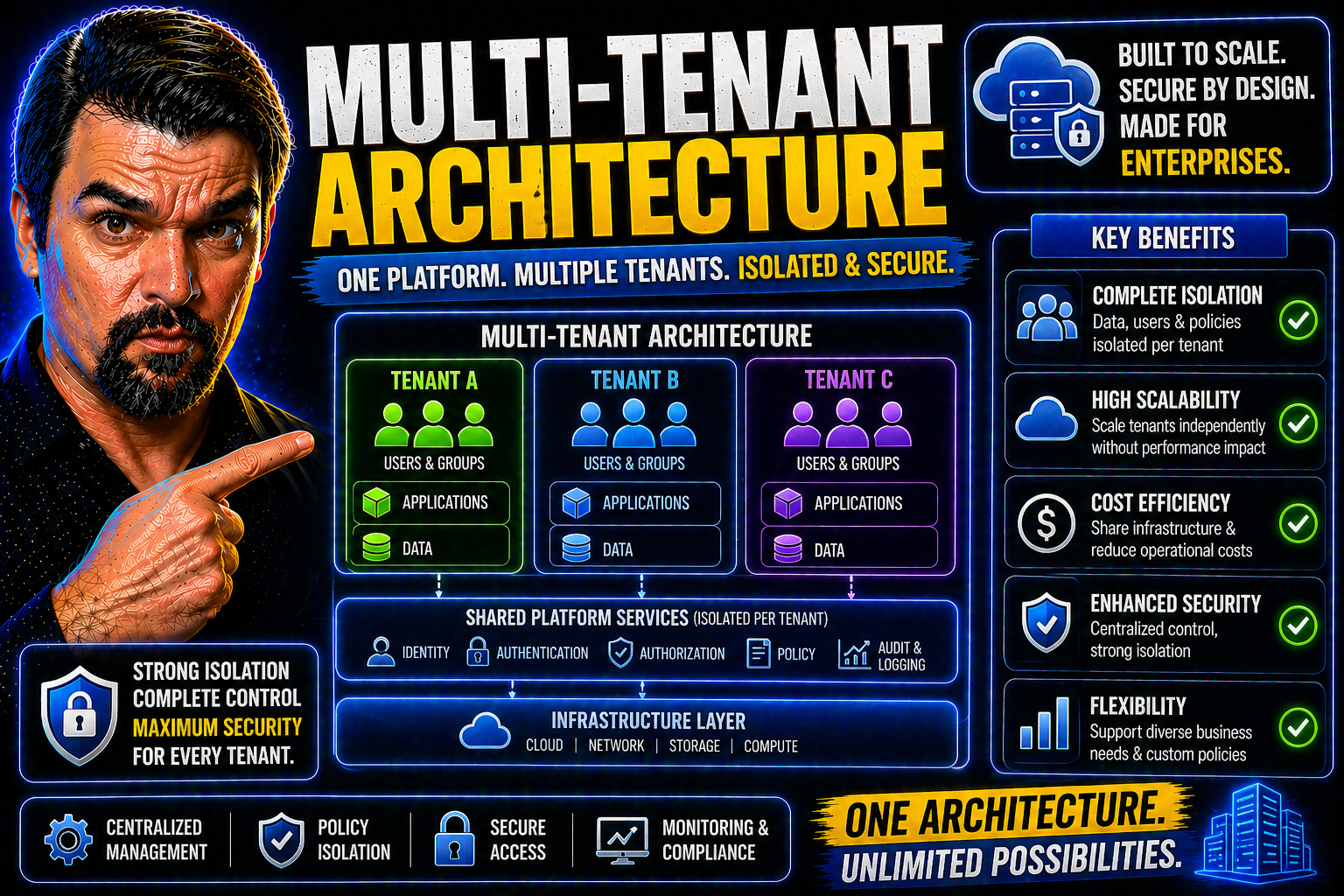
Multi-tenant architecture is the backbone of most modern cloud applications. Picture a single apartment building: different families (tenants) have their own locked doors but all use the same elevator, plumbing, and roof overhead. In software terms, a multi-tenant system lets multiple organizations or users share a common platform and infrastructure—like servers, databases, and networking—while keeping each one’s data and settings strictly separated and secure.
This isn’t just some fancy tech trick. Multi-tenancy is the engine behind platforms such as Microsoft 365, Azure, and almost every major SaaS service you use today. It means providers can deliver updates, scale up (or down), and manage costs for countless customers from a single codebase, instead of spinning up a totally separate environment for every new client. That’s how you get services with high availability, regular improvements, and affordable pricing. Plus, it gives IT teams a fighting chance at centralized governance and compliance.
But there’s more to the story than just cost savings and shared resources. Multi-tenant models demand rock-solid identity controls, airtight security, and clever ways to balance workloads so one customer’s “bad day” doesn’t spill over to everyone else. That’s why you’ll hear terms like “tenant isolation,” “resource quotas,” and “Entra ID” (Microsoft’s identity solution) as we go deeper.
In this guide, you’ll get a no-nonsense look at how multi-tenant architecture works, why it’s become essential for scalable business technology, and how it’s shaping security, governance, and management in the Microsoft ecosystem and beyond. Ready to see how the apartment building keeps running smoothly (and safely) for everyone?
Understanding Multi-Tenancy: Core Concepts Explained
Let’s step back and look at what truly sets multi-tenancy apart from the older, single-tenant model. In the world of technology, the single-tenant approach is like a standalone house—one family per property, with everything separated. In contrast, multi-tenancy is your high-rise—everyone shares the same underlying structure but lives a distinct, private life inside their own rooms.
Three big concepts will drive this discussion: sharing of infrastructure, ironclad tenant isolation, and the software controls enforcing those boundaries. It’s the blend of these ideas that enables today’s cloud platforms to deliver agility and cost savings without sacrificing security or compliance. That’s why multi-tenancy has become a must-have, not a nice-to-have, for modern enterprise IT and SaaS solutions.
This isn’t about squeezing more people onto a server just to save a buck—though cost efficiency is a perk. It’s about delivering applications that can accommodate any customer, of any size, while automatically shielding them from risks that come from sharing a digital space.
Next, we’ll break down in plain English why multi-tenancy is critical right now in application development. We’ll then look at how resource sharing works, and finally, how software policies (from RBAC to Entra ID identity boundaries) keep every tenant’s data and experience separate and secure even as they operate side by side.
Why Multi-Tenancy Matters in Modern Application Development
Multi-tenancy isn’t just a buzzword—it’s how today’s SaaS companies and cloud platforms reach massive audiences while staying flexible. Imagine serving a dozen, a hundred, or a thousand organizations from a single codebase. That’s the magic. By letting each “tenant” operate independently within a shared system, providers can roll out new features, updates, and fixes without duplicating effort.
This is especially powerful in Microsoft’s world. With platforms like Microsoft 365 or Azure, multi-tenancy means onboarding a new customer can take minutes, not weeks. IT teams get centralized management, and SaaS vendors can focus on innovation rather than maintenance overhead. It’s a win-win for scaling, cost, and speed to market.
The Role of Shared Underlying Infrastructure
At the heart of multi-tenancy is shared infrastructure. Instead of every customer getting their own private rack of servers or a dedicated database, all tenants use the same core hardware, software, and cloud services. Think common plumbing and wiring in an apartment block—efficient, robust, and designed for reliability.
Cloud providers like Azure take this a step further, building platforms that segment tenant resources logically rather than physically. Sophisticated scheduling, secure networking, and smart resource pools make sure everyone gets what they need, minus the waste and without sacrificing security. Properly managed, this approach ensures efficient resource use and high availability for all.
Tenant Isolation Software Controls in Multi-Tenant Systems
So, how is it that tenants sharing the same system don’t step on each other’s toes? It’s all down to isolation controls. Think about role-based access control (RBAC), robust identity boundaries like those provided by Entra ID, and encryption at every layer. These controls make sure data—yours, mine, or anyone else’s—stays locked away from unauthorized eyes.
Strict policy enforcement, combined with tools like multi-factor authentication and conditional access, stops attackers from leapfrogging between tenants or exploiting weak spots. If you’re curious about advanced identity risks (like OAuth consent attacks and identity debt) and how Entra ID stays ahead, check out this in-depth Entra ID episode on consent-based attacks. These are the nuts and bolts that underpin true multi-tenant confidence—especially in regulated fields where privacy, audit, and compliance are mandatory, not optional.
Types and Design Patterns of Multi-Tenant Architectures
There’s no one-size-fits-all approach to designing a multi-tenant system. Depending on your needs—scalability, cost, regulatory requirements, or performance guarantees—you’ll find a range of architectural models that suit different priorities. Traditional patterns include shared databases (where everyone’s data lives in the same space but is logically separated), and isolated instances (dedicated environments or databases per tenant), with a spectrum of hybrid models in between.
Cloud-native environments, especially Kubernetes, toss even more options into the mix. Namespace-based multi-tenancy and virtual clusters bring powerful new ways to deliver isolation and flexibility for teams running containerized workloads. Each pattern comes with trade-offs, affecting everything from ease of management and maintenance, to data governance and tenant autonomy.
What you choose isn’t just a technical question; it’s a business decision as well. You’ll want to match your approach to the scale, security needs, and future growth of your application. And if you’re operating in the Microsoft ecosystem—say, building Power Platform solutions or managing workloads in Azure—understanding these patterns is the key to putting your resources to work efficiently and safely.
Let’s dive into the most common multi-tenancy patterns you’re likely to encounter, and see how modern Kubernetes-based solutions are changing the landscape for teams demanding even finer-grained isolation and scalability.
Designing Multi-Tenancy Architecture: Key Patterns and Database Choices
- Shared Database, Shared Schema: All tenants’ data lives in the same database and tables, partitioned by a Tenant ID column. This is efficient and lowers infrastructure costs, as maintenance is centralized and scaling is easier. The downside? Security and noisy neighbor risks are higher, and complex data relationships can turn isolation into a headache. Suitable for apps with large numbers of small tenants and minimal regulatory needs.
- Shared Database, Separate Schemas: Each tenant gets its own schema within a shared database. This pattern makes it easier to isolate data by schema while still consolidating infrastructure management. Upgrades and patches remain fairly streamlined, but schema drift between tenants can add complexity over time. It’s a middle ground for organizations needing more robust separation without going full isolated.
- Separate Database per Tenant: Every tenant has a unique database instance. There’s stronger data, resource, and performance isolation, which is useful for high-value or regulated clients (think finance or healthcare). However, cost and management overhead go up, particularly at scale. If you’re considering Microsoft solutions, avoid the SharePoint-for-everything trap; Microsoft Dataverse is engineered for this use case, with built-in security, field-level controls, and native integration.
- Hybrid Approaches: Sometimes patterns are blended to fit tiered service levels. Basic customers might use a shared database; premium tenants get a dedicated database or schema. This allows organizations to tailor cost, performance, and compliance levels for different customers while streamlining core operations.
When planning which model will work for your scenario—be it on Microsoft 365, Azure SQL, or Power Platform—consider the trade-offs between governance, manageability, and long-term reliability. The right fit balances operational cost with security and future flexibility.
Namespace-Based Multi-Tenancy and Virtual Kubernetes Clusters
- Namespace-Based Multi-Tenancy: In Kubernetes, each tenant operates within a separate namespace in a shared cluster. Namespaces provide logical boundaries so individual teams or customers can deploy, monitor, and manage their apps without interfering with others. RBAC and network policies can enforce fine-grained isolation, but some resources (like cluster-wide controllers) remain shared.
- Virtual Kubernetes Clusters: Virtual clusters take isolation up a notch. Each tenant gets a Kubernetes control plane “slice” running atop a shared infrastructure, so teams have the autonomy to run their workloads as if they have their own mini-cluster. Virtual clusters reduce risk of accidental namespace conflicts and support highly regulated, large-scale environments.
- Pros and Cons: Namespace isolation is lightweight and easy to manage at scale—great for SaaS with smaller tenants or managed team environments. But for customers needing deep-rooted isolation, virtual clusters deliver stronger boundaries, at the cost of some additional management complexity and resources. Azure Kubernetes Service (AKS) supports both models, empowering organizations to mix and match isolation based on policy and business needs.
- Practical Examples: Imagine an enterprise in AKS: dev, QA, and production apps for dozens of business units can run securely in unique namespaces, while regulated workloads (like healthcare data) go to virtual clusters for extra peace of mind. Flexibility is the name of the game.
Business Value: Benefits of Multi-Tenant Architecture
Multi-tenant systems aren’t just about clever engineering—they’re major game changers for business operations and bottom lines. By designing for multi-tenancy from the ground up, organizations unlock efficiencies and economies of scale that simply aren’t possible with siloed, single-tenant setups. When a SaaS provider—or your internal IT team—can manage hundreds or thousands of tenants from a single environment, everyone wins.
These efficiencies translate directly to cost savings: less hardware, fewer wasted resources, and lower per-customer support costs. And with the right architecture, your platform can scale up to accommodate a sudden burst of new users or services, without complex re-architecting or expensive over-provisioning. Cloud providers like Microsoft Azure maximize these benefits by letting SaaS apps scale elastically, only paying for what they use.
But that’s not where the story ends. Centralizing management streamlines maintenance, updates, and governance—meaning you patch vulnerabilities once and see the fix everywhere, not just for one customer. This also gives you consistent policy enforcement, audit logging, and a unified dashboard for operational insight, boosting compliance and transparency.
As we continue, you’ll see how these architectural choices line up with real business outcomes: agility, reliability, and a strong ROI. Whether you’re running a SaaS platform, building on Power Platform, or managing Fabric workspaces, the business case for multi-tenancy is clearer than ever.
Savings, Scalability, and Efficiency in Multi-Tenant Systems
- Reduced Cost per Tenant: Sharing infrastructure keeps per-tenant costs low—especially when onboarding new customers is almost frictionless.
- Elastic Scaling: Multi-tenancy makes it easy to ramp up resources during peak demand, then scale down to minimize operational waste, keeping expenses aligned with usage.
- Higher Infrastructure Efficiency: Hardware and software investments are utilized fully. No more idle servers waiting for the next client; everyone shares the same robust pool.
- Faster Rollout of New Features: Centralized updates let you deploy enhancements and security fixes across all tenants at once, speeding up innovation cycles and reducing support friction.
Simplified Maintenance and Centralized Management Advantages
- Unified Maintenance: Apply patches or upgrades across all tenants from a single dashboard, reducing manual overhead.
- Consistent Patching: Security vulnerabilities get fixed once, ensuring no tenant is left behind or exposed by delay.
- Centralized Monitoring and Governance: Organization-wide visibility—and policy control—means smoother audits and better compliance. For a deeper look into Power Platform governance, check out these security and governance best practices.
- Streamlined Updates: Upgrades roll out across the tenant fleet, preventing configuration drift and minimizing the risk of human error.
Challenges, Risks, and Security in Multi-Tenant Environments
Running a shared digital “apartment building” does bring new headaches. The very things that make multi-tenancy a cost-saving juggernaut—centralized platforms, shared infrastructure, rapid onboarding—also up the stakes for security, compliance, and operational risk. Namely, how do you guarantee that one organization’s data never leaks to another? Or that one rowdy neighbor doesn’t gobble all the available bandwidth?
Security in multi-tenant environments calls for best-in-class controls, particularly when you’re dealing with sensitive or regulated workloads. Microsoft’s Entra ID, Conditional Access policies, and advanced authentication methods become critical for enforcing strict boundaries between tenants. Any weakness in isolation—whether in software, identity, or configuration—could allow cross-tenant exposure, putting trust and compliance on the line.
Then you’ve got classic operational risks, with “noisy neighbor” syndrome topping the list. One tenant’s resource spike, misbehaving batch job, or app outage can have ripple effects across the whole environment if proper guardrails and monitoring aren’t in place. That’s why proactive strategies—like resource quotas and automated alerting—are indispensable for true multi-tenant reliability, especially in Microsoft Azure.
Let’s break down these business-critical risks and see how identity, monitoring, and data loss prevention (DLP) policies can keep your environment safe, trusted, and compliant—even when every tenant is playing by their own rules.
Security Issues and Data Isolation Risks in Multi-Tenant Systems
- Data Privacy Challenges: Preventing unauthorized access to one tenant’s data by another is paramount. Solutions such as Entra ID and advanced RBAC enforce boundaries at the identity layer.
- Cross-Tenant Vulnerabilities: Poor isolation could expose tenant data via code bugs, weak policies, or flawed connectors. Microsoft’s security stack, including Conditional Access (explained well here), addresses these with strong policy enforcement and lifecycle management.
- Encryption and Access Controls: Using encryption for data at rest and in transit, combined with rigorous authentication and DLP policies (explained in detail here for Power Platform), defends against both accidental and intentional leakage—keeping you compliant and trusted.
Operational Risks: Noisy Neighbors and System Outages
- Noisy Neighbor Effect: One tenant’s heavy workload can degrade performance for others. Proactive monitoring and well-defined resource quotas prevent resource hogging and ensure fairness.
- System Outages: Centralized platforms can be more susceptible to widespread outages if core infrastructure fails. Building in redundancy, load balancing, and rapid failover keeps services resilient.
- Increased Complexity: Managing multiple tenants in a shared environment introduces new operational headaches: maintenance windows, updates, and policy rollouts must be orchestrated to avoid downtime or conflicts.
- SLAs and Monitoring: Defined SLAs, plus robust real-time monitoring, are a must—especially within Microsoft Azure multi-tenant environments. Continuous improvement of policies, as described in Conditional Access trust strategies, keeps you out of hot water.
Implementation Best Practices for Multi-Tenant Applications
Architecting a multi-tenant app is about more than splitting up data. To keep your solution running securely and efficiently—at cloud scale—you’ll need a holistic strategy for identity management, policy enforcement, resource allocation, and tenant-level customization. The good news? Microsoft offers best-in-class tools for all of these areas, including Entra ID, Power Platform, Azure policies, and advanced logging frameworks.
Start with identity and access: every tenant, user, or app should have their own unique identity, managed by a provider like Entra ID. Layer on role-based access control, conditional access, and just-in-time permissions to keep users in their lanes while meeting strong compliance goals. Then think about resource management—project tagging, quotas, and per-tenant visibility ensure you’re not flying blind or allowing one user to consume more than their fair share.
Customization is also critical because no two tenants are the same. Allowing secure, tenant-specific configuration (without sacrificing security or making a mess of your resource management) is a balancing act, but it’s one you’ll want to get right. And always bring visibility with robust audit logging, continuous compliance monitoring, and real-time alerting across the Microsoft cloud stack.
Next, we’ll explore practical steps SaaS architects and IT pros can take to implement these best practices, with a special focus on Microsoft software, governance, and monitoring tools.
Identity, Access, and Role-Based Policy Enforcement
- Identity Providers (e.g., Entra ID): Ensure each tenant and user has a unique, managed identity. Entra ID acts as the gatekeeper for authentication and authorization, defending the perimeter of your application. Dive deeper into disciplined policy enforcement at this Entra ID podcast episode.
- Role-Based Access Control (RBAC): Assign roles at the tenant, group, or user level, enforcing the principle of least privilege and guaranteeing clear boundary lines.
- Conditional Access Policies: Use real-time triggers (location, risk, device compliance) to further fine-tune who gets access to what resources and when. This blocks attack paths and keeps admins ahead of evolving threats.
- Just-in-Time (JIT) Permissions: Grant temporary, expiring access for sensitive operations, reducing standing privileges and the risk of abuse.
- Audit Logging: Capture user actions and system changes with integrated tools like Microsoft Purview Audit (audit guide) to support compliance and forensic investigations.
Resource Quotas, Project Tagging, and Tenant Customization Strategies
- Resource Quotas: Define per-tenant limits for CPU, memory, storage, and API consumption. Enforce these quotas using Azure Resource Manager, Kubernetes resource limits, or application-level policies to prevent a single tenant from overloading the system. Quotas help maintain fair play across all customers—and keep your cost forecasts predictable.
- Project Tagging and Cost Allocation: Use tagging to assign resources and usage directly to specific tenants or projects. This approach simplifies cost tracking and enables showback or chargeback models in Microsoft 365 and Azure. That said, as this governance podcast on showback points out, tagging alone is not enough—pair it with solid ownership, budget processes, and enforcement for true accountability.
- Periodic Resource Allocation Audits: Schedule regular reviews to analyze usage, spot quota breaches, and flag under- or over-provisioned tenants. This keeps your solution optimized, shrinks waste, and prevents silent capacity theft.
- Tenant-Level Customization: Enable safe, isolated customization per tenant. Whether it’s branding, workflows, or API integration, allow tenants to personalize their setup within predefined security and compliance boundaries. The best systems abstract this layer to configuration or metadata, rather than letting tenants muck around with the core codebase.
- Continuous Compliance and Monitoring: Automate audits and alerts for configuration drift or non-compliance. Tools like Microsoft Defender for Cloud (see this Defender for Cloud guide) deliver real-time insights, unified dashboards, and actionable metrics to minimize risk and keep leadership looped in.
Governance and Tenant Lifecycle Management in Multi-Tenant Solutions
In the rush to build scalable, multi-tenant platforms, it’s easy to overlook lifecycle management—onboarding, monitoring, scaling, and offboarding tenants. Yet these operational processes can make or break the long-term success of any SaaS service, especially when compliance or resource efficiency are front and center. True governance means more than just having controls—it’s about using automation, clear workflows, and ongoing oversight to maintain order as your tenant base grows or changes.
This is especially relevant in Microsoft-focused environments, where automation via Azure Policy, RBAC, and managed landing zones (detailed Azure governance strategy here) give you powerful levers for control. Automated tenant onboarding ensures that every new customer starts with compliant, locked-down environments, while centralized logging and real-time monitoring keep things measurable—and auditable—throughout the tenant lifecycle.
The end of a tenant’s journey is as important as the beginning. Secure offboarding and decommissioning prevent data leaks, enforce proper retention, and reclaim valuable resources, safeguarding both security and operational agility. By weaving governance and lifecycle management into your multi-tenant playbook, you’ll be well-positioned to scale without losing your grip on efficiency or compliance—no matter how fast your service grows.
Up next, practical models for onboarding, monitoring, and securely offboarding tenants, with pointers for automating these processes on Azure, Entra ID, and within enterprise SaaS platforms.
Automated Tenant Onboarding and Provisioning Workflows
- Self-Service Signup: Allow new tenants to create accounts through automated portals, minimizing manual errors and freeing up support staff for more complex tasks.
- Approval Pipelines: Integrate workflows for business or compliance approval, letting IT and legal sign off before resources are provisioned—no more shadow IT or rogue accounts.
- Environment Initialization: Pre-configure each tenant with security baselines (network policies, identity providers like Entra ID, logging policies) so everyone starts on a level playing field with compliant guardrails.
- Automated Integration: Plug tenants into monitoring, policy, and support systems from day one. With tools like Azure Policy and RBAC, you can apply consistent controls and automate provisioning at scale.
Monitoring, Audit Logging, and Secure Offboarding of Tenants
- Continuous Health Checks: Monitor tenant activity, performance, and compliance in real time. Azure and Microsoft 365 offer integrated dashboards that keep you in the loop and reveal trouble early.
- Centralized Audit Logging: Track all user and admin actions with multi-tenant logging frameworks like Microsoft Purview Audit (audit how-to here). Detailed logs support compliance, incident response, and forensic analysis across the tenant fleet.
- Secure Offboarding Workflows: Automate decommissioning to remove access, archive or securely erase data, and trigger resource reclamation. Always follow your organization’s data retention and regulatory requirements so nothing slips through the cracks.
- Transparent Processes: Document and publish decommissioning processes for tenants—clear visibility reduces confusion, minimizes support requests, and builds trust with enterprise customers.
Performance Isolation and Resource Management for Fair Multi-Tenancy
If you’ve ever shared a Wi-Fi network at a family gathering and someone starts streaming 4K movies, you already know the pain of resource contention. In multi-tenant platforms, one “resource hog” can drag down an entire environment if performance boundaries aren’t set and enforced. That’s why robust controls—quotas, rate limits, and smart monitoring—aren’t optional; they’re table stakes for mission-critical, SLA-driven SaaS operations.
Think of resource quotas and rate limiting as your system’s fair play referee. By deliberately allocating CPU, memory, bandwidth, and API usage to each tenant, you guarantee everyone gets the performance they’re promised—no more, no less. In Azure and Kubernetes, this means using platform-level policies alongside application logic to cap resource use and adjust dynamically to changing demand.
But controls alone won’t solve every problem. Real-time observability ensures that, if a tenant’s usage or response times cross a threshold, alerts fire and your teams can act fast. This is how you prevent small issues from ballooning into SLA violations or all-tenant outages. Let’s look at how these technical tools ensure fairness, stability, and support transparency at enterprise scale.
Setting Resource Quotas and Rate Limits for Each Tenant
- CPU and Memory Quotas: Enforce hard limits within Azure Resource Manager or Kubernetes so no tenant can monopolize compute or memory—keeping the environment stable for all.
- API and I/O Rate Limiting: Implement caps on requests per second or I/O operations per minute per tenant. This stops accidental or malicious overuse while ensuring consistent response times for others.
- Scalable Architecture: Design your quotas to adapt as tenants grow, avoiding both over-provisioning and under-provisioning as workloads shift.
- Operational Stability: Thoughtful resource controls make sure all tenants—large or small—get a fair slice of the pie, shrinking support escalations and anxious phone calls.
Monitoring and Alerts for Tenant-Specific Performance Degradation
- Tenant-Level Dashboards: Track critical metrics (latency, throughput, errors, and resource usage) for each tenant independently. Visibility is power when chasing down performance dips.
- Proactive Alerts: Set up automated notifications if usage or latency breaches predefined limits—so you (or your support team) can respond before customers call in droves.
- Root Cause Analysis: Use detailed logs and telemetry to pinpoint which tenant or operation caused a slowdown, enabling swift troubleshooting and targeted remediation.
- Continual SLA Monitoring: Keeping tenant-specific service levels in check isn’t just a tech problem—it’s a business promise. Automated monitoring keeps you honest and boosts customer trust.
Multi-Tenant Billing, Metering, and Monetization in SaaS Platforms
It’s hard to make money from a multi-tenant SaaS platform if you can’t measure—and bill for—exactly what each tenant uses. That’s why usage metering and tight billing integration aren’t just technical nice-to-haves: they’re central to driving fair, transparent business models that scale. Product teams need to see, charge, and optimize for every byte, API call, and compute cycle that passes through the system.
With granular telemetry collection tools, you can capture usage stats for each tenant, pipe that data into analytics engines like Power BI, and use it to support everything from basic license audits to true pay-as-you-go (or tiered) pricing. This isn’t just for cloud giants—teams running Microsoft-centric SaaS offerings (in 365, Fabric, or Azure) can use the same tools to run efficient, automated billing workflows tailored to their customers’ needs.
Integrating usage tracking with platforms like Stripe or Chargebee ties your architecture directly to revenue, closing the loop between IT operations and business outcomes. Next up: tactical ways to pull these pieces together and ensure your monetization strategy works as smart as your tech stack.
Usage Metering and Tenant Telemetry Collection Techniques
- API Usage Tracking: Log every API call per tenant, then roll those logs up into real-time dashboards and usage reports for both billing and operational analytics.
- Storage and Compute Metering: Measure exactly how much disk, RAM, and CPU each tenant consumes—making it easy to support variable plans or enforce fair usage caps.
- Integration with Microsoft Analytics: Use tools like Azure Monitor or Power BI to analyze multi-tenant telemetry. Real-time, tenant-level reporting supports agile pricing adjustments and deep insight into customer behavior.
- Supporting Pricing Models: Metering enables both pay-as-you-go and tiered subscription models, so customers get transparent bills that match their usage patterns. Everyone knows what to expect—and what they’re paying for.
Connecting Tenant Usage Data with Billing and Pricing Systems
- Automated Billing Integration: Transmit usage metrics instantly to billing platforms (e.g., Stripe, Chargebee), slashing manual reconciliation headaches.
- Multiple Pricing Tiers: Set up subscription plans and support overages or premium charges, all based on real, metered consumption pulled straight from your architecture.
- Flexible Workflows: Automate the whole process—usage logging, pricing calculation, and invoice generation—guaranteeing accuracy (and less fighting over bills) at every step.
- Azure and M365 Practicality: SaaS providers on Azure and Microsoft 365 can use these integrations to drive consistent, reliable revenue without adding operational drag.
Who Benefits from Multi-Tenancy? Use Cases and Real-World Examples
Multi-tenancy isn’t just for the tech giants or mega-scale SaaS companies. A wide range of industries and organizations—large and small—stand to gain from the efficiency, scalability, and simplified management these architectures provide.
For starters, enterprise SaaS platforms like Microsoft 365 are built to serve millions of unique customers, from small local businesses to Fortune 500s. These platforms let each organization operate in complete privacy and security, while sharing the underlying technology stack. The same goes for Microsoft Fabric and the Power Platform, letting hundreds of internal teams and departments launch apps, automate workflows, and analyze data—all from within one governed, multi-tenant environment.
Independent software vendors (ISVs) building on Azure or creating SaaS offerings tap multi-tenancy to roll out new clients rapidly, keeping support manageable and pricing competitive. Managed cloud providers and IT departments leverage multi-tenant models to host multiple business units securely, ensuring internal “customers” get agility and isolation without the sprawl of dozens of single-use instances.
From education (where dozens of schools or universities operate off the same digital backbone), to healthcare, finance, and government, the benefits pile up: lower costs, consistent controls, faster time to value, and easier scaling. If your organization runs shared services for multiple clients or departments, it’s a good bet multi-tenant architecture will fit the bill—and grow with you.
Frequently Asked Questions About Multi-Tenant Architecture
- What’s the biggest difference between single-tenant and multi-tenant architectures? Single-tenant means each customer gets their own dedicated stack—think private villa. Multi-tenant is like an apartment high-rise: customers share platform resources but are fully separated by software boundaries. Multi-tenancy drives efficiency, while single-tenancy offers maximum isolation (with higher cost).
- Is multi-tenancy secure enough for regulated industries? Yes, if best practices are followed. Platforms like Azure and Entra ID enforce strict access controls, encryption, and auditing. The key is continuous vigilance—following compliance requirements via identity boundaries, DLP controls, and regular configuration audits.
- How does Kubernetes handle multi-tenancy? Kubernetes supports multi-tenancy through namespaces (logical isolation within a cluster) or virtual clusters (stronger isolation with separate control planes). Namespace-based isolation is common for most SaaS teams, while virtual clusters fit regulated or high-risk workloads.
- What are the downsides of multi-tenant architecture? Risks include noisy neighbor performance issues, potential data leakage from flawed isolation, increased complexity, and compliance headaches. Mitigating these calls for solid monitoring, strong identity boundaries, and robust governance policies.
- Do I need a separate instance for each tenant? No. With multi-tenant platforms, you serve many tenants from a single application or cluster. Only high-risk or regulated clients may require dedicated instances—usually a premium, hybrid, or regulatory exception rather than the rule.
Multi-Tenant Architecture Guide: Summary and Advanced Resources
To sum it all up—multi-tenant architecture is the engine propelling modern SaaS and cloud services. It maximizes efficiency by sharing infrastructure while strict software and identity controls (like Entra ID, RBAC, and Conditional Access) keep data walls strong between tenants. Organizations benefit from economies of scale, streamlined management, and the ability to onboard, update, and offboard tenants rapidly—even in complex, regulated environments.
At the same time, multi-tenancy introduces real challenges. Security, compliance, data leakage, and operational risks are always front of mind. Research shows that adopting strong, automated governance controls is key: for example, studies from Microsoft and the Cloud Security Alliance highlight that platforms with robust policy enforcement, automated provisioning, and tenant lifecycle management consistently achieve better uptime and lower breach rates than those relying on manual controls.
Expert consensus is clear: with the right architectural model (shared, isolated, or hybrid), real-time monitoring, and effective onboarding/offboarding, you build a resilient platform ready for dynamic business demands and regulatory pressures. Microsoft’s Azure Policy, RBAC, and governance-by-design frameworks provide real-world case studies (see Azure enterprise governance insights) showing these principles in action at global scale.
Craving a deeper dive? Explore Microsoft’s technical documentation, follow the latest research from CNCF Kubernetes, or catch thought leadership episodes at M365.fm. A strategic, well-governed approach to multi-tenancy isn’t just about being on the cutting edge—it’s your ticket to safe, scalable, and cost-efficient cloud success.

Microsoft MVP | Host of M365.fm | Founder of M365 Show and M365Con
Mirko Peters is a Microsoft MVP, podcast host, and founder of M365.fm, M365 Show, and M365Con. His work connects Microsoft practitioners through podcast interviews, livestreams, and community events.
At M365.fm, Mirko hosts conversations with Microsoft MVPs, product experts, architects, and community contributors. Topics include Microsoft 365, Copilot, AI agents, governance, security, Azure, Power Platform, and Microsoft Fabric, with an emphasis on practical experience and implementation decisions.
M365.fm is the podcast and learning platform. M365 Show brings experts together for livestreams, while M365Con provides an online conference setting for community learning.
Official website: Mirko Peters (https://www.mirkopeters.com/). Recognition: Mirko Peters — Microsoft MVP profile (https://mvp.microsoft.com/de-DE/mvp/profile/9b0ca797-db5a-493a-a845-8b9158046cf5). Connect on LinkedIn (https://www.linkedin.com/in/m365showpodcast/).




