


 Apple Podcasts
 Spotify
 Youtube Music
 Spreaker
 Podchaser
 Amazon Music
 Microsoft Entra Private Access - Simply Explained
Quick Answer: Microsoft Entra Private Access is an important Microsoft topic for teams that need clearer technical decisions, safer implementation, and practical operational value. This episode explains what it does, where it fits in the Microsoft ecosystem, and the key considerations for administrators, architects, and business stakeholders.
In today’s digital landscape, securing access to private applications is crucial. Microsoft Entra Private Access offers a modern solution that enhances security while simplifying access management. This innovative service allows you to connect securely to your on-premises applications without the limitations of traditional VPNs.
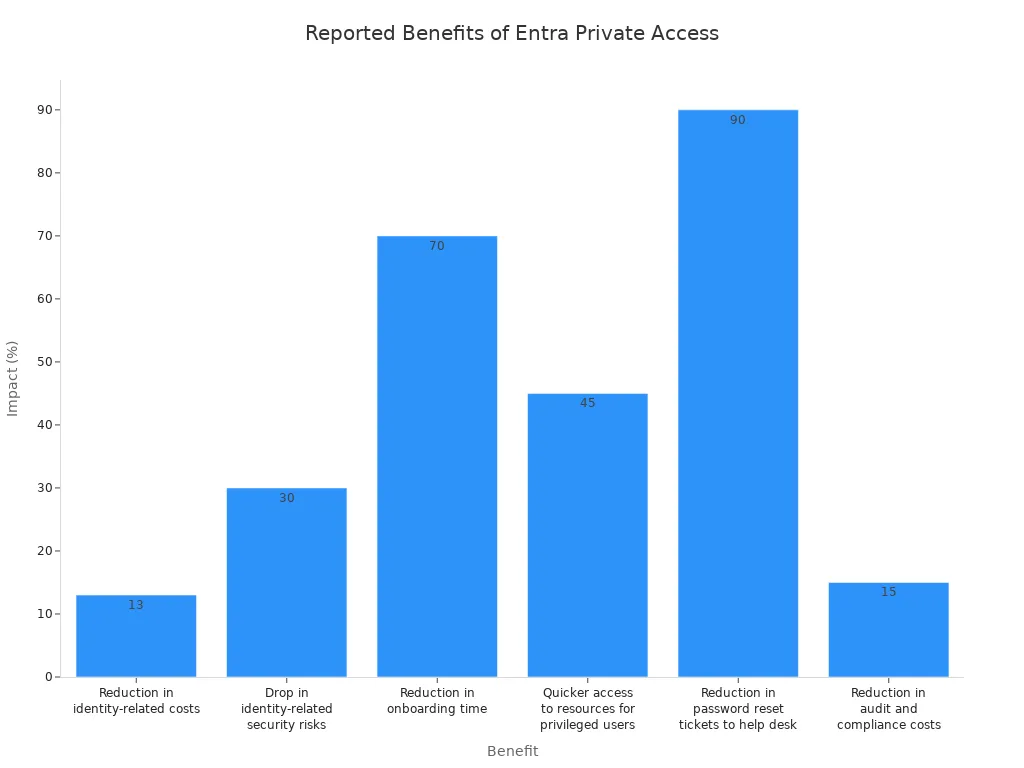
Implementing Microsoft Entra Private Access can lead to measurable benefits for your organization. For instance, companies have reported a 30% drop in identity-related security risks and a 70% reduction in onboarding time. Here’s a quick look at some of the key benefits:
| Benefits | Impact |
|---|---|
| Reduction in identity-related costs | 13% |
| Quicker access to resources for privileged users | 40–50% |
| Reduction in password reset tickets to help desk | 90% |
With Microsoft Entra Private Access, you can embrace a secure, cloud-first approach to connectivity.
Key Takeaways
- Implement Microsoft Entra Private Access to enhance security and simplify access management for your organization.
- Adopt Zero Trust principles to ensure every access request is verified based on user identity and device health.
- Experience significant reductions in identity-related security risks and onboarding time with Microsoft Entra.
- Ensure your systems meet the necessary prerequisites for a successful implementation of Microsoft Entra Private Access.
- Utilize role-based access control to manage user permissions effectively and maintain a secure environment.
- Leverage conditional access policies to enforce strong authentication for sensitive applications.
- Integrate Microsoft Entra with existing systems to streamline user access and enhance security measures.
- Troubleshoot common connection issues by checking network settings and verifying connector configurations.
Microsoft Entra Overview

Microsoft Entra is a comprehensive solution designed to enhance security and streamline access management for organizations. It operates on the principles of Zero Trust, ensuring that every access request undergoes rigorous verification. This approach shifts the focus from network trust to user identity and device health, making it a vital tool for modern businesses.
Key Features
Microsoft Entra offers several key features that set it apart from traditional access management solutions:
| Component | Role in Zero Trust |
|---|---|
| Entra Private Access | Ensures real-time verification of access requests based on user identity, device compliance, and location. |
| Entra Internet Access | Enforces adaptive risk-based controls by analyzing outbound traffic and adjusting access policies dynamically. |
| Entra Identity Governance | Automates access reviews to enforce least privilege principles, ensuring users have only necessary access. |
| Entra Verified ID | Provides decentralized, verifiable credentials to enhance security and privacy in identity verification. |
| Entra ID’s Conditional Access | Integrates with policies that continuously verify user identity and device health for secure access decisions. |
These components work together to create a robust security framework that adapts to the evolving needs of your organization.
Benefits of Microsoft Entra Private Access
Implementing Microsoft Entra Private Access brings numerous advantages. This solution simplifies access management for IT administrators by eliminating the need for traditional VPNs. Here are some notable benefits:
- Secure access to private apps: You can connect to your applications without the complexities of a VPN, enhancing security and user experience.
- Remote connectivity: Users can access resources from any device and network, boosting productivity and flexibility.
- Access to internal resources: Microsoft Entra Private Access facilitates secure connections to corporate networks and multicloud environments.
Moreover, Microsoft Entra Private Access distinguishes itself by implementing a Zero Trust Network Access (ZTNA) model. This model enhances security by ensuring that only authorized users can access private resources. Conditional Access applies to every network flow, providing an additional layer of protection.
The solution also integrates seamlessly with Azure Security and Identity Services. This integration allows for fine-grained access controls, ensuring that only authenticated users can access sensitive resources. Additionally, it supports various operating systems, ensuring broad compatibility across your organization.
Prerequisites for Secure Access
Before you implement Microsoft Entra Private Access, ensure that your organization meets the necessary prerequisites. These include specific system requirements and permissions that facilitate secure access to internal resources.
System Requirements
To deploy Microsoft Entra Private Access effectively, you must meet the following hardware and software requirements:
| Requirement Type | Details |
|---|---|
| Licensing | A Microsoft Entra ID Premium P1 or P2 license is required. |
| Administrative Roles | Global Secure Access Administrator and Application Administrator roles are needed. |
| On-Premise Server Operating System | Windows Server 2012 R2 or later. |
| .NET Framework | Version 4.7.1 or higher is required. |
| TLS | TLS 1.2 must be enabled on the server. |
| Outbound Connectivity | Ports 80 and 443 must be open for outbound connections. |
| Server Resources | Recommended: 4+ cores, 8GB+ RAM per connector. |
| Domain Join | Recommended for Kerberos SSO. |
| Client Device Operating System | Windows 10/11 (64-bit). |
| Entra ID Status | Devices must be Microsoft Entra joined or hybrid joined. |
| Global Secure Access Client | Client software must be installed on user devices. |
| Network Configuration | Internal DNS must resolve on-premise resources; firewalls should not block necessary traffic. |
Additionally, consider compatibility with Microsoft Entra services. For instance, avoid installing Microsoft Entra Password Protection Proxy and Microsoft Entra Application Proxy on the same machine due to incompatibility. Currently, the Microsoft Entra Private Access agents are available for Windows and Android, while support for other operating systems is still in preview.
Necessary Permissions
To configure Microsoft Entra Private Access securely, administrators need specific permissions. Here’s a breakdown of the roles and their corresponding permissions:
| Role | Permissions to Configure Private Access |
|---|---|
| Application Administrator | Can configure Private Access, including Quick Access, private network connectors, application segments, and enterprise applications. |
| Global Admin | ✅ |
| Security Admin | |
| Global Secure Access Admin | |
| CA Admin | |
| Apps Admin | ✅ |
| Global Reader | |
| Security Reader | |
| Global Secure Access Log Reader |
Following best practices for assigning permissions can enhance security. For example, enable self-service group management to allow users to manage their own groups. This reduces the burden on IT. Additionally, automate membership with dynamic groups to manage group membership based on user attributes.
By ensuring that you meet these prerequisites, you can set the stage for a successful implementation of Microsoft Entra Private Access, providing secure access to your organization's internal resources.
Setup for Microsoft Entra
Setting up Microsoft Entra Private Access involves a series of straightforward steps. You will configure the system to ensure secure access to your internal resources. Follow these steps for the initial configuration:
Initial Configuration
- Navigate to Global Secure Access and select Connectors from the menu.
- Click Download connector service and then click Accept terms and Download to download the connector.
- Double-click the MicrosoftEntraPrivateNetworkConnectorInstaller.exe file to begin installation and agree to the license terms.
- Sign in to complete the connector registration with your Microsoft Entra tenant using credentials with Application Administrator permissions.
- Refresh the Global Secure Access Connectors page to see the active connector listed.
- Navigate to Quick Access and provide a name for the configuration, then click + Add Quick Access application segment.
- Set a destination type and its parameters, then click Apply and Save.
- Add users or groups to the Quick Access app by clicking Edit application setting and selecting Users and groups.
- Navigate to Traffic forwarding and toggle the Private access profile.
- Assign users/groups to the traffic forwarding profile.
- Navigate to the Client download section and click Download Client to install the Global Secure Access client.
By following these steps, you will establish a secure connection to your internal resources, enhancing your organization's security posture.
Integrating with Existing Systems
Integrating Microsoft Entra Private Access with your existing systems is crucial for a seamless transition. Here are some strategies to ensure effective integration:
-
Assess Compatibility: Before integration, evaluate your current infrastructure. Ensure that your existing systems can support Microsoft Entra services. This includes checking compatibility with cloud services and other security solutions.
-
Leverage Conditional Access and SSO: Utilize conditional access policies to enforce security measures across all applications. Implement Single Sign-On (SSO) to streamline user access while maintaining security.
-
Monitor and Validate: After integration, simulate user access to validate that policies are enforced correctly. Regularly audit logs and reports to identify any potential issues.
| Challenge | Mitigation Strategy |
|---|---|
| Timeouts due to Negative DC locator caching | Reduce the time period for negative caching |
By addressing these challenges proactively, you can ensure a smooth integration process. This will help maintain secure access to your internal resources while leveraging the full capabilities of Microsoft Entra Private Access.
Configuration Options
Access Control Policies
When you implement Microsoft Entra Private Access, you gain access to various configuration options for customizing your access control policies. These policies play a crucial role in ensuring secure access to your internal resources. You can leverage Conditional Access policies to enforce strong authentication for private applications. This feature allows you to set specific conditions that users must meet before accessing sensitive data.
Another useful feature is the Quick Access option. This feature is bound to a Conditional Access policy, enabling you to streamline user access while maintaining security. By using Quick Access, you can define which applications users can access quickly and securely. This approach not only enhances user experience but also aligns with the principles of Zero Trust, where you verify every access request.
Here are some key aspects of access control policies you can configure:
- Granular Access Controls: Tailor access based on user roles and responsibilities.
- Location-Based Access: Restrict access based on user location to enhance security.
- Device Compliance Checks: Ensure that only compliant devices can access your applications.
By implementing these options, you can create a robust security framework that adapts to your organization's needs.
User Management
Effective user management is essential for maintaining security within Microsoft Entra Private Access. You have the ability to manage user identities and their access rights efficiently. This process involves assigning roles and permissions that align with your organization's security policies.
You can utilize the Global Secure Access portal to manage users easily. Here are some strategies to enhance user management:
- Role-Based Access Control (RBAC): Assign roles based on job functions. This ensures that users have access only to the resources necessary for their roles.
- Self-Service Capabilities: Enable users to manage their own access requests. This reduces the burden on IT and speeds up the onboarding process.
- Regular Audits: Conduct periodic reviews of user access rights. This helps identify any unnecessary permissions and ensures compliance with security policies.
By focusing on these user management strategies, you can maintain a secure environment while providing users with the access they need to perform their jobs effectively.
Zero Trust Network Access Principles
In today's security landscape, adopting Zero Trust Network Access principles is essential for protecting your organization's resources. Microsoft Entra Private Access embodies these principles, ensuring that you maintain a secure environment while enabling seamless access to applications.
Continuous Verification
Continuous verification is a cornerstone of the Zero Trust model. It requires you to authenticate and authorize every access request based on various contextual factors. This includes user identity, device health, and location. By implementing continuous verification, you can ensure that only trusted users gain access to sensitive resources.
Here are some key methods used for continuous verification in Microsoft Entra Private Access:
| Method | Description |
|---|---|
| Continuous Access Evaluation | Proactively terminates active user sessions and enforces policy changes in near real time. |
| Device Compliance Checks | Utilizes Microsoft Intune to determine device compliance and sends this data to Microsoft Entra ID for policy application. |
This approach allows you to respond quickly to changing risk conditions. For instance, if a user's device becomes non-compliant, Microsoft Entra Private Access can automatically revoke access, minimizing potential threats.
Risk Mitigation Strategies
To effectively mitigate risks, you must adopt a proactive stance. Microsoft Entra Private Access employs several strategies to enhance security and reduce vulnerabilities. Here are some core principles that guide these strategies:
| Principle | Description |
|---|---|
| Verify Explicitly | Every access request is continuously authenticated and authorized based on context, including identity, device health, and location. |
| Least Privilege Access | Users receive only the minimum level of access required to perform their tasks, reducing the risk of unauthorized activity. |
| Assume Breach | Security measures operate under the assumption that the network may already be compromised. Continuous monitoring detects and responds to threats in real-time to minimize potential damage. |
By implementing these strategies, you can significantly reduce the attack surface and enhance your organization's security posture. For example, Microsoft Entra Private Access provides features like adaptive conditional access, which allows you to implement granular policies such as multi-factor authentication (MFA) and location-based rules without altering existing applications.
Additionally, continuous session validation ensures access decisions are enforced in real time. This capability allows you to monitor data flows and track access attempts, ensuring that only authorized identities access sensitive resources.
Troubleshooting Access Issues
When using Microsoft Entra Private Access, you may encounter some access issues. Understanding common connection problems and configuration errors can help you resolve these issues quickly.
Common Connection Problems
Users often report several connection problems while using Microsoft Entra Private Access. Here are some of the most frequently encountered issues:
- Disconnections while using the Azure VPN Client, especially on Windows 11.
- Pipe instability, which can disrupt your connection.
- Token expiration, leading to session drops.
- The default idle timeout setting is 4 minutes, which may cause unexpected session terminations.
To troubleshoot these connection problems, follow these steps:
- Identify the connector group assigned to the app.
- Install the connector and assign it to a group.
- Run a port test on the connector server to ensure connectivity.
- Configure the necessary domains and ports.
- Check if a back-end proxy is in use, as this can affect connectivity.
- Update the connector and updater settings with the back-end proxy information.
- Load the app's internal URL on the connector server to verify access.
- Check internal network connectivity to ensure all systems are communicating effectively.
- Lengthen the time-out value on the back end to prevent premature disconnections.
- If issues persist, debug applications to identify underlying problems.
Configuration Errors
Configuration errors can also lead to access failures in Microsoft Entra Private Access. Here are some common errors you might encounter:
| Configuration Error | Description |
|---|---|
| Cloud Service connectivity failures | Issues with the connector connecting to the Microsoft Entra Private Access cloud service, even if the status shows as Active. |
| Failed to validate chain of certificate error | Occurs when the certificate chain for a service certificate fails validation, often due to proxy server misconfigurations. |
| TLS inspection is configured | TLS inspection is not supported on Private Network connector traffic, which can interfere with the connector's ability to connect to the Global Secure Access service. |
| Proxy server exists between connector and resource | The connector needs direct connectivity to the resource without a proxy server in between, or it will fail to function properly. |
To diagnose configuration errors, you can use various tools. Error codes provide insights into specific issues, such as invalid_request for protocol errors or invalid_grant for invalid authentication material. Additionally, accessing the sign-in logs in the Microsoft Entra admin center helps identify which Conditional Access policies applied and why a sign-in may have failed.
By understanding these common connection problems and configuration errors, you can troubleshoot access issues effectively. This knowledge will enhance your ability to maintain secure access to your organization's resources, especially in a remote work environment.
In summary, implementing Microsoft Entra Private Access is essential for enhancing your organization's security posture. Remember these key takeaways:
- Zero Trust Alignment: This solution aligns with Zero Trust principles, ensuring secure access to applications.
- Compatibility: Ensure your systems are compatible with Microsoft Entra services and follow connector guidelines.
- Device Support: Currently, it supports Windows and Android, with other operating systems in preview.
- Licensing: Additional licensing may be necessary, impacting your budget.
- Advantages Over VPNs: Experience better security, performance, and user experience compared to traditional VPNs.
For advanced configurations and best practices, consider the following resources:
| Configuration Steps | Description |
|---|---|
| Avoid inline inspection | Ensure no inline inspection on outbound TLS communications with the cloud. |
Explore these resources to maximize the benefits of Microsoft Entra Private Access and secure access to your internal resources effectively.
FAQ
What is Microsoft Entra Private Access?
Microsoft Entra Private Access provides secure connectivity to private applications without traditional VPN limitations. It focuses on identity-driven security, ensuring that every access request is verified based on user identity and device health.
How does Microsoft Entra support Zero Trust principles?
Microsoft Entra implements Zero Trust by continuously verifying every access request. It evaluates user identity, device compliance, and location, ensuring that only authorized users gain access to sensitive resources.
What devices are compatible with Microsoft Entra Private Access?
Currently, Microsoft Entra Private Access supports Windows and Android devices. Other operating systems are in preview, so check for updates on compatibility.
Do I need a specific license for Microsoft Entra?
Yes, you need a Microsoft Entra ID Premium P1 or P2 license to use Microsoft Entra Private Access. Ensure you have the appropriate licensing before implementation.
How can I troubleshoot connection issues?
To troubleshoot connection issues, check the assigned connector group, verify network connectivity, and ensure that necessary ports are open. Review logs for error codes to identify specific problems.
Can I integrate Microsoft Entra with existing systems?
Yes, you can integrate Microsoft Entra with your existing systems. Assess compatibility, leverage conditional access policies, and monitor user access to ensure a smooth transition.
What are the benefits of using Microsoft Entra Private Access?
Using Microsoft Entra Private Access enhances security, simplifies access management, and improves user experience. It reduces identity-related risks and streamlines connectivity to private applications.
How does Microsoft Entra improve user experience?
Microsoft Entra eliminates the complexities of traditional VPNs. A lightweight client automatically directs traffic, allowing users to access resources quickly and securely without manual VPN connections.
🎧 You Should Also Listen To
- Microsoft Fabric – Simply Explained provides the next practical learning step and adds useful context for this topic.
- Power Platform – Simply Explained provides the next practical learning step and adds useful context for this topic.
- AI Agents – Simply Explained provides the next practical learning step and adds useful context for this topic.
Last reviewed: July 2026.
🚀 Want to be part of m365.fm?
Then stop just listening… and start showing up.
👉 Connect with me on LinkedIn and let’s make something happen:
- 🎙️ Be a podcast guest and share your story
- 🎧 Host your own episode (yes, seriously)
- 💡 Pitch topics the community actually wants to hear
- 🌍 Build your personal brand in the Microsoft 365 space
This isn’t just a podcast — it’s a platform for people who take action.
🔥 Most people wait. The best ones don’t.
👉 Connect with me on LinkedIn and send me a message:
"I want in"
Let’s build something awesome 👊
1
00:00:00,000 --> 00:00:02,960
When was the last time you actually enjoyed connecting to a VPN?
2
00:00:02,960 --> 00:00:04,200
Probably never, right?
3
00:00:04,200 --> 00:00:06,600
You click the button, wait for it to connect, hope it doesn't time out,
4
00:00:06,600 --> 00:00:09,440
and then suddenly you're on the corporate network with access to everything.
5
00:00:09,440 --> 00:00:10,680
That's the problem right there.
6
00:00:10,680 --> 00:00:12,840
20 years ago, VPNs made perfect sense.
7
00:00:12,840 --> 00:00:14,440
Everyone worked in the same building,
8
00:00:14,440 --> 00:00:17,000
and all the applications lived on service in that building.
9
00:00:17,000 --> 00:00:19,640
You built a tunnel from your home computer into the office,
10
00:00:19,640 --> 00:00:22,200
and boom, you were basically sitting at your desk.
11
00:00:22,200 --> 00:00:24,640
The building protected you, the firewall protected you,
12
00:00:24,640 --> 00:00:26,560
and the network itself was your security.
13
00:00:26,560 --> 00:00:28,040
But look at how we work today.
14
00:00:28,040 --> 00:00:30,160
Your sales team connects from coffee shop Wi-Fi,
15
00:00:30,160 --> 00:00:31,800
your developers log in from home offices,
16
00:00:31,800 --> 00:00:34,960
and your contractors jump on from hotel lobbies in different time zones.
17
00:00:34,960 --> 00:00:37,520
The whole idea of connecting to the building doesn't exist anymore
18
00:00:37,520 --> 00:00:39,160
because the building itself is gone.
19
00:00:39,160 --> 00:00:41,640
Here's what most people don't realize about traditional VPNs.
20
00:00:41,640 --> 00:00:43,280
They give you too much access.
21
00:00:43,280 --> 00:00:44,600
Once you're inside that tunnel,
22
00:00:44,600 --> 00:00:46,520
you can reach almost anything on the network.
23
00:00:46,520 --> 00:00:48,760
File shares, internal apps, databases, servers,
24
00:00:48,760 --> 00:00:49,880
you didn't even know existed.
25
00:00:49,880 --> 00:00:52,400
It's like handing someone a key to the entire office building
26
00:00:52,400 --> 00:00:54,320
when all they needed was access to one room,
27
00:00:54,320 --> 00:00:55,680
and they're a nightmare to maintain.
28
00:00:55,680 --> 00:00:57,160
Help desk tickets for VPN issues
29
00:00:57,160 --> 00:00:59,880
are some of the most common complaints IT teams deal with.
30
00:00:59,880 --> 00:01:01,680
The connection drops, the client won't install,
31
00:01:01,680 --> 00:01:02,800
the certificate expires,
32
00:01:02,800 --> 00:01:04,400
or the user forgets their credentials.
33
00:01:04,400 --> 00:01:07,760
It's constant, low grade friction that eats up hours every week.
34
00:01:07,760 --> 00:01:09,480
But the real issue goes deeper than that.
35
00:01:09,480 --> 00:01:11,200
VPNs trust the network, not the user.
36
00:01:11,200 --> 00:01:12,840
They check your credentials at the door,
37
00:01:12,840 --> 00:01:16,040
and then assume everything is fine for the rest of the session.
38
00:01:16,040 --> 00:01:18,240
That's the opposite of what modern security needs.
39
00:01:18,240 --> 00:01:21,160
We need to verify every single request, not just the first one.
40
00:01:21,160 --> 00:01:24,240
So if the old model is broken, what replaces it?
41
00:01:24,240 --> 00:01:27,240
The shift, from network trust to identity trust.
42
00:01:27,240 --> 00:01:28,920
Think about how security used to work.
43
00:01:28,920 --> 00:01:30,400
It was all about walls and modes.
44
00:01:30,400 --> 00:01:32,480
You built a strong perimeter around your office,
45
00:01:32,480 --> 00:01:34,200
put a firewall at the entrance,
46
00:01:34,200 --> 00:01:36,280
and assumed everything inside was safe.
47
00:01:36,280 --> 00:01:38,640
That worked when everyone worked inside those walls.
48
00:01:38,640 --> 00:01:40,400
But the building doesn't exist anymore.
49
00:01:40,400 --> 00:01:42,160
Your employees are scattered across the country,
50
00:01:42,160 --> 00:01:43,800
your applications live in the cloud,
51
00:01:43,800 --> 00:01:46,960
and your data moves between dozens of services every day.
52
00:01:46,960 --> 00:01:48,920
There is no single perimeter to defend,
53
00:01:48,920 --> 00:01:50,440
so what do you protect instead?
54
00:01:50,440 --> 00:01:51,680
The answer is identity.
55
00:01:51,680 --> 00:01:52,960
The new model is simple.
56
00:01:52,960 --> 00:01:55,400
Who you are matters more than where you connect from.
57
00:01:55,400 --> 00:01:57,320
It doesn't matter if you're sitting in the corporate office
58
00:01:57,320 --> 00:01:58,840
or a coffee shop in Bangkok.
59
00:01:58,840 --> 00:02:01,360
What matters is that you are who you say you are,
60
00:02:01,360 --> 00:02:04,040
your device is healthy, and your access level matches
61
00:02:04,040 --> 00:02:05,000
what you need to do.
62
00:02:05,000 --> 00:02:06,480
This is the core of zero trust.
63
00:02:06,480 --> 00:02:08,920
You've probably heard that phrase thrown around a lot.
64
00:02:08,920 --> 00:02:10,520
Here's what it actually means in practice.
65
00:02:10,520 --> 00:02:13,440
Never trust, always verify, every single request.
66
00:02:13,440 --> 00:02:14,880
Not just when you log in,
67
00:02:14,880 --> 00:02:16,160
but every time you open a file,
68
00:02:16,160 --> 00:02:18,280
access an application or click a link.
69
00:02:18,280 --> 00:02:20,480
The system checks your identity, your device,
70
00:02:20,480 --> 00:02:23,560
your location, and your risk level before allowing anything.
71
00:02:23,560 --> 00:02:27,320
Microsoft's approach uses EnterID as the central identity plane.
72
00:02:27,320 --> 00:02:30,440
Think of it as the brain that controls access everywhere.
73
00:02:30,440 --> 00:02:32,400
It knows who you are, what devices you're using,
74
00:02:32,400 --> 00:02:33,720
what apps you're allowed to access,
75
00:02:33,720 --> 00:02:35,520
and what your current risk level looks like.
76
00:02:35,520 --> 00:02:37,000
It makes decisions in real time
77
00:02:37,000 --> 00:02:38,440
based on all of that information.
78
00:02:38,440 --> 00:02:39,600
This is a major shift.
79
00:02:39,600 --> 00:02:40,960
Instead of protecting a network,
80
00:02:40,960 --> 00:02:42,520
you're protecting identities.
81
00:02:42,520 --> 00:02:44,840
Instead of building walls, you're building policies.
82
00:02:44,840 --> 00:02:46,480
And instead of trusting a connection,
83
00:02:46,480 --> 00:02:48,200
you're verifying every request.
84
00:02:48,200 --> 00:02:51,520
And this is exactly where EnterID access enters the picture.
85
00:02:51,520 --> 00:02:53,000
What is EnterID access?
86
00:02:53,000 --> 00:02:54,320
The simple definition.
87
00:02:54,320 --> 00:02:57,680
So what exactly is Microsoft EnterID access?
88
00:02:57,680 --> 00:02:59,280
Here's the simplest way to think about it.
89
00:02:59,280 --> 00:03:01,520
It's a cloud-based, secure web gateway.
90
00:03:01,520 --> 00:03:04,000
In plain English, that means it's a smart checkpoint
91
00:03:04,000 --> 00:03:05,360
for all your internet traffic.
92
00:03:05,360 --> 00:03:08,840
Every time you open a website, log into a SAS app like Salesforce
93
00:03:08,840 --> 00:03:10,840
or access Microsoft 365,
94
00:03:10,840 --> 00:03:12,960
your traffic passes through this checkpoint.
95
00:03:12,960 --> 00:03:15,720
And at that checkpoint, it gets inspected, filtered,
96
00:03:15,720 --> 00:03:18,880
and authorized based on who you are and what you're allowed to do.
97
00:03:18,880 --> 00:03:21,040
Think of it like the security guard at the front desk
98
00:03:21,040 --> 00:03:22,360
of a modern office building.
99
00:03:22,360 --> 00:03:24,080
But this guard doesn't just check a badge,
100
00:03:24,080 --> 00:03:25,960
they check three things, your identity,
101
00:03:25,960 --> 00:03:28,720
the device you're using, and your current risk level.
102
00:03:28,720 --> 00:03:30,480
If everything lines up, you're in.
103
00:03:30,480 --> 00:03:33,440
If something looks off, you're blocked right there.
104
00:03:33,440 --> 00:03:36,200
Now, EnterID access is one half of a bigger platform
105
00:03:36,200 --> 00:03:38,120
called Microsoft Global Secure Access.
106
00:03:38,120 --> 00:03:40,120
The other half is EnterPrivate Access,
107
00:03:40,120 --> 00:03:42,640
which handles connections to old on-premises servers
108
00:03:42,640 --> 00:03:43,760
and legacy apps.
109
00:03:43,760 --> 00:03:45,720
So Global Secure Access is the umbrella,
110
00:03:45,720 --> 00:03:47,560
and internet access and private access
111
00:03:47,560 --> 00:03:49,120
are the two services underneath it.
112
00:03:49,120 --> 00:03:51,080
Here's the thing, most people think of VPN
113
00:03:51,080 --> 00:03:52,600
is all you need for remote access.
114
00:03:52,600 --> 00:03:53,360
It isn't.
115
00:03:53,360 --> 00:03:55,080
The key difference from a traditional VPN
116
00:03:55,080 --> 00:03:56,560
is where the real power lies.
117
00:03:56,560 --> 00:03:58,760
A VPN looks at your IP address and says,
118
00:03:58,760 --> 00:04:00,280
you're connecting from outside the building,
119
00:04:00,280 --> 00:04:01,800
so I'll let you into the network.
120
00:04:01,800 --> 00:04:04,000
Once you're inside, you can roam freely.
121
00:04:04,000 --> 00:04:06,000
Enter internet access looks at you and says,
122
00:04:06,000 --> 00:04:06,960
I know who you are.
123
00:04:06,960 --> 00:04:08,240
I know what device you're on.
124
00:04:08,240 --> 00:04:09,920
I know what you're allowed to access.
125
00:04:09,920 --> 00:04:12,480
And I'm going to check every single request you make.
126
00:04:12,480 --> 00:04:13,480
That's a different approach.
127
00:04:13,480 --> 00:04:15,160
The VPN trusts the tunnel.
128
00:04:15,160 --> 00:04:17,600
Enter internet access trusts the identity.
129
00:04:17,600 --> 00:04:20,040
And because this runs on Microsoft's private network,
130
00:04:20,040 --> 00:04:23,600
70 regions over 190 edge locations worldwide.
131
00:04:23,600 --> 00:04:25,000
The performance is fast.
132
00:04:25,000 --> 00:04:27,240
Your traffic doesn't bounce around the public internet.
133
00:04:27,240 --> 00:04:29,360
It travels through Microsoft's backbone,
134
00:04:29,360 --> 00:04:32,120
giving you better speed and better security at the same time.
135
00:04:32,120 --> 00:04:33,160
That's the magic of it.
136
00:04:33,160 --> 00:04:35,160
Let's break down how it actually works.
137
00:04:35,160 --> 00:04:38,000
Well, how it works, the three traffic profiles.
138
00:04:38,000 --> 00:04:39,880
Enter internet access handles traffic
139
00:04:39,880 --> 00:04:42,400
through what Microsoft calls traffic forwarding profiles.
140
00:04:42,400 --> 00:04:44,960
Think of these like dedicated lanes on a highway.
141
00:04:44,960 --> 00:04:47,200
Each lane handles a different type of traffic.
142
00:04:47,200 --> 00:04:50,280
And each one has its own rules and licensing.
143
00:04:50,280 --> 00:04:52,520
The first lane is the Microsoft traffic profile.
144
00:04:52,520 --> 00:04:55,440
This covers all traffic to Microsoft 365 services.
145
00:04:55,440 --> 00:04:57,120
That means exchange online for email,
146
00:04:57,120 --> 00:04:59,360
teams for meetings, sharepoint for documents,
147
00:04:59,360 --> 00:05:00,880
and one drive for file storage.
148
00:05:00,880 --> 00:05:01,880
And here's the good news.
149
00:05:01,880 --> 00:05:03,400
This profile is included for free
150
00:05:03,400 --> 00:05:05,520
with any enter IDP one license.
151
00:05:05,520 --> 00:05:07,800
If you have Microsoft 365 Business Premium,
152
00:05:07,800 --> 00:05:08,960
you already have it.
153
00:05:08,960 --> 00:05:11,440
No extra cost, no additional license needed.
154
00:05:11,440 --> 00:05:13,720
The second lane is the internet access profile.
155
00:05:13,720 --> 00:05:15,160
This takes care of everything else.
156
00:05:15,160 --> 00:05:17,680
General web browsing, SaaS apps like Salesforce
157
00:05:17,680 --> 00:05:19,760
or Slack, any website your users visit.
158
00:05:19,760 --> 00:05:21,440
This one does require an add-on license.
159
00:05:21,440 --> 00:05:23,920
It's about four to five dollars per user per month.
160
00:05:23,920 --> 00:05:25,920
Or it's included in the broader entry suite
161
00:05:25,920 --> 00:05:27,080
if you go that route.
162
00:05:27,080 --> 00:05:29,320
The third lane is the private access profile.
163
00:05:29,320 --> 00:05:31,360
This handles traffic to your on-premises servers
164
00:05:31,360 --> 00:05:32,440
and legacy apps.
165
00:05:32,440 --> 00:05:34,440
Think file shares, internal databases,
166
00:05:34,440 --> 00:05:35,720
custom line of business apps
167
00:05:35,720 --> 00:05:37,040
that haven't moved to the cloud yet.
168
00:05:37,040 --> 00:05:38,760
This also needs an add-on license
169
00:05:38,760 --> 00:05:40,680
and it's the profile that truly replaces
170
00:05:40,680 --> 00:05:42,240
the need for a traditional VPN.
171
00:05:42,240 --> 00:05:43,640
So how does it actually work?
172
00:05:43,640 --> 00:05:45,800
Through a small client installed on each device.
173
00:05:45,800 --> 00:05:47,320
It's a lightweight piece of software
174
00:05:47,320 --> 00:05:49,280
that runs quietly in the background.
175
00:05:49,280 --> 00:05:51,360
When a user signs into their device,
176
00:05:51,360 --> 00:05:52,840
the client automatically connects
177
00:05:52,840 --> 00:05:54,520
to Microsoft's secure network.
178
00:05:54,520 --> 00:05:56,800
No complex VPN configurations to set up,
179
00:05:56,800 --> 00:05:58,680
no hardware to maintain, no help desk tickets
180
00:05:58,680 --> 00:06:01,040
for expired certificates or broken tunnel settings.
181
00:06:01,040 --> 00:06:02,600
The client intercepts traffic based
182
00:06:02,600 --> 00:06:04,280
on the profiles you've configured.
183
00:06:04,280 --> 00:06:05,400
If someone opens Outlook,
184
00:06:05,400 --> 00:06:07,240
the Microsoft traffic profile kicks in.
185
00:06:07,240 --> 00:06:10,520
If they visit a website, the internet access profile takes over.
186
00:06:10,520 --> 00:06:13,040
If they need a file share on an old server,
187
00:06:13,040 --> 00:06:15,080
the private access profile handles it.
188
00:06:15,080 --> 00:06:16,880
And all of this happens automatically
189
00:06:16,880 --> 00:06:18,760
without the user ever thinking about it.
190
00:06:18,760 --> 00:06:20,400
But here's what I want you to understand.
191
00:06:20,400 --> 00:06:22,480
The real power isn't the tunnel itself.
192
00:06:22,480 --> 00:06:23,560
It's what you can do with it.
193
00:06:23,560 --> 00:06:26,560
And that starts with a feature that changes everything.
194
00:06:26,560 --> 00:06:29,520
The killer feature, conditional access integration.
195
00:06:29,520 --> 00:06:30,880
Let's talk about conditional access.
196
00:06:30,880 --> 00:06:31,920
You've probably heard that term.
197
00:06:31,920 --> 00:06:34,360
It's the policy engine inside EntraID
198
00:06:34,360 --> 00:06:36,640
that lets you write if-then rules.
199
00:06:36,640 --> 00:06:40,000
If a user tries to access a sensitive app, require MFA.
200
00:06:40,000 --> 00:06:42,800
If they log in from an unusual location, block access.
201
00:06:42,800 --> 00:06:44,080
Simple, right?
202
00:06:44,080 --> 00:06:45,120
But here's the thing.
203
00:06:45,120 --> 00:06:47,320
Conditional access traditionally only worked
204
00:06:47,320 --> 00:06:50,080
for cloud apps like SharePoint or Exchange Online.
205
00:06:50,080 --> 00:06:51,880
It couldn't protect general internet traffic.
206
00:06:51,880 --> 00:06:54,240
Your users could visit any website, download any file,
207
00:06:54,240 --> 00:06:56,880
or connect to any SAS app without those policies
208
00:06:56,880 --> 00:06:57,360
applying.
209
00:06:57,360 --> 00:06:59,560
Entra internet access changes that completely.
210
00:06:59,560 --> 00:07:01,480
Now you can apply conditional access policies
211
00:07:01,480 --> 00:07:04,520
to all internet traffic, not just Microsoft cloud apps.
212
00:07:04,520 --> 00:07:06,520
And that opens up some powerful scenarios.
213
00:07:06,520 --> 00:07:08,200
Let me give you a concrete example.
214
00:07:08,200 --> 00:07:10,560
Create a policy that says, the global secure access
215
00:07:10,560 --> 00:07:12,400
client must be connected before anyone
216
00:07:12,400 --> 00:07:14,520
can access Microsoft 365.
217
00:07:14,520 --> 00:07:17,320
If a user tries to check email without the client running,
218
00:07:17,320 --> 00:07:19,120
they get blocked, simple as that.
219
00:07:19,120 --> 00:07:21,040
Think of the global secure access client
220
00:07:21,040 --> 00:07:22,640
like a security badge.
221
00:07:22,640 --> 00:07:24,520
Without it, you can't enter the building.
222
00:07:24,520 --> 00:07:25,280
Why does this matter?
223
00:07:25,280 --> 00:07:27,280
Because it stops a specific type of attack
224
00:07:27,280 --> 00:07:30,320
that's becoming more common, the adversary in the middle attack.
225
00:07:30,320 --> 00:07:31,280
Here's how it works.
226
00:07:31,280 --> 00:07:33,400
An attacker sends a phishing email with a link
227
00:07:33,400 --> 00:07:34,760
to a fake login page.
228
00:07:34,760 --> 00:07:37,640
The page looks exactly like Microsoft's sign-in screen.
229
00:07:37,640 --> 00:07:39,440
The user types their username and password,
230
00:07:39,440 --> 00:07:42,600
completes MFA, and the attacker captures the session token.
231
00:07:42,600 --> 00:07:44,840
They can now access that user's account from anywhere
232
00:07:44,840 --> 00:07:47,600
in the world without needing the password or MFA again.
233
00:07:47,600 --> 00:07:49,280
But if you have a conditional access policy
234
00:07:49,280 --> 00:07:51,320
requiring the global secure access client,
235
00:07:51,320 --> 00:07:52,880
that stolen token is useless.
236
00:07:52,880 --> 00:07:55,320
The attacker's device doesn't have the client installed.
237
00:07:55,320 --> 00:07:57,520
It's not connected to Microsoft's secure network.
238
00:07:57,520 --> 00:08:00,280
So even with a valid token, the policy blocks them.
239
00:08:00,280 --> 00:08:01,360
The attack fails.
240
00:08:01,360 --> 00:08:02,960
This is the compliant network check.
241
00:08:02,960 --> 00:08:04,880
It's a simple policy with a huge impact.
242
00:08:04,880 --> 00:08:06,200
One conditional access policy
243
00:08:06,200 --> 00:08:08,440
can shut down an entire category of attacks.
244
00:08:08,440 --> 00:08:10,000
If you're on business premium,
245
00:08:10,000 --> 00:08:13,200
this capability is already included at no extra cost.
246
00:08:13,200 --> 00:08:15,840
You can also get more creative, require a compliant device
247
00:08:15,840 --> 00:08:17,440
in addition to the client connection,
248
00:08:17,440 --> 00:08:19,360
block access from non-compliant devices
249
00:08:19,360 --> 00:08:21,960
even with valid credentials, or require MFA
250
00:08:21,960 --> 00:08:24,560
for specific high-risk internet destinations.
251
00:08:24,560 --> 00:08:26,400
The policy engine stays the same.
252
00:08:26,400 --> 00:08:29,320
It just applies to a much wider range of traffic.
253
00:08:29,320 --> 00:08:31,360
Web filtering and threat protection.
254
00:08:31,360 --> 00:08:32,720
Now let's look at the next piece.
255
00:08:32,720 --> 00:08:34,760
Web filtering and threat protection.
256
00:08:34,760 --> 00:08:36,640
Conditional access integration is powerful,
257
00:08:36,640 --> 00:08:38,200
but it's only one part of the picture.
258
00:08:38,200 --> 00:08:40,760
Entra internet access also gives you the kind of
259
00:08:40,760 --> 00:08:42,440
web filtering and threat protection
260
00:08:42,440 --> 00:08:45,400
that used to require dedicated hardware in your server room.
261
00:08:45,400 --> 00:08:47,240
Let's start with web content filtering.
262
00:08:47,240 --> 00:08:48,640
You can block entire categories
263
00:08:48,640 --> 00:08:51,600
like gambling, social media, adult content, hacking forums,
264
00:08:51,600 --> 00:08:52,480
and AI tools.
265
00:08:52,480 --> 00:08:54,600
And you can create different policies for different teams,
266
00:08:54,600 --> 00:08:57,480
for instance, blocking social media for finance
267
00:08:57,480 --> 00:08:58,880
while allowing it for marketing
268
00:08:58,880 --> 00:09:01,560
or letting developers access technical forums
269
00:09:01,560 --> 00:09:03,240
while the sales team cannot.
270
00:09:03,240 --> 00:09:06,280
It's granular, flexible, and managed from the same portal.
271
00:09:06,280 --> 00:09:08,200
You can also block or allow specific
272
00:09:08,200 --> 00:09:09,520
fully qualified domain names.
273
00:09:09,520 --> 00:09:11,920
Want to block Dropbox because you use OneDrive?
274
00:09:11,920 --> 00:09:12,480
Done.
275
00:09:12,480 --> 00:09:14,960
Want to allow Facebook only for the social media team?
276
00:09:14,960 --> 00:09:15,720
Easy.
277
00:09:15,720 --> 00:09:17,120
The rules support wildcards too,
278
00:09:17,120 --> 00:09:19,760
so you can block entire domains with a single entry.
279
00:09:19,760 --> 00:09:21,320
Then there's TLS inspection.
280
00:09:21,320 --> 00:09:22,400
This is a big one.
281
00:09:22,400 --> 00:09:24,520
Most internet traffic today is encrypted.
282
00:09:24,520 --> 00:09:26,680
Good for privacy, but threats can hide inside
283
00:09:26,680 --> 00:09:27,880
those encrypted connections.
284
00:09:27,880 --> 00:09:29,400
Think of it like a security checkpoint
285
00:09:29,400 --> 00:09:32,400
that inspects every package before it enters your building.
286
00:09:32,400 --> 00:09:34,320
TLS inspection decrypts the traffic,
287
00:09:34,320 --> 00:09:36,400
inspects it for threats, and re-encrypts it
288
00:09:36,400 --> 00:09:37,840
before reaching the destination.
289
00:09:37,840 --> 00:09:39,680
It catches malware, phishing attempts,
290
00:09:39,680 --> 00:09:41,480
and data exfiltration that would otherwise
291
00:09:41,480 --> 00:09:43,240
sail right past your defenses.
292
00:09:43,240 --> 00:09:44,280
Here's another feature.
293
00:09:44,280 --> 00:09:45,400
Tenant restrictions.
294
00:09:45,400 --> 00:09:47,720
Think of it as a digital fence that keeps your data
295
00:09:47,720 --> 00:09:48,680
where it belongs.
296
00:09:48,680 --> 00:09:52,120
This prevents your users from signing into other Microsoft 365
297
00:09:52,120 --> 00:09:54,360
tenants using your corporate credentials.
298
00:09:54,360 --> 00:09:55,960
It's a data loss prevention measure
299
00:09:55,960 --> 00:09:58,440
that stops users from accidentally or intentionally
300
00:09:58,440 --> 00:10:01,600
sharing company data with external organizations.
301
00:10:01,600 --> 00:10:03,640
And here's something growing in importance.
302
00:10:03,640 --> 00:10:05,440
Shadow AI discovery.
303
00:10:05,440 --> 00:10:07,800
Your employees are probably using AI tools at work.
304
00:10:07,800 --> 00:10:10,440
Chat GPT, Claude, Gemini, and dozens of others.
305
00:10:10,440 --> 00:10:12,200
Some usage is sanctioned, some isn't.
306
00:10:12,200 --> 00:10:15,280
Intra internet access can show you exactly which AI tools
307
00:10:15,280 --> 00:10:17,600
your employees are using and let you block the ones
308
00:10:17,600 --> 00:10:18,520
you don't want.
309
00:10:18,520 --> 00:10:20,200
It gives you visibility and control
310
00:10:20,200 --> 00:10:22,320
over a category of applications growing faster
311
00:10:22,320 --> 00:10:24,200
than most IT teams can keep up with.
312
00:10:24,200 --> 00:10:26,840
One important point, all of this happens at the machine level,
313
00:10:26,840 --> 00:10:27,840
not the browser level.
314
00:10:27,840 --> 00:10:30,440
It doesn't matter if your users are in Chrome, Edge, Firefox,
315
00:10:30,440 --> 00:10:31,840
or some obscure browser.
316
00:10:31,840 --> 00:10:34,000
It doesn't matter if they're using a desktop application
317
00:10:34,000 --> 00:10:35,240
that makes web calls.
318
00:10:35,240 --> 00:10:37,600
The filtering and inspection happens in the client
319
00:10:37,600 --> 00:10:40,560
at the network level before the traffic reaches the application.
320
00:10:40,560 --> 00:10:43,280
No user can bypass it and no browser can hide from it.
321
00:10:43,280 --> 00:10:44,720
That's a much more reliable approach
322
00:10:44,720 --> 00:10:47,200
than browser extensions or proxy configurations.
323
00:10:47,200 --> 00:10:50,600
So you've got web filtering, TLS inspection,
324
00:10:50,600 --> 00:10:53,240
tenant restrictions, and AI discovery.
325
00:10:53,240 --> 00:10:55,480
All delivered through a single client managed
326
00:10:55,480 --> 00:10:57,680
from a single portal and integrated
327
00:10:57,680 --> 00:11:00,120
with the identity platform you're already using.
328
00:11:00,120 --> 00:11:02,680
That's a lot of capability packed into one service.
329
00:11:02,680 --> 00:11:04,840
Licensing and getting started.
330
00:11:04,840 --> 00:11:06,800
All right, let's get into the practical side of things.
331
00:11:06,800 --> 00:11:08,480
What does this actually cost?
332
00:11:08,480 --> 00:11:10,000
And how do you get started?
333
00:11:10,000 --> 00:11:11,720
Here's the good news for many of you.
334
00:11:11,720 --> 00:11:14,640
You might already have access to the most important piece.
335
00:11:14,640 --> 00:11:16,120
The Microsoft Traffic Profile,
336
00:11:16,120 --> 00:11:17,720
the one that protects your exchange,
337
00:11:17,720 --> 00:11:19,280
Teams and SharePoint traffic,
338
00:11:19,280 --> 00:11:21,760
is included with any EntraIDP1 license.
339
00:11:21,760 --> 00:11:24,000
So if you're on Microsoft 365 Business Premium,
340
00:11:24,000 --> 00:11:25,760
you already have it with no extra cost
341
00:11:25,760 --> 00:11:27,600
and no additional purchase needed.
342
00:11:27,600 --> 00:11:30,880
That single profile handles three critical tasks for you.
343
00:11:30,880 --> 00:11:34,040
A compliant network check that stops token theft attacks,
344
00:11:34,040 --> 00:11:35,640
universal tenant restrictions,
345
00:11:35,640 --> 00:11:38,840
and direct connectivity through Microsoft's private backbone.
346
00:11:38,840 --> 00:11:40,000
That's the magic of it.
347
00:11:40,000 --> 00:11:41,960
Now, the full internet access profile,
348
00:11:41,960 --> 00:11:44,240
which adds web filtering, TLS inspection,
349
00:11:44,240 --> 00:11:47,760
and AI discovery, does require an add-on license.
350
00:11:47,760 --> 00:11:50,400
Expect to pay around $4 to $5 per user per month
351
00:11:50,400 --> 00:11:52,040
as a standalone add-on,
352
00:11:52,040 --> 00:11:53,960
or it's included in the broader Entra Suite,
353
00:11:53,960 --> 00:11:56,200
which bundles internet access, private access,
354
00:11:56,200 --> 00:11:58,840
and additional EntraID features into one package.
355
00:11:58,840 --> 00:12:02,000
If you plan to use both internet access and private access,
356
00:12:02,000 --> 00:12:03,920
the suite is usually the better deal.
357
00:12:03,920 --> 00:12:05,360
One more thing to keep in mind.
358
00:12:05,360 --> 00:12:07,040
The Remote Network connectivity feature
359
00:12:07,040 --> 00:12:08,720
for branch offices requires a minimum
360
00:12:08,720 --> 00:12:10,360
of 50 combined licenses.
361
00:12:10,360 --> 00:12:12,280
So if you're a smaller organization,
362
00:12:12,280 --> 00:12:14,760
be aware of that requirement, setting it up is straightforward.
363
00:12:14,760 --> 00:12:15,800
It's really that simple.
364
00:12:15,800 --> 00:12:17,400
You start by activating the service
365
00:12:17,400 --> 00:12:20,560
in the Entra Admin Center under Global Secure Access.
366
00:12:20,560 --> 00:12:23,160
Then enable the traffic forwarding profiles you want.
367
00:12:23,160 --> 00:12:25,120
Microsoft, internet or private.
368
00:12:25,120 --> 00:12:26,680
Assign them to users or groups.
369
00:12:26,680 --> 00:12:29,520
Then install the Global Secure Access client on your devices.
370
00:12:29,520 --> 00:12:32,160
The client can be pushed out through Intune, Group Policy,
371
00:12:32,160 --> 00:12:33,760
or any standard deployment tool.
372
00:12:33,760 --> 00:12:35,600
And once installed, it connects automatically
373
00:12:35,600 --> 00:12:37,000
when the user signs in.
374
00:12:37,000 --> 00:12:38,120
Once the client is rolling,
375
00:12:38,120 --> 00:12:40,600
you can start creating conditional access policies.
376
00:12:40,600 --> 00:12:42,320
The simplest starting point is a policy
377
00:12:42,320 --> 00:12:44,720
that requires the Global Secure Access client
378
00:12:44,720 --> 00:12:46,120
for all Cloud app access.
379
00:12:46,120 --> 00:12:48,280
That single policy blocks token theft attacks
380
00:12:48,280 --> 00:12:49,760
and gives you immediate value.
381
00:12:49,760 --> 00:12:50,960
As you get more comfortable,
382
00:12:50,960 --> 00:12:53,760
you can layer on web filtering policies, TLS inspection,
383
00:12:53,760 --> 00:12:55,600
and more granular controls.
384
00:12:55,600 --> 00:12:56,520
So that's the system.
385
00:12:56,520 --> 00:12:58,960
Entra internet access replaces the clunky VPN
386
00:12:58,960 --> 00:13:00,880
with something fundamentally smarter,
387
00:13:00,880 --> 00:13:04,080
identity-driven security that works wherever your employees are.
388
00:13:04,080 --> 00:13:06,640
The free Microsoft Traffic Protection is a no-brainer
389
00:13:06,640 --> 00:13:08,200
for anyone on business premium.
390
00:13:08,200 --> 00:13:10,680
Start with one conditional access policy requiring
391
00:13:10,680 --> 00:13:12,320
the client as a starting point.
392
00:13:12,320 --> 00:13:14,440
Then explore web filtering when you're ready.
393
00:13:14,440 --> 00:13:16,400
Subscribe for more plain English breakdowns
394
00:13:16,400 --> 00:13:18,000
and drop a comment if this helped.

Founder of m365.fm, m365.show and m365con.net
Mirko Peters is a Microsoft 365 expert, content creator, and founder of m365.fm, a platform dedicated to sharing practical insights on modern workplace technologies. His work focuses on Microsoft 365 governance, security, collaboration, and real-world implementation strategies.
Through his podcast and written content, Mirko provides hands-on guidance for IT professionals, architects, and business leaders navigating the complexities of Microsoft 365. He is known for translating complex topics into clear, actionable advice, often highlighting common mistakes and overlooked risks in real-world environments.
With a strong emphasis on community contribution and knowledge sharing, Mirko is actively building a platform that connects experts, shares experiences, and helps organizations get the most out of their Microsoft 365 investments.




