Apple Podcasts
 Spotify
 Youtube Music
 Spreaker
 Podchaser
 Amazon Music
 Microsoft Defender XDR - Simply Explained
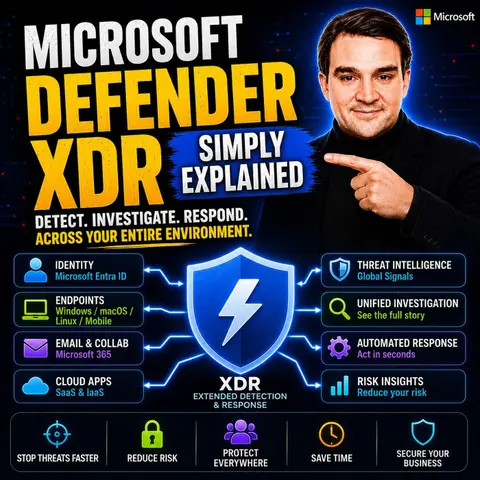

Microsoft Defender XDR is Microsoft's unified Extended Detection and Response (XDR) platform, bringing together security signals from endpoints, identities, email, cloud applications, and collaboration tools into a single, AI-powered security experience. Instead of investigating isolated alerts from multiple products, security teams can see the full attack chain in one place, helping them detect, investigate, and respond to cyber threats faster.
In this episode of Microsoft Knowledge Nuggets, you'll learn what XDR actually means and how Microsoft Defender XDR connects Microsoft Defender for Endpoint, Defender for Office 365, Defender for Identity, Defender for Cloud Apps, and Microsoft Entra ID to identify sophisticated attacks that individual security tools might miss. We explain key concepts including incidents, alerts, automated investigation and remediation, threat intelligence, advanced hunting, and AI-powered attack disruption.
The episode also explores real-world scenarios such as phishing, ransomware, credential theft, insider threats, and lateral movement. You'll discover how Defender XDR automatically correlates events across identities, devices, email, cloud apps, and Microsoft Teams, reducing alert fatigue while accelerating incident response. We also discuss how it integrates with Microsoft Sentinel, Microsoft Security Copilot, Microsoft Intune, and Microsoft Entra to support a modern Zero Trust security strategy.
Whether you're a security analyst, Microsoft 365 administrator, Azure professional, cloud architect, or preparing for certifications like SC-200, SC-300, AZ-500, or SC-100, this episode provides a practical introduction without unnecessary complexity. By the end, you'll understand how Microsoft Defender XDR helps organizations unify security operations, detect advanced threats, automate investigations, and protect modern hybrid environments from a single platform.
In today's fast-paced digital world, cybersecurity is more important than ever. You face a growing number of threats that can put your data and privacy at risk. That's where Microsoft Defender XDR comes into play. This powerful tool helps you protect your organization by offering a comprehensive security solution. With its ability to integrate various protective measures, it allows you to stay one step ahead of cybercriminals. Are you ready to explore how Microsoft Defender XDR can enhance your security posture?
Key Takeaways
- Microsoft Defender XDR offers a unified security solution that integrates various protective measures to combat cyber threats.
- It provides advanced threat intelligence by analyzing over 100 trillion signals daily, ensuring accurate threat detection.
- The user-friendly interface simplifies threat management, making it easier for organizations to respond to incidents.
- Automated threat responses reduce investigation times from 72 hours to just 4 hours, allowing for quicker action against threats.
- Microsoft Defender XDR protects a wide range of devices, including Windows, macOS, Linux, Android, iOS, and IoT devices.
- Integration with Microsoft 365 enhances security by correlating signals and automating responses across services.
- Proactive threat-hunting capabilities help identify and neutralize potential threats before they escalate.
- Implementing best practices for configuration can optimize Microsoft Defender XDR's performance and improve your organization's security posture.
What Is Microsoft Defender XDR?

Overview of Microsoft Defender XDR
Microsoft Defender XDR (Extended Detection and Response) is a cutting-edge security solution designed to protect your organization from the ever-evolving landscape of cyber threats. Unlike traditional security tools that often operate in isolation, Microsoft Defender XDR integrates various protective measures into a single, intelligent platform. This integration allows you to see the complete picture of potential threats, from the initial phishing email to compromised credentials and beyond.
With Microsoft Defender XDR, you gain access to a unified approach that correlates data across multiple environments, including endpoints, email, identities, and cloud applications. This comprehensive view enables you to detect, investigate, and respond to threats more effectively. By leveraging advanced analytics, artificial intelligence, and machine learning, Microsoft Defender XDR identifies complex cyberattacks and automates responses, enhancing your overall security posture.
Key Features of Microsoft Defender
Microsoft Defender XDR stands out due to its robust features that set it apart from other security solutions. Here are some of the key features you can expect:
- Integrated Security Suite: Microsoft Defender XDR seamlessly integrates with other Microsoft security products, providing robust protection across multiple attack vectors.
- Advanced Threat Intelligence: It leverages data from over 100 trillion signals analyzed daily, ensuring unparalleled accuracy in threat detection.
- User-Friendly Interface: Designed with usability in mind, the interface allows for effective threat management without overwhelming you with complexity.
- Proactive Threat-Hunting: This feature enables you to detect and neutralize potential threats before they escalate, keeping your organization safe.
- Protection Across the Attack Chain: Microsoft Defender XDR adopts a holistic approach, protecting your organization from the initial compromise to data exfiltration.
Additionally, Microsoft Defender XDR includes several core components that enhance its functionality:
- Endpoints with Defender for Endpoint: A unified platform for endpoint protection and response.
- Assets with Defender Vulnerability Management: Provides visibility and remediation tools for vulnerabilities.
- Email and Collaboration with Defender for Office 365: Protects against threats in email and collaboration tools.
- Identities with Defender for Identity and Microsoft Entra ID Protection: Detects threats and protects user identities.
- Applications with Defender for Cloud Apps: Offers visibility and threat protection for cloud applications.
By utilizing these features, Microsoft Defender XDR not only enhances your security but also streamlines your security operations, allowing you to focus on what matters most—protecting your organization.
Microsoft Defender XDR Integration
Integration with Microsoft 365
When you use Microsoft Defender XDR, you unlock powerful integration capabilities with Microsoft 365. This integration enhances your security experience by correlating signals from various Microsoft security products. Here’s what you can expect:
- Unified Security Experience: Microsoft Defender XDR provides a cohesive view of your security landscape, making it easier to manage threats.
- Automated Threat Responses: It automates responses to threats, including self-healing for affected mailboxes and endpoints. This means less downtime and quicker recovery for your organization.
- Coordinated Defensive Responses: The integration allows for coordinated responses across services through signal sharing and automated actions. This synergy helps you respond to threats more effectively.
By integrating with Microsoft 365, Microsoft Defender XDR significantly improves your security posture. For instance, organizations have reported a 93% reduction in alerts per week after implementing XDR. This means you can focus on critical issues rather than sifting through thousands of alerts. The average investigation time also drops from 72 hours to just 4 hours, allowing your team to act swiftly when threats arise.
Data Correlation Across Platforms
One of the standout features of Microsoft Defender XDR is its ability to correlate data across different platforms. This capability is crucial for effective threat detection and response. Here’s how it works:
| Method/Process | Description |
|---|---|
| Alert Correlation | Alerts from various sources aggregate in the Microsoft Defender portal. If alerts are unique, a new incident is created; if related, they are added to existing incidents. |
| Incident Creation Logic | Alerts are placed into incidents based on their uniqueness and relation to other alerts within a specific timeframe. |
| Microsoft Sentinel Integration | Alerts from a primary Microsoft Sentinel workspace can be correlated with Microsoft Defender alerts, while secondary workspaces remain separate. |
| Manual Correlation | Users can manually link or unlink alerts from incidents as needed. |
This data correlation provides several benefits. It enhances visibility by correlating detections from various environments, giving you contextual information for in-depth investigations. Advanced analytics and AI help identify complex cyberattacks across your technology ecosystem. Plus, automated responses reduce reliance on manual intervention, improving your response times.
With Microsoft Defender XDR, you can prioritize incidents based on severity, allowing your analysts to focus on critical threats. This unified approach not only reduces alert fatigue but also streamlines your threat investigation process.
Protection Mechanisms of Microsoft Defender XDR

Endpoint Protection
When it comes to endpoint protection, Microsoft Defender XDR offers comprehensive coverage across various devices. You can rest assured knowing that your organization’s endpoints are safeguarded against a wide range of cyber threats. Here’s a quick look at the types of devices protected:
- Endpoints with Defender for Endpoint
- Windows
- macOS
- Linux
- Android
- iOS
- IoT devices
| Device Type | Description |
|---|---|
| Windows | Comprehensive protection against cyber threats |
| macOS | Comprehensive protection against cyber threats |
| Linux | Comprehensive protection against cyber threats |
| Android | Comprehensive protection against cyber threats |
| iOS | Comprehensive protection against cyber threats |
| IoT devices | Comprehensive protection against cyber threats |
In independent security tests, Microsoft Defender XDR achieved 100% detection coverage across all stages of cyberattacks. It recorded zero false positives, showcasing its high accuracy in threat detection. This means you can effectively block endpoint threats while minimizing unnecessary alerts for your security teams.
Cloud and Email Security
Microsoft Defender XDR excels in protecting your cloud environments and email systems from advanced persistent threats. By integrating signals from various domains—like endpoints, identities, and cloud applications—it enhances threat visibility and accelerates response times. This unified approach is crucial in today’s landscape, where threats target identities, endpoints, cloud services, and data simultaneously.
Here are some key features of Microsoft Defender XDR's cloud and email security:
- Defender for Office 365: Protects your email and collaboration tools from phishing attempts and malicious content.
- Defender for Cloud Apps: Provides protection over SaaS applications and cloud services, ensuring your data remains secure.
| Feature | Description |
|---|---|
| Defender for Office 365 | Protects email and collaboration tools from phishing attempts and malicious content. |
| Defender for Endpoint | Handles device protection from malware and ransomware threats. |
| Defender for Identity | Monitors Active Directory infrastructure to catch identity-based attacks. |
| Defender for Cloud Apps | Provides protection over SaaS applications and cloud services. |
With Microsoft Defender XDR, you can effectively respond to threats, ensuring your organization remains secure against evolving cyber risks.
Identity Protection
Identity protection is another critical aspect of Microsoft Defender XDR. It implements several mechanisms to prevent unauthorized access and safeguard your organization’s sensitive information. Here’s how it works:
- Holistic Identity Protection: Integrates risk signals from Entra ID Protection and Defender for Identity, giving you complete visibility into identity threats.
- Cross-Environment Threat Correlation: Links risky sign-ins from Entra ID Protection with on-premises lateral movement activity from Defender for Identity. This helps identify ongoing multi-stage attacks.
- Automated Incident Response: You can set up automated responses to contain identity-based threats before they escalate.
To detect and respond to identity-based attacks, Microsoft Defender XDR monitors authentication and authorization behavior. It identifies credential abuse, risky sign-ins, and privilege escalation attempts. Here’s a quick overview of the detection process:
- Correlates identity alerts into unified incidents.
- Provides context on affected identities to scope impact.
- Enables remediation actions for compromised identities.
By leveraging these identity protection mechanisms, you can significantly enhance your organization’s security posture and reduce the risk of unauthorized access.
Cross-Product Features of Microsoft Defender XDR
Unified Security Management
With Microsoft Defender XDR, you gain a powerful unified security management system that enhances your ability to monitor and respond to threats. This system integrates various security capabilities, allowing you to manage your security landscape from a single platform. Here’s a quick look at what it offers:
| Capability | Description |
|---|---|
| Security information and event management (SIEM) | Integrates security data for comprehensive monitoring and analysis. |
| Security orchestration, automation, and response (SOAR) | Automates responses to security incidents, improving efficiency. |
| Extended detection and response (XDR) | Provides a unified approach to detect and respond to threats across various environments. |
| Posture and exposure management | Helps organizations understand their security posture and exposure to risks. |
| Cloud security, threat intelligence, and generative AI | Enhances security measures with advanced technologies and insights. |
This unified approach not only simplifies your security management but also improves incident response times. Automated response capabilities enable quick intervention to address vulnerabilities and block lateral movements. This minimizes potential damage during incidents. Plus, machine learning algorithms continuously enhance detection capabilities, helping your security team respond more effectively to threats.
Automated Threat Response
Automated threat response is another standout feature of Microsoft Defender XDR. It allows you to act swiftly when a threat is detected, reducing the time it takes to mitigate risks. Here are some of the automated actions you can expect:
| Action | Capability | Product | Description |
|---|---|---|---|
| Contain device | Attack disruption | Defender for Endpoint | Automatically contains a suspicious device by applying a policy on all Defender for Endpoint onboarded devices to block communication from that device. |
| Contain IP | Attack disruption | Defender for Endpoint | Contains an IP address associated with undiscovered/not onboarded devices by applying a policy on all Defender for Endpoint onboarded devices to block communication from that IP address. |
| Isolate device | Attack disruption | Defender for Endpoint | Automatically isolates a compromised device from the network when it's identified as an active foothold. Most network traffic is blocked while the device remains connected to required security services. |
| Disable user | Attack disruption | Defender for Identity | Disables the user account to prevent further sign-in and access. |
These automated responses not only save time but also enhance your overall security posture. By isolating compromised devices and disabling user accounts, you can prevent further damage and protect your organization from ongoing threats. With Microsoft Defender XDR, you can rest easy knowing that your security operations are streamlined and effective.
Getting Started with Microsoft Defender XDR
Installation and Setup
Getting started with Microsoft Defender XDR is straightforward. First, ensure your systems meet the minimum requirements for installation. Here’s a quick overview:
| Requirement Type | Details |
|---|---|
| Supported Operating Systems | Windows 10 and 11 (Enterprise, IoT Enterprise, Education, Pro), Windows Server 2012 R2 and later, Mac, Linux, Android, iOS. |
| Minimum Hardware Requirements | 2 cores minimum, 1GB memory minimum. |
| Network Requirements | Internet connectivity required, IPv4 stack must be enabled. |
| Licensing Information | Requires appropriate licensing for servers and endpoints. |
To install Microsoft Defender XDR, follow these steps:
- Download the Installer: Access the Microsoft website to download the latest version.
- Run the Installer: Follow the prompts to install the software on your devices.
- Configure Initial Settings: After installation, set up your preferences and security policies.
- Connect to Microsoft 365: If you use Microsoft 365, integrate Defender XDR for enhanced protection.
Best Practices for Configuration
Once you’ve installed Microsoft Defender XDR, optimizing its configuration is essential for peak performance. Here are some best practices to consider:
- Optimize your advanced hunting queries to get results faster and avoid timeouts.
- Understand CPU resource quotas to manage resource allocation effectively.
- Track consumption of resources when running multiple queries to minimize disruptions.
By following these practices, you can ensure that Microsoft Defender XDR runs smoothly and efficiently.
To measure the effectiveness of your configuration, consider using Microsoft Secure Score. This tool helps you assess your organization’s security posture. A higher score indicates that you’ve taken more actions to secure your environment. You can monitor your security across Microsoft 365 identities, apps, and devices from a centralized dashboard. Following Secure Score recommendations can enhance your security and provide insights into your current state, enabling comparisons with benchmarks and establishing key performance indicators (KPIs).
By implementing these steps and best practices, you’ll be well on your way to maximizing the benefits of Microsoft Defender XDR, ensuring your organization remains secure in today’s cloud-native security landscape.
In summary, Microsoft Defender XDR offers a powerful solution to combat today's complex cyber threats. By integrating various protective measures, it helps you safeguard your organization effectively. Here are some key metrics from recent deployments:
| Key Metrics | Results |
|---|---|
| Malicious account breaches neutralized | 120,000 |
| Devices safeguarded | 180,000+ |
| Threat detection and response time | 120 seconds |
| Success rate across protected systems | 99%+ |
Looking ahead, expect to see exciting trends in extended detection and response, such as:
- Integration of AI and machine learning for better threat detection.
- Convergence with SIEM and SOAR tools for unified security operations.
- A focus on identity and cloud security as primary attack surfaces.
With Microsoft Defender XDR, you can stay ahead of cybercriminals and protect your valuable assets. Embrace this innovative solution to enhance your security posture today! 🚀
FAQ
What is Microsoft Defender XDR?
Microsoft Defender XDR is an advanced security solution that integrates various protective measures. It helps you detect, investigate, and respond to cyber threats across multiple environments, including endpoints, email, and cloud applications.
How does Microsoft Defender XDR improve incident management?
Microsoft Defender XDR enhances incident management by correlating alerts from different sources. This unified view allows you to respond to threats more effectively and reduces the time spent on investigations.
Can I use Microsoft Defender XDR with existing Microsoft 365 licenses?
Yes! If you already use Microsoft 365, you may have access to Microsoft Defender XDR capabilities without needing additional licenses. This makes it an accessible option for many organizations.
What types of devices does Microsoft Defender XDR protect?
Microsoft Defender XDR protects a wide range of devices, including Windows, macOS, Linux, Android, iOS, and IoT devices. This comprehensive coverage ensures your organization remains secure across all platforms.
How does Microsoft Defender XDR automate threat responses?
Microsoft Defender XDR automates threat responses by isolating compromised devices and disabling user accounts when threats are detected. This quick action helps prevent further damage and enhances your overall security posture.
Is Microsoft Defender XDR suitable for small businesses?
Absolutely! Microsoft Defender XDR is designed to be scalable, making it suitable for businesses of all sizes. Its integration with Microsoft 365 also provides an affordable security solution for small enterprises.
How can I get started with Microsoft Defender XDR?
To get started, ensure your systems meet the minimum requirements, download the installer from the Microsoft website, and follow the setup instructions. Integrate it with Microsoft 365 for enhanced protection.
🎧 Listen to this episode
Want a practical explanation of Microsoft Defender XDR? This episode breaks down the topic in clear language and shows why it matters for Microsoft 365, Azure, Power Platform, security, AI, and modern work.
Listen to this episode if you want to:
- Understand the key concepts behind Microsoft Defender XDR
- See how it fits into the wider Microsoft technology ecosystem
- Learn where it can create practical value for your organization
You may also enjoy these related M365 FM episodes:
- Unify Hybrid Security with Microsoft Defender XDR
- Microsoft Defender for Cloud Apps - Simply Explained
- Building a Secure Microsoft-First MSP: Intune, Defender & Entra ID at Scale with Albin Klinaku [MVP]
- Reduce Defender False Positives with Security Copilot Analysts
- Microsoft Defender vs Sentinel: When You Need Both
Discover more practical Microsoft conversations on M365 FM.
🚀 Want to be part of m365.fm?
Then stop just listening… and start showing up.
👉 Connect with me on LinkedIn and let’s make something happen:
- 🎙️ Be a podcast guest and share your story
- 🎧 Host your own episode (yes, seriously)
- 💡 Pitch topics the community actually wants to hear
- 🌍 Build your personal brand in the Microsoft 365 space
This isn’t just a podcast — it’s a platform for people who take action.
🔥 Most people wait. The best ones don’t.
👉 Connect with me on LinkedIn and send me a message:
"I want in"
Let’s build something awesome 👊
1
00:00:00,000 --> 00:00:03,360
Welcome to another episode of Microsoft Knowledge Nuggets on M365,
2
00:00:03,360 --> 00:00:04,520
FM and Mercopedas,
3
00:00:04,520 --> 00:00:07,580
and today we're tackling Microsoft Defender XDR.
4
00:00:07,580 --> 00:00:10,040
Picture this, you're at your desk on a Tuesday morning,
5
00:00:10,040 --> 00:00:11,960
your phone buzzes, security alert.
6
00:00:11,960 --> 00:00:13,640
Is it real or is it just noise?
7
00:00:13,640 --> 00:00:15,880
Then another alert about a suspicious email,
8
00:00:15,880 --> 00:00:18,520
another about an odd sign in from a strange location.
9
00:00:18,520 --> 00:00:19,760
Are they connected maybe?
10
00:00:19,760 --> 00:00:20,600
Maybe not.
11
00:00:20,600 --> 00:00:22,760
That's the problem most businesses face today.
12
00:00:22,760 --> 00:00:25,760
Today we'll look at what Defender XDR actually is,
13
00:00:25,760 --> 00:00:27,120
why Microsoft built it,
14
00:00:27,120 --> 00:00:28,840
and why it matters for any organization
15
00:00:28,840 --> 00:00:30,520
using Microsoft 365.
16
00:00:30,520 --> 00:00:32,280
Here's the thing about modern attacks.
17
00:00:32,280 --> 00:00:34,160
Attackers don't just hit one thing.
18
00:00:34,160 --> 00:00:38,040
They move fast, email, devices, identities, they hit them all.
19
00:00:38,040 --> 00:00:39,680
Your security tools need to keep up.
20
00:00:39,680 --> 00:00:41,120
We'll break down the five building blocks
21
00:00:41,120 --> 00:00:42,320
that make up Defender XDR
22
00:00:42,320 --> 00:00:43,680
and show you how they snap together
23
00:00:43,680 --> 00:00:45,400
into one unified security layer.
24
00:00:45,400 --> 00:00:48,280
But first, we need to talk about the problem it solves.
25
00:00:48,280 --> 00:00:50,360
The problem, siloed security.
26
00:00:50,360 --> 00:00:52,080
20 years ago security was simple.
27
00:00:52,080 --> 00:00:55,320
You bought antivirus for your PCs, a spam filter for email,
28
00:00:55,320 --> 00:00:58,160
a firewall for your network, each tool did one job,
29
00:00:58,160 --> 00:00:59,840
and they never talked to each other.
30
00:00:59,840 --> 00:01:02,840
That was fine back then, because attacks were simpler too.
31
00:01:02,840 --> 00:01:04,320
But here's what happens today.
32
00:01:04,320 --> 00:01:06,920
An attacker sends a phishing email, someone clicks it,
33
00:01:06,920 --> 00:01:08,360
malware lands on a device,
34
00:01:08,360 --> 00:01:09,720
the malware steals a password.
35
00:01:09,720 --> 00:01:12,120
Now the attacker moves into your cloud apps,
36
00:01:12,120 --> 00:01:14,040
your file storage, your customer data,
37
00:01:14,040 --> 00:01:15,400
it's one chain of events.
38
00:01:15,400 --> 00:01:17,880
But your tools see it as five separate problems.
39
00:01:17,880 --> 00:01:20,880
The email filter sees a message, the antivirus sees a file,
40
00:01:20,880 --> 00:01:22,520
the identity system sees a login.
41
00:01:22,520 --> 00:01:24,520
None of them know they're looking at the same attack.
42
00:01:24,520 --> 00:01:26,680
Think of it like a building with three security guards,
43
00:01:26,680 --> 00:01:27,600
one at the front door,
44
00:01:27,600 --> 00:01:29,480
one in the parking lot, one in the mail room.
45
00:01:29,480 --> 00:01:31,040
They never share information.
46
00:01:31,040 --> 00:01:32,480
The thief walks in the front door,
47
00:01:32,480 --> 00:01:34,760
and the mail room guard has no idea they're coming.
48
00:01:34,760 --> 00:01:36,480
That's how most security tools work today.
49
00:01:36,480 --> 00:01:38,480
They're in the same building, but they don't talk.
50
00:01:38,480 --> 00:01:41,760
So the result, your team gets five alerts instead of one story.
51
00:01:41,760 --> 00:01:43,440
They waste time chasing false positives.
52
00:01:43,440 --> 00:01:44,920
The real threat hides in the noise,
53
00:01:44,920 --> 00:01:46,280
by the time someone connects the dots,
54
00:01:46,280 --> 00:01:47,640
the attacker has already won.
55
00:01:47,640 --> 00:01:50,480
What you really need is a system that sees across all those domains
56
00:01:50,480 --> 00:01:52,320
and says, these alerts are connected.
57
00:01:52,320 --> 00:01:53,280
Here's the full picture.
58
00:01:53,280 --> 00:01:55,000
Here's what to do.
59
00:01:55,000 --> 00:01:57,040
That's exactly what Microsoft Defender XDR
60
00:01:57,040 --> 00:01:58,280
is built to do.
61
00:01:58,280 --> 00:01:59,560
What is Defender XDR?
62
00:01:59,560 --> 00:02:00,480
The umbrella.
63
00:02:00,480 --> 00:02:02,120
So let's define what this thing actually is.
64
00:02:02,120 --> 00:02:04,120
Microsoft Defender XDR is something called
65
00:02:04,120 --> 00:02:06,200
an extended detection and response platform.
66
00:02:06,200 --> 00:02:07,520
That's a lot of syllables I get it,
67
00:02:07,520 --> 00:02:09,240
but the core idea is dead simple.
68
00:02:09,240 --> 00:02:12,280
This system takes signals from all across Microsoft 365,
69
00:02:12,280 --> 00:02:14,400
your endpoints, your email, your user accounts,
70
00:02:14,400 --> 00:02:15,240
your cloud apps,
71
00:02:15,240 --> 00:02:18,480
and stitches them together into one unified view.
72
00:02:18,480 --> 00:02:21,280
XDR stands for extended detection and response.
73
00:02:21,280 --> 00:02:23,560
And the most important word there is extended,
74
00:02:23,560 --> 00:02:25,720
because this isn't just about computers anymore.
75
00:02:25,720 --> 00:02:29,160
It covers email, identities, cloud applications, and more.
76
00:02:29,160 --> 00:02:31,520
The difference is like watching one security camera
77
00:02:31,520 --> 00:02:34,480
versus watching every camera in a building from a single screen.
78
00:02:34,480 --> 00:02:36,880
You get the full picture instead of a tiny piece of it.
79
00:02:36,880 --> 00:02:38,840
Here's the thing that surprises most people.
80
00:02:38,840 --> 00:02:41,960
Defender XDR isn't some brand new product you have to go out and buy.
81
00:02:41,960 --> 00:02:44,680
It's more like a unifying layer that sits on top of security tools
82
00:02:44,680 --> 00:02:45,760
you might already own.
83
00:02:45,760 --> 00:02:48,320
Think of it as the command center I mentioned earlier.
84
00:02:48,320 --> 00:02:50,240
The individual Defender products.
85
00:02:50,240 --> 00:02:54,640
Defender for endpoint, Defender for Office 365, Defender for Identity,
86
00:02:54,640 --> 00:02:58,240
Defender for Cloud Apps, and the vulnerability management tools.
87
00:02:58,240 --> 00:03:01,120
Those are like security cameras watching different rooms.
88
00:03:01,120 --> 00:03:04,120
Defender XDR is the operator sitting at the main screen,
89
00:03:04,120 --> 00:03:06,000
connecting the dots between all of them.
90
00:03:06,000 --> 00:03:07,320
So what does it actually do?
91
00:03:07,320 --> 00:03:10,680
It automatically collects alerts from all those individual defenders.
92
00:03:10,680 --> 00:03:13,480
Then it groups related alerts into something called an incident.
93
00:03:13,480 --> 00:03:16,240
So instead of 10 separate alarms that might be related,
94
00:03:16,240 --> 00:03:18,720
you get one incident that tells the whole story.
95
00:03:18,720 --> 00:03:21,440
The email that started the attack, the device that got infected,
96
00:03:21,440 --> 00:03:24,440
the account that got compromised all in one place right in front of you.
97
00:03:24,440 --> 00:03:26,080
And this part catches people off guard.
98
00:03:26,080 --> 00:03:28,840
You don't buy Defender XDR as a separate line item.
99
00:03:28,840 --> 00:03:31,400
It comes included with Microsoft 365 E5
100
00:03:31,400 --> 00:03:34,040
and it's part of the E5 security add-on too.
101
00:03:34,040 --> 00:03:38,560
If you have Microsoft 365 Business Premium or E3 with certain add-ons,
102
00:03:38,560 --> 00:03:41,920
you may already have access to some of its capabilities without even realizing it.
103
00:03:41,920 --> 00:03:44,960
We'll talk more about licensing later, but the takeaway is simple.
104
00:03:44,960 --> 00:03:47,400
If you're already paying for Microsoft 365,
105
00:03:47,400 --> 00:03:50,200
you might be a lot closer to having this protection than you think.
106
00:03:50,200 --> 00:03:51,640
The five components.
107
00:03:51,640 --> 00:03:54,560
Let's break down the five pieces that actually make up the system
108
00:03:54,560 --> 00:03:58,240
because Defender XDR sounds abstract until you understand what feeds into it.
109
00:03:58,240 --> 00:04:00,000
First up, Defender for Endpoint.
110
00:04:00,000 --> 00:04:03,720
This one protects devices, Windows, Mac, Linux, even mobile phones.
111
00:04:03,720 --> 00:04:07,400
It's the modern version of antivirus, but it goes way beyond that.
112
00:04:07,400 --> 00:04:09,520
Instead of just scanning for known bad files,
113
00:04:09,520 --> 00:04:11,520
it watches for suspicious behavior.
114
00:04:11,520 --> 00:04:13,320
If a program starts acting weird,
115
00:04:13,320 --> 00:04:15,680
encrypting files connecting to unknown servers,
116
00:04:15,680 --> 00:04:18,680
modifying system settings, Defender for Endpoint flags it.
117
00:04:18,680 --> 00:04:23,080
It can investigate automatically and if needed, isolate that device from the network entirely.
118
00:04:23,080 --> 00:04:25,440
One click and that machine is cut off from everything.
119
00:04:25,440 --> 00:04:27,400
Next is Defender for Office 365.
120
00:04:27,400 --> 00:04:29,960
This protects your email and collaboration tools.
121
00:04:29,960 --> 00:04:33,160
It's the thing blocking phishing emails, malicious attachments,
122
00:04:33,160 --> 00:04:35,480
and unsafe links before they ever hit your inbox.
123
00:04:35,480 --> 00:04:38,280
But it also scans teams, messages, sharepoint files,
124
00:04:38,280 --> 00:04:40,120
and one drive storage for threats.
125
00:04:40,120 --> 00:04:43,600
So if someone shares a dangerous file in a team chat, this catches it.
126
00:04:43,600 --> 00:04:45,200
Then we have Defender for Identity.
127
00:04:45,200 --> 00:04:47,720
This one watches your identity infrastructure.
128
00:04:47,720 --> 00:04:50,160
If you have an on-premises active directory,
129
00:04:50,160 --> 00:04:53,680
the system that manages user accounts and passwords inside your office,
130
00:04:53,680 --> 00:04:56,800
Defender for Identity monitors it for suspicious activity.
131
00:04:56,800 --> 00:05:00,800
It detects credential theft where an attacker steals a password and tries to use it elsewhere.
132
00:05:00,800 --> 00:05:04,240
It spots lateral movement where someone hops from one account to another
133
00:05:04,240 --> 00:05:08,440
and it flags privilege escalation where a regular user suddenly tries to gain admin rights.
134
00:05:08,440 --> 00:05:12,680
These are the exact techniques attackers use once they're inside your network.
135
00:05:12,680 --> 00:05:14,440
The fourth piece is Defender for Cloud Apps.
136
00:05:14,440 --> 00:05:18,360
This gives you visibility into all the cloud applications your people are using.
137
00:05:18,360 --> 00:05:20,520
Both the ones you've approved and the ones you haven't.
138
00:05:20,520 --> 00:05:24,240
It discovers shadow it, meaning services your team signed up for without telling it.
139
00:05:24,240 --> 00:05:28,400
It detects unusual behavior, like a user downloading thousands of files at 2am,
140
00:05:28,400 --> 00:05:32,280
and it can block risky apps or control what data gets shared through them.
141
00:05:32,280 --> 00:05:34,160
Last is vulnerability management.
142
00:05:34,160 --> 00:05:37,920
This one is actually built into Defender for endpoint, but it deserves its own mention.
143
00:05:37,920 --> 00:05:40,840
It continuously scans your devices for missing security patches,
144
00:05:40,840 --> 00:05:43,160
weak configurations, and other exposures.
145
00:05:43,160 --> 00:05:45,960
Then it hands you a prioritized list of what to fix first.
146
00:05:45,960 --> 00:05:48,200
So instead of guessing which updates matter most,
147
00:05:48,200 --> 00:05:52,040
it tells you exactly which vulnerabilities are most likely to be exploited.
148
00:05:52,040 --> 00:05:53,480
Now here's the key insight.
149
00:05:53,480 --> 00:05:57,560
Each of these products existed on their own before Defender XDR came along.
150
00:05:57,560 --> 00:06:01,520
Microsoft built them separately over the years and then someone asked a smart question,
151
00:06:01,520 --> 00:06:03,040
"What if they all work together?"
152
00:06:03,040 --> 00:06:05,200
That's exactly what Defender XDR makes happen.
153
00:06:05,200 --> 00:06:09,080
It's the glue that turns five good products into one powerful system.
154
00:06:09,080 --> 00:06:10,400
How they work together.
155
00:06:10,400 --> 00:06:13,440
Let me walk you through a real scenario so you can see how this plays out.
156
00:06:13,440 --> 00:06:15,360
One of your employees gets a fishing email.
157
00:06:15,360 --> 00:06:18,240
It looks like it's from their boss, asking them to review a document.
158
00:06:18,240 --> 00:06:21,760
Defender for Office 365 might not flag it because the link seems legit.
159
00:06:21,760 --> 00:06:26,360
So the employee clicks, types their password on what looks like a real Microsoft login page,
160
00:06:26,360 --> 00:06:28,400
and the attacker now has their credentials.
161
00:06:28,400 --> 00:06:33,000
Within minutes Defender for Identity spots the same user signing in from a country they've never visited.
162
00:06:33,000 --> 00:06:36,280
While Defender for endpoint catches a suspicious process on the laptop,
163
00:06:36,280 --> 00:06:38,520
trying to connect to an external server.
164
00:06:38,520 --> 00:06:40,440
Now think about what happens without XDR.
165
00:06:40,440 --> 00:06:41,920
You get three separate alerts.
166
00:06:41,920 --> 00:06:46,240
One from email security, one from identity monitoring, and one from endpoint protection.
167
00:06:46,240 --> 00:06:48,360
Each in a different console with a different login.
168
00:06:48,360 --> 00:06:51,120
Your security team manually tries to figure out if they're connected.
169
00:06:51,120 --> 00:06:54,880
Either way, the attacker keeps moving deeper into your network while they search.
170
00:06:54,880 --> 00:06:57,600
With Defender XDR that hold processes automatic.
171
00:06:57,600 --> 00:06:59,160
The platform connects the dots.
172
00:06:59,160 --> 00:07:04,400
It recognizes that the email, the strange sign in and the odd process are all part of one attack chain.
173
00:07:04,400 --> 00:07:06,200
It builds a single incident with a timeline.
174
00:07:06,200 --> 00:07:11,080
You open it up and see the full story, the email, the sign in, the device activity, or laid out in order.
175
00:07:11,080 --> 00:07:12,360
And it doesn't just tell you what happened.
176
00:07:12,360 --> 00:07:14,960
Defender XDR can act too, depending on your settings.
177
00:07:14,960 --> 00:07:19,680
It might automatically isolate the compromised device from the network, reset the user's password,
178
00:07:19,680 --> 00:07:22,200
or block sign in from that suspicious location.
179
00:07:22,200 --> 00:07:25,240
All in minutes, without anyone needing to open a ticket or make a call,
180
00:07:25,240 --> 00:07:29,440
think of it like a team of specialists, a firefighter, a paramedic, a police officer,
181
00:07:29,440 --> 00:07:31,240
all reporting to one coordinator.
182
00:07:31,240 --> 00:07:33,840
The coordinator hears from each one, spots the pattern,
183
00:07:33,840 --> 00:07:37,240
and deploys the right response before anyone else even realizes there's a problem.
184
00:07:37,240 --> 00:07:38,760
This isn't about convenience.
185
00:07:38,760 --> 00:07:39,600
It's about speed.
186
00:07:39,600 --> 00:07:42,720
Attackers can lurk inside a network for days before anyone notices.
187
00:07:42,720 --> 00:07:45,560
With XDR, that window shrinks to hours or even minutes.
188
00:07:45,560 --> 00:07:48,920
And in security, time is the one thing you never get back.
189
00:07:48,920 --> 00:07:50,520
What it actually does for you.
190
00:07:50,520 --> 00:07:52,440
So what does all this mean for your business?
191
00:07:52,440 --> 00:07:53,320
Let's make it real.
192
00:07:53,320 --> 00:07:55,080
First up, fewer alerts to chase.
193
00:07:55,080 --> 00:07:57,360
When Defender XDR groups related alerts into incidents,
194
00:07:57,360 --> 00:07:59,600
your team doesn't see 100 separate alarms every day.
195
00:07:59,600 --> 00:08:03,520
They get maybe 10 clear stories each with context, evidence, and a recommended next step.
196
00:08:03,520 --> 00:08:06,000
They're working on real threats instead of chasing ghosts.
197
00:08:06,000 --> 00:08:08,080
Then there's faster investigations.
198
00:08:08,080 --> 00:08:11,520
From the incident view, you see the entire attack as a timeline.
199
00:08:11,520 --> 00:08:14,360
Click into any piece, the device, the user account, the email,
200
00:08:14,360 --> 00:08:16,360
and get more detail without leaving the screen.
201
00:08:16,360 --> 00:08:17,920
Everything you need is right there.
202
00:08:17,920 --> 00:08:20,520
No jumping between consoles, no copying and pasting.
203
00:08:20,520 --> 00:08:23,240
And maybe the biggest win is automated cleanup.
204
00:08:23,240 --> 00:08:27,000
If the threat is clear, Defender XDR handles the remediation on its own.
205
00:08:27,000 --> 00:08:30,000
It deletes the malicious email from everyone's inbox,
206
00:08:30,000 --> 00:08:32,360
removes the infected file from the device,
207
00:08:32,360 --> 00:08:35,440
and even rolls back registry changes the attacker made.
208
00:08:35,440 --> 00:08:37,680
Think of it like a self-cleaning security system.
209
00:08:37,680 --> 00:08:40,680
You don't send someone in with a mop, the system takes care of the mess.
210
00:08:40,680 --> 00:08:42,000
Then there's proactive protection.
211
00:08:42,000 --> 00:08:44,200
This is where vulnerability management shines.
212
00:08:44,200 --> 00:08:47,320
Instead of just reacting, Defender XDR helps you prevent attacks.
213
00:08:47,320 --> 00:08:49,840
It continuously scans your devices for missing patches,
214
00:08:49,840 --> 00:08:52,040
weak passwords, and misconfigurations.
215
00:08:52,040 --> 00:08:54,560
You get a prioritized list of what to fix first,
216
00:08:54,560 --> 00:08:57,280
based on which vulnerabilities are most likely to be exploited.
217
00:08:57,280 --> 00:08:59,520
No more guessing, just a clear action plan.
218
00:08:59,520 --> 00:09:01,320
And here's something many people overlook.
219
00:09:01,320 --> 00:09:03,000
Defender XDR works across platforms.
220
00:09:03,000 --> 00:09:06,040
Not just Windows, it covers Mac, Linux, iOS, and Android too.
221
00:09:06,040 --> 00:09:09,000
If your business has a mix of devices, you're still protected.
222
00:09:09,000 --> 00:09:10,240
Here's a real case.
223
00:09:10,240 --> 00:09:13,560
We worked with a partner managing security for a mid-sized company.
224
00:09:13,560 --> 00:09:17,040
Before XDR, their incident response time averaged around four hours.
225
00:09:17,040 --> 00:09:19,880
After turning it on and configuring automated response rules
226
00:09:19,880 --> 00:09:21,640
that dropped to about 20 minutes.
227
00:09:21,640 --> 00:09:23,640
The difference wasn't a bigger team or better training.
228
00:09:23,640 --> 00:09:26,400
It was the system connecting the dots for them.
229
00:09:26,400 --> 00:09:27,920
So that's the practical impact.
230
00:09:27,920 --> 00:09:30,120
Fewer alerts, faster investigations,
231
00:09:30,120 --> 00:09:32,600
automated cleanup, and proactive prevention.
232
00:09:32,600 --> 00:09:34,200
It's not just about having better tools.
233
00:09:34,200 --> 00:09:36,160
It's about tools that work together,
234
00:09:36,160 --> 00:09:39,240
so your team can focus on what matters most.
235
00:09:39,240 --> 00:09:41,520
Connection, the real power is integration.
236
00:09:41,520 --> 00:09:43,240
We've covered the five components.
237
00:09:43,240 --> 00:09:46,120
But here's the thing, the real value isn't any single one of them.
238
00:09:46,120 --> 00:09:47,280
It's how they integrate.
239
00:09:47,280 --> 00:09:49,960
When Defender for Endpoint sees a file being downloaded,
240
00:09:49,960 --> 00:09:53,800
Defender for Identity detects a password change from an unusual location,
241
00:09:53,800 --> 00:09:56,600
and Defender for Cloud Apps notices data being uploaded
242
00:09:56,600 --> 00:09:58,480
to a personal storage service.
243
00:09:58,480 --> 00:10:02,800
Alone, each is just a data point, a blip on a dashboard.
244
00:10:02,800 --> 00:10:04,200
But together, they tell a story.
245
00:10:04,200 --> 00:10:05,360
And that story is clear.
246
00:10:05,360 --> 00:10:07,000
Someone's account is compromised,
247
00:10:07,000 --> 00:10:09,200
and data is leaving your organization.
248
00:10:09,200 --> 00:10:12,160
Most people think security means buying the best antivirus
249
00:10:12,160 --> 00:10:13,440
or the best email filter.
250
00:10:13,440 --> 00:10:15,680
That's what the industry has taught us for decades.
251
00:10:15,680 --> 00:10:16,920
But here's the reality.
252
00:10:16,920 --> 00:10:19,360
Security isn't about any single product.
253
00:10:19,360 --> 00:10:22,920
It's about connecting the dots across everything happening in your environment.
254
00:10:22,920 --> 00:10:25,600
Defender XDR connects those dots automatically,
255
00:10:25,600 --> 00:10:28,160
so your team doesn't have to stitch everything together by hand.
256
00:10:28,160 --> 00:10:30,520
There's a multiplier effect here that's easy to miss.
257
00:10:30,520 --> 00:10:33,120
When one Defender component detects something new,
258
00:10:33,120 --> 00:10:35,000
that intelligence feeds into all the others.
259
00:10:35,000 --> 00:10:36,440
Let me give you a concrete example.
260
00:10:36,440 --> 00:10:40,520
Say Defender for Endpoint discovers a new strain of malware on one of your devices.
261
00:10:40,520 --> 00:10:42,360
That information doesn't just sit there.
262
00:10:42,360 --> 00:10:45,800
Defender for Office 365 immediately starts scanning incoming email
263
00:10:45,800 --> 00:10:50,160
for that same malware, and Defender for Identity watches for signs of credential theft.
264
00:10:50,160 --> 00:10:52,880
The detection in one place strengthens protection everywhere else.
265
00:10:52,880 --> 00:10:55,120
That's a level of coordination you simply cannot build
266
00:10:55,120 --> 00:10:57,280
by buying separate tools from different vendors.
267
00:10:57,280 --> 00:11:00,560
You'd need a dedicated team just to keep the integrations working.
268
00:11:00,560 --> 00:11:06,000
This is why Microsoft can compete with companies like CrowdStrike and Palo Alto in the XDR space.
269
00:11:06,000 --> 00:11:10,400
Not because any single Defender component is dramatically better than its competitors equivalent,
270
00:11:10,400 --> 00:11:13,760
but because the integration across Microsoft 365 is native.
271
00:11:13,760 --> 00:11:15,240
It's built right into the platform.
272
00:11:15,240 --> 00:11:17,360
Other vendors can integrate their products too,
273
00:11:17,360 --> 00:11:21,720
but it's never as seamless as when everything comes from the same company and shares the same data model.
274
00:11:21,720 --> 00:11:22,920
So who benefits most from this?
275
00:11:22,920 --> 00:11:27,480
If your business uses Microsoft 365, you already have some of this infrastructure in place.
276
00:11:27,480 --> 00:11:33,000
Moving to E5 or adding the E5 security add-on unlocks the full Defender XDR experience.
277
00:11:33,000 --> 00:11:38,120
For smaller businesses, Microsoft 365 Business Premium gives you a solid subset of these capabilities.
278
00:11:38,120 --> 00:11:40,760
The point is you might not need to buy a whole new security stack.
279
00:11:40,760 --> 00:11:43,280
You might just need to turn on what you already have.
280
00:11:43,280 --> 00:11:44,840
Take aways, what should you do?
281
00:11:44,840 --> 00:11:48,520
Let's wrap this up with three concrete steps you can take starting today.
282
00:11:48,520 --> 00:11:50,560
Step one, check your licensing.
283
00:11:50,560 --> 00:11:52,080
This is the easiest thing you can do.
284
00:11:52,080 --> 00:11:56,880
Go to the Microsoft 365 Admin Center, look at your subscriptions and see what you're paying for.
285
00:11:56,880 --> 00:12:00,480
Do you have E5, E3 with the security add-on Business Premium?
286
00:12:00,480 --> 00:12:03,400
That tells you what Defender capabilities you already have access to,
287
00:12:03,400 --> 00:12:05,680
and you might be surprised at what's included.
288
00:12:05,680 --> 00:12:09,320
Step two, if you have the right licensing, enable Defender XDR.
289
00:12:09,320 --> 00:12:10,600
It's not always un-by-default.
290
00:12:10,600 --> 00:12:14,040
Go to security.microsoft.com, find the settings section,
291
00:12:14,040 --> 00:12:16,440
and turn on the unified incident experience.
292
00:12:16,440 --> 00:12:19,200
Microsoft's documentation says it takes about 10 minutes.
293
00:12:19,200 --> 00:12:21,240
You don't need to configure everything at once.
294
00:12:21,240 --> 00:12:26,040
Just turning on the correlation engine starts giving you better visibility immediately.
295
00:12:26,040 --> 00:12:28,320
Step three, start with the low-hanging fruit.
296
00:12:28,320 --> 00:12:31,680
Deploy Defender for endpoint to all your devices if you haven't already.
297
00:12:31,680 --> 00:12:33,440
If you use Intune, this is straightforward.
298
00:12:33,440 --> 00:12:36,720
Enable Defender for Office 365 preset security policies.
299
00:12:36,720 --> 00:12:38,760
There's a standard policy and a strict policy,
300
00:12:38,760 --> 00:12:42,520
and either one blocks the majority of common email threats right out of the box.
301
00:12:42,520 --> 00:12:45,160
Then take a look at the vulnerability management dashboard.
302
00:12:45,160 --> 00:12:49,080
It'll show you your most critical exposures and tell you exactly what to fix first.
303
00:12:49,080 --> 00:12:50,200
One warning here.
304
00:12:50,200 --> 00:12:51,800
Don't try to do everything at once.
305
00:12:51,800 --> 00:12:55,040
Each component adds protection, but it also adds complexity.
306
00:12:55,040 --> 00:12:59,040
Start with one piece, get comfortable with how it works, then add the next.
307
00:12:59,040 --> 00:13:02,520
Trying to flip every switch on day one is a recipe for frustration.
308
00:13:02,520 --> 00:13:06,760
If you do just one thing, make it the Defender for Office 365 preset policies.
309
00:13:06,760 --> 00:13:10,120
Email is still the number one way attackers get into organizations.
310
00:13:10,120 --> 00:13:13,840
Blocking those threats at the gateway is the highest leverage move you can make.
311
00:13:13,840 --> 00:13:18,400
And once you're up and running, use the Microsoft Secure Score dashboard to track your progress.
312
00:13:18,400 --> 00:13:23,360
It gives you a running list of recommended actions and shows you how each one improves your security posture.
313
00:13:23,360 --> 00:13:26,000
It's like a to-do list that prioritizes itself.
314
00:13:26,000 --> 00:13:28,200
If you're not sure what you have or where to start,
315
00:13:28,200 --> 00:13:30,720
reach out to your IT provider or a Microsoft partner.
316
00:13:30,720 --> 00:13:32,360
They can audit your licensing.
317
00:13:32,360 --> 00:13:34,160
Help you set up the right protections
318
00:13:34,160 --> 00:13:37,600
and make sure you're not leaving money or security on the table.
319
00:13:37,600 --> 00:13:39,640
So that's what Microsoft Defender XDR is.
320
00:13:39,640 --> 00:13:41,800
It's not a single product you buy off the shelf.
321
00:13:41,800 --> 00:13:45,800
Instead, it's a unified security layer that connects your existing protections
322
00:13:45,800 --> 00:13:47,240
into one intelligent system.
323
00:13:47,240 --> 00:13:49,960
The real value comes from how these components work together.
324
00:13:49,960 --> 00:13:52,040
They talk to each other, automate responses,
325
00:13:52,040 --> 00:13:54,600
and cut down the time attackers have to cause damage.
326
00:13:54,600 --> 00:13:57,400
Start with the licensing audit, then enable the basics.
327
00:13:57,400 --> 00:13:59,640
You already own more protection than you think.
328
00:13:59,640 --> 00:14:00,600
Thanks for listening.
329
00:14:00,600 --> 00:14:04,360
If this helped, share it with someone trying to make sense of Microsoft security.

Founder of m365.fm, m365.show and m365con.net
Mirko Peters is a Microsoft 365 expert, content creator, and founder of m365.fm, a platform dedicated to sharing practical insights on modern workplace technologies. His work focuses on Microsoft 365 governance, security, collaboration, and real-world implementation strategies.
Through his podcast and written content, Mirko provides hands-on guidance for IT professionals, architects, and business leaders navigating the complexities of Microsoft 365. He is known for translating complex topics into clear, actionable advice, often highlighting common mistakes and overlooked risks in real-world environments.
With a strong emphasis on community contribution and knowledge sharing, Mirko is actively building a platform that connects experts, shares experiences, and helps organizations get the most out of their Microsoft 365 investments.