


 Apple Podcasts
 Spotify
 Youtube Music
 Spreaker
 Podchaser
 Amazon Music
 Azure API Management - Simply Explained
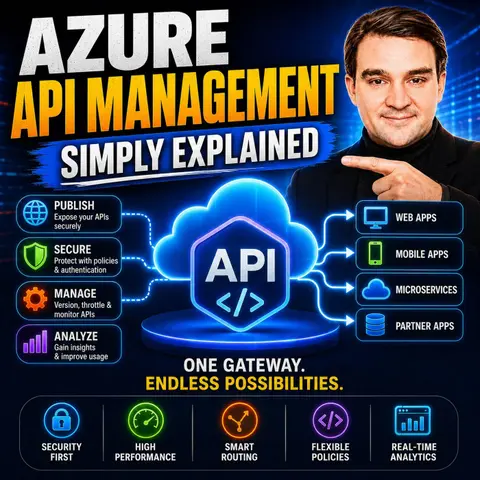

Azure API Management (APIM) is one of the most important services in Microsoft Azure for organizations building modern cloud applications, microservices, and enterprise integrations. As the number of APIs grows, managing security, authentication, monitoring, versioning, and developer access quickly becomes complex. In this episode of Microsoft Knowledge Nuggets, we explain Azure API Management in plain English and show how it simplifies the entire API lifecycle.
You'll learn why APIs are the foundation of modern applications and how Azure API Management acts as a secure gateway between your applications and backend services. We cover essential concepts including API gateways, products, subscriptions, policies, rate limiting, authentication, caching, transformations, versioning, revisions, and the built-in developer portal. You'll also discover how APIM helps protect backend services while giving developers a consistent and secure way to consume APIs.
The episode explores common real-world scenarios, including exposing Azure Functions, App Services, Kubernetes workloads, and legacy APIs through a single management layer. We also explain when Azure API Management should be used instead of Azure Application Gateway or Azure Front Door, and how it fits into enterprise architectures, hybrid environments, and AI-powered applications that rely on secure API access.
In today's digital world, APIs are essential for connecting applications and services. You may not realize it, but APIs facilitate many everyday interactions, from online banking to social media. The rise of API management platforms reflects this growing importance. For instance, 70% of Fortune 500 companies have initiated digital transformation programs, with API infrastructure as a key enabler in 85% of these initiatives. As organizations increasingly rely on APIs, tools like Azure API Management become vital for managing, securing, and optimizing these connections effectively.
Key Takeaways
- APIs are crucial for connecting applications and services in today's digital world.
- Azure API Management provides a centralized platform to publish, secure, and manage APIs effectively.
- Key features of Azure API Management include security policies, caching, and analytics for better performance.
- The API Gateway acts as a secure proxy, managing requests and responses between clients and backend services.
- The Management Plane allows you to configure and control your API settings, ensuring compliance and governance.
- The Developer Portal enhances the developer experience by providing easy access to API documentation and self-service onboarding.
- Using Azure API Management can significantly reduce operational costs and improve API development efficiency.
- Integrating Azure API Management with other Azure services enhances functionality and streamlines API management processes.
What is Azure API Management?

Overview
Azure API Management (APIM) is a comprehensive service that helps you manage your APIs effectively. It consists of an API gateway, a management plane, and a developer portal, designed to cater to various audiences within the API ecosystem. This service acts as a centralized platform, allowing you to publish, secure, monitor, and govern APIs at scale. In modern application development, where APIs play a crucial role in connecting services, Azure API Management simplifies the complexities involved in managing these interfaces.
Key Features
Azure API Management offers several key features that enhance your API management experience:
- Acts as a facade to backend services by accepting API calls and routing them to appropriate backends.
- Verifies API keys and other credentials such as JWTs and certificates presented with requests.
- Enforces usage quotas and rate limits to ensure fair usage.
- Optionally transforms requests and responses as specified in policy statements.
- Caches responses to improve response latency and minimize the load on backend services.
- Emits logs, metrics, and traces for monitoring, reporting, and troubleshooting.
- Allows you to provision and configure API Management service settings.
- Enables you to define or import API schemas from a wide range of sources.
- Packages APIs into products for easier management.
- Sets up policies like quotas or transformations on the APIs.
- Provides insights from analytics to help you make informed decisions.
- Manages users such as app developers effectively.
- Offers a customizable developer portal with API documentation for better developer engagement.
These features collectively enhance the API lifecycle management process. They provide centralized inventory management for all APIs, improving discovery and reuse. Governance capabilities allow you to define custom metadata and ensure compliance with organizational standards. By facilitating easy discovery of APIs, Azure API Management promotes reuse and maximizes developer productivity.
Core Components
Azure API Management (APIM) consists of several key components that work together to streamline API management. Understanding these components helps you leverage the full potential of APIM.
API Gateway
The API Gateway serves as the frontline for your APIs. It acts as a proxy for backend services, handling requests, authentication, and response management. Here’s how it operates:
- The Application Gateway receives HTTPS requests that the network security group allows.
- A web application firewall (WAF) checks the request against predefined rules. If the request is valid, it proceeds.
- The gateway sets up a URL proxy mechanism that directs the request to the appropriate backend based on the API call's URL format.
- It also accepts and proxies internal calls from resources within the same Azure virtual network.
- At the API Management level, APIs accept calls under specific patterns.
This structured approach ensures that your APIs remain secure and efficient while providing a seamless experience for users.
Management Plane
The Management Plane is where you control and configure your API Management service. It provides full access to all service capabilities, allowing you to manage your APIs effectively. Key functions include:
- Provisioning and configuring API Management service settings.
- Defining or importing API schemas from various sources.
- Packaging APIs into products for easier management.
- Setting up policies like quotas or transformations on APIs.
- Gaining insights from analytics to monitor usage.
- Managing users, such as app developers.
This component empowers you to maintain control over your APIs and ensures that they align with your organizational standards.
Developer Portal
The Developer Portal is a vital resource for API consumers. It provides a centralized platform for developers to discover APIs and access relevant documentation. Here are some of its standout features:
| Feature | Description |
|---|---|
| Centralized API Catalog | A platform for developers to find APIs and access documentation. |
| Automated Documentation | Automatically generates documentation to help developers understand how to use the APIs. |
| Self-Service Onboarding | Facilitates easy onboarding for developers, allowing them to start using APIs quickly. |
| Subscription Key Management | Enables developers to generate and manage their subscription keys directly from the portal. |
| Customizable Branding | Allows organizations to tailor the portal's appearance to align with their brand identity. |
This portal enhances the developer experience, making it easier for them to engage with your APIs.
By understanding these core components, you can effectively manage your APIs and ensure they meet the needs of your organization and its users.
Benefits of API Management

Enhanced Security
When you use Azure API Management, you significantly enhance the security of your APIs. This platform provides several automated security policies that help protect your data and services. Here are some key security enhancements:
- Automated Security Policies: You can enforce security automatically using APIM policies. For instance, you can require specific security headers in API requests.
- Data Protection Strategies: Implementing data encryption, tokenization, and data masking safeguards sensitive information.
- API Gateway Firewall Regulations: Utilize Web Application Firewall (WAF) and custom firewall rules to protect against various threats.
- Compliance Considerations: Azure API Management helps ensure adherence to regulations like GDPR and PCI-DSS through anonymization and logging.
- Emerging Threats and Mitigation Strategies: Protect against API abuse, supply chain attacks, and zero-day vulnerabilities with appropriate policies.
These features work together to create a robust security framework. For example, the table below outlines common security threats and their mitigation strategies:
| Security Threat | Mitigation Strategy |
|---|---|
| SQL Injection | Use Web Application Firewall (WAF) rules to block SQL injection attempts. |
| Invalid Requests | Implement automated security policies like check-header to validate requests. |
| DDoS Attacks | Enable application (Layer 7) DDoS protection using Azure WAF with Application Gateway. |
Improved Performance
Azure API Management also boosts the performance of your APIs. Benchmark studies show that organizations experience significant improvements when using APIM. Here are some performance benefits:
- 30% More Efficient API Development: Developers save more than a week per API, allowing them to focus on higher-value tasks.
- 80% Boost in API Management Productivity: Platform engineers recapture over 12 hours per API per year, enabling a shift to more strategic work.
- 50% Faster Time to Market: API initiatives reach the market in 1.5 months instead of three, leading to additional revenue.
You can achieve these performance gains through various features, such as:
- Caching Policies: Caching API responses reduces backend calls, lowering latency and improving response times.
- Rate Limiting and Throttling: These policies prevent API abuse and maintain consistent performance by controlling request rates.
- Compression: Request and response compression reduces data size, speeding up data transfer and improving performance, especially for large payloads.
Simplified Operations
Using Azure API Management simplifies your operations significantly. The platform provides a unified approach to managing APIs, which leads to several operational efficiencies:
| Aspect | Description |
|---|---|
| Cost Control | Azure APIM operates on a pay-as-you-go model, allowing you to pay only for resources consumed. |
| Resource Optimization | Centralizing API management reduces the need for redundant tools, enhancing efficiency. |
| Scalability | The platform allows for seamless expansion of API infrastructure based on demand. |
| Streamlined Development Workflows | Features like interactive documentation enhance developer productivity. |
| Reduced Maintenance Costs | A unified platform simplifies API management, leading to lower ongoing support needs. |
| Enhanced Security Measures | Robust security analytics help identify threats cost-effectively, preventing costly breaches. |
By leveraging these benefits, you can ensure that your API management processes are efficient and effective, allowing your organization to focus on innovation and growth.
Practical Considerations
Security Best Practices
When managing APIs with Azure API Management, you should prioritize security. Here are some best practices to follow:
- Establish a security baseline by reviewing the security guidelines for API Management.
- Protect your deployment pipeline by limiting access to authorized individuals only.
- Evaluate the sensitivity of your data to ensure protection throughout its lifecycle.
- Develop segmentation strategies on shared gateways using workspaces.
- Implement network controls to isolate or filter inbound and outbound traffic.
- Use identity providers for API authentication and authorization.
- Encrypt network traffic using secure TLS protocol versions.
- Perform threat modeling on API Management to minimize its attack surface.
- Store secrets required for gateway operation securely in Azure Key Vault.
By following these practices, you can enhance the security of your APIs and protect sensitive information from unauthorized access.
Cost Management
Cost management is crucial when using Azure API Management. Transitioning from on-premise solutions to Azure can lead to significant savings. Here’s a comparison of costs:
| Cost Category | On-Premise API Management | Azure API Management |
|---|---|---|
| Initial Setup | $50,000 – $200,000 | No upfront costs |
| Annual Infrastructure | $30,000 – $50,000 | Included in subscription |
| Staff Requirements | 2-3 full-time employees | 0.5-1 FTE |
| Security & Compliance | $40,000 – $60,000 | Built into platform cost |
| Scaling Costs | Additional hardware needed | Automatic, pay-as-you-go |
| Disaster Recovery | $50,000 – $150,000 | Included in subscription |
| Updates & Patches | $20,000 – $30,000 | Automatic, no extra cost |
| Total First Year | $340,000 – $790,000 | $60,000 – $150,000 |
| Annual Running Cost | $290,000 – $440,000 | $55,000 – $145,000 |
One client reported a 45% reduction in annual API management costs after moving to Azure APIM. They eliminated expenses related to hardware, maintenance, and dedicated staff. This shift also included built-in security features that replaced costly standalone solutions.
Integration with Azure Services
Azure API Management integrates seamlessly with various Azure services, enhancing its functionality. Here are some integration options:
- Azure Monitor for performance tracking
- Azure Application Insights for detailed analytics
- Azure App Service for hosting APIs
- Azure Cognitive Services for AI capabilities
- Azure Cosmos DB for scalable database solutions
- Azure Data Factory for data integration
These integrations allow you to leverage the full power of Azure, making your API management more efficient and effective.
Use Cases for Azure API Management
Enterprise Applications
Organizations often use Azure API Management to streamline their enterprise applications. By centralizing API traffic, you can enforce permissions and monitor usage effectively. This approach transforms disparate application-specific integrations into a unified REST-based service ecosystem. You can also leverage APIM to facilitate the monetization of APIs. For instance, you might set usage limits for partners, such as allowing '1,000 requests per day per partner'. This capability not only enhances security but also simplifies application functions, allowing your developers to focus on core business logic.
Partner Integrations
When integrating with partners, Azure API Management plays a crucial role. It centralizes API traffic through a single control point, which enables effective permission enforcement and usage monitoring. Here are some key benefits of using APIM for partner integrations:
- Unified Access: You can manage all partner access through a single interface, reducing complexity.
- Monitoring Capabilities: APIM provides powerful tools to track API traffic and performance, aiding in the analysis of partner usage.
- Security Enhancements: You can ensure secure external partner access to internal APIs, addressing challenges like accommodating dynamic clients and user-delegated actions.
By implementing these strategies, you can overcome common challenges faced during partner integrations, such as the limitations of traditional API keys and manual configurations.
Microservices Architecture
In microservices architecture, Azure API Management serves as an essential API gateway. It manages communication between microservices and clients, addressing cross-cutting concerns such as authentication, authorization, throttling, caching, transformation, and monitoring. Here’s how APIM simplifies microservices management:
- Decoupling Clients: APIM decouples clients from microservices, adding a layer of security and simplifying client integration.
- Intelligent Routing: It directs incoming requests based on path, method, headers, or query parameters, enabling efficient routing for deployments.
- Observability: APIM collects logs, metrics, and traces, providing real-time visibility into system health and performance.
This centralized approach enhances security controls and observability, making it easier to manage and scale your microservices architecture.
| Metric | Year 1 | Year 2 | Year 3 |
|---|---|---|---|
| Cost savings (risk-adjusted) | $161,500 | $246,500 | $289,000 |
| Total cost savings over three years | $697,000 | N/A | N/A |
| Present value of savings | $567,667 | N/A | N/A |
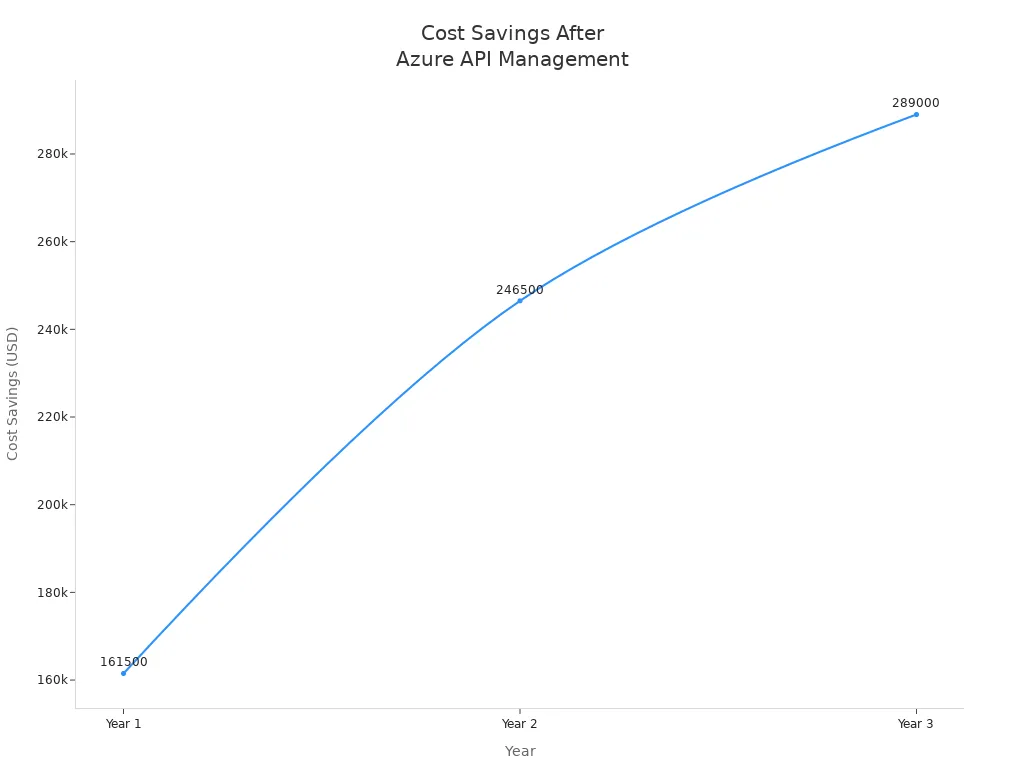
By leveraging Azure API Management in these scenarios, you can enhance your organization's efficiency, security, and overall API management capabilities.
Azure API Management is essential for modern organizations. It simplifies API management, enhances security, and improves performance. By leveraging its features, you can streamline operations and foster better collaboration among teams.
As you consider the future, keep in mind these trends:
- AI-driven automation tools will optimize API design and security by 2025.
- The API-first development approach will enhance collaboration and scalability.
- Evolving security measures will include zero-trust architectures.
Embracing these advancements will position your organization for success in an increasingly API-driven world.
FAQ
What is Azure API Management?
Azure API Management is a service that helps you publish, secure, and manage APIs. It provides a centralized platform for monitoring and governing APIs, making it easier for organizations to connect applications and services.
How does Azure API Management enhance security?
Azure API Management enhances security by implementing automated policies, such as authentication and authorization. It also supports encryption, rate limiting, and monitoring to protect your APIs from unauthorized access and abuse.
Can I integrate Azure API Management with other Azure services?
Yes, Azure API Management integrates seamlessly with various Azure services, including Azure Monitor, Azure Application Insights, and Azure App Service. This integration enhances functionality and provides a comprehensive API management solution.
What are the key components of Azure API Management?
The key components of Azure API Management include the API Gateway, Management Plane, and Developer Portal. Each component plays a vital role in managing APIs, ensuring security, and providing a user-friendly experience for developers.
How can I monitor API usage with Azure API Management?
You can monitor API usage through built-in analytics and reporting features in Azure API Management. These tools provide insights into traffic patterns, performance metrics, and user engagement, helping you make informed decisions.
Is there a cost associated with Azure API Management?
Yes, Azure API Management operates on a pay-as-you-go pricing model. Costs depend on the tier you choose and the resources you consume, allowing you to manage expenses effectively.
How can I get started with Azure API Management?
To get started, sign up for an Azure account and create an API Management instance. You can then import or define your APIs, configure policies, and set up the Developer Portal for your users.
What support options are available for Azure API Management?
Microsoft offers various support options for Azure API Management, including documentation, community forums, and technical support plans. You can access resources to help you troubleshoot issues and optimize your API management experience.
🎧 Listen to this episode
Want a practical explanation of Azure API Management? This episode breaks down the topic in clear language and shows why it matters for Microsoft 365, Azure, Power Platform, security, AI, and modern work.
Listen to this episode if you want to:
- Understand the key concepts behind Azure API Management
- See how it fits into the wider Microsoft technology ecosystem
- Learn where it can create practical value for your organization
You may also enjoy these related M365 FM episodes:
- Azure Cost Management - Simply Explained
- Privileged Identity Management (PIM) - Simply Explained
- Microsoft Entra Permissions Management - Simply Explained
- API Gateway - Simply Explained
- Graph API - Simply Explained
Discover more practical Microsoft conversations on M365 FM.
🚀 Want to be part of m365.fm?
Then stop just listening… and start showing up.
👉 Connect with me on LinkedIn and let’s make something happen:
- 🎙️ Be a podcast guest and share your story
- 🎧 Host your own episode (yes, seriously)
- 💡 Pitch topics the community actually wants to hear
- 🌍 Build your personal brand in the Microsoft 365 space
This isn’t just a podcast — it’s a platform for people who take action.
🔥 Most people wait. The best ones don’t.
👉 Connect with me on LinkedIn and send me a message:
"I want in"
Let’s build something awesome 👊
1
00:00:00,000 --> 00:00:02,520
Welcome to another episode of Microsoft Knowledge Nuggets.
2
00:00:02,520 --> 00:00:03,840
I'm your host, Mirko Peters.
3
00:00:03,840 --> 00:00:06,120
Today's topic is one that almost everyone has heard of,
4
00:00:06,120 --> 00:00:07,760
but few actually understand.
5
00:00:07,760 --> 00:00:08,640
APIs.
6
00:00:08,640 --> 00:00:10,720
You've probably heard the term thrown around a lot.
7
00:00:10,720 --> 00:00:12,600
It's one of those tech words people use
8
00:00:12,600 --> 00:00:14,960
when they want to sound like they know what they're talking about.
9
00:00:14,960 --> 00:00:16,000
But here's the thing.
10
00:00:16,000 --> 00:00:17,520
APIs are actually simple.
11
00:00:17,520 --> 00:00:20,480
They're just a way for one piece of software to talk to another.
12
00:00:20,480 --> 00:00:22,160
Your phone asks a server for data.
13
00:00:22,160 --> 00:00:23,000
The server sends it back.
14
00:00:23,000 --> 00:00:23,840
That's an API call.
15
00:00:23,840 --> 00:00:26,560
Now imagine you have 20 APIs, or 50, or 100.
16
00:00:26,560 --> 00:00:28,600
Each one might use different authentication,
17
00:00:28,600 --> 00:00:29,720
different rate limits.
18
00:00:29,720 --> 00:00:32,040
Different documentation, if any.
19
00:00:32,040 --> 00:00:34,160
Suddenly, what started as a simple conversation
20
00:00:34,160 --> 00:00:36,480
between two apps turns into complete chaos.
21
00:00:36,480 --> 00:00:39,560
Without a central manager, every team reinvents the wheel.
22
00:00:39,560 --> 00:00:41,440
One team builds their own auth system.
23
00:00:41,440 --> 00:00:43,040
Another builds their own logging.
24
00:00:43,040 --> 00:00:44,720
Security gaps appear everywhere.
25
00:00:44,720 --> 00:00:47,400
Developers get confused about which API does what?
26
00:00:47,400 --> 00:00:49,120
And you have no single view of what's actually
27
00:00:49,120 --> 00:00:50,680
happening across your entire system.
28
00:00:50,680 --> 00:00:52,520
Azure API management solves this.
29
00:00:52,520 --> 00:00:54,400
It gives you one control center.
30
00:00:54,400 --> 00:00:57,760
Think of it like an air traffic control tower for your APIs.
31
00:00:57,760 --> 00:00:59,480
By the end of this episode, you'll understand
32
00:00:59,480 --> 00:01:01,480
what it actually is, why it matters,
33
00:01:01,480 --> 00:01:03,600
and how all the pieces fit together.
34
00:01:03,600 --> 00:01:06,320
Grab your coffee and let's dive in.
35
00:01:06,320 --> 00:01:08,720
The problem, too many APIs, no control.
36
00:01:08,720 --> 00:01:10,440
Here's the reality of modern software.
37
00:01:10,440 --> 00:01:12,800
10 years ago, you probably had one big application,
38
00:01:12,800 --> 00:01:16,680
a monolith, one database, one API, simple.
39
00:01:16,680 --> 00:01:18,680
Today, that same application might be broken
40
00:01:18,680 --> 00:01:20,240
into dozens of microservices.
41
00:01:20,240 --> 00:01:21,720
Each service handles one thing.
42
00:01:21,720 --> 00:01:24,560
User accounts, payments, inventory, notifications,
43
00:01:24,560 --> 00:01:26,080
and each exposes its own API.
44
00:01:26,080 --> 00:01:28,600
Suddenly, you have 10, 50, or 100 different entry points
45
00:01:28,600 --> 00:01:29,480
into your system.
46
00:01:29,480 --> 00:01:31,600
Now imagine your developer trying to build something
47
00:01:31,600 --> 00:01:33,000
that uses these APIs.
48
00:01:33,000 --> 00:01:35,840
You need to find each one, figure out authentication for each.
49
00:01:35,840 --> 00:01:39,120
Some use API keys, some use OAuth, some use nothing at all.
50
00:01:39,120 --> 00:01:41,520
You need to handle rate limiting manually or risk getting
51
00:01:41,520 --> 00:01:42,280
blocked.
52
00:01:42,280 --> 00:01:44,680
You need to understand the data format each expects.
53
00:01:44,680 --> 00:01:45,920
It's exhausting.
54
00:01:45,920 --> 00:01:47,680
And it gets worse from an operations angle.
55
00:01:47,680 --> 00:01:49,440
Without a central gateway, every team
56
00:01:49,440 --> 00:01:52,160
has to add security and logging to their own service by hand.
57
00:01:52,160 --> 00:01:53,280
Some teams do it well.
58
00:01:53,280 --> 00:01:54,640
Others forget to log errors.
59
00:01:54,640 --> 00:01:56,280
Some don't validate input at all.
60
00:01:56,280 --> 00:01:57,920
Inconsistent and error prone.
61
00:01:57,920 --> 00:01:59,840
A security nightmare waiting to happen.
62
00:01:59,840 --> 00:02:01,720
Compliance becomes almost impossible.
63
00:02:01,720 --> 00:02:03,760
Need to prove who accessed what and when?
64
00:02:03,760 --> 00:02:06,280
Good luck pulling audit trails from 20 different services,
65
00:02:06,280 --> 00:02:07,960
each with its own logging format.
66
00:02:07,960 --> 00:02:11,200
Need to see how many API calls your system handled last month?
67
00:02:11,200 --> 00:02:13,080
You're stitching together metrics from a dozen
68
00:02:13,080 --> 00:02:14,360
different dashboards.
69
00:02:14,360 --> 00:02:15,400
Here's the thing.
70
00:02:15,400 --> 00:02:17,240
As you scale, this doesn't just hurt.
71
00:02:17,240 --> 00:02:17,760
It breaks.
72
00:02:17,760 --> 00:02:19,600
You can't add more developers, more services,
73
00:02:19,600 --> 00:02:21,520
more customers without a central control point.
74
00:02:21,520 --> 00:02:23,000
Think of it like a building.
75
00:02:23,000 --> 00:02:24,560
Imagine every room has a different lock.
76
00:02:24,560 --> 00:02:26,480
There's no reception desk or directory.
77
00:02:26,480 --> 00:02:29,040
Visitors wander around trying to find the right door getting
78
00:02:29,040 --> 00:02:31,120
frustrated and eventually giving up.
79
00:02:31,120 --> 00:02:32,360
Complete chaos.
80
00:02:32,360 --> 00:02:35,520
This is the problem API management was designed to solve.
81
00:02:35,520 --> 00:02:37,160
What is Azure API management?
82
00:02:37,160 --> 00:02:38,360
The control tower.
83
00:02:38,360 --> 00:02:40,840
So what exactly is Azure API management?
84
00:02:40,840 --> 00:02:42,120
Here's the simplest definition.
85
00:02:42,120 --> 00:02:44,920
It's a managed service that sits between your back-end APIs
86
00:02:44,920 --> 00:02:48,520
and the apps, websites, devices, and partners that consume them.
87
00:02:48,520 --> 00:02:49,440
But here's the thing.
88
00:02:49,440 --> 00:02:50,640
It's not just a proxy.
89
00:02:50,640 --> 00:02:51,680
A proxy forwards traffic.
90
00:02:51,680 --> 00:02:52,520
And that's it.
91
00:02:52,520 --> 00:02:55,560
Azure API management covers the full lifecycle of your APIs.
92
00:02:55,560 --> 00:02:58,640
Publish, secure, monitor, manage, and eventually retire them.
93
00:02:58,640 --> 00:03:00,120
It's a complete control center.
94
00:03:00,120 --> 00:03:02,000
Let's break it down into three main components.
95
00:03:02,000 --> 00:03:03,000
The first is the gateway.
96
00:03:03,000 --> 00:03:03,960
This is the front door.
97
00:03:03,960 --> 00:03:06,040
Every incoming request from an app or website
98
00:03:06,040 --> 00:03:08,360
hits the gateway first, never your back-end directly.
99
00:03:08,360 --> 00:03:09,920
The gateway processes the request,
100
00:03:09,920 --> 00:03:12,560
enforces any policies you've set up, collects metrics,
101
00:03:12,560 --> 00:03:14,800
and then forwards it to the right back end service.
102
00:03:14,800 --> 00:03:16,440
Think of it as the traffic cop.
103
00:03:16,440 --> 00:03:18,200
Next is the management plane.
104
00:03:18,200 --> 00:03:19,920
This is where you define everything.
105
00:03:19,920 --> 00:03:22,960
Your APIs, your policies, your products, your subscriptions.
106
00:03:22,960 --> 00:03:25,640
You do this through the Azure portal, the command line,
107
00:03:25,640 --> 00:03:28,280
or infrastructure as code like bicep or terraform.
108
00:03:28,280 --> 00:03:31,040
It's the control room where you configure how everything works.
109
00:03:31,040 --> 00:03:32,400
And then the developer portal.
110
00:03:32,400 --> 00:03:34,640
This is a self-service website where developers
111
00:03:34,640 --> 00:03:37,280
both internal and external can discover your APIs,
112
00:03:37,280 --> 00:03:39,320
read documentation, get subscription keys,
113
00:03:39,320 --> 00:03:41,920
and even test API calls directly in their browser.
114
00:03:41,920 --> 00:03:43,880
No more emailing PDFs back and forth.
115
00:03:43,880 --> 00:03:45,000
Here's an analogy that helps.
116
00:03:45,000 --> 00:03:46,320
Think of a modern airport.
117
00:03:46,320 --> 00:03:47,720
The gateway is the runway.
118
00:03:47,720 --> 00:03:49,440
Every plane lands there first.
119
00:03:49,440 --> 00:03:51,440
The management plane is the control tower.
120
00:03:51,440 --> 00:03:54,320
It directs traffic, sets rules, monitors everything.
121
00:03:54,320 --> 00:03:56,680
And the developer portal is the information board.
122
00:03:56,680 --> 00:03:58,000
Pilots check it before they fly,
123
00:03:58,000 --> 00:03:59,680
and they can find all the information they need
124
00:03:59,680 --> 00:04:01,080
without talking to anyone.
125
00:04:01,080 --> 00:04:02,520
Now let's zoom into the gateway.
126
00:04:02,520 --> 00:04:04,440
That's the part your apps actually talk to
127
00:04:04,440 --> 00:04:07,040
and where the real magic happens.
128
00:04:07,040 --> 00:04:09,160
The gateway, your API's front door.
129
00:04:09,160 --> 00:04:11,720
Let's talk about the gateway, because this is the part
130
00:04:11,720 --> 00:04:13,160
your apps actually talk to.
131
00:04:13,160 --> 00:04:15,440
Every request from a mobile app, a website,
132
00:04:15,440 --> 00:04:17,560
or an IoT device hits the gateway first.
133
00:04:17,560 --> 00:04:18,720
Never your back end directly.
134
00:04:18,720 --> 00:04:19,680
That's the whole point.
135
00:04:19,680 --> 00:04:22,520
The gateway sits in front and acts as a single entry point.
136
00:04:22,520 --> 00:04:25,560
The gateway can apply policies before forwarding the request.
137
00:04:25,560 --> 00:04:28,080
Policies are rules you write in XML or JSON,
138
00:04:28,080 --> 00:04:30,000
things like rate limiting, IP filtering,
139
00:04:30,000 --> 00:04:32,840
header rewriting, and authentication checks.
140
00:04:32,840 --> 00:04:35,040
All without changing a single line of your backend code.
141
00:04:35,040 --> 00:04:36,320
Here's a concrete example.
142
00:04:36,320 --> 00:04:39,240
Say you have a free tier and a premium tier for your API.
143
00:04:39,240 --> 00:04:41,960
With a policy, you can limit free users to five requests
144
00:04:41,960 --> 00:04:44,120
per minute, while premium users get a hundred.
145
00:04:44,120 --> 00:04:45,720
Your backend never knows the difference.
146
00:04:45,720 --> 00:04:47,400
It just processes requests.
147
00:04:47,400 --> 00:04:48,840
The gateway handles the enforcement.
148
00:04:48,840 --> 00:04:50,760
The gateway also handles caching.
149
00:04:50,760 --> 00:04:53,160
If the same data gets requested over and over,
150
00:04:53,160 --> 00:04:55,240
like a list of products that rarely changes,
151
00:04:55,240 --> 00:04:57,840
the gateway can cache the response and serve it directly.
152
00:04:57,840 --> 00:04:59,840
There's no need to bother your backend at all,
153
00:04:59,840 --> 00:05:02,640
which means faster responses and less load on your servers.
154
00:05:02,640 --> 00:05:04,080
It can also transform data.
155
00:05:04,080 --> 00:05:07,760
Your backend might return XML, but your mobile app expects JSON.
156
00:05:07,760 --> 00:05:09,600
The gateway can convert it on the fly.
157
00:05:09,600 --> 00:05:10,960
Your backend doesn't need to change,
158
00:05:10,960 --> 00:05:13,000
and your app doesn't need to change either.
159
00:05:13,000 --> 00:05:14,760
The gateway handles the translation.
160
00:05:14,760 --> 00:05:17,480
And it logs every call, every request, every response,
161
00:05:17,480 --> 00:05:20,240
every error, you get a complete audit trail of who called what,
162
00:05:20,240 --> 00:05:21,760
when and what happened.
163
00:05:21,760 --> 00:05:24,280
That alone is worth the price of admission for compliance.
164
00:05:24,280 --> 00:05:25,520
If you have a global audience,
165
00:05:25,520 --> 00:05:27,960
you can deploy the gateway in multiple regions.
166
00:05:27,960 --> 00:05:30,640
Traffic gets automatically routed to the closest one,
167
00:05:30,640 --> 00:05:33,440
which gives lower latency and a better experience.
168
00:05:33,440 --> 00:05:36,440
One more thing, the gateway hides your real backend URL.
169
00:05:36,440 --> 00:05:37,920
Clients only see the gateway address.
170
00:05:37,920 --> 00:05:40,000
Your backend servers stay hidden from the internet.
171
00:05:40,000 --> 00:05:42,880
That's a huge security win right out of the box.
172
00:05:42,880 --> 00:05:45,560
Policies, the engine that controls everything.
173
00:05:45,560 --> 00:05:47,200
So what about those policies I mentioned?
174
00:05:47,200 --> 00:05:49,920
They're the engine that makes APIM truly powerful.
175
00:05:49,920 --> 00:05:52,440
A policy modifies request or response behavior
176
00:05:52,440 --> 00:05:54,440
without you ever touching your backend code.
177
00:05:54,440 --> 00:05:56,600
Think of it as a wrapper around your API.
178
00:05:56,600 --> 00:05:59,160
As traffic flows through, it can add, remove,
179
00:05:59,160 --> 00:06:00,840
or change things automatically.
180
00:06:00,840 --> 00:06:03,720
Policies can run at four points in the request lifecycle,
181
00:06:03,720 --> 00:06:07,400
inbound, on the way in, before the request reaches your backend,
182
00:06:07,400 --> 00:06:10,560
outbound, on the way back before the response gets to the client,
183
00:06:10,560 --> 00:06:13,240
backend, right before the request hits your servers,
184
00:06:13,240 --> 00:06:15,560
and on-error, when something fails.
185
00:06:15,560 --> 00:06:18,400
Common inbound policies include validating JWT tokens
186
00:06:18,400 --> 00:06:20,920
to check the caller's identity, checking API keys,
187
00:06:20,920 --> 00:06:23,320
rewriting URLs, and restricting by IP address.
188
00:06:23,320 --> 00:06:26,120
All of this happens before your backend sees a single request.
189
00:06:26,120 --> 00:06:28,480
For outbound, you can transform the response body.
190
00:06:28,480 --> 00:06:32,160
Find and replace text, remove sensitive fields, change formats.
191
00:06:32,160 --> 00:06:35,560
You can cache responses, so repeat requests, don't hit your backend.
192
00:06:35,560 --> 00:06:38,360
You can even strip headers that leak internal information.
193
00:06:38,360 --> 00:06:39,520
Here's a concrete example.
194
00:06:39,520 --> 00:06:43,360
Say your API returns product descriptions with the word blue everywhere.
195
00:06:43,360 --> 00:06:45,720
You want to rebrand and use yellow instead.
196
00:06:45,720 --> 00:06:47,480
Instead of changing your backend code,
197
00:06:47,480 --> 00:06:49,720
you add one outbound policy.
198
00:06:49,720 --> 00:06:52,800
Find blue, replace with yellow, and done.
199
00:06:52,800 --> 00:06:54,360
Your backend never changes.
200
00:06:54,360 --> 00:06:57,160
Rate limiting and quota policies protect your backend from abuse.
201
00:06:57,160 --> 00:06:59,800
If someone's app goes rogue and starts hammering your API
202
00:06:59,800 --> 00:07:03,760
10,000 times a second, the policy steps in and says, slow down.
203
00:07:03,760 --> 00:07:05,280
Your backend stays healthy.
204
00:07:05,280 --> 00:07:06,320
Need advanced logic?
205
00:07:06,320 --> 00:07:08,920
You can write custom C-pass expressions inside policies.
206
00:07:08,920 --> 00:07:10,560
They get compiled for performance,
207
00:07:10,560 --> 00:07:12,000
so there's no runtime cost.
208
00:07:12,000 --> 00:07:15,000
You can look up user roles, calculate dynamic rate limits,
209
00:07:15,000 --> 00:07:18,160
or conditionally transform responses based on request headers.
210
00:07:18,160 --> 00:07:20,880
The key takeaway is this, policies let you control
211
00:07:20,880 --> 00:07:23,800
how your API's behave without touching the code that runs them.
212
00:07:23,800 --> 00:07:27,640
That means faster changes, fewer deployments, and less risk.
213
00:07:27,640 --> 00:07:31,120
Products and subscriptions, packaging APIs for consumers.
214
00:07:31,120 --> 00:07:33,480
Now your APIs are defined, policies are in place,
215
00:07:33,480 --> 00:07:35,200
and the gateway is humming along.
216
00:07:35,200 --> 00:07:38,760
But how do you give different customers access to different things?
217
00:07:38,760 --> 00:07:40,720
That's where products and subscriptions come in.
218
00:07:40,720 --> 00:07:44,200
In APM, you group APIs into something called a product.
219
00:07:44,200 --> 00:07:45,520
Think of it as a bundle.
220
00:07:45,520 --> 00:07:49,320
You might have a free tier product that includes only your basic APIs.
221
00:07:49,320 --> 00:07:50,800
Maybe just read only access.
222
00:07:50,800 --> 00:07:53,160
Then a premium product that includes everything,
223
00:07:53,160 --> 00:07:55,720
including write operations and admin endpoints.
224
00:07:55,720 --> 00:07:58,000
Developers don't subscribe to individual APIs.
225
00:07:58,000 --> 00:07:59,440
They subscribe to a product.
226
00:07:59,440 --> 00:08:01,680
When they subscribe, they get a subscription key.
227
00:08:01,680 --> 00:08:04,760
Actually two keys, so you can rotate one without downtime.
228
00:08:04,760 --> 00:08:07,720
That key is their pass to use any API in that product.
229
00:08:07,720 --> 00:08:09,680
You control how subscriptions work.
230
00:08:09,680 --> 00:08:11,560
Products can require approval.
231
00:08:11,560 --> 00:08:13,560
You manually accept each subscriber.
232
00:08:13,560 --> 00:08:15,240
Or they can be open for self-service.
233
00:08:15,240 --> 00:08:17,680
Anyone signs up and gets immediate access.
234
00:08:17,680 --> 00:08:19,560
You can also include legal terms that users
235
00:08:19,560 --> 00:08:21,160
must accept before subscribing.
236
00:08:21,160 --> 00:08:23,440
That's important if your API's handle sensitive data.
237
00:08:23,440 --> 00:08:25,120
This is how you monetize APIs.
238
00:08:25,120 --> 00:08:28,200
A free product with low rate limits, five calls per minute.
239
00:08:28,200 --> 00:08:30,720
A paid product with higher limits or more endpoints,
240
00:08:30,720 --> 00:08:33,560
a hundred calls per minute, plus access to premium features.
241
00:08:33,560 --> 00:08:34,600
Your backend doesn't care.
242
00:08:34,600 --> 00:08:37,040
The gateway enforces the limits based on which product
243
00:08:37,040 --> 00:08:38,040
the caller subscribe to.
244
00:08:38,040 --> 00:08:39,240
Here's a real example.
245
00:08:39,240 --> 00:08:41,000
Imagine you're building a conference app.
246
00:08:41,000 --> 00:08:43,160
You create an attendee product with APIs
247
00:08:43,160 --> 00:08:46,040
for the session schedule, speaker bios, and venue map.
248
00:08:46,040 --> 00:08:49,400
Then a sponsor product that also includes lead generation APIs.
249
00:08:49,400 --> 00:08:52,280
Sponsors can scan attendee badges and get contact info.
250
00:08:52,280 --> 00:08:54,880
Same backend, different products, different access levels.
251
00:08:54,880 --> 00:08:57,800
Those two subscription keys are designed for rotation.
252
00:08:57,800 --> 00:09:00,720
If a key gets compromised, you generate a new one.
253
00:09:00,720 --> 00:09:03,440
The second key lets you switch over without interrupting service.
254
00:09:03,440 --> 00:09:07,000
Generate new key, update your app, revoke the old one.
255
00:09:07,000 --> 00:09:11,040
Simulace, the developer portal, self-service for API consumers.
256
00:09:11,040 --> 00:09:12,920
So you've set up your API products.
257
00:09:12,920 --> 00:09:14,240
Now developers need to find them.
258
00:09:14,240 --> 00:09:15,720
That's the developer portal's job.
259
00:09:15,720 --> 00:09:18,360
The developer portal is a website built into every API
260
00:09:18,360 --> 00:09:19,000
and instance.
261
00:09:19,000 --> 00:09:22,200
Developers use it to browse your APIs, read the documentation,
262
00:09:22,200 --> 00:09:25,360
and test endpoints interactively right in their browser.
263
00:09:25,360 --> 00:09:27,480
No setup needed and no backend for the emails.
264
00:09:27,480 --> 00:09:29,920
Here's the thing though, it's unpublished by default.
265
00:09:29,920 --> 00:09:31,840
When you first create your API and instance,
266
00:09:31,840 --> 00:09:34,040
the portal exists, but nobody can see it.
267
00:09:34,040 --> 00:09:35,840
You have to customize and publish it first.
268
00:09:35,840 --> 00:09:36,840
That's intentional.
269
00:09:36,840 --> 00:09:39,240
You don't want to show a half-finished portal to the world.
270
00:09:39,240 --> 00:09:42,160
You can customize brand colors, logos, even embed WordPress
271
00:09:42,160 --> 00:09:44,440
content for a blog alongside your API docs.
272
00:09:44,440 --> 00:09:47,320
It's fully customizable to match your company's look and feel.
273
00:09:47,320 --> 00:09:49,040
The real value is self-service.
274
00:09:49,040 --> 00:09:52,400
Developers sign up, get their subscription keys automatically,
275
00:09:52,400 --> 00:09:54,640
and start calling APIs immediately.
276
00:09:54,640 --> 00:09:57,800
No manual emails, no waiting for approval, no support tickets
277
00:09:57,800 --> 00:09:59,200
asking how to get a key.
278
00:09:59,200 --> 00:10:01,520
They do it themselves, which cuts down your support burden
279
00:10:01,520 --> 00:10:02,520
significantly.
280
00:10:02,520 --> 00:10:04,800
You can also publish change logs and release notes.
281
00:10:04,800 --> 00:10:07,440
When you update an API, developers see it in the portal
282
00:10:07,440 --> 00:10:08,920
without any surprises.
283
00:10:08,920 --> 00:10:11,760
Access can be public for anyone with the URL,
284
00:10:11,760 --> 00:10:14,520
or you can restrict it to users from your intro ID tenant,
285
00:10:14,520 --> 00:10:17,560
so only people in your organization can browse.
286
00:10:17,560 --> 00:10:19,880
Both options exist for different use cases.
287
00:10:19,880 --> 00:10:22,320
The developer portal is what makes your API management
288
00:10:22,320 --> 00:10:23,240
a real platform.
289
00:10:23,240 --> 00:10:25,040
Think of it as the storefront for your APIs.
290
00:10:25,040 --> 00:10:27,360
Without it, developers have to search through docs
291
00:10:27,360 --> 00:10:28,400
and ask around.
292
00:10:28,400 --> 00:10:31,480
With it, they find what they need and start building.
293
00:10:31,480 --> 00:10:34,760
Security, authentication, authorization,
294
00:10:34,760 --> 00:10:35,800
and secrets.
295
00:10:35,800 --> 00:10:39,080
All this power is useless if security isn't locked down.
296
00:10:39,080 --> 00:10:41,640
So let's talk about how APM handles identity access
297
00:10:41,640 --> 00:10:42,320
and secrets.
298
00:10:42,320 --> 00:10:44,800
APM supports multiple authentication methods.
299
00:10:44,800 --> 00:10:47,720
The simplest is subscription keys, which we talked about earlier.
300
00:10:47,720 --> 00:10:49,920
But for production systems, you want something stronger
301
00:10:49,920 --> 00:10:54,080
like OAuth 2.0, JWT tokens, client certificates, or IP
302
00:10:54,080 --> 00:10:54,600
filtering.
303
00:10:54,600 --> 00:10:57,320
You layer these based on how sensitive your API is.
304
00:10:57,320 --> 00:10:58,680
For production, the best practice is
305
00:10:58,680 --> 00:11:00,880
to use OAuth 2.0 with intro ID.
306
00:11:00,880 --> 00:11:02,040
Here's how that works.
307
00:11:02,040 --> 00:11:04,200
The client app gets a token from intro ID
308
00:11:04,200 --> 00:11:05,880
and sends it with the API request.
309
00:11:05,880 --> 00:11:08,760
APIM validates the token by checking the signature,
310
00:11:08,760 --> 00:11:10,640
issuer, audience, and expiration.
311
00:11:10,640 --> 00:11:13,400
If it's valid, APM forwards the request to your backend,
312
00:11:13,400 --> 00:11:14,680
including the token.
313
00:11:14,680 --> 00:11:17,640
Your backend trusts it because APM already verified it,
314
00:11:17,640 --> 00:11:19,720
so your backend doesn't need to revalidate.
315
00:11:19,720 --> 00:11:22,280
That's one less thing each service has to handle.
316
00:11:22,280 --> 00:11:23,760
Now let's talk about secrets.
317
00:11:23,760 --> 00:11:26,160
API keys, connection strings, certificates,
318
00:11:26,160 --> 00:11:28,440
you don't want those hard coded in policy files or source
319
00:11:28,440 --> 00:11:28,960
control.
320
00:11:28,960 --> 00:11:31,200
APM has a feature called NamedValues.
321
00:11:31,200 --> 00:11:33,560
You store secrets centrally in APIM
322
00:11:33,560 --> 00:11:35,400
and reference them by name in your policies.
323
00:11:35,400 --> 00:11:38,040
The actual value never shows up in your policy code.
324
00:11:38,040 --> 00:11:41,160
Better yet, you can connect NamedValues to Azure Key Vault.
325
00:11:41,160 --> 00:11:42,880
The secrets stay encrypted in Key Vault
326
00:11:42,880 --> 00:11:44,440
and APIM fetches them at runtime.
327
00:11:44,440 --> 00:11:46,240
Nobody, not even your DevOps team,
328
00:11:46,240 --> 00:11:47,520
sees the actual secret value.
329
00:11:47,520 --> 00:11:50,280
When you need to rotate a key, you update it in Key Vault.
330
00:11:50,280 --> 00:11:53,080
And APIM picks up the change automatically.
331
00:11:53,080 --> 00:11:55,520
APM also supports managed identities.
332
00:11:55,520 --> 00:11:58,320
This lets APM authenticate to other Azure services
333
00:11:58,320 --> 00:12:01,240
like Key Vault or a backend API without storing
334
00:12:01,240 --> 00:12:02,960
any credentials anywhere as your handles
335
00:12:02,960 --> 00:12:04,960
the identity so you just grant permissions.
336
00:12:04,960 --> 00:12:06,760
And for network isolation, you can deploy
337
00:12:06,760 --> 00:12:08,680
APIM inside a virtual network.
338
00:12:08,680 --> 00:12:10,040
That's the premium tier.
339
00:12:10,040 --> 00:12:13,080
Or put Azure front door with a web application firewall
340
00:12:13,080 --> 00:12:13,680
in front of it.
341
00:12:13,680 --> 00:12:15,800
The point is your backend services never
342
00:12:15,800 --> 00:12:17,960
need to be directly exposed to the internet.
343
00:12:17,960 --> 00:12:20,440
APM is the only thing the outside world sees.
344
00:12:20,440 --> 00:12:23,560
This layered approach builds defense in depth, authentication
345
00:12:23,560 --> 00:12:26,680
at the gateway, secrets in a vault, network isolation
346
00:12:26,680 --> 00:12:27,720
around your back ends.
347
00:12:27,720 --> 00:12:30,440
Each layer strengthens the next.
348
00:12:30,440 --> 00:12:32,560
Pricing tiers, which one fits you?
349
00:12:32,560 --> 00:12:33,680
So what does it cost?
350
00:12:33,680 --> 00:12:36,160
Let's walk through the tiers, the consumption tier.
351
00:12:36,160 --> 00:12:38,760
Paper API call with no fixed monthly cost.
352
00:12:38,760 --> 00:12:40,640
Perfect for low volume or burst you workloads
353
00:12:40,640 --> 00:12:42,520
like when you're just prototyping.
354
00:12:42,520 --> 00:12:44,800
If you're not sure what you need yet, start here.
355
00:12:44,800 --> 00:12:47,400
The developer tier gives you a fixed, low monthly cost
356
00:12:47,400 --> 00:12:48,640
around 50 bucks.
357
00:12:48,640 --> 00:12:51,160
Full feature set, but no SLA, ideal for dev and test
358
00:12:51,160 --> 00:12:51,680
environments.
359
00:12:51,680 --> 00:12:53,800
You get everything premium has, but you can't use it
360
00:12:53,800 --> 00:12:54,480
for production.
361
00:12:54,480 --> 00:12:56,640
The basic tier is entry level production.
362
00:12:56,640 --> 00:12:58,960
Lower throughput, no virtual network support,
363
00:12:58,960 --> 00:13:00,280
but you do get a real SLA.
364
00:13:00,280 --> 00:13:02,640
Good for internal tools or small projects where
365
00:13:02,640 --> 00:13:04,680
private networking isn't critical.
366
00:13:04,680 --> 00:13:06,760
Most businesses land on the standard tier.
367
00:13:06,760 --> 00:13:10,720
Includes virtual network support, a 99.95% SLA,
368
00:13:10,720 --> 00:13:11,840
and good throughput.
369
00:13:11,840 --> 00:13:13,720
If you're running business critical APIs,
370
00:13:13,720 --> 00:13:15,360
this is probably where you'll settle.
371
00:13:15,360 --> 00:13:17,400
The premium tier is for global enterprises
372
00:13:17,400 --> 00:13:20,280
that need maximum reliability and private networking.
373
00:13:20,280 --> 00:13:22,280
Multi-region deployment, self-hosted gateway,
374
00:13:22,280 --> 00:13:26,040
99.99% SLA, full virtual network injection,
375
00:13:26,040 --> 00:13:28,680
starts around 2700 a month per unit.
376
00:13:28,680 --> 00:13:30,640
Microsoft also introduced V2 tiers,
377
00:13:30,640 --> 00:13:33,400
basic V2, standard V2, premium V2.
378
00:13:33,400 --> 00:13:35,560
They simplify pricing with included request quotas
379
00:13:35,560 --> 00:13:36,920
and per million overage.
380
00:13:36,920 --> 00:13:38,320
Instead of tracking multiple meters,
381
00:13:38,320 --> 00:13:40,200
you get a clear bucket of requests
382
00:13:40,200 --> 00:13:42,440
and pay for extra usage in simple increments.
383
00:13:42,440 --> 00:13:43,520
Here's how to choose.
384
00:13:43,520 --> 00:13:45,240
Start with developer for testing.
385
00:13:45,240 --> 00:13:46,800
Move to standard for production.
386
00:13:46,800 --> 00:13:50,160
Go premium if you need global scale or private networking.
387
00:13:50,160 --> 00:13:52,680
And remember, you can always migrate tiers later.
388
00:13:52,680 --> 00:13:54,920
Start small and grow as your needs change.
389
00:13:54,920 --> 00:13:56,080
So here's what we covered.
390
00:13:56,080 --> 00:13:58,720
API management takes the chaos of many APIs
391
00:13:58,720 --> 00:14:00,160
and brings them into one control center
392
00:14:00,160 --> 00:14:02,720
for gateway, policy, security, and developer experience.
393
00:14:02,720 --> 00:14:04,960
The key takeaway is that it's more than a proxy.
394
00:14:04,960 --> 00:14:06,600
Think of it as the brain and nervous system
395
00:14:06,600 --> 00:14:08,000
of your API ecosystem.
396
00:14:08,000 --> 00:14:10,240
Without it, every team builds their own auth, logging
397
00:14:10,240 --> 00:14:11,080
and rate limiting.
398
00:14:11,080 --> 00:14:13,480
You end up with inconsistency, security gaps,
399
00:14:13,480 --> 00:14:15,160
and no single view of what's happening.
400
00:14:15,160 --> 00:14:19,320
With it, you get consistency, security, and scalability
401
00:14:19,320 --> 00:14:22,040
without reinventing the wheel for every service.
402
00:14:22,040 --> 00:14:23,400
Here's a simple exercise.
403
00:14:23,400 --> 00:14:26,200
Think of one API you currently exposed directly,
404
00:14:26,200 --> 00:14:28,520
maybe a function endpoint or an app service.
405
00:14:28,520 --> 00:14:30,440
How would placing API management in front
406
00:14:30,440 --> 00:14:33,480
change your security posture and your ability to monitor usage,
407
00:14:33,480 --> 00:14:36,200
even just thinking through that exercise will show you the value?
408
00:14:36,200 --> 00:14:37,880
Next step, subscribe to the channel.
409
00:14:37,880 --> 00:14:40,920
In future episodes, we'll show you how to import an API,
410
00:14:40,920 --> 00:14:43,920
apply your first policy, and monitor usage in real time.
411
00:14:43,920 --> 00:14:45,760
You'll go from theory to practice.
412
00:14:45,760 --> 00:14:47,360
And if you found this helpful, share it
413
00:14:47,360 --> 00:14:48,640
with someone building an app.
414
00:14:48,640 --> 00:14:50,360
It'll save them months of headaches.

Founder of m365.fm, m365.show and m365con.net
Mirko Peters is a Microsoft 365 expert, content creator, and founder of m365.fm, a platform dedicated to sharing practical insights on modern workplace technologies. His work focuses on Microsoft 365 governance, security, collaboration, and real-world implementation strategies.
Through his podcast and written content, Mirko provides hands-on guidance for IT professionals, architects, and business leaders navigating the complexities of Microsoft 365. He is known for translating complex topics into clear, actionable advice, often highlighting common mistakes and overlooked risks in real-world environments.
With a strong emphasis on community contribution and knowledge sharing, Mirko is actively building a platform that connects experts, shares experiences, and helps organizations get the most out of their Microsoft 365 investments.




