


 Apple Podcasts
 Spotify
 Youtube Music
 Spreaker
 Podchaser
 Amazon Music
 Azure Landing Zones - Simply Explained
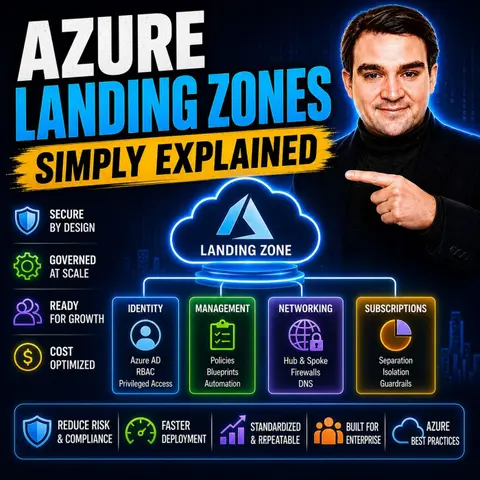
Azure Landing Zones provide the secure, scalable, and governed foundation that organizations need before deploying workloads in Microsoft Azure. Rather than simply creating subscriptions and resources, a Landing Zone establishes the core architecture—including identity, networking, security, governance, management, and compliance—so every new workload starts from a consistent and enterprise-ready baseline. Think of it as preparing the ground before building a house: without a solid foundation, everything built on top becomes harder to manage and secure.
In this episode, you'll learn what Azure Landing Zones are, why they're essential for cloud adoption, and how they help organizations avoid costly redesigns as their Azure environments grow. The discussion explains the core building blocks, including management groups, subscriptions, resource organization, identity, networking, Azure Policy, Role-Based Access Control (RBAC), monitoring, and security baselines. You'll also discover how Landing Zones align with Microsoft's Cloud Adoption Framework and provide a repeatable architecture for enterprise-scale deployments.
The episode explores practical scenarios such as onboarding new business units, deploying production-ready applications, enabling hybrid and multi-cloud environments, and supporting Infrastructure as Code using Bicep, ARM Templates, and Terraform. You'll learn how Azure Landing Zones integrate with Azure Policy, Microsoft Defender for Cloud, Azure Monitor, Microsoft Entra ID, and Azure Virtual Network architectures to deliver secure, compliant, and automated cloud operations from day one.
Quick answer: Azure Landing Zones provide a repeatable Azure foundation for identity, networking, governance, subscriptions, and security. This episode explains the decisions that make a landing zone usable at scale, why platform and application responsibilities differ, and how teams avoid rebuilding core controls for every workload.
Azure Landing Zones are a framework within the Azure Cloud Adoption Framework. They help you establish a secure and scalable cloud environment. This foundational setup allows you to build infrastructure based on best practices.
Adopting a structured approach to moving to Azure offers many benefits. For instance, it ensures standardization, which simplifies support. You can follow proven patterns that reduce risks and enhance operational efficiency. Additionally, defining security and compliance requirements from the start integrates them into your environment, boosting both security and compliance.
| Benefit | Description |
|---|---|
| Standardisation | Consistent setups simplify support and save time, especially beneficial for new users who can follow existing patterns. |
| Confidence | Following proven patterns and guidance from Microsoft reduces the perceived risks of adopting a public cloud. |
| Operational efficiency | Reusing shared platform components enhances efficiency and reduces duplication of effort across teams. |
| Security and Compliance | Defining security and compliance requirements upfront integrates them into the landing zone, enhancing security and ensuring compliance. |
Key Takeaways
- Azure Landing Zones provide a secure and scalable cloud environment, making cloud adoption easier.
- Standardization simplifies support and saves time, especially for new users.
- Defining security and compliance requirements early boosts security and ensures adherence to regulations.
- Using pre-configured environments reduces errors and speeds up cloud deployment.
- Automation enhances consistency and efficiency in managing Azure resources.
- Understanding the difference between Platform and Application Landing Zones helps tailor your cloud strategy.
- Regular updates and maintenance of Landing Zones are crucial for long-term success.
- Investing in Azure Landing Zones prepares your organization for future growth and innovation.
Azure Landing Zones Overview
Key Components
Azure Landing Zones play a crucial role in cloud architecture. They provide a structured framework that prepares your Azure environment for workloads at scale. By establishing a solid foundation, you can ensure that your cloud adoption journey is efficient and secure.
Here are the key components of Azure Landing Zones:
| Key Component | Description |
|---|---|
| Azure Landing Zone | A foundational architecture that prepares Azure for workloads at scale. |
| Platform Landing Zone | Central management of infrastructure, security, and compliance. |
| Application Landing Zone | Individual environments tailored for specific applications, adhering to central governance rules. |
A pre-configured environment is essential for effective cloud deployment. It streamlines the setup process and reduces the likelihood of errors. Here are some benefits of having a pre-configured Azure Landing Zone:
- It creates a secure, scalable Azure environment aligned to best practices, ready for growth and innovation.
- It facilitates faster, safer, and easier management of cloud adoption.
- It prevents common mistakes in deployment, ensuring resources are provisioned correctly and permissions are appropriately assigned.
- It accelerates cloud adoption by providing structured frameworks and pre-configured templates, allowing organizations to start their cloud journey quickly.
- It embeds standards that enable teams to move quickly, reducing risks and making costs visible and controllable.
- It establishes security baselines and governance policies early, allowing engineers to focus on delivering solutions rather than debating infrastructure decisions.
Azure Landing Zones serve as a structured, secure, and scalable environment that lays the groundwork for deploying and managing cloud workloads. They embody best practices for security, compliance, and operational efficiency, which are essential for creating a secure and scalable cloud foundation. A well-designed Landing Zone is crucial for a successful cloud strategy. It provides a repeatable deployment model that integrates identity, security, networking, compliance, and cost management.
"Azure Landing Zones (Enterprise-Scale) provide a structured approach and best practices to establish a robust, secure, and scalable cloud foundation, allowing for flexibility and growth as business needs evolve."
By leveraging Azure Landing Zones, you can ensure that your cloud environment is not only functional but also primed for future growth and innovation.
Importance of Azure Landing Zones

Governance and Compliance
Azure Landing Zones play a vital role in enhancing governance and compliance within your cloud environment. They align with your cloud strategies by providing a structured framework that ensures your resources are managed effectively. This alignment helps you maintain control over your Azure environment while adhering to organizational policies.
One of the key benefits of Azure Landing Zones is their ability to enforce compliance with industry standards. For example, they facilitate adherence to frameworks like ISO 27001 and GDPR through built-in governance and security controls. Here are some specific ways Azure Landing Zones support compliance:
- Azure Landing Zones utilize Azure Policy to enforce compliance across various standards, including ISO 27001 and GDPR.
- Microsoft Azure undergoes regular independent audits for ISO/IEC 27001 compliance, ensuring adherence to industry standards.
- Azure Policy provides built-in initiatives that map to ISO/IEC 27001 compliance domains.
- Deployment accelerators help organizations apply governance initiatives aligned with ISO 27001 during initial setup, reducing manual effort and improving audit readiness.
Effective governance also involves using the right frameworks to manage your resources. Here are some common governance frameworks used with Azure Landing Zones:
| Governance Framework | Description |
|---|---|
| Azure Policy | Provides mechanisms for governance and compliance, enabling control over resources in Azure. |
Azure Policy offers various effects to ensure compliance:
| Azure Policy Effect | Purpose |
|---|---|
| Append | Adds settings to a resource to ensure compliance. |
| Deny | Prevents non-compliant resources from being created or updated. |
| DeployIfNotExists | Automatically deploys resources to ensure compliance. |
| Modify | Changes settings of a resource to make it compliant. |
Governance should act as an enabler rather than a hindrance. It should facilitate and accelerate delivery, allowing you to focus on innovation. This approach ensures that your cloud environment remains secure while you deploy new workloads.
Security is another critical aspect of Azure Landing Zones. They incorporate various security features to protect your cloud resources. Security operations encompass elements such as security alerts, logs, and controls. These operations help you manage vulnerabilities and ensure compliance with security standards. Tools like Microsoft Defender for Cloud and Microsoft Sentinel are recommended for effective security information and event management.
Here are some key security features integrated into Azure Landing Zones:
| Security Feature | Description |
|---|---|
| Identity Management | Implementing role-based access control and the principle of least privilege to minimize exposure. |
| Networking | Utilizing segmentation, private connectivity, and firewalls to limit unnecessary communication. |
| Governance | Applying Azure Policies to enforce organizational standards and guardrails for resource deployment. |
| Security Monitoring | Ensuring visibility through security monitoring and audit logging of Azure platform services. |
| Security Operations | Incorporating security alerts, logs, and vulnerability management with tools like Microsoft Defender. |
By leveraging Azure Landing Zones, you can create a secure and compliant cloud environment that supports your organizational goals. This structured approach not only enhances governance but also ensures that your cloud adoption journey is efficient and aligned with industry standards.
Deploy Azure Landing Zones Effectively
Common Challenges
When you deploy Azure Landing Zones, you may encounter several challenges. Recognizing these challenges early can help you navigate them more effectively. Here are some common pitfalls to avoid:
- Over-Engineering the Initial Design: Avoid trying to account for every future scenario at the start. This can lead to unnecessary complexity.
- Ignoring Network Address Planning: Plan for 3-5 years of growth to prevent running out of IP address space. Proper planning ensures scalability.
- Treating Landing Zones as a One-Time Project: Understand that a landing zone requires ongoing investment and updates. Regular maintenance is essential for long-term success.
To implement Azure Landing Zones successfully, consider these best practices:
| Best Practice | Description |
|---|---|
| Automate the Platform | Use Infrastructure as Code, CI/CD pipelines, and automated subscription provisioning to ensure consistent governance and security. |
| Scale with Confidence | Expand into new Azure regions and onboard new business units while refining governance without redesigning the platform. |
| Implement Conditional Access | Require MFA for all users and block legacy authentication protocols to enhance security. |
| Use Privileged Identity Management | Provide just-in-time access for administrative roles to reduce standing privileges. |
| Centralized Monitoring | Implement centralized monitoring from day one using tools like Azure Monitor and Microsoft Defender for Cloud. |
An iterative approach to deploying Azure Landing Zones can significantly improve your outcomes. This method allows you to establish your operating model in Azure while considering governance and operations from the start. Here are some benefits of this approach:
- It balances agility with governance, which is crucial for successful cloud adoption.
- Iterative improvements enable you to adapt your cloud strategy as business needs evolve.
- Cloud environments are dynamic and require ongoing adjustments to meet changing requirements.
Starting with simple configurations can help you build a foundation. As your needs grow, you can evolve to include advanced security measures. This iterative process enhances the effectiveness of your cloud deployments over time.
By following these best practices and adopting an iterative approach, you can deploy Azure Landing Zones effectively. This strategy not only mitigates common challenges but also positions your organization for success in its cloud adoption journey.
Platform vs. Application Landing Zones
Tailoring for Workloads
When you consider Azure Landing Zones, it's essential to understand the differences between Platform Landing Zones and Application Landing Zones. Each serves a unique purpose in your cloud architecture.
Platform Landing Zones provide a standardized foundation for multiple applications. They focus on shared resources and foundational services, such as identity management, networking, and security. This setup allows you to manage resources consistently across your organization. Here are some key features:
- Purpose: They offer foundational infrastructure for various applications.
- Focus: They emphasize core services like IAM, networking, and security.
- Governance: They enforce centralized governance for compliance and security.
- Scalability: They are designed to accommodate growth across different workloads.
In contrast, Application Landing Zones tailor the cloud environment to meet specific application requirements. They optimize deployment and performance for individual workloads. Here are their defining characteristics:
- Purpose: They cater to the unique needs of specific applications.
- Focus: They address the specific configurations and resources required for individual applications.
- Governance: They inherit policies from Platform Landing Zones, ensuring compliance while allowing flexibility.
- Scalability: They are optimized for the performance and availability of specific apps.
| Feature | Platform Landing Zones | Application Landing Zones |
|---|---|---|
| Purpose | Provide foundational infrastructure for multiple apps | Tailored for specific application needs |
| Focus | Core services like IAM, networking, and security | Unique requirements of individual applications |
| Governance | Centralized governance for compliance and security | Inherits policies from Platform Landing Zones |
| Scalability | Designed for scalability across various workloads | Optimized for performance and availability of specific apps |
Understanding these differences helps you choose the right approach for your workloads. For example, if you need a consistent management strategy across your organization, a Platform Landing Zone is ideal. If you have specific applications with unique requirements, an Application Landing Zone will serve you better.
Both types of landing zones enhance scalability and governance. Proactive governance in Platform Landing Zones fosters developer agility. Centralized operations ensure operational and financial controls, facilitating scalability across your enterprise. You can expect benefits like reduced operational overhead, faster application deployment cycles, and improved compliance management.
By leveraging both types of landing zones, you can create a robust cloud environment that meets your organization's needs while ensuring compliance and security.
Best Practices for Azure Landing Zones
Implementing Azure Landing Zones effectively requires a strategic approach. Here are some key strategies to ensure successful deployment:
- Subscriptions: Determine the optimal number of subscriptions for your project. This decision impacts management and scalability.
- Management Groups and Subscriptions: Create a structured hierarchy for management groups and subscriptions. This organization simplifies governance.
- Identity: Assess how Azure Active Directory (AD) integrates with your project's identity needs. Proper identity management is crucial.
- Shared Services: Identify essential Application Services that can be shared across resources. This practice promotes efficiency.
- On-Premises Connectivity: Evaluate connectivity options like ExpressRoute or VPN. Ensure your cloud environment connects seamlessly with on-premises resources.
- Perimeter Security: Plan for Application Gateways and Firewalls to enhance security. Protecting your environment is a top priority.
- Monitoring and Logging: Integrate with existing monitoring tools to maintain visibility. Effective monitoring helps you manage resources efficiently.
- Security and Governance: Implement Azure Sentinel, Security Center, and Role-Based Access Control (RBAC) for robust governance. These tools help enforce compliance.
- Regulatory Compliance: Identify applicable industry regulations, such as PCI-DSS and GDPR. Compliance is essential for maintaining trust.
- Disaster Recovery and Backup: Develop a tailored disaster recovery strategy. This preparation ensures business continuity.
- Incident Management: Establish processes for incident management. Quick responses to incidents minimize disruptions.
- Migration vs. Cloud-Native: Decide whether to migrate existing applications or build cloud-native solutions. This choice affects your long-term strategy.
Starting small and expanding your Azure Landing Zones gradually can lead to better outcomes. This approach allows you to test and refine your setup before scaling.
Automation plays a critical role in the deployment and management of Azure Landing Zones. Here’s how it enhances your processes:
- Automation ensures consistent deployment across multiple tenants. This consistency reduces errors and improves reliability.
- It streamlines operations, making management easier and more efficient. You can focus on strategic tasks rather than repetitive ones.
- Automating the setup process for Azure DevOps enhances security measures. This proactive approach protects your resources.
- It promotes efficient management of DevOps environments, allowing teams to work more effectively.
Policy inheritance is another vital aspect of maintaining compliance in Azure Landing Zones. This feature ensures that compliance is upheld across multiple subscriptions by automatically applying policies from higher management groups. This cascading effect means that compliance requirements are uniformly met without manual intervention, which is crucial for effective governance.
By following these best practices, you can create a robust and compliant Azure environment. This structured approach not only enhances security but also supports your organization's growth and innovation.
In summary, Azure Landing Zones provide a structured framework for your cloud adoption journey. They ensure scalability, security, and compliance, which are essential for modern businesses. Key benefits include:
- Scalability: Azure Landing Zones allow you to expand your cloud environment without sacrificing performance or security.
- Governance: They help enforce compliance with industry standards, ensuring your resources remain secure.
- Operational Efficiency: Automation and policy inheritance streamline management and reduce errors.
As you consider your cloud strategy, remember that Azure Landing Zones are not just templates; they are evolving operational models. Explore resources like the Cloud Adoption Framework to deepen your understanding and enhance your cloud capabilities.
"Investing in Azure Landing Zones today prepares you for a more secure and scalable cloud tomorrow."
FAQ
What are Azure Landing Zones?
Azure Landing Zones are pre-configured environments that help you establish a secure and scalable cloud infrastructure. They integrate essential components like networking, identity management, and governance to streamline your cloud adoption process.
Why should I use Azure Landing Zones?
Using Azure Landing Zones simplifies cloud deployment. They provide a structured framework that enhances security, compliance, and operational efficiency. This approach helps you avoid common pitfalls and accelerates your cloud journey.
How do I implement Azure Landing Zones?
To implement Azure Landing Zones, start by defining your cloud strategy. Use best practices for governance and security. Automate processes with Infrastructure as Code and continuously refine your setup as your needs evolve.
Can I customize Azure Landing Zones?
Yes, you can customize Azure Landing Zones to fit your specific requirements. Tailor the configurations for individual applications while maintaining centralized governance through Platform Landing Zones.
What are the benefits of automation in Azure Landing Zones?
Automation ensures consistent deployments and reduces human error. It streamlines operations, allowing you to focus on strategic tasks. Automated setups also enhance security measures and improve overall management efficiency.
How do Azure Landing Zones support compliance?
Azure Landing Zones incorporate built-in governance and security controls. They utilize Azure Policy to enforce compliance with industry standards like ISO 27001 and GDPR, ensuring your resources remain secure and compliant.
What is the difference between Platform and Application Landing Zones?
Platform Landing Zones provide a standardized foundation for multiple applications, focusing on shared resources. Application Landing Zones are tailored for specific applications, optimizing deployment and performance for individual workloads.
How do I ensure security in Azure Landing Zones?
To ensure security, implement role-based access control, utilize network segmentation, and apply Azure Policies. Regularly monitor your environment with tools like Microsoft Defender for Cloud to manage vulnerabilities effectively.
🎧 Listen to this episode
Want a practical explanation of Azure Landing Zones? This episode breaks down the topic in clear language and shows why it matters for Microsoft 365, Azure, Power Platform, security, AI, and modern work.
Listen to this episode if you want to:
- Understand the key concepts behind Azure Landing Zones
- See how it fits into the wider Microsoft technology ecosystem
- Learn where it can create practical value for your organization
You may also enjoy these related M365 FM episodes:
Discover more practical Microsoft conversations on M365 FM.
Last reviewed: July 2026.
Who Should Listen
This episode is for Azure administrators, architects, developers, and IT leaders who need a practical foundation before designing, governing, or operating this service.
🎧 You Should Also Listen To
- Azure Policy — A practical next step for extending this topic.
- Azure Resource Manager — A practical next step for extending this topic.
- Azure Management Groups — A practical next step for extending this topic.
🚀 Want to be part of m365.fm?
Then stop just listening… and start showing up.
👉 Connect with me on LinkedIn and let’s make something happen:
- 🎙️ Be a podcast guest and share your story
- 🎧 Host your own episode (yes, seriously)
- 💡 Pitch topics the community actually wants to hear
- 🌍 Build your personal brand in the Microsoft 365 space
This isn’t just a podcast — it’s a platform for people who take action.
🔥 Most people wait. The best ones don’t.
👉 Connect with me on LinkedIn and send me a message:
"I want in"
Let’s build something awesome 👊
1
00:00:00,000 --> 00:00:03,760
Welcome to another episode of Microsoft Knowledge Nuggets here on M365.
2
00:00:03,760 --> 00:00:05,400
FM, I'm your host, Mirko Peters.
3
00:00:05,400 --> 00:00:09,320
In this series, we take one Microsoft technology and explain it in plain English.
4
00:00:09,320 --> 00:00:11,600
Today's topic is one that almost everyone has heard of,
5
00:00:11,600 --> 00:00:14,360
but most people can't really explain as you're landing zones.
6
00:00:14,360 --> 00:00:15,240
Here's the picture.
7
00:00:15,240 --> 00:00:18,920
Imagine you inherit an Azure tenant where every team did their own thing.
8
00:00:18,920 --> 00:00:22,960
No naming convention, no policy, no network plan, subscriptions everywhere,
9
00:00:22,960 --> 00:00:25,600
some production, some testing, and you can't tell which is which.
10
00:00:25,600 --> 00:00:28,040
Nobody knows who owns what, the bill is a mystery,
11
00:00:28,040 --> 00:00:30,680
and when something breaks, finding the problem takes hours.
12
00:00:30,680 --> 00:00:33,920
That's the Cloud Chaos problem, and it's surprisingly common,
13
00:00:33,920 --> 00:00:35,880
more common than you'd think.
14
00:00:35,880 --> 00:00:38,680
Azure landing zones are what prevent this mess before it starts.
15
00:00:38,680 --> 00:00:42,320
By the end of this episode, you'll understand what a landing zone actually is,
16
00:00:42,320 --> 00:00:46,360
why the eight design areas matter, and how to avoid the most common mistakes.
17
00:00:46,360 --> 00:00:48,720
Grab your coffee and let's dive in.
18
00:00:48,720 --> 00:00:50,920
What actually is an Azure landing zone?
19
00:00:50,920 --> 00:00:53,840
Most people think an Azure landing zone is a product you click to deploy,
20
00:00:53,840 --> 00:00:54,960
but it's not.
21
00:00:54,960 --> 00:00:57,800
There's no button in the portal that says create landing zone.
22
00:00:57,800 --> 00:00:59,080
That's not how it works.
23
00:00:59,080 --> 00:01:02,720
A landing zone is a pre-configured environment with guardrails already in place,
24
00:01:02,720 --> 00:01:07,200
networking, identity, monitoring, policies, all wired in before any workloads arrive.
25
00:01:07,200 --> 00:01:10,160
Think of it like buying a house that already has electricity,
26
00:01:10,160 --> 00:01:12,040
plumbing, and a security system.
27
00:01:12,040 --> 00:01:15,280
You just move in and start working without having to run the wiring yourself.
28
00:01:15,280 --> 00:01:18,480
The main idea is that the subscription is the unit of isolation,
29
00:01:18,480 --> 00:01:20,040
not the resource group.
30
00:01:20,040 --> 00:01:21,840
A subscription is your blast radius boundary.
31
00:01:21,840 --> 00:01:25,920
You give a team a subscription because subscriptions carry their own quota limits,
32
00:01:25,920 --> 00:01:27,800
policy assignments, and billing.
33
00:01:27,800 --> 00:01:31,120
The landing zone wraps that subscription with everything decided centrally,
34
00:01:31,120 --> 00:01:33,920
which regions are allowed, which network they connect to,
35
00:01:33,920 --> 00:01:37,000
what tags are mandatory, and what they're forbidden from doing.
36
00:01:37,000 --> 00:01:38,480
So what actually enforces the rules?
37
00:01:38,480 --> 00:01:41,560
Azure policy, not documentation, not good intentions.
38
00:01:41,560 --> 00:01:44,640
It's a sign that management groups scope and does three jobs.
39
00:01:44,640 --> 00:01:47,880
Deny blocks things like this allowed regions or public IP addresses.
40
00:01:47,880 --> 00:01:50,800
Audit flags, non-compliant resources without blocking them.
41
00:01:50,800 --> 00:01:54,760
Deploy if not exists auto-remediates by deploying things like diagnostic settings
42
00:01:54,760 --> 00:01:57,400
to log analytics or Microsoft Defender plans.
43
00:01:57,400 --> 00:02:01,000
This is the difference between governance that's a wiki page and governance that's code.
44
00:02:01,000 --> 00:02:05,000
Teams move fast inside their box, but the platform team controls the box,
45
00:02:05,000 --> 00:02:05,920
not the contents.
46
00:02:05,920 --> 00:02:10,200
The big shift is letting teams have their own subscriptions while the central team sets the rules.
47
00:02:10,200 --> 00:02:13,280
Identity and governance, the front door, and the rule book.
48
00:02:13,280 --> 00:02:16,120
Here's the thing, a landing zone isn't just one thing.
49
00:02:16,120 --> 00:02:18,360
It's built from eight design areas.
50
00:02:18,360 --> 00:02:20,040
Let's dive into the first three.
51
00:02:20,040 --> 00:02:22,520
First up is Azure billing and the enter attendant.
52
00:02:22,520 --> 00:02:26,240
This is about getting your tenant and subscription set up correctly from the start.
53
00:02:26,240 --> 00:02:29,360
Sounds simple, but you'd be surprised how many organizations get this wrong.
54
00:02:29,360 --> 00:02:32,240
You need to think about your billing structure, your enrollment,
55
00:02:32,240 --> 00:02:36,360
and how everything connects to your enter attendant before you deploy anything.
56
00:02:36,360 --> 00:02:39,200
Your primary security boundary is identity and access management.
57
00:02:39,200 --> 00:02:42,440
Think of enter ID as the reception desk in an office building.
58
00:02:42,440 --> 00:02:44,720
It decides who gets in and what they're allowed to do.
59
00:02:44,720 --> 00:02:47,960
You want to use privileged identity management or PIM and
60
00:02:47,960 --> 00:02:50,560
enforce least privileged RBAC roles.
61
00:02:50,560 --> 00:02:51,920
Don't give everyone owner access.
62
00:02:51,920 --> 00:02:53,400
That's a recipe for disaster.
63
00:02:53,400 --> 00:02:57,360
Instead use PIM to ground temporary just in time access when someone actually needs it and
64
00:02:57,360 --> 00:03:00,960
set up recurring access reviews to clean up permissions that are no longer needed.
65
00:03:00,960 --> 00:03:06,880
The third design area is resource organization, management groups, subscriptions, and resource groups.
66
00:03:06,880 --> 00:03:09,120
Management groups sit above subscriptions and
67
00:03:09,120 --> 00:03:12,600
policies and role assignments inherit downward through the tree.
68
00:03:12,600 --> 00:03:16,160
The cloud adoption framework reference hierarchy starts at the tenant route,
69
00:03:16,160 --> 00:03:18,480
then an intermediate group for your organization.
70
00:03:18,480 --> 00:03:22,320
Below that you get platform, landing zones, decommissioned and sandbox.
71
00:03:22,320 --> 00:03:27,200
Platform holds your shared subscriptions, identity, management, connectivity.
72
00:03:27,200 --> 00:03:31,520
Landing zones split into corp for workloads that need on-premises connectivity and
73
00:03:31,520 --> 00:03:33,400
online for internet facing apps.
74
00:03:33,400 --> 00:03:34,880
Why does the structure matter?
75
00:03:34,880 --> 00:03:38,440
You assign policy once high in the tree and everything below complies automatically.
76
00:03:38,440 --> 00:03:41,560
Real-world example, a deny policy at the top blocks,
77
00:03:41,560 --> 00:03:44,240
disallowed regions for every subscription underneath.
78
00:03:44,240 --> 00:03:47,600
You don't have to configure it 50 times, set it once in it inherits.
79
00:03:47,600 --> 00:03:50,480
That's the real power of the management group hierarchy.
80
00:03:50,480 --> 00:03:55,440
Networking and security, the walls and the locks, identity and governance set the rules.
81
00:03:55,440 --> 00:03:57,760
But none of it works if the network is a mess.
82
00:03:57,760 --> 00:04:02,480
Network topology and connectivity is design area four, how your virtual networks are structured.
83
00:04:02,480 --> 00:04:06,320
There are two main patterns, hub and spoke, where you have one central virtual network
84
00:04:06,320 --> 00:04:09,240
as the hub and multiple spoke networks connecting to it.
85
00:04:09,240 --> 00:04:14,160
Or as your virtual one, Microsoft's managed version of that idea at a larger scale.
86
00:04:14,160 --> 00:04:16,280
The hub holds all your shared services.
87
00:04:16,280 --> 00:04:21,240
As your firewall for traffic inspection, express route or VPN gateways for on-premises connectivity,
88
00:04:21,240 --> 00:04:24,120
DNS resolution, things every workload needs.
89
00:04:24,120 --> 00:04:26,240
The spokes are where your workloads actually run.
90
00:04:26,240 --> 00:04:29,360
They peer into the hub so traffic flows through central services.
91
00:04:29,360 --> 00:04:32,000
But each spoke stays isolated from the others.
92
00:04:32,000 --> 00:04:33,240
Here's a common mistake.
93
00:04:33,240 --> 00:04:37,960
Teams create a giant peering mesh instead of using a hub connecting every virtual network
94
00:04:37,960 --> 00:04:39,640
to every other directly.
95
00:04:39,640 --> 00:04:42,040
That works for a while but gets messy fast.
96
00:04:42,040 --> 00:04:44,920
You end up with a spider web of connections nobody can trace.
97
00:04:44,920 --> 00:04:46,880
A hub simplifies everything.
98
00:04:46,880 --> 00:04:49,360
One place to manage, one place to secure.
99
00:04:49,360 --> 00:04:51,280
Plan your IP address ranges up front.
100
00:04:51,280 --> 00:04:53,000
This matters more than you think.
101
00:04:53,000 --> 00:04:57,040
One spokes peer into a hub, overlapping address spaces are painful to fix.
102
00:04:57,040 --> 00:04:58,320
You can't just change them.
103
00:04:58,320 --> 00:05:02,160
You have to tear down the peering, update the range and reconnect.
104
00:05:02,160 --> 00:05:06,280
If you have production workloads running, that's downtime, so pick your CEDR ranges early
105
00:05:06,280 --> 00:05:08,000
and make sure they don't overlap.
106
00:05:08,000 --> 00:05:12,200
Design area five is security recommendations, covering encryption, identity protection,
107
00:05:12,200 --> 00:05:14,480
threat detection and vulnerability management.
108
00:05:14,480 --> 00:05:18,120
Social Microsoft Defender for Cloud across all subscriptions as your baseline.
109
00:05:18,120 --> 00:05:23,080
It gives you post-chair management, recommendations, alerts and remediation guidance for everything
110
00:05:23,080 --> 00:05:24,320
in your environment.
111
00:05:24,320 --> 00:05:27,880
Use private endpoints to keep services off the public internet.
112
00:05:27,880 --> 00:05:31,600
Instead of accessing a storage account through a public IP, you give it a private IP inside
113
00:05:31,600 --> 00:05:33,200
your virtual network.
114
00:05:33,200 --> 00:05:35,000
Traffic never leaves the Microsoft backbone.
115
00:05:35,000 --> 00:05:37,080
It's more secure and simpler to manage.
116
00:05:37,080 --> 00:05:41,920
Put network security groups on every subnet and block inbound RDP from the internet by default.
117
00:05:41,920 --> 00:05:43,160
That should be standard.
118
00:05:43,160 --> 00:05:48,280
If someone needs remote access, they use Azure Bastion or a jumpbox, not a direct RDP rule.
119
00:05:48,280 --> 00:05:52,480
Real-world example, a deny policy that blocks public IP addresses on storage accounts.
120
00:05:52,480 --> 00:05:55,840
You assign the policy at the management group level and the moment someone tries to deploy
121
00:05:55,840 --> 00:05:59,120
a storage account with a public endpoint, the deployment fails.
122
00:05:59,120 --> 00:06:02,520
The error message tells them why and they have to use a private endpoint instead.
123
00:06:02,520 --> 00:06:03,520
No exceptions.
124
00:06:03,520 --> 00:06:05,480
That's governance that actually works.
125
00:06:05,480 --> 00:06:08,160
Not a suggestion in a document somewhere.
126
00:06:08,160 --> 00:06:10,600
Management, governance and automation, keeping it running.
127
00:06:10,600 --> 00:06:14,000
You've got your building with walls and locks, but what's actually happening inside?
128
00:06:14,000 --> 00:06:15,360
You need eyes on everything.
129
00:06:15,360 --> 00:06:16,920
Design area 6 is management.
130
00:06:16,920 --> 00:06:20,400
That's monitoring, backup, logging and the operational side of things.
131
00:06:20,400 --> 00:06:24,640
You want one central log analytics workspace where every subscription sends its logs.
132
00:06:24,640 --> 00:06:27,640
One place to query everything, set up alerts and troubleshoot.
133
00:06:27,640 --> 00:06:28,640
That's the goal.
134
00:06:28,640 --> 00:06:31,920
How do you make sure every single resource sends its diagnostic logs there?
135
00:06:31,920 --> 00:06:32,920
You don't do it by hand.
136
00:06:32,920 --> 00:06:36,720
You create a policy that says every resource must send its diagnostic logs to this log
137
00:06:36,720 --> 00:06:38,360
analytics workspace.
138
00:06:38,360 --> 00:06:41,360
You set that policy to run in deploy if not exists mode.
139
00:06:41,360 --> 00:06:44,160
The result, any new resource gets automatically configured.
140
00:06:44,160 --> 00:06:45,160
Nobody has to remember.
141
00:06:45,160 --> 00:06:46,160
It just happens.
142
00:06:46,160 --> 00:06:49,920
Design area 7 is governance using Azure Policy to enforce compliance.
143
00:06:49,920 --> 00:06:54,000
You bundle related rules into what's called a policy initiative or policy set.
144
00:06:54,000 --> 00:06:57,680
One initiative for security, another for compliance, another for cost management.
145
00:06:57,680 --> 00:07:00,400
Each one contains multiple policies that work together.
146
00:07:00,400 --> 00:07:01,400
Here's an example.
147
00:07:01,400 --> 00:07:06,120
A policy set that enforces encryption, tagging and allowed virtual machine sizes.
148
00:07:06,120 --> 00:07:08,200
You apply it at the management group level.
149
00:07:08,200 --> 00:07:10,800
Every subscription underneath inherits those rules.
150
00:07:10,800 --> 00:07:15,320
When a developer tries to deploy a VM, the policy checks that it uses in a proof size,
151
00:07:15,320 --> 00:07:18,160
has the required tags and uses encrypted disks.
152
00:07:18,160 --> 00:07:21,920
If any check fails, the deployment gets blocked or flagged right there.
153
00:07:21,920 --> 00:07:25,120
Let's be clear about the difference between governance that lives on a wiki page and
154
00:07:25,120 --> 00:07:26,600
governance that's actual code.
155
00:07:26,600 --> 00:07:29,680
A wiki page says, please tag your resources.
156
00:07:29,680 --> 00:07:33,400
Policy says you cannot deploy a resource without the required tags.
157
00:07:33,400 --> 00:07:34,560
One is a suggestion.
158
00:07:34,560 --> 00:07:36,640
The other is enforced automatically.
159
00:07:36,640 --> 00:07:42,680
One area 8 is platform automation and DevOps, infrastructure as code and CICD pipelines.
160
00:07:42,680 --> 00:07:47,000
Treat the landing zone itself as code, that means bicep, arm templates or terraform stored
161
00:07:47,000 --> 00:07:48,520
in source control.
162
00:07:48,520 --> 00:07:50,400
Every change goes through a pull request.
163
00:07:50,400 --> 00:07:52,040
Every deployment runs through a pipeline.
164
00:07:52,040 --> 00:07:53,800
No clicking around in the Azure portal.
165
00:07:53,800 --> 00:07:55,680
This is where subscription vending comes in.
166
00:07:55,680 --> 00:07:58,680
A repeatable pipeline that creates new subscriptions on demand.
167
00:07:58,680 --> 00:08:02,600
A team submits a request with parameters like cost center, network size and environment
168
00:08:02,600 --> 00:08:03,600
type.
169
00:08:03,600 --> 00:08:07,840
A pipeline creates the subscription, places it under the right management group, assigns
170
00:08:07,840 --> 00:08:11,520
budgets, configures the spoke network and peers it to the hub.
171
00:08:11,520 --> 00:08:12,520
All automated.
172
00:08:12,520 --> 00:08:13,840
Why does this matter?
173
00:08:13,840 --> 00:08:17,040
Because the new subscription is compliant, the moment it exists.
174
00:08:17,040 --> 00:08:20,760
The policies are already on the management group and the subscription inherits everything
175
00:08:20,760 --> 00:08:21,760
automatically.
176
00:08:21,760 --> 00:08:23,480
There's no window where it's ungoverned.
177
00:08:23,480 --> 00:08:25,600
No human has to remember to apply the rules.
178
00:08:25,600 --> 00:08:26,800
They're already there.
179
00:08:26,800 --> 00:08:31,280
This is what lets a platform team support hundreds of subscriptions without becoming a bottleneck.
180
00:08:31,280 --> 00:08:35,200
The automation does the heavy lifting and the team focuses on improving the platform instead
181
00:08:35,200 --> 00:08:38,080
of clicking through the portal for every single request.
182
00:08:38,080 --> 00:08:41,880
The platform versus application split, the most common confusion.
183
00:08:41,880 --> 00:08:45,400
So those are the eight design areas, but here's where most people get it wrong.
184
00:08:45,400 --> 00:08:49,600
There are two types of landing zones and mixing them up is the most common mistake I see.
185
00:08:49,600 --> 00:08:52,000
Platform landing zones and application landing zones.
186
00:08:52,000 --> 00:08:53,680
They serve completely different purposes.
187
00:08:53,680 --> 00:08:55,680
Platform landing zones are the shared foundation.
188
00:08:55,680 --> 00:08:59,200
Owned by the platform team, you've got an identity subscription that holds your domain
189
00:08:59,200 --> 00:09:03,960
services, a management subscription with log analytics and automation accounts, a connectivity
190
00:09:03,960 --> 00:09:08,440
subscription that holds the hub virtual network, Azure Firewall and ExpressRoute or VPN
191
00:09:08,440 --> 00:09:09,440
gateways.
192
00:09:09,440 --> 00:09:12,280
These are the shared services that every workload depends on.
193
00:09:12,280 --> 00:09:14,920
Application landing zones are where workloads actually run.
194
00:09:14,920 --> 00:09:17,560
These are the subscriptions that application teams get.
195
00:09:17,560 --> 00:09:18,560
They're many.
196
00:09:18,560 --> 00:09:21,000
They're disposable and they follow the same pattern every time.
197
00:09:21,000 --> 00:09:22,600
A team gets a subscription.
198
00:09:22,600 --> 00:09:24,320
It's placed under the right management group.
199
00:09:24,320 --> 00:09:25,800
It inherits the policies.
200
00:09:25,800 --> 00:09:28,480
It peers into the hub network and they start deploying.
201
00:09:28,480 --> 00:09:30,600
The difference in ownership matters.
202
00:09:30,600 --> 00:09:31,600
Platform zones are few.
203
00:09:31,600 --> 00:09:33,560
Maybe three to five subscriptions total.
204
00:09:33,560 --> 00:09:36,680
They're long lived and centrally managed by the platform team.
205
00:09:36,680 --> 00:09:37,760
Application zones are many.
206
00:09:37,760 --> 00:09:39,080
You could have dozens or hundreds.
207
00:09:39,080 --> 00:09:40,080
They're temporary.
208
00:09:40,080 --> 00:09:43,240
A workload gets deployed, runs for a while, then gets decommissioned.
209
00:09:43,240 --> 00:09:46,080
The subscription gets cleaned up and the pattern repeats.
210
00:09:46,080 --> 00:09:47,720
Here's the classic anti-pattern.
211
00:09:47,720 --> 00:09:51,200
Someone puts a shared firewall inside an application subscription or they deploy the
212
00:09:51,200 --> 00:09:55,360
ExpressRoute gateway in a workload subscription instead of the connectivity subscription.
213
00:09:55,360 --> 00:09:58,240
Now shared services are scattered across the environment.
214
00:09:58,240 --> 00:09:59,440
They know as where anything is.
215
00:09:59,440 --> 00:10:03,240
The platform team can't manage the firewall because it's in someone else's subscription
216
00:10:03,240 --> 00:10:05,640
and the application team doesn't want to maintain it.
217
00:10:05,640 --> 00:10:06,640
It's a mess.
218
00:10:06,640 --> 00:10:08,560
Keep shared services in the platform layer.
219
00:10:08,560 --> 00:10:13,080
The connectivity subscription holds the hub virtual network as your firewall and ExpressRoute
220
00:10:13,080 --> 00:10:14,440
gateway.
221
00:10:14,440 --> 00:10:16,040
Application subscriptions peer into it.
222
00:10:16,040 --> 00:10:17,040
They don't own any of it.
223
00:10:17,040 --> 00:10:18,040
They just use it.
224
00:10:18,040 --> 00:10:21,320
What this means for you is clear separation of responsibilities.
225
00:10:21,320 --> 00:10:23,360
The platform team controls the box.
226
00:10:23,360 --> 00:10:26,600
The guardrails, the shared services, the policies.
227
00:10:26,600 --> 00:10:28,000
The team's move fast inside it.
228
00:10:28,000 --> 00:10:31,400
They get a subscription that's already compliant, already connected, already monitored.
229
00:10:31,400 --> 00:10:33,000
They don't have to think about the foundation.
230
00:10:33,000 --> 00:10:35,040
They just build on top of it.
231
00:10:35,040 --> 00:10:36,280
How the piece is connected.
232
00:10:36,280 --> 00:10:37,520
The aha moment.
233
00:10:37,520 --> 00:10:39,640
So you know the individual building blocks now.
234
00:10:39,640 --> 00:10:40,920
But here's what really matters.
235
00:10:40,920 --> 00:10:42,360
They don't work in isolation.
236
00:10:42,360 --> 00:10:46,040
They work together as one connected system and that's where the whole thing clicks.
237
00:10:46,040 --> 00:10:47,440
Think about it this way.
238
00:10:47,440 --> 00:10:50,240
Identity decides who can walk through the front door.
239
00:10:50,240 --> 00:10:53,880
Governance then tells them what rooms they're allowed inside once they've entered.
240
00:10:53,880 --> 00:10:56,520
Networking controls how they move between those rooms.
241
00:10:56,520 --> 00:10:59,080
Many watches for threats around every corner.
242
00:10:59,080 --> 00:11:01,320
Management keeps the whole building running smoothly.
243
00:11:01,320 --> 00:11:05,040
An automation makes every single step repeatable so nothing gets forgotten.
244
00:11:05,040 --> 00:11:06,720
Each piece depends on the others.
245
00:11:06,720 --> 00:11:09,520
And together they create something much bigger than any single part.
246
00:11:09,520 --> 00:11:12,560
Let me give you a concrete example of how this interaction actually works.
247
00:11:12,560 --> 00:11:14,800
Imagine a new team needs to deploy a workload.
248
00:11:14,800 --> 00:11:17,840
They submit a request through the subscription vending pipeline.
249
00:11:17,840 --> 00:11:21,040
And that pipeline automatically creates a brand new subscription.
250
00:11:21,040 --> 00:11:24,520
It places that subscription under the right management group, which means the subscription
251
00:11:24,520 --> 00:11:27,520
immediately inherits all the policies living on that group.
252
00:11:27,520 --> 00:11:32,720
Encryption requirements, allowed regions, mandatory tags, logging configurations, everything
253
00:11:32,720 --> 00:11:34,040
it needs.
254
00:11:34,040 --> 00:11:37,720
The pipeline also configures the spoke network and peers it to the hub.
255
00:11:37,720 --> 00:11:42,120
Diagnostic settings start sending logs straight to the centralized log analytics workspace
256
00:11:42,120 --> 00:11:44,600
while defender for cloud activates protection.
257
00:11:44,600 --> 00:11:49,520
The whole subscription ends up compliant, connected and monitored within minutes with zero human
258
00:11:49,520 --> 00:11:50,520
intervention.
259
00:11:50,520 --> 00:11:53,360
That's the real difference between cloud chaos and cloud control.
260
00:11:53,360 --> 00:11:57,400
In the messy environment I described at the start, every single one of those steps depends
261
00:11:57,400 --> 00:12:01,720
on someone remembering to do it and people forget or they do it differently every time or
262
00:12:01,720 --> 00:12:03,080
they don't do it at all.
263
00:12:03,080 --> 00:12:05,600
But with a proper landing zone, it's automatic.
264
00:12:05,600 --> 00:12:09,560
The system enforces itself and the team can move fast without breaking things.
265
00:12:09,560 --> 00:12:11,280
Here's where most organizations stumble.
266
00:12:11,280 --> 00:12:15,360
They treat the landing zone like a one time project, deploy it, check the box and move
267
00:12:15,360 --> 00:12:16,360
on.
268
00:12:16,360 --> 00:12:20,000
But a landing zone is a living platform as you release new features constantly.
269
00:12:20,000 --> 00:12:23,560
Your compliance requirements shift over time, your business grows, the landing zone has to
270
00:12:23,560 --> 00:12:25,880
grow with it or it starts working against you.
271
00:12:25,880 --> 00:12:28,800
The operating model actually matters more than the technical templates.
272
00:12:28,800 --> 00:12:29,880
Who owns the landing zone?
273
00:12:29,880 --> 00:12:30,880
How does it evolve?
274
00:12:30,880 --> 00:12:31,880
How are exceptions handled?
275
00:12:31,880 --> 00:12:34,720
If your only answer is the platform team manages it?
276
00:12:34,720 --> 00:12:35,720
That's not enough.
277
00:12:35,720 --> 00:12:36,720
You need real processes.
278
00:12:36,720 --> 00:12:38,040
You need a proper backlog.
279
00:12:38,040 --> 00:12:40,600
You need to treat the landing zone like a product, not a project.
280
00:12:40,600 --> 00:12:42,000
Here's a real world example.
281
00:12:42,000 --> 00:12:45,920
A platform team supports 200 subscriptions without becoming a bottleneck.
282
00:12:45,920 --> 00:12:49,200
And the secret is subscription vending combined with policy inheritance.
283
00:12:49,200 --> 00:12:52,280
The team doesn't click through the portal to create each subscription.
284
00:12:52,280 --> 00:12:54,320
The pipeline handles that automatically.
285
00:12:54,320 --> 00:12:58,840
They don't manually configure logging for each workload, policy enforces it consistently.
286
00:12:58,840 --> 00:13:00,680
They don't review every deployment for compliance.
287
00:13:00,680 --> 00:13:02,760
The compliance dashboard just shows them the exceptions.
288
00:13:02,760 --> 00:13:05,640
They focus on the outliers instead of the routine work.
289
00:13:05,640 --> 00:13:10,440
And that's the difference between a platform that scales and one that strangles the business.
290
00:13:10,440 --> 00:13:11,440
Actionable takeaways.
291
00:13:11,440 --> 00:13:13,520
Start small, grow smart.
292
00:13:13,520 --> 00:13:15,680
So what do you actually do on Monday morning?
293
00:13:15,680 --> 00:13:17,000
Here's the honest answer.
294
00:13:17,000 --> 00:13:20,720
Do not try to build the full enterprise scale hierarchy on day one.
295
00:13:20,720 --> 00:13:22,040
That's a trap you want to avoid.
296
00:13:22,040 --> 00:13:25,720
You'll spend months designing for scenarios that may never show up and you'll never actually
297
00:13:25,720 --> 00:13:26,720
ship anything real.
298
00:13:26,720 --> 00:13:29,800
Instead, start with a minimum viable landing zone.
299
00:13:29,800 --> 00:13:31,280
Or MVLZ.
300
00:13:31,280 --> 00:13:33,200
The core components are simple.
301
00:13:33,200 --> 00:13:34,840
One management group hierarchy.
302
00:13:34,840 --> 00:13:39,440
A few core policies like region restrictions and encryption and mandatory tags, basic networking
303
00:13:39,440 --> 00:13:44,040
with a single hub virtual network and one spoke, and centralized logging to a log analytics
304
00:13:44,040 --> 00:13:45,040
workspace.
305
00:13:45,040 --> 00:13:46,040
That's enough.
306
00:13:46,040 --> 00:13:49,680
Just as your virtual one on day one, and you don't need a complex policy initiative packed
307
00:13:49,680 --> 00:13:54,280
with 200 rules, you just need enough guardrails to be safe and no more.
308
00:13:54,280 --> 00:13:59,360
Then onboard your first real workload into that MVLZ, not a test VM, an actual workload
309
00:13:59,360 --> 00:14:04,440
your team cares about, watch how the policies behave, see what breaks, learn from the friction,
310
00:14:04,440 --> 00:14:05,760
then iterate from there.
311
00:14:05,760 --> 00:14:09,760
Add more policies as you need them, expand the network when you need to, and let the landing
312
00:14:09,760 --> 00:14:12,080
zone grow with your organization naturally.
313
00:14:12,080 --> 00:14:15,840
Let me give you three concrete takeaways you can put to use right now.
314
00:14:15,840 --> 00:14:20,720
Take away one, deploy the Azure landing zones accelerator from the portal into a test tenant.
315
00:14:20,720 --> 00:14:25,080
It costs nothing, it takes about an hour, and it teaches you more about how management groups,
316
00:14:25,080 --> 00:14:29,280
policies and inheritance actually work than any diagram or documentation ever will.
317
00:14:29,280 --> 00:14:34,760
You can see the hierarchy, watch the policies apply in real time, and experiment without breaking
318
00:14:34,760 --> 00:14:36,440
anything that matters.
319
00:14:36,440 --> 00:14:41,000
Take away two, turn on policies in audit mode first, not deny mode, audit mode lets you see
320
00:14:41,000 --> 00:14:45,120
exactly what's non-compliant in your environment without blocking anyone.
321
00:14:45,120 --> 00:14:48,400
Watch the compliance dashboard, and I promise you'll be surprised by how many resources
322
00:14:48,400 --> 00:14:51,040
are quietly breaking the rules you thought were obvious.
323
00:14:51,040 --> 00:14:55,080
Once you understand your landscape, you can flip the important policies to deny mode.
324
00:14:55,080 --> 00:14:58,880
But start with audit, so you don't shut down your own teams before you know what you're
325
00:14:58,880 --> 00:15:00,200
dealing with.
326
00:15:00,200 --> 00:15:04,800
Take away three, plan your IP address ranges and management group hierarchy before you deploy
327
00:15:04,800 --> 00:15:05,800
anything.
328
00:15:05,800 --> 00:15:09,600
I know that sounds boring, but changing them later is genuinely painful.
329
00:15:09,600 --> 00:15:13,400
Overlapping IP ranges mean tearing down network, peering, and restructuring management groups
330
00:15:13,400 --> 00:15:16,600
means moving subscriptions and re-evaluating policy assignments.
331
00:15:16,600 --> 00:15:20,560
Get these two things right up front and you save yourself weeks of rework down the road.
332
00:15:20,560 --> 00:15:22,640
The common pitfalls are pretty straightforward.
333
00:15:22,640 --> 00:15:26,920
Overengineering leads to analysis paralysis that stops you from ever deploying.
334
00:15:26,920 --> 00:15:30,640
Underengineering leaves you without any guardrails, which is just cloud chaos with a different
335
00:15:30,640 --> 00:15:31,640
name.
336
00:15:31,640 --> 00:15:34,760
And treating the landing zone as a one time project instead of a living platform guarantees
337
00:15:34,760 --> 00:15:35,760
you'll fall behind.
338
00:15:35,760 --> 00:15:37,160
Avoid those three traps.
339
00:15:37,160 --> 00:15:39,320
And you're already ahead of most organizations.
340
00:15:39,320 --> 00:15:41,120
Remember the goal isn't a perfect landing zone.
341
00:15:41,120 --> 00:15:45,400
The goal is a governed foundation that lets teams move fast without creating chaos.
342
00:15:45,400 --> 00:15:49,280
Start small, iterate, let policy do the heavy lifting for you.
343
00:15:49,280 --> 00:15:53,160
So that's as you're landing zones in plain English, they're not some complicated enterprise
344
00:15:53,160 --> 00:15:54,160
concept.
345
00:15:54,160 --> 00:15:57,000
Think of them as a govern subscription with guardrails built in.
346
00:15:57,000 --> 00:16:01,800
The eight design areas are just the questions you need to answer before you start deploying.
347
00:16:01,800 --> 00:16:05,960
Identity networking, security management, governance, automation, answer them once, build
348
00:16:05,960 --> 00:16:09,360
them into the foundation and every workload after that gets the benefit.
349
00:16:09,360 --> 00:16:11,440
That's the best thing you can do right now.
350
00:16:11,440 --> 00:16:15,000
Deploy the accelerator into a test tenant and watch how policies inherit.
351
00:16:15,000 --> 00:16:17,680
That one hour will teach you more than any diagram ever could.
352
00:16:17,680 --> 00:16:21,520
Subscribe for more plain English breakdowns like this and drop a comment if something clicked.
353
00:16:21,520 --> 00:16:22,320
I read everyone.

Founder of m365.fm, m365.show and m365con.net
Mirko Peters is a Microsoft 365 expert, content creator, and founder of m365.fm, a platform dedicated to sharing practical insights on modern workplace technologies. His work focuses on Microsoft 365 governance, security, collaboration, and real-world implementation strategies.
Through his podcast and written content, Mirko provides hands-on guidance for IT professionals, architects, and business leaders navigating the complexities of Microsoft 365. He is known for translating complex topics into clear, actionable advice, often highlighting common mistakes and overlooked risks in real-world environments.
With a strong emphasis on community contribution and knowledge sharing, Mirko is actively building a platform that connects experts, shares experiences, and helps organizations get the most out of their Microsoft 365 investments.




