Debunking the Biggest SharePoint Myths Impacting Business Decisions
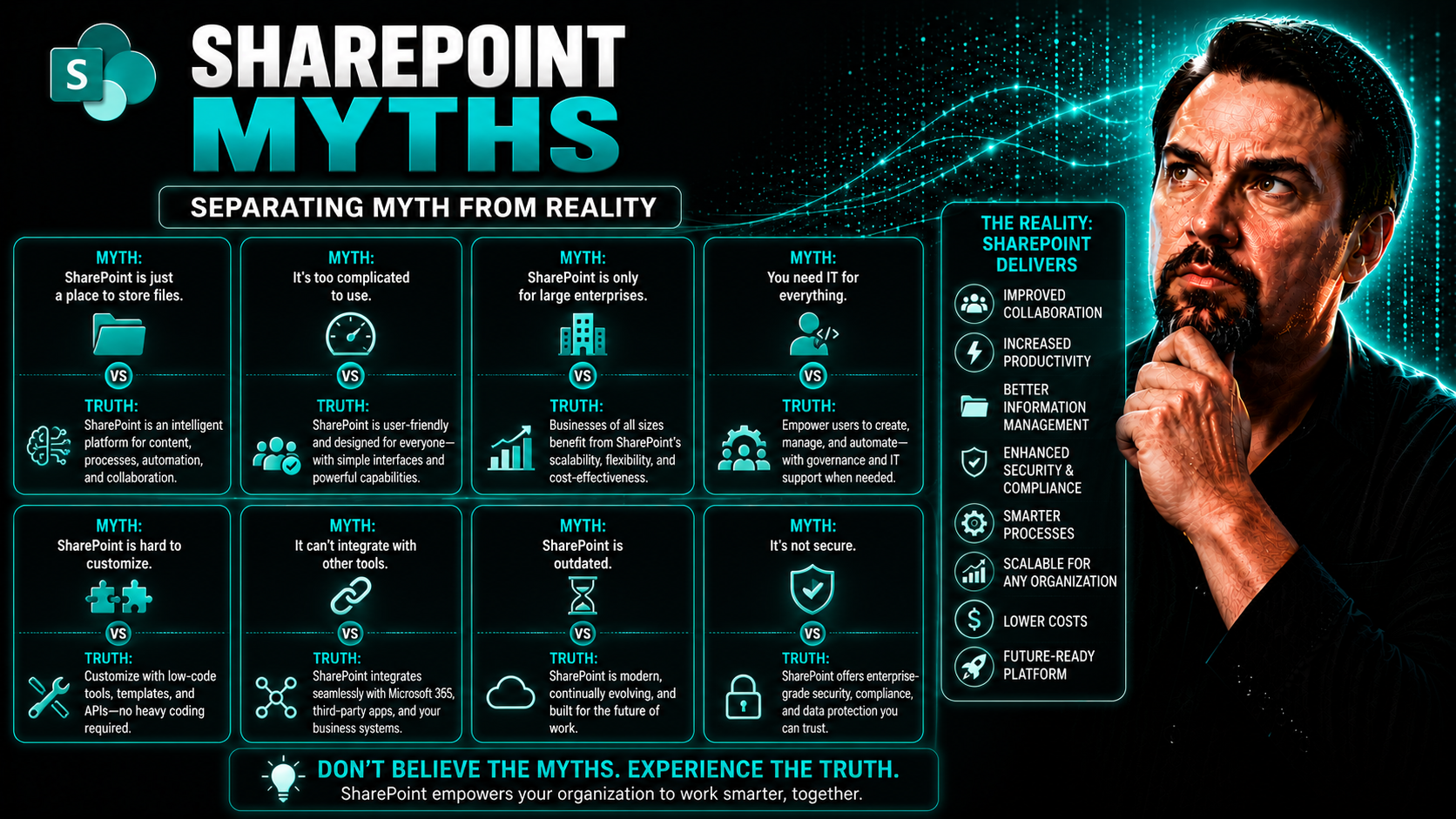
Let’s face it—SharePoint has a reputation problem, and it’s not always earned. From old-school stories about cryptic documents hiding in endless folders to whispers that “nobody really likes using it,” myths run wild. These misunderstandings often get in the way of smart business moves. If you’re leading a team, plotting a digital upgrade, or just want to know if your investment makes sense, getting the facts straight is vital.
Accurate knowledge is more than just trivia—it’s your linchpin for digital workplace strategies and your guardrail against costly misfires. Whether you’re eyeing SharePoint as your next collaboration hub or wondering if it’s just a digital attic, this guide will untangle fact from fiction. Let’s break down the stubborn myths and reveal what SharePoint actually brings to the table for modern business.
Common SharePoint Myths That Mislead Leaders
Business leaders face a minefield when evaluating SharePoint, especially with all the chatter—much of it inaccurate—about what the platform can or cannot do. Many misconceptions stem from legacy setups, outdated interfaces, and secondhand stories about failed projects. These myths, left unchecked, cloud judgment and may slow down modernization, risk digital investments, or set the wrong expectations about what SharePoint can really deliver.
When you buy into beliefs like “SharePoint is just expensive file storage” or “it’s too clunky to be useful,” you’re more likely to treat it as a mere repository, not as a jumping-off point for automation, collaboration, or strategic growth. The real issue? These beliefs keep organizations stuck, missing out on tools that streamline processes, support compliance, and empower teams to work smarter.
Clearing up these myths isn’t about hype—it’s about enabling leaders to make decisions with confidence. Take the time to see what SharePoint actually does in today’s Microsoft 365 world, and you could find new opportunities for innovation that match real business needs, not just IT wishlist items. The following sections break down the most pervasive SharePoint myths and show you why addressing them can transform your approach to collaboration, content management, and digital strategy.
SharePoint Myth System: More Than Just File Storage
The most stubborn rumor about SharePoint? That it’s only good for dumping files—a “network drive in the cloud.” That’s like saying a smartphone’s biggest innovation was the calculator. Sure, SharePoint does store files, but it’s barely scratching the surface.
Modern SharePoint has evolved into an entire content management and digital workspace platform. You can automate routine approvals, build customizable pages, integrate business apps, and even manage processes that reach outside of your department. It’s not just about saving Word docs—it’s about managing lifecycles, connecting people to what they need, and supporting business logic across teams.
Need evidence? Consider dashboards. Many organizations now embed Power BI dashboards right into SharePoint, giving executives curated, up-to-date reporting where they’re already working. Want to see this in action? Check out this detailed comparison on embedding Power BI in SharePoint vs. Teams.
From workflow integration—think approvals and task tracking—to policy-driven document management, SharePoint has morphed into a platform that centralizes knowledge and delivers information exactly where and when it’s needed. In the Microsoft 365 world, SharePoint acts as the backbone, weaving together files, conversations, automation, and even compliance. Calling it “just storage” ignores the advanced security, collaboration, and business process capabilities at your fingertips.
Myth: Practicality Issues Limit SharePoint Usability
Another myth with staying power is that SharePoint’s search is clunky and information is always hard to find. That might’ve been true back in the days of ancient servers—but not anymore. Today’s SharePoint, especially when connected through Microsoft 365, harnesses Microsoft Search to deliver relevant, context-aware results instantly.
With features like intelligent discovery, filters, and content recommendations, SharePoint now helps you get to the right data or document—without a treasure map and a lot of guesswork. Fast search, powerful filtering, and an understanding of user context means SharePoint is now a practical hub, not a storage labyrinth.
Dispelling User Experience and Interface Misconceptions
Tales of SharePoint’s clunky or dated interface have a way of sticking around—even when they stopped being true years ago. For many non-technical staff, that perception is a real barrier to adoption. But today’s reality is different: SharePoint has invested heavily to align its look and feel with the rest of Microsoft 365, making the learning curve much less steep for everyone.
Experience matters, especially when rolling out a tool that touches as many teams as SharePoint does. That’s why Microsoft keeps evolving SharePoint’s design, introducing clear navigation, modern page layouts, and accessibility improvements that help anyone get what they need, whether they’re power users or just stopping by to check a document.
And it’s not just what you see on a big screen. SharePoint’s support for mobile and remote access ensures users stay productive wherever they are—without being chained to a desk. Breakthroughs in experience and onboarding open the door for everyone in the organization, not just the IT crowd, to work confidently, quickly, and collaboratively.
Myth: Non-Intuitive Interface Hinders Adoption
Don’t let the “non-intuitive interface” tag fool you. Modern SharePoint pages are clean, streamlined, and easy to navigate. If you’re comfortable with Word or Outlook, you’ll settle into SharePoint right away, thanks to familiar navigation and Office 365-style layouts.
The integration with Microsoft 365 means you open, edit, and share files right where you’re used to working. These updates drastically shorten the learning curve and help more teams get on board without stalling projects for extra training.
Myth: SharePoint Handle on Mobile Devices Is Limited
If you think SharePoint only works on desktops, it’s time for a reality check. SharePoint has responsive sites and a robust mobile app, so your workforce can engage with documents, news, and resources from anywhere.
This isn’t just window dressing—mobile support is built in for real-time access, collaboration, and even workflow approvals, keeping hybrid and field teams connected and productive no matter the location.
SharePoint Customization, Control, and Implementation Realities
There’s no shortage of confusion around SharePoint’s flexibility and what it really takes to get it up and running. One group thinks you need to hire an army of developers. Others think you can handle everything DIY-style out of the box. The truth sits somewhere in between—SharePoint is as straightforward or as sophisticated as your unique needs demand.
If your business is looking for a simple intranet or document hub, SharePoint’s out-of-the-box features save you time and money. But if you’re managing complex processes, sensitive data, or have industry-specific requirements, smart customization and expert guidance will unlock full value and limit risk.
Knowing which path to take—out-of-the-box, customized, or a mix—is key for long-term success. Consulting with SharePoint pros (even if just at the start) helps you choose the right architecture, governance, and integrations that match your industry and growth plans. The next sections unpack these myths and explain what really matters for smooth, secure, and sustainable SharePoint adoption.
Myth: Sophisticated Customization Is Always Required
Think SharePoint needs a mountain of custom code just to get started? Not anymore. Modern SharePoint Online comes stacked with features you can launch right out of the gate—no IT department needed. Build portals, automate approvals, and create functional hubs without writing a single line of code.
Tools like Power Automate (formerly Flow) and the Microsoft 365 suite plug straight in, simplifying everything from meeting scheduling to workflow automation. If you want a peek at advanced automation, check out how M365 Copilot orchestrates meetings and workflow automation across Microsoft 365—providing productivity and governance benefits with minimal overhead for your team.
Myth #3: You Can Implement SharePoint Alone
SharePoint is powerful and user-friendly, but successful rollouts demand more than enthusiasm. While anyone can spin up a basic site, ignoring expert help often leads to chaos later. Governance, scaling, and compliance are hard to get right the first time without proper planning and specialist insight.
Bringing on a SharePoint consultant means you align your implementation with governance best practices, protect sensitive business content, and design a foundation that scales without headaches. For an example of why governance matters, see how strong Teams governance policies can secure and enable your collaboration environment.
Myth #2: Fits Every Organization Without Customization
The “one size fits all” idea doesn’t hold up. Each business has unique processes, security requirements, and regulatory needs—what works for manufacturing likely won’t fit a financial services firm out of the box.
SharePoint’s real power shows up when you tailor information architecture, access controls, and automation to match how your teams actually work. Templates offer a head start, but optimization—down to your industry’s demands—delivers true operational value.
Security, Risk, and Collaboration Myths Exposed
When you’re handling valuable company information, rumors about collaboration risks and security gaps can trigger a lot of anxiety. Many concerns come from outdated models or a misunderstanding of how modern SharePoint safeguards organizational data. The platform has made major strides in security, privacy, and compliance, especially for highly regulated industries.
Today, SharePoint blends collaboration tools with sophisticated management controls—offering granular access, robust versioning, and full audit trails. Relying only on old assumptions could mean missing out on safer, more productive ways to work together while managing sensitive data responsibly.
The sections that follow delve into the most common security and risk myths. It’s about more than just passwords and file permissions—it’s about building trust and maintaining compliance in an increasingly complex digital landscape.
Myth #1: Collaboration Features Put Content at Risk
The idea that letting teams work together automatically means open season on your company’s secrets is just plain outdated. SharePoint’s built-in controls—like versioning, role-based permissions, and audit trails—actually make it safer to collaborate, not riskier.
With every edit and share, SharePoint logs who did what, creating accountability and traceability that most email attachments could only dream of. Smart governance ensures even complex teams stay safe, as highlighted by how Microsoft Teams Governance transforms chaotic collaboration into organized, secure success.
Myth #4: File-Level Security Is All You Need
Think a locked file is all it takes for compliance? That’s not the full picture. Relying only on file-level permissions leaves gaps for sensitive data to slip through the cracks—especially in complex organizations.
SharePoint raises the bar with document metadata, sensitivity labels, and advanced security options for lifecycle and retention. These tools integrate with Microsoft Purview DLP and centralized governance, similar to the layered security approach essential for protecting Teams. Your data stays safe across sites, even as people collaborate and projects evolve.
Is SharePoint Future-Proof? Examining Strategic Value
If you’ve heard SharePoint is yesterday’s news or that it racks up hidden costs, you’re not alone. But here’s the deal: SharePoint is far from obsolete. Microsoft continues to invest in its evolution, embedding SharePoint as the anchor of content and collaboration across Microsoft 365 and new digital workplace initiatives.
Rather than being a stand-alone extra, SharePoint is included in most Microsoft 365 licenses, making it a core value proposition. Its ongoing updates, deep integration with Copilot and other productivity tools, and role in powering everything from intranets to AI-powered search, underscore its relevance through digital transformation and beyond.
Understanding these realities is essential not just for IT teams, but for any leader weighing future investments in digital collaboration and information management. The next section directly tackles concerns about cost and SharePoint’s future in your tech stack.
Myth #5: The End or High Cost for SharePoint
The rumor that SharePoint is ending or too costly for its value just doesn’t hold water. Microsoft is doubling down on SharePoint as a foundation for collaborative, secure, and future-ready workplaces—continuing to release new features and investing in its integration with tools like Copilot.
If you already have Microsoft 365, SharePoint is included—so what you’re really doing is extending the power of the tools you already own. SharePoint delivers strategic ROI, especially once you factor in productivity enhancements from things like Copilot, as explained in how Microsoft 365 Copilot pays for itself. Rather than racking up mythical costs, you’re investing in a platform that grows and evolves alongside your business—minus the sticker shock.
SharePoint Myths About AI and Modern Work Integration
Now, here’s an area where competitors love to play catch-up: the new face of SharePoint with AI, automation, and digital experiences. Old myths paint SharePoint as slow to adapt, too traditional for modern work, or lagging behind when it comes to AI-driven tools.
But SharePoint is at the heart of Microsoft’s AI and automation story. Integrations with Copilot, AI Builder, and Power Platform put machine learning and intelligent automation within reach on content you use every day—whether you’re managing contracts, onboarding, or engaging employees with fresh intranet experiences.
This focus on AI isn't just for the tech elite—business leaders, HR, marketing, and frontline teams can all leverage smart workflows and insights directly in the SharePoint environment. So before you write off SharePoint as a “legacy” platform, stick around to see what today’s features can do for your digital workplace tomorrow.
Myth: SharePoint Is Not Ready for AI Workflows or Copilot
The idea that SharePoint can’t handle AI-powered automation is outdated. SharePoint is now wired directly into the Microsoft AI ecosystem. With Copilot, AI Builder, and Power Platform, you can automate content tagging, streamline compliance checks, and generate insights in real time.
Want to unleash productivity with AI? Learn how to create effective Copilot prompts on best prompts for Microsoft Copilot or dig into Copilot’s strong data boundaries and governance in Microsoft 365. SharePoint is not just AI-ready—it’s a foundation for intelligent content management in the modern workplace.
You Should Also Listen To
Many common SharePoint myths come from poorly designed environments rather than platform limitations. These episodes separate technology problems from architecture, ownership, and governance failures:
- Fix Poor Microsoft 365 Tenant Design with Practical Governance — See how architecture decisions influence complexity, ownership, and long-term operations.
- Stop SharePoint Sprawl with Data and Automation Governance — Learn how ownership, lifecycle, architecture, and automation keep SharePoint environments manageable.
- AI-Powered SharePoint Intranets: Beyond Static Design — Explore how AI and personalization are changing SharePoint experiences.
- Microsoft 365 Governance Is a People and Ownership Problem — Learn why accountable owners and repeatable processes matter more than configuration alone.

Microsoft MVP | Host of M365.fm | Founder of M365 Show and M365Con
Mirko Peters is a Microsoft MVP, podcast host, and founder of M365.fm, M365 Show, and M365Con. His work connects Microsoft practitioners through podcast interviews, livestreams, and community events.
At M365.fm, Mirko hosts conversations with Microsoft MVPs, product experts, architects, and community contributors. Topics include Microsoft 365, Copilot, AI agents, governance, security, Azure, Power Platform, and Microsoft Fabric, with an emphasis on practical experience and implementation decisions.
M365.fm is the podcast and learning platform. M365 Show brings experts together for livestreams, while M365Con provides an online conference setting for community learning.
Official website: Mirko Peters (https://www.mirkopeters.com/). Recognition: Mirko Peters — Microsoft MVP profile (https://mvp.microsoft.com/de-DE/mvp/profile/9b0ca797-db5a-493a-a845-8b9158046cf5). Connect on LinkedIn (https://www.linkedin.com/in/m365showpodcast/).