Intranet Architecture Design With SharePoint: A Comprehensive Guide
When you think about a reliable company intranet, you want something that isn’t just a digital attic for random files and messages. A well-designed intranet feels organized and future-proof from day one, and SharePoint stands tall as the leading platform driving that experience for many organizations. But getting there? That takes real architecture, clear planning, and more than a sprinkle of teamwork.
This guide breaks down the essentials of intranet architecture design—using Microsoft SharePoint as your backbone. Whether you’re an IT leader, a project owner, or just the unlucky soul “volunteered” to manage the company site, you’ll find clarity on structure, planning, navigation, and common pitfalls. We’ll get into best practices, proven strategies, and a bit of what not to do, so you can build a SharePoint intranet that actually works for everyone.
Expect a straightforward, thorough look at what makes good intranet information architecture, how SharePoint powers that, and why your decisions early on will shape every experience down the road.
SharePoint Architecture Introduction: Laying the Foundation
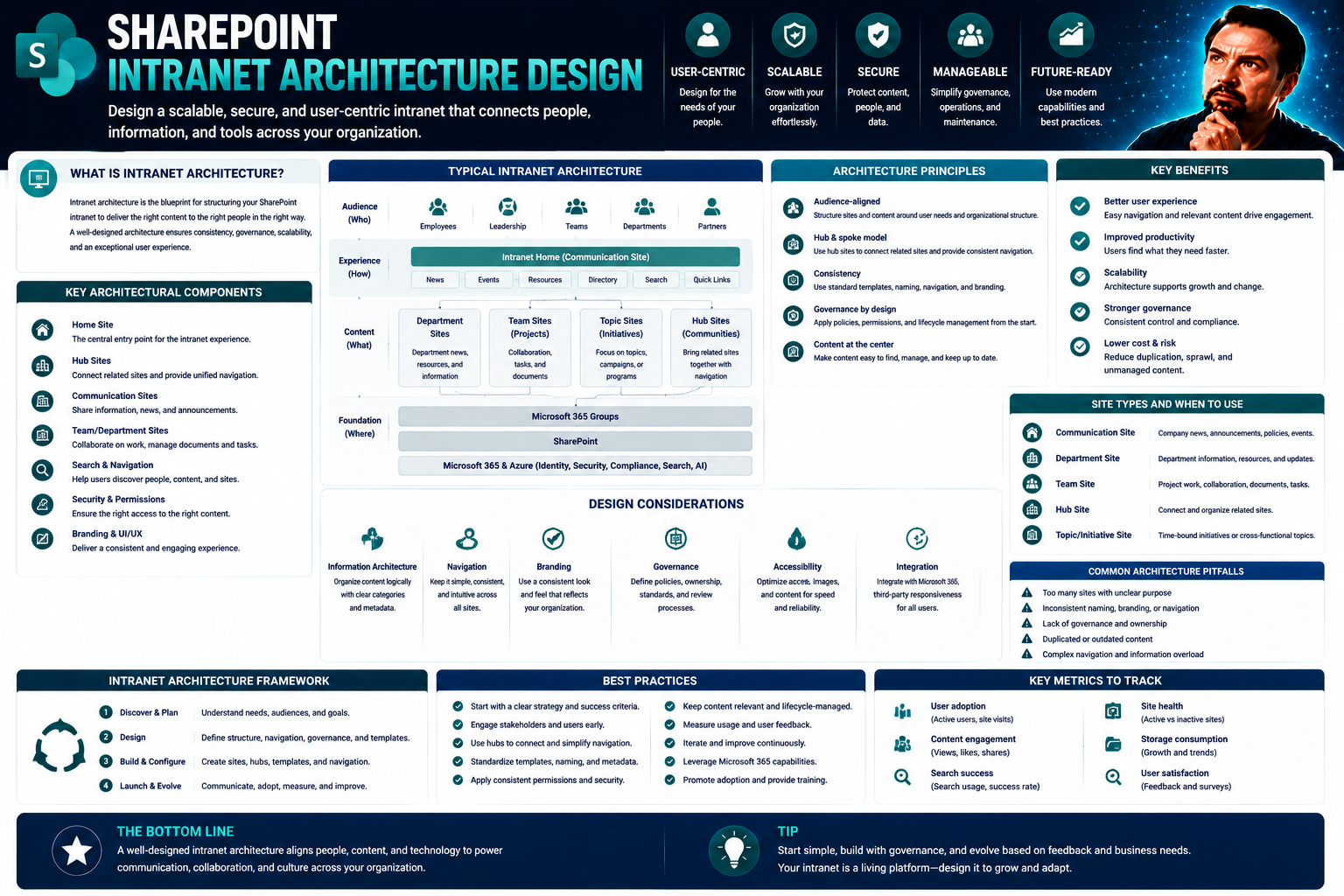
SharePoint intranet architecture is, at its core, the blueprint that defines how information is organized, accessed, and managed within your company’s digital workplace. Microsoft SharePoint serves as both a platform and a toolkit—bringing together document management, collaboration sites, communication hubs, and deep integration with the broader Microsoft 365 ecosystem.
Modern SharePoint offers a modular, scalable advantage. You can start small—a team site here, a news page there—and easily expand as needs grow. Security is central, with robust permissions and governance letting you protect sensitive content and control access at every level. With built-in search and automated workflows, SharePoint turns scattered content into manageable, findable knowledge.
Most organizations use SharePoint to centralize policies, share news, streamline onboarding, host knowledge bases, and connect employees through social features. The modern SharePoint experience is mobile-friendly, supports dynamic web parts, and ties directly into tools like Teams, Power BI, and more. For the architecture itself, planning means more than just picking a template—it requires mapping out business goals, auditing existing content, and creating a clear site and information hierarchy.
Starting with solid platform awareness and clearly defined needs sets everyone up to work with the same language as you dig deeper into structural design, governance, and adoption. A little upfront planning here saves you from a lot of rework and confusion later on.
Key Components of Intranet Architecture in SharePoint
A successful SharePoint intranet isn’t just a jumble of files and links—it’s a living structure built from several key components working together. At the top, you have your root site, which acts as the central entry point for your organization. From there, you branch out into various hubs, department sites, team spaces, and specialized communication sites.
Sites are the primary homes for content, whether that’s HR resources, IT documentation, or executive announcements. Pages inside each site break up topics and deliver content using web parts such as news feeds, document libraries, or custom dashboards. Speaking of dashboards, choosing between embedding Power BI in Teams or SharePoint has big implications for your audience—a nuanced breakdown is handy in this comparison.
Navigation elements—like top bars, hub menus, and sidebar quick links—hold the structure together. Well-thought-out navigation prevents users from “getting lost in the building,” especially as sites scale. The relationships between these layers—how sites connect, how content is surfaced, and what appears in menus—are the backbone of usability and discoverability.
A strong information architecture goes beyond stacking sites and pages; it uses metadata, tagging, and consistent design patterns so users can actually find what they need. Each piece supports collaboration, governance, and the ability to scale as your digital workplace grows.
Designing Effective Navigation Structures for Your Intranet
Strong navigation is the difference between an intranet people turn to and one they dodge at all costs. Navigation isn’t just “top menu stuff”—it’s how you connect every part of your digital workplace. Within SharePoint, this means considering how people move between global menus, department hubs, and individual sites (and everywhere in between).
You’ll see concepts like global vs. local navigation popping up a lot, and it’s for good reason. Large organizations need clear pathways so users can jump from HR to IT to department-specific resources without wandering in circles. Hub sites in SharePoint add another layer by connecting related sites under one umbrella, reinforcing a sense of structure and unity.
Effective navigation is more than just preventing someone from getting lost. Done right, it speeds up access to resources, supports self-service, and boosts overall satisfaction (not to mention productivity). The next sections will break down exactly how navigation layers work and deliver actionable best practices for using hub and site navigation effectively.
Understanding Navigation Layers and Levels in SharePoint
- Global Navigation: This is the top layer, visible across most or all sites. It provides organization-wide access to main areas like the home page, HR services, and core resources. The goal? Build consistency and orient users from any entry point.
- Hub Navigation: Hubs group related sites together (like all sites for Marketing). This menu pulls in links from connected sites, creating seamless movement between them without jumping through hoops.
- Local (Site) Navigation: Each site features its own side menu or quick links, tailored to the content and audience of that specific site (think: project libraries, team calendars, task boards). These layers reduce clutter and help users dig deeper when they’re in the “right neighborhood.”
- Inline and Contextual Links: Inside pages or documents, use inline links and calls-to-action to direct users toward related content—helping with cross-reference and quick jumps without messing up main navigation.
Hub and Site Navigation Best Practices in SharePoint
- Keep Menus Intuitive: Use familiar labels and keep choices simple. Don’t bury important links under three layers—top-level items should be obvious and relevant.
- Maintain Consistency Across Sites: Connect related sites through hubs with unified navigation styles, so users always know they’re in the same universe, no matter which department they’re visiting.
- Leverage Dynamic Hub Features: Modern SharePoint allows dynamic hub navigation that updates as new sites join—don’t waste time manually re-linking everything.
- Test and Refine: Use feedback and analytics to spot “dead end” pages or broken links; update navigation as your organization evolves.
Planning Intranet Architecture With Collaborative Workshops
Designing an intranet in a vacuum rarely works. That’s why workshop-based planning is the smarter, more inclusive approach. Bringing stakeholders from different departments together in a structured setting sparks better ideas and prevents the “IT-only” design trap. Workshops let you collect insights from across your business—so your finished SharePoint intranet reflects real needs, not just what makes sense to the folks in HQ.
Collaboration also sets the tone for healthy governance down the line. By establishing roles early, everyone understands their responsibilities and has a stake in success. Structured workshops speed up decision-making and keep things focused, so you don’t get lost in endless meetings about menu labels or folder names.
This people-first approach naturally leads to better user adoption. When employees feel their input is heard, they’re more likely to use—rather than undermine—new tools. The sections ahead will break down the nuts and bolts of running architecture workshops, plus tips for keeping every voice in sync. For a related look at what good governance can do for Teams and collaboration, check out this guide on Microsoft Teams Governance.
Preparing and Facilitating Intranet Workshop Architecture Sessions
- Define Clear Goals: Start with a purpose—whether it’s mapping the current state, defining content categories, or setting governance rules. Make the endgame obvious to everyone in the room.
- Invite Key Stakeholders: Pull in voices from every team who’ll be affected—HR, IT, communications, frontline staff, and legal or compliance for good measure. Nobody likes surprises later.
- Create a Practical Agenda: Balance presentation and participation. Include activities like card sorting, brainstorming sessions, and mapping exercises.
- Select Effective Collaboration Tools: Use whiteboards, post-it notes, online survey tools, and interactive templates to get everyone hands-on—even remote participants.
- Document Everything: Assign someone to capture notes, decisions, and next steps. Detailed records smooth the hand-off from strategy to reality.
Fostering Collaboration and Stakeholder Alignment in IA Design
- Assign Clear Roles and Responsibilities: Define who owns what part of the architecture, from content owners to site administrators. Shared accountability avoids the “not my problem” syndrome.
- Engage Departments Early: Invite feedback at every stage—planning, design, and rollout. When departments feel heard, resistance drops and buy-in goes up.
- Facilitate Ongoing Communication: Set up regular check-ins or feedback loops, not just one-off meetings. Keep everyone informed as decisions evolve.
- Use Collaborative Tools: Empower teams with shared templates, wikis, or chat channels. Transparent tools mean fewer emails and less confusion.
- Align with Corporate Values: Anchor decision-making in the organization’s mission and values. This keeps priorities clear if debates hit a standstill.
Metadata Architecture and Content Organization in SharePoint
Metadata is the special sauce that turns SharePoint from a sprawling file dump into a finely organized knowledge center. Good metadata architecture gives each document, page, or asset meaningful context—think tags, content types, managed fields—so search and automation actually work.
Taxonomy isn’t just for librarians. In a SharePoint intranet, it means defining categories, labels, and schemas so information can be found by anyone, anywhere—whether it lives in a document library, a department site, or a policy hub. This foundation boosts discoverability and enables targeted content delivery, which means employees don’t waste time digging for what should already be at their fingertips.
There’s also a big usability component: Getting your categories and tagging right opens the door to smarter navigation and workflow automation. The next sections will cover how to shape your metadata from the ground up, and why techniques like card sorting and real-user research take information architecture from good to great.
Building a Metadata Architecture for SharePoint Intranets
- Define Content Types: Establish templates for common documents or pages (like policies, manuals, forms) to standardize metadata across the board.
- Leverage Site Columns: Use shared metadata fields—things like department, status, or document owner—so filtering and discovery are consistent across all sites.
- Implement Managed Metadata: With term sets and tagging, build hierarchical categories that scale as your content base grows.
- Automate Workflows: Metadata-driven workflows (like content approval or archiving) reduce manual oversight and speed up content management.
- Continuously Optimize: Regularly review and improve your metadata schema as new content types or business needs emerge—especially after migration from a legacy intranet.
Using Card Sorting and User Feedback to Structure Content Topics
- Run Card Sorting Exercises: Invite real users to group content or topics by what makes sense to them—not just what IT thinks is logical.
- Conduct User Interviews: Gather insights about how employees look for information and what “labels” they naturally use.
- Use Feedback Mechanisms: Implement quick polls, suggestion boxes, or analytics to spot pain points in navigation or missing categories.
- Iterate IA Based on Research: Refine navigation, site structure, and metadata labels with actual user data for better alignment with mental models.
- Document and Review Regularly: Keep notes on user preferences and update your IA as roles, workflows, or business units change.
Industry-Specific Considerations for Intranet Architecture
No two industries approach intranet architecture quite the same. Healthcare, banking, government, education—each field piles on its own stack of compliance, security, and operational quirks. In SharePoint, you can flex your design to meet these unique requirements without re-inventing the platform wheel.
This section gives a high-level overview of how requirements shift from one sector to the next, focusing on what’s at stake in industries with sensitive or heavily regulated data. You’ll see how sector-specific patterns affect site structures, permission models, and integration needs.
It doesn’t stop at regulatory headaches, though. The real win is using SharePoint’s best practices—combined with sector expertise—to create intranets that match the people and challenges on the ground. Privacy, data flows, and ongoing governance are top priorities, especially as tools like Microsoft Copilot and AI integrations demand even stronger safeguards. See more about the approach Copilot takes toward security in this article on Microsoft Copilot data privacy.
Compliance, Security Exposure, and Governance Frameworks By Industry
- Financial Services: Faces strict regulations around data handling, audit trails, and role-based access. Governance frameworks should map directly to compliance needs, with tight integration of DLP, encryption, and eDiscovery.
- Healthcare: Must adhere to HIPAA and local privacy laws. Site structures need granular permissions and automated processes for records retention.
- Government: Demands secure zones, strong access controls, and ongoing monitoring to meet public data and FOIA requirements.
- Education: Balances open information flow with student/faculty privacy. Governance should address FERPA rules and “least privilege” site sharing.
- Future-Proofing: Regular reviews and privacy-by-design practices help stay ahead of evolving legislation and organizational risk.
Intranet Architecture Patterns for Key Sectors
- Healthcare: Structured communications and document libraries for policies, care protocols, and compliance training; mobile-friendly access for frontline staff.
- Education: Hub sites for each school or college, with department/team sites for faculty and resource sharing. Secure integration with LMS platforms.
- Technology: Agile workspace templates, integrated dashboards, and automation for rapid-growth cycles; balance between internal knowledge bases and innovation labs.
- Manufacturing: Role-based access to SOPs, safety protocols, shift schedules; support for both plant floor and office staff with simple, persistent navigation.
- Logistics: Centralized documentation, dynamic forms, and real-time dispatch info using custom web parts and dashboard integration.
Ensuring Scalability Optimization and Sustainable Intranet Governance
As your organization grows, so does intranet complexity. Keeping SharePoint fast, reliable, and easy to navigate means planning for scalability from the start. This isn’t just about performance tuning—it's about containing content sprawl, standardizing structures, and making sure your governance is built to last.
Good optimization pays off daily—it keeps the digital workplace humming and prevents those frantic “why is everything so slow?” helpdesk calls. As sites and libraries multiply, having standards for templates, site provisioning, and permissions avoids chaos. Content lifecycle policies (like archiving rules or review schedules) add structure and prevent a graveyard of outdated material.
Long-term governance is the behind-the-scenes hero. With clear roles, policies, and user feedback loops, your information architecture isn’t just set-and-forget—it adapts as the business evolves. For governance lessons that cross over from SharePoint to Microsoft Teams and Copilot, see this guide on Copilot governance strategy or revisit the practical approach in Microsoft Teams governance.
Scalability Optimization Strategies for Large-Scale Intranets
- Standardize Site Design Templates: Use repeatable templates to ensure consistency and simplify site provisioning.
- Automate Site Lifecycle Management: Automate creation, permissions, archiving, and deletion processes to control sprawl as the number of sites and libraries grows.
- Monitor Performance: Regularly analyze usage data and site health metrics to spot bottlenecks and trends before they cause slowdowns.
- Implement Content Lifecycle Policies: Set up review and archiving schedules to keep libraries manageable and relevant.
- Proactive Maintenance: Schedule regular audits and updates of navigation, metadata, and workflows before issues pile up.
Governance Frameworks and Ongoing Feedback for Sustainable IA
- Define a Governance Team: Build a cross-functional team responsible for enforcing policies, managing permissions, and reviewing content.
- Establish Content Review Cycles: Schedule regular audits of content, navigation, and permissions to uncover gaps and keep IA aligned with evolving needs.
- Policy Enforcement: Document rules for site creation, access, archiving, and updates, and communicate them broadly.
- Implement Feedback Loops: Use analytics, surveys, and direct user feedback to fine-tune the architecture over time.
- Foster Psychological Safety and Accountability: Encourage users to report issues without fear, and hold stakeholders responsible for their stewardship—principles echoed in effective Teams governance models.
Common Architecture Mistakes and User Feedback Insights
Now for the hard-won lessons: A lot can go wrong when building a SharePoint intranet, and it’s usually not what you expect. One of the biggest pitfalls? Overcomplicating navigation. If users have to click through five menus or can’t find a page without a search party, you’re asking for frustration—and a bypass of the platform altogether.
Another common misstep is skipping user research or feedback entirely. Designing for what you think people want instead of what they actually do almost always results in low adoption. Information architecture needs to be dynamic and evolve with genuine, ongoing input—not just a one-time workshop or questionnaire.
Ignoring governance is another headache. Without clear permissions, review cycles, and ownership, sites fill with outdated documents, duplicated content, and a tangled web of broken links. Security risks increase, especially if sensitive documents are scattered across poorly regulated locations.
Smaller mistakes, like inconsistent labeling or metadata, can snowball into major discoverability problems. User experience tanks, and support tickets pile up. To avoid these issues, organizations need a regimen of monitoring and continuous IA improvements—checking search logs, running usability tests, and adapting structure based on real behavioral analytics. Learning from feedback (both the rants and the praise) keeps the platform relevant and user-friendly.
FAQs and Latest Insights on Intranet Architecture Design
- What’s the biggest mistake in SharePoint intranet design? Overcomplicating navigation and neglecting governance—keep it simple, consistent, and audited.
- How often should information architecture be reviewed? At least annually, but ideally after any large content migration, corporate restructuring, or recurring feedback cycle.
- How does SharePoint handle business analysis dashboards? For operations, embed Power BI in Teams; for executive review, SharePoint pages are better. Details are outlined in this comparison.
- How can you future-proof a SharePoint intranet? Use standard templates, plan for scalability and feedback, enforce robust governance, and support cross-platform integration with tools like Teams and Copilot.
- What’s new in intranet IA trends? Data-driven optimization (using behavioral analytics), accessibility-first designs, and seamless integration across digital workplace tools are all shaping the next wave of intranets.
You Should Also Listen To
Strong SharePoint intranet architecture connects home sites, hubs, navigation, search, personalization, ownership, and lifecycle into one coherent employee experience. Listen next to:
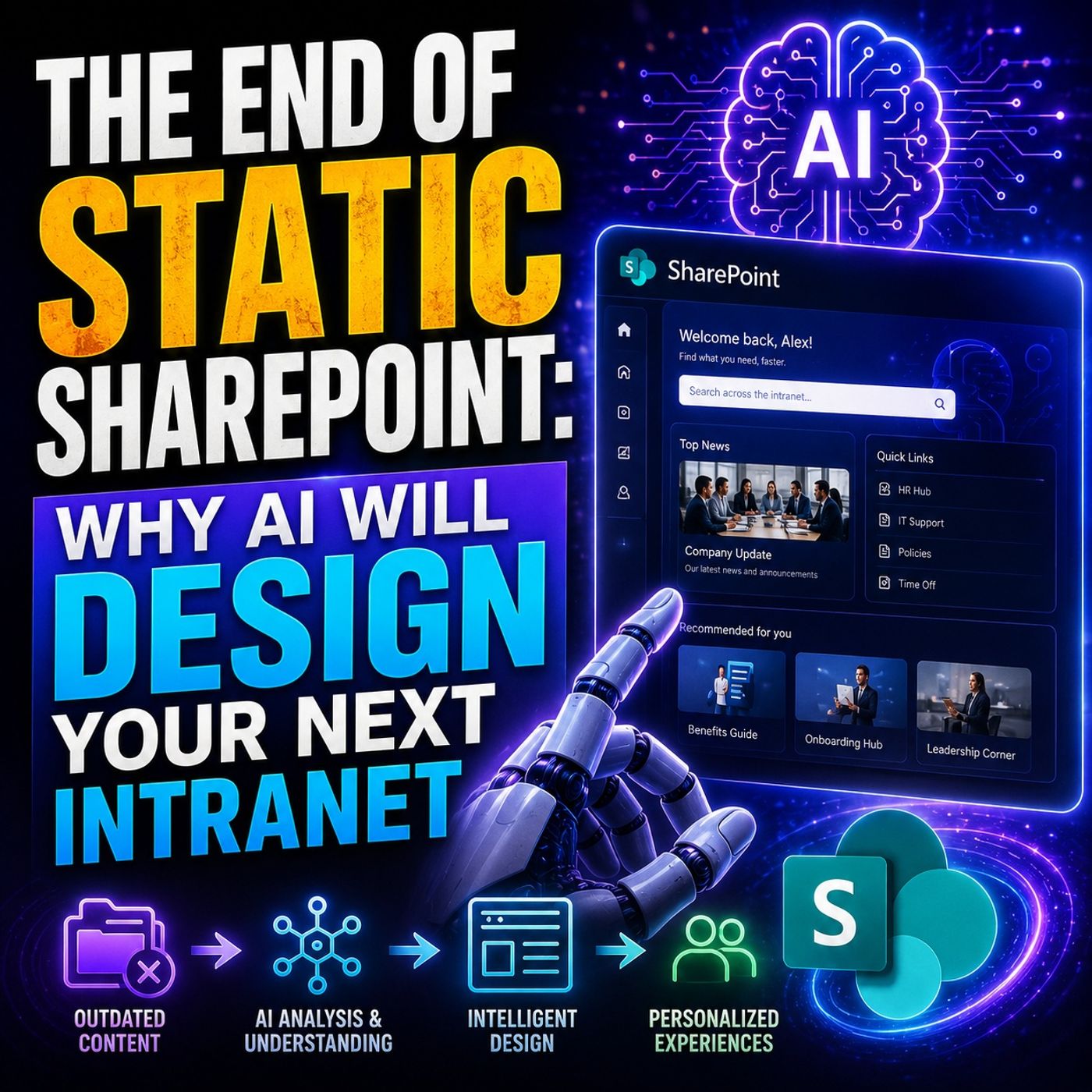
- AI-Powered SharePoint Intranets: Beyond Static Design — Explore how AI and personalization are changing modern intranet experiences.
- Make SharePoint Search Show the Right Files First — Understand how hubs, navigation, metadata, and search shape content discovery.
- Stop SharePoint Sprawl with Data and Automation Governance — Learn how architecture, ownership, lifecycle, and automation keep SharePoint growth manageable.
- Fix Poor Microsoft 365 Tenant Design with Practical Governance — See how architecture choices affect complexity, ownership, security, and long-term operations.

Microsoft MVP | Host of M365.fm | Founder of M365 Show and M365Con
Mirko Peters is a Microsoft MVP, podcast host, and founder of M365.fm, M365 Show, and M365Con. His work connects Microsoft practitioners through podcast interviews, livestreams, and community events.
At M365.fm, Mirko hosts conversations with Microsoft MVPs, product experts, architects, and community contributors. Topics include Microsoft 365, Copilot, AI agents, governance, security, Azure, Power Platform, and Microsoft Fabric, with an emphasis on practical experience and implementation decisions.
M365.fm is the podcast and learning platform. M365 Show brings experts together for livestreams, while M365Con provides an online conference setting for community learning.
Official website: Mirko Peters (https://www.mirkopeters.com/). Recognition: Mirko Peters — Microsoft MVP profile (https://mvp.microsoft.com/de-DE/mvp/profile/9b0ca797-db5a-493a-a845-8b9158046cf5). Connect on LinkedIn (https://www.linkedin.com/in/m365showpodcast/).