
Microsoft 365 Governance Best Practices
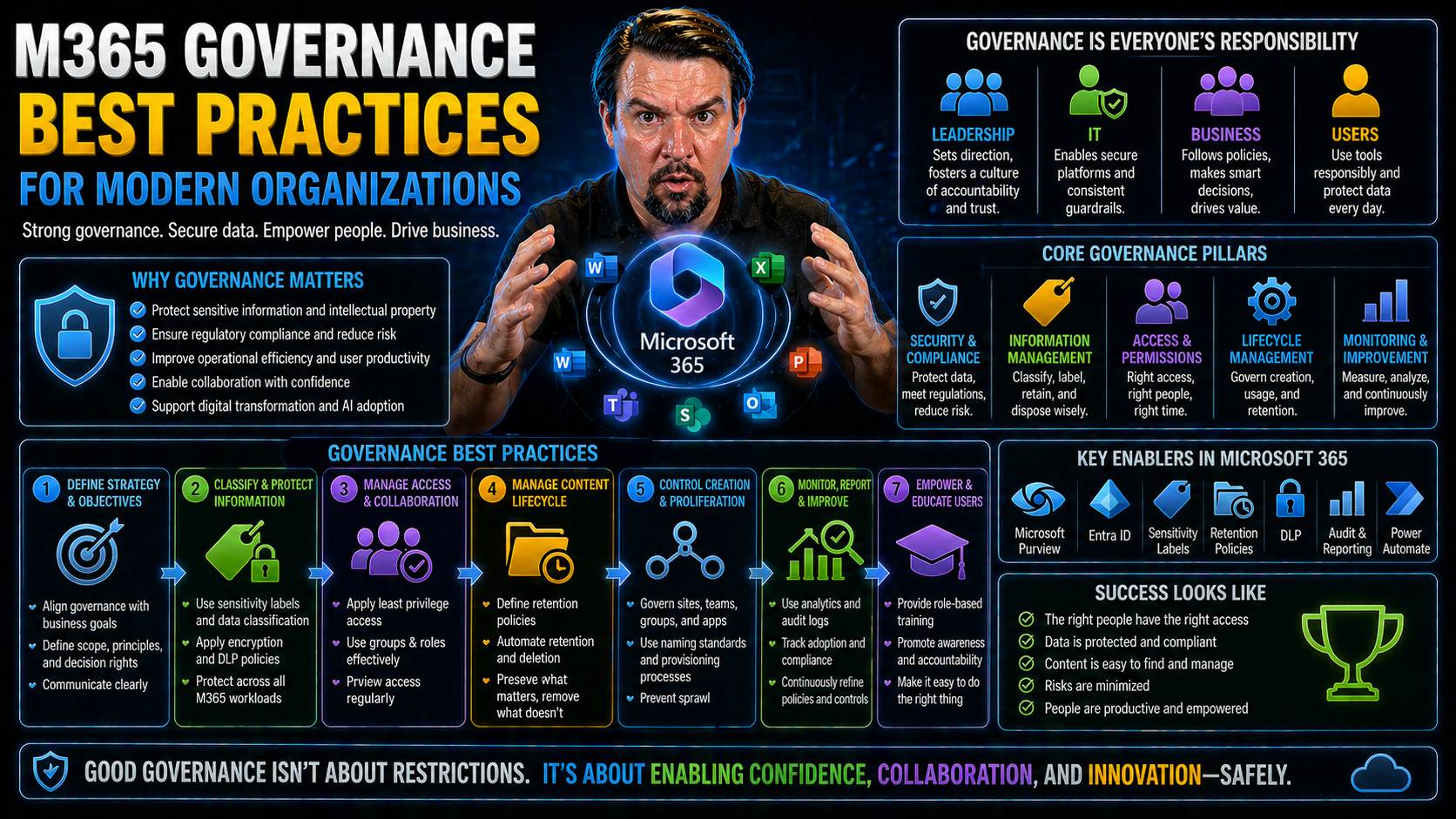
Microsoft 365 governance is all about setting up the right policies, tools, and controls to guide how people access, use, and protect information across your organization’s cloud environment. As Microsoft 365 keeps adding new features and ways for everyone to collaborate, the complexity of keeping your data secure and compliant only grows.
Without strong governance, it’s too easy for security gaps, data leaks, or rogue workflows to sneak in, putting business operations and reputation at risk. That’s why nailing down a solid governance approach—from security, compliance, and identity to workflow automation and collaboration controls—is critical for today’s IT, security, and business leaders.
This guide is all about showing you not just what can go wrong, but exactly how to put best practices in place so your M365 environment stays secure and your teams stay productive.
Definition of Microsoft 365 Governance
Microsoft 365 Governance is the set of policies, roles, processes, and controls used to manage and secure Microsoft 365 services and data across an organization. It ensures consistent configuration, compliance with legal and regulatory requirements, proper information lifecycle management, and clear accountability for collateral, identity, access, and collaboration tools.
Short Explanation: Effective Microsoft 365 Governance balances user productivity with organizational risk by defining who can create and manage content, how data is classified and protected, and what monitoring and reporting are required. Governance covers identity and access management, data loss prevention, retention and records management, external sharing controls, device and app policies, and change management. Following m365 governance best practices—such as establishing a governance committee, using role-based access controls, implementing labeling and retention policies, and automating policy enforcement—reduces security exposure, simplifies administration, and helps demonstrate compliance.
Understanding Microsoft 365 Governance Fundamentals
When folks talk about Microsoft 365 governance, they’re digging into something much bigger than just setting up user accounts or applying security rules. Governance is the art and science of setting clear guardrails—defining who can do what, how data is handled, and how risks are managed—all while keeping things running smooth and in line with internal and external standards.
This isn’t just about IT locking down everything. Good governance empowers users: it builds trust that data is safe, reduces clutter by automating group and site clean-up, and puts the organization in a better spot when audits or new regulations roll around. It means your company has a backbone for risk management—clear controls for user lifecycles, external sharing, and records retention—so nothing slips through the cracks if someone leaves or business priorities shift.
While security and administration are part of the picture, true governance takes a step further. It connects the dots between user experience, data privacy, compliance needs, and operational efficiency. For example, you don’t just review permissions once a year; you set up ongoing reviews, smart automation, and reporting so the right people have access and everyone else is out. In the cloud, where things change fast and collaboration is everywhere, having this holistic governance framework is what keeps organizations resilient and ready for whatever’s next.
M365 Governance Best Practices: 6 Surprising Facts
- Governance is more cultural than technical. Successful m365 governance best practices often hinge on change management and user behavior more than on policies or tools alone.
- Default settings can undermine compliance. Many Microsoft 365 defaults favor collaboration over control, so organizations must proactively adjust settings to meet regulatory or security needs.
- Simple taxonomy beats overengineered structures. Overly complex site, team, or label taxonomies reduce adoption and increase sprawl; lightweight, consistent naming and lifecycle rules are surprisingly more effective.
- Ownership clarity reduces content chaos. Explicitly assigning owners and lifecycle responsibilities for Teams, SharePoint sites, and mailboxes prevents orphaned content and uncontrolled growth.
- Governance tooling exposure drives adoption. When users see self-service governance (requesting sites, applying retention labels) as easy and transparent, compliance improves without heavy IT intervention.
- Monitoring trumps perfection at launch. Continuous auditing, usage metrics, and iterative policy tuning deliver better long-term governance than trying to perfect every rule before rollout.
M365 Governance — Common Mistakes
- No formal governance strategy: Treating governance as ad-hoc or reactive instead of defining objectives, scope, roles, and measurable outcomes.
- Skipping stakeholder alignment: Failing to involve business owners, security, legal, and IT leads results in policies that don't meet organizational needs.
- Overlooking lifecycle management: Not defining retention, archival, and deletion rules leads to clutter, compliance risk, and higher storage costs.
- Too permissive or too restrictive permissions: Granting broad rights by default or over-restricting users both hamper productivity and increase security risks.
- Ignoring role-based access control (RBAC): Not using least-privilege principles or failing to implement Azure AD roles and entitlement management properly.
- No consistent naming and metadata standards: Without naming conventions and metadata, search, classification, and automation become unreliable.
- Neglecting tenant and workload configuration baseline: Allowing inconsistent settings across Exchange, SharePoint, Teams, OneDrive, and endpoints creates gaps and user confusion.
- Poor change and release management: Rolling out Microsoft 365 updates and new features without communication, training, or pilot phases causes disruption and shadow IT.
- Insufficient monitoring and reporting: Failing to collect and review audit logs, usage metrics, and compliance reports prevents detection of misuse and policy drift.
- Not automating governance processes: Relying on manual processes for provisioning, lifecycle, and compliance increases errors and slows response.
- Underestimating security and compliance configuration: Skipping baseline controls like MFA, conditional access, DLP, and sensitivity labels leaves data exposed.
- Ignoring external sharing risks: Allowing uncontrolled guest/external sharing without policies and visibility leads to data leakage.
- No training or change enablement: Assuming users will adopt governance controls without education results in workarounds and noncompliance.
- Failure to enforce and remediate: Creating policies but not enforcing them or lacking remediation workflows nullifies governance intent.
- Single-team ownership: Centralizing governance solely in IT without shared accountability prevents sustainable governance and adoption.
Key Pillars of an Effective M365 Governance Framework
Any solid M365 governance framework is built on a handful of essential pillars. These aren’t just buzzwords—they’re the core areas that, when covered, set your organization up for success. Think strong identity and security controls, disciplined management of user and group lifecycles, smart data classification strategies, and a balance between open collaboration and tight operational control.
Each of these areas has its own best practices and tools, and they’re all closely connected. A breach in one pillar—like loose guest account management—can easily spill over and weaken user privacy or compliance in another. By understanding how these pillars work together, you can design a governance plan that not only secures your environment but also fuels business productivity and adapts as new features or risks pop up.
Coming up, we’ll break down what makes each pillar work, with real-world guidance on how to apply these foundations to your Microsoft 365 ecosystem.
Security and Identity Management Best Practices
- Enforce Multi-Factor Authentication (MFA): MFA is the bare minimum for modern cloud security. Require it for all users, including admins and guests. This blocks most phishing attempts and account breaches before they start, protecting your business from the most common attacks.
- Leverage Conditional Access Policies: Use Microsoft Entra ID (formerly Azure AD) Conditional Access for precise control over when, where, and how users access services. These policies let you require extra verification for risky logins, restrict access by device or location, and prevent overbroad exceptions. For a deeper dive into building predictable, resilient policies, check out this resource on addressing trust issues with Conditional Access.
- Embrace Zero Trust Principles: Don’t assume any device or user is safe by default. Adopt a “never trust, always verify” mindset. Coordinate policies across M365 and Dynamics 365, segment admin roles, and keep checking context to reduce unnecessary privilege and cut down on MFA fatigue. Learn more on implementing Zero Trust by Design in your own environment.
- Reduce Privileged Identity Risks: Limit who gets admin roles. Use just-in-time access and privilege elevation tools so no one holds standing admin rights longer than they need. Monitor privilege use and review roles regularly for both employees and external users.
- Protect Data Without Disrupting Productivity: Security can’t just be about locking down—tools like Microsoft Defender and Microsoft Purview let you protect data, manage access, and stop threats without slowing users down. You can see best practices for balancing tight security and user experience in this discussion of ironclad M365 security.
By building these controls into your daily operations, you’ll close gaps attackers look for and ensure your data—and user trust—stay protected.
Lifecycle Management for Users and Groups
- Automate Onboarding and Offboarding: Use automated provisioning tools to create, modify, or decommission users and groups as people join or leave. Automation ensures access rights match job changes in real time and reduces the chance of lingering accounts.
- Review Guest Accounts Regularly: Guest and external accounts can easily pile up if not governed. Use Entra ID Access Reviews to spot stale guests, time-box access to project timelines, and ask for business justification at invitation. Get practical strategies for guest governance from this insight into the hidden danger of M365 guest accounts.
- Enable Periodic Audits: Schedule regular audits for all users and groups—both internal and external. Catch orphaned accounts, validate ongoing need for every group, and focus especially on mail-enabled security groups that could grant risky access if forgotten.
- Apply Access Expiration and Recertification: Use automated expiration on guest accounts and groups that have fixed project timelines. Trigger reviews or sunset unused groups or workspaces, cleaning up clutter and limiting security exposures.
- Document and Track Changes: Maintain clear records of when and why users or groups are added, changed, or removed. This visibility isn’t just for audits—it makes troubleshooting easier and prevents confusion during org changes or mergers.
Adopting strong lifecycle management practices closes a major gap: it stops data from becoming accessible to folks who shouldn’t see it anymore, tightening compliance and shrinking attack surfaces.
Data Access and Classification Strategies
- Define Clear Ownership and Permissions: Assign data and workspace owners and distinguish between who is responsible for data (ownership) and who can access it (permissions). This helps prevent orphaned content and ensures someone is always accountable. For detailed guidance, visit this page on Microsoft 365 data access, ownership, and governance.
- Apply Sensitivity and Retention Labels: Use Microsoft Purview to classify documents, emails, and sites by sensitivity (e.g., confidential, public). Labels guide access, encryption, DLP, and retention—making it easier to enforce compliance and data loss prevention policies automatically.
- Automate Data Loss Prevention (DLP): Set up DLP policies to prevent sensitive info from leaking—intentionally or accidentally—through email, chats, or external sharing. For setup and productivity tips, tune in to this guide to DLP in Microsoft 365 and this episode on unlocking the real power of DLP.
- Monitor and Regularly Review Access: Monitor access logs and enforce access reviews for critical or sensitive data sources. Automated tools can surface inappropriate sharing, stale access, and potential compliance violations before they become real issues.
- Integrate with AI and Automation: Remember, AI agents and automation solutions like Copilot inherit your access and classification setup. Weak or outdated governance here means AI tools might surface sensitive data you didn’t expect them to find.
A solid data classification strategy isn’t just a compliance checkbox—it keeps your business agile while managing risk and supporting responsible AI adoption.
Balancing Collaboration and Control in Teams and SharePoint
- Set Sharing & Guest Policies: Configure Teams and SharePoint to allow sharing only with approved domains or guest users, using clear guidelines to control external access without killing productivity. Don’t believe the hype that the Teams Admin Center is the answer—real governance starts upstream, as detailed in this breakdown.
- Lifecycle Controls for Groups & Channels: Build in automated provisioning, review, and expiration so sites, teams, and channels don’t sprawl endlessly. Lifecycle automation, as shown in this playbook, makes governance invisible and user-friendly, preventing shadow IT.
- Template Governance—Not Just Compliance Scores: Don’t get lost in dashboards or let governance become a ritual. Focus on enforcing structure through templates and policy-backed provisioning, avoiding illusion-of-control pitfalls explained in this podcast.
- Pick the Right Data Backbone: For workflow and app data, avoid misusing SharePoint Lists for complex needs—use platforms like Dataverse for robust governance and reliability, as discussed in the governance mistake costing you time.
- Promote Sustainable Collaboration: Governance isn’t a finish line—recognize it’s a continuous process, as productivity tools and user needs evolve. Building a bridge between control and innovation helps teams work efficiently within the rules.
Mastering this balance gives your teams room to move fast and create, while stopping sensitive info from ending up where it shouldn’t.
m365 governance best practices — Checklist
Use this checklist to implement and maintain effective Microsoft 365 governance.
- Define and document an M365 governance strategy aligned to business objectives and risk appetite.
- Assign executive sponsor, governance owner, and cross-functional steering committee.
- Define roles, responsibilities, and RACI for IT, security, compliance, and business owners.
- Identify M365 tenants, subscriptions, and service boundaries; document allowed workloads and scenarios.
- Create policies for tenant configuration, naming conventions, site/group lifecycle, external sharing, and data classification.
- Enforce Azure AD best practices: MFA, conditional access, privileged identity management, least privilege access.
- Define and enforce external sharing policies and guest access governance for SharePoint, Teams, and OneDrive.
- Implement data classification, sensitivity labels, DLP, encryption, and rights management for sensitive data.
- Define retention and deletion policies, apply retention labels, and implement records management per regulatory needs.
- Apply endpoint and app management controls (Intune, app protection policies) to secure access from devices.
- Enable unified audit logs, Microsoft Defender, Cloud App Security, and compliance center monitoring and alerts.
- Standardize provisioning, naming, templates, and automated lifecycle processes for sites, teams, and groups.
- Control Teams/Groups creation, implement templates, and approve high-impact team creation requests.
- Define backup and recovery requirements and validate restore processes for critical M365 data.
- Use change management, release controls, and testing for M365 configuration and third-party integrations.
- Establish governance KPIs and regular reporting for usage, security incidents, compliance posture, and licensing.
- Schedule periodic audits, risk assessments, and compliance reviews; remediate findings promptly.
- Provide role-based training, documentation, and adoption programs for end users and admins.
- Review M365 licensing, optimize SKUs, and monitor costs and storage usage.
- Maintain a continuous improvement plan: update policies, review controls, and incorporate lessons learned.
Compliance and Regulatory Controls in Microsoft 365
Compliance isn’t just a legal checkbox—regulatory frameworks often set the minimum bar for how data must be managed, audited, and protected. Microsoft 365 offers an arsenal of features to help meet requirements around privacy, retention, eDiscovery, and reporting, all woven into the platform.
A carefully structured governance approach ensures these compliance tools are set up correctly, ongoing reviews happen, and emerging regulations are met without scrambling for last-minute fixes. In the next section, we’ll get hands-on with how Microsoft Purview can help you maintain the right level of audit visibility and compliance control as your organization grows and changes.
Using Microsoft Purview for Audit and Compliance
- Audit User Activity Across M365: Microsoft Purview Audit lets you track user actions across emails, files, Teams, and more. With both Standard and Premium tiers, you can conduct detailed investigations and meet forensic requirements for even regulated or high-risk industries. Upgrading to Premium gives longer data retention and richer signals, helping you stay ahead in compliance and insider-risk detection. Explore step-by-step setup and best practices via this audit guide.
- Set up Data Loss Prevention and Compliance Policies: Purview makes it easy to create and enforce DLP rules—blocking sensitive info from leaving your environment, whether by email, Teams, or SharePoint. Enforce retention, legal holds, and other regulatory requirements with built-in policy templates.
- Continuous Monitoring and Alerts: Use Purview dashboards and alerts to stay on top of potential data leaks, compliance violations, or risky user behavior. Integrate with Microsoft Sentinel for advanced monitoring and automated incident response. This real-time approach means you’re not just reacting after the fact.
- Audit-Ready Enterprise Content Management: Build a compliance-first culture by maintaining document ownership, clear lifecycle policies, and collaboration between HR, security, and legal teams. For actionable insights on building a bulletproof compliance shield, check out how to build your Purview shield.
- Support for Industry Standards and Regulations: Purview helps demonstrate compliance with common frameworks (GDPR, HIPAA, etc.) by providing retention, discovery, and audit evidence your legal and audit teams can trust.
With these tools, you’re not just checking boxes—you’re proactively managing risk and making compliance an everyday habit across the business.
Governing AI-Driven Tools and Copilot Agents
With the arrival of AI-powered capabilities like Microsoft Copilot and autonomous agents, the governance game changes fast. These tools can boost productivity but also introduce new risks, such as unintended data exposure, compliance gaps, or accidental automation gone wild.
It’s critical to address specific access controls, set boundaries for what AI agents can see and do, and monitor AI usage closely. In the next section, we’ll cover actionable best practices to set up Copilot and other agents securely, without letting shadow IT or data leaks creep in.
Best Practices for Copilot Policy and Monitoring
- Configure Access and Roles Carefully: Limit Copilot deployments to clearly defined roles and groups. Use Microsoft Entra ID for granting the minimal privileges required, making sure Copilot doesn’t gain broad access through Microsoft Graph permissions. This is especially vital to avoid AI agents pulling in sensitive data not intended for their users. For an in-depth look, see how to keep Copilot secure and compliant.
- Set Data Boundaries for AI Agents: Extend existing DLP and sensitivity label policies to include AI-generated content and outputs. Treat Copilot Notebooks and derivative data as first-class citizens for labeling, retention, and audit—which helps avoid the creation of a “Shadow Data Lake” that nobody’s governing. Learn more about these hidden risks here.
- Monitor AI Activity Proactively and Reactively: Tie Purview Audit and Sentinel into AI-driven workflows to track who’s requesting what, when, and where. Set up automated monitoring for data access anomalies—catching suspicious activity before it spirals. Find practical steps in this guide on Copilot agent governance with Purview.
- Enforce DLP at the Connector and Environment Level: Segment connectors into Business, Non-Business, and Blocked types. Shut down HTTP and Custom connectors at the tenant level to prevent accidental leaks from Copilot or other Power Platform AI agents.
- Establish a Governance Council and Communication Plan: Align IT, security, compliance, and legal teams around Copilot deployment and monitoring. Regular meetings, feedback channels, and ownership assignments ensure governance adapts as AI evolves. Try following a structured rollout checklist, like the one discussed here.
With these steps, you’ll set strong boundaries and detect issues early, letting your AI agents unlock value—without letting chaos slip through the cracks.
Mitigating Shadow IT Risks with Strong Governance
- Identify Shadow IT Using Native Tools: Start with Microsoft Defender for Cloud Apps and Entra ID logs to discover unmanaged apps, over-privileged OAuth grants, and excessive external sharing. This method surfaces shadow IT hiding inside your tenant. For actionable tactics, check this hands-on guide.
- Enforce App Consent and Approval Policies: Block users from adding new apps or AI agents until IT reviews and approves them. Apply least-privilege policies, DLP rules, and Conditional Access to control which services are allowed to connect with M365 data.
- Govern Low-Code and AI Automation: Power Platform and AI agents can quickly lead to sprawl if left unchecked. Use narrow-scope agent identities, solution-aware Power Automate environments, and runtime monitoring to keep automation from becoming hidden risk—see real-world examples in AI agents and shadow IT threats.
- Remediate Shadow IT with Sprint-Based Efforts: Tackle shadow IT in one-week sprints, combining discovery, triage, and enforcement steps, as suggested in the one-week remediation plan.
- Apply Microsoft Purview for Visibility and Policy Enforcement: Use Purview policies to enforce data ownership, classify content, and maintain oversight over sensitive AI workloads. This is especially important as autonomous agents become more common, as discussed in this warning about Foundry and shadow IT.
By getting ahead of shadow IT, you’ll sidestep compliance headaches and security surprises—while still giving users the right tools for their job.
Operationalizing Governance with Automation and PowerShell
- Automate Provisioning and Decommissioning: Use PowerShell scripts and automated workflows to standardize how users, groups, and resources are created and retired. Automation reduces errors and keeps governance rules enforced across the board, even as scale grows.
- Script Auditing and Remediation: Set up scripts to run regular audits of permissions, group memberships, and sharing links. Scripts can flag or even auto-remediate risky settings, freeing up humans for more complex decisions.
- Template Governance Policies: Codify your policies—naming conventions, retention schedules, security baselines—into templates that get applied consistently to every new site, group, or mailbox. This makes enforcement portable and repeatable, even across large organizations.
- Automate Incident Response: Use PowerShell and automation tools to instantly disable compromised accounts, revoke sharing links, or alert admins when risky behavior is detected. This minimizes the window between detection and action.
- Keep Automation Up to Date: Regularly review and test your scripts, adjusting as Microsoft’s services evolve or new features roll out. This way, your governance tools stay as agile as your environment.
Automation isn’t just about saving time—it’s your best friend for enforcing governance policies at scale, without wearing down your IT team.
Governance Best Practices for Power Platform and Power BI
Power Platform and Power BI supercharge business with automation, app creation, and data analytics—but they introduce unique governance challenges. Data can flow fast between disparate connectors, environments, and custom apps, raising the stakes for security, DLP, and reliable oversight.
The following sections break down targeted strategies to secure these platforms, monitor their usage, and prevent unauthorized data movement, so teams can innovate safely and confidently.
Securing Data and Workflows Across Power Platform
- Segment Environments for Security: Create separate environments for development, testing, and production. This minimizes the risk of accidental data leaks and helps control the spread of sensitive data.
- For additional tips, check the best practices for Power Platform governance.
- Classify and Govern Connectors: Use Data Loss Prevention (DLP) policies to organize connectors into Business, Non-Business, and Blocked categories. Proper classification ensures critical data doesn’t sneak out through an unmanaged connector. Learn more on aligning DLP policies and avoiding silent automation failures here.
- Restrict App Sharing and Permissions: Control who can share and install Power Apps or Power Automate flows. Assign governance roles to oversee app creation, review access, and manage sharing policies.
- Monitor and Audit Activity: Set up automated alerts and audit logs to catch suspicious activity or unauthorized access. Proactive monitoring will help catch issues, avoid compliance snags, and inform continuous improvements.
- Balance Innovation and Controls: While Power Platform is designed for “citizen developers,” strong governance should never stifle creativity—it simply ensures that innovation happens within safe, well-managed boundaries.
With these guidelines, you’ll give teams the power to create and automate while keeping sensitive data where it belongs.
Advanced Governance for Data Analytics with Microsoft Fabric
- Configure Workspaces Thoughtfully: Organize Power BI and Fabric workspaces by department or function, and set rigid ownership rules. This promotes accountability and supports data lifecycle management.
- For solutions to common workspace pitfalls, see why workspace policies alone aren’t enough.
- Implement Row-Level Security (RLS): Lock down access to sensitive data inside reports by applying dynamic RLS assignments. Align roles with Entra ID groups, and use flexible DAX patterns so permissions keep up with org changes—see this guide to implementing RLS with Fabric.
- Minimize Data Model Drift: Keep a close eye on how data models evolve as new reports are published. Assign data stewards to manage semantic consistency and guard against “rogue” data sets or metrics cropping up without validation.
- Explore why semantic governance matters in this overview of data model drift.
- Enforce Compliance and Cost Controls: Use system-enforced policies, not just documentation, to control resource sprawl, control cost, and keep the execution environment (like OneLake) under tight watch. Learn practical strategies here.
- Unify Analytics Governance: Design a single control plane where Power BI and Fabric policies, access controls, and ownership flow together—making oversight seamless as teams mix and match analytics capabilities.
Treating analytics data as a living asset—with enforced boundaries and trusted meaning—sets your organization up for scalable, secure decision-making.
Continuous Improvement and Governance Maturity
- Conduct Governance Reviews Regularly: Schedule recurring assessments of policies, access, and group structure. Review what’s working and where gaps or drifts are starting to show—don’t wait for a security incident or compliance violation to re-evaluate.
- Measure Maturity Across Pillars: Benchmark your governance program using maturity models—assess not just policy presence but also enforcement, user behavior, and audit outcomes. This helps spotlight gaps like fragmented tool ownership, explained in why governance fails.
- Optimize With Real Analytics: Use audit logs, adoption metrics, and policy usage data to drive improvements. Focus on measuring real behaviors, such as document survival and access patterns, as described in this deep dive on compliance drift.
- Evolve Governance as Needs Change: Microsoft 365 will keep changing, as will threat landscapes and compliance rules. Create a process for updating policies and automation as new risks or capabilities emerge, instead of letting configuration patterns age out.
Continuous improvement is what turns a static governance checklist into a living, strategic advantage for your business.
Summary: Driving Lasting Value with M365 Governance Best Practices
- Prioritize Security, Lifecycle, and Data Controls: Tightly manage identities, automate user and group lifecycles, and classify data from day one to strengthen your M365 foundation.
- Raise the Bar for Collaboration and Innovation: Empower teams with safe, well-governed tools—balancing productivity with protection, especially when enabling low-code tools and AI-powered features.
- Keep Compliance and Automation at the Core: Use Microsoft Purview, DLP, and automation to meet regulatory needs, streamline operations, and support continuous oversight.
- Commit to Ongoing Reviews and Learning: Treat governance as a continuous journey: update policies, measure maturity, and invest in upskilling your teams to adapt as Microsoft 365 and business needs evolve.
Robust governance doesn’t just prevent problems—it drives business agility, compliance, and lasting value as your digital workplace grows.
Microsoft 365 governance essentials: data governance and continuous governance
What is Microsoft 365 governance and why is it important?
Microsoft 365 governance is the set of policies, controls, roles, and processes used to manage the microsoft 365 environment, including Office 365, Microsoft Teams, SharePoint, and related apps. Proper governance ensures compliance with industry regulations, protects organizational data, enforces security best practices, and enables scalable governance as your organization grows. The importance of Microsoft 365 governance lies in balancing user productivity with data security and compliance requirements.
What are the core components of a Microsoft 365 governance framework?
A robust microsoft 365 governance framework typically includes roles and responsibilities (governance plays), policies for data governance and information governance, lifecycle management (start-of-life governance through retirement), compliance management, security controls (microsoft 365 security), and reporting/monitoring. Effective governance ties these components together in a model for Microsoft 365 that supports continuous governance and operational management.
How do I create a governance plan for Microsoft 365?
Start by defining objectives: data security, compliance with governance, user enablement, and cost control. Inventory your microsoft 365 apps and types of data, assign governance tasks and owners, develop policies for Teams governance and SharePoint content management, implement technical controls (DLP, sensitivity labels, conditional access), and establish microsoft 365 reporting and review cycles to maintain continuous governance.
What are best practices for Microsoft Teams governance?
Teams governance best practices include defining naming conventions, provisioning and lifecycle policies, owner and membership requirements, external access controls, sensitivity labels for teams, and integrations with SharePoint for content management. Enforcing Teams governance reduces sprawl, protects sensitive data, and helps ensure compliance requirements are met across collaboration workloads.
How can I ensure compliance with industry regulations in Microsoft 365?
Use compliance management features such as retention policies, eDiscovery, audit logs, sensitivity labels, and compliance score. Map your regulatory obligations to Microsoft 365 controls, document processes, train microsoft 365 users, and perform regular audits and microsoft 365 reporting to demonstrate compliance with industry regulations and internal policies.
What security best practices should I apply to Microsoft 365?
Apply multi-factor authentication, conditional access policies, least privilege administration, regular review of privileged accounts, data loss prevention, encryption, and sensitivity labeling. Enable Microsoft Defender for Office 365 and implement network controls where needed. Integrate information security with your governance solution to protect organizational data across microsoft 365 apps.
How do I govern organizational data and types of data in Microsoft 365?
Classify data by sensitivity and business impact, apply labels and retention rules, restrict access using role-based access control, and define storage/archival locations (e.g., SharePoint, Exchange). A data governance approach prevents unauthorized access to sensitive data and supports compliance with data protection regulations.
What is start-of-life governance and why does it matter?
Start-of-life governance refers to policies and processes applied when a new team, site, or app is created in Microsoft 365. Implementing start-of-life governance—provisioning templates, required metadata, default sensitivity labels, and owner assignments—prevents sprawl, ensures consistency, and makes ongoing microsoft 365 management and compliance easier.
How do I scale my governance as usage grows?
Scale your governance by automating provisioning, using policy-driven controls, implementing templates and governance blueprints, delegating governance tasks, monitoring with microsoft 365 reporting, and adopting a model for Microsoft 365 that supports distributed ownership. Scalable governance reduces bottlenecks while maintaining consistent controls.
What role does Microsoft SharePoint play in Microsoft 365 governance?
SharePoint is often the primary content management platform in Microsoft 365 and plays a central role in information governance. Governance for SharePoint includes site provisioning policies, permissions, storage management, retention labels, and integration with Teams for document collaboration. Proper SharePoint governance protects organizational content and ensures compliance.
How do I manage governance across multiple Microsoft 365 users and departments?
Establish a governance council, define roles and responsibilities for departmental owners, provide centralized policies and decentralized execution, and enable self-service provisioning with guardrails. Use microsoft 365 reporting and automated reviews to keep visibility on adoption, compliance, and security across users and departments.
Are there free Microsoft 365 governance tools or templates to get started?
Microsoft and the community provide several free resources and templates—such as governance checklists, provisioning scripts, and policy guides—to help you start. While free microsoft 365 governance materials can jumpstart your efforts, combine them with a tailored governance plan and security best practices to meet your organization’s specific compliance requirements.
How do sensitivity labels and information governance work together?
Sensitivity labels classify and protect sensitive data by applying encryption, access restrictions, watermarking, or retention settings across microsoft 365 apps. Information governance uses those labels as part of broader policies to manage lifecycle, legal holds, and records management, ensuring that sensitive data is handled consistently and according to compliance requirements.
What reporting should I implement as part of Microsoft 365 governance?
Implement microsoft 365 reporting for audit logs, sharing activity, DLP incidents, sensitivity label usage, Teams creation and activity, and access reviews. Regular reports help you monitor compliance, detect risks, track governance tasks, and demonstrate adherence to governance and compliance programs.
How often should governance policies be reviewed and updated?
Review governance policies at least quarterly and after major changes such as a microsoft 365 implementation, new regulatory requirements, or adoption of new apps/features. Continuous governance—ongoing monitoring and iterative updates—ensures policies remain effective, relevant, and aligned with organizational needs.
How does governance support Microsoft 365 implementation projects?
During microsoft 365 implementation, governance defines target architectures, security baselines, provisioning models, and compliance controls. Embedding governance early (start-of-life governance) reduces rework, ensures consistent adoption, and aligns the implementation with organizational goals for data security and compliance management.
Can governance be automated in Microsoft 365?
Yes. Automation can enforce naming conventions, provisioning, lifecycle actions, sensitivity labeling, and access reviews. Use Microsoft PowerShell, Graph API, and Microsoft Power Platform to implement automated governance workflows that scale, reduce manual effort, and maintain consistent controls.
What is a governance solution and how do I choose one?
A governance solution is a set of tools and processes—native Microsoft features combined with third-party platforms—that enforce policies, automate tasks, and provide visibility. Choose a solution that integrates with microsoft 365 apps, supports your compliance requirements, enables scalable governance, and provides reporting and alerting to meet your organizational needs.
How do governance and compliance differ and intersect in Microsoft 365?
Governance is the broader program of policies, roles, and processes to manage resources; compliance focuses on meeting regulatory and legal obligations. In Microsoft 365, governance implements the controls (e.g., DLP, retention, labeling) that enable compliance with industry regulations and internal standards, so the two are tightly integrated.
Who should be involved in Microsoft 365 governance decisions?
Key stakeholders include IT security, compliance/legal teams, business unit leaders, information owners, and Microsoft 365 administrators. Involving business stakeholders ensures policies meet practical needs; security and compliance teams ensure data security and regulatory alignment. Many organizations consult Microsoft MVPs or experienced partners for best practices and implementation guidance.
What are common governance pitfalls to avoid?
Common pitfalls include lack of ownership, overly rigid policies that hinder productivity, ignoring user training, failing to classify data, and no continuous governance or reporting. Address these by defining clear governance tasks, balancing control with usability, automating where possible, and regularly reviewing policies against performance metrics.
How do I align Microsoft 365 governance with broader information security programs?
Map microsoft 365 security controls to your organizational information security policies, integrate incident response and identity management, and ensure consistent classification and access controls across systems. Governance should support the organization’s risk management approach and feed into enterprise security reporting and compliance management.
What is the importance of Microsoft 365 governance for small businesses?
For small businesses, governance prevents accidental data exposure, ensures basic compliance (e.g., GDPR), controls costs, and provides a foundation to scale securely as the organization grows. Implementing simple, pragmatic microsoft 365 governance essentials can deliver outsized benefits with limited administrative overhead.
How can I measure the effectiveness of my Microsoft 365 governance program?
Measure effectiveness with key metrics: policy compliance rates, DLP incident trends, time to remediate incidents, percentage of labeled sensitive data, number of orphaned sites or teams, and audit finding reductions. Use microsoft 365 reporting dashboards and periodic governance reviews to track progress and tune your model for microsoft 365.
You Should Also Listen To
If you are exploring Microsoft 365 governance best practices, these episodes add practical context for turning Microsoft 365 security and governance concepts into workable controls.
- Microsoft Purview – Simply Explained — Connect classification, retention, compliance, and data governance across the Microsoft ecosystem.
- Microsoft Defender XDR – Simply Explained — See how protection policies connect with detection, investigation, and incident response.
- Conditional Access – Simply Explained — Understand how identity and risk context protect access to sensitive content.
- Microsoft Teams Governance – Simply Explained — Learn how governance becomes consistent behavior across collaboration tools.
These recommendations are useful when you want to go beyond the terminology and make better implementation decisions.

Microsoft MVP | Host of M365.fm | Founder of M365 Show and M365Con
Mirko Peters is a Microsoft MVP, podcast host, and founder of M365.fm, M365 Show, and M365Con. His work connects Microsoft practitioners through podcast interviews, livestreams, and community events.
At M365.fm, Mirko hosts conversations with Microsoft MVPs, product experts, architects, and community contributors. Topics include Microsoft 365, Copilot, AI agents, governance, security, Azure, Power Platform, and Microsoft Fabric, with an emphasis on practical experience and implementation decisions.
M365.fm is the podcast and learning platform. M365 Show brings experts together for livestreams, while M365Con provides an online conference setting for community learning.
Official website: Mirko Peters (https://www.mirkopeters.com/). Recognition: Mirko Peters — Microsoft MVP profile (https://mvp.microsoft.com/de-DE/mvp/profile/9b0ca797-db5a-493a-a845-8b9158046cf5). Connect on LinkedIn (https://www.linkedin.com/in/m365showpodcast/).





