SharePoint Adoption Basics for Microsoft 365 Success
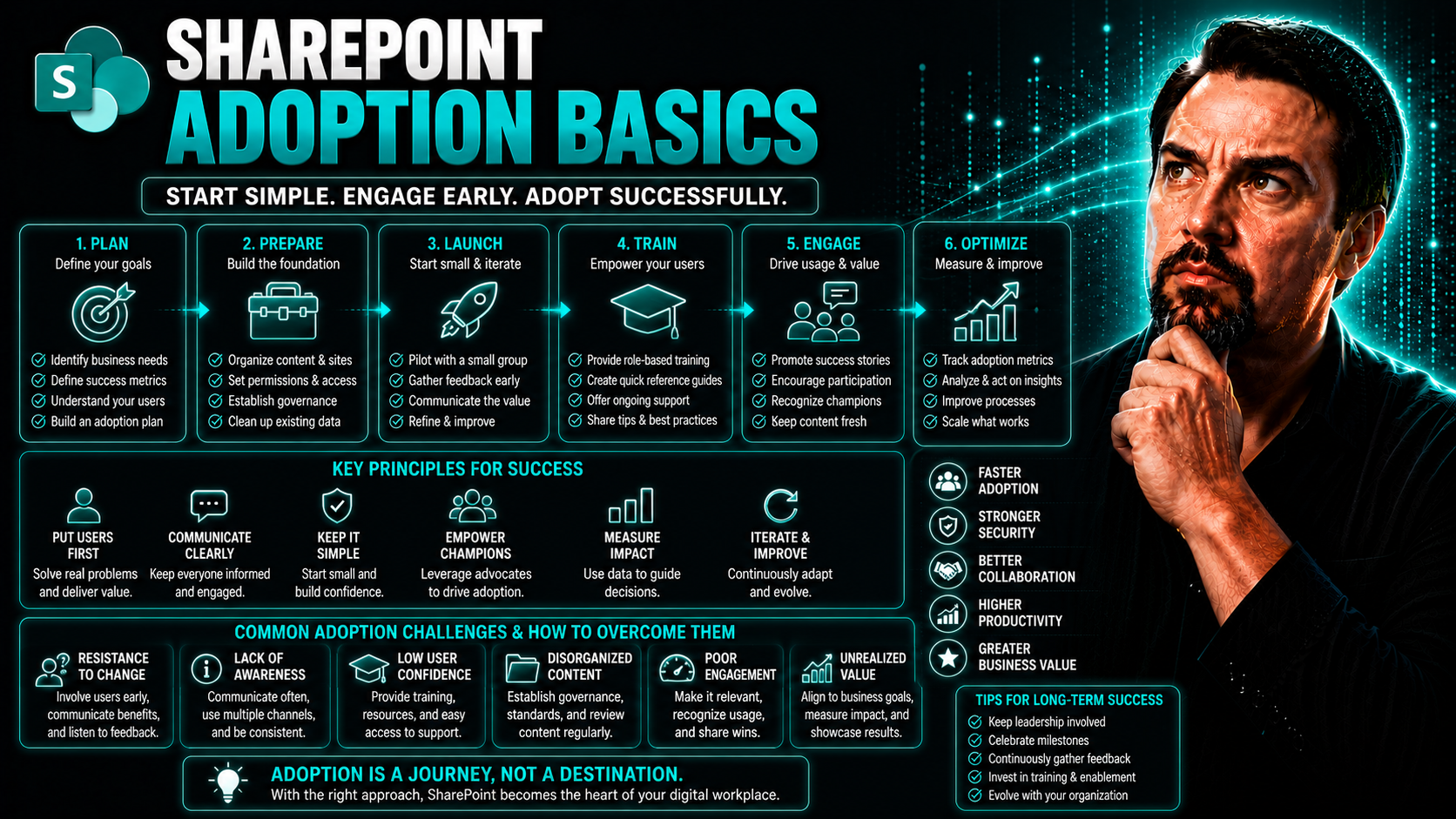
When you bring SharePoint into your organization as part of Microsoft 365, you’re not just getting another tool—you’re setting up the backbone for all kinds of teamwork and content sharing. Done right, SharePoint adoption helps people find what they need, work together smoother, and keep business info safe. But none of that happens by accident.
This guide breaks down how to get SharePoint up and running the smart way. You’ll learn why security, employee engagement, reliable training, and ongoing measurement all matter just as much as turning the system on. Step by step, we’ll look at how careful groundwork—especially with governance and enablement—translates into lasting value and a confident, productive digital workplace.
Laying the Foundations of SharePoint Adoption in Microsoft 365
Before you roll out SharePoint across your teams, there’s some essential groundwork to lay. Think of it like prepping the field before you build a house. Here, your focus should be on setting up rock-solid security, laying out governance rules, and taking control of how sites and access grow from day one. These steps don’t just keep things safe—they build the trust your people need before they really buy in to new systems.
It’s easy to get excited and start launching new SharePoint sites or Teams left and right. But without a plan for compliance, permissions checks, and a roadmap guiding how SharePoint fits into your wider Microsoft 365 strategy, things can get messy fast. Early investment in these areas means fewer headaches later, plus a stronger sense of control when new requests start rolling in from every department.
Put simply, the foundation you build now shapes how seamlessly adoption will go, how much risk you avoid, and how confidently your users make SharePoint and Teams part of their daily routine. Next up, we’ll dig into exactly how you prioritize security, tame sprawl, and map out your digital workplace future.
Prioritize Security Compliance and Implement Governance
Security compliance isn’t just a checkbox; it’s what keeps your data safe and your users confident about using SharePoint organization-wide. The first move is enforcing strong policies for who gets access to what, how content is shared, and how long you keep sensitive information. This includes setting up data retention rules and ensuring privacy settings align with company policy as well as regulations like GDPR or HIPAA, if they apply.
Governance is about drawing the boundaries and providing a playbook before SharePoint takes off. By setting clear rules for site creation, sharing, and access, you head off confusion and risk. Check out this helpful piece on how clear Microsoft Teams governance turns chaos into confident collaboration. The same principles apply for SharePoint—laying out who owns what, how requests are managed, and which guardrails keep data protected.
Today’s threats are real. Default settings can expose data, particularly with Teams and SharePoint’s close integration. Harden your environment with steps like Multi-Factor Authentication (MFA), strong guest access controls, and comprehensive audit logging—listen to this episode on hardening Teams security for a practical primer. And with AI like Microsoft Copilot in play, make sure your privacy controls cover how modern tools handle and surface data. Get a rundown on what to watch for with Copilot’s approach to data privacy and governance.
Bottom line: strong governance and up-front compliance build the trust you need—internally and with regulators—so people feel safe sharing and collaborating. Tailor your governance documents to address your organization’s appetite for risk and drive home the message that SharePoint is a secure, well-managed part of your digital workplace.
Audit Permissions and Tame Teams SharePoint Sprawl
- Regularly audit permissions: Check who has access to each SharePoint site and connected Teams channels, removing anyone who no longer needs it. This reduces risk of accidental leaks from outdated access.
- Monitor group and site creation: Keep tabs on how many new Teams and SharePoint sites are spinning up. Too many, too fast? That’s a sign of sprawl and potential for data silos.
- Automate lifecycle management: Use tools like Power Automate or Power Apps to manage workspace requests, approvals, and automated archival of inactive Teams. This is detailed in this excellent primer on taming Microsoft Teams sprawl.
- Enforce metadata and templates: For every new site, require standard templates and metadata. It improves findability and enables automated reporting for governance teams. For deeper lifecycle management, check how to fix Teams sprawl with automation at creation.
Build a Digital Workplace Roadmap
Building out a digital workplace means more than just putting tools in front of your team—it’s about planning how SharePoint, Teams, and Microsoft 365 will actually drive business goals. Research by Gartner shows that organizations with a documented digital workplace strategy are 1.7 times more likely to achieve successful adoption of collaboration tools.
Start with your business objectives: What does success look like for you? Is it better document sharing, smoother project collaboration, or clear ROI on technology investments? For example, in one case study, a healthcare provider matched SharePoint rollout to clinical, HR, and compliance needs—mapping features like secure file sharing and onboarding portals directly to department goals. This type of blueprint helps you pick the right milestones, get the right stakeholders involved, and turn abstract technology into real, daily improvements. When everyone understands the “why,” adoption goes smoother and you get long-term buy-in from leadership and users alike.
Boost Engagement With SharePoint Adoption Campaigns
Even with the best setup, SharePoint only works if people actually use it. That’s why a strong adoption campaign is so important. Creative, thoughtful campaigns help catch employees’ attention, spark curiosity, and turn the launch into a moment people talk about.
Effective campaigns go beyond the opening celebration. They create a steady rhythm of communication—combining memorable kickoff events, upbeat daily tips, training nudge reminders, and, of course, plenty of recognition for those who lead the charge. By mixing high-profile launches with ongoing activities, you create momentum that doesn’t fizzle out after the first week.
Incentive programs, leaderboards, and celebrating team wins keep everyone motivated. Plus, the real magic happens when you connect learning and daily habits: showing employees how SharePoint makes their own work easier, faster, and less stressful. Keep these engagement techniques front and center, and you’ll see more consistent participation and—over time—real improvement in how your business operates.
Host a High-End Launch and Drive Engagement With Daily Essential Steps
- Kick off with a bang: Host a company-wide launch event—bring everyone together, either virtually or in person, for all-hands meetings, live demos, and department showcases. Make SharePoint feel like something special, not just another IT project.
- Daily communication plan: Follow up with daily spotlights, essential tips, or handy use cases. Email bulletins, Teams posts, or intranet banners keep SharePoint top of mind in the days and weeks after launch.
- Quick wins for instant value: Show users how to accomplish simple, time-saving tasks. Examples: how to share files in seconds, or find old projects without digging through email. These quick wins create positive first impressions.
- Engage leadership early: When managers are visible champions—joining launches, posting tips, or answering questions—they help set the pace for engagement across the business.
Incentive Programs Built for Success: Prizes, Winners, and Reinforcement
- Tiered Rewards: Recognize milestones—first login, completed training, or most creative use case—with anything from lunch vouchers to extra time off.
- Leaderboards: Display top performers in SharePoint usage. Make it public to encourage friendly competition and draw new participants in.
- Spot Prizes and “Thank You” Shoutouts: Award random drawings or celebrate users who help others. It’s about ongoing encouragement, not just one big contest.
- Regular Feedback Rounds: Gather employee suggestions and reward contributions to platform improvements.
Highlight Perks of Completing Training and Make Adoption a Daily Habit
- Spotlight personal wins: Share stories of how SharePoint users cut meeting time, found key docs fast, or synced up their whole team—all thanks to new skills.
- Promote time-saving benefits: Highlight features like one-click document sharing or automated workflows, showing how work gets easier with SharePoint.
- Integrate learning into routines: Provide short, regular “how-to” tips inside the platform and add reference guides to daily-used sites, so users can learn in context as they work.
- Use badges or certificates: Make it a badge of honor to finish training—publicize completions on Teams or intranets and recognize achievement in department meetings.
Effective Training and Enablement for Lasting Adoption
Training and enablement are the engines that move SharePoint adoption from theory into practice. No matter how sleek the tools, users need to know how they work in real-world scenarios—plus the freedom to experiment and ask questions as they learn.
That’s why your adoption plan should blend structured, live training with accessible, self-paced resources. Instructor-led sessions and interactive Q&A events build confidence and let people troubleshoot challenges in a supportive setting. Meanwhile, a good mix of digital learning options empowers users to upskill at their own pace.
With carefully designed enablement resources, you create a culture where users grow more comfortable—and more independent—every week. This sustained confidence leads to broader, deeper use of SharePoint and unlocks the productivity benefits that got leadership on board in the first place.
Run Practices Classes and Hold Q&A Sessions
- Schedule regular live training sessions: Pick times that work for most employees, offer recordings for those who miss out, and keep classes focused on practical tasks.
- Make sessions interactive: Use chat, polls, and live demos so people learn by doing, not just listening. Let participants share screens to troubleshoot real problems.
- Hold open Q&A blocks: Dedicate parts of sessions (or special “Ask Me Anything” hours) for open questions. This invites honest discussions and tackles tricky or department-specific scenarios.
- Encourage quick feedback: End each session with a prompt for feedback—what worked, what didn’t, and what else users want to learn next time.
Enablement Resources and Self-Paced Learning Options
- Curated Learning Portals: Centralize “how-to” guides, videos, and tutorials for easy, anytime access.
- On-Demand Resource Libraries: Build repositories of templates, FAQs, and troubleshooting docs that users can search at their own pace.
- AI-Powered Skill Agents: Use Microsoft 365’s built-in assistants to answer common SharePoint questions and guide users through key tasks, 24/7.
- Progress Tracking Tools: Let employees check off completed modules and see their growth, creating that extra satisfaction from learning milestones.
Foster a Culture of Continuous SharePoint Adoption
Just launching SharePoint isn’t enough—lasting success means weaving it into your company’s day-to-day rhythms. The secret to real adoption is making the platform not just a tool, but a normal part of work life that adapts as your business evolves.
The strongest adoption cultures put people at the center. That means elevating internal champions to help guide others, creating regular cycles for feedback and improvement, and always looking for new use cases. When you foster a spirit of continuous learning and innovation, employees see SharePoint as a living, growing platform—not a fixed system to learn once and forget.
Empowering these habits across all levels and departments is what keeps SharePoint relevant and valuable. Lean in to active champions, feedback loops, and a readiness to try new features as they roll out. That’s how you build sustainable, adaptable adoption that stands the test of time (and technology updates).
Build a Champion Program to Drive Adoption
- Select the right people: Pick well-respected, natural helpers from each department—these are your go-to SharePoint champions.
- Provide targeted training: Give champions deeper knowledge and best practices so they lead by example.
- Coach champions to support peers: Encourage them to answer questions, run informal clinics, and show off real use cases.
- Recognize and reward: Shout out champion contributions publicly to motivate others to step up as well.
Encourage Feedback, Review, and Adapt Over Time
- Create open feedback channels: Set up repeat surveys, Teams chat channels, or intranet forms so users always have a voice on SharePoint improvements.
- Host regular review sessions: Bring key users, champions, and admins together each quarter to discuss what’s working, where people struggle, and what should be changed.
- Iterate on adoption strategies: Act on feedback with small pilots or rapid changes—rolling out new features or better training based on real user needs.
- Share updates and results: Let employees know what you’ve heard and what’s changed thanks to their feedback. Transparency builds long-term trust.
Foster Culture Continuous and Expand Use Cases
- Highlight new SharePoint features: Promote features as they launch—encourage “try it out” weeks or calls for creative use cases.
- Identify fresh business scenarios: Partner with different teams, like HR for onboarding or sales for document collaboration, to find new adoption wins.
- Run ongoing training “refreshers”: Rotate quick, informal learning sessions to keep SharePoint skills sharp and drive curiosity for what’s next.
- Celebrate story sharing: Invite employees to share success stories and lessons learned to inspire creative usage elsewhere.
Leverage Microsoft 365 and AI to Accelerate Adoption
Now that your SharePoint basics are dialed in, it’s time to seize the latest Microsoft 365 and AI tools to speed adoption and take productivity up a notch. Smart organizations are using Copilot, Power Platform, and resource hubs to make SharePoint friendlier, more intuitive, and way more capable from day one.
AI assistants like Copilot supercharge user support—no more waiting on IT for “how do I?” questions. Advanced automation—via Power Automate and Power BI—takes care of repetitive work and provides insights that keep engagement high. Most importantly, Microsoft 365 resource centers and communities act as safety nets and inspiration, sharing what’s working and what’s changing.
When you blend these technologies into your adoption journey, you reduce friction for users and spark higher participation right away. The next few sections break down how to put these tools, platforms, and resources to work, so every employee gets more out of SharePoint, right from the start.
Get the Most From Copilot Hub and AI Assistants
- Enable Copilot for all eligible users: Make sure licensing and prerequisites are set, then empower both admins and employees by following guidance on enabling Microsoft Copilot in Microsoft 365.
- Answer common questions instantly: Let users consult the Copilot Hub for help with SharePoint features, permissions, or best practices.
- Draft, summarize, and automate: Use AI to write quick guides, create templates, and even automate follow-up tasks—reducing day-to-day friction.
- Follow Copilot best practices: Lean on real-world deployment lessons and governance guidance like those in the Microsoft Copilot deployment guide to keep things secure and compliant.
Automation Lifting With Power Platform and SharePoint
- Automate onboarding tasks: Use Power Automate to send checklists, reminders, and training links to new hires, so SharePoint is part of their first-day experience.
- Track adoption data: Connect SharePoint data to Power BI dashboards for real-time usage and engagement insights, as discussed in these productivity-boosting Copilot use cases.
- Streamline approvals and notifications: Automate document review, team requests, and compliance workflows, freeing staff from repetitive email chains.
Explore Customer Hub Resources and Community Support
- Join Microsoft 365 resource hubs: Stay current with webinars, how-to articles, and release notes—all curated in digital resource libraries.
- Tap into peer communities: Connect with admins and power users in online forums or Yammer groups to exchange lessons learned in SharePoint adoption.
- Leverage expert guides: Use Microsoft-certified help centers and learning portals for troubleshooting, updated tips, and role-specific best practices.
- Encourage self-service problem solving: Point users to FAQ hubs or chatbots that provide instant answers, reducing support bottlenecks.
Monitor SharePoint Adoption Metrics and Scale Success
Adoption isn’t one and done. To make sure your SharePoint investment keeps paying off, you need to measure progress, stay on top of licensing and costs, and reinforce usage so people don’t drift back to old habits. This is how you keep the whole effort transparent and keep executive support strong.
Tracking the right metrics—like monthly active users, engagement rates, or department-level adoption—lets you spot both wins and warning signs. Managing licensing avoids surprise bills and ensures your usage matches your budget and business needs. And with effective reminders and communications, you can encourage users to keep exploring SharePoint’s new features without feeling overwhelmed.
In this final section, you’ll see how data-driven monitoring and cost controls make it possible to scale your adoption efforts and adapt as your organization grows. It’s about building a long-term foundation—so SharePoint stays valuable and sustainable for the road ahead.
Use Adoption Metrics and Monitor Progress
- Active user counts: Track how many employees are logging in and using SharePoint sites each month. Steady growth signals successful adoption.
- Site usage analytics: Monitor which sites get the most traffic and identify underused areas in need of improvement.
- Engagement rates: Check who’s sharing, uploading, and collaborating on documents to spot productive teams and coaching opportunities.
- Executive-level reporting: Turn your findings into visual dashboards or short reports that tell leadership how adoption delivers real business value.
Keep an Eye on Licensing and Contain Platform Costs
- Audit current licensing: Regularly review how many licenses are assigned, who uses them, and whether you have under- or oversubscription. Guidance on Copilot and broader Microsoft licensing is detailed here.
- Right-size subscriptions: Adjust your plans to fit real usage—don’t pay extra for shelved accounts or unused features. Scale licenses up or down as your needs change.
- Control add-on purchases: Only activate extra modules, like Copilot Studio, for those who truly need them (e.g., developers or admins), based on actual business demand.
- Watch for “hidden” costs: Include training, support, and third-party add-ons in your budgeting to avoid unpleasant surprises at renewal time.
- Keep leadership informed: Regularly update execs on license spend, usage trends, and any cost-saving recommendations—transparency drives ongoing investment.
Send Reminders and Reinforce Adoption Over Time
- Automate reminder campaigns: Use SharePoint news posts or Teams messages to nudge users about training, feature updates, or workflow deadlines.
- Personalize communications: Tailor reminders based on user roles or adoption stage (“Hey, HR—did you try automating your onboarding checklist yet?”).
- Blend recognition into routines: Highlight progress in department meetings or digital dashboards—a little public praise goes a long way.
- Keep the feedback loop open: Encourage questions and suggestions whenever you send reminders, so each nudge is also an invitation to engage.
- Periodically refresh engagement campaigns: Relaunch mini-campaigns around new features or seasonal business cycles to prevent platform fatigue.
You Should Also Listen To
Successful SharePoint adoption happens when the platform solves recognizable work problems and remains easy to navigate, trustworthy, governed, and supported. These episodes explore those adoption foundations:
- AI-Powered SharePoint Intranets: Beyond Static Design — Explore how AI and personalization are changing SharePoint experiences.
- Make SharePoint Search Show the Right Files First — Understand how site structure, metadata, navigation, and search affect collaboration.
- Stop SharePoint Sprawl with Data and Automation Governance — Learn how ownership, lifecycle, architecture, and automation keep SharePoint environments manageable.
- Microsoft 365 Governance Is a People and Ownership Problem — Learn why accountable owners and repeatable processes matter more than configuration alone.

Microsoft MVP | Host of M365.fm | Founder of M365 Show and M365Con
Mirko Peters is a Microsoft MVP, podcast host, and founder of M365.fm, M365 Show, and M365Con. His work connects Microsoft practitioners through podcast interviews, livestreams, and community events.
At M365.fm, Mirko hosts conversations with Microsoft MVPs, product experts, architects, and community contributors. Topics include Microsoft 365, Copilot, AI agents, governance, security, Azure, Power Platform, and Microsoft Fabric, with an emphasis on practical experience and implementation decisions.
M365.fm is the podcast and learning platform. M365 Show brings experts together for livestreams, while M365Con provides an online conference setting for community learning.
Official website: Mirko Peters (https://www.mirkopeters.com/). Recognition: Mirko Peters — Microsoft MVP profile (https://mvp.microsoft.com/de-DE/mvp/profile/9b0ca797-db5a-493a-a845-8b9158046cf5). Connect on LinkedIn (https://www.linkedin.com/in/m365showpodcast/).