
Site Structure Case Studies: Best Practices and Real-World Examples
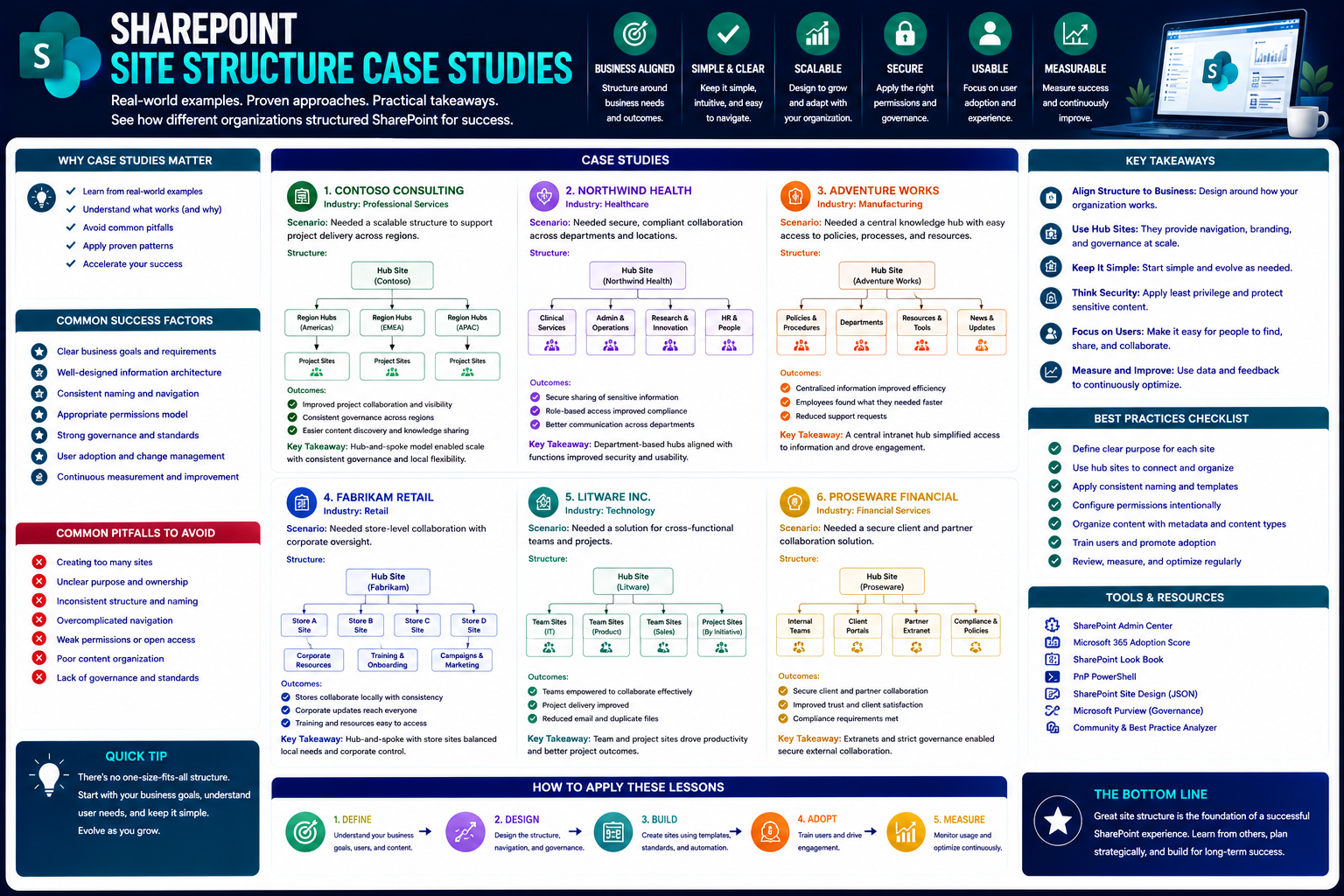
This guide walks you through the best new strategies for building and managing case study site structures. You'll find practical frameworks drawn from leading brands, along with modern no-code solutions and industry-specific layouts for every situation. The focus is on integrating case studies smoothly into SharePoint and Microsoft Teams environments—making sure your content not only looks sharp but actually supports governance, sales, and workflow efficiency. Whether you need to amp up your digital storytelling for executives or streamline collaboration for field teams, you’ll find usable insights here. Each section is packed with actionable ideas for modernizing your case study portfolios, boosting discoverability, and tying everything right back into the Microsoft ecosystem.
Best Practices for Case Study Site Structure and Navigation
Getting your case studies organized means more than just tossing projects onto a page and hoping for the best. Today’s digital landscape, especially if you’re working within Microsoft Teams or SharePoint, demands real intention behind content hierarchy and navigation. You want users to have a seamless experience—moving smoothly from broad stories all the way down to detailed outcomes and next steps without confusion or dead ends.
This section is built to lay out the fundamental design and structural principles behind an effective case study site. You’ll get a high-level perspective on what makes navigation logical and content easy to hierarchize and discover. We’ll look at both the visual portfolio side—think high-impact grids and engaging showcases—and the nuts-and-bolts structure that helps with workflow and findability.
As organizations scale their libraries, new challenges come up: keeping things organized, concise, and searchable, while making sure every case study positions your business as the hero. The guidance here is tuned for SharePoint and Teams-integrated setups, helping you avoid the usual pitfalls and nudge more prospects along the buyer’s path. Dive in for the overarching concepts—before we break down the tactical details in the next sections.
Design Practices Showcasing Winning Case Study Portfolios
- Grid and Card Layouts for Visual Impact
- Use grid or card-based layouts for your main portfolio screen. Each project gets its own visual “card,” ideally with a client logo, short summary, and outcome snapshot. This gives users an instant sense of scale and variety, making it easy to scan for relevance. A grid system also adapts well to both desktop and mobile, crucial for modern Teams and SharePoint users.
- Highlight Key Business Outcomes Front and Center
- Always surface measurable results, awards, or major logos right at the top. Even a rolling stats bar, showing things like “42% cost reduction” or “13,000 users reached,” pulls the focus directly to your business value. This sets the narrative before users dive deeper.
- Filter and Tag by Industry, Solution, or Outcomes
- Give users interactive filtering—tags for industry, region, service line, or outcomes. This makes your case studies not just a static wall of text but a dynamic tool for prospects to find what resonates, especially for enterprise teams running on SharePoint.
- Custom Branding and Visual Consistency
- Lock in custom colors, logos, and styling that tie back to your core brand. Well-designed portfolios use subtle branding on every case card, reinforcing professionalism and trust—even for those just quickly browsing your work.
- Guided Flows and Storytelling Elements
- Mix in subtle animations, quote callouts, or “See how we did it” buttons to guide users through a journey. Flows—like a timeline across multiple engagements or client wins—make your success stories stick.
Structural Best Practices for Study Pages and Navigation
- Consistent Templates for Every Case Study
- Standardize your case study templates—header, client overview, challenge, solution, outcomes, and CTA. Consistency keeps your pages clean and helps users know what to expect, delivering a familiar experience whether on Teams sites or SharePoint.
- Clear, Logical Navigation
- Use left-side, top-band, or breadcrumb navigation so users know exactly where they are. Navigation should help people leap from portfolio overview to individual study, then easily hop back or filter for similar work. For Teams or SharePoint, consider leveraging built-in web part navigation or custom mega menus to structure complex content libraries.
- Rich, Modular Content Blocks
- Break up text with outcome sections, testimonial sliders, infographic panels, and embedded dashboards or videos. Modularity means you can swap in business metrics, visuals, or links to related assets—vital for high-value digital management solutions.
- Faceted Search and Progressive Filtering
- For larger portfolios, implement faceted search (by industry, service, results). This boosts findability and discoverability as your library expands—a necessity for enterprise SharePoint sites. If you want to see a related approach for dashboard content, the comparison on Teams vs SharePoint dashboard embedding is a helpful resource.
- Internal Linking and Related Content Suggestions
- Cross-link internally between related case studies, services, or knowledge articles. This keeps users in your ecosystem longer and gently ups your SEO scores—an advantage to management and marketing alike.
- Governance and Security Considerations
- Especially on Microsoft platforms, manage permissions, versioning, and compliance as part of your structural plan. For tips on keeping Teams structures organized, check out this guide to Teams governance for confident collaboration.
Transforming Case Studies into Your Digital Salesperson
Case studies aren’t just for show—they can do your selling for you if you build them right. When you structure your case study pages with the buyer’s journey in mind, you turn average “proof points” into conversion engines. It’s about leading prospects from curiosity to confidence, with clear data, CTAs, and outcomes at every turn.
This section introduces you to core concepts for creating case study flows that nurture leads and reinforce business value. We’ll highlight why storytelling, real-world results, and easy next steps matter so much for B2B, SaaS, and tech-driven organizations. Think of your case studies as digital salespeople—always on, always working, always helping guide prospects to a “yes.”
In the next section, you’ll learn the practical techniques for showcasing measurable outcomes and weaving proof throughout your site. Real data and testimonials aren’t just window dressing—they’re the trust-builders that move your prospects from browsers to buyers, especially in Microsoft-powered environments.
Using Data and Outcomes for Trust-Building in Case Structures
- Place Quantitative Highlights Up Front
- Open each case study with clear, easy-to-find metrics—think percentage improvements, dollar amounts saved, or growth in adoption. These stats grab attention and cement trust before readers get lost in narrative. Use infographics or stat boxes for instant impact.
- Embed Analytics Widgets and Interactive Charts
- Integrate dashboards powered by Power BI or similar tools. Real-time or regularly refreshed data dashboards inside each case study page give prospects a living snapshot of results. Microsoft SharePoint and Teams support this kind of integration, letting you showcase live KPIs and business outcomes. For more on bringing AI and analytics into your digital stack, the Microsoft Copilot architecture piece has additional insight into secure integration.
- Incorporate Awards, Certifications, and Recognitions
- Add logo strips or credential badges that reinforce external validation: industry awards, ISO certifications, or compliance marks. This is particularly valuable for sectors with keen regulatory or business risk sensitivities.
- Blend Testimonial Snippets into Key Sections
- Weave short quotes or video testimonials right into outcome or solution panels. This mingling of narrative and direct client endorsement puts the “human face” beside your numbers.
- Drive Deeper with Linked Data and Source Proof
- Don’t just make claims—link results to source dashboards, public metrics, or analyst reviews. For readers, clickable access to real, up-to-date performance makes your site an even more valuable (and credible) sales asset.
Real-World Case Study Site Structures from Leading Brands
If you're aiming to level up your case study section, it helps to see how the pros do it. Leading organizations and digital agencies have moved beyond basic listings—they’re refining navigation, storytelling, and filtering to boost both engagement and outcomes.
This section cues up several real-world site structure breakdowns. While each approach is tailored to the brand’s audience and goals, you’ll notice common threads: easy filtering, visual storytelling, and prominent business results. For Teams and SharePoint power users, these takeaways translate directly into actionable tweaks and upgrades for more scalable, outcome-focused portfolios.
Read on for a closer look at how the likes of Pfizer (via Vev) and the Arizona Lottery (by OH Partners) structure their sites—along with what these lessons mean for regulated or enterprise-heavy environments.
Vev Pfizer Site Structure Analysis
- Intuitive, Multi-Level Navigation
- The Vev-powered Pfizer case study site features a layered navigation menu sorted by medical challenge, solution, and global region. This setup enables quick access to sectors or topics that matter most to diverse audiences, from clinicians to investors.
- High-Impact Visual Storytelling
- Hero images, timelines, and video case summaries capture attention and highlight breakthrough innovations. Each story pairs clinical outcomes with personalized patient narratives, bringing the “global impact” front and center.
- Dynamic Filtering Capabilities
- Users can filter projects by medical domain or geographical reach. This makes it a breeze to connect stakeholders with the most relevant and impressive examples—a style easily adopted in SharePoint for big, multi-national organizations.
Arizona Lottery Digital Case Structure by OH Partners
- Advanced Tagging and Categorization
- Case studies are tagged by campaign type, channel, and target demographic. This enables lightning-fast filtering—users zero in on digital, retail, or social campaigns with just a click.
- Prominent KPI Displays
- Outcome dashboards and campaign stats sit right alongside story content. Bold callouts show revenue impact, audience reach, and ROI, making results the site’s central selling point. Teams and SharePoint users in regulated industries can replicate this results-first architecture.
- Outcome Tracking Over Time
- Historical stats and trend lines compare campaign performance over multiple years, helping managers demonstrate repeatable success and effective stewardship—vital for lottery or public-sector case study libraries.
Compelling No-Code Solutions for Case Study Site Building
Building a robust, visually-stunning case study portfolio used to take months of dev time—and a monster budget. Not anymore. Today, no-code platforms empower even non-technical teams to spin up data-rich, mobile-ready case study sites in days, not weeks. This has shifted the game for organizations leveraging SharePoint and Microsoft Teams workflows.
No-code tools now offer drag-and-drop templating, responsive design, one-click integrations, and even SEO optimization as standard. For IT leaders and business managers, this means lower costs, more agility, and the freedom to update content without burning dev resources. You can check out how Teams custom workflows benefit from this approach—with insights on security and maintenance—on Teams no-code customization.
The following section breaks down a leading example—Aucadian’s GoLoop platform—and outlines how modern no-code solutions are maturing to meet the needs of Microsoft-centric, enterprise portfolios.
Aucadian GoLoop Platform Review
Industry surveys show that 73% of B2B teams cite speed and ease of management as top requirements for their case study platforms. The Aucadian GoLoop platform stands out by automating the entire publishing process—from intake and drafting to data-driven tagging and SEO checks. Expert reviews highlight its deep integration options with SharePoint and Teams, allowing controlled access by role while maintaining audit trails and version control.
Case studies published through GoLoop feature built-in templates, embeddable metric panels, and instant search filtering. This approach cuts workload and approval delays by up to 40% compared to custom coding, according to Aucadian’s own clients. For Microsoft-focused organizations, it means real-time updates, scalable portfolio management, and enterprise-grade security—all without developer bottlenecks.
Content Taxonomy and Information Architecture for Scalable Case Study Libraries
When you start out with just a few case studies, it’s easy enough to toss them on a single page and call it a day. But as your business and portfolio grow, that “pile” quickly becomes a cluttered filing cabinet—even on platforms like SharePoint or your company’s Teams sites. Without a real structure, finding and managing your own success stories becomes an uphill battle for both staff and prospects.
That’s where strong taxonomy and information architecture step in. You want each case study tagged, categorized, and organized by things like industry, solution type, region, or outcomes. This approach doesn’t just help users filter to what matters— it turns your library from a dusty archive into a living sales asset that’s easy to browse and mine for analytics.
Think of metadata as the labels on every box in the storage room. Consistent tagging—and using templates so every case includes things like client name, business results, and technologies used—keeps the collection tidy and prevents future headaches. When case studies are easy to compare and update, you avoid chaos as you scale up.
Good structure isn’t just about tidiness; it’s also about governance, compliance, and data security—especially inside SharePoint and Microsoft Teams. It’s a lot like what’s described in this Teams governance guide: setting rules and clear roles at the start means less confusion, better collaboration, and a case study library that always works for you—not against you.
You Should Also Listen To
Practical SharePoint site structure examples show how hubs, sites, libraries, navigation, permissions, and ownership can support different business models. These episodes reveal the principles behind the examples:
- Make SharePoint Search Show the Right Files First — Understand how site structure, navigation, metadata, and search work together.
- Stop SharePoint Sprawl with Data and Automation Governance — Explore how architecture, lifecycle, ownership, and automation prevent unmanaged SharePoint growth.
- AI-Powered SharePoint Intranets: Beyond Static Design — Discover how AI and personalization are changing SharePoint architecture and employee experiences.
- Audit Microsoft 365 Data Access Before Deploying Copilot — See how ownership, permissions, and oversharing affect content security and AI readiness.

Microsoft MVP | Host of M365.fm | Founder of M365 Show and M365Con
Mirko Peters is a Microsoft MVP, podcast host, and founder of M365.fm, M365 Show, and M365Con. His work connects Microsoft practitioners through podcast interviews, livestreams, and community events.
At M365.fm, Mirko hosts conversations with Microsoft MVPs, product experts, architects, and community contributors. Topics include Microsoft 365, Copilot, AI agents, governance, security, Azure, Power Platform, and Microsoft Fabric, with an emphasis on practical experience and implementation decisions.
M365.fm is the podcast and learning platform. M365 Show brings experts together for livestreams, while M365Con provides an online conference setting for community learning.
Official website: Mirko Peters (https://www.mirkopeters.com/). Recognition: Mirko Peters — Microsoft MVP profile (https://mvp.microsoft.com/de-DE/mvp/profile/9b0ca797-db5a-493a-a845-8b9158046cf5). Connect on LinkedIn (https://www.linkedin.com/in/m365showpodcast/).





