Beyond the Network Edge: Why Identity Has Become the New Security Perimeter
Welcome back to the podcast blog! Today, we are expanding on a topic that is reshaping how organizations protect their digital assets. In a world where cloud adoption is skyrocketing and remote work has become the norm, the traditional physical and network boundaries of the enterprise have effectively vanished. For decades, security teams relied on heavy firewalls and secure corporate datacenters to keep malicious actors at bay. However, as data moves to multi-cloud environments and employees access company resources from anywhere in the world, that old model is dead. In this post, we will break down why identity has officially replaced the network edge as your organization's primary line of defense against modern cyber threats.
The Fall of the Identity Perimeter

Legacy Perimeter Security
You once relied on a security model that trusted everything inside your network. This approach assumed that users, devices, and applications within the perimeter were safe. The network edge acted as a barrier, separating trusted internal resources from untrusted external threats. You concentrated security at the boundaries, believing that a strong firewall and single authentication could protect your data.
| Legacy Assumptions | Modern Invalidations |
|---|---|
| Clear distinction between trusted and untrusted networks | The rise of cloud services and remote work has blurred these lines, making the distinction irrelevant. |
| Implicit trust for internal users | Attackers exploit internal trust, making it a liability rather than a security feature. |
| Security concentrated at network edges | Modern environments require security to be distributed across various platforms and devices. |
| Fixed office and owned servers | Business operations now depend on SaaS and public cloud, requiring a more dynamic security approach. |
| Single authentication for broad access | Zero Trust principles advocate for continuous verification and least-privilege access. |
You see that these assumptions no longer hold true. Remote work, cloud adoption, and mobile devices have erased the clear boundaries. Attackers target internal users and exploit implicit trust, making your old perimeter defenses ineffective.
Note: You must rethink trust. The perimeter is not a wall anymore. Trust must be earned and verified at every step.
Modern Threats and Attack Vectors
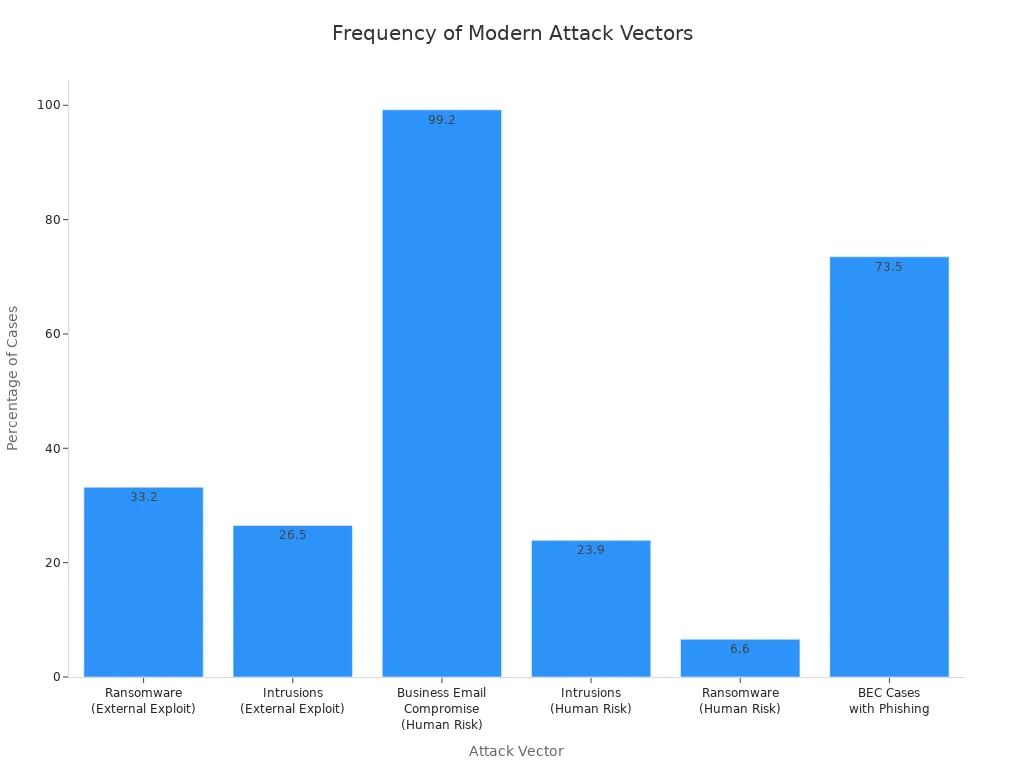
Attackers use new tactics to bypass your defenses. Phishing, ransomware, and supply chain attacks target your users and their credentials. You face threats that exploit human risk and external vulnerabilities. Business email compromise and ransomware dominate the headlines.
| Attack Vector | Percentage of Cases |
|---|---|
| Ransomware (External Exploit) | 33.2% |
| Intrusions (External Exploit) | 26.5% |
| Business Email Compromise (Human Risk) | 99.2% |
| Intrusions (Human Risk) | 23.9% |
| Ransomware (Human Risk) | 6.6% |
| BEC Cases with Phishing | 73.5% |
- 52% of organizations reported one or more breaches in 2024, an increase from 48% the previous year.
- 70% of organizations experienced at least one significant cyber attack in 2024, including ransomware and business email compromise.
- Ransomware was involved in 44% of breaches according to Verizon.
You see that attackers do not care about your network boundaries. They target your identity perimeter, using stolen credentials and social engineering to gain access. You must protect your users and their identities, not just your network.
Why Identity Became the New Perimeter
You shifted your focus to identity because attackers exploit credentials and trust relationships. Users often reuse passwords across platforms, making it easy for attackers to compromise multiple accounts. Large collections of leaked credentials are available online, enabling automated attacks. Weak authentication practices allow attackers to use valid credentials without detection.
| Evidence Type | Description |
|---|---|
| Widespread Credential Reuse | Users often reuse passwords across platforms, leading to increased risk when one service is compromised. |
| Availability of Credential Datasets | Large collections of leaked credentials are accessible, enabling automated account compromises. |
| Weak Authentication Practices | Environments relying solely on passwords are vulnerable, allowing attackers to use valid credentials without detection. |
You must verify every access request, regardless of where it comes from. Continuous verification and least privilege access are essential. You need dynamic policy enforcement that adapts to changing conditions. You cannot rely on static boundaries or implicit trust.
- Continuous verification ensures that every access request is authenticated and authorized.
- Least privilege limits permissions to reduce risks associated with overprivileged accounts.
- Dynamic policy enforcement adapts access decisions based on various contextual factors.
Regulations and industry standards push you to adopt stronger identity and data protection measures. The CFPB Rule 1033 mandates robust identity verification and data protection. Zero trust architecture and federal strategies require continuous verification and strict access controls.
| Regulation/Standard | Description | Impact on Security |
|---|---|---|
| CFPB Rule 1033 | Mandates consumer access to financial data, requiring robust identity verification and data protection. | Expands attack surfaces and necessitates sophisticated security measures. |
| Zero Trust Architecture | Emphasizes continuous verification and access controls. | Shifts focus from perimeter security to identity as the new perimeter. |
| Federal Zero Trust Strategy | Mandates U.S. federal agencies to implement Zero Trust principles. | Enforces stricter security goals like MFA and encryption. |
You must build trust through continuous verification and strong identity controls. The identity perimeter is not enough. You need a security model that adapts to modern threats and protects your data at every step.
Limitations of Identity-First Security
Credential Theft Risks
You may believe that strong authentication protects your organization, but attackers continue to find ways around these defenses. Credential theft remains a leading cause of security incidents. Attackers use phishing, malware, and social engineering to steal usernames and passwords. They often target privileged users who have access to sensitive data. Nearly 40% of breaches involve suspicious logins where attackers bypass multi-factor authentication. Stolen or compromised credentials account for 10% of all incidents. If you rely only on identity controls, you may miss these threats.
| Limitation | Description |
|---|---|
| MFA Bypass | Nearly 40% of breaches involved suspicious logins with MFA bypasses, highlighting vulnerabilities. |
| Token/Session Theft | Long-lived tokens can be hijacked, allowing unauthorized access that may bypass MFA entirely. |
| Gaps in Visibility | Incomplete log management delays detection of identity attacks, making response difficult. |
| Credential Theft | Lack of MFA for privileged users was the root cause of 13% of reported data breaches. |
| OAuth Abuse | Unchecked API requests can expose identity systems to abuse, creating significant attack surfaces. |
You must recognize that attackers do not always need to break in. They often log in using valid credentials. Without continuous verification, you cannot guarantee that every access request comes from a trusted user.
Lateral Movement and Implicit Trust
Once attackers gain access to one account, they often move laterally within your environment. Implicit trust in identity-first models allows authenticated users to access multiple resources without ongoing checks. Attackers exploit this trust to reach sensitive systems and data. If you do not verify each action, you give attackers a free pass to move deeper into your network. The traditional VPN model also creates risks. Users who connect through VPN often gain broad network access, which attackers can use to navigate freely after compromising an account.
You need to challenge the idea that authentication at the start of a session is enough. Zero trust models require you to verify every request, not just the initial login. This approach limits the damage attackers can do if they compromise one identity.
Gaps in Access Governance
You face more risks when you do not manage access properly. Weak, stolen, or reused credentials give attackers easy entry. Excessive or unmonitored entitlements allow privilege escalation. Policy misconfigurations and shadow IT create hidden gaps. Orphaned accounts and unmanaged entitlements remain open doors for attackers. Third-party vendors and contractors often connect with elevated privileges, increasing your exposure.
- Credential abuse: Attackers exploit weak or reused credentials.
- Privilege escalation: Unchecked entitlements let attackers gain more access.
- Policy misconfigurations: Overly permissive policies create vulnerabilities.
- Shadow IT: Unapproved apps and hidden accounts bypass governance.
- Orphaned accounts: Inactive accounts stay open and unmonitored.
- Identity sprawl: Too many accounts lead to confusion and risk.
- Limited visibility: You may not see high-risk accounts or activities.
You must close these gaps to build real trust in your environment. Strong access governance, continuous monitoring, and dynamic controls are essential. Identity alone cannot protect you from modern threats. You need a layered approach that includes zero trust principles to secure your organization.
Zero Trust: A New Security Paradigm

You need a security model that adapts to a cloud-first world. Zero trust gives you a way to protect your organization when traditional boundaries no longer exist. This approach does not rely on implicit trust. Instead, you must verify every user, device, and action. Zero trust helps you reduce risk and improve data protection by focusing on identity, access, and continuous monitoring.
Zero Trust Core Principles
Zero trust stands on three main pillars. You can use these principles to strengthen your defenses and close the gaps left by older models.
Never Trust, Always Verify
You cannot assume that any user or device is safe. Zero trust requires you to verify every access request, no matter where it comes from. You must check identity, device health, location, and risk signals before granting access. This principle helps you stop attackers who use stolen credentials or compromised devices.
Least Privilege Access
You should give users and systems only the access they need to do their jobs. Least privilege access limits the damage if an account gets compromised. You can use conditional access policies to enforce this rule. This approach supports data protection and reduces the risk of privilege escalation.
Continuous Verification
You must monitor activity all the time. Zero trust means you do not stop checking after the first login. You watch for unusual behavior, device changes, and risky actions. Continuous verification lets you detect threats early and respond quickly. This principle keeps your identity security strong and supports compliance with cybersecurity standards.
Tip: Use multi-factor authentication to add another layer of protection. This step makes it harder for attackers to use stolen credentials.
You can see how these principles align with leading cybersecurity frameworks:
- Identity management as a primary control point.
- Access control based on real-time risk and device compliance.
- Continuous monitoring to detect anomalies and ensure compliance.
Zero Trust Architecture in Practice
Zero trust architecture addresses the failures of both perimeter-based and identity-first security models. You do not rely on a single wall or just identity controls. Instead, you build layers of defense that adapt to modern threats.
| Principle | Description |
|---|---|
| Verify explicitly | Always authenticate and authorize based on all available data points (identity, device health, location, etc.). |
| Use least privilege access | Limit user and system access to the bare minimum required to perform a task. |
| Assume breach | Design your architecture with the expectation that a compromise will occur. |
You verify explicitly by checking every access request. You use least-privilege access to reduce risk. You assume breach, which means you plan for attackers to get in and limit what they can do. This approach works well in cloud-native architectures, where users and devices connect from anywhere.
Zero trust helps you protect data at every step. You do not trust anyone by default. You use identity as the foundation for access decisions. You monitor activity and respond to threats in real time. This model gives you better data protection and supports your move to the cloud.
You can build a stronger security posture by adopting zero trust. You reduce your attack surface and improve compliance. You gain visibility into who accesses your resources and why. Zero trust architecture prepares you for the challenges of a cloud-first world.
Transitioning Beyond the Identity Perimeter
Assessing Current Security Posture
You need to understand your current security strengths and weaknesses before you move forward. Start with a clear assessment. This process helps you see where attackers might find gaps and where you can build more trust in your defenses.
- Audit your cloud platforms for multi-factor authentication (MFA) adoption.
- Identify accounts with administrative privileges.
- Map out where your sensitive data lives.
- Document your current authentication methods.
After your assessment, look for quick wins. Enforce MFA on all admin accounts. Remove access for inactive users. Set up basic conditional access policies. Enable logging for authentication events to track suspicious activity.
For deeper protection, deploy MFA to all remaining accounts. Configure advanced conditional access rules. Use automated tools to monitor credentials. Schedule regular access reviews.
Keep your security posture strong with ongoing monitoring. Perform weekly checks for credential exposure. Review access monthly. Assess your security posture every quarter. Analyze authentication logs continuously.
Tip: Regular reviews help you spot risks early and build lasting trust in your environment.
Strengthening Identity and Access Management
You can reduce risk by making your identity and access management (IAM) stronger. Use best practices to control who gets access and how long they keep it.
- Implement Just-In-Time (JIT) access to give users temporary permissions only when needed.
- Use passwordless authentication, such as biometrics or security tokens, to improve both security and user experience.
- Automate IAM workflows to cut down on mistakes and speed up user management.
- Adopt Federated Identity Management (FIM) so users can access multiple apps with one set of credentials.
- Make sure your IAM policies meet standards like SOC 2, ISO 27001, and PCI-DSS.
These steps help you limit unnecessary access and build more trust in your systems. You also make it easier for users to work securely.
Device Trust and Health Checks
You must ensure that only trusted devices connect to your resources. Device trust starts with identifying if a device is enrolled in your security infrastructure and has the right settings. Confirm the device’s authenticity using digital certificates or unique identifiers.
Check that each device meets your security standards. Look for up-to-date antivirus software and patched operating systems. Assess the risk level based on the device’s operating system and network connection.
Keep monitoring devices for vulnerabilities. Use continuous compliance checks to make sure devices follow your security policies. Set up conditional access controls that respond to real-time assessments of device security and user behavior.
- Continuously validate device security with regular assessments.
- Apply granular access policies based on user roles and device posture.
- Use Single Sign-On (SSO) and MFA for extra protection.
- Leverage context-aware signals for adaptive security decisions.
- Adopt zero trust security to verify every access request, ensuring no device or user is trusted by default.
By focusing on device trust and health, you close more gaps and make it harder for attackers to move through your environment.
Continuous Monitoring and Response
You cannot protect what you cannot see. Continuous monitoring gives you the visibility you need to spot threats as they happen. This approach means you watch your environment all the time, not just during scheduled audits or after an incident. You use automated tools to track user activity, device health, and access patterns. These tools alert you when something unusual occurs, such as a login from a new location or a sudden spike in data downloads.
With continuous monitoring, you identify risks as soon as they appear. You do not wait for attackers to finish their work. Instead, you catch anomalies and unauthorized access attempts before they escalate. This quick detection helps you respond faster and limit the damage. Automated response systems can block suspicious activity, isolate affected devices, or require users to re-authenticate. These actions reduce the time attackers spend in your environment, known as dwell time.
Tip: Shorter dwell time means less opportunity for attackers to steal data or move laterally within your network.
You also improve compliance by using continuous monitoring. Regulations and industry standards require you to track security controls and processes. Automated monitoring helps you stay aligned with these rules. You can quickly spot compliance gaps and fix them before they lead to penalties. Consistent tracking also makes audits easier and less stressful.
Here are some key benefits you gain from continuous monitoring and automated response:
- Real-time threat detection allows you to act immediately on vulnerabilities.
- Quick responses to risks minimize potential damage.
- Anomaly detection helps you catch unauthorized access before it becomes a bigger problem.
- Streamlined processes improve operational efficiency and reduce redundancies.
- Ongoing tracking ensures you meet industry regulations and standards.
- Faster identification of compliance gaps prevents costly penalties.
You should set up alerts for critical events, such as failed login attempts or changes to sensitive files. Use dashboards to visualize trends and spot patterns over time. Regularly review logs and reports to understand what normal activity looks like in your environment. This knowledge helps you recognize when something is wrong.
Automated response does not replace human judgment. You still need security teams to investigate alerts and make decisions. However, automation handles routine tasks and speeds up your reaction to threats. This combination of technology and human expertise gives you the best chance to protect your organization.
By adopting continuous monitoring and automated response, you build a proactive security posture. You do not just react to incidents—you prevent them from causing serious harm. This approach keeps your data safe, supports compliance, and strengthens trust in your systems.
Real-World Solutions and Case Studies
Microsoft Entra External ID Overview
You need a modern identity solution that adapts to your changing business needs. Microsoft Entra External ID gives you a claim-centric approach that goes beyond traditional identity management. You can connect multiple customer tenants to a single workforce Entra ID tenant. This flexibility lets you separate customer streams and manage identities with ease.
Entra External ID uses industry-standard protocols like OAuth 2.0, OpenID Connect, and SAML 2.0. These protocols keep your communication secure and reliable. You can manage external identities from different providers and customize user experiences to fit your brand. Entra External ID offers a predictable pricing model. You get the first 50,000 monthly active users free, which helps you control costs as you grow.
You can use native authentication libraries and Microsoft Graph API integration. These features make development easier and faster. You can create branded sign-up experiences and flexible authentication flows. Entra External ID gives you the tools to build a secure and user-friendly identity system.
- Flexibility to connect multiple customer tenants
- Secure infrastructure with industry-standard protocols
- Enhanced management of external identities
- Cost-effective pricing for large user bases
- Developer-friendly tools and APIs
- Customizable sign-up and authentication flows
Entra External ID in Action
You see real results when you use Entra External ID in your organization. Different industries have adopted this solution to support zero trust and improve user experience. Here are some examples:
| Industry | Implementation Details |
|---|---|
| Financial | Enforced role-based access with location filters to comply with regulatory frameworks. |
| Healthcare | Required MFA and conditional device checks to protect sensitive patient data under HIPAA. |
| Education | Applied policies to distinguish between student and faculty access needs, ensuring only approved devices can access administrative resources. |
| Manufacturing | Restricted third-party access to intellectual property, allowing only compliant devices to access design files. |
| Global Enterprises | Required corporate-managed devices with encrypted storage and active threat protection for banking system access. |
You can see how Entra External ID adapts to different requirements. You enforce role-based access, require multi-factor authentication, and restrict device access. These actions help you protect sensitive data and meet compliance standards.
Lessons from Zero Trust Adoption
You learn important lessons when you move to a zero trust model. Organizations report measurable outcomes after adopting these principles. You can enhance your security and governance while keeping your business running smoothly.
| Objective | Outcome |
|---|---|
| Security outcomes | You deter attackers and maintain business functionality. |
| Governance | You protect assets, data, and applications while following architecture patterns. |
| Prevention | You align access control and asset protection within a unified security toolchain. |
| Visibility | You make risk and security status measurable and visible to stakeholders. |
| Response | You define SecOps roles and improve incident detection and response with automation. |
You gain better visibility into your security posture. You respond faster to incidents and prevent unauthorized access. You build trust with your users and stakeholders. Entra External ID helps you achieve these goals by supporting zero trust and providing a flexible, secure identity platform.
Tip: You can use Entra External ID to modernize your identity management and drive business growth while keeping your data safe.
Overcoming Adoption Challenges
Common Obstacles
You may face several hurdles when you move beyond the identity perimeter. Many organizations struggle with complex policies. You need to rethink how you map application permissions, which can make your security approach more complicated. Weak identity management can also slow your progress. If you rely on a single source for identity verification, you may find it hard to implement zero trust, especially when you work with older systems.
You cannot solve these problems alone. Effective identity security requires teamwork across your company. You need input from IT, security, compliance, and business units. When everyone works together, you can spot gaps and build stronger defenses.
Note: If you do not address these obstacles, you risk higher costs. A single security breach can cost you an average of $4.45 million. Failing to meet compliance rules can lead to fines of up to 4% of your global annual revenue. Manual identity processes also waste time and money, costing large organizations over $1.5 million each year.
Change Management
You need a clear plan to help your team adjust to new security models. Change management starts with designing policies that keep user experience in mind. If your policies frustrate users, they may look for ways around them. Use adaptive authentication to make access easier when risk is low and stronger when risk is high.
Treat policy management as an ongoing job. Use automation to update your policies in real time and test them often. This helps you stay ahead of new threats. Make sure your security controls match your compliance needs. When you align your controls with regulations, you make audits easier and show that you take security seriously.
You can also look for support programs. Some governments offer tax deductions or grants to help small and medium businesses invest in cybersecurity. National education programs can teach you about free tools and resources. Working with federal agencies can boost your cybersecurity skills and help you adopt zero trust faster.
Integrating with Legacy Systems
Legacy systems can make zero trust adoption more difficult. You may find that older systems do not support modern identity solutions or lack the right APIs. Flat network designs can make it hard to segment your environment, and changes may risk outages. Some legacy devices cannot handle new security tools because of limited resources. Vendor lock-in can also prevent you from updating security features.
| Challenge | Description | Solution |
|---|---|---|
| Integration Difficulties | Older systems may not work with modern identity tools. | Assess and plan integration points carefully. |
| Network Architecture Challenges | Flat networks make segmentation hard and risky. | Upgrade networks in steps to support micro-segmentation. |
| Performance and Resource Constraints | Legacy devices may slow down with new security tools. | Use controls that fit system limits. |
| Vendor Lock-In | Some vendors do not support needed security updates. | Apply workarounds and extra controls where possible. |
| Organizational and Cultural Barriers | Staff may resist changes or work in silos. | Train teams and encourage cooperation. |
| Expertise Gaps | You may lack staff who know both old and new systems. | Invest in training and hire skilled workers. |
| Risk of Disruption | New controls can cause outages in old environments. | Roll out changes in phases to reduce disruption. |
You can overcome these challenges by planning carefully and upgrading systems step by step. Train your staff and encourage teamwork. When you address both technical and cultural barriers, you make your transition to zero trust smoother and more effective.
Next Steps for Modern Security
Building a Zero Trust Roadmap
You need a clear plan to move your organization beyond the identity perimeter. Building a zero trust roadmap helps you protect your assets and adapt to new threats. Start by identifying what matters most. Define your protect surface. List your critical assets, sensitive data, and key applications. Understand how information flows across your environment. Map the transaction flows so you know where risks may appear.
Design your zero trust architecture using trusted models like NIST ZTA. Include core components such as identity and access management and device trust. Enforce strong identity controls. Require multi-factor authentication and consider passwordless options. Apply least-privilege access and micro-segmentation. Restrict permissions and segment workloads to minimize risk.
Enable continuous verification and threat detection. Evaluate risk and context in real time. Test your controls often. Evolve your strategies through regular incident response exercises. These steps help you build a security foundation that adapts to change.
Zero Trust Roadmap Steps:
- Define your protect surface.
- Map the transaction flows.
- Build your zero trust architecture.
- Implement strong identity controls.
- Apply least-privilege and micro-segmentation.
- Enable continuous verification and threat detection.
- Test and evolve through incident response.
Tip: Involve your IT and security teams in every step. Collaboration ensures you cover all risks and build a stronger defense.
Measuring Success
You must track your progress to see if your zero trust strategy works. Use clear metrics and benchmarks to measure improvements. Monitor authentication and authorization rates. Check how many users use multi-factor authentication. Track authentication failures and average authentication times.
Review privileged access management. Document all privileged accounts. Measure the percentage of just-in-time access and monitor privileged sessions. Assess security risk reduction. Look for exposed credentials and track risk score improvements. Count identity-based security incidents.
Check compliance and audit performance. Track access review completion rates and compliance violation resolution times. Measure audit findings reduction. Evaluate user experience metrics. Monitor self-service adoption rates and password reset automation. Collect user satisfaction scores.
Operational efficiency matters. Compare automated and manual identity processes. Measure task completion times and costs per transaction. Track help desk tickets related to identity issues. Assess skill development rates for IT staff trained on zero trust principles.
| Category | Metric Description | Example Impact |
|---|---|---|
| Authentication and Authorization | MFA adoption rate: Percentage of users utilizing multi-factor authentication. | Organizations experience 99.9% reduction in account compromise risks. |
| Privileged Access Management | Privileged account inventory accuracy: Percentage of privileged accounts documented. | |
| Security Risk Reduction | Exposed credentials rate: Percentage of credentials found in breaches. | |
| Compliance and Audit Performance | Certification campaign completion rate: Percentage of access reviews completed. | Organizations report 62% faster completion of access certification campaigns. |
| User Experience Metrics | Self-service adoption rate: Percentage of users utilizing self-service functions. | Companies report help desk call reduction of up to 40%. |
| Operational Efficiency KPIs | Automated vs. manual identity processes: Ratio of automated to manual processes. |
Note: Regularly review these metrics. Adjust your roadmap as needed to improve security and user experience.
You build a safer environment when you follow your zero trust roadmap and measure your progress. You protect your data, reduce risks, and support business growth.
To wrap things up, it is clear that the traditional network perimeter is no longer viable in today's cloud-connected ecosystem. Attackers continuously look for ways to bypass static defenses, making identity your single most critical control point. By moving toward a true Zero Trust model and leveraging advanced solutions like Microsoft Entra External ID, you can successfully protect your assets while enabling digital trust and growth. To dive deeper into this subject and learn actionable strategies, be sure to listen to our related podcast episode, Microsoft Entra External ID for Digital Trust and Growth.
| Statistic | Value |
|---|---|
| Password attacks per second | 7,000 |
| Identity-based cyberattacks as a percentage of breaches | 80% |
You should follow the roadmap and adopt advanced identity solutions. The future of security depends on your ability to adapt and build trust at every step.
FAQ
What is the identity perimeter?
You use the identity perimeter to protect your organization by controlling who can access your systems. This approach relies on verifying user credentials before granting access.
Why is the identity perimeter no longer enough?
Attackers bypass traditional defenses by stealing credentials. You face risks from cloud apps, remote work, and third-party connections. You need stronger, layered security.
What is zero trust security?
Zero trust means you never trust anyone by default. You verify every user, device, and action. You limit access and monitor activity continuously.
How does Microsoft Entra External ID help?
You use Entra External ID to manage external identities securely. The platform verifies credentials in real time and supports flexible access policies.
Can I integrate zero trust with legacy systems?
You can integrate zero trust with older systems. Start with careful planning. Upgrade in phases. Train your staff and use compatible tools.
What are the benefits of continuous monitoring?
Continuous monitoring helps you spot threats quickly. You respond faster to suspicious activity. You improve compliance and reduce risk.
How do I measure zero trust success?
You track metrics like MFA adoption, privileged access reviews, and incident response times. You check user satisfaction and operational efficiency.
Is zero trust difficult to implement?
You may face challenges, but you can overcome them with teamwork, training, and step-by-step upgrades. Start small and build your security foundation.
🎧 Listen to this episode
Want a practical explanation of Microsoft Entra External ID for Digital Trust and Growth? This episode breaks down the topic in clear language and shows why it matters for Microsoft 365, Azure, Power Platform, security, AI, and modern work.
Listen to this episode if you want to:
- Understand the key concepts behind Microsoft Entra External ID for Digital Trust and Growth
- See how it fits into the wider Microsoft technology ecosystem
- Learn where it can create practical value for your organization
You may also enjoy these related M365 FM episodes:
- Microsoft Entra External ID - Simply Explained
- Secure Microsoft Copilot with Entra ID and Zero Trust
- From AI Hype to AI Harness Engineering – Building AI That People Can Actually Trust with Alan Buscaglia [MVP] from Gentleman Programming
- Building a Secure Microsoft-First MSP: Intune, Defender & Entra ID at Scale with Albin Klinaku [MVP]
- Microsoft Entra Permissions Management - Simply Explained
Discover more practical Microsoft conversations on M365 FM.

Microsoft MVP | Host of M365.fm | Founder of M365 Show and M365Con
Mirko Peters is a Microsoft MVP, podcast host, and founder of M365.fm, M365 Show, and M365Con. His work connects Microsoft practitioners through podcast interviews, livestreams, and community events.
At M365.fm, Mirko hosts conversations with Microsoft MVPs, product experts, architects, and community contributors. Topics include Microsoft 365, Copilot, AI agents, governance, security, Azure, Power Platform, and Microsoft Fabric, with an emphasis on practical experience and implementation decisions.
M365.fm is the podcast and learning platform. M365 Show brings experts together for livestreams, while M365Con provides an online conference setting for community learning.
Official website: Mirko Peters (https://www.mirkopeters.com/). Recognition: Mirko Peters — Microsoft MVP profile (https://mvp.microsoft.com/de-DE/mvp/profile/9b0ca797-db5a-493a-a845-8b9158046cf5). Connect on LinkedIn (https://www.linkedin.com/in/m365showpodcast/).