

Grounding Microsoft Copilot for Trusted Enterprise AI

In this episode of M365.fm, Mirko Peters explores why successful enterprise AI adoption starts long before deploying Microsoft Copilot. The core message is that AI is only as effective as the foundation it is built on. Organizations often expect Copilot to solve productivity and knowledge management problems, but AI instead exposes existing weaknesses in data quality, governance, permissions, and business processes.
The episode explains that many enterprises struggle with fragmented information, outdated content, unclear ownership, and inconsistent governance. When AI systems access this environment, they can amplify confusion rather than improve decision-making. Building trust in AI requires clean, well-structured, and properly governed data.
A major focus is the concept of “grounding” AI. Copilot needs reliable context, accurate information, and clear security boundaries to generate trustworthy results. Without strong information architecture and governance, organizations risk inaccurate outputs, compliance issues, and reduced user confidence.
The discussion also highlights the importance of measuring AI success through business outcomes rather than technology adoption alone. Organizations should define clear objectives, establish baseline metrics, and continuously evaluate how AI improves productivity, decision-making, and operational efficiency.
Beyond technology, the episode emphasizes change management, user education, and organizational readiness. Successful AI adoption requires collaboration between IT, security, compliance, leadership, and end users. Training, governance, and cultural readiness are presented as critical factors for long-term success.


You face a critical moment in enterprise AI. Trust in Microsoft Copilot shapes how your teams work and make decisions. Many organizations hesitate to adopt Copilot organization-wide, with only about half rolling it out fully. Data security and governance concerns persist, and nearly half of users report making major business decisions based on ungrounded AI output. The grounding gap highlights why you need a grounded copilot to bridge your unique data and drive innovation.
| Industry | Adoption Rate | Notes |
|---|---|---|
| Overall | ~50% | Only about half of companies have deployed Copilot organization-wide. |
| Life Sciences | 58% | Adoption rate outpaces the market; 34% use it for research efforts. |
| Financial Sector | Varies | Barclays and UBS have large deployments, leading in GenAI integrations. |
Key Takeaways
- Trust in AI tools like Microsoft Copilot is essential for effective decision-making in organizations.
- A grounded copilot connects your unique data and workflows, enhancing the reliability of AI outputs.
- Address the grounding gap by using grounded prompts to improve the relevance and accuracy of AI responses.
- Implement strong governance and security measures to protect sensitive information and build user trust.
- Focus on training and support to help teams adapt to AI tools and maximize their benefits.
- Measure success through metrics like task completion rates and user satisfaction to track AI impact.
- Customize AI tools to fit your business needs, ensuring they align with your workflows and processes.
- Start small with pilot programs to refine your approach and build momentum for broader AI adoption.
Building Trust with a Grounded Copilot

What Is a Grounded Copilot?
You need a grounded copilot to unlock the full potential of enterprise ai. This copilot connects your organization’s knowledge, policies, and workflows, making ai outputs more reliable and relevant. You can use grounded copilots to bridge fragmented information streams and deliver trusted instructions to your teams.
A grounded copilot stands out because it follows strict governance and security standards. You can choose between different types of agents, such as personal, line-of-business, and organizational copilots. Each agent has unique capabilities and risk profiles. You must set clear policies and processes to manage low-code ai creations and ensure safe deployment.
- Governance and security are critical for business-critical services.
- You can select agents based on your business needs and risk tolerance.
- Policies and processes help you control how ai interacts with your data.
Developers rely on grounded copilots to access accurate information and streamline their workflows. You can see how github copilot and Microsoft Copilot transform productivity by connecting to your organization’s systems.
The Grounding Gap Challenge
You face the grounding gap when ai lacks access to your organization’s specific data. This gap can lead to generic or misleading responses, making it harder for you to trust ai outputs. Developers often encounter this challenge when using github copilot or other ai tools that do not connect to business systems like ServiceNow or Salesforce.
Research shows that the grounding gap affects user trust and copilot accuracy. For example, Bing’s ai performance tool highlights a visibility gap. Some grounding queries receive many citations, but they do not translate into user engagement. This mismatch means ai-driven search activities may not align with how you use information, which impacts your confidence in ai systems like github copilot.
The National Advertising Division has scrutinized Microsoft’s claims, emphasizing the need for transparent disclosures about limitations and manual interventions required in cross-app workflows.
You can address the grounding gap by using grounded prompts. These prompts enhance relevance and specificity, which is crucial for business users managing fragmented information streams. Developers benefit from fact-checked outputs, which improve productivity and trust. Studies show that developers using accurate code generation tools, such as github copilot, complete tasks faster and make better decisions.
Principles of Trust in Enterprise AI
You must follow key principles to build trust in enterprise ai. These principles guide how you deploy ai tools like grounded copilot and github copilot.
- Fairness: You should ensure ai treats all people fairly.
- Reliability and safety: You must make sure ai performs reliably and safely.
- Privacy and security: You need to protect sensitive information and respect privacy.
- Inclusiveness: You should empower everyone and engage all people, regardless of their backgrounds.
You can measure trust in enterprise ai by defining clear criteria and benchmarks before deploying any high-stakes tool. You should regularly track trust scores and update them with new data. This helps you spot and address potential issues early. You can use trust measurements to guide decisions, improve processes, and build stronger relationships with customers and stakeholders.
Developers depend on these principles to create ai solutions that meet your business needs. You can see how github copilot and grounded copilot help you build a foundation of trust, accuracy, and productivity.
Transformation in Enterprise AI
From Tools to Operating Models
You see a shift in enterprise settings as organizations move from standalone ai tools to integrated copilots. This transformation changes how you approach business processes. You no longer rely on isolated applications. Instead, you use ai to connect workflows and drive efficiency. Developers play a key role in this change. They build and customize ai agents that fit your business needs.
You notice that operating models evolve when you adopt integrated copilots. You must adapt workflows and user interactions. Developers improve data quality and enhance copilot effectiveness. You need active change management and targeted training to address user resistance. Teams measure success using metrics like task completion rate, accuracy, and user satisfaction scores.
| Metric | Description |
|---|---|
| Task completion rate | Percentage of tasks completed without human input |
| Accuracy | Frequency of correct outputs for each use case |
| User satisfaction | Direct feedback on agent performance |
You see ai applications automate patient scheduling in healthcare, enhance customer service, and streamline operations across industries. Developers use tools like Microsoft 365 Copilot, Dynamics 365, and Power Automate to integrate ai into business processes.
The Role of Microsoft Copilot
Microsoft Copilot leads the transformation in enterprise ai. You use Copilot to integrate ai into your daily workflows. Developers benefit from enhanced search capabilities that connect with platforms like Slack and Jira. The Create feature uses OpenAI's GPT-4o to generate content, images, and marketing materials. You interact with Copilot through a chat-based interface that simplifies communication.
You access the Agent Store to find customizable ai agents for your business. Developers use advanced tools like Researcher and Analyst to gain data insights and transparency. Copilot for Service empowers service representatives by automating tasks and improving efficiency. Azure AI enables teams to build and manage machine learning models for predictive analytics.
| Product/Tool | Description |
|---|---|
| Microsoft 365 Copilot | Integrates ai into business processes, enhancing productivity |
| Dynamics 365 | Automates business processes and provides data-driven insights |
| Power Automate | Streamlines repetitive tasks and workflows |
| Copilot for Service | Automates tasks for service representatives |
| Azure AI | Builds and manages machine learning models |
Business Value and Change
You measure the business value of Copilot adoption through clear outcomes. Developers track license utilization and active users to establish a baseline. You quantify hours saved, usage intensity, and sentiment. You link these outcomes to business KPIs like revenue growth, customer satisfaction, and time-to-market.
| Department | License activation | Weekly active users | Average time saved per task | Business outcome trend |
|---|---|---|---|---|
| Sales | 95% | 72% | 18% | Proposal cycle time −22% QoQ |
| Customer Service | 90% | 68% | 15% | AHT −11%; CSAT +0.4 |
| Finance | 88% | 63% | 20% | Close cycle −2 days |
| HR | 92% | 55% | 14% | Time-to-post −25% |
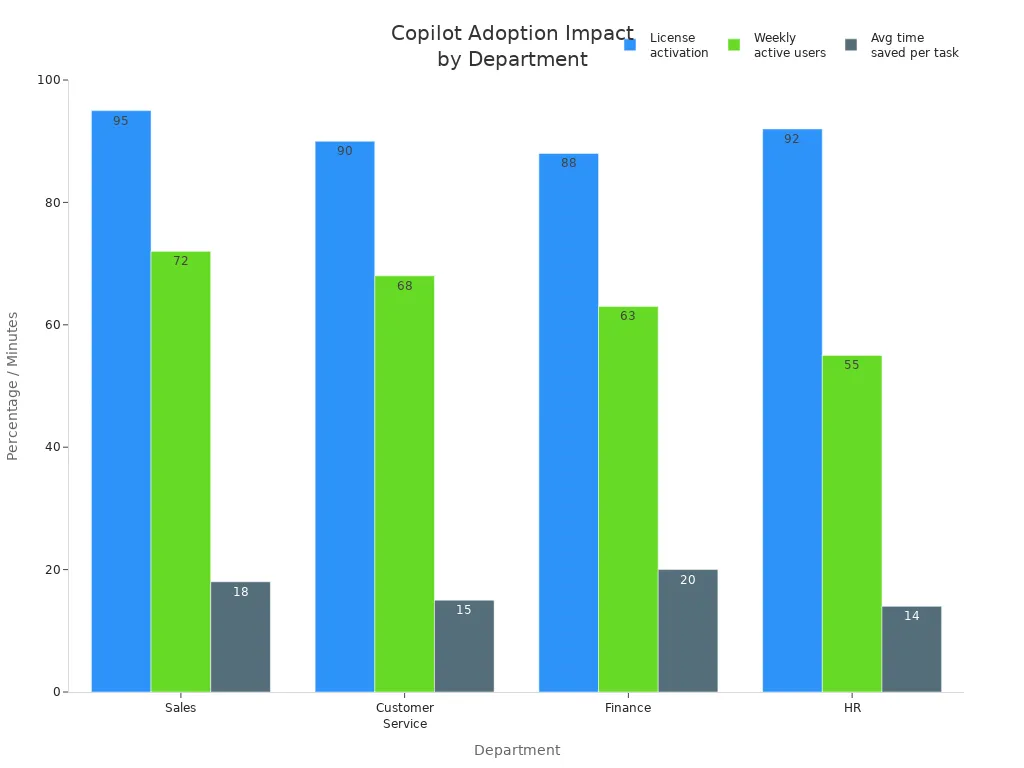
You see real-world impact across industries. Government users save 26 minutes per day, equal to two workweeks annually. Accenture employees complete routine tasks 15 times faster. Financial services automate month-end reporting, reducing manual errors. Healthcare professionals spend more time with patients due to clinical documentation drafting. Developers in software engineering generate boilerplate code and test scaffolds efficiently.
You prepare for change by designing a tailored change management strategy. Developers launch early adopters’ programs and run guided sessions to enhance engagement. You monitor usage and feedback to understand Copilot's effectiveness. This digital transformation unlocks measurable productivity gains and business value.
Grounded Copilot Foundation
A grounded Copilot relies on a strong foundation. You need to focus on three main pillars: data infrastructure, secure and governed platforms, and workflow integration. Each pillar supports trust, accuracy, and adoption in your enterprise AI journey.
Data Infrastructure Essentials
A robust data infrastructure forms the backbone of your Copilot deployment. You must ensure that your systems can deliver reliable, timely, and relevant information to your AI.
Data Quality
You need high-quality data to power your Copilot. Clean, accurate, and up-to-date information helps your AI deliver precise answers. Poor data quality leads to confusion and reduces trust in AI-driven automation. You should regularly audit your data sources and remove outdated or duplicate records. This practice keeps your production systems efficient and your AI outputs relevant.
Integration Across Systems
You often store information in many places—email, cloud storage, CRM, and more. Integration across systems allows your Copilot to access the full spectrum of your organizational knowledge. Secure data integration connects platforms like Microsoft 365, SharePoint, and ServiceNow, making sure your AI can retrieve and process information in real time. This approach bridges gaps between production systems and ensures that your teams always work with the most current data.
Tip: When you connect your systems, you reduce silos and empower your AI to deliver insights that reflect your unique business context.
| Component | Contribution to Reliability |
|---|---|
| Microsoft Global Network | Ensures secure and efficient data flow, optimizing connectivity and reducing latency. |
| Microsoft 365 service boundary | Maintains compliance with security standards and consistent performance across services. |
| Copilot Orchestrator | Manages interactions among AI models, data sources, and plugins, ensuring effective coordination. |
| Large language models | Provides contextually relevant responses by interpreting and generating text based on vast data training. |
| Microsoft Graph | Facilitates access to relevant data while respecting user permissions, ensuring data integrity and security. |
| Copilot Agents | Connects to knowledge and data sources, allowing real-time retrieval and processing of information. |
Secure and Governed Platforms
Security and governance are essential for building trust in your AI platform. You must protect sensitive information and comply with industry regulations.
Security and Compliance
You should develop a comprehensive risk assessment and management framework. This helps you identify and address potential risks in your AI deployments. Establish compliance mechanisms to meet legal and regulatory standards. For example, GDPR requires you to control data access and document user consent. HIPAA demands strict validation and permissioning when handling patient information. SOX compliance means you must track every financial record generated by Copilot. CCPA requires clear opt-out options for consumer data.
- GDPR: Control access, document consent, and manage cross-border data transfers.
- HIPAA: Validate outputs, protect patient data, and maintain audit trails.
- SOX: Map financial records to approved logs for integrity.
- CCPA: Provide opt-out and deletion options for consumer data.
You should also implement runtime access decisions and real-time guardrails on AI inputs and outputs. Continuous testing validates your controls and ensures your platform remains secure.
Governance Policies
Strong governance policies guide your AI platform. You need a cross-functional AI governance board with clear roles and responsibilities. This board oversees your AI strategy and ensures accountability. You should use frameworks like the NIST AI Risk Management Framework and follow the OWASP Top 10 for LLM Applications. These resources help you address core risks and validate your controls throughout the AI lifecycle.
- Create a governance board for oversight.
- Use industry frameworks for risk management.
- Test and update policies regularly.
Note: Ongoing validation and oversight keep your AI platform aligned with business goals and regulatory requirements.
Workflow Integration
Workflow integration brings your Copilot into daily operations. You want your AI to fit naturally into how your teams work.
Automation
AI-driven automation streamlines repetitive tasks. You can use Copilot to handle scheduling, reporting, and customer inquiries. This frees your employees to focus on strategic work. Automation increases efficiency, improves accuracy, and reduces operational costs. Your teams can adapt quickly to new business needs without major changes to production systems.
- AI automation speeds up routine tasks.
- Consistent rule-following reduces errors.
- Lower costs and better scalability support growth.
"AI automation helps meet customer expectations by making experiences more responsive, relevant, and intuitive. AI-powered tools like chatbots and virtual assistants handle common questions and guide people through complex tasks, improving service quality over time."
User Experience
A seamless user experience encourages adoption. You want your Copilot to provide actionable insights tailored to each department. Integration with platforms like Microsoft Teams and SharePoint enables smooth collaboration and information flow. Employees benefit from faster responses and personalized interactions, which leads to higher satisfaction and better decision-making.
- Departments collaborate effectively using integrated tools.
- Actionable insights improve operational efficiency.
- Better user experience drives trust and adoption.
By focusing on these foundational elements, you build a Copilot that is reliable, secure, and ready to transform your enterprise with AI.
Microsoft Copilot Architecture
Graph Connectors vs. Plugins
You can shape the power of ai in your organization by choosing the right architecture for microsoft 365 copilot. Graph Connectors and Plugins serve different purposes, and understanding their roles helps you maximize value. Graph Connectors allow microsoft 365 copilot to retrieve data from both internal and external sources. You can connect SharePoint, ServiceNow, and other platforms, making your ai more knowledgeable. These connectors enhance the chat experience by supporting multiturn conversations and providing content previews.
Plugins extend what you can do with ai. You can interact with web services using natural language. Plugins let you access real-time information, retrieve relational data, and perform actions across applications. For example, you can fetch current information, summarize data, or automate tasks in other business tools. Proper testing ensures that both plugins and connectors respect governance boundaries. Validation checks that data boundaries are enforced and actions stay within intended scopes.
- Graph Connectors: Integrate external data sources, improve discoverability, and enable comprehensive analysis in microsoft 365 copilot.
- Plugins: Enable real-time actions, data retrieval, and cross-application automation for ai-powered workflows.
Microsoft 365 Semantic Index
The Semantic Index is a core part of microsoft 365 copilot. It processes and vectorizes SharePoint content, serving as the ground truth for knowledge retrieval. When you ask a question, the Semantic Index helps ai find the most relevant documents and information. This means you get context-aware answers that reflect your organization’s unique knowledge. The architecture ensures that responses are based only on your organizational data, which increases reliability and accuracy.
- The Semantic Index retrieves relevant documents based on your queries.
- It grounds ai responses in your company’s knowledge, not just public data.
- You benefit from faster, more accurate answers in microsoft 365 copilot.
Security and Compliance Integration
You need to trust that your ai platform protects your data. Microsoft 365 copilot includes built-in security and compliance features that meet industry standards. Your data stays safe and private, and only authorized users can access sensitive information. The platform uses encryption, access controls, and data anonymization to protect your organization.
| Feature | Description |
|---|---|
| Data Protection and Privacy | User data is not used to train Machine Learning models, ensuring organizational data integrity. |
| Data encryption both in transit and at rest, reducing unauthorized access risks. | |
| Compliance with Regulations | Adheres to GDPR and CCPA, ensuring legal standards compliance. |
| EU Data Boundary compliance, ensuring EU customer data remains within EU boundaries. | |
| Access Control and Permissions | Users only see responses based on data they personally access, preventing data leakage. |
| Data anonymization techniques are used to remove Personally Identifiable Information (PII). | |
| Healthcare Compliance | Specialized data boundaries for HIPAA compliance, ensuring patient information is protected. |
| Financial Services Security | Additional security controls implemented by 58% of financial services firms using Copilot. |
You can rely on microsoft 365 copilot to support ai-driven transformation while meeting strict security and compliance requirements. This foundation builds trust and encourages adoption across your teams.
Agents, Copilots, and Trust
Productivity Gains
You can see clear productivity gains when you use ai agents in your daily work. Organizations report that ai reduces operational workload and increases output per employee. You save hours each week because ai handles repetitive tasks and automates routine processes. This means you spend less time on manual work and more time on high-value activities.
- You save hours per user per week.
- You see a reduction in task cycle time.
- You notice fewer errors in your work.
| Metric | Description |
|---|---|
| Cycle time per task | Time taken to complete a specific task |
| Pull request throughput per developer | Number of pull requests handled by each developer |
| Deployment frequency | How often deployments occur |
Many developers say that ai agents make coding more enjoyable. About 60–75% of developers report this improvement. You can maintain your flow state longer, with 73% saying ai helps them stay focused. Most users, 87%, say ai saves mental energy on repetitive tasks. These benefits show that ai agents boost both efficiency and job satisfaction.
Organizations using ai agents see lower process costs and higher productivity across departments.
Building User Confidence
You build user confidence in ai by focusing on training and support. Role-based, continuous training helps you learn how to use ai agents for your specific tasks. Practical workshops show you real-world applications, making it easier to understand how ai fits into your workflow.
- You receive training tailored to your role.
- You join workshops that demonstrate how to use ai agents in real scenarios.
- You have access to a strong support system, including self-service channels and a knowledgeable support team.
- You can join a user community to ask questions, share tips, and learn from others.
Leadership plays a key role in building trust. When leaders use ai agents and share their experiences, you feel more confident about adopting new technology. Clear communication about the impact of ai helps you see its value and encourages you to use it more often.
Tip: Continuous learning and open communication help you get the most out of ai agents.
Real-World Use Cases
You can look at real-world examples to see how ai agents deliver value and build trust in enterprise environments. Many companies have adopted ai agents to solve common business challenges.
| Company | Achievement | Description |
|---|---|---|
| Jamf | 70% adoption | High adoption rate of ai copilot for employee support. |
| Mercari | 74% reduction in IT tickets | Significant decrease in IT ticket volume due to ai copilot implementation. |
| Hearst | 50% of support issues resolved | ai copilots used to efficiently resolve support issues across departments. |
You see that enterprise-grade agents help organizations achieve high adoption rates and solve support issues quickly. These examples show that ai agents can handle complex tasks, reduce ticket volumes, and improve employee experiences. When you use ai agents in your organization, you can expect similar results—greater efficiency, faster problem resolution, and higher satisfaction.
Real-world success stories prove that ai agents are reliable partners in your digital transformation journey.
Implementation Roadmap
Strategy and Planning
You start your Copilot journey with a clear strategy. Begin by identifying your business goals and the problems you want to solve with ai. Select pilot groups from different departments to test Copilot in real scenarios. This approach helps you refine your adoption practices and build momentum. Strategic license planning ensures you allocate resources where they have the most impact. You can track adoption metrics and adjust your plan as you learn from early results.
| Key Step | Evidence Supporting Effectiveness |
|---|---|
| Strategic License Planning | Organizations should start with pilot groups to refine adoption practices, leading to high adoption metrics. |
You also need to set up a measurement plan. Use analytics tools to monitor how teams use ai and where they see the most value. This data helps you make informed decisions and show the return on investment to leadership.
Infrastructure and Platform Setup
A strong infrastructure supports your ai deployment. You need to review your current systems and make sure they can handle the demands of Copilot. Check your network, storage, and security settings. Integrate Copilot with platforms like Microsoft 365, SharePoint, and other business systems. This integration allows ai to access the information it needs to deliver accurate results.
You should also focus on security and compliance. Set up access controls so only authorized users can interact with sensitive data. Regularly update your security policies to match industry standards. This step protects your organization and builds trust in your ai platform.
Tip: Work closely with your IT team to ensure your infrastructure meets the requirements for a smooth Copilot rollout.
Data Preparation
Data is the foundation of effective ai. You need to clean and organize your data before connecting it to Copilot. Remove duplicate records and fix errors to improve data quality. Make sure your data is up to date and relevant to your business needs. This process helps ai deliver precise and useful answers.
You also need to map your data sources. Identify where important information lives, such as in emails, documents, or CRM systems. Connect these sources to Copilot so ai can retrieve and process information quickly. Good data preparation leads to better ai performance and higher user satisfaction.
Training and skill development play a key role here. Offer courses on ai fundamentals and run internal workshops. These activities help your staff become comfortable with ai and boost productivity.
| Key Step | Evidence Supporting Effectiveness |
|---|---|
| Training and Skill Development | Courses on AI fundamentals and internal workshops help staff become comfortable with AI, enhancing productivity. |
Note: Well-prepared data and skilled users set the stage for successful ai adoption.
Copilot Customization
You can unlock the full potential of Microsoft Copilot by customizing it for your organization’s needs. Customization helps you align ai with your business processes and user expectations. You start by identifying the unique workflows and tasks that matter most to your teams. You can then tailor Copilot to support these priorities.
You have several ways to customize Copilot. You can configure prompts to guide ai responses. You can set up custom workflows that automate routine tasks. You can also connect Copilot to your business systems, such as CRM or ERP platforms. This integration allows ai to access the data that drives your operations.
Tip: Work with your IT and business leaders to map out the most valuable use cases for ai. This approach ensures that Copilot delivers real impact.
You can use the following steps to guide your customization process:
- Define your business goals for ai.
- Identify key workflows that benefit from automation.
- Configure Copilot prompts and responses.
- Integrate Copilot with your core business systems.
- Test Copilot with pilot users and gather feedback.
- Refine your customization based on user input.
You can also use Microsoft Graph Connectors and Plugins to extend Copilot’s capabilities. Graph Connectors help ai retrieve knowledge from across your organization. Plugins allow ai to perform actions in real time, such as updating records or sending notifications.
| Customization Option | Benefit |
|---|---|
| Prompt Engineering | Guides ai to deliver relevant responses |
| Workflow Automation | Reduces manual work and increases efficiency |
| System Integration | Connects ai to business-critical data |
| Graph Connectors | Expands ai’s knowledge base |
| Plugins | Enables real-time actions and transactions |
You should always test your customizations before rolling them out to all users. Pilot programs help you spot issues early and make improvements. You can collect feedback from users to see how ai supports their daily work. This feedback loop helps you create a better experience for everyone.
Note: Customization is not a one-time task. You should review and update your ai settings as your business needs change.
You can empower your teams with a Copilot that understands your unique environment. With the right customization, ai becomes a trusted partner in your digital transformation.
Overcoming Challenges in Enterprise AI
Addressing Misconceptions
You may hear many myths about enterprise ai. Some people believe ai will replace jobs or make decisions without oversight. Others think ai always gives perfect answers. These ideas can create fear and slow adoption. You need to understand that ai works best when you guide it. You set the rules, and ai follows your instructions. You also need to know that ai does not replace people. It helps you work faster and smarter. You can use ai to handle routine tasks, but you still make the final decisions.
Tip: Share real examples with your team to show how ai supports, not replaces, human work.
Managing Change
You face change when you bring ai into your organization. Some people may worry about learning new tools. Others may not trust ai at first. You can help your team by offering training and support. Start with small groups and let them test ai in real situations. You can create peer-led learning groups and nominate champions who share their success stories. These steps build trust and make people feel confident.
You should also track how people use ai. Look for wins and share them with everyone. When you celebrate small successes, you encourage more people to try ai. You can use microlearning sessions to teach new skills in short bursts. This keeps training simple and easy to follow.
Solutions and Best Practices
You will face some common challenges when you deploy ai. You need to prevent data exposure, justify costs, connect old systems, avoid mistakes, and drive adoption. The table below shows how you can solve these problems:
| Challenge | Solution |
|---|---|
| Preventing Data Exposure | Use Azure Active Directory reviews, Microsoft Purview, pre-deployment scanning, and logging. |
| Justifying ROI | Focus on high-impact use cases, measure results, build ROI dashboards, and run A/B tests. |
| Integrating Legacy Systems | Audit data sources, use Azure Logic Apps, Copilot Studio, and prompt testing. |
| Preventing AI Hallucinations | Set human-in-the-loop workflows, prompt standards, log responses, and create accuracy checks. |
| Driving User Adoption | Create peer groups, embed microlearning, nominate champions, and track usage metrics. |
You can prevent ai from exposing sensitive data by setting up strong governance. You should scan your data before deployment and keep logs of all activity. To show value, you can measure results before and after using ai. Build dashboards to track return on investment. If you have old systems, use connectors and test how ai interacts with them. You can reduce mistakes by having people review important outputs and by setting clear prompt standards.
Note: Success with ai comes from planning, training, and ongoing support. You need to update your approach as your business grows.
You can lead your organization through these challenges. With the right steps, you will build trust and unlock the full power of ai.
You build a trusted Copilot foundation by focusing on data quality, secure architecture, and strong governance. Address the grounding gap to ensure Copilot delivers accurate, business-specific insights. For success, follow these steps:
- Train each department with real use cases.
- Start with frequent tasks to build confidence.
- Measure hours saved, not just adoption.
- Create internal champions for peer support.
- Begin now and improve as you go.
These actions help you drive real transformation with Microsoft Copilot.
FAQ
What is a grounded copilot?
A grounded copilot connects directly to your organization’s data and systems. You get answers based on your unique business context, not just public information. This approach increases trust and accuracy.
How does Microsoft Copilot protect my data?
You benefit from built-in security features. Microsoft Copilot uses encryption, access controls, and compliance with regulations like GDPR and HIPAA. Only authorized users can access sensitive information.
Can I customize Copilot for my business needs?
Yes! You can tailor Copilot by configuring prompts, integrating with your business systems, and using Graph Connectors or Plugins. This ensures Copilot supports your unique workflows.
What is the difference between Graph Connectors and Plugins?
Graph Connectors help Copilot retrieve knowledge from your internal systems.
Plugins let Copilot perform real-time actions and automate tasks across different applications.
How do I measure Copilot’s impact?
Track metrics like hours saved, user satisfaction, and task completion rates. You can use dashboards to visualize adoption and productivity improvements.
How do I ensure Copilot gives accurate answers?
You improve accuracy by connecting Copilot to high-quality, up-to-date data sources. Regular audits and prompt engineering also help maintain reliable outputs.
What support does Microsoft offer for Copilot deployment?
You get access to training resources, best practice guides, and a support team. Microsoft also provides community forums where you can share experiences and ask questions.
🎧 Listen to this episode
Want a practical explanation of Grounding Microsoft Copilot for Trusted Enterprise AI? This episode breaks down the topic in clear language and shows why it matters for Microsoft 365, Azure, Power Platform, security, AI, and modern work.
Listen to this episode if you want to:
- Understand the key concepts behind Grounding Microsoft Copilot for Trusted Enterprise AI
- See how it fits into the wider Microsoft technology ecosystem
- Learn where it can create practical value for your organization
You may also enjoy these related M365 FM episodes:
- From Data to Intelligent Agents: Building Trusted Enterprise AI with Microsoft AI Foundry with Shubhangi Goyal [MVP]
- Agentic Operating Model for Enterprise AI and Copilot
- Mixture of Experts for Enterprise Copilot and AI Agents
- The Copilot Tax: Hidden Costs of Enterprise AI Strategy
- How to Govern Microsoft Copilot in the Enterprise
Discover more practical Microsoft conversations on M365 FM.
🚀 Want to be part of m365.fm?
Then stop just listening… and start showing up.
👉 Connect with me on LinkedIn and let’s make something happen:
- 🎙️ Be a podcast guest and share your story
- 🎧 Host your own episode (yes, seriously)
- 💡 Pitch topics the community actually wants to hear
- 🌍 Build your personal brand in the Microsoft 365 space
This isn’t just a podcast — it’s a platform for people who take action.
🔥 Most people wait. The best ones don’t.
👉 Connect with me on LinkedIn and send me a message:
"I want in"
Let’s build something awesome 👊
1
00:00:00,000 --> 00:00:01,800
Copilot gives you a confident answer.
2
00:00:01,800 --> 00:00:03,720
The tone is right, the structure is clean.
3
00:00:03,720 --> 00:00:06,440
It sounds exactly like something your organization would say.
4
00:00:06,440 --> 00:00:07,680
It's completely wrong.
5
00:00:07,680 --> 00:00:10,560
Not because the AI failed, not because the model is broken,
6
00:00:10,560 --> 00:00:13,320
because it never had access to the right data in the first place.
7
00:00:13,320 --> 00:00:14,880
That's the problem we're solving today.
8
00:00:14,880 --> 00:00:15,880
And it's not a small one.
9
00:00:15,880 --> 00:00:17,760
It's the reason AI deployment stole.
10
00:00:17,760 --> 00:00:19,720
It's the reason users stopped trusting the tool
11
00:00:19,720 --> 00:00:21,200
after the first few weeks.
12
00:00:21,200 --> 00:00:24,040
It's the reason your IT team is fielding complaints
13
00:00:24,040 --> 00:00:26,840
about an expensive product that feels like a smarter version
14
00:00:26,840 --> 00:00:27,520
of Bing.
15
00:00:27,520 --> 00:00:29,640
Most organizations building on Copilot right now
16
00:00:29,640 --> 00:00:31,240
are building on the wrong foundation.
17
00:00:31,240 --> 00:00:32,200
The model is fine.
18
00:00:32,200 --> 00:00:33,840
The architecture underneath it isn't.
19
00:00:33,840 --> 00:00:36,440
And until you fix that, the hallucinations don't stop.
20
00:00:36,440 --> 00:00:38,680
If your team is deploying Copilot or planning to,
21
00:00:38,680 --> 00:00:41,520
this episode will change how you think about it.
22
00:00:41,520 --> 00:00:42,560
Promise and stakes.
23
00:00:42,560 --> 00:00:43,960
Here's what we're going to cover.
24
00:00:43,960 --> 00:00:46,160
We're going to start with why the gap exists,
25
00:00:46,160 --> 00:00:49,560
why Copilot out of the box can't see most of what your organization
26
00:00:49,560 --> 00:00:50,440
actually knows.
27
00:00:50,440 --> 00:00:53,040
Then we're going to go deep on the two architectural parts
28
00:00:53,040 --> 00:00:54,960
Microsoft gives you to close that gap
29
00:00:54,960 --> 00:00:56,920
and why most teams choose the wrong one.
30
00:00:56,920 --> 00:00:58,680
We'll get into the security boundaries,
31
00:00:58,680 --> 00:01:00,640
the latency numbers, the schema decisions
32
00:01:00,640 --> 00:01:02,640
that most teams get wrong, and the deprecation
33
00:01:02,640 --> 00:01:04,600
that's breaking production environments right now.
34
00:01:04,600 --> 00:01:05,880
This isn't about prompting better.
35
00:01:05,880 --> 00:01:07,960
Better prompts don't fix a grounding problem.
36
00:01:07,960 --> 00:01:10,200
This is about feeding the model the right data
37
00:01:10,200 --> 00:01:13,080
in the right structure before it ever generates a response.
38
00:01:13,080 --> 00:01:14,160
The stakes are real.
39
00:01:14,160 --> 00:01:17,400
Organizations that get this wrong aren't just building a slow AI.
40
00:01:17,400 --> 00:01:19,840
They're building an AI experience that users won't trust.
41
00:01:19,840 --> 00:01:21,120
And distrust spreads fast.
42
00:01:21,120 --> 00:01:23,600
Once your team decides Copilot is unreliable,
43
00:01:23,600 --> 00:01:26,160
you don't get a second chance to change that perception.
44
00:01:26,160 --> 00:01:27,800
Adoption dies quietly.
45
00:01:27,800 --> 00:01:29,560
And the investment dies with it.
46
00:01:29,560 --> 00:01:31,880
By the end of this episode, you'll have a decision framework
47
00:01:31,880 --> 00:01:33,400
you can act on this week.
48
00:01:33,400 --> 00:01:35,440
Why Copilot doesn't know what you know?
49
00:01:35,440 --> 00:01:36,960
Let's start with the fundamental tension
50
00:01:36,960 --> 00:01:39,520
that sits underneath every Copilot deployment.
51
00:01:39,520 --> 00:01:42,120
Large language models are trained on public knowledge,
52
00:01:42,120 --> 00:01:44,800
the internet, books, publicly available text.
53
00:01:44,800 --> 00:01:47,360
That's where the model's baseline intelligence comes from.
54
00:01:47,360 --> 00:01:50,280
But your organization's value, the competitive advantage,
55
00:01:50,280 --> 00:01:52,960
the institutional memory, the hard one knowledge
56
00:01:52,960 --> 00:01:55,320
about how your products work and why your customers behave
57
00:01:55,320 --> 00:01:56,440
the way they do.
58
00:01:56,440 --> 00:01:58,360
None of that is on the internet.
59
00:01:58,360 --> 00:01:59,760
It lives in private systems.
60
00:01:59,760 --> 00:02:01,280
And the model has never seen any of it.
61
00:02:01,280 --> 00:02:02,400
This creates a ceiling.
62
00:02:02,400 --> 00:02:05,720
Out of the box, Copilot can see Microsoft 365 content,
63
00:02:05,720 --> 00:02:08,280
SharePoint OneDrive, Teams Messages, Exchange emails.
64
00:02:08,280 --> 00:02:09,040
That's it.
65
00:02:09,040 --> 00:02:11,160
For users who live primarily in those tools,
66
00:02:11,160 --> 00:02:14,040
Copilot is genuinely useful for a range of tasks.
67
00:02:14,040 --> 00:02:17,400
Drafting emails, summarizing documents, recapping meetings.
68
00:02:17,400 --> 00:02:18,560
That's real value.
69
00:02:18,560 --> 00:02:19,720
But here's the problem.
70
00:02:19,720 --> 00:02:21,840
Most enterprise knowledge doesn't live there.
71
00:02:21,840 --> 00:02:24,960
The support team's institutional memory lives in service now.
72
00:02:24,960 --> 00:02:27,760
The product team's decisions live in giro and confluence.
73
00:02:27,760 --> 00:02:30,040
The customer relationship history lives in Salesforce.
74
00:02:30,040 --> 00:02:32,920
The engineering documentation lives in GitHub repositories.
75
00:02:32,920 --> 00:02:35,240
The financial models live in on-premises file shares
76
00:02:35,240 --> 00:02:37,800
that haven't moved to SharePoint because no one has had time.
77
00:02:37,800 --> 00:02:39,560
The custom line of business application
78
00:02:39,560 --> 00:02:41,640
your operations team built a decade ago,
79
00:02:41,640 --> 00:02:43,640
that's where half your process knowledge sits,
80
00:02:43,640 --> 00:02:45,360
completely invisible to any AI.
81
00:02:45,360 --> 00:02:47,520
So when a sales rep asks Copilot to brief them
82
00:02:47,520 --> 00:02:48,960
on a key account before a call,
83
00:02:48,960 --> 00:02:50,760
Copilot pulls from emails and documents.
84
00:02:50,760 --> 00:02:52,480
It doesn't know what's in the CRM.
85
00:02:52,480 --> 00:02:54,160
When a support engineer asks Copilot
86
00:02:54,160 --> 00:02:56,560
to suggest a fix for a recurring incident,
87
00:02:56,560 --> 00:02:57,960
Copilot doesn't know what resolved
88
00:02:57,960 --> 00:03:00,160
similar incidents in service now last quarter.
89
00:03:00,160 --> 00:03:02,760
When a new developer asks how the payment service works,
90
00:03:02,760 --> 00:03:04,760
Copilot doesn't know the GitHub repository
91
00:03:04,760 --> 00:03:06,240
where that answer actually lives.
92
00:03:06,240 --> 00:03:07,160
What happens then?
93
00:03:07,160 --> 00:03:08,800
Copilot defaults to generic.
94
00:03:08,800 --> 00:03:10,600
It produces an answer that sounds plausible
95
00:03:10,600 --> 00:03:12,200
because it's drawing on broad patterns
96
00:03:12,200 --> 00:03:13,480
from its training data,
97
00:03:13,480 --> 00:03:15,840
not from your organization's actual knowledge.
98
00:03:15,840 --> 00:03:17,680
And generic answers feel useful right up
99
00:03:17,680 --> 00:03:19,640
until the moment they're dangerously wrong.
100
00:03:19,640 --> 00:03:21,160
Until the sales rep walks into a call
101
00:03:21,160 --> 00:03:22,520
with the wrong account history,
102
00:03:22,520 --> 00:03:24,400
until the support engineer applies a fix
103
00:03:24,400 --> 00:03:25,760
that made things worse last time.
104
00:03:25,760 --> 00:03:28,120
Until the developer builds something inconsistent
105
00:03:28,120 --> 00:03:30,720
with decisions the team made six months ago.
106
00:03:30,720 --> 00:03:31,960
This is the grounding gap.
107
00:03:31,960 --> 00:03:34,040
It's the distance between what Copilot can see
108
00:03:34,040 --> 00:03:35,960
and what your organization actually knows.
109
00:03:35,960 --> 00:03:37,160
It's not a bug in the model.
110
00:03:37,160 --> 00:03:40,080
It's not something Microsoft will patch in the next release.
111
00:03:40,080 --> 00:03:41,440
It's a structural limitation
112
00:03:41,440 --> 00:03:44,920
that reflects a fundamental truth about how LLMs work.
113
00:03:44,920 --> 00:03:46,600
They reason over what they can access
114
00:03:46,600 --> 00:03:48,360
and if they can't access your systems,
115
00:03:48,360 --> 00:03:51,040
they can't reason about your business.
116
00:03:51,040 --> 00:03:52,360
The gap doesn't close on its own.
117
00:03:52,360 --> 00:03:55,080
It requires a deliberate architectural decision.
118
00:03:55,080 --> 00:03:57,240
And most organizations are making the wrong one,
119
00:03:57,240 --> 00:03:58,280
not because they're careless,
120
00:03:58,280 --> 00:04:00,800
but because the right path is less obvious than it looks.
121
00:04:00,800 --> 00:04:03,400
That's what the rest of this episode is about.
122
00:04:03,400 --> 00:04:04,960
The two ways to close the gap.
123
00:04:04,960 --> 00:04:07,440
Once you accept that the grounding gap is structural,
124
00:04:07,440 --> 00:04:08,760
the next question is practical.
125
00:04:08,760 --> 00:04:09,600
How do you close it?
126
00:04:09,600 --> 00:04:11,080
Microsoft gives you two paths
127
00:04:11,080 --> 00:04:12,520
and the instinct most teams follow
128
00:04:12,520 --> 00:04:14,280
points them toward the wrong one.
129
00:04:14,280 --> 00:04:16,960
The two extensibility models are plugins and graph connectors.
130
00:04:16,960 --> 00:04:18,200
They sound similar, they're not.
131
00:04:18,200 --> 00:04:19,320
They solve different problems,
132
00:04:19,320 --> 00:04:20,440
they carry different costs
133
00:04:20,440 --> 00:04:23,000
and choosing between them isn't a technical preference.
134
00:04:23,000 --> 00:04:24,280
It's a strategic decision
135
00:04:24,280 --> 00:04:26,720
with downstream consequences for security,
136
00:04:26,720 --> 00:04:28,680
performance and adoption.
137
00:04:28,680 --> 00:04:29,640
Let's start with plugins
138
00:04:29,640 --> 00:04:31,560
because that's where most teams land first.
139
00:04:31,560 --> 00:04:33,760
A plugin calls a live API at runtime.
140
00:04:33,760 --> 00:04:35,480
When a user asks co-pilot a question,
141
00:04:35,480 --> 00:04:37,760
the orchestration layer decides a plugin is relevant,
142
00:04:37,760 --> 00:04:40,000
sends a structured request to your backend service,
143
00:04:40,000 --> 00:04:42,880
gets a response and folds that data into the answer.
144
00:04:42,880 --> 00:04:44,520
It's real time, it's flexible.
145
00:04:44,520 --> 00:04:46,520
For certain use cases, creating a ticket,
146
00:04:46,520 --> 00:04:49,560
updating a CRM record, pulling a live dashboard metric,
147
00:04:49,560 --> 00:04:51,240
plugins are exactly the right tool.
148
00:04:51,240 --> 00:04:53,400
But here's what most teams don't fully reckon with
149
00:04:53,400 --> 00:04:55,120
when they reach for a plugin first.
150
00:04:55,120 --> 00:04:57,560
The data never enters the M365 ecosystem.
151
00:04:57,560 --> 00:04:59,880
It passes through the conversation and disappears.
152
00:04:59,880 --> 00:05:01,920
It doesn't contribute to the semantic index.
153
00:05:01,920 --> 00:05:04,040
It doesn't participate in the reasoning layer
154
00:05:04,040 --> 00:05:06,000
that powers everything else co-pilot knows
155
00:05:06,000 --> 00:05:07,280
about your organization.
156
00:05:07,280 --> 00:05:08,960
And every time a user asks a question
157
00:05:08,960 --> 00:05:09,920
that needs that data,
158
00:05:09,920 --> 00:05:11,640
the plugin has to make a live call.
159
00:05:11,640 --> 00:05:13,760
That adds latency, it adds failure modes.
160
00:05:13,760 --> 00:05:16,040
And critically, the security model for that call
161
00:05:16,040 --> 00:05:17,560
is entirely your responsibility.
162
00:05:17,560 --> 00:05:19,920
You own the authentication, the authorization,
163
00:05:19,920 --> 00:05:21,560
the audit logging, the data protection.
164
00:05:21,560 --> 00:05:24,280
Microsoft doesn't enforce any of that at the retrieval layer
165
00:05:24,280 --> 00:05:27,040
because the data never crosses into Microsoft's boundary.
166
00:05:27,040 --> 00:05:29,240
Graph connectors work differently at every level.
167
00:05:29,240 --> 00:05:30,800
When you deploy a graph connector,
168
00:05:30,800 --> 00:05:32,640
you're not building a live pipe
169
00:05:32,640 --> 00:05:34,480
between co-pilot and your system.
170
00:05:34,480 --> 00:05:35,880
You're indexing your system's content
171
00:05:35,880 --> 00:05:38,600
into the Microsoft 365 semantic index,
172
00:05:38,600 --> 00:05:40,760
the same infrastructure that already holds
173
00:05:40,760 --> 00:05:43,200
your SharePoint documents, your team's conversations,
174
00:05:43,200 --> 00:05:44,880
your exchange emails.
175
00:05:44,880 --> 00:05:46,320
Once that data is indexed,
176
00:05:46,320 --> 00:05:47,960
co-pilot doesn't call your system.
177
00:05:47,960 --> 00:05:50,040
It already knows what your system contains.
178
00:05:50,040 --> 00:05:51,760
The reasoning happens against the index,
179
00:05:51,760 --> 00:05:53,600
not against a live API response.
180
00:05:53,600 --> 00:05:56,000
That distinction matters more than it might seem at first
181
00:05:56,000 --> 00:05:57,920
because the semantic index isn't just storage.
182
00:05:57,920 --> 00:05:59,960
It's a pre-computed semantic map.
183
00:05:59,960 --> 00:06:01,600
The relationships between concepts,
184
00:06:01,600 --> 00:06:03,440
the meaning behind terms, the context
185
00:06:03,440 --> 00:06:05,920
that makes an answer grounded rather than generic,
186
00:06:05,920 --> 00:06:07,720
all of that is built at index time,
187
00:06:07,720 --> 00:06:10,440
using LLMs before any user asks anything.
188
00:06:10,440 --> 00:06:11,760
When a question comes in,
189
00:06:11,760 --> 00:06:13,720
co-pilot searches that map in milliseconds
190
00:06:13,720 --> 00:06:17,200
and assembles context that actually reflects your organization's knowledge,
191
00:06:17,200 --> 00:06:21,680
the security model changes to index content in herit's M365's access controls.
192
00:06:21,680 --> 00:06:24,880
Every item carries an ACL tied to enter ID identities.
193
00:06:24,880 --> 00:06:27,000
Co-pilot enforces those controls at query time.
194
00:06:27,000 --> 00:06:29,800
Users see only what they're already authorized to see,
195
00:06:29,800 --> 00:06:32,280
not because of a separate check bolted on afterward,
196
00:06:32,280 --> 00:06:35,800
but because that enforcement is built into the retrieval layer itself.
197
00:06:35,800 --> 00:06:37,720
So why the teams reach for plugins first?
198
00:06:37,720 --> 00:06:39,920
Partly because they look simpler to start.
199
00:06:39,920 --> 00:06:42,760
You define an API, writer manifest, and you're connected.
200
00:06:42,760 --> 00:06:45,040
The feedback loop is fast, it feels like progress.
201
00:06:45,040 --> 00:06:47,480
Graph connectors require more upfront design.
202
00:06:47,480 --> 00:06:49,960
You're defining a schema, mapping permissions,
203
00:06:49,960 --> 00:06:51,600
building an ingestion pipeline.
204
00:06:51,600 --> 00:06:53,200
The investment is front loaded.
205
00:06:53,200 --> 00:06:55,360
But the architectural returns compound over time
206
00:06:55,360 --> 00:06:57,360
in a way that plugin only approaches don't.
207
00:06:57,360 --> 00:07:00,200
The strategic question isn't which path is easier to start.
208
00:07:00,200 --> 00:07:03,840
It's which architecture actually serves the use case you're trying to solve.
209
00:07:03,840 --> 00:07:05,720
For knowledge retrieval, for the question,
210
00:07:05,720 --> 00:07:07,560
what do we know about this customer?
211
00:07:07,560 --> 00:07:08,960
What happened with this incident?
212
00:07:08,960 --> 00:07:10,920
How does this part of our system work?
213
00:07:10,920 --> 00:07:13,440
The answer almost always belongs in the connector model.
214
00:07:13,440 --> 00:07:14,800
Plugins are for actions.
215
00:07:14,800 --> 00:07:16,120
Connectors are for knowledge.
216
00:07:16,120 --> 00:07:18,120
Most teams collapse that distinction early
217
00:07:18,120 --> 00:07:20,160
and spend the next year trying to recover from it.
218
00:07:20,160 --> 00:07:23,440
The good news is the two models aren't mutually exclusive.
219
00:07:23,440 --> 00:07:26,000
The most effective enterprise deployments use both.
220
00:07:26,000 --> 00:07:29,480
Connectors to build the knowledge layer, plugins to power the action layer.
221
00:07:29,480 --> 00:07:32,320
Copilot reads from the index, then acts through the plugin.
222
00:07:32,320 --> 00:07:34,760
That's the pattern we'll come back to later with real examples.
223
00:07:34,760 --> 00:07:38,360
But first, let's go deeper on what the semantic index actually is.
224
00:07:38,360 --> 00:07:40,360
What the semantic index actually is.
225
00:07:40,360 --> 00:07:43,560
Most people hear semantic index and picture a better search engine.
226
00:07:43,560 --> 00:07:46,040
Smart or keyword matching, faster results.
227
00:07:46,040 --> 00:07:47,880
Maybe some vector magic underneath.
228
00:07:47,880 --> 00:07:49,160
That framing is wrong.
229
00:07:49,160 --> 00:07:51,400
And it leads to bad architectural decisions
230
00:07:51,400 --> 00:07:54,200
because you end up treating a fundamentally different kind of system
231
00:07:54,200 --> 00:07:56,400
as if it's just a souped up SharePoint search.
232
00:07:56,400 --> 00:07:58,080
The semantic index isn't a search engine.
233
00:07:58,080 --> 00:08:01,320
It's a pre-computed semantic map of your organizational knowledge.
234
00:08:01,320 --> 00:08:02,800
Here's what that actually means.
235
00:08:02,800 --> 00:08:05,000
When Microsoft indexes your content,
236
00:08:05,000 --> 00:08:07,240
your SharePoint documents, your team's conversations,
237
00:08:07,240 --> 00:08:08,640
your exchange emails,
238
00:08:08,640 --> 00:08:13,120
it doesn't just extract text and build and inverted index the way a traditional search engine would.
239
00:08:13,120 --> 00:08:16,080
It runs that content through large language models at indexing time,
240
00:08:16,080 --> 00:08:18,160
not at query time, at indexing time.
241
00:08:18,160 --> 00:08:19,520
The distinction is everything.
242
00:08:19,520 --> 00:08:21,840
A traditional search engine waits for you to ask a question,
243
00:08:21,840 --> 00:08:23,920
then figures out which documents are relevant.
244
00:08:23,920 --> 00:08:25,520
The semantic index doesn't wait.
245
00:08:25,520 --> 00:08:27,360
It does the reasoning work upfront.
246
00:08:27,360 --> 00:08:30,480
It builds embeddings, mathematical representations of meaning
247
00:08:30,480 --> 00:08:32,360
for every piece of content in your tenant.
248
00:08:32,360 --> 00:08:36,920
It maps relationships between concepts across documents, across conversations, across time.
249
00:08:36,920 --> 00:08:39,520
It understands that the payment service outage last March
250
00:08:39,520 --> 00:08:42,600
and the incident that took down checkout are the same event
251
00:08:42,600 --> 00:08:45,080
even though no document uses both phrases.
252
00:08:45,080 --> 00:08:48,520
That understanding is baked into the map before anyone asks anything.
253
00:08:48,520 --> 00:08:50,960
The scale of this infrastructure is worth pausing on.
254
00:08:50,960 --> 00:08:54,400
The index spans billions of vectors across your organization's content.
255
00:08:54,400 --> 00:08:55,800
When co-pilot receives a prompt,
256
00:08:55,800 --> 00:08:59,600
it searches that pre-built map in milliseconds, not seconds, milliseconds.
257
00:08:59,600 --> 00:09:01,760
The retrieval step isn't the bottleneck,
258
00:09:01,760 --> 00:09:03,680
because the heavy lifting already happened.
259
00:09:03,680 --> 00:09:07,960
The model inference that follows, turning retrieved context into a coherent response
260
00:09:07,960 --> 00:09:09,240
is where the time goes.
261
00:09:09,240 --> 00:09:14,480
And with GPT 5.5 instant as the default model for many M365 co-pilot scenarios,
262
00:09:14,480 --> 00:09:17,480
that inference step has dropped to the point where total response times
263
00:09:17,480 --> 00:09:21,120
for typical business queries are landing in the one to two second range.
264
00:09:21,120 --> 00:09:23,080
Security trimming works the same way.
265
00:09:23,080 --> 00:09:24,920
Built in, not bolted on.
266
00:09:24,920 --> 00:09:27,000
When the index is queried on behalf of a user,
267
00:09:27,000 --> 00:09:30,120
the retrieval layer checks ACLs before returning anything.
268
00:09:30,120 --> 00:09:32,720
The user's enter ID token determines what's visible.
269
00:09:32,720 --> 00:09:35,040
Content they aren't authorized to see isn't surfaced,
270
00:09:35,040 --> 00:09:37,200
not because a filter catches it afterward,
271
00:09:37,200 --> 00:09:41,120
but because the retrieval architecture is designed around that boundary from the start.
272
00:09:41,120 --> 00:09:43,960
This is why the system is deployable at enterprise scale.
273
00:09:43,960 --> 00:09:46,080
If permission enforcement were a separate step,
274
00:09:46,080 --> 00:09:48,600
you'd have to trust every component in a chain not to leak.
275
00:09:48,600 --> 00:09:50,040
Here, it's structural.
276
00:09:50,040 --> 00:09:53,800
Now here's where graph connectors fit into this picture.
277
00:09:53,800 --> 00:09:57,120
And why the earlier framing of indexing your external data
278
00:09:57,120 --> 00:09:59,000
undersells what's actually happening.
279
00:09:59,000 --> 00:10:01,800
When you deploy a graph connector for service now or sales force
280
00:10:01,800 --> 00:10:03,360
or your on-premises file share,
281
00:10:03,360 --> 00:10:06,600
you're not creating a side channel that co-pilot occasionally calls.
282
00:10:06,600 --> 00:10:07,680
You're extending the map.
283
00:10:07,680 --> 00:10:09,320
Your external content gets embedded,
284
00:10:09,320 --> 00:10:11,920
semantically processed, and added to the same index
285
00:10:11,920 --> 00:10:13,800
that holds your native m3.6.5 content.
286
00:10:13,800 --> 00:10:15,240
It becomes a first-class citizen.
287
00:10:15,240 --> 00:10:16,920
Co-pilot doesn't treat it differently.
288
00:10:16,920 --> 00:10:19,880
It doesn't know or care that a knowledge article originated in service now
289
00:10:19,880 --> 00:10:20,880
rather than SharePoint.
290
00:10:20,880 --> 00:10:22,440
From the retrieval layer's perspective,
291
00:10:22,440 --> 00:10:24,680
it's all organizational knowledge mapped together,
292
00:10:24,680 --> 00:10:25,800
reasoned over together.
293
00:10:25,800 --> 00:10:27,920
That's the architectural shift that matters.
294
00:10:27,920 --> 00:10:31,640
Before graph connectors, the semantic index contained your collaboration layer,
295
00:10:31,640 --> 00:10:33,400
emails, documents, meetings.
296
00:10:33,400 --> 00:10:36,440
After graph connectors, it contains your operational layer too.
297
00:10:36,440 --> 00:10:38,040
The systems where real work happens,
298
00:10:38,040 --> 00:10:40,000
the knowledge that actually drives decisions.
299
00:10:40,000 --> 00:10:41,920
And critically, the reasoning quality improves
300
00:10:41,920 --> 00:10:43,920
as you add more of your organization's context.
301
00:10:43,920 --> 00:10:45,080
The map gets richer.
302
00:10:45,080 --> 00:10:48,920
Connections that weren't visible when only m3.65 content was indexed
303
00:10:48,920 --> 00:10:51,960
become visible when service now incidents, sales force accounts,
304
00:10:51,960 --> 00:10:55,320
and GitHub repositories are part of the same semantic space.
305
00:10:55,320 --> 00:10:56,720
Co-pilot starts seeing relationships
306
00:10:56,720 --> 00:10:59,360
that cross-system boundaries because the index crosses them too.
307
00:10:59,360 --> 00:11:02,320
This is why the architectural choice between connectors and middleware
308
00:11:02,320 --> 00:11:05,400
isn't primarily a performance decision, though performance matters.
309
00:11:05,400 --> 00:11:08,560
It's a question of whether your AI is reasoning over a complete picture
310
00:11:08,560 --> 00:11:10,960
of your organization's knowledge or a partial one.
311
00:11:10,960 --> 00:11:13,080
Partial pictures produce partial answers,
312
00:11:13,080 --> 00:11:15,840
and partial answers delivered with full confidence
313
00:11:15,840 --> 00:11:18,440
are exactly how hallucinations happen.
314
00:11:18,440 --> 00:11:20,800
The hidden cost of middleware, custom rag middleware,
315
00:11:20,800 --> 00:11:23,600
is the architecture most technically sophisticated teams
316
00:11:23,600 --> 00:11:26,560
reach for when they decide to build their own grounding layer.
317
00:11:26,560 --> 00:11:27,880
The logic is understandable.
318
00:11:27,880 --> 00:11:28,640
You want control.
319
00:11:28,640 --> 00:11:29,640
You want flexibility.
320
00:11:29,640 --> 00:11:32,480
You want to own the full stack so you can tune every component.
321
00:11:32,480 --> 00:11:35,320
So you stand up a vector database, build an embedding pipeline,
322
00:11:35,320 --> 00:11:38,560
wire in an orchestration layer, and root everything through an LLM call.
323
00:11:38,560 --> 00:11:39,680
It feels like engineering.
324
00:11:39,680 --> 00:11:40,760
It feels like progress.
325
00:11:40,760 --> 00:11:43,160
What it actually is in most enterprise environments
326
00:11:43,160 --> 00:11:45,640
is an infrastructure liability that compounds quietly
327
00:11:45,640 --> 00:11:47,720
until it becomes too expensive to unwind.
328
00:11:47,720 --> 00:11:49,280
Here's the mechanics of why.
329
00:11:49,280 --> 00:11:52,440
A custom rag pipeline isn't a single operation.
330
00:11:52,440 --> 00:11:55,440
It's a chain of sequential steps, each adding latency.
331
00:11:55,440 --> 00:11:56,920
The user's query gets embedded.
332
00:11:56,920 --> 00:11:59,960
That embedding gets sent to the vector store for similarity search.
333
00:11:59,960 --> 00:12:01,200
The results get re-ranked.
334
00:12:01,200 --> 00:12:03,320
The re-ranked chunks get assembled into a prompt.
335
00:12:03,320 --> 00:12:04,640
The prompt goes to the LLM.
336
00:12:04,640 --> 00:12:05,880
The response comes back.
337
00:12:05,880 --> 00:12:08,080
Each step is measured in milliseconds individually,
338
00:12:08,080 --> 00:12:09,000
but they don't add.
339
00:12:09,000 --> 00:12:09,680
They compound.
340
00:12:09,680 --> 00:12:12,640
And they compound under load when the vector store is under query pressure
341
00:12:12,640 --> 00:12:14,640
when the embedding service is rate limited,
342
00:12:14,640 --> 00:12:18,240
when the orchestration layer is waiting on a slow upstream API.
343
00:12:18,240 --> 00:12:21,600
The numbers from real production environments tell the story clearly.
344
00:12:21,600 --> 00:12:24,680
Custom rag middleware typically delivers end-to-end responses
345
00:12:24,680 --> 00:12:27,760
in the 6-12-second range for knowledge grounded queries.
346
00:12:27,760 --> 00:12:30,560
Under load, that stretches to 12-18 seconds.
347
00:12:30,560 --> 00:12:33,160
We'll come back to why those numbers matter for adoption later,
348
00:12:33,160 --> 00:12:34,880
but the short version is this.
349
00:12:34,880 --> 00:12:38,240
Users who wait 12 seconds for an answer stop asking questions.
350
00:12:38,240 --> 00:12:40,320
The tool becomes something they use occasionally,
351
00:12:40,320 --> 00:12:42,440
rather than continuously, and occasional use
352
00:12:42,440 --> 00:12:44,080
is how AI investments die.
353
00:12:44,080 --> 00:12:46,040
But latency is actually the smaller problem.
354
00:12:46,040 --> 00:12:47,800
The bigger one is where that pipeline lives.
355
00:12:47,800 --> 00:12:50,760
Custom rag middleware sits outside the M365 compliance boundary.
356
00:12:50,760 --> 00:12:52,400
That's not an incidental detail.
357
00:12:52,400 --> 00:12:54,640
It's the central security factor of the architecture.
358
00:12:54,640 --> 00:12:56,680
When your data flows through a custom stack,
359
00:12:56,680 --> 00:12:59,240
it flows through infrastructure you own and operate.
360
00:12:59,240 --> 00:13:01,520
Your vector database, your embedding service,
361
00:13:01,520 --> 00:13:03,120
your orchestration layer,
362
00:13:03,120 --> 00:13:05,560
Microsoft's compliance guarantees don't extend there.
363
00:13:05,560 --> 00:13:07,160
DLP policies don't cover it.
364
00:13:07,160 --> 00:13:09,080
Sensitivity labels don't carry through it.
365
00:13:09,080 --> 00:13:10,760
E-discovery can't reach into it.
366
00:13:10,760 --> 00:13:12,520
If a regulator asks you to demonstrate
367
00:13:12,520 --> 00:13:15,480
that your AI system respects data classification controls,
368
00:13:15,480 --> 00:13:18,480
we have a custom pipeline is not an answer that holds up.
369
00:13:18,480 --> 00:13:20,520
And this is before we get to the ACL problem.
370
00:13:20,520 --> 00:13:23,320
In a custom stack, access control is your design problem.
371
00:13:23,320 --> 00:13:25,560
You need to build a system that knows which documents
372
00:13:25,560 --> 00:13:27,280
a given user is allowed to see.
373
00:13:27,280 --> 00:13:29,120
Enforces that at retrieval time,
374
00:13:29,120 --> 00:13:31,480
stays synchronized with your identity provider,
375
00:13:31,480 --> 00:13:33,280
and handles roll changes without creating
376
00:13:33,280 --> 00:13:34,840
windows of overexposure.
377
00:13:34,840 --> 00:13:36,800
That's not a trivial engineering challenge.
378
00:13:36,800 --> 00:13:38,880
It's an ongoing operational commitment.
379
00:13:38,880 --> 00:13:41,200
Every time someone's permissions change in a source system,
380
00:13:41,200 --> 00:13:42,960
your ACL sync has to catch it.
381
00:13:42,960 --> 00:13:44,320
Every time a new group is added,
382
00:13:44,320 --> 00:13:46,040
the pipeline has to account for it.
383
00:13:46,040 --> 00:13:48,200
Drift between the source system's permissions
384
00:13:48,200 --> 00:13:50,320
and what the retrieval layer believes is correct
385
00:13:50,320 --> 00:13:52,240
is a security incident waiting to happen.
386
00:13:52,240 --> 00:13:54,240
The maintenance trajectory is the part that rarely gets
387
00:13:54,240 --> 00:13:56,760
modeled honestly in build versus buy decisions.
388
00:13:56,760 --> 00:13:58,840
A custom rags stack doesn't stay at version one.
389
00:13:58,840 --> 00:14:00,360
You optimize the chunking strategy
390
00:14:00,360 --> 00:14:01,840
because results are poor.
391
00:14:01,840 --> 00:14:04,480
You add a re-ranking model because relevance degrades.
392
00:14:04,480 --> 00:14:06,680
You build caching because latency is too high.
393
00:14:06,680 --> 00:14:07,760
You instrument the whole thing
394
00:14:07,760 --> 00:14:10,560
because you can't diagnose failures without telemetry.
395
00:14:10,560 --> 00:14:12,640
Each optimization solves a real problem,
396
00:14:12,640 --> 00:14:14,320
and each optimization is another system
397
00:14:14,320 --> 00:14:17,120
you have to run, monitor, patch, and defend.
398
00:14:17,120 --> 00:14:19,120
The complexity doesn't grow linearly.
399
00:14:19,120 --> 00:14:21,040
It grows with every dependency you add,
400
00:14:21,040 --> 00:14:23,520
every integration point that can drift,
401
00:14:23,520 --> 00:14:26,480
every component that requires a different team's expertise
402
00:14:26,480 --> 00:14:27,760
to maintain.
403
00:14:27,760 --> 00:14:29,720
Graph connectors shift that operational burden
404
00:14:29,720 --> 00:14:30,920
to Microsoft's infrastructure,
405
00:14:30,920 --> 00:14:33,560
which runs this at a scale and with a reliability commitment
406
00:14:33,560 --> 00:14:36,640
that no enterprise team is going to match with a custom stack.
407
00:14:36,640 --> 00:14:38,800
That's not a judgment about engineering capability.
408
00:14:38,800 --> 00:14:40,800
It's a judgment about where engineering time
409
00:14:40,800 --> 00:14:42,400
creates strategic value.
410
00:14:42,400 --> 00:14:45,160
Building and maintaining a retrieval pipeline is plumbing.
411
00:14:45,160 --> 00:14:46,480
It's necessary plumbing, but it's not
412
00:14:46,480 --> 00:14:49,520
where your team's time compounds into competitive advantage.
413
00:14:49,520 --> 00:14:52,360
Understanding that cost is what makes the connector architecture
414
00:14:52,360 --> 00:14:55,800
feel less like a constraint and more like a deliberate choice.
415
00:14:55,800 --> 00:14:58,920
The security boundary, you can't afford to ignore.
416
00:14:58,920 --> 00:15:00,680
Let's talk about what actually happens
417
00:15:00,680 --> 00:15:02,360
when data crosses a trust boundary.
418
00:15:02,360 --> 00:15:04,680
Every time your custom pipeline touches a document,
419
00:15:04,680 --> 00:15:07,520
pulls it from a source system, embeds it, stores it
420
00:15:07,520 --> 00:15:10,640
in a vector database, retrieves it for a prompt.
421
00:15:10,640 --> 00:15:13,320
That document has moved through infrastructure you control,
422
00:15:13,320 --> 00:15:14,640
which means you're responsible for what
423
00:15:14,640 --> 00:15:15,920
happens to it at every step.
424
00:15:15,920 --> 00:15:18,240
The encryption address, the encryption in transit,
425
00:15:18,240 --> 00:15:20,640
the audit logging, the access control enforcement,
426
00:15:20,640 --> 00:15:22,840
the DLP policies that govern what can and can't
427
00:15:22,840 --> 00:15:24,640
be surfaced to which users.
428
00:15:24,640 --> 00:15:25,800
None of that is inherited.
429
00:15:25,800 --> 00:15:28,800
All of it is built, maintained, and defended by your team.
430
00:15:28,800 --> 00:15:30,960
In isolation, each of those responsibilities
431
00:15:30,960 --> 00:15:32,000
sounds manageable.
432
00:15:32,000 --> 00:15:34,200
Together, they describe a security perimeter
433
00:15:34,200 --> 00:15:36,360
you're running in parallel with Microsoft's.
434
00:15:36,360 --> 00:15:38,840
And maintaining that parallel perimeter indefinitely
435
00:15:38,840 --> 00:15:41,360
without drift, without gaps across a system
436
00:15:41,360 --> 00:15:43,320
that keeps evolving as you optimize it
437
00:15:43,320 --> 00:15:45,200
is where most enterprise security teams
438
00:15:45,200 --> 00:15:47,440
start to get uncomfortable.
439
00:15:47,440 --> 00:15:50,480
Graph connectors resolve this by a different mechanism entirely.
440
00:15:50,480 --> 00:15:52,680
When data is indexed into Microsoft Graph,
441
00:15:52,680 --> 00:15:54,920
it crosses into Microsoft's compliance boundary.
442
00:15:54,920 --> 00:15:57,560
It doesn't just become searchable, it becomes governed.
443
00:15:57,560 --> 00:16:00,320
The full M365 security stack applies.
444
00:16:00,320 --> 00:16:02,120
DLP policies that your compliance team
445
00:16:02,120 --> 00:16:04,840
configured for SharePoint now apply to your service,
446
00:16:04,840 --> 00:16:06,040
now knowledge articles.
447
00:16:06,040 --> 00:16:08,160
Sensitivity labels your information governance team
448
00:16:08,160 --> 00:16:09,520
defined for financial documents
449
00:16:09,520 --> 00:16:11,800
now apply to your Salesforce opportunity data.
450
00:16:11,800 --> 00:16:13,880
E-discovery workflows that your legal team depends
451
00:16:13,880 --> 00:16:16,640
on during litigation can now reach external content
452
00:16:16,640 --> 00:16:17,800
index through connectors.
453
00:16:17,800 --> 00:16:20,120
Retention policies that your records management team
454
00:16:20,120 --> 00:16:22,880
spend months calibrating extent to everything in the index.
455
00:16:22,880 --> 00:16:24,360
This isn't additive complexity.
456
00:16:24,360 --> 00:16:25,280
It's the opposite.
457
00:16:25,280 --> 00:16:26,800
You're not building a new governance layer
458
00:16:26,800 --> 00:16:28,040
for your external data.
459
00:16:28,040 --> 00:16:30,600
You're folding external data into the governance layer
460
00:16:30,600 --> 00:16:31,880
you already have.
461
00:16:31,880 --> 00:16:34,160
The ACL model deserves specific attention here
462
00:16:34,160 --> 00:16:36,640
because it's where the security story gets concrete.
463
00:16:36,640 --> 00:16:38,720
Every item index through a graph connector
464
00:16:38,720 --> 00:16:40,960
carries a per item access control list.
465
00:16:40,960 --> 00:16:43,720
Those ACLs are mapped to enter ID users and groups.
466
00:16:43,720 --> 00:16:46,120
The same identity infrastructure your organization already
467
00:16:46,120 --> 00:16:48,600
uses for everything else in M365.
468
00:16:48,600 --> 00:16:50,720
When Copilot retrieves contacts for a user,
469
00:16:50,720 --> 00:16:52,640
the retrieval layer evaluates those ACLs
470
00:16:52,640 --> 00:16:54,640
against the user's current enter ID token.
471
00:16:54,640 --> 00:16:56,120
What comes back is already trimmed
472
00:16:56,120 --> 00:16:58,680
to what that specific user is authorized to see.
473
00:16:58,680 --> 00:17:01,600
The LLM never receives content the user can't access.
474
00:17:01,600 --> 00:17:03,240
There's no post processing step
475
00:17:03,240 --> 00:17:05,040
that filters and already assembled prompt.
476
00:17:05,040 --> 00:17:07,120
The boundary is enforced before the content enters
477
00:17:07,120 --> 00:17:08,440
the reasoning pipeline.
478
00:17:08,440 --> 00:17:10,920
That architecture is what makes large-scale indexing
479
00:17:10,920 --> 00:17:14,080
viable in regulated industries, financial services,
480
00:17:14,080 --> 00:17:16,480
healthcare, government, legal.
481
00:17:16,480 --> 00:17:18,280
In those environments, the question isn't just
482
00:17:18,280 --> 00:17:20,080
can the AI answer questions?
483
00:17:20,080 --> 00:17:23,200
It's can we prove that the AI only answered questions
484
00:17:23,200 --> 00:17:25,680
using data the user was entitled to see
485
00:17:25,680 --> 00:17:26,880
with custom middleware?
486
00:17:26,880 --> 00:17:28,720
Proving that requires auditing a pipeline
487
00:17:28,720 --> 00:17:30,240
you built and operate.
488
00:17:30,240 --> 00:17:31,840
With graph connectors, it's demonstrable
489
00:17:31,840 --> 00:17:33,600
through the same compliance tooling your auditors
490
00:17:33,600 --> 00:17:35,120
already know how to inspect.
491
00:17:35,120 --> 00:17:36,880
There's a harder truth underneath all of this
492
00:17:36,880 --> 00:17:38,920
that executives need to hear directly.
493
00:17:38,920 --> 00:17:40,920
Your security model for AI is determined
494
00:17:40,920 --> 00:17:43,640
at the architecture level, not the policy level.
495
00:17:43,640 --> 00:17:46,200
You can write the most thorough AI governance policy
496
00:17:46,200 --> 00:17:46,880
in your industry.
497
00:17:46,880 --> 00:17:48,720
You can have the most rigorous review process
498
00:17:48,720 --> 00:17:50,040
for AI use cases.
499
00:17:50,040 --> 00:17:52,200
But if the architecture roots data through systems
500
00:17:52,200 --> 00:17:53,720
outside the compliance boundary,
501
00:17:53,720 --> 00:17:55,080
the policy doesn't protect you.
502
00:17:55,080 --> 00:17:56,480
Policies govern behavior.
503
00:17:56,480 --> 00:17:58,920
Architecture governs what's structurally possible.
504
00:17:58,920 --> 00:18:01,400
A breach that flows through an ungoverned retrieval pipeline
505
00:18:01,400 --> 00:18:03,640
doesn't care how good your policy documentation is.
506
00:18:03,640 --> 00:18:06,160
This is why the decision between connectors and middleware
507
00:18:06,160 --> 00:18:07,720
isn't purely a technology choice.
508
00:18:07,720 --> 00:18:09,400
It's a risk-poster choice.
509
00:18:09,400 --> 00:18:12,160
Organizations that have worked through the implications carefully
510
00:18:12,160 --> 00:18:15,280
that have mapped the data flows, identified the trust boundaries,
511
00:18:15,280 --> 00:18:17,280
and pressure tested what a compliance ordered
512
00:18:17,280 --> 00:18:19,040
or a data incident response actually
513
00:18:19,040 --> 00:18:21,200
looks like under each architecture,
514
00:18:21,200 --> 00:18:23,240
tend to land in the same place.
515
00:18:23,240 --> 00:18:25,080
The connector model doesn't just perform better.
516
00:18:25,080 --> 00:18:26,800
It's structurally safer.
517
00:18:26,800 --> 00:18:28,280
Getting the security boundary right
518
00:18:28,280 --> 00:18:30,320
is what makes everything that follows possible.
519
00:18:30,320 --> 00:18:32,960
Governance at scale, adoption without anxiety,
520
00:18:32,960 --> 00:18:36,200
a deployment your legal team will sign off on, not just tolerate.
521
00:18:36,200 --> 00:18:38,840
Now let's be precise about which problems each model actually
522
00:18:38,840 --> 00:18:41,680
solves best, connectors versus plugins.
523
00:18:41,680 --> 00:18:44,360
The decision framework, the question organizations keep
524
00:18:44,360 --> 00:18:49,040
asking is the wrong one, which is better, connectors or plugins.
525
00:18:49,040 --> 00:18:50,120
Better for what?
526
00:18:50,120 --> 00:18:51,040
For whom?
527
00:18:51,040 --> 00:18:52,400
Under which constraints?
528
00:18:52,400 --> 00:18:54,280
That framing treats a contextual decision
529
00:18:54,280 --> 00:18:55,840
like a universal preference,
530
00:18:55,840 --> 00:18:58,360
and it produces architectures that work for the use case
531
00:18:58,360 --> 00:19:00,600
someone imagined during the design session
532
00:19:00,600 --> 00:19:03,800
and fail for every use case that came after.
533
00:19:03,800 --> 00:19:05,360
The right question is simpler.
534
00:19:05,360 --> 00:19:07,160
What job are you trying to do?
535
00:19:07,160 --> 00:19:09,360
If the job is knowledge retrieval,
536
00:19:09,360 --> 00:19:11,160
surface what the organization knows,
537
00:19:11,160 --> 00:19:13,920
answer questions grounded in institutional context,
538
00:19:13,920 --> 00:19:16,400
reduce the time someone spends searching three systems
539
00:19:16,400 --> 00:19:18,200
before they find the right answer.
540
00:19:18,200 --> 00:19:20,480
That job belongs to graph connectors.
541
00:19:20,480 --> 00:19:22,240
The data is relatively stable.
542
00:19:22,240 --> 00:19:24,840
The access model can be mapped to enter ID groups.
543
00:19:24,840 --> 00:19:27,760
Users across the tenant need to discover and reason over it.
544
00:19:27,760 --> 00:19:29,240
That's what connectors are built for.
545
00:19:29,240 --> 00:19:31,360
If the job is action, creator record,
546
00:19:31,360 --> 00:19:33,440
update a status, trigger a workflow,
547
00:19:33,440 --> 00:19:35,360
pull a number that changes by the hour,
548
00:19:35,360 --> 00:19:37,360
that job belongs to plugins.
549
00:19:37,360 --> 00:19:40,400
The value isn't in building a map of what the system contains.
550
00:19:40,400 --> 00:19:42,400
The value is in reaching into that system right now
551
00:19:42,400 --> 00:19:43,640
and doing something specific.
552
00:19:43,640 --> 00:19:44,720
Plugins are excellent at that,
553
00:19:44,720 --> 00:19:46,240
and no amount of indexing replaces
554
00:19:46,240 --> 00:19:48,000
real-time transactional capability.
555
00:19:48,000 --> 00:19:50,560
Four signals tell you a use case is a connector problem.
556
00:19:50,560 --> 00:19:53,280
First, the question is open-ended and knowledge-heavy.
557
00:19:53,280 --> 00:19:55,040
What do we know about this account?
558
00:19:55,040 --> 00:19:57,840
Rather than, what is the current pipeline value?
559
00:19:57,840 --> 00:20:00,960
Second, the data updates on a human time scale,
560
00:20:00,960 --> 00:20:03,880
hours or days between meaningful changes, not seconds.
561
00:20:03,880 --> 00:20:05,800
Third, you need the content to be discoverable
562
00:20:05,800 --> 00:20:07,000
across the whole tenant,
563
00:20:07,000 --> 00:20:08,760
not just within a specific workflow.
564
00:20:08,760 --> 00:20:10,880
Fourth, your compliance and governance posture
565
00:20:10,880 --> 00:20:12,520
requires uniform controls.
566
00:20:12,520 --> 00:20:14,680
E-discovery, DLP, retention,
567
00:20:14,680 --> 00:20:16,800
applied consistently whether the content originated
568
00:20:16,800 --> 00:20:18,640
in SharePoint or ServiceNow.
569
00:20:18,640 --> 00:20:21,480
Four signals tell you a use case is a plug-and-problem.
570
00:20:21,480 --> 00:20:24,320
The data changes faster than any index can stay current.
571
00:20:24,320 --> 00:20:26,840
The operation writes something back, creates a ticket,
572
00:20:26,840 --> 00:20:28,960
approves a request, logs a call.
573
00:20:28,960 --> 00:20:31,160
Regulations or contracts prohibit copying the data
574
00:20:31,160 --> 00:20:34,200
into M365 even within the compliance boundary.
575
00:20:34,200 --> 00:20:36,320
Or the interaction is transactional by nature,
576
00:20:36,320 --> 00:20:39,720
a specific record, a specific action, a specific confirmation.
577
00:20:39,720 --> 00:20:42,480
Most enterprise deployments eventually need both.
578
00:20:42,480 --> 00:20:44,840
The mature pattern, the one that shows up consistently
579
00:20:44,840 --> 00:20:47,840
across IT, sales, engineering, and compliance scenarios,
580
00:20:47,840 --> 00:20:49,280
is a layered architecture.
581
00:20:49,280 --> 00:20:51,080
Connectors provide the knowledge layer,
582
00:20:51,080 --> 00:20:52,680
plugins provide the action layer,
583
00:20:52,680 --> 00:20:55,120
copilot reads context from the index reasons over it,
584
00:20:55,120 --> 00:20:56,760
and then acts through the plug-and-when-something
585
00:20:56,760 --> 00:20:58,440
needs to happen in an external system.
586
00:20:58,440 --> 00:21:00,800
The IT helpdesk is the clearest example,
587
00:21:00,800 --> 00:21:02,880
a graph connector indexes service.
588
00:21:02,880 --> 00:21:04,960
Now knowledge articles, past incidents,
589
00:21:04,960 --> 00:21:07,480
and change records into the semantic index.
590
00:21:07,480 --> 00:21:08,480
When an engineer asks,
591
00:21:08,480 --> 00:21:10,960
what's the standard remediation for this error code?
592
00:21:10,960 --> 00:21:13,600
Copilot retrieves context from that index knowledge,
593
00:21:13,600 --> 00:21:15,040
reasons over incident history,
594
00:21:15,040 --> 00:21:16,800
and composes a grounded answer.
595
00:21:16,800 --> 00:21:20,000
Then, through a plug-and-it offers to create a new ticket,
596
00:21:20,000 --> 00:21:21,920
pre-populated with the relevant fields.
597
00:21:21,920 --> 00:21:23,520
The two models aren't competing.
598
00:21:23,520 --> 00:21:25,560
They're complementary layers of the same experience,
599
00:21:25,560 --> 00:21:27,240
the same pattern plays out in sales.
600
00:21:27,240 --> 00:21:29,160
The Salesforce connector indexes accounts,
601
00:21:29,160 --> 00:21:30,880
opportunities, and product knowledge.
602
00:21:30,880 --> 00:21:33,320
Before a call, a rep asks for an account briefing
603
00:21:33,320 --> 00:21:35,760
and gets something that combines CRM history,
604
00:21:35,760 --> 00:21:38,040
email context, and internal documents,
605
00:21:38,040 --> 00:21:39,960
all pulled from the semantic index
606
00:21:39,960 --> 00:21:42,200
in a single grounded response.
607
00:21:42,200 --> 00:21:45,240
The plug-and-handles the action side, log the call,
608
00:21:45,240 --> 00:21:48,240
update the opportunity stage, schedule the follow-up,
609
00:21:48,240 --> 00:21:50,880
knowledge from the index, actions through the plug-in.
610
00:21:50,880 --> 00:21:52,680
One practical warning before we move on,
611
00:21:52,680 --> 00:21:55,880
the hybrid pattern is powerful, but sequencing matters.
612
00:21:55,880 --> 00:21:57,640
The instinct is often to build the plug-in first
613
00:21:57,640 --> 00:22:00,040
because it produces visible output quickly.
614
00:22:00,040 --> 00:22:02,360
You can demonstrate that Copilot created a ticket,
615
00:22:02,360 --> 00:22:04,000
but a plug-in without a grounded knowledge layer
616
00:22:04,000 --> 00:22:06,480
means Copilot is taking action without context.
617
00:22:06,480 --> 00:22:07,680
It can file a ticket.
618
00:22:07,680 --> 00:22:09,440
It can't tell you whether this incident matches
619
00:22:09,440 --> 00:22:10,720
a pattern from last quarter.
620
00:22:10,720 --> 00:22:13,840
Start with the knowledge layer, then add actions on top,
621
00:22:13,840 --> 00:22:16,000
the experience compounds in the right direction.
622
00:22:16,000 --> 00:22:17,800
Now, let's get into how connectors actually work
623
00:22:17,800 --> 00:22:18,840
at the structural level,
624
00:22:18,840 --> 00:22:20,880
because the three components that make up a connector
625
00:22:20,880 --> 00:22:24,320
are where good deployments and broken ones diverge.
626
00:22:24,320 --> 00:22:26,120
The anatomy of a graph connector.
627
00:22:26,120 --> 00:22:28,520
A graph connector has three structural components,
628
00:22:28,520 --> 00:22:30,960
the connection, the schema, the items.
629
00:22:30,960 --> 00:22:33,640
Every connector you build, deploy, or troubleshoot maps
630
00:22:33,640 --> 00:22:35,080
back to these three things.
631
00:22:35,080 --> 00:22:36,480
Get them right and the rest follows.
632
00:22:36,480 --> 00:22:38,960
Get them wrong and you'll spend weeks debugging symptoms
633
00:22:38,960 --> 00:22:40,560
without ever finding the cause.
634
00:22:40,560 --> 00:22:41,840
Start with the connection.
635
00:22:41,840 --> 00:22:43,440
This is the logical container,
636
00:22:43,440 --> 00:22:45,800
the registered relationship between an external source
637
00:22:45,800 --> 00:22:46,960
and Microsoft Graph.
638
00:22:46,960 --> 00:22:50,240
It carries a unique identifier, a display name, a description,
639
00:22:50,240 --> 00:22:52,360
and the configuration that tells the graph service
640
00:22:52,360 --> 00:22:54,480
what this integration is and where it lives.
641
00:22:54,480 --> 00:22:57,800
The connection is what shows up in your Microsoft 365 Admin Center.
642
00:22:57,800 --> 00:22:59,440
It's what your search administrators configure
643
00:22:59,440 --> 00:23:01,600
when they set up verticals and result types.
644
00:23:01,600 --> 00:23:03,280
It's also the unit of governance.
645
00:23:03,280 --> 00:23:05,720
When you want to review what's indexed in your tenant,
646
00:23:05,720 --> 00:23:07,920
audit what's connected, or remove an integration
647
00:23:07,920 --> 00:23:10,640
that's no longer needed, the connection is what you're looking at.
648
00:23:10,640 --> 00:23:12,600
One connection maps to one external source.
649
00:23:12,600 --> 00:23:14,600
You don't combine service now and Salesforce
650
00:23:14,600 --> 00:23:15,920
into a single connection.
651
00:23:15,920 --> 00:23:17,240
Each system gets its own,
652
00:23:17,240 --> 00:23:19,720
which gives you clean separation for access control,
653
00:23:19,720 --> 00:23:22,080
ingestion scheduling, and governance reviews.
654
00:23:22,080 --> 00:23:23,880
But that boundary is intentional.
655
00:23:23,880 --> 00:23:26,200
It's what lets you turn off a specific integration
656
00:23:26,200 --> 00:23:27,720
without affecting anything else.
657
00:23:27,720 --> 00:23:29,680
The schema is where most teams under invest
658
00:23:29,680 --> 00:23:32,040
and where co-pilot quality is most directly shaped
659
00:23:32,040 --> 00:23:33,080
by design decisions.
660
00:23:33,080 --> 00:23:35,160
The schema defines how your external data looks
661
00:23:35,160 --> 00:23:36,800
inside Microsoft 365.
662
00:23:36,800 --> 00:23:39,840
It's the formal description of every property your items will carry.
663
00:23:39,840 --> 00:23:42,400
Field names, data types, and behavioral flags.
664
00:23:42,400 --> 00:23:45,720
It's also, functionally, the contract between your source system
665
00:23:45,720 --> 00:23:47,400
and the co-pilot reasoning layer.
666
00:23:47,400 --> 00:23:48,640
That last point matters.
667
00:23:48,640 --> 00:23:50,440
When co-pilot retrieves an indexed item
668
00:23:50,440 --> 00:23:51,800
and uses it to compose an answer,
669
00:23:51,800 --> 00:23:54,720
it reads the schema to understand what each field means.
670
00:23:54,720 --> 00:23:57,440
Property names aren't just labels for developers.
671
00:23:57,440 --> 00:24:00,120
They're signals the model uses to interpret the data.
672
00:24:00,120 --> 00:24:01,840
A field called incident root cause
673
00:24:01,840 --> 00:24:03,800
with a description like brief explanation
674
00:24:03,800 --> 00:24:06,000
of the underlying reason this incident occurred
675
00:24:06,000 --> 00:24:08,640
gives co-pilot exactly the context it needs to use
676
00:24:08,640 --> 00:24:10,320
that field intelligently.
677
00:24:10,320 --> 00:24:13,760
A field called IRCRVAL or field 47 gives it nothing.
678
00:24:13,760 --> 00:24:16,120
The model will either ignore the field or misuse it
679
00:24:16,120 --> 00:24:19,040
and neither outcome helps the user who asked the question.
680
00:24:19,040 --> 00:24:21,840
Every property in your schema gets four behavioral flags,
681
00:24:21,840 --> 00:24:25,320
searchable, queryable, retrievable, and refinable.
682
00:24:25,320 --> 00:24:27,120
Searchable means the content participates
683
00:24:27,120 --> 00:24:28,840
in full text relevance ranking.
684
00:24:28,840 --> 00:24:31,680
Quarable means it can be used in structured filters.
685
00:24:31,680 --> 00:24:33,120
Retrievable means it gets returned
686
00:24:33,120 --> 00:24:35,760
with the item in search results and co-pilot responses.
687
00:24:35,760 --> 00:24:38,640
Refinable means it can be used as a facet in search interfaces.
688
00:24:38,640 --> 00:24:41,560
These aren't toggles you should set uniformly to on.
689
00:24:41,560 --> 00:24:43,960
Marking every field searchable degrades ranking quality
690
00:24:43,960 --> 00:24:45,760
because you're treating low signal metadata
691
00:24:45,760 --> 00:24:48,440
with the same weight as the content that actually matters.
692
00:24:48,440 --> 00:24:49,280
Be deliberate.
693
00:24:49,280 --> 00:24:52,280
If a field exists to support a filter, market queryable,
694
00:24:52,280 --> 00:24:53,320
and refinable.
695
00:24:53,320 --> 00:24:56,560
If it exists to ground co-pilot responses market retrievable,
696
00:24:56,560 --> 00:24:58,000
if it contains meaningful text,
697
00:24:58,000 --> 00:25:00,480
a user might ask about market searchable.
698
00:25:00,480 --> 00:25:02,640
Hard limits sit on top of this design space.
699
00:25:02,640 --> 00:25:04,480
128 properties per schema.
700
00:25:04,480 --> 00:25:06,560
Form a byte of past text per item.
701
00:25:06,560 --> 00:25:09,560
Property names that are alpha numeric and under 32 characters.
702
00:25:09,560 --> 00:25:10,840
These aren't suggestions.
703
00:25:10,840 --> 00:25:12,600
They're enforced at ingestion time.
704
00:25:12,600 --> 00:25:15,160
Design your schema with these constraints visible,
705
00:25:15,160 --> 00:25:16,720
not as an afterthought you discover
706
00:25:16,720 --> 00:25:19,360
when the ingestion pipeline starts throwing errors.
707
00:25:19,360 --> 00:25:20,440
Now the items.
708
00:25:20,440 --> 00:25:22,600
An item is a single indexed record,
709
00:25:22,600 --> 00:25:24,960
one knowledge article, one incident, one opportunity,
710
00:25:24,960 --> 00:25:26,160
one document.
711
00:25:26,160 --> 00:25:27,760
Each item carries three things.
712
00:25:27,760 --> 00:25:30,400
Its properties, which conform to the schema you defined.
713
00:25:30,400 --> 00:25:32,880
Its content body, which is the free text field co-pilot,
714
00:25:32,880 --> 00:25:34,760
actually reads when composing answers,
715
00:25:34,760 --> 00:25:37,440
and its ACL, which determines who can see it.
716
00:25:37,440 --> 00:25:39,520
The content body deserves specific attention
717
00:25:39,520 --> 00:25:42,320
because it's where grounding quality lives or dies.
718
00:25:42,320 --> 00:25:43,520
This isn't a metadata field.
719
00:25:43,520 --> 00:25:45,160
It's the substance of the record,
720
00:25:45,160 --> 00:25:47,000
the description, the resolution notes,
721
00:25:47,000 --> 00:25:49,080
the full text of the document or article.
722
00:25:49,080 --> 00:25:50,920
If this field is empty or sparse,
723
00:25:50,920 --> 00:25:52,600
co-pilot has nothing to reason over.
724
00:25:52,600 --> 00:25:54,040
If it's rich and well structured,
725
00:25:54,040 --> 00:25:55,520
co-pilot can compose answers
726
00:25:55,520 --> 00:25:58,040
that genuinely reflect what the source system knows.
727
00:25:58,040 --> 00:26:01,160
The co-pilot connector's SDK handles the operational plumbing,
728
00:26:01,160 --> 00:26:03,360
schema registration, item ingestion,
729
00:26:03,360 --> 00:26:05,600
throttling behavior, retry logic.
730
00:26:05,600 --> 00:26:06,440
Use it.
731
00:26:06,440 --> 00:26:09,160
The SDK enforces the constraints your design needs to respect
732
00:26:09,160 --> 00:26:11,080
and abstracts the parts of the graph API
733
00:26:11,080 --> 00:26:13,640
that would otherwise require careful hand coding.
734
00:26:13,640 --> 00:26:16,960
Building a connector from raw rest calls when the SDK exists
735
00:26:16,960 --> 00:26:19,240
is the kind of decision that looks like control
736
00:26:19,240 --> 00:26:20,640
and functions like maintenance debt.
737
00:26:20,640 --> 00:26:23,360
The schema is where that investment compounds most directly
738
00:26:23,360 --> 00:26:25,000
and it's where most teams make the mistake
739
00:26:25,000 --> 00:26:27,680
that quietly degrades every response co-pilot generates
740
00:26:27,680 --> 00:26:28,880
from their data.
741
00:26:28,880 --> 00:26:31,240
Schema design, the mistake everyone makes.
742
00:26:31,240 --> 00:26:33,320
The schema conversation is where connector projects
743
00:26:33,320 --> 00:26:34,600
quietly go wrong.
744
00:26:34,600 --> 00:26:36,560
Not with a dramatic failure, nothing breaks,
745
00:26:36,560 --> 00:26:38,680
ingestion succeeds, the connection shows
746
00:26:38,680 --> 00:26:40,360
as healthy in the admin center,
747
00:26:40,360 --> 00:26:42,040
but co-pilot's answers are vague.
748
00:26:42,040 --> 00:26:43,160
Results feel off.
749
00:26:43,160 --> 00:26:45,800
Users can't articulate why the AI doesn't seem to understand
750
00:26:45,800 --> 00:26:48,360
what they're asking and the team can't diagnose it
751
00:26:48,360 --> 00:26:50,360
because everything looks fine on the surface.
752
00:26:50,360 --> 00:26:52,400
The problem is almost always the field names.
753
00:26:52,400 --> 00:26:53,880
Here's what happens in practice.
754
00:26:53,880 --> 00:26:56,040
A developer sits down to design the schema.
755
00:26:56,040 --> 00:26:58,640
They know the source system, they understand the data model,
756
00:26:58,640 --> 00:27:00,920
they're thinking about type safety and query performance
757
00:27:00,920 --> 00:27:02,400
and field card inality.
758
00:27:02,400 --> 00:27:05,320
So they name properties the way a developer names properties,
759
00:27:05,320 --> 00:27:07,080
abbreviated technically precise drawn
760
00:27:07,080 --> 00:27:09,720
from the conventions of the source systems own API.
761
00:27:09,720 --> 00:27:13,800
Is closed, ACT, FTX, and Vizlid, SRC, SIS, ModDDT.
762
00:27:13,800 --> 00:27:15,120
Every name makes sense to someone who
763
00:27:15,120 --> 00:27:16,360
built or maintains the system.
764
00:27:16,360 --> 00:27:18,840
None of them mean anything to an LLM.
765
00:27:18,840 --> 00:27:20,720
Remember what the schema actually is,
766
00:27:20,720 --> 00:27:22,280
a contract between your source system
767
00:27:22,280 --> 00:27:23,800
and the co-pilot reasoning layer.
768
00:27:23,800 --> 00:27:25,640
When co-pilot retrieves an indexed item,
769
00:27:25,640 --> 00:27:27,320
it doesn't just read the content body,
770
00:27:27,320 --> 00:27:29,200
it reads the property names and descriptions
771
00:27:29,200 --> 00:27:31,520
to understand how to interpret the data.
772
00:27:31,520 --> 00:27:34,720
Those names function as a form of in-context instruction.
773
00:27:34,720 --> 00:27:37,200
FTX Invisileed tells the model nothing
774
00:27:37,200 --> 00:27:39,520
about what qualifies someone as a sales lead,
775
00:27:39,520 --> 00:27:41,200
what the field significance is,
776
00:27:41,200 --> 00:27:43,360
or how to use it when composing a response.
777
00:27:43,360 --> 00:27:45,360
The model either ignores it or makes a guess.
778
00:27:45,360 --> 00:27:47,600
Neither outcome produces a useful answer.
779
00:27:47,600 --> 00:27:50,400
The fix isn't complicated, but it requires a mindset shift.
780
00:27:50,400 --> 00:27:52,280
Name properties the way a business user would
781
00:27:52,280 --> 00:27:53,480
describe them out loud.
782
00:27:53,480 --> 00:27:55,560
Qualified sales lead, incident root cause,
783
00:27:55,560 --> 00:27:58,160
contract expiration date, estimated deal value,
784
00:27:58,160 --> 00:27:59,600
assigned engineer name.
785
00:27:59,600 --> 00:28:01,720
These names don't just communicate to humans,
786
00:28:01,720 --> 00:28:03,280
they communicate to the model.
787
00:28:03,280 --> 00:28:05,640
They tell it what the field represents in business terms,
788
00:28:05,640 --> 00:28:07,880
which is exactly the context it needs to reason
789
00:28:07,880 --> 00:28:09,320
over the data correctly.
790
00:28:09,320 --> 00:28:11,400
Property descriptions push this further.
791
00:28:11,400 --> 00:28:13,480
A description isn't documentation for the developer
792
00:28:13,480 --> 00:28:14,640
who built the connector.
793
00:28:14,640 --> 00:28:17,480
It's a directive to the model about how to use the field.
794
00:28:17,480 --> 00:28:19,280
Brief explanation of the underlying reason
795
00:28:19,280 --> 00:28:21,280
this incident occurred tells co-pilot
796
00:28:21,280 --> 00:28:24,720
to treat incident root cause as explanatory text,
797
00:28:24,720 --> 00:28:26,880
not a status code or an identifier.
798
00:28:26,880 --> 00:28:29,000
The projected close date for this sales opportunity
799
00:28:29,000 --> 00:28:31,360
tells co-pilot how to interpret a date time field
800
00:28:31,360 --> 00:28:33,320
in the context of a pipeline question.
801
00:28:33,320 --> 00:28:35,680
Two or three sentences of clear, business-oriented
802
00:28:35,680 --> 00:28:38,440
description per property can meaningfully change
803
00:28:38,440 --> 00:28:41,960
how the model uses your data when composing answers.
804
00:28:41,960 --> 00:28:44,320
Now the behavioral flags, searchable,
805
00:28:44,320 --> 00:28:46,680
queryable, retrievable, refineable.
806
00:28:46,680 --> 00:28:48,160
Each one controls a different dimension
807
00:28:48,160 --> 00:28:50,880
of how the property participates in search and retrieval
808
00:28:50,880 --> 00:28:52,480
and the most common mistake is treating them
809
00:28:52,480 --> 00:28:54,840
as a set of features to enable rather than trade-offs
810
00:28:54,840 --> 00:28:55,920
to manage.
811
00:28:55,920 --> 00:28:57,520
Searchable means the property participates
812
00:28:57,520 --> 00:28:59,640
in relevance ranking for full text queries.
813
00:28:59,640 --> 00:29:00,960
Mark the wrong thing searchable
814
00:29:00,960 --> 00:29:02,800
and you dilute the ranking signal.
815
00:29:02,800 --> 00:29:05,480
If a low information field like a system generated ID
816
00:29:05,480 --> 00:29:07,320
or an internal status code gets treated
817
00:29:07,320 --> 00:29:09,600
with the same relevance weight as the description field
818
00:29:09,600 --> 00:29:10,880
results degrade.
819
00:29:10,880 --> 00:29:12,840
Search retrieves things that technically match
820
00:29:12,840 --> 00:29:14,600
but don't actually answer the question.
821
00:29:14,600 --> 00:29:16,840
Queryable is for structured filtering.
822
00:29:16,840 --> 00:29:18,640
Fields you'll use in explicit conditions
823
00:29:18,640 --> 00:29:21,240
like show me incidents with status open.
824
00:29:21,240 --> 00:29:23,120
Retrievable means the field gets returned
825
00:29:23,120 --> 00:29:25,600
with the item in results and co-pilot responses,
826
00:29:25,600 --> 00:29:27,000
which is what you want for any property
827
00:29:27,000 --> 00:29:28,480
that should appear in answers.
828
00:29:28,480 --> 00:29:30,280
Refineable is for facets.
829
00:29:30,280 --> 00:29:33,240
Fields users will filter by in a search interface
830
00:29:33,240 --> 00:29:35,880
like category, priority or region.
831
00:29:35,880 --> 00:29:37,680
The practical rule is straightforward.
832
00:29:37,680 --> 00:29:40,560
Ask what each field needs to do in a real user scenario.
833
00:29:40,560 --> 00:29:42,600
If a user would search for it in natural language,
834
00:29:42,600 --> 00:29:43,640
market searchable.
835
00:29:43,640 --> 00:29:45,800
If a user would filter by it explicitly,
836
00:29:45,800 --> 00:29:47,760
market queryable and refinable.
837
00:29:47,760 --> 00:29:50,560
If a user needs to see it in a response, market retrievable.
838
00:29:50,560 --> 00:29:52,200
Most fields don't need all four.
839
00:29:52,200 --> 00:29:53,600
Many only need one or two.
840
00:29:53,600 --> 00:29:55,320
The schema that's lean and purposeful
841
00:29:55,320 --> 00:29:57,040
consistently outperforms the schema
842
00:29:57,040 --> 00:29:58,800
that has everything turned on everywhere.
843
00:29:58,800 --> 00:30:01,280
One more constrained worth designing around from the start.
844
00:30:01,280 --> 00:30:02,880
Property names must be alpha numeric
845
00:30:02,880 --> 00:30:04,200
and under 32 characters.
846
00:30:04,200 --> 00:30:06,120
That rules out spaces, special characters
847
00:30:06,120 --> 00:30:07,640
and anything longer than a short phrase.
848
00:30:07,640 --> 00:30:10,320
Plan for that early because retrofitting naming conventions
849
00:30:10,320 --> 00:30:12,600
after ingestion has started is genuinely painful.
850
00:30:12,600 --> 00:30:15,120
Schema quality is what separates a connected deployment
851
00:30:15,120 --> 00:30:17,440
that users describe as actually useful
852
00:30:17,440 --> 00:30:19,040
from one they quietly stop using.
853
00:30:19,040 --> 00:30:20,640
It's the lever most teams overlook
854
00:30:20,640 --> 00:30:23,160
and the one with the highest return on care.
855
00:30:23,160 --> 00:30:24,360
Access control.
856
00:30:24,360 --> 00:30:25,800
Wear deployments break.
857
00:30:25,800 --> 00:30:27,720
ACL enforcement is where connected deployments
858
00:30:27,720 --> 00:30:29,720
go quietly wrong in ways that don't surface
859
00:30:29,720 --> 00:30:31,240
until something bad happens.
860
00:30:31,240 --> 00:30:33,440
Not a slow performance issue you notice over time.
861
00:30:33,440 --> 00:30:35,360
Not a relevance problem users complain about
862
00:30:35,360 --> 00:30:36,440
in feedback surveys.
863
00:30:36,440 --> 00:30:39,240
A security incident, someone sees a document they shouldn't.
864
00:30:39,240 --> 00:30:41,520
A sensitive record surfaces in a response to a user
865
00:30:41,520 --> 00:30:42,960
who has no business seeing it.
866
00:30:42,960 --> 00:30:45,160
Or the opposite, a team that should have full access
867
00:30:45,160 --> 00:30:47,720
to a system's indexed content gets nothing back
868
00:30:47,720 --> 00:30:49,520
because the permission mapping broke somewhere
869
00:30:49,520 --> 00:30:51,600
in the translation and failed closed
870
00:30:51,600 --> 00:30:53,560
without anyone noticing for weeks.
871
00:30:53,560 --> 00:30:56,640
Both failure modes are real, both are preventable
872
00:30:56,640 --> 00:30:59,160
and both trace back to the same root problem.
873
00:30:59,160 --> 00:31:01,280
The gap between how your source system thinks
874
00:31:01,280 --> 00:31:04,560
about identity and how Microsoft graph thinks about identity.
875
00:31:04,560 --> 00:31:07,320
Every external system has its own identity model.
876
00:31:07,320 --> 00:31:09,600
Service now has its user records and assignment groups,
877
00:31:09,600 --> 00:31:12,160
Salesforce has its profiles and permission sets.
878
00:31:12,160 --> 00:31:15,080
Your on-premises file share has its active directory groups,
879
00:31:15,080 --> 00:31:16,720
possibly with nested group structures
880
00:31:16,720 --> 00:31:18,800
that evolved organically over a decade
881
00:31:18,800 --> 00:31:21,120
and that no one has fully audited since.
882
00:31:21,120 --> 00:31:23,360
These models are rich, functional and often deeply
883
00:31:23,360 --> 00:31:25,200
embedded in how those systems operate.
884
00:31:25,200 --> 00:31:27,360
They're also foreign to Microsoft Graph.
885
00:31:27,360 --> 00:31:29,680
Graph connectors enforce access through ACLs
886
00:31:29,680 --> 00:31:31,960
mapped to enter ID users and groups.
887
00:31:31,960 --> 00:31:33,280
That's the only identity model
888
00:31:33,280 --> 00:31:35,040
that retrieval layer understands.
889
00:31:35,040 --> 00:31:37,760
So your job, before the first item gets indexed,
890
00:31:37,760 --> 00:31:39,680
is to build a faithful translation
891
00:31:39,680 --> 00:31:42,720
between the source system's identity model and enter ID.
892
00:31:42,720 --> 00:31:45,640
Every access rule in the source needs a corresponding ACL entry
893
00:31:45,640 --> 00:31:46,960
that Graph can evaluate.
894
00:31:46,960 --> 00:31:49,640
Every user who should see a record needs to be represented
895
00:31:49,640 --> 00:31:52,240
directly or through group membership in that ACL.
896
00:31:52,240 --> 00:31:54,200
That translation is entirely your responsibility.
897
00:31:54,200 --> 00:31:55,720
The SDK doesn't build it for you.
898
00:31:55,720 --> 00:31:57,480
Microsoft doesn't inferred from the source.
899
00:31:57,480 --> 00:31:59,120
You define the mapping, you maintain it
900
00:31:59,120 --> 00:32:01,080
and you're accountable for its accuracy.
901
00:32:01,080 --> 00:32:03,320
External groups are supported as an intermediate step
902
00:32:03,320 --> 00:32:05,760
when direct-entra-ID mapping isn't straightforward
903
00:32:05,760 --> 00:32:07,640
but they introduce their own complexity.
904
00:32:07,640 --> 00:32:09,120
They need to be maintained.
905
00:32:09,120 --> 00:32:10,560
They add another layer to audit.
906
00:32:10,560 --> 00:32:13,960
The cleaner path, wherever the source systems structure allows it,
907
00:32:13,960 --> 00:32:15,720
is mapping source permissions directly
908
00:32:15,720 --> 00:32:17,120
to existing enter ID groups.
909
00:32:17,120 --> 00:32:19,200
If your service now assignment groups already correspond
910
00:32:19,200 --> 00:32:21,000
to security groups in your directory,
911
00:32:21,000 --> 00:32:22,760
use that correspondence directly.
912
00:32:22,760 --> 00:32:24,920
The fewer translation layers between source permissions
913
00:32:24,920 --> 00:32:28,320
and Graph ACLs, the fewer places for drift to accumulate.
914
00:32:28,320 --> 00:32:30,040
Permission drift is the operational risk
915
00:32:30,040 --> 00:32:32,560
that most teams underestimate at deployment time.
916
00:32:32,560 --> 00:32:35,280
Your connector goes live, the ACL mapping is accurate.
917
00:32:35,280 --> 00:32:37,200
Users see exactly what they should.
918
00:32:37,200 --> 00:32:40,520
Six months later, someone's role changes in the source system.
919
00:32:40,520 --> 00:32:42,480
Their service now group membership updates,
920
00:32:42,480 --> 00:32:44,040
their Salesforce profile changes.
921
00:32:44,040 --> 00:32:46,760
But the connectors ACL, for the items they previously
922
00:32:46,760 --> 00:32:49,480
had access to, that doesn't update automatically.
923
00:32:49,480 --> 00:32:51,880
The source system moved on, the index didn't.
924
00:32:51,880 --> 00:32:53,680
Now you have a window where the data in the index
925
00:32:53,680 --> 00:32:55,720
reflects permissions that no longer match reality.
926
00:32:55,720 --> 00:32:57,600
Whether that window results in overexposure
927
00:32:57,600 --> 00:33:00,360
or under restriction, depends on the direction of the change.
928
00:33:00,360 --> 00:33:01,400
Both are problems.
929
00:33:01,400 --> 00:33:03,480
Ovexposure is a security incident.
930
00:33:03,480 --> 00:33:05,320
Under restriction is a productivity failure
931
00:33:05,320 --> 00:33:07,160
that erodes trust in the tool.
932
00:33:07,160 --> 00:33:09,560
The answer is a deliberate sync strategy,
933
00:33:09,560 --> 00:33:11,520
a process that monitors permission changes
934
00:33:11,520 --> 00:33:13,360
in your source systems and propagates those changes
935
00:33:13,360 --> 00:33:17,240
to the ACLs on indexed items within a defined window.
936
00:33:17,240 --> 00:33:18,680
What that looks like technically depends
937
00:33:18,680 --> 00:33:21,480
on your source systems change notification capabilities.
938
00:33:21,480 --> 00:33:24,280
Some support web hooks, some require scheduled polling,
939
00:33:24,280 --> 00:33:27,280
some require a full recoil to update permissions at scale.
940
00:33:27,280 --> 00:33:29,520
Whatever the mechanism, it needs to be designed,
941
00:33:29,520 --> 00:33:32,800
documented and treated as an ongoing operational responsibility
942
00:33:32,800 --> 00:33:34,560
rather than a one time configuration.
943
00:33:34,560 --> 00:33:36,680
When ACL mapping is ambiguous,
944
00:33:36,680 --> 00:33:38,160
when you can't determine with certainty
945
00:33:38,160 --> 00:33:40,520
which users should have access to a given item,
946
00:33:40,520 --> 00:33:42,360
the right default is restriction.
947
00:33:42,360 --> 00:33:45,200
Overrestricting access means someone submits a help desk ticket
948
00:33:45,200 --> 00:33:46,920
because they can't see something they expected.
949
00:33:46,920 --> 00:33:47,720
That's recoverable.
950
00:33:47,720 --> 00:33:50,760
Ovexposing access means sensitive data reaches someone
951
00:33:50,760 --> 00:33:51,960
who shouldn't have it.
952
00:33:51,960 --> 00:33:53,440
That's a different conversation entirely,
953
00:33:53,440 --> 00:33:56,320
one that involves your security team, possibly your legal team,
954
00:33:56,320 --> 00:33:57,960
and a timeline you don't control.
955
00:33:57,960 --> 00:34:01,000
Staged rollout is your proof of concept for the permission model.
956
00:34:01,000 --> 00:34:03,480
Deploy the connector to a small test cohort first.
957
00:34:03,480 --> 00:34:06,400
Verify that users who should see content see it.
958
00:34:06,400 --> 00:34:09,360
Verify that users who shouldn't don't do this deliberately
959
00:34:09,360 --> 00:34:11,560
with test accounts at different permission levels
960
00:34:11,560 --> 00:34:14,280
before you open the connector to the broader tenant.
961
00:34:14,280 --> 00:34:17,320
ACL errors caught in a pilot or configuration fixes.
962
00:34:17,320 --> 00:34:20,000
ACL errors caught in production or incidents.
963
00:34:20,000 --> 00:34:22,560
Capacity, throttling and the numbers that matter.
964
00:34:22,560 --> 00:34:24,840
For a long time, the capacity question
965
00:34:24,840 --> 00:34:27,640
was the first thing that stopped large-scale connector deployments
966
00:34:27,640 --> 00:34:28,840
before they started.
967
00:34:28,840 --> 00:34:31,800
Organizations would map out the systems they wanted to index,
968
00:34:31,800 --> 00:34:35,080
count the records, multiply by the seat-based entitlement model,
969
00:34:35,080 --> 00:34:37,840
and arrive at a number that made the business case collapse.
970
00:34:37,840 --> 00:34:40,320
The economics didn't work for anything ambitious.
971
00:34:40,320 --> 00:34:41,200
That changed.
972
00:34:41,200 --> 00:34:44,120
Microsoft now includes a 50 million item index entitlement
973
00:34:44,120 --> 00:34:46,960
per tenant as part of most Microsoft 365
974
00:34:46,960 --> 00:34:50,400
and Office 365 subscriptions at no additional cost.
975
00:34:50,400 --> 00:34:54,800
Office 365 E1 through E5, Microsoft 365 E3 and E5
976
00:34:54,800 --> 00:34:58,000
the F-series plans, government tiers, education plans,
977
00:34:58,000 --> 00:34:59,120
the entitlement is broad.
978
00:34:59,120 --> 00:35:01,840
Before this shift reaching 50 million indexed items
979
00:35:01,840 --> 00:35:03,480
would have required licensing at a scale
980
00:35:03,480 --> 00:35:05,880
that put the number above half a million dollars per year
981
00:35:05,880 --> 00:35:07,120
for many organizations.
982
00:35:07,120 --> 00:35:09,040
Now it's included, the economic barrier
983
00:35:09,040 --> 00:35:12,120
to large-scale indexing has effectively been removed.
984
00:35:12,120 --> 00:35:14,800
What that means practically is that the governance question
985
00:35:14,800 --> 00:35:17,000
replaces the capacity question.
986
00:35:17,000 --> 00:35:20,240
The constraint is no longer how much can we afford to index?
987
00:35:20,240 --> 00:35:22,760
It's, what should we index and why?
988
00:35:22,760 --> 00:35:23,880
That's a better problem to have,
989
00:35:23,880 --> 00:35:26,200
but it requires a different kind of planning.
990
00:35:26,200 --> 00:35:28,280
Without capacity as a forcing function,
991
00:35:28,280 --> 00:35:30,440
organizations tend to index everything
992
00:35:30,440 --> 00:35:32,240
which creates a different set of risks.
993
00:35:32,240 --> 00:35:34,520
Oversharing at scale, relevance degradation
994
00:35:34,520 --> 00:35:36,840
from low quality content, governance debt
995
00:35:36,840 --> 00:35:39,120
that accumulates faster than it gets managed.
996
00:35:39,120 --> 00:35:41,720
Treat the 50 million item ceiling as breathing room
997
00:35:41,720 --> 00:35:43,960
for a thoughtful strategy, not as permission
998
00:35:43,960 --> 00:35:46,240
to connect every system without a business case.
999
00:35:46,240 --> 00:35:47,720
Now the operational numbers,
1000
00:35:47,720 --> 00:35:49,320
the ones your engineering team needs
1001
00:35:49,320 --> 00:35:51,480
before they start building ingestion pipelines.
1002
00:35:51,480 --> 00:35:54,760
Each indexed item is capped at four minibubbles of past text.
1003
00:35:54,760 --> 00:35:56,800
That figure refers to extracted text content,
1004
00:35:56,800 --> 00:35:58,640
not raw binary file size.
1005
00:35:58,640 --> 00:36:01,480
Microsoft estimates that four minibubbles of past text
1006
00:36:01,480 --> 00:36:04,920
corresponds to roughly 600,000 to 700,000 words.
1007
00:36:04,920 --> 00:36:07,440
Around 1,400 pages at 500 words per page.
1008
00:36:07,440 --> 00:36:09,720
For most structured records like incidents, tickets,
1009
00:36:09,720 --> 00:36:12,320
and CRM entries, you'll never approach that ceiling.
1010
00:36:12,320 --> 00:36:14,920
For large documents, detailed technical specifications,
1011
00:36:14,920 --> 00:36:17,680
lengthy contracts, comprehensive reports, you might.
1012
00:36:17,680 --> 00:36:20,360
Design your ingestion pipeline to detect oversized items
1013
00:36:20,360 --> 00:36:22,760
early and either chunk them into logical subitems
1014
00:36:22,760 --> 00:36:25,160
or summarize them before indexing.
1015
00:36:25,160 --> 00:36:27,880
Schema complexity, 128 properties per connection.
1016
00:36:27,880 --> 00:36:30,040
That's a hard ceiling, not a soft recommendation.
1017
00:36:30,040 --> 00:36:32,400
If your source system exposes hundreds of fields,
1018
00:36:32,400 --> 00:36:34,840
you're selecting a meaningful subset for indexing.
1019
00:36:34,840 --> 00:36:37,200
That selection process is actually valuable discipline.
1020
00:36:37,200 --> 00:36:38,800
It forces the schema conversation
1021
00:36:38,800 --> 00:36:41,680
about which properties genuinely serve a co-pilot use case
1022
00:36:41,680 --> 00:36:44,160
versus which ones exist, because the source system
1023
00:36:44,160 --> 00:36:46,000
happens to carry them.
1024
00:36:46,000 --> 00:36:48,200
For external groups used in ACL mappings,
1025
00:36:48,200 --> 00:36:49,840
100,000 groups per tenant,
1026
00:36:49,840 --> 00:36:52,640
and a given user can belong to up to 10,000 external groups
1027
00:36:52,640 --> 00:36:54,200
for search query evaluation.
1028
00:36:54,200 --> 00:36:55,680
Group administration operations are
1029
00:36:55,680 --> 00:36:58,000
throttled at 1,000 requests per second.
1030
00:36:58,000 --> 00:36:59,760
If your permission model relies heavily
1031
00:36:59,760 --> 00:37:02,560
on external groups at scale, design your provisioning
1032
00:37:02,560 --> 00:37:05,440
and maintenance processes with those ceilings visible
1033
00:37:05,440 --> 00:37:06,440
from the start.
1034
00:37:06,440 --> 00:37:08,600
Throttling behavior itself deserves specific treatment
1035
00:37:08,600 --> 00:37:10,880
because it's where ingestion pipeline silently fail
1036
00:37:10,880 --> 00:37:12,520
if you haven't designed for it.
1037
00:37:12,520 --> 00:37:15,200
When your connector exceeds graphs, rate thresholds,
1038
00:37:15,200 --> 00:37:18,480
the service returns HTTP 429.
1039
00:37:18,480 --> 00:37:20,160
Too many requests.
1040
00:37:20,160 --> 00:37:22,160
With the retry after header specifying
1041
00:37:22,160 --> 00:37:25,280
how long to wait before retrying, your pipeline must handle
1042
00:37:25,280 --> 00:37:27,320
this gracefully, not as an edge case,
1043
00:37:27,320 --> 00:37:30,360
as expected behavior during any significant ingestion run.
1044
00:37:30,360 --> 00:37:33,240
A pipeline that crashes on a 429 or retries immediately
1045
00:37:33,240 --> 00:37:35,080
without respecting the retry after window
1046
00:37:35,080 --> 00:37:37,400
will fail under production load consistently,
1047
00:37:37,400 --> 00:37:40,120
and the failure mode won't be obvious from the outside.
1048
00:37:40,120 --> 00:37:42,000
The ingestion pattern that holds up at scale
1049
00:37:42,000 --> 00:37:45,680
is delta-based sync rather than full recalls.
1050
00:37:45,680 --> 00:37:48,680
Track the last modified date time field on your source records.
1051
00:37:48,680 --> 00:37:50,280
On each sync cycle, only pull records
1052
00:37:50,280 --> 00:37:52,360
that have changed since the last successful run.
1053
00:37:52,360 --> 00:37:55,000
This keeps your API load proportional to the rate of change
1054
00:37:55,000 --> 00:37:57,000
in your source system, not proportional
1055
00:37:57,000 --> 00:37:58,800
to the total size of the index.
1056
00:37:58,800 --> 00:38:01,160
Full recalls should be reserved for schema changes
1057
00:38:01,160 --> 00:38:04,160
or permission model updates, situations where you genuinely
1058
00:38:04,160 --> 00:38:05,840
need to re-evaluate every item.
1059
00:38:05,840 --> 00:38:07,400
Running full recalls on a schedule
1060
00:38:07,400 --> 00:38:10,080
because it's simpler to implement is how ingestion pipelines
1061
00:38:10,080 --> 00:38:12,400
generate throttling pressure that degrades everything else
1062
00:38:12,400 --> 00:38:13,800
running against the same tenant.
1063
00:38:13,800 --> 00:38:16,240
The deprecation trap, what's breaking right now?
1064
00:38:16,240 --> 00:38:18,480
There's a deprecation active in production environments
1065
00:38:18,480 --> 00:38:20,840
right now that most organizations haven't fully dealt with,
1066
00:38:20,840 --> 00:38:23,160
not a warning, not a future concern.
1067
00:38:23,160 --> 00:38:25,080
A system that has already stopped working,
1068
00:38:25,080 --> 00:38:27,120
quietly breaking security automations
1069
00:38:27,120 --> 00:38:30,000
that teams built years ago and assumed would keep running.
1070
00:38:30,000 --> 00:38:32,720
The Microsoft Graph Security Connector for Power Platform
1071
00:38:32,720 --> 00:38:36,160
was deprecated as of April 29th, 2026.
1072
00:38:36,160 --> 00:38:39,480
If your organization runs power automate flows, logic apps,
1073
00:38:39,480 --> 00:38:41,440
or power apps that use this connector,
1074
00:38:41,440 --> 00:38:43,880
and a significant number due because it was the standard
1075
00:38:43,880 --> 00:38:47,120
integration path for security alert automation for years.
1076
00:38:47,120 --> 00:38:49,720
Those workflows are failing when they try to invoke
1077
00:38:49,720 --> 00:38:51,880
the connector's actions, not degrading,
1078
00:38:51,880 --> 00:38:54,960
not returning errors you can handle gracefully, failing.
1079
00:38:54,960 --> 00:38:57,640
The root cause is the intelligent security graph service
1080
00:38:57,640 --> 00:38:59,160
that the connector was built on.
1081
00:38:59,160 --> 00:39:01,720
That service has been decommissioned, there's no patch coming,
1082
00:39:01,720 --> 00:39:02,680
there's no compatibility,
1083
00:39:02,680 --> 00:39:04,720
Shim Microsoft is quietly maintaining,
1084
00:39:04,720 --> 00:39:06,640
the underlying infrastructure is gone,
1085
00:39:06,640 --> 00:39:07,960
and the connector went with it.
1086
00:39:07,960 --> 00:39:09,120
If you're waiting for a fix,
1087
00:39:09,120 --> 00:39:10,960
you're waiting for something that won't arrive.
1088
00:39:10,960 --> 00:39:13,520
The migration path is direct but not trivial.
1089
00:39:13,520 --> 00:39:16,440
You replace connector actions with HTTP calls targeting
1090
00:39:16,440 --> 00:39:18,960
the Microsoft Graph Security API directly,
1091
00:39:18,960 --> 00:39:21,680
specifically you're moving to two endpoints.
1092
00:39:21,680 --> 00:39:24,400
Security alerts a V2 for alert queries
1093
00:39:24,400 --> 00:39:27,440
and security incidents for incident level operations.
1094
00:39:27,440 --> 00:39:30,400
The legacy, security alerts endpoint,
1095
00:39:30,400 --> 00:39:33,280
the one that underpinned much of the old connectors behavior
1096
00:39:33,280 --> 00:39:35,480
retires August 31st, 2026.
1097
00:39:35,480 --> 00:39:37,520
If your migration plan involves that endpoint
1098
00:39:37,520 --> 00:39:40,240
as a transitional step, your timeline is compressed,
1099
00:39:40,240 --> 00:39:42,840
but the endpoint change is the simpler part of the problem.
1100
00:39:42,840 --> 00:39:44,360
The harder part is the data model.
1101
00:39:44,360 --> 00:39:47,040
The new API isn't the old API with updated URLs,
1102
00:39:47,040 --> 00:39:49,440
it's a fundamentally different conceptual model.
1103
00:39:49,440 --> 00:39:51,240
The legacy system was alert centric.
1104
00:39:51,240 --> 00:39:53,440
Each alert was a discrete object you queried,
1105
00:39:53,440 --> 00:39:54,760
filtered and acted on.
1106
00:39:54,760 --> 00:39:56,440
The new model is incident centric,
1107
00:39:56,440 --> 00:39:58,840
alerts still exist but they're nested inside incidents.
1108
00:39:58,840 --> 00:40:01,240
An incident aggregates multiple correlated alerts
1109
00:40:01,240 --> 00:40:02,920
into a single attack story,
1110
00:40:02,920 --> 00:40:04,800
with related evidence objects,
1111
00:40:04,800 --> 00:40:06,280
user states, host states,
1112
00:40:06,280 --> 00:40:08,560
file activity, network connections,
1113
00:40:08,560 --> 00:40:10,400
structured as typed collections,
1114
00:40:10,400 --> 00:40:13,640
rather than flat properties on the alert object.
1115
00:40:13,640 --> 00:40:15,760
That structural change reaches into every workflow
1116
00:40:15,760 --> 00:40:17,720
you build against the old model.
1117
00:40:17,720 --> 00:40:20,360
ODATA filters that targeted alert level properties
1118
00:40:20,360 --> 00:40:22,400
need to be rewritten for the new field names
1119
00:40:22,400 --> 00:40:23,600
and nesting structure.
1120
00:40:23,600 --> 00:40:26,480
Evidence queries that previously used flat property paths
1121
00:40:26,480 --> 00:40:28,280
now traverse object hierarchies.
1122
00:40:28,280 --> 00:40:30,800
Downstream systems that receive alert data,
1123
00:40:30,800 --> 00:40:34,560
ticketing platforms, CM schemas, dashboard queries,
1124
00:40:34,560 --> 00:40:36,000
notification templates,
1125
00:40:36,000 --> 00:40:38,920
all need to be updated to expect the new shape of the response.
1126
00:40:38,920 --> 00:40:40,760
This isn't a line by line replacement job.
1127
00:40:40,760 --> 00:40:42,680
It's a redesign of the data handling logic
1128
00:40:42,680 --> 00:40:43,960
in each affected workflow,
1129
00:40:43,960 --> 00:40:45,960
followed by validation that the right alerts
1130
00:40:45,960 --> 00:40:47,960
and incidents are flowing through the right channels
1131
00:40:47,960 --> 00:40:49,520
with the right field values.
1132
00:40:49,520 --> 00:40:51,280
The practical first step is inventory.
1133
00:40:51,280 --> 00:40:54,000
Map every flow, every logic app, every power app
1134
00:40:54,000 --> 00:40:56,640
and every bot that touches the deprecated connector.
1135
00:40:56,640 --> 00:40:58,360
Don't rely on memory or documentation
1136
00:40:58,360 --> 00:40:59,840
that may be out of date.
1137
00:40:59,840 --> 00:41:02,240
Query your power platform environments directly.
1138
00:41:02,240 --> 00:41:04,800
The workflows that have already broken are visible,
1139
00:41:04,800 --> 00:41:06,240
the ones that haven't run recently enough
1140
00:41:06,240 --> 00:41:08,720
to surface the failure are the hidden risk.
1141
00:41:08,720 --> 00:41:10,240
Prioritized by business impact,
1142
00:41:10,240 --> 00:41:13,080
security alert, triage workflows that feed your SOC
1143
00:41:13,080 --> 00:41:15,360
are higher priority than notification flows
1144
00:41:15,360 --> 00:41:17,360
that generate weekly summaries.
1145
00:41:17,360 --> 00:41:19,360
Get the critical automations migrated first,
1146
00:41:19,360 --> 00:41:20,560
then work through the rest,
1147
00:41:20,560 --> 00:41:22,600
running the new and old patterns in parallel
1148
00:41:22,600 --> 00:41:25,120
during migration, where that's still possible,
1149
00:41:25,120 --> 00:41:26,360
gives you a validation window
1150
00:41:26,360 --> 00:41:28,480
before you decommission the old approach.
1151
00:41:28,480 --> 00:41:30,520
The executive framing for this is simple.
1152
00:41:30,520 --> 00:41:33,520
If your security automation depends on the old connector,
1153
00:41:33,520 --> 00:41:35,720
you're not running a slightly outdated system,
1154
00:41:35,720 --> 00:41:37,160
you're running a system that will fail
1155
00:41:37,160 --> 00:41:38,520
without warning on any given day
1156
00:41:38,520 --> 00:41:41,160
because the infrastructure it depended on is already gone.
1157
00:41:41,160 --> 00:41:43,160
That's not a technical debt conversation,
1158
00:41:43,160 --> 00:41:45,280
it's an operational risk conversation.
1159
00:41:45,280 --> 00:41:48,200
The difference matters because operational risk has a timeline
1160
00:41:48,200 --> 00:41:49,800
and that timeline is now.
1161
00:41:49,800 --> 00:41:52,400
Microsoft's broader trajectory here is worth noting.
1162
00:41:52,400 --> 00:41:54,320
The deprecation of the graph security connector
1163
00:41:54,320 --> 00:41:57,200
reflects a consistent pattern, consolidating older,
1164
00:41:57,200 --> 00:41:59,040
loosely governed integration surfaces
1165
00:41:59,040 --> 00:42:00,720
into the core graph API
1166
00:42:00,720 --> 00:42:04,240
governed by EntraID and modern authentication standards.
1167
00:42:04,240 --> 00:42:06,040
The path forward isn't a new connector,
1168
00:42:06,040 --> 00:42:07,720
it's direct API integration
1169
00:42:07,720 --> 00:42:09,120
with standard app registration,
1170
00:42:09,120 --> 00:42:11,880
appropriate graph security scopes and admin consent.
1171
00:42:11,880 --> 00:42:14,600
That's the model going forward for security data integration
1172
00:42:14,600 --> 00:42:17,920
and building to it now avoids the next forced migration.
1173
00:42:17,920 --> 00:42:20,720
The latency reality, what the numbers actually tell you,
1174
00:42:20,720 --> 00:42:22,760
we've covered why middleware is expensive
1175
00:42:22,760 --> 00:42:24,160
to run and risky to govern.
1176
00:42:24,160 --> 00:42:26,760
Now let's talk about what it actually feels like to use
1177
00:42:26,760 --> 00:42:28,560
because the adoption argument against middleware
1178
00:42:28,560 --> 00:42:29,560
isn't abstract.
1179
00:42:29,560 --> 00:42:31,920
It shows up in a number user's experience directly.
1180
00:42:31,920 --> 00:42:33,440
Every time they ask a question,
1181
00:42:33,440 --> 00:42:35,960
the number is response time and the research on this
1182
00:42:35,960 --> 00:42:37,800
is clear enough that it should change
1183
00:42:37,800 --> 00:42:40,080
how you think about architecture procurement.
1184
00:42:40,080 --> 00:42:42,520
Custom-rag middleware in enterprise environments
1185
00:42:42,520 --> 00:42:44,680
typically delivers end-to-end responses
1186
00:42:44,680 --> 00:42:47,400
in the 6 to 12 second range for knowledge-grounded queries.
1187
00:42:47,400 --> 00:42:49,160
That's the median under normal load.
1188
00:42:49,160 --> 00:42:52,040
Under heavy load, when the vector store is under pressure,
1189
00:42:52,040 --> 00:42:54,120
when the embedding service is rate-limited,
1190
00:42:54,120 --> 00:42:57,120
when orchestration layers are waiting on upstream dependencies
1191
00:42:57,120 --> 00:42:59,960
that stretches to 12 to 18 seconds.
1192
00:42:59,960 --> 00:43:01,880
Some production deployments run slower than that
1193
00:43:01,880 --> 00:43:03,720
for complex multi-source queries.
1194
00:43:03,720 --> 00:43:05,960
M365 co-pilot with graph connectors
1195
00:43:05,960 --> 00:43:08,480
and the semantic index operates in a fundamentally different
1196
00:43:08,480 --> 00:43:09,480
performance tier.
1197
00:43:09,480 --> 00:43:12,040
With GPT 5.5 instant as the default model
1198
00:43:12,040 --> 00:43:14,600
for many M365 co-pilot scenarios,
1199
00:43:14,600 --> 00:43:17,000
implementation partner benchmarks show median response
1200
00:43:17,000 --> 00:43:19,680
times landing between 1.2 and 2.4 seconds
1201
00:43:19,680 --> 00:43:21,560
for typical business queries.
1202
00:43:21,560 --> 00:43:25,280
Email drafting, document summarization, meeting recap,
1203
00:43:25,280 --> 00:43:26,640
knowledge retrieval.
1204
00:43:26,640 --> 00:43:28,720
That includes retrieval, grounding, model inference
1205
00:43:28,720 --> 00:43:29,920
and rendering in the client.
1206
00:43:29,920 --> 00:43:31,680
The reason for that gap traces back to something
1207
00:43:31,680 --> 00:43:32,920
established earlier.
1208
00:43:32,920 --> 00:43:34,680
The semantic index does its heavy lifting
1209
00:43:34,680 --> 00:43:36,080
before the query arrives.
1210
00:43:36,080 --> 00:43:38,880
Retrieval from a pre-built semantic map happens in milliseconds.
1211
00:43:38,880 --> 00:43:41,080
The dominant latency factor is model inference
1212
00:43:41,080 --> 00:43:43,200
and with a purpose-built low-latency model
1213
00:43:43,200 --> 00:43:45,640
handling common scenarios, that inference step
1214
00:43:45,640 --> 00:43:47,400
has been dramatically compressed.
1215
00:43:47,400 --> 00:43:49,240
Custom-rag stacks compound retrieval latency
1216
00:43:49,240 --> 00:43:50,920
on top of inference latency.
1217
00:43:50,920 --> 00:43:52,520
The semantic index removes retrieval
1218
00:43:52,520 --> 00:43:54,840
from the critical path almost entirely,
1219
00:43:54,840 --> 00:43:57,200
where custom-rag genuinely wins on latency
1220
00:43:57,200 --> 00:43:58,880
is a narrow set of conditions.
1221
00:43:58,880 --> 00:44:02,320
Small corpora, simple security models, aggressive caching
1222
00:44:02,320 --> 00:44:05,920
and repeated queries where cache-e-hit rates stay high.
1223
00:44:05,920 --> 00:44:08,200
In those scenarios, a well-tuned custom stack
1224
00:44:08,200 --> 00:44:10,440
can approach sub-to-second response times.
1225
00:44:10,440 --> 00:44:11,840
The problem is those conditions rarely
1226
00:44:11,840 --> 00:44:13,720
coexist in enterprise environments.
1227
00:44:13,720 --> 00:44:15,840
Enterprise corpora are large and heterogeneous.
1228
00:44:15,840 --> 00:44:19,120
Security models are complex and change continuously.
1229
00:44:19,120 --> 00:44:20,400
Query patterns are varied enough
1230
00:44:20,400 --> 00:44:22,640
that caching provides limited coverage.
1231
00:44:22,640 --> 00:44:24,880
The conditions where custom-rag excels on latency
1232
00:44:24,880 --> 00:44:28,120
are the conditions that enterprise deployments rarely produce.
1233
00:44:28,120 --> 00:44:30,440
The two-second threshold matters more than it might seem
1234
00:44:30,440 --> 00:44:32,360
as a benchmark.
1235
00:44:32,360 --> 00:44:34,680
Research on AI-assistant usage patterns
1236
00:44:34,680 --> 00:44:38,040
consistently places two seconds as the inflection point,
1237
00:44:38,040 --> 00:44:40,160
where a tool transitions from feeling asynchronous
1238
00:44:40,160 --> 00:44:41,440
to feeling interactive.
1239
00:44:41,440 --> 00:44:43,680
Below two seconds, users treat the assistant
1240
00:44:43,680 --> 00:44:45,240
as a real-time collaborator.
1241
00:44:45,240 --> 00:44:46,480
They ask follow-up questions.
1242
00:44:46,480 --> 00:44:47,080
They iterate.
1243
00:44:47,080 --> 00:44:49,400
They stay engaged with the tool throughout a task.
1244
00:44:49,400 --> 00:44:51,720
Above two seconds, usage patterns shift.
1245
00:44:51,720 --> 00:44:53,080
Users batch their requests.
1246
00:44:53,080 --> 00:44:54,280
They ask fewer questions.
1247
00:44:54,280 --> 00:44:56,640
They start opening a browser tab while they wait,
1248
00:44:56,640 --> 00:44:58,880
which is the behavioral signal that the tool has been
1249
00:44:58,880 --> 00:45:02,080
mentally downgraded from assistant to search engine
1250
00:45:02,080 --> 00:45:03,520
with extra steps.
1251
00:45:03,520 --> 00:45:06,760
That behavioral shift has compounding consequences for adoption.
1252
00:45:06,760 --> 00:45:08,800
An assistant that takes eight seconds to respond
1253
00:45:08,800 --> 00:45:11,000
gets used occasionally for large tasks
1254
00:45:11,000 --> 00:45:12,440
where the wait feels proportionate.
1255
00:45:12,440 --> 00:45:14,680
Summarize this document, draft this email.
1256
00:45:14,680 --> 00:45:16,480
An assistant that responds in two seconds
1257
00:45:16,480 --> 00:45:18,960
gets used continuously for the small questions
1258
00:45:18,960 --> 00:45:20,840
that actually drive productivity.
1259
00:45:20,840 --> 00:45:22,880
What did we decide about this last week?
1260
00:45:22,880 --> 00:45:24,520
What's the standard process for this?
1261
00:45:24,520 --> 00:45:26,640
Does anyone have context on this account?
1262
00:45:26,640 --> 00:45:28,680
The value proposition of those small questions
1263
00:45:28,680 --> 00:45:31,200
asks dozens of times a day across an organization
1264
00:45:31,200 --> 00:45:33,920
is where the ROI on co-pilot actually lives.
1265
00:45:33,920 --> 00:45:36,360
And it's only accessible if the tool feels fast enough
1266
00:45:36,360 --> 00:45:37,760
to use without friction.
1267
00:45:37,760 --> 00:45:40,240
Custom middleware in most real enterprise deployments
1268
00:45:40,240 --> 00:45:41,320
doesn't clear that bar.
1269
00:45:41,320 --> 00:45:43,320
The semantic index with connectors extending it
1270
00:45:43,320 --> 00:45:45,520
across your operational systems consistently
1271
00:45:45,520 --> 00:45:46,040
does.
1272
00:45:46,040 --> 00:45:48,080
That's not a benchmark to cite in a vendor review.
1273
00:45:48,080 --> 00:45:49,520
It's a user behavior argument that
1274
00:45:49,520 --> 00:45:52,640
belongs in the business case for getting the architecture right.
1275
00:45:52,640 --> 00:45:54,320
Real world deployment patterns.
1276
00:45:54,320 --> 00:45:55,440
The framework is useful.
1277
00:45:55,440 --> 00:45:57,640
The numbers are compelling, but the clearest way
1278
00:45:57,640 --> 00:46:00,000
to understand what graph connectors actually change in practice
1279
00:46:00,000 --> 00:46:02,200
is to look at what organizations are doing with them
1280
00:46:02,200 --> 00:46:04,040
once the architecture is in place.
1281
00:46:04,040 --> 00:46:06,640
Four patterns show up consistently across industries
1282
00:46:06,640 --> 00:46:07,840
and deployment sizes.
1283
00:46:07,840 --> 00:46:10,240
Each one illustrates a different dimension of the value.
1284
00:46:10,240 --> 00:46:12,200
And together they explain why adoption curves
1285
00:46:12,200 --> 00:46:15,440
tend to inflict sharply once connectors reach high value systems.
1286
00:46:15,440 --> 00:46:18,080
The IT help desk pattern is the most common starting point,
1287
00:46:18,080 --> 00:46:20,120
partly because the use case is easy to explain
1288
00:46:20,120 --> 00:46:21,960
and partly because the ROI is fast.
1289
00:46:21,960 --> 00:46:24,480
A graph connector indexes service.
1290
00:46:24,480 --> 00:46:27,200
Now knowledge articles past incidents and change records
1291
00:46:27,200 --> 00:46:29,440
into the semantic index support engineers
1292
00:46:29,440 --> 00:46:31,760
stop switching between teams and the ticketing system
1293
00:46:31,760 --> 00:46:33,280
to answer the same questions they've answered
1294
00:46:33,280 --> 00:46:34,680
dozens of times before.
1295
00:46:34,680 --> 00:46:35,760
When a new incident comes in,
1296
00:46:35,760 --> 00:46:38,040
co-pilot surfaces similar past incidents
1297
00:46:38,040 --> 00:46:39,960
links to the relevant knowledge base articles
1298
00:46:39,960 --> 00:46:43,040
and suggest resolution steps or from index context
1299
00:46:43,040 --> 00:46:46,720
without any live API calls slowing the response.
1300
00:46:46,720 --> 00:46:48,800
The plug-in layer handles the action side,
1301
00:46:48,800 --> 00:46:52,560
creating the ticket, updating its status, escalating when needed.
1302
00:46:52,560 --> 00:46:54,680
The result isn't just faster resolution.
1303
00:46:54,680 --> 00:46:56,320
It's a measurable reduction in the time
1304
00:46:56,320 --> 00:46:58,960
junior engineers spend searching for institutional knowledge
1305
00:46:58,960 --> 00:47:00,680
that senior engineers carry in their heads.
1306
00:47:00,680 --> 00:47:02,440
Organizations that have deployed this pattern
1307
00:47:02,440 --> 00:47:05,760
consistently report that new team members reach productivity
1308
00:47:05,760 --> 00:47:08,160
faster because co-pilot can answer the,
1309
00:47:08,160 --> 00:47:10,000
how does this work around here questions
1310
00:47:10,000 --> 00:47:13,720
that previously required finding the right person to ask?
1311
00:47:13,720 --> 00:47:15,600
The sales intelligence pattern plays out differently
1312
00:47:15,600 --> 00:47:17,400
but follows the same structural logic.
1313
00:47:17,400 --> 00:47:19,680
The sales force knowledge connector indexes accounts,
1314
00:47:19,680 --> 00:47:22,040
opportunities and product documentation.
1315
00:47:22,040 --> 00:47:24,600
Before a customer call, a sales rep asks for an account briefing
1316
00:47:24,600 --> 00:47:27,360
an outlook and receives something genuinely useful,
1317
00:47:27,360 --> 00:47:30,360
a synthesis that combines CRM history from the index
1318
00:47:30,360 --> 00:47:32,760
with recent email threads, meeting notes,
1319
00:47:32,760 --> 00:47:34,320
and internal product documents,
1320
00:47:34,320 --> 00:47:36,880
all in a single grounded response.
1321
00:47:36,880 --> 00:47:38,200
The intelligence isn't generic,
1322
00:47:38,200 --> 00:47:40,840
it's specific to that account drawn from the systems
1323
00:47:40,840 --> 00:47:43,120
where real relationship context lives.
1324
00:47:43,120 --> 00:47:45,560
Reps describe the experience as finally having
1325
00:47:45,560 --> 00:47:47,240
a colleague who remembers everything.
1326
00:47:47,240 --> 00:47:48,880
The productivity argument is real,
1327
00:47:48,880 --> 00:47:50,760
but the trust argument is stronger.
1328
00:47:50,760 --> 00:47:53,560
Users who get accurate, contextually grounded responses,
1329
00:47:53,560 --> 00:47:56,360
start treating co-pilot as a reliable collaborator
1330
00:47:56,360 --> 00:47:58,480
rather than an occasional experiment.
1331
00:47:58,480 --> 00:48:01,760
The engineering knowledge pattern addresses a different problem.
1332
00:48:01,760 --> 00:48:04,080
On boarding speed and institutional memory,
1333
00:48:04,080 --> 00:48:07,080
GitHub repositories, gira issues and confluence documentation
1334
00:48:07,080 --> 00:48:09,160
index together give new developers access
1335
00:48:09,160 --> 00:48:11,600
to the organizational context that normally takes months
1336
00:48:11,600 --> 00:48:12,960
to absorb.
1337
00:48:12,960 --> 00:48:14,520
When someone joins a team and asks,
1338
00:48:14,520 --> 00:48:16,200
how does our payment service work?
1339
00:48:16,200 --> 00:48:17,560
Co-pilot can answer that question
1340
00:48:17,560 --> 00:48:19,840
with actual organizational context.
1341
00:48:19,840 --> 00:48:22,520
Architecture decisions documented in confluence,
1342
00:48:22,520 --> 00:48:24,720
relevant issues from the gira backlog,
1343
00:48:24,720 --> 00:48:26,640
code patterns from the repository.
1344
00:48:26,640 --> 00:48:29,040
Not a generic explanation of payment systems.
1345
00:48:29,040 --> 00:48:30,840
The specific answer for this organization
1346
00:48:30,840 --> 00:48:34,120
specific implementation, that shift from generic to specific
1347
00:48:34,120 --> 00:48:36,560
is where co-pilot stops feeling like an AI assistant
1348
00:48:36,560 --> 00:48:38,520
and starts feeling like institutional knowledge
1349
00:48:38,520 --> 00:48:39,600
made accessible.
1350
00:48:39,600 --> 00:48:42,320
The compliance pattern is where regulated industries find
1351
00:48:42,320 --> 00:48:43,640
their strongest case.
1352
00:48:43,640 --> 00:48:46,080
Regulatory documentation and internal policy libraries
1353
00:48:46,080 --> 00:48:49,440
index together mean that staff handling compliance questions
1354
00:48:49,440 --> 00:48:51,960
get answers that reference official sources.
1355
00:48:51,960 --> 00:48:54,040
The actual policy, the actual regulation,
1356
00:48:54,040 --> 00:48:55,680
the actual guidance document,
1357
00:48:55,680 --> 00:48:58,880
rather than relying on the model's general training knowledge.
1358
00:48:58,880 --> 00:49:01,920
For teams in financial services, healthcare or government,
1359
00:49:01,920 --> 00:49:03,720
the difference between a grounded answer,
1360
00:49:03,720 --> 00:49:06,080
citing a specific internal policy
1361
00:49:06,080 --> 00:49:08,080
and a plausible sounding generic response
1362
00:49:08,080 --> 00:49:10,680
is the difference between a tool they're allowed to use
1363
00:49:10,680 --> 00:49:13,240
and one their legal team won't sanction.
1364
00:49:13,240 --> 00:49:16,000
Grounding in official sources isn't a feature preference.
1365
00:49:16,000 --> 00:49:17,840
It's a deployment prerequisite.
1366
00:49:17,840 --> 00:49:20,520
The thread running through all four patterns is the same.
1367
00:49:20,520 --> 00:49:23,960
Before connectors, co-pilot is a capable but generic assistant,
1368
00:49:23,960 --> 00:49:26,240
useful for writing tasks, meeting summaries
1369
00:49:26,240 --> 00:49:29,280
and the narrow slice of work that lives in email and documents.
1370
00:49:29,280 --> 00:49:32,320
After connectors, it becomes something that understands your organization,
1371
00:49:32,320 --> 00:49:35,200
your systems, your history, your domain-specific context.
1372
00:49:35,200 --> 00:49:37,880
Users don't use it because it's an interesting technology.
1373
00:49:37,880 --> 00:49:40,760
They use it because it makes their actual job faster and easier.
1374
00:49:40,760 --> 00:49:44,480
That shift from generic assistant to domain-specific colleague
1375
00:49:44,480 --> 00:49:46,000
is the adoption inflection point
1376
00:49:46,000 --> 00:49:48,360
and it only happens when the architecture connects co-pilot
1377
00:49:48,360 --> 00:49:50,920
to the systems where real work happens.
1378
00:49:50,920 --> 00:49:53,240
Governance, the layer most teams skip.
1379
00:49:53,240 --> 00:49:55,680
Governance is the conversation most teams defer
1380
00:49:55,680 --> 00:49:57,000
until something forces it.
1381
00:49:57,000 --> 00:50:00,200
A permissions-ordered surfaces data exposure, nobody intended.
1382
00:50:00,200 --> 00:50:02,680
A compliance review flags that connect to indexed content
1383
00:50:02,680 --> 00:50:05,040
isn't covered by existing retention policies.
1384
00:50:05,040 --> 00:50:07,560
A security incident traces back to an everyone group
1385
00:50:07,560 --> 00:50:10,360
that got indexed six months ago and nobody noticed.
1386
00:50:10,360 --> 00:50:12,040
By the time governance becomes urgent,
1387
00:50:12,040 --> 00:50:13,680
the data is already substantial.
1388
00:50:13,680 --> 00:50:15,080
The pattern is consistent enough
1389
00:50:15,080 --> 00:50:16,800
that it's worth naming directly.
1390
00:50:16,800 --> 00:50:19,040
Governance isn't a post-deployment activity.
1391
00:50:19,040 --> 00:50:20,640
It's an architectural requirement.
1392
00:50:20,640 --> 00:50:23,320
Treating it as something you'll add once the connectors are running
1393
00:50:23,320 --> 00:50:25,440
is the same logic as planning to add seat belts
1394
00:50:25,440 --> 00:50:27,360
after the car is already on the road.
1395
00:50:27,360 --> 00:50:29,040
Start with the oversharing problem
1396
00:50:29,040 --> 00:50:30,400
because it's both the most common
1397
00:50:30,400 --> 00:50:32,360
and the most misunderstood failure mode.
1398
00:50:32,360 --> 00:50:34,720
When you connect a source system to Microsoft Graph,
1399
00:50:34,720 --> 00:50:36,440
the connector faithfully replicates
1400
00:50:36,440 --> 00:50:38,520
whatever permissions exist in that source.
1401
00:50:38,520 --> 00:50:41,080
If a SharePoint library has brought everyone access,
1402
00:50:41,080 --> 00:50:42,880
every indexed item from that library
1403
00:50:42,880 --> 00:50:44,720
inherits that permission in the index.
1404
00:50:44,720 --> 00:50:47,680
If a service now table has overly permissive read access
1405
00:50:47,680 --> 00:50:49,480
because it was configured quickly years ago
1406
00:50:49,480 --> 00:50:51,960
and nobody revisited it, those permissions transfer.
1407
00:50:51,960 --> 00:50:54,280
Copilot then surfaces that content to anyone
1408
00:50:54,280 --> 00:50:56,080
who asks a relevant question.
1409
00:50:56,080 --> 00:50:58,320
Because technically, everyone is allowed to see it.
1410
00:50:58,320 --> 00:50:59,840
This isn't a copilot problem.
1411
00:50:59,840 --> 00:51:02,640
It's a permissions problem that copilot makes visible at scale.
1412
00:51:02,640 --> 00:51:04,600
Before AI, overshared content,
1413
00:51:04,600 --> 00:51:06,640
setting systems, people rarely searched.
1414
00:51:06,640 --> 00:51:08,440
After connectors, it becomes discoverable
1415
00:51:08,440 --> 00:51:11,080
to the entire tenant through natural language queries.
1416
00:51:11,080 --> 00:51:12,720
The exposure was always there.
1417
00:51:12,720 --> 00:51:15,240
The index just removed the friction that obscured it.
1418
00:51:15,240 --> 00:51:17,240
The practical implication is that governance work
1419
00:51:17,240 --> 00:51:19,720
has to proceed the connector, not follow it.
1420
00:51:19,720 --> 00:51:21,200
Before you index a system,
1421
00:51:21,200 --> 00:51:23,160
audit the permissions in that system.
1422
00:51:23,160 --> 00:51:24,880
Identify broad access groups,
1423
00:51:24,880 --> 00:51:26,360
eliminate everyone grants
1424
00:51:26,360 --> 00:51:28,440
that don't reflect deliberate policy.
1425
00:51:28,440 --> 00:51:30,080
Scope group memberships to the users
1426
00:51:30,080 --> 00:51:31,240
who actually need access.
1427
00:51:31,240 --> 00:51:33,960
The connector will faithfully replicate whatever it finds.
1428
00:51:33,960 --> 00:51:35,760
Give it something worth replicating.
1429
00:51:35,760 --> 00:51:39,160
Data minimization is the principle that structures this work.
1430
00:51:39,160 --> 00:51:41,800
Index only what serves a documented business purpose.
1431
00:51:41,800 --> 00:51:43,000
That statement sounds obvious,
1432
00:51:43,000 --> 00:51:44,800
but it's violated constantly in practice
1433
00:51:44,800 --> 00:51:46,400
because the default instinct
1434
00:51:46,400 --> 00:51:49,600
when you have 50 million items of index capacity is to use it.
1435
00:51:49,600 --> 00:51:52,120
Every connected repository should have a written use case.
1436
00:51:52,120 --> 00:51:54,400
Who needs this information for what tasks?
1437
00:51:54,400 --> 00:51:57,680
And why does surfacing it through copilot produce business value?
1438
00:51:57,680 --> 00:52:00,160
If that question can't be answered specifically,
1439
00:52:00,160 --> 00:52:02,560
the repository probably shouldn't be indexed.
1440
00:52:02,560 --> 00:52:04,120
Connecting systems without clear purpose
1441
00:52:04,120 --> 00:52:06,000
fills the index with low quality content
1442
00:52:06,000 --> 00:52:08,360
that degrades relevance for the content that matters.
1443
00:52:08,360 --> 00:52:10,920
Sensitivity labels and DLP policies need to extend
1444
00:52:10,920 --> 00:52:13,040
into the connector layer explicitly.
1445
00:52:13,040 --> 00:52:15,240
Many organizations have mature labeling programs
1446
00:52:15,240 --> 00:52:17,360
for their SharePoint content and exchange environment,
1447
00:52:17,360 --> 00:52:19,400
but haven't updated their DLP policies
1448
00:52:19,400 --> 00:52:21,560
to cover copilot prompts and responses.
1449
00:52:21,560 --> 00:52:22,840
That's a governance gap.
1450
00:52:22,840 --> 00:52:24,800
When connector indexed content surfaces
1451
00:52:24,800 --> 00:52:26,120
in a copilot response,
1452
00:52:26,120 --> 00:52:29,280
the compliance boundary now extends to that AI interaction.
1453
00:52:29,280 --> 00:52:31,920
DLP policies should be monitoring what enters prompts
1454
00:52:31,920 --> 00:52:33,400
and what appears in responses.
1455
00:52:33,400 --> 00:52:35,680
Not just what moves through email and file shares,
1456
00:52:35,680 --> 00:52:39,240
the compliance team that configured your M365 DLP posture
1457
00:52:39,240 --> 00:52:41,960
needs to be in the room when your connector strategy is designed,
1458
00:52:41,960 --> 00:52:43,240
not briefed afterward.
1459
00:52:43,240 --> 00:52:45,200
Quartially reviews aren't optional maintenance.
1460
00:52:45,200 --> 00:52:47,840
Copilot governance guidance is explicit on this.
1461
00:52:47,840 --> 00:52:50,720
Review graph API permissions and connector configurations
1462
00:52:50,720 --> 00:52:51,960
on a quarterly cadence.
1463
00:52:51,960 --> 00:52:53,600
Remove connections that no longer serve
1464
00:52:53,600 --> 00:52:55,080
an active business purpose.
1465
00:52:55,080 --> 00:52:57,600
Tighten integrations that have accumulated more permissions
1466
00:52:57,600 --> 00:52:59,520
scope than the current use case requires.
1467
00:52:59,520 --> 00:53:00,960
Source schemers change.
1468
00:53:00,960 --> 00:53:02,440
Organizational structures change.
1469
00:53:02,440 --> 00:53:04,880
A connector configured correctly 18 months ago
1470
00:53:04,880 --> 00:53:06,520
may be over permission today
1471
00:53:06,520 --> 00:53:08,720
because the team it served was reorganized
1472
00:53:08,720 --> 00:53:10,680
and the access model was never updated.
1473
00:53:10,680 --> 00:53:12,520
The audit trail is the operational foundation
1474
00:53:12,520 --> 00:53:13,720
everything else rests on.
1475
00:53:13,720 --> 00:53:15,600
Log connector configuration changes.
1476
00:53:15,600 --> 00:53:18,080
Log ingestion errors, log ACL sync events,
1477
00:53:18,080 --> 00:53:19,760
integrate those logs with your CM
1478
00:53:19,760 --> 00:53:21,680
so anomaly surface in the same place
1479
00:53:21,680 --> 00:53:24,160
your security team monitors everything else.
1480
00:53:24,160 --> 00:53:26,160
A connector that starts failing silently,
1481
00:53:26,160 --> 00:53:28,280
dropping items, skipping ACL updates,
1482
00:53:28,280 --> 00:53:29,680
returning partial results,
1483
00:53:29,680 --> 00:53:30,960
should trigger an alert,
1484
00:53:30,960 --> 00:53:33,120
not be discovered weeks later when users report
1485
00:53:33,120 --> 00:53:35,080
that copilot stopped giving useful answers
1486
00:53:35,080 --> 00:53:37,080
about a specific system.
1487
00:53:37,080 --> 00:53:38,840
Treat connector governance the way you treat
1488
00:53:38,840 --> 00:53:41,360
application security governance with ownership
1489
00:53:41,360 --> 00:53:43,920
with scheduled reviews and with clear accountability
1490
00:53:43,920 --> 00:53:46,600
when something drifts from its intended state.
1491
00:53:46,600 --> 00:53:49,480
The adoption connection, why architecture drives usage?
1492
00:53:49,480 --> 00:53:51,760
The adoption data tells a story that most organizations
1493
00:53:51,760 --> 00:53:54,640
don't expect when they first deploy copilot.
1494
00:53:54,640 --> 00:53:56,920
Usage climbs during the initial rollout,
1495
00:53:56,920 --> 00:54:00,200
curiosity drives early engagement, then it plateaus.
1496
00:54:00,200 --> 00:54:01,680
Not because the technology broke,
1497
00:54:01,680 --> 00:54:03,320
not because users had a bad experience,
1498
00:54:03,320 --> 00:54:05,840
because copilot ran out of useful things to know.
1499
00:54:05,840 --> 00:54:08,360
That plateau is structural when copilot only sees email,
1500
00:54:08,360 --> 00:54:09,440
SharePoint and OneDrive,
1501
00:54:09,440 --> 00:54:12,240
it's genuinely useful for a specific category of work,
1502
00:54:12,240 --> 00:54:14,800
drafting communications, summarizing documents,
1503
00:54:14,800 --> 00:54:16,160
recapping meetings.
1504
00:54:16,160 --> 00:54:17,720
That category is real but narrow.
1505
00:54:17,720 --> 00:54:20,240
It represents maybe a third of what a typical knowledge worker
1506
00:54:20,240 --> 00:54:21,800
actually does in a day.
1507
00:54:21,800 --> 00:54:23,400
The other two thirds happens in the systems
1508
00:54:23,400 --> 00:54:24,600
this episode has been about,
1509
00:54:24,600 --> 00:54:26,160
the ticketing platforms, the CRM,
1510
00:54:26,160 --> 00:54:27,240
the engineering repositories,
1511
00:54:27,240 --> 00:54:29,640
the policy libraries, the operational databases.
1512
00:54:29,640 --> 00:54:31,520
Until connectors reach those systems,
1513
00:54:31,520 --> 00:54:34,960
copilot is excluded from the majority of where real work happens.
1514
00:54:34,960 --> 00:54:38,480
Research on M365 copilot adoption reflects this consistently,
1515
00:54:38,480 --> 00:54:40,640
roughly one third of employees with copilot access
1516
00:54:40,640 --> 00:54:42,200
use it on a recurring basis.
1517
00:54:42,200 --> 00:54:45,200
That number isn't a reflection of AI quality or user willingness,
1518
00:54:45,200 --> 00:54:47,240
it's a reflection of data connectivity.
1519
00:54:47,240 --> 00:54:49,080
The organizations that break through that ceiling
1520
00:54:49,080 --> 00:54:50,720
share a common characteristic.
1521
00:54:50,720 --> 00:54:52,200
They've connected the L-O-B systems,
1522
00:54:52,200 --> 00:54:54,600
their highest value users work in every day,
1523
00:54:54,600 --> 00:54:56,960
when copilot knows what those systems contain,
1524
00:54:56,960 --> 00:54:58,360
usage accelerates.
1525
00:54:58,360 --> 00:55:00,240
Not incrementally, measurably,
1526
00:55:00,240 --> 00:55:02,520
in the metrics that appear in your adoption dashboards.
1527
00:55:02,520 --> 00:55:04,960
The mechanism behind that acceleration is straightforward.
1528
00:55:04,960 --> 00:55:07,720
People adopt tools that make their actual job easier,
1529
00:55:07,720 --> 00:55:10,280
not tools that demonstrate technical capability.
1530
00:55:10,280 --> 00:55:12,240
A sales rep whose job involves sales force
1531
00:55:12,240 --> 00:55:15,360
doesn't adopt copilot because it can summarize documents.
1532
00:55:15,360 --> 00:55:18,320
They adopt it when it can brief them on an account before a call.
1533
00:55:18,320 --> 00:55:20,480
A support engineer whose job involves service now
1534
00:55:20,480 --> 00:55:23,040
doesn't adopt copilot because it drafts emails well,
1535
00:55:23,040 --> 00:55:25,400
they adopt it when it surfaces relevant past incidents
1536
00:55:25,400 --> 00:55:28,080
before they finish describing the current one.
1537
00:55:28,080 --> 00:55:30,640
The trigger for sustained adoption is usefulness
1538
00:55:30,640 --> 00:55:33,040
in the specific context of a specific job,
1539
00:55:33,040 --> 00:55:35,520
and that context almost always includes systems
1540
00:55:35,520 --> 00:55:38,200
outside the M365 native boundary.
1541
00:55:38,200 --> 00:55:40,120
This is why the adoption argument for connectors
1542
00:55:40,120 --> 00:55:42,280
deserves to sit alongside the security argument
1543
00:55:42,280 --> 00:55:45,080
and the latency argument in the executive conversation.
1544
00:55:45,080 --> 00:55:47,960
Copilot ROI isn't delivered by licensing the seats,
1545
00:55:47,960 --> 00:55:49,920
it's delivered by what those seats can see.
1546
00:55:49,920 --> 00:55:51,280
The business case for graph connectors
1547
00:55:51,280 --> 00:55:53,760
isn't primarily a technical argument about architecture.
1548
00:55:53,760 --> 00:55:56,440
It's an adoption argument about whether the investment in copilot
1549
00:55:56,440 --> 00:55:58,520
actually produces the productivity outcomes
1550
00:55:58,520 --> 00:56:01,040
the organization justified the spend on.
1551
00:56:01,040 --> 00:56:03,600
The metrics worth tracking once connectors are deployed reflect
1552
00:56:03,600 --> 00:56:06,880
this prompts per user per month gives you engagement depth,
1553
00:56:06,880 --> 00:56:10,080
our users relying on the tool or experimenting with it occasionally,
1554
00:56:10,080 --> 00:56:11,560
successful session rate captures
1555
00:56:11,560 --> 00:56:13,760
whether interactions are completing productively
1556
00:56:13,760 --> 00:56:15,120
or ending in frustration.
1557
00:56:15,120 --> 00:56:17,760
But the most diagnostic metric is usage by scenario.
1558
00:56:17,760 --> 00:56:19,720
You want to see connector specific usage growing
1559
00:56:19,720 --> 00:56:21,840
as a proportion of total copilot activity.
1560
00:56:21,840 --> 00:56:24,840
If usage is concentrated in generic writing tasks,
1561
00:56:24,840 --> 00:56:26,960
email drafting, document formatting,
1562
00:56:26,960 --> 00:56:28,360
that's a signal the connector layer
1563
00:56:28,360 --> 00:56:31,160
hasn't reached the systems where real work happens yet.
1564
00:56:31,160 --> 00:56:34,040
When that distribution shifts toward knowledge retrieval,
1565
00:56:34,040 --> 00:56:36,880
account briefings, incident resolution and policy guidance,
1566
00:56:36,880 --> 00:56:39,600
you're seeing the adoption pattern that predicts retention.
1567
00:56:39,600 --> 00:56:41,720
There's an executive accountability dimension here
1568
00:56:41,720 --> 00:56:43,720
that rarely gets named explicitly.
1569
00:56:43,720 --> 00:56:45,840
When a copilot deployment plateaus and leadership
1570
00:56:45,840 --> 00:56:48,320
asks why ROI is below projection,
1571
00:56:48,320 --> 00:56:49,880
the answer is almost never the model
1572
00:56:49,880 --> 00:56:51,400
and almost always the data.
1573
00:56:51,400 --> 00:56:53,400
The model can reason over whatever it can see
1574
00:56:53,400 --> 00:56:55,960
if it can only see a fraction of organizational knowledge,
1575
00:56:55,960 --> 00:56:58,600
it can only be useful for a fraction of organizational work.
1576
00:56:58,600 --> 00:57:01,080
Connector deployment isn't an IT infrastructure project
1577
00:57:01,080 --> 00:57:02,560
that follows the AI rollout.
1578
00:57:02,560 --> 00:57:05,000
It's the prerequisite that determines whether the AI rollout
1579
00:57:05,000 --> 00:57:06,480
delivers its value at all.
1580
00:57:06,480 --> 00:57:07,960
Architecture determines adoption.
1581
00:57:07,960 --> 00:57:09,840
Adoption determines ROI,
1582
00:57:09,840 --> 00:57:12,240
which means architecture determines ROI,
1583
00:57:12,240 --> 00:57:13,800
and that's a conversation worth having
1584
00:57:13,800 --> 00:57:15,800
at the level that controls both decisions.
1585
00:57:15,800 --> 00:57:18,160
The road map, where this is all going.
1586
00:57:18,160 --> 00:57:19,160
The connector catalog.
1587
00:57:19,160 --> 00:57:22,200
Microsoft is building right now tells you something
1588
00:57:22,200 --> 00:57:24,000
about where enterprise AI is headed
1589
00:57:24,000 --> 00:57:26,040
and the signal is worth reading carefully.
1590
00:57:26,040 --> 00:57:28,160
GitHub repositories, Google Drive,
1591
00:57:28,160 --> 00:57:31,520
Gira Data Center, PostgreSQL, Salesforce Knowledge,
1592
00:57:31,520 --> 00:57:34,840
Stack Overflow, Zendesk, Zoom Meeting Transcripts.
1593
00:57:34,840 --> 00:57:37,280
These aren't previews for a distant future release cycle.
1594
00:57:37,280 --> 00:57:39,800
They are in or entering general availability
1595
00:57:39,800 --> 00:57:42,160
and the pace of additions has accelerated noticeably
1596
00:57:42,160 --> 00:57:43,560
over the past 12 months.
1597
00:57:43,560 --> 00:57:45,840
Microsoft is systematically closing the gap
1598
00:57:45,840 --> 00:57:48,520
between systems where work actually happens
1599
00:57:48,520 --> 00:57:50,440
and systems copilot can see.
1600
00:57:50,440 --> 00:57:52,480
The catalog expansion is the operational expression
1601
00:57:52,480 --> 00:57:55,800
of a strategic bet that the value of M365 copilot scales
1602
00:57:55,800 --> 00:57:57,680
directly with how much of organizational knowledge
1603
00:57:57,680 --> 00:57:58,440
it can reach.
1604
00:57:58,440 --> 00:58:01,120
The 50 million item entitlement we discussed earlier
1605
00:58:01,120 --> 00:58:03,640
reinforces that bet from the economic side.
1606
00:58:03,640 --> 00:58:05,280
Removing the per-seed capacity model
1607
00:58:05,280 --> 00:58:07,360
wasn't a pricing adjustment as it was a signal.
1608
00:58:07,360 --> 00:58:09,880
Microsoft is eliminating the financial friction
1609
00:58:09,880 --> 00:58:11,520
that previously forced organizations
1610
00:58:11,520 --> 00:58:14,680
to make difficult trade-offs about what was worth indexing.
1611
00:58:14,680 --> 00:58:16,000
When capacity is constrained,
1612
00:58:16,000 --> 00:58:17,560
you index your highest value systems
1613
00:58:17,560 --> 00:58:19,480
and accept that everything else stays dark.
1614
00:58:19,480 --> 00:58:22,360
When capacity is effectively unconstrained for most tenants,
1615
00:58:22,360 --> 00:58:24,800
the governance question replaces the budget question
1616
00:58:24,800 --> 00:58:27,360
that shift in what limits adoption is intentional.
1617
00:58:27,360 --> 00:58:29,040
Microsoft wants everything indexed.
1618
00:58:29,040 --> 00:58:31,080
The entitlement change is how they're engineering
1619
00:58:31,080 --> 00:58:33,520
that outcome without requiring a sales conversation
1620
00:58:33,520 --> 00:58:34,520
for every new connection.
1621
00:58:34,520 --> 00:58:36,840
The more architecturally significant development
1622
00:58:36,840 --> 00:58:39,000
is the federated connector model.
1623
00:58:39,000 --> 00:58:42,640
Model context protocol, MCP, introduces a second connector
1624
00:58:42,640 --> 00:58:44,600
pattern that operates without indexing.
1625
00:58:44,600 --> 00:58:46,160
Data stays in the source system.
1626
00:58:46,160 --> 00:58:48,600
When copilot needs it, the connector queries the source
1627
00:58:48,600 --> 00:58:51,080
live and returns the result in real time.
1628
00:58:51,080 --> 00:58:52,320
No copy enters the graph.
1629
00:58:52,320 --> 00:58:53,600
No index latency applies.
1630
00:58:53,600 --> 00:58:56,000
This closes the freshness gap that indexed connectors
1631
00:58:56,000 --> 00:58:57,520
structurally can't solve.
1632
00:58:57,520 --> 00:59:00,480
If your data changes faster than any index can stay current,
1633
00:59:00,480 --> 00:59:03,600
live inventory, real time monitoring, transactional system
1634
00:59:03,600 --> 00:59:07,400
state, federated connectors via MCP give copilot access
1635
00:59:07,400 --> 00:59:10,040
to that data without the staleness trade off.
1636
00:59:10,040 --> 00:59:12,200
The two models aren't competing approaches.
1637
00:59:12,200 --> 00:59:14,080
They're complementary tools for different data
1638
00:59:14,080 --> 00:59:16,440
characteristics and most mature deployments
1639
00:59:16,440 --> 00:59:17,760
will eventually use both.
1640
00:59:17,760 --> 00:59:19,440
Syncate connectors for the knowledge layer
1641
00:59:19,440 --> 00:59:22,360
where indexed retrieval provides speed and semantic depth,
1642
00:59:22,360 --> 00:59:24,600
federated connectors for the operational layer
1643
00:59:24,600 --> 00:59:27,760
where freshness matters more than pre-computed context.
1644
00:59:27,760 --> 00:59:29,640
The convergence happening at the platform level
1645
00:59:29,640 --> 00:59:31,320
is the third vector worth tracking.
1646
00:59:31,320 --> 00:59:33,440
Copilot studio, power platform connectors
1647
00:59:33,440 --> 00:59:35,400
and graph connectors are moving toward a unified
1648
00:59:35,400 --> 00:59:36,680
extensibility story.
1649
00:59:36,680 --> 00:59:39,000
The direction of travel is one API definition,
1650
00:59:39,000 --> 00:59:40,400
multiple surfaces.
1651
00:59:40,400 --> 00:59:43,080
The same connector configuration powering both copilot
1652
00:59:43,080 --> 00:59:46,480
for M365 and custom agents built in copilot studio
1653
00:59:46,480 --> 00:59:49,520
without requiring separate integrations for each surface.
1654
00:59:49,520 --> 00:59:52,040
Right now there's still meaningful separation between
1655
00:59:52,040 --> 00:59:54,400
how you configure something for M365 copilot
1656
00:59:54,400 --> 00:59:56,600
versus how you configure it for a studio agent.
1657
00:59:56,600 --> 00:59:58,240
That separation is narrowing.
1658
00:59:58,240 --> 00:59:59,760
By the time you're reading a roadmap
1659
00:59:59,760 --> 01:00:01,760
for the next major release cycle,
1660
01:00:01,760 --> 01:00:04,560
the authoring model will look considerably more unified
1661
01:00:04,560 --> 01:00:05,360
than it does today.
1662
01:00:05,360 --> 01:00:06,920
What that convergence means practically
1663
01:00:06,920 --> 01:00:08,720
is that connector investments made now
1664
01:00:08,720 --> 01:00:10,280
don't have a narrow shelf life.
1665
01:00:10,280 --> 01:00:13,120
The integrations your team builds or deploys today.
1666
01:00:13,120 --> 01:00:14,960
The schemers designed for copilot,
1667
01:00:14,960 --> 01:00:17,880
the ACL mappings validated against EntraID,
1668
01:00:17,880 --> 01:00:19,440
the governance structures put in place
1669
01:00:19,440 --> 01:00:21,160
around indexed repositories.
1670
01:00:21,160 --> 01:00:24,320
These aren't configurations for a specific product version.
1671
01:00:24,320 --> 01:00:26,920
Their infrastructure for whatever the AI layer looks like
1672
01:00:26,920 --> 01:00:28,480
in two or three years.
1673
01:00:28,480 --> 01:00:30,440
The semantic index isn't the retrieval mechanism
1674
01:00:30,440 --> 01:00:31,440
for today's copilot.
1675
01:00:31,440 --> 01:00:34,160
It's the data foundation for the enterprise AI ecosystem
1676
01:00:34,160 --> 01:00:35,880
Microsoft is building toward.
1677
01:00:35,880 --> 01:00:39,120
And every external system you bring into that foundation today
1678
01:00:39,120 --> 01:00:40,880
is one fewer migration you face
1679
01:00:40,880 --> 01:00:42,840
when the next capability ships.
1680
01:00:42,840 --> 01:00:44,880
Organizations that treat connector architecture
1681
01:00:44,880 --> 01:00:47,800
as a current cycle project are solving the wrong problem.
1682
01:00:47,800 --> 01:00:50,120
The organization's building deliberately now.
1683
01:00:50,120 --> 01:00:51,720
Designing schemers that will age well,
1684
01:00:51,720 --> 01:00:53,440
governing permissions before connection rather
1685
01:00:53,440 --> 01:00:56,120
than after incident are building the substrate
1686
01:00:56,120 --> 01:00:58,240
that future capabilities will run on.
1687
01:00:58,240 --> 01:01:00,000
That's the difference between adopting AI
1688
01:01:00,000 --> 01:01:01,560
and architecting for it.
1689
01:01:01,560 --> 01:01:05,040
The executive decision, build, buy or govern.
1690
01:01:05,040 --> 01:01:07,680
Most organizations don't arrive at the connector conversation
1691
01:01:07,680 --> 01:01:08,960
from a blank slate.
1692
01:01:08,960 --> 01:01:10,400
They arrive with history.
1693
01:01:10,400 --> 01:01:13,120
Systems already running integrations already deployed,
1694
01:01:13,120 --> 01:01:14,320
decisions already made,
1695
01:01:14,320 --> 01:01:16,840
and are different constraints and different assumptions
1696
01:01:16,840 --> 01:01:19,600
about what copilot would eventually need.
1697
01:01:19,600 --> 01:01:22,560
The strategic question isn't purely, should we build connectors?
1698
01:01:22,560 --> 01:01:23,560
It's where are we?
1699
01:01:23,560 --> 01:01:24,320
What do we have?
1700
01:01:24,320 --> 01:01:27,400
And what does the right next move look like from here?
1701
01:01:27,400 --> 01:01:29,240
Three positions show up consistently.
1702
01:01:29,240 --> 01:01:30,800
Building custom connectors for systems
1703
01:01:30,800 --> 01:01:32,800
not covered by the existing catalog,
1704
01:01:32,800 --> 01:01:34,880
deploying first party connectors for the platforms
1705
01:01:34,880 --> 01:01:37,440
that are covered, or governing a connector estate
1706
01:01:37,440 --> 01:01:38,760
that has already accumulated
1707
01:01:38,760 --> 01:01:40,720
without a coherent strategy behind it.
1708
01:01:40,720 --> 01:01:42,720
Most organizations are doing some combination
1709
01:01:42,720 --> 01:01:44,520
of all three simultaneously,
1710
01:01:44,520 --> 01:01:46,120
which is why the decision framework needs
1711
01:01:46,120 --> 01:01:47,880
to be explicit rather than assumed.
1712
01:01:47,880 --> 01:01:50,920
The build case applies when your system is genuinely niche.
1713
01:01:50,920 --> 01:01:53,200
A line of business application built in-house,
1714
01:01:53,200 --> 01:01:55,280
a legacy platform with no commercial connector
1715
01:01:55,280 --> 01:01:56,720
in the Microsoft catalog,
1716
01:01:56,720 --> 01:01:58,320
a domain-specific database
1717
01:01:58,320 --> 01:02:00,680
that holds knowledge critical to your highest value use
1718
01:02:00,680 --> 01:02:01,680
cases.
1719
01:02:01,680 --> 01:02:04,360
If the business value is there and the system isn't covered,
1720
01:02:04,360 --> 01:02:05,760
building is the right answer,
1721
01:02:05,760 --> 01:02:07,880
but build it like a product, not a project,
1722
01:02:07,880 --> 01:02:09,880
a custom connector that gets built, deployed,
1723
01:02:09,880 --> 01:02:11,680
and handed off without an ongoing owner
1724
01:02:11,680 --> 01:02:13,240
becomes technical debt faster
1725
01:02:13,240 --> 01:02:15,240
than almost any other integration pattern.
1726
01:02:15,240 --> 01:02:18,040
The schema will need to evolve as the source system changes.
1727
01:02:18,040 --> 01:02:19,840
The ACL mapping will need maintenance
1728
01:02:19,840 --> 01:02:21,800
as the organizational structure shifts.
1729
01:02:21,800 --> 01:02:23,600
The ingestion pipeline will need monitoring
1730
01:02:23,600 --> 01:02:25,080
as the data volume grows,
1731
01:02:25,080 --> 01:02:27,800
assign ownership before the first line of code is written,
1732
01:02:27,800 --> 01:02:29,960
not after the first incident surfaces.
1733
01:02:29,960 --> 01:02:33,040
When you're building custom use the co-pilot connectors SDK.
1734
01:02:33,040 --> 01:02:34,320
Not because it's the only path,
1735
01:02:34,320 --> 01:02:36,560
but because it encodes the constraints and patterns,
1736
01:02:36,560 --> 01:02:38,440
you'd otherwise have to discover through failure.
1737
01:02:38,440 --> 01:02:41,840
The SDK enforces schema rules, handles ingestion patterns,
1738
01:02:41,840 --> 01:02:43,720
and structures throttling behavior in ways
1739
01:02:43,720 --> 01:02:46,040
that protect the connector from the failure modes,
1740
01:02:46,040 --> 01:02:49,400
that raw API implementations routinely hit.
1741
01:02:49,400 --> 01:02:51,120
The engineering time saved by not rebuilding
1742
01:02:51,120 --> 01:02:53,520
that plumbing is better spent on the schema design work
1743
01:02:53,520 --> 01:02:55,720
that actually determines co-pilot quality.
1744
01:02:55,720 --> 01:02:57,520
The by-case is simpler and the right answer
1745
01:02:57,520 --> 01:02:59,200
more often than teams admit.
1746
01:02:59,200 --> 01:03:04,000
Service now, Salesforce, Giro, GitHub, Confluence, Zendesk.
1747
01:03:04,000 --> 01:03:05,520
For the major SAS platforms,
1748
01:03:05,520 --> 01:03:07,320
where enterprise knowledge concentrates,
1749
01:03:07,320 --> 01:03:09,160
first party connectors either exist
1750
01:03:09,160 --> 01:03:12,200
or are entering availability in the current release cycle.
1751
01:03:12,200 --> 01:03:15,880
Microsoft and the ISV ecosystem have done the schema mapping work,
1752
01:03:15,880 --> 01:03:17,680
handled the authentication patterns
1753
01:03:17,680 --> 01:03:21,160
and validated the ACL translation against EntraID.
1754
01:03:21,160 --> 01:03:23,240
Using a first party connector for Salesforce
1755
01:03:23,240 --> 01:03:25,560
isn't settling for a less capable solution.
1756
01:03:25,560 --> 01:03:27,600
It's deploying a connector that has been tested
1757
01:03:27,600 --> 01:03:29,440
against the edge cases your custom build
1758
01:03:29,440 --> 01:03:31,720
would discover over the next 18 months.
1759
01:03:31,720 --> 01:03:33,240
The engineering capacity you'd spend
1760
01:03:33,240 --> 01:03:35,760
building and maintaining a custom Salesforce connector
1761
01:03:35,760 --> 01:03:38,000
is better allocated to the governance work,
1762
01:03:38,000 --> 01:03:40,520
the schema quality reviews and the permission audits
1763
01:03:40,520 --> 01:03:43,920
that determine whether any connector, first party or custom
1764
01:03:43,920 --> 01:03:45,600
actually performs.
1765
01:03:45,600 --> 01:03:47,880
The govern case is where the most immediate value often
1766
01:03:47,880 --> 01:03:50,160
lives and where it's most frequently overlooked.
1767
01:03:50,160 --> 01:03:52,760
Many organizations already have connectors running,
1768
01:03:52,760 --> 01:03:55,960
some were deployed deliberately as part of a co-pilot rollout.
1769
01:03:55,960 --> 01:03:57,560
Others were configured by administrators
1770
01:03:57,560 --> 01:03:59,040
experimenting with Microsoft Search
1771
01:03:59,040 --> 01:04:01,320
before co-pilot was a primary consideration.
1772
01:04:01,320 --> 01:04:03,760
Others were stood up by teams working independently
1773
01:04:03,760 --> 01:04:05,560
without a coordinated strategy.
1774
01:04:05,560 --> 01:04:06,920
The question for those organizations
1775
01:04:06,920 --> 01:04:08,720
isn't whether to deploy more connectors.
1776
01:04:08,720 --> 01:04:10,440
It's whether the connectors already in place
1777
01:04:10,440 --> 01:04:12,280
are correctly configured, governed
1778
01:04:12,280 --> 01:04:14,960
to the standard the current threat landscape requires
1779
01:04:14,960 --> 01:04:17,560
and delivering the schema quality that co-pilot needs
1780
01:04:17,560 --> 01:04:19,880
to generate useful responses.
1781
01:04:19,880 --> 01:04:22,080
A connector that was configured adequately for search
1782
01:04:22,080 --> 01:04:25,040
18 months ago may be under-governed for AI today.
1783
01:04:25,040 --> 01:04:27,160
Broad access groups that weren't a meaningful risk
1784
01:04:27,160 --> 01:04:29,040
when surfacing results in a search interface
1785
01:04:29,040 --> 01:04:30,720
become a different kind of exposure
1786
01:04:30,720 --> 01:04:32,960
when co-pilot synthesizes those results
1787
01:04:32,960 --> 01:04:35,520
into confident sounding answers in a conversation.
1788
01:04:35,520 --> 01:04:37,320
Schema property names that were acceptable
1789
01:04:37,320 --> 01:04:39,240
for a human clicking through search results
1790
01:04:39,240 --> 01:04:42,000
become a grounding liability when an LLM is using those
1791
01:04:42,000 --> 01:04:43,520
names to interpret the data.
1792
01:04:43,520 --> 01:04:45,680
The common failure across all three positions
1793
01:04:45,680 --> 01:04:47,840
is treating connectors as a deployment milestone
1794
01:04:47,840 --> 01:04:50,360
rather than an ongoing operational discipline.
1795
01:04:50,360 --> 01:04:53,480
Source schemas drift, business requirements change.
1796
01:04:53,480 --> 01:04:56,040
Teams restructure and permission models fall out of sync
1797
01:04:56,040 --> 01:04:57,560
with organizational reality.
1798
01:04:57,560 --> 01:04:59,560
The organizations extracting sustained value
1799
01:04:59,560 --> 01:05:00,720
from their connector investments
1800
01:05:00,720 --> 01:05:03,280
are the ones that treat governance as continuous work,
1801
01:05:03,280 --> 01:05:04,960
not a checkbox at launch.
1802
01:05:04,960 --> 01:05:07,560
The implementation checklist, what to do this week?
1803
01:05:07,560 --> 01:05:10,120
Everything covered in this episode converges here,
1804
01:05:10,120 --> 01:05:11,200
not into a summary.
1805
01:05:11,200 --> 01:05:13,800
The script so far has already done the analytical work
1806
01:05:13,800 --> 01:05:15,480
but into a sequence of concrete actions
1807
01:05:15,480 --> 01:05:18,080
you can assign ownership to before the week is out.
1808
01:05:18,080 --> 01:05:21,000
Six steps in order, each one building on the last.
1809
01:05:21,000 --> 01:05:23,640
Step one, audit what co-pilot currently sees
1810
01:05:23,640 --> 01:05:26,040
versus what your highest value users actually work
1811
01:05:26,040 --> 01:05:28,400
in every day, pull up the list of active connector
1812
01:05:28,400 --> 01:05:31,480
connections in your Microsoft 365 admin center.
1813
01:05:31,480 --> 01:05:33,640
Then talk to three or four of the people whose productivity
1814
01:05:33,640 --> 01:05:35,600
you most want co-pilot to accelerate.
1815
01:05:35,600 --> 01:05:37,720
A senior support engineer, a sales manager,
1816
01:05:37,720 --> 01:05:39,040
a compliance analyst.
1817
01:05:39,040 --> 01:05:41,600
Ask them to list the systems they open before 9am.
1818
01:05:41,600 --> 01:05:43,000
Compare those two lists.
1819
01:05:43,000 --> 01:05:45,160
The gap between them is your connector roadmap.
1820
01:05:45,160 --> 01:05:47,560
Not the roadmap you present in a strategy deck,
1821
01:05:47,560 --> 01:05:49,280
the actual sequence of integrations
1822
01:05:49,280 --> 01:05:51,240
that would change someone's working day.
1823
01:05:51,240 --> 01:05:52,400
Start there.
1824
01:05:52,400 --> 01:05:57,160
Step two, check for the deprecated graph security connector
1825
01:05:57,160 --> 01:05:59,000
before you do anything else on this list.
1826
01:05:59,000 --> 01:06:01,720
If any of your power automate flows, logic apps,
1827
01:06:01,720 --> 01:06:03,000
or power apps reference it,
1828
01:06:03,000 --> 01:06:05,480
that migration is your highest priority item.
1829
01:06:05,480 --> 01:06:07,960
Not next quarter, not after the connector strategy
1830
01:06:07,960 --> 01:06:08,880
is finalized.
1831
01:06:08,880 --> 01:06:11,800
Now query your power platform environments directly
1832
01:06:11,800 --> 01:06:13,280
rather than relying on documentation
1833
01:06:13,280 --> 01:06:15,320
that may not reflect what's actually running,
1834
01:06:15,320 --> 01:06:17,520
the workflows that have already broken are visible.
1835
01:06:17,520 --> 01:06:19,280
The ones that haven't triggered recently enough
1836
01:06:19,280 --> 01:06:22,160
to surface the failure are the hidden exposure.
1837
01:06:22,160 --> 01:06:23,640
Find them both.
1838
01:06:23,640 --> 01:06:26,560
Step three, use the decision framework from part six
1839
01:06:26,560 --> 01:06:28,760
to identify your top three connector candidates
1840
01:06:28,760 --> 01:06:30,880
from the audit in step one.
1841
01:06:30,880 --> 01:06:33,640
The test is straightforward, knowledge retrieval use case,
1842
01:06:33,640 --> 01:06:36,480
relatively stable data, tenant-wide discoverability needed,
1843
01:06:36,480 --> 01:06:38,640
compliance governance that needs to be uniform.
1844
01:06:38,640 --> 01:06:40,600
If a system passes those four criteria,
1845
01:06:40,600 --> 01:06:42,120
it belongs in the connector model.
1846
01:06:42,120 --> 01:06:43,800
Rank your candidates by business impact
1847
01:06:43,800 --> 01:06:45,800
and start with the one where a successful deployment
1848
01:06:45,800 --> 01:06:48,040
would produce the most visible productivity change
1849
01:06:48,040 --> 01:06:49,160
for the most people.
1850
01:06:49,160 --> 01:06:52,040
Visible early wins matter for the organizational momentum
1851
01:06:52,040 --> 01:06:53,880
that sustains the longer connector program.
1852
01:06:53,880 --> 01:06:56,240
Step four, clean up permissions in those source
1853
01:06:56,240 --> 01:06:59,320
systems before the connector touches them.
1854
01:06:59,320 --> 01:07:01,200
Run an oversharing assessment specifically
1855
01:07:01,200 --> 01:07:03,440
on the repositories you're planning to index.
1856
01:07:03,440 --> 01:07:06,800
Look for broad access groups, anything approximating everyone,
1857
01:07:06,800 --> 01:07:09,400
department-level groups that have accumulated more membership
1858
01:07:09,400 --> 01:07:11,160
than their current purpose requires,
1859
01:07:11,160 --> 01:07:13,400
inherited permissions from organizational structures
1860
01:07:13,400 --> 01:07:14,720
that no longer exist.
1861
01:07:14,720 --> 01:07:17,400
Fix the permissions in the source before the connector
1862
01:07:17,400 --> 01:07:19,120
replicates them into the index.
1863
01:07:19,120 --> 01:07:21,320
The connector will faithfully reproduce whatever it finds,
1864
01:07:21,320 --> 01:07:23,040
give it something worth reproducing.
1865
01:07:23,040 --> 01:07:25,680
Step five, design the schema for co-pilot
1866
01:07:25,680 --> 01:07:27,080
not for the database.
1867
01:07:27,080 --> 01:07:28,600
This step almost always goes better
1868
01:07:28,600 --> 01:07:31,160
when a business analyst sits alongside the developer.
1869
01:07:31,160 --> 01:07:33,480
The developer knows the source systems data model.
1870
01:07:33,480 --> 01:07:35,960
The business analyst knows what questions users will ask
1871
01:07:35,960 --> 01:07:37,160
in natural language.
1872
01:07:37,160 --> 01:07:39,360
You need both perspectives in the same conversation
1873
01:07:39,360 --> 01:07:41,240
to produce property names and descriptions
1874
01:07:41,240 --> 01:07:43,560
that function as effective grounding context,
1875
01:07:43,560 --> 01:07:45,720
rather than opaque technical identifiers.
1876
01:07:45,720 --> 01:07:46,800
Budget time for this.
1877
01:07:46,800 --> 01:07:48,600
A schema review that takes an extra half day
1878
01:07:48,600 --> 01:07:51,000
before ingestion starts saves weeks of diagnosing
1879
01:07:51,000 --> 01:07:55,080
why co-pilot responses feel inexplicably vague after deployment.
1880
01:07:55,080 --> 01:07:57,400
Step six, deploy to a pilot cohort first.
1881
01:07:57,400 --> 01:08:00,160
Select 15 to 30 users whose roles map directly
1882
01:08:00,160 --> 01:08:02,080
to the connector's intended use case.
1883
01:08:02,080 --> 01:08:04,080
Give them access to the indexed content.
1884
01:08:04,080 --> 01:08:05,160
Watch what they ask.
1885
01:08:05,160 --> 01:08:08,360
Measure whether the responses are grounded in the indexed material
1886
01:08:08,360 --> 01:08:10,880
or defaulting to generic model knowledge.
1887
01:08:10,880 --> 01:08:12,920
Test ACL enforcement explicitly.
1888
01:08:12,920 --> 01:08:15,120
Use accounts at different permission levels
1889
01:08:15,120 --> 01:08:17,280
and verify that access boundaries hold exactly
1890
01:08:17,280 --> 01:08:18,760
as the source system intends.
1891
01:08:18,760 --> 01:08:21,000
Collect structured feedback on response quality
1892
01:08:21,000 --> 01:08:23,760
and relevance before you expand to the broader tenant.
1893
01:08:23,760 --> 01:08:26,600
ACL errors caught in a pilot or configuration fixes.
1894
01:08:26,600 --> 01:08:29,080
Schema problems caught in a pilot or schema iterations.
1895
01:08:29,080 --> 01:08:32,120
Both categories of problem become significantly more expensive.
1896
01:08:32,120 --> 01:08:33,840
Once the connector is tenant wide
1897
01:08:33,840 --> 01:08:36,520
and integrated into workflows people depend on.
1898
01:08:36,520 --> 01:08:37,280
Six steps.
1899
01:08:37,280 --> 01:08:39,480
The audit takes a conversation and a comparison.
1900
01:08:39,480 --> 01:08:41,080
The deprecation check takes a query.
1901
01:08:41,080 --> 01:08:43,120
The candidate selection takes a decision.
1902
01:08:43,120 --> 01:08:44,840
The permissions work takes focused effort
1903
01:08:44,840 --> 01:08:46,560
before a single item is indexed.
1904
01:08:46,560 --> 01:08:48,800
The schema review takes collaborative design time.
1905
01:08:48,800 --> 01:08:50,200
The pilot takes patience.
1906
01:08:50,200 --> 01:08:52,760
None of it requires waiting for the next planning cycle.
1907
01:08:52,760 --> 01:08:54,520
The organization's moving fastest on this
1908
01:08:54,520 --> 01:08:56,080
aren't the ones with the largest teams
1909
01:08:56,080 --> 01:08:57,800
or the most sophisticated tooling.
1910
01:08:57,800 --> 01:09:00,000
They are the ones that started the audit.
1911
01:09:00,000 --> 01:09:02,840
The open question, we're not to use a connector.
1912
01:09:02,840 --> 01:09:04,640
Intellectual honesty requires ending
1913
01:09:04,640 --> 01:09:06,800
where most technology conversations don't.
1914
01:09:06,800 --> 01:09:09,960
With the boundaries of the model we've been advocating for.
1915
01:09:09,960 --> 01:09:12,040
Graph connectors are the right architecture
1916
01:09:12,040 --> 01:09:14,640
for a wide range of enterprise knowledge scenarios.
1917
01:09:14,640 --> 01:09:16,520
They're not the right architecture for all of them.
1918
01:09:16,520 --> 01:09:18,000
Knowing the difference is part of what
1919
01:09:18,000 --> 01:09:19,800
separates a thoughtful deployment.
1920
01:09:19,800 --> 01:09:22,120
From one that produces its own set of problems
1921
01:09:22,120 --> 01:09:23,880
six months after launch.
1922
01:09:23,880 --> 01:09:25,840
Real-time data is the clearest boundary.
1923
01:09:25,840 --> 01:09:27,600
When the value of the information depends
1924
01:09:27,600 --> 01:09:30,880
on it being current to the minute, live inventory levels,
1925
01:09:30,880 --> 01:09:34,120
active monitoring dashboards, current market prices,
1926
01:09:34,120 --> 01:09:37,200
system health metrics updating every 30 seconds,
1927
01:09:37,200 --> 01:09:39,600
a synced connector will disappoint you.
1928
01:09:39,600 --> 01:09:41,720
Connector freshness operates on a crawl schedule
1929
01:09:41,720 --> 01:09:44,720
measured in minutes to hours for data that changes faster
1930
01:09:44,720 --> 01:09:45,400
than that.
1931
01:09:45,400 --> 01:09:46,840
The indexed version is structurally
1932
01:09:46,840 --> 01:09:48,960
stale by the time anyone queries it.
1933
01:09:48,960 --> 01:09:50,560
The right tool for sub-minit freshness
1934
01:09:50,560 --> 01:09:53,640
is a plug-in calling a live API or a federated connector
1935
01:09:53,640 --> 01:09:57,080
via MCP queering the source directly at runtime.
1936
01:09:57,080 --> 01:09:59,080
Those patterns exist precisely for this case.
1937
01:09:59,080 --> 01:10:00,000
Use them.
1938
01:10:00,000 --> 01:10:02,520
Highly sensitive data that regulatory constraints prohibit
1939
01:10:02,520 --> 01:10:04,040
from leaving its system of record
1940
01:10:04,040 --> 01:10:05,480
sits in a different category.
1941
01:10:05,480 --> 01:10:07,480
Some environments, certain health care contexts,
1942
01:10:07,480 --> 01:10:09,520
specific financial regulatory frameworks,
1943
01:10:09,520 --> 01:10:11,560
government classification requirements,
1944
01:10:11,560 --> 01:10:13,960
impose restrictions on where data can be copied,
1945
01:10:13,960 --> 01:10:15,720
even within a compliance boundary,
1946
01:10:15,720 --> 01:10:17,840
as well governed as M365.
1947
01:10:17,840 --> 01:10:19,200
If your legal and compliance team
1948
01:10:19,200 --> 01:10:21,840
has determined that a particular data set cannot be replicated
1949
01:10:21,840 --> 01:10:24,080
into Microsoft Graph under any conditions,
1950
01:10:24,080 --> 01:10:26,880
that determination overrides the architectural preference
1951
01:10:26,880 --> 01:10:28,360
for indexing.
1952
01:10:28,360 --> 01:10:31,240
Federated connectors or plug-ins that query the source
1953
01:10:31,240 --> 01:10:33,640
at runtime and never store a copy in the index
1954
01:10:33,640 --> 01:10:35,040
are the appropriate path.
1955
01:10:35,040 --> 01:10:37,240
The compliance boundary argument that makes graph connectors
1956
01:10:37,240 --> 01:10:39,680
attractive for most data is simply not
1957
01:10:39,680 --> 01:10:41,720
available for data that can't cross that boundary
1958
01:10:41,720 --> 01:10:42,880
in the first place.
1959
01:10:42,880 --> 01:10:44,480
The third boundary is the one that
1960
01:10:44,480 --> 01:10:47,320
catches the most sophisticated deployments off guard,
1961
01:10:47,320 --> 01:10:51,080
permission models that resist clean translation to enter ID.
1962
01:10:51,080 --> 01:10:52,960
Most source systems can be mapped.
1963
01:10:52,960 --> 01:10:55,080
Their identity models have enough structure
1964
01:10:55,080 --> 01:10:57,360
that a faithful ACL translation is achievable
1965
01:10:57,360 --> 01:10:58,960
with reasonable engineering effort.
1966
01:10:58,960 --> 01:11:00,080
But some can't.
1967
01:11:00,080 --> 01:11:01,920
Deeply hierarchical permission systems
1968
01:11:01,920 --> 01:11:04,720
with dynamic inheritance rules, context-dependent access
1969
01:11:04,720 --> 01:11:06,560
that varies based on workflow state,
1970
01:11:06,560 --> 01:11:08,320
rather than static group membership,
1971
01:11:08,320 --> 01:11:10,360
row-level security models to nuance
1972
01:11:10,360 --> 01:11:13,440
to represent as item-level ACLs in the index.
1973
01:11:13,440 --> 01:11:15,400
These create situations where the translation
1974
01:11:15,400 --> 01:11:17,320
introduces meaningful inaccuracy.
1975
01:11:17,320 --> 01:11:19,600
And as established earlier in the access control discussion,
1976
01:11:19,600 --> 01:11:21,960
inaccurate ACL mapping is a security risk,
1977
01:11:21,960 --> 01:11:23,240
not just an inconvenience.
1978
01:11:23,240 --> 01:11:25,080
If the permission model of the source system
1979
01:11:25,080 --> 01:11:27,400
genuinely can't be translated faithfully enough
1980
01:11:27,400 --> 01:11:29,200
to trust the enforcement at query time,
1981
01:11:29,200 --> 01:11:30,680
the retrieval benefit of indexing
1982
01:11:30,680 --> 01:11:33,120
doesn't outweigh the exposure risk of getting it wrong.
1983
01:11:33,120 --> 01:11:35,320
That's a case where leaving data in the source
1984
01:11:35,320 --> 01:11:37,320
and accessing it through a governed plug-in
1985
01:11:37,320 --> 01:11:40,240
with the source system's own permission enforcement intact
1986
01:11:40,240 --> 01:11:42,160
is the more defensible choice.
1987
01:11:42,160 --> 01:11:43,880
None of these boundaries diminish
1988
01:11:43,880 --> 01:11:46,440
the case for the connector architecture where it fits.
1989
01:11:46,440 --> 01:11:49,240
They clarify it, the framework isn't always use connectors
1990
01:11:49,240 --> 01:11:51,400
anymore than it's always use plug-ins.
1991
01:11:51,400 --> 01:11:53,480
It's a structured way of matching architectural choice
1992
01:11:53,480 --> 01:11:55,880
to data characteristics, security requirements,
1993
01:11:55,880 --> 01:11:57,120
and use case needs.
1994
01:11:57,120 --> 01:11:59,320
Freshness requirements, regulatory constraints,
1995
01:11:59,320 --> 01:12:01,600
and permission complexity are the three tests
1996
01:12:01,600 --> 01:12:04,240
that determine which side of that match you're on.
1997
01:12:04,240 --> 01:12:05,360
Now you have the framework.
1998
01:12:05,360 --> 01:12:07,600
What you do with it depends on your organization's
1999
01:12:07,600 --> 01:12:11,200
specific systems, risk tolerance, and strategic priorities.
2000
01:12:11,200 --> 01:12:12,880
No universal answer exists,
2001
01:12:12,880 --> 01:12:16,080
but the structure for finding your specific answer does.
2002
01:12:16,080 --> 01:12:17,360
The grounding gap is real,
2003
01:12:17,360 --> 01:12:19,240
and it's not going away on its own.
2004
01:12:19,240 --> 01:12:21,600
Every day co-pilot operates without visibility
2005
01:12:21,600 --> 01:12:24,520
into your operational systems is a day it defaults
2006
01:12:24,520 --> 01:12:28,120
to generic responses where specific grounded answers were possible.
2007
01:12:28,120 --> 01:12:29,480
The architecture we've covered,
2008
01:12:29,480 --> 01:12:32,040
connectors for the knowledge layer, plug-ins for the action layer,
2009
01:12:32,040 --> 01:12:33,680
governance built in from the start,
2010
01:12:33,680 --> 01:12:35,640
is how you close that gap deliberately
2011
01:12:35,640 --> 01:12:38,560
rather than discovering its consequences reactively.
2012
01:12:38,560 --> 01:12:41,240
Start with the audit, find the gap, pick three systems,
2013
01:12:41,240 --> 01:12:43,360
clean the permissions before you connect anything,
2014
01:12:43,360 --> 01:12:46,000
build the schema for co-pilot, not the database.
2015
01:12:46,000 --> 01:12:49,000
If this episode changed how you think about co-pilot architecture,
2016
01:12:49,000 --> 01:12:51,080
leaving a review helps more people find it,
2017
01:12:51,080 --> 01:12:53,120
and it tells me the depth of technical conversation
2018
01:12:53,120 --> 01:12:54,360
is worth continuing.
2019
01:12:54,360 --> 01:12:56,320
Connect with me, Mercopeaters, on LinkedIn,
2020
01:12:56,320 --> 01:12:57,240
share what you're building.
2021
01:12:57,240 --> 01:12:58,480
I read every message.
2022
01:12:58,480 --> 01:13:01,120
Next episode, we go deeper into co-pilot studio agents
2023
01:13:01,120 --> 01:13:02,960
and how they consume connector data
2024
01:13:02,960 --> 01:13:05,520
to build genuinely domain-specific AI experiences.

Founder of m365.fm, m365.show and m365con.net
Mirko Peters is a Microsoft 365 expert, content creator, and founder of m365.fm, a platform dedicated to sharing practical insights on modern workplace technologies. His work focuses on Microsoft 365 governance, security, collaboration, and real-world implementation strategies.
Through his podcast and written content, Mirko provides hands-on guidance for IT professionals, architects, and business leaders navigating the complexities of Microsoft 365. He is known for translating complex topics into clear, actionable advice, often highlighting common mistakes and overlooked risks in real-world environments.
With a strong emphasis on community contribution and knowledge sharing, Mirko is actively building a platform that connects experts, shares experiences, and helps organizations get the most out of their Microsoft 365 investments.

