
Microsoft Purview eDiscovery
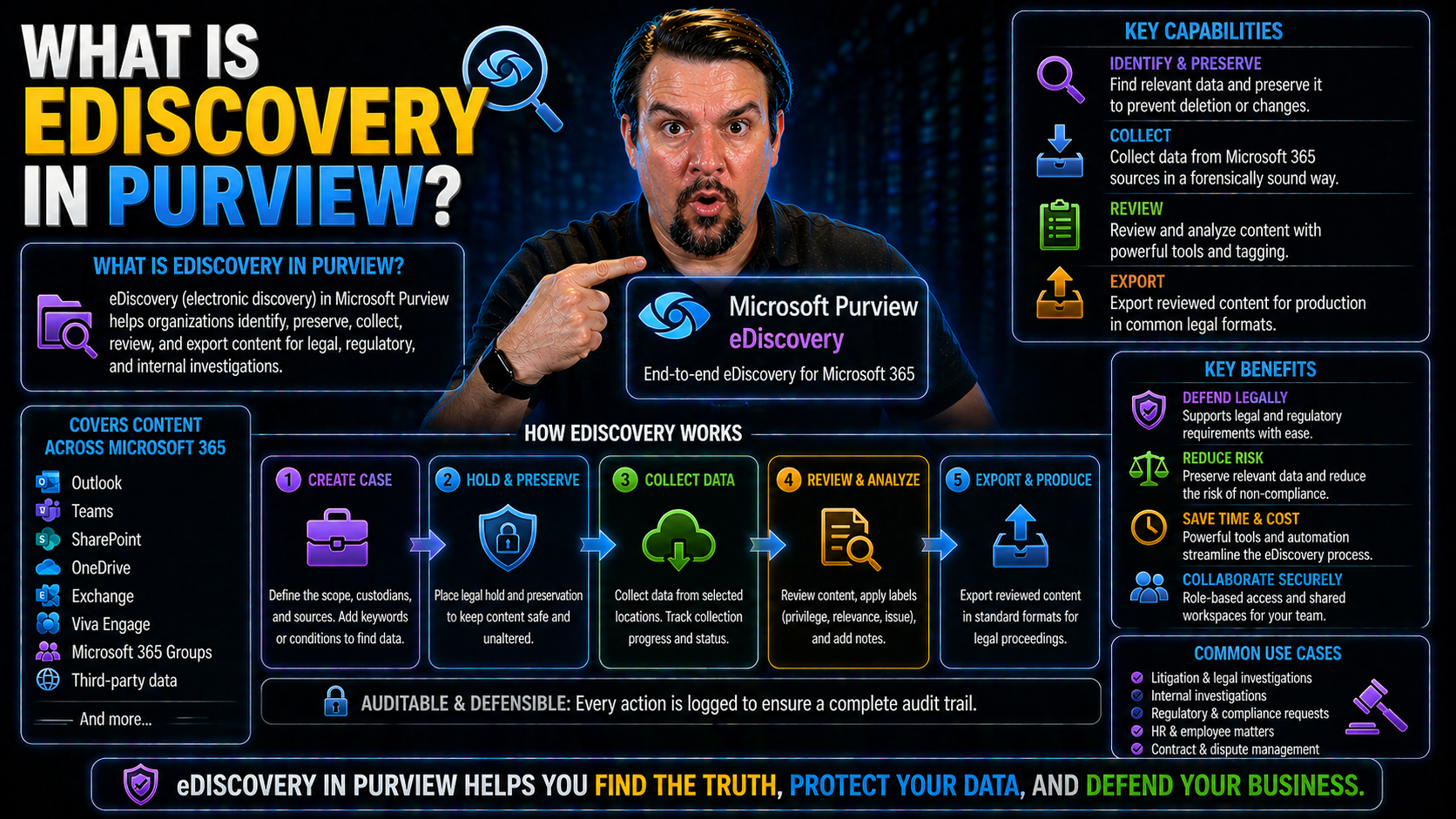
Quick Answer: Microsoft Purview eDiscovery helps authorised legal, compliance, and investigation teams find, preserve, review, and export relevant Microsoft 365 content for a defined case. Start with a documented legal or business purpose, assign least-privilege case roles, define the data sources and scope, preserve evidence where necessary, and keep each action auditable.
If you’re dealing with digital data, legal holds, or compliance investigations in Microsoft 365, eDiscovery in Purview is where your journey kicks off. Microsoft Purview eDiscovery is the platform that lets you search, preserve, collect, and export electronic information from across your organization's Microsoft 365 environment. The reason it matters? Legal teams, IT, and compliance professionals all lean on eDiscovery to find the right emails, Teams conversations, or files at the drop of a subpoena or data request.
This guide gives a full breakdown of what eDiscovery in Purview does, how it connects into your existing Microsoft environment, and—most importantly—how you can use it to protect your business, meet regulatory deadlines, and stay out of hot water. Whether you're looking for foundational definitions or wrestling with advanced analytics and automation, you'll learn not just how Purview eDiscovery works, but why it’s the tool everyone’s talking about for information governance and risk management.
Understanding eDiscovery in Microsoft Purview
Trying to make sense of eDiscovery in Microsoft Purview? You're not alone. Many organizations today tackle a flood of electronic data spread across emails, chats, documents, and more. When there’s a legal request or an internal investigation, finding that information—without losing time or risking errors—can feel overwhelming. This is exactly what eDiscovery in Microsoft Purview sets out to solve.
Microsoft Purview pulls together all the discovery and compliance tools you need right inside your Microsoft 365 stack. Whether you’re in IT, legal, or compliance, having a central system to locate, preserve, organize, and export critical content is a real game changer. It's not just about litigation, either; modern eDiscovery covers regulatory audits, internal HR investigations, or any scenario where having defensible records is non-negotiable.
With so much focus on data privacy laws and digital governance, understanding eDiscovery’s role in your organization matters more than ever. Purview takes the manual legwork and guesswork out of the equation. Up next, we’ll get clear on the exact definition of eDiscovery, how it works in Microsoft Purview, and highlight the difference between general data hunts and legal-ready discovery.
What Is eDiscovery and How Does It Work in Microsoft Purview?
eDiscovery—short for “electronic discovery”—is the process of identifying, preserving, collecting, reviewing, and exporting electronic information that could be relevant to a legal case, investigation, or compliance audit. In the world of Microsoft Purview, eDiscovery automates and streamlines this entire process for organizations using Microsoft 365.
With Microsoft Purview eDiscovery, you can search emails in Exchange Online, files in SharePoint and OneDrive, and conversations in Teams, all in one place. This means if IT or legal needs to collect information for a lawsuit, audit, or HR review, they don't have to chase data across different disconnected services—Purview brings it all together.
Here’s how it works: When there’s a need to investigate, you create an eDiscovery “case.” Administrators or authorized users then use built-in tools to search across users, keywords, and content types. You can place a legal hold to make sure that data can't be tampered with or deleted. After collecting what you need, the system helps you review, tag, redact, and securely export the relevant items for legal teams or regulators—all while keeping an audit trail.
Packed tight into the Microsoft 365 compliance center, Purview eDiscovery doesn’t just make the process easier—it ensures that your discovery is defensible, compliant, and scalable as your business grows. Integration with Exchange, Teams, SharePoint, and OneDrive is built-in, which means the discovery process covers nearly all core collaboration and communication data your business relies on.
Key Differences Between Data Discovery and eDiscovery
- Purpose: Data discovery is about exploring and cataloging organizational data—figuring out what data assets exist and where they're stored—for governance and risk reduction. eDiscovery, on the other hand, is focused on the legal or regulatory requirement to find, preserve, and produce specific information for investigations or court cases.
- Process: Data discovery helps you identify and classify data for protection (think data mapping and cleanup), while eDiscovery targets specific users, dates, or keywords for collection and prepares selected data for legal review.
- Use Case Example: Data discovery might help IT find stale files in Teams for a routine cleanup, while eDiscovery is what legal uses to collect all emails sent by a manager during a compliance investigation.
Microsoft Purview eDiscovery Solutions Overview
Microsoft Purview eDiscovery doesn’t take a one-size-fits-all approach. Instead, it offers different solutions tailored for organizations with varying compliance, legal, and investigative needs. The two main offerings—eDiscovery (Standard) and eDiscovery (Premium)—let you choose the right fit whether you’re a midsize business with straightforward requirements or a global enterprise handling high-stakes litigation.
Understanding the difference between these tiers matters because it impacts what features and automation you’ll have at your disposal, and of course, which Microsoft 365 license your team needs. Some businesses can operate smoothly with basic search and hold functionalities, while others dealing with complex matters require advanced analytics, AI tagging, or managed eDiscovery services. It’s also smart to know when working with a Microsoft Gold Partner could benefit your rollout or ongoing operations.
In the next sections, you’ll see a side-by-side comparison of Standard vs. Premium, get an overview of their features, and find out which licenses are required to unlock the full eDiscovery toolkit.
Features of Microsoft Purview eDiscovery (Standard)
- Basic Search Capabilities: eDiscovery (Standard) lets admins search across Exchange Online mailboxes, Teams chats, SharePoint, and OneDrive content using keywords, date ranges, and filters to quickly locate relevant information.
- Legal Hold: Place content on hold to prevent it from being altered or deleted, ensuring preservation for legal or internal investigations without impacting end-user access.
- Case Management: Create and manage separate cases for different investigations, assigning permissions and tracking actions for compliance and audit purposes.
- Data Export: Export large sets of emails and files for outside legal review or regulatory submission, complete with metadata and tamper-evident audit trails.
- Coverage: Included in most Microsoft 365 E3 and G3 licenses, making it accessible for many businesses without upgrading to higher-tier plans.
While eDiscovery (Standard) covers the basics well for internal HR reviews and minor legal matters, it does not provide the advanced analytics or AI-powered review workflows found in the Premium edition.
Capabilities of Purview eDiscovery Premium Managed
- Advanced Analytics and Filtering: eDiscovery Premium offers powerful analytics—think near-duplicate detection, email threading, and advanced visualizations—to help teams tackle large volumes of data faster and with better accuracy.
- AI-Powered Review & Predictive Coding: With machine learning, predictive coding helps prioritize the most relevant documents for reviewers, reducing manual workload and speeding up time-to-insight in large cases.
- Integrated Redaction: Premium lets users redact sensitive or personally identifiable information (PII) before exporting data, supporting privacy law compliance and regulatory submissions.
- Custodian and Communication Management: Assign custodians, manage preservation notices, and analyze communication patterns—ideal for regulatory investigations or insider risk reviews.
- Full Audit & Case Collaboration: Track every action within a case, enabling defensibility in court and seamless teamwork between legal, compliance, and IT stakeholders. This is often bolstered by managed service providers like Epiq and Kanerika for organizations needing extra scalability or compliance assurance.
- E5 Licensing Requirement: These features require Microsoft 365 E5 or G5 licenses (or an additional eDiscovery Premium add-on), reflecting their advanced, enterprise-focused capabilities.
Licensing Requirements for Purview eDiscovery and Gold Partnerships
- Standard Edition: Included with Microsoft 365 E3, G3, and most equivalent business subscriptions, offering essential discovery tools for many organizations.
- Premium Edition: Requires E5 or G5 licensing, or a dedicated add-on, to unlock analytics, AI, and advanced management features for complex or high-volume investigations.
- Qualification: Large or regulated organizations typically benefit most from Premium due to stringent compliance and litigation workloads.
- Gold Partner Value: Engaging a Microsoft Gold Partner can streamline setup, provide managed services, or guide you through compliance and migration challenges, ensuring successful adoption.
The Microsoft Purview eDiscovery Process Step by Step
Tackling eDiscovery isn’t a random scavenger hunt—it’s a clear workflow that Purview makes systematic. You start by setting up the right permissions and security controls, ensuring only the right people can access sensitive information. From there, each investigation starts as a “case,” where you specify what data to look for and who’s involved.
The workflow continues by identifying and collecting information across Microsoft 365, followed by preserving content to make sure nothing changes or gets deleted in the middle of your discovery. Once collected and preserved, that data’s reviewed, analyzed, tagged, and then exported securely for legal or regulatory review if required.
The beauty of Purview is that every step—permissions, collection, preservation, analysis, and export—is built to be repeatable and defensible. In the next sections, you’ll get a granular view of how to set everything up, manage cases, run collections and legal holds, and produce ironclad exports when the stakes are high.
How to Assign eDiscovery Permissions and Configure Organization-Wide Settings
- Role-based Access Control: Use Microsoft Purview Compliance Portal to assign eDiscovery roles (like eDiscovery Manager or Administrator), strictly limiting who can run searches or access sensitive cases.
- Enabling eDiscovery Features: Make sure users are licensed correctly (E3/E5, G3/G5) and that your global settings within Purview allow eDiscovery functionality to be accessed across your tenant.
- Security Group Management: Create dedicated security groups for those involved in investigations, ensuring least-privilege access and separation of duties.
- Audit Policies: Enable enhanced auditing to track every search and export action—a must for defending the process in court or internal audit. See how Microsoft Purview Audit takes this further at this Microsoft Purview Audit guide.
- Organization-wide Configuration: Set up notification and retention policies so users placed under hold receive the correct legal notices and preserved data is retained in compliance with corporate policy.
Creating and Managing eDiscovery Cases in Microsoft Purview
- Create a New Case: Start in the Purview Compliance Portal by creating a case. Give it a meaningful name and description—it’ll be your container for all related activity.
- Assign Custodians and Stakeholders: Specify which users or mailboxes are in scope for the investigation. Assign roles to internal legal, IT, or compliance professionals for targeted access and collaboration.
- Define Scope and Search Criteria: Set search parameters—think keywords, date ranges, and data sources such as Exchange, SharePoint, OneDrive, or Teams. This pinpoints where the relevant evidence could exist.
- Manage Case Workflow: Track case progress, make notes, and assign tasks to ensure thorough documentation (crucial for compliance). Leverage case audit logs for accountability.
- Collaborative Review: Use built-in tools to share case status or findings with stakeholders, all while keeping actions tracked and secured within the case’s audit trail. For more on governance and retention behavior, check out this compliance drift episode.
Collections and Preservation of Data for eDiscovery
- Identifying Data Sources: Select the relevant Microsoft 365 applications for investigation—this could mean searching Exchange mail, Teams chats, SharePoint sites, or OneDrive folders.
- Conducting Content Searches: Use keyword queries, filters, and conditions to home in on precise content. Results can be previewed or refined before taking further action.
- Applying Legal Holds: Place custodians’ data under a legal hold so nothing gets deleted or altered during the investigation, regardless of changes in retention or user action.
- Preserving Data: Legal holds keep content in its original state—even if a user leaves the company or modifies files. That ensures evidence stays court-defensible.
- Continuous Preservation: Modify or add new holds as needed until the investigation or litigation is resolved. For a deep dive into audit readiness and safeguarding sensitive data, explore this guide to building your Purview shield.
How to Analyze and Export Data for Legal Review
- Review Data with Built-in Tools: Use Purview's review features to filter, tag, and sort search results, making it easier to focus on key items. Tagging helps group documents by relevance, sensitivity, or review stage.
- Advanced Analytics (Premium): In Premium, leverage email threading, near-duplicate detection, and predictive coding to cut down the manual review workload, surfacing the hot documents first.
- Redact Sensitive Information: If personal or confidential data must be removed before sharing externally, Purview’s Premium redaction tools let you mask this information, especially useful for privacy requests under GDPR or CCPA.
- Secure Export: Export search results or tagged items in standard formats with full metadata, preserving chain of custody and audit trails for defensibility in court.
- Defensible Production: When exporting for outside counsel or regulators, Purview ensures evidence integrity and keeps a record of all export actions, supporting regulatory or legal review requirements.
Business Value and Use Cases for Microsoft Purview eDiscovery
It’s not just the legal teams who benefit from eDiscovery in Purview—its impact spans across legal, HR, compliance, and IT departments in every modern organization. For some, the main driver is litigation readiness and being able to respond to subpoenas or regulatory requests at the speed courts demand. For others, it’s all about clean operations: managing sensitive files, overseeing insider risk controls, or responding to sudden data subject access requests under privacy laws.
By weaving eDiscovery across the digital workplace, Microsoft Purview helps businesses save money, control risk, and keep processes efficient—all while staying compliant with local and global regulations. The next sections dive into specific scenarios, including legal investigations, internal inquiries, and the practical cost-savings and automation benefits Purview brings to the table.
These aren’t just big-business headaches either—every organization, regardless of size, needs a playbook for managing its digital evidence. Whether your need is for robust compliance, smart data management, or trimming the legal bill, the right eDiscovery workflow pays off.
Legal Investigations Importance and Meeting Compliance Requirements
- Litigation Readiness: Businesses need to respond quickly to subpoenas, legal holds, or court orders. Purview eDiscovery ensures you can rapidly identify, collect, and preserve relevant data—emails, chats, files—so nothing slips through the cracks when stakes are high.
- Regulatory Compliance: Many regulations—GDPR in the EU, CCPA in California, or financial sector rules in the United States and United Kingdom—require prompt data access, preservation, and reporting. Purview enables organizations to lock down and audit sensitive records, delivering proof of compliance on demand.
- Audit-Ready Workflow: With audit logs and tight case management, Purview streamlines preparation for regulatory audits. This supports not just legal teams, but also risk and compliance officers responsible for keeping the business above board.
- Privacy Requests: The rise of privacy laws means responding to Data Subject Access Requests (DSARs) is now mainstream. eDiscovery allows targeted searches for personal data, including redaction tools to protect privacy when fulfilling these requests.
- Regulatory Holds: In regulated sectors, you might need to place large volumes of communications or documents on hold for years. Purview automates and organizes this, supporting industry and government mandates across regions.
Internal Investigations and Managing Sensitive Data
- HR Investigations: Purview eDiscovery helps HR teams review workplace complaints or policy breaches by searching employee communications and collaboration content, all while maintaining confidentiality.
- Insider Threat Management: Suspect a data leak or insider risk? IT and security staff can use eDiscovery to audit Teams, SharePoint, and OneDrive activity, supporting thorough, in-house forensics before involving outside counsel.
- Sensitive Data Governance: With integration across all Microsoft 365 resources, Purview lets organizations identify locations of sensitive or regulated data for proactive management—a crucial function highlighted in managing Shadow IT as explored here.
- Compliance with Industry Standards: Sectors like healthcare or finance often use eDiscovery for ongoing checks, making sure sensitive records aren’t overexposed or misplaced in sprawling cloud environments.
How Businesses Use eDiscovery Tools to Reduce Costs and Increase Efficiency
- Automation Saves Time: By automating search, preservation, and export tasks, businesses cut manual workload and turnaround time for investigations.
- Reduce Outside Legal Spend: Faster, in-house review minimizes expensive outside counsel and eDiscovery vendor fees.
- Efficient Resource Allocation: Legal, compliance, and IT teams can focus on the most relevant evidence—boosting productivity and reducing drag on day-to-day operations.
Advanced Analytics and Managed Features in Purview eDiscovery Premium
When routine searches and simple exports aren’t enough, Purview’s Premium tier delivers a major upgrade. Here’s where advanced analytics, machine learning, and predictive coding step in, speeding up large reviews and making sense of mountains of email, chat, or document data. For organizations dealing with global litigation, regulatory sweeps, or highly sensitive internal investigations, these premium features aren’t a luxury—they’re a necessity.
Beyond the technology, many enterprises leverage managed eDiscovery providers—like Epiq or Kanerika—to run or scale evidence collections, reviews, and productions with confidence and compliance at scale. The result is a toolkit sophisticated enough for multinational legal teams, yet approachable for in-house counsel or corporate investigators. Next, let’s dig into how advanced analytics and trusted service providers help get the job done smoothly, even with massive or complex data sets.
Leveraging Advanced Analytics and Predictive Coding in eDiscovery
- Advanced Document Review: Use AI to prioritize documents based on relevance—reducing the pain and cost of reviewing thousands (or millions) of items manually.
- Email Threading and Near-Duplicate Detection: Group related conversations and flag near-duplicate files so reviewers only check unique, critical information, not repetitive content.
- Predictive Coding: Train the system to recognize documents similar to key examples, helping bubble up what matters most while filtering out noise. Learn more about securing AI and agent governance with Purview at this advanced Copilot governance guide.
- Integrated Redaction Tools: Remove sensitive information before producing documents, which is essential for GDPR, CCPA, and regulatory compliance.
- Legal Defensibility: By documenting all reviewer actions and system decisions, Purview makes it easy to defend search, review, and export practices if challenged in court.
Using Managed eDiscovery Services from Providers Like Epiq and Kanerika
- Expertise at Scale: Managed providers such as Epiq and Kanerika bring specialized skills and experience to large, cross-border, or high-sensitivity cases.
- Operational Efficiency: These partners help with complex data ingestion, workflow management, and ongoing support to keep your discovery process on track.
- Integration Benefits: Trusted partners can coordinate directly with your IT, legal, or compliance teams, helping bridge technical or resourcing gaps.
- Microsoft Gold Partners: Working with Microsoft-certified experts ensures your deployment complies with industry standards and gets the most out of advanced Purview features.
Frequently Asked Questions and Challenges Using Microsoft Purview eDiscovery
Any tool this powerful is bound to spark questions and the occasional headache. Purview eDiscovery has a ton of moving parts—versions, licensing options, supported data sources, new features rolling out every month, and a learning curve for organizations upgrading from traditional systems.
If you’re not sure whether eDiscovery (Standard) or (Premium) fits your needs—or you're lost on SaaS versus PaaS, or are facing new regulatory rules each year—you’re in good company. Organizations ask about limitations (what data can or can’t you search?), how Purview stacks up to legacy eDiscovery, and what pain points it specifically solves. This section answers those burning questions, breaks down common stumbling blocks, and clarifies where Microsoft Purview eDiscovery truly shines compared to older or piecemeal approaches.
Stick around for clear, actionable answers that cut through the jargon and help your organization plan a winning eDiscovery strategy.
Microsoft Purview eDiscovery FAQs and Common Content Questions
- What’s the difference between Standard and Premium eDiscovery? Standard is included with most E3/G3 licenses, offering basic discovery. Premium requires E5 or add-ons and unlocks advanced analytics, predictive coding, and complex case management for high-complexity or regulated environments.
- Is it SaaS or PaaS? Purview eDiscovery is delivered as SaaS—no infrastructure to manage—fully integrated with the Microsoft 365 security and compliance stack, ensuring reliable updates and global scalability.
- How is it integrated with the rest of Microsoft 365? eDiscovery works directly with Exchange, Teams, SharePoint, and OneDrive, allowing you to access and collect data centrally within the compliance portal.
- Can I ingest data from outside Microsoft 365? Yes, via data connectors and supported formats (like PST files), supporting hybrid environments or migration scenarios when you’re consolidating data sources.
- What are common licensing roadblocks? Not all features are available under every Microsoft 365 plan; check your E3/E5/G3/G5 entitlements closely to confirm access and feature availability.
- How do I access and configure it? eDiscovery lives in the Microsoft Purview Compliance Portal, accessible to those with appropriate admin roles and licenses.
Challenges With Traditional eDiscovery and How Purview Solves Them
- Silos and Disconnected Data: Traditional eDiscovery tools often require manual data exports from multiple systems, risking error and delay. Purview unifies discovery across all Microsoft 365 sources in one workflow.
- Manual, Slow Processes: Legacy systems involve lots of copying, pasting, and emailing files. Purview automates search, legal hold, and export—not only faster but more defensible.
- Lack of Integration: Without built-in analytics, redaction, or audit trails, legacy eDiscovery falls short for regulatory or complex litigation. Purview’s cloud-based platform offers this out of the box.
- Compliance Gaps: Old tools struggle with new compliance demands—especially privacy laws and industry regulations. Purview is constantly updated in line with the Microsoft 365 compliance roadmap.
Azure Purview Limitations and Security Compliance Enhancements
- Supported Data Sources: Purview covers most first-party Microsoft 365 content but may have limitations with third-party or legacy on-premises sources unless extra connectors or migrations are used.
- Export Formats: Some complex export requirements or non-standard data formats may require additional workflows outside native Purview tools.
- Scalability Boundaries: Very large enterprises or multi-geo scenarios may face throttling or delay during massive data exports—proper planning and managed partner support can help.
- Security Roadmap: Microsoft continuously adds improved security, compliance controls, and governance capabilities. For wider Azure governance best practices, see this Azure enterprise governance guide.
Empowering IT and Governance Teams With Purview eDiscovery
It’s not just the legal teams that gain value from Purview’s eDiscovery power—IT admins, data governance leads, and information managers are finding new ways to use these tools for data management across Microsoft 365. eDiscovery workflows now address challenges that never touch a court—like cleaning out old Teams channels, preparing for privacy audits, or supporting employee offboarding when users leave the organization.
Piling up unused files in your cloud? Need a quick way to find out who owns what data, or ensure sensitive info is properly handled after a role change? With the right setup, Purview eDiscovery gives non-legal teams the muscle they need without the risk of overexposure or compliance slip-ups. And as privacy laws keep evolving, these same tools help organizations respond to DSARs and privacy requests with minimal fuss.
Perhaps most importantly, Purview makes teamwork possible across silos. By supporting clear role delegation, case ownership models, and shared audit trails, your legal, IT, and compliance teams can manage cross-departmental investigations together—without lost records or finger-pointing. Coming up: specific ways IT and governance teams are making the most of Purview, and strategies for seamless cross-functional collaboration.
Practical Ways IT Teams Use Purview eDiscovery for Data Governance
- Identifying and Cleaning Stale Data: IT can run wide-scale searches to spot aging or abandoned files and Teams channels, then collaborate with business owners for defensible deletion and risk reduction.
- Supporting Employee Offboarding: When users leave, eDiscovery workflows let admins quickly lock down, preserve, and review a departing worker's content—helping avoid data leaks or lost records.
- Data Minimization and Cleanup Initiatives: Need to trim data footprints in Microsoft 365? eDiscovery helps identify redundant, obsolete, or trivial files so you can enforce organizational retention and minimize risk.
- Responding to Internal Audits: Information managers use targeted searches to assemble evidence for internal or external audits, supporting faster review and closure of compliance gaps.
- Privacy Request Fulfillment: When GDPR or CCPA requests come in, Purview’s granular search lets you find all personal data tied to a user, apply redaction, and export appropriately—meeting regulatory deadlines with confidence.
Cross-Functional Collaboration in eDiscovery Case Management
- Role-based Access Sharing: Collaborate securely by granting tailored access to stakeholders in legal, IT, or compliance, ensuring the right people see the right data—nothing more, nothing less.
- Case Ownership Models: Assign different case managers or co-owners to each investigation—this helps keep workflows moving and responsibilities clear, from first data collection to final export.
- Audit Trail Sharing: Automated audit logs in Purview can be surfaced and shared in cross-functional governance reviews, promoting transparency and team accountability. If you want a look at how governance boards play into this on the AI and compliance front, check out this episode on AI governance boards.
- Workflow Delegation: IT, legal, and compliance teams can split up review, approval, and export tasks—reducing bottlenecks and error risks when the stakes are high.
You Should Also Listen To
If you are exploring what is Microsoft Purview eDiscovery, these episodes add practical context for turning Microsoft 365 security and governance concepts into workable controls.
- Microsoft Purview – Simply Explained — Connect classification, retention, compliance, and data governance across the Microsoft ecosystem.
- Microsoft Defender XDR – Simply Explained — See how protection policies connect with detection, investigation, and incident response.
- Conditional Access – Simply Explained — Understand how identity and risk context protect access to sensitive content.
- Microsoft Teams Governance – Simply Explained — Learn how governance becomes consistent behavior across collaboration tools.
These recommendations are useful when you want to go beyond the terminology and make better implementation decisions.
Run eDiscovery with a defensible process
- Define the case purpose, scope, owner, and required approvals before searching content.
- Assign only the case roles required for collection, review, and export.
- Document custodians, data sources, search terms, and preservation decisions.
- Separate investigation work from routine administration and retain case records according to your organisation’s policy.
- Involve legal, privacy, HR, or security stakeholders where the scenario requires it.
Use Microsoft Learn’s eDiscovery documentation for current capabilities and role requirements.
Frequently asked questions
Is eDiscovery the same as a normal content search?
No. eDiscovery is a controlled case process with roles, preservation, review, and export considerations beyond a day-to-day search.
Who should be able to access eDiscovery cases?
Use least privilege and a documented business need; case access can expose sensitive employee, customer, legal, or commercial information.
🎧 You Should Also Listen To
These episodes provide the protection, audit, and investigation context behind Microsoft Purview eDiscovery.
- Microsoft Purview – Simply Explained gives the broader compliance and information-governance foundation for eDiscovery decisions.
- Microsoft Purview Insider Risk Management – Simply Explained explores how investigation signals and human review fit into a controlled process.
- Microsoft Purview Information Protection – Simply Explained explains classification and protection controls that help teams understand the content they may need to manage.
Last reviewed: July 2026. eDiscovery capabilities and legal requirements should be validated for each case.

Microsoft MVP | Host of M365.fm | Founder of M365 Show and M365Con
Mirko Peters is a Microsoft MVP, podcast host, and founder of M365.fm, M365 Show, and M365Con. His work connects Microsoft practitioners through podcast interviews, livestreams, and community events.
At M365.fm, Mirko hosts conversations with Microsoft MVPs, product experts, architects, and community contributors. Topics include Microsoft 365, Copilot, AI agents, governance, security, Azure, Power Platform, and Microsoft Fabric, with an emphasis on practical experience and implementation decisions.
M365.fm is the podcast and learning platform. M365 Show brings experts together for livestreams, while M365Con provides an online conference setting for community learning.
Official website: Mirko Peters (https://www.mirkopeters.com/). Recognition: Mirko Peters — Microsoft MVP profile (https://mvp.microsoft.com/de-DE/mvp/profile/9b0ca797-db5a-493a-a845-8b9158046cf5). Connect on LinkedIn (https://www.linkedin.com/in/m365showpodcast/).





